LakeB2B vs SalesQL: Which B2B Contact Data Wins in 2026?
One sells you a custom-built list by quote. The other scrapes contact details off LinkedIn profiles for about $39 a month. Here is how LakeB2B and SalesQL actually compare on price, accuracy, and workflow fit.
TL;DR
- LakeB2B sells you a list. SalesQL rents you a scraper. LakeB2B builds custom B2B contact files by quote and delivers them as CSV. SalesQL is a Chrome extension that pulls emails and phone numbers off LinkedIn profiles one search at a time.
- Pricing models are not comparable. SalesQL starts free (around 100 credits/month) and climbs to roughly $89/mo. LakeB2B publishes no self-serve pricing at all — expect a quote, a minimum order, and a sales call.
- SalesQL wins on freshness, LakeB2B wins on volume and firmographic targeting. Scraped-at-request-time data beats a six-month-old list file. A list file beats scraping when you need 40,000 contacts in one week.
- Neither ships a serious verification layer. Both hand you addresses; validating them before you send is on you.
- If you want fresh data, an API, and public pricing in the same product, an email finder like Tomba ($49/mo Starter, free tier at 25 searches) sits between the two models.
What is LakeB2B, and who actually buys it?#
LakeB2B is a data-services company, not a self-serve SaaS tool. You tell them the audience — "hospital CIOs in the US Midwest at facilities with 200+ beds" — and their team assembles a file from their database plus appends and (they say) human verification, then delivers it as a CSV or Excel export. They also sell append services, intent data, and event-attendee lists, and they lean hard into healthcare and technology-user segments.
The buyer profile is a demand-gen or field-marketing lead with budget and a campaign deadline, not an SDR working a laptop. You are buying a project deliverable. There is no dashboard where you type a domain and get back an answer in two seconds.
That distinction matters more than any feature table, because it determines your failure mode. With a purchased list, the failure is staleness at scale: you pay once for 25,000 rows, and by the time your third sequence step lands, a chunk of those people have changed jobs. Buying contact data in bulk is like buying a printed phone directory. Accurate the day it shipped, decaying every day after.
Check pricing and segment coverage directly at lakeb2b.com — nothing is published, so a quote is the only way to get a real number.
What is SalesQL, and how does it actually work?#
SalesQL is a browser extension. You install it in Chrome, open a LinkedIn profile, LinkedIn search, or Sales Navigator list, and click the SalesQL button. It returns work emails, personal emails, and phone numbers for the profiles in view, then lets you export to CSV/XLSX or push into a CRM.
The mental model is a pair of tongs, not a warehouse. Data is retrieved at the moment you ask, against a profile that the person themselves maintains. You only ever pay for contacts you actually looked at.
The trade-off is throughput. SalesQL is bounded by LinkedIn's own limits — how many profiles you can view, how many search pages you can page through, how aggressively you can bulk-extract before LinkedIn starts throttling your account. That ceiling is real and it is not something SalesQL can engineer away. See the official feature list at salesql.com.
How do LakeB2B and SalesQL compare head-to-head?#
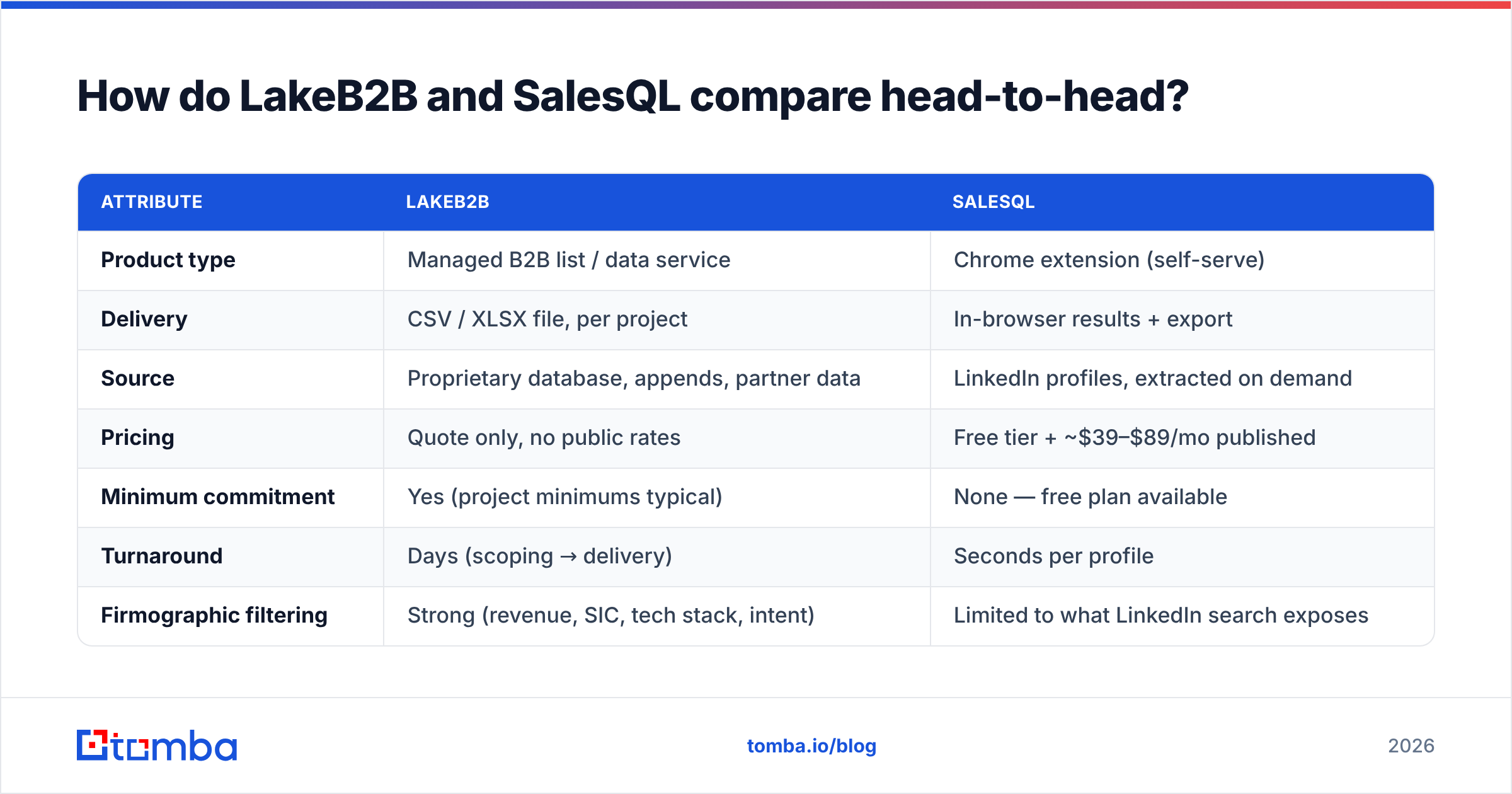
Here is the honest side-by-side. Note how few rows are actually apples-to-apples — that alone should tell you these products are aimed at different jobs.
| Attribute | LakeB2B | SalesQL |
|---|---|---|
| Product type | Managed B2B list / data service | Chrome extension (self-serve) |
| Delivery | CSV / XLSX file, per project | In-browser results + export |
| Source | Proprietary database, appends, partner data | LinkedIn profiles, extracted on demand |
| Pricing | Quote only, no public rates | Free tier + ~$39–$89/mo published |
| Minimum commitment | Yes (project minimums typical) | None — free plan available |
| Turnaround | Days (scoping → delivery) | Seconds per profile |
| Firmographic filtering | Strong (revenue, SIC, tech stack, intent) | Limited to what LinkedIn search exposes |
| Phone numbers | Yes, as part of the append | Yes, direct dials and mobiles on paid tiers |
| API access | Enterprise / DaaS arrangement | Available on higher tiers |
| Best for | Large ABM pushes, event lists, healthcare | Individual SDRs, founder-led outbound |
| Worst for | Fast, small, iterative list-building | Building 20,000 contacts this quarter |

The row that decides most purchases is "minimum commitment." If you cannot get procurement to sign off on a five-figure data project, the LakeB2B path closes before you evaluate a single record.
What does each one actually cost?#
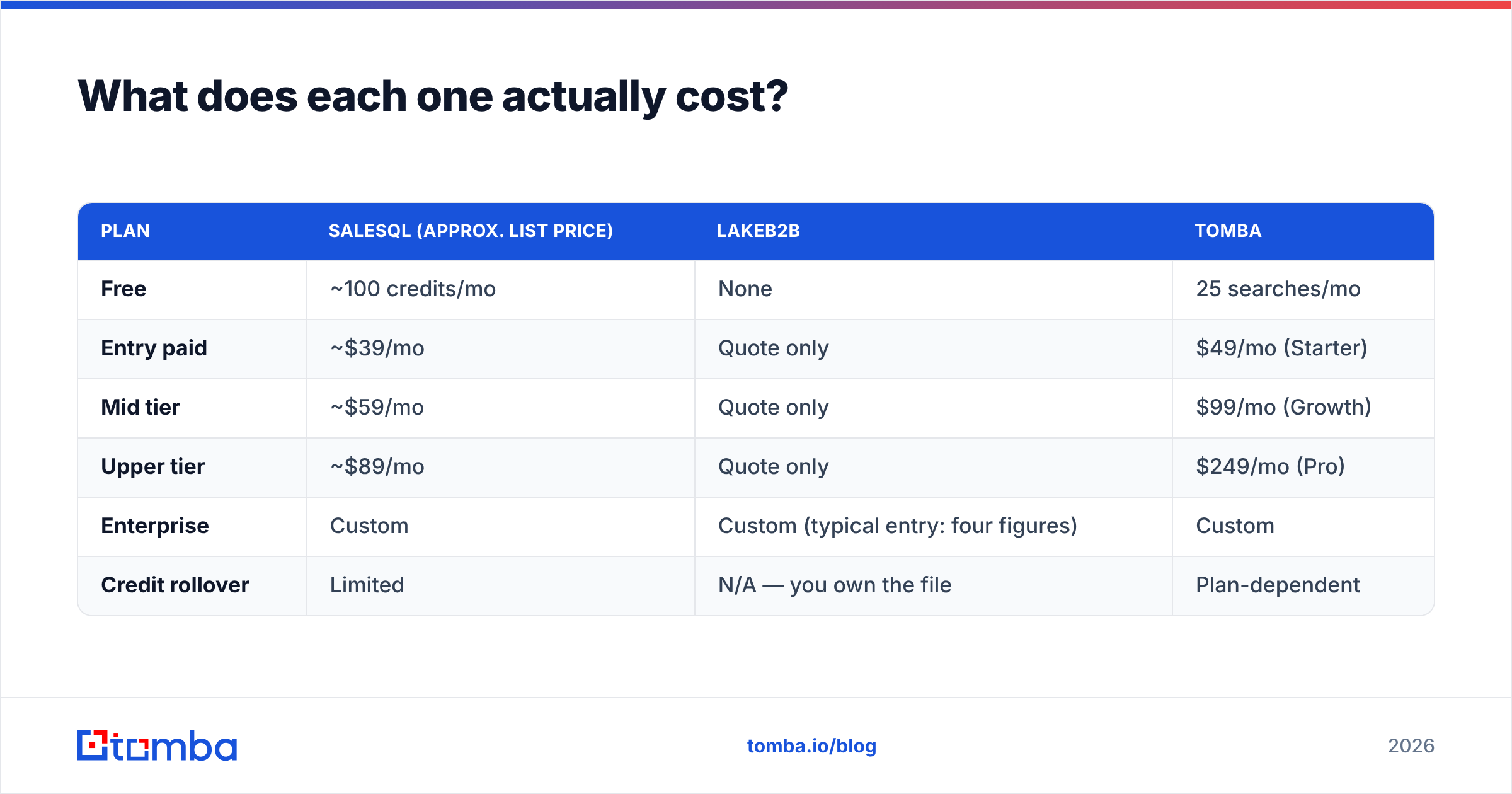
SalesQL publishes tiers. LakeB2B does not, which is standard for list vendors — pricing scales with record count, field depth, and exclusivity, so a rate card would be misleading anyway.
| Plan | SalesQL (approx. list price) | LakeB2B | Tomba |
|---|---|---|---|
| Free | ~100 credits/mo | None | 25 searches/mo |
| Entry paid | ~$39/mo | Quote only | $49/mo (Starter) |
| Mid tier | ~$59/mo | Quote only | $99/mo (Growth) |
| Upper tier | ~$89/mo | Quote only | $249/mo (Pro) |
| Enterprise | Custom | Custom (typical entry: four figures) | Custom |
| Credit rollover | Limited | N/A — you own the file | Plan-dependent |
Treat the SalesQL column as directional and confirm on their site before you buy; extension pricing moves. Tomba's numbers are on the Tomba pricing page.
The real cost comparison is not the sticker. It is cost per usable contact. A $2,000 list of 20,000 rows looks like $0.10 per record until you verify it and discover 22% bounce. Now it is $0.13 per deliverable record, and you have also burned sender reputation learning that. A $59 extension plan that returns 1,500 contacts at 91% deliverability is $0.043 per usable record — but it also cost you 15 hours of manual clicking, which is not free either.
Run both numbers with your own loaded SDR hourly rate before you decide. Most teams that do this exercise land on a hybrid: a small self-serve tool for daily prospecting, and a purchased file only when a campaign genuinely needs scale.
Whose data is more accurate?#
Conclusion first: on-demand lookup beats static files on freshness, and static files beat lookup on coverage of people who are not active on LinkedIn.

Three mechanics drive the gap:
- Decay rate. B2B contact data degrades roughly 2–3% per month through job changes, domain migrations, and departures. A list assembled in January and delivered in March has already lost ground before you open it.
- Source of truth. LinkedIn profiles are maintained by the contact. Database records are maintained by a vendor's refresh cycle. Self-maintained data is usually fresher, but it is also incomplete — plenty of decision-makers have a two-line profile from 2019.
- Pattern inference vs. observation. Both models partly infer email addresses from name plus domain patterns. Inference is cheap and often right, but it is only as good as the verification behind it. Neither vendor makes SMTP-level verification the centerpiece of the product.
That last point is the one teams under-weight. Whatever you buy, run it through an email verifier before it touches a sequence. Catch-all domains in particular need their own handling — a plain SMTP ping returns "accept" for everything, which is why a dedicated catch-all verifier exists as a separate step. Skipping this is the single most common reason a technically-fine list produces a 14% bounce rate.
Independent user reviews on G2's lead intelligence category are worth 20 minutes before you commit to either vendor; pay attention to complaints about refund policy and credit expiry, not star averages.
Is LakeB2B better than SalesQL for outbound?#
For classic SDR outbound — 40 to 80 new contacts a day, sequenced over three weeks — SalesQL is the better fit, and it is not close. The workflow matches how reps actually work: find the account, find the person, get the address, move on.
LakeB2B is better when the job is not outbound at all but campaign supply: a webinar invite to 30,000 healthcare IT contacts, a conference pre-show push, an ABM list that must match a specific firmographic cut you cannot express in LinkedIn search filters. That is a marketing operations job, and a list vendor is the right shape of tool for it.
Where both struggle:
- Neither is a system of record. You still need a CRM and a dedupe step. Exported CSVs collide with existing records fast; run them through a remove duplicates pass before import.
- Neither guards deliverability. Warmup, SPF/DKIM alignment, and sending volume ramp are your problem. A perfect list sent from a cold domain still lands in spam.
- Neither gives you a clean programmatic path at entry price. SalesQL gates API access to higher tiers; LakeB2B's API is an enterprise arrangement.

Which one should you choose?#
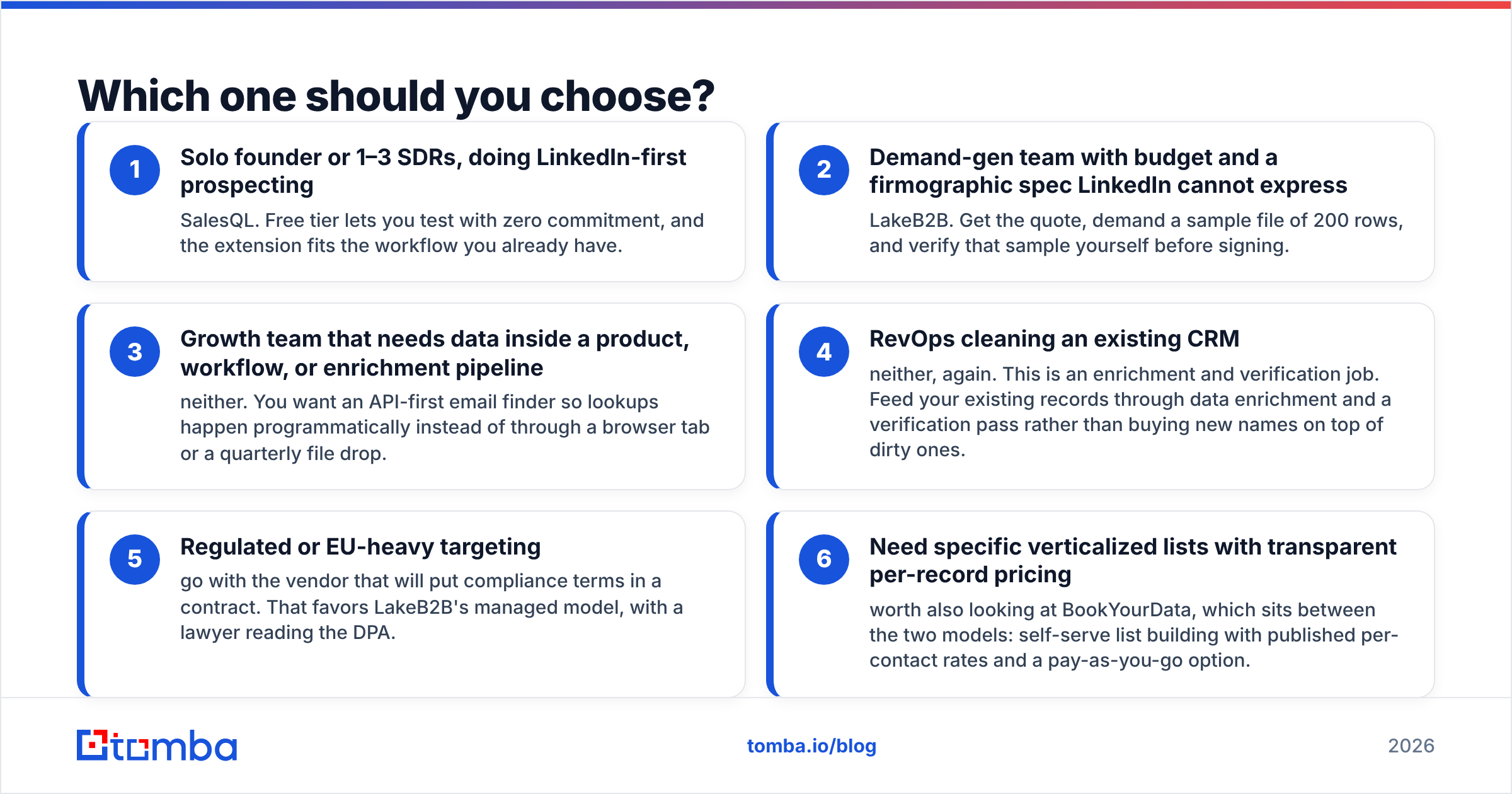
Pick by the shape of your job, not by feature count.
- Solo founder or 1–3 SDRs, doing LinkedIn-first prospecting — SalesQL. Free tier lets you test with zero commitment, and the extension fits the workflow you already have.
- Demand-gen team with budget and a firmographic spec LinkedIn cannot express — LakeB2B. Get the quote, demand a sample file of 200 rows, and verify that sample yourself before signing.
- Growth team that needs data inside a product, workflow, or enrichment pipeline — neither. You want an API-first email finder so lookups happen programmatically instead of through a browser tab or a quarterly file drop.
- RevOps cleaning an existing CRM — neither, again. This is an enrichment and verification job. Feed your existing records through data enrichment and a verification pass rather than buying new names on top of dirty ones.
- Regulated or EU-heavy targeting — go with the vendor that will put compliance terms in a contract. That favors LakeB2B's managed model, with a lawyer reading the DPA.
- Need specific verticalized lists with transparent per-record pricing — worth also looking at BookYourData, which sits between the two models: self-serve list building with published per-contact rates and a pay-as-you-go option.
What are the practical alternatives to both?#
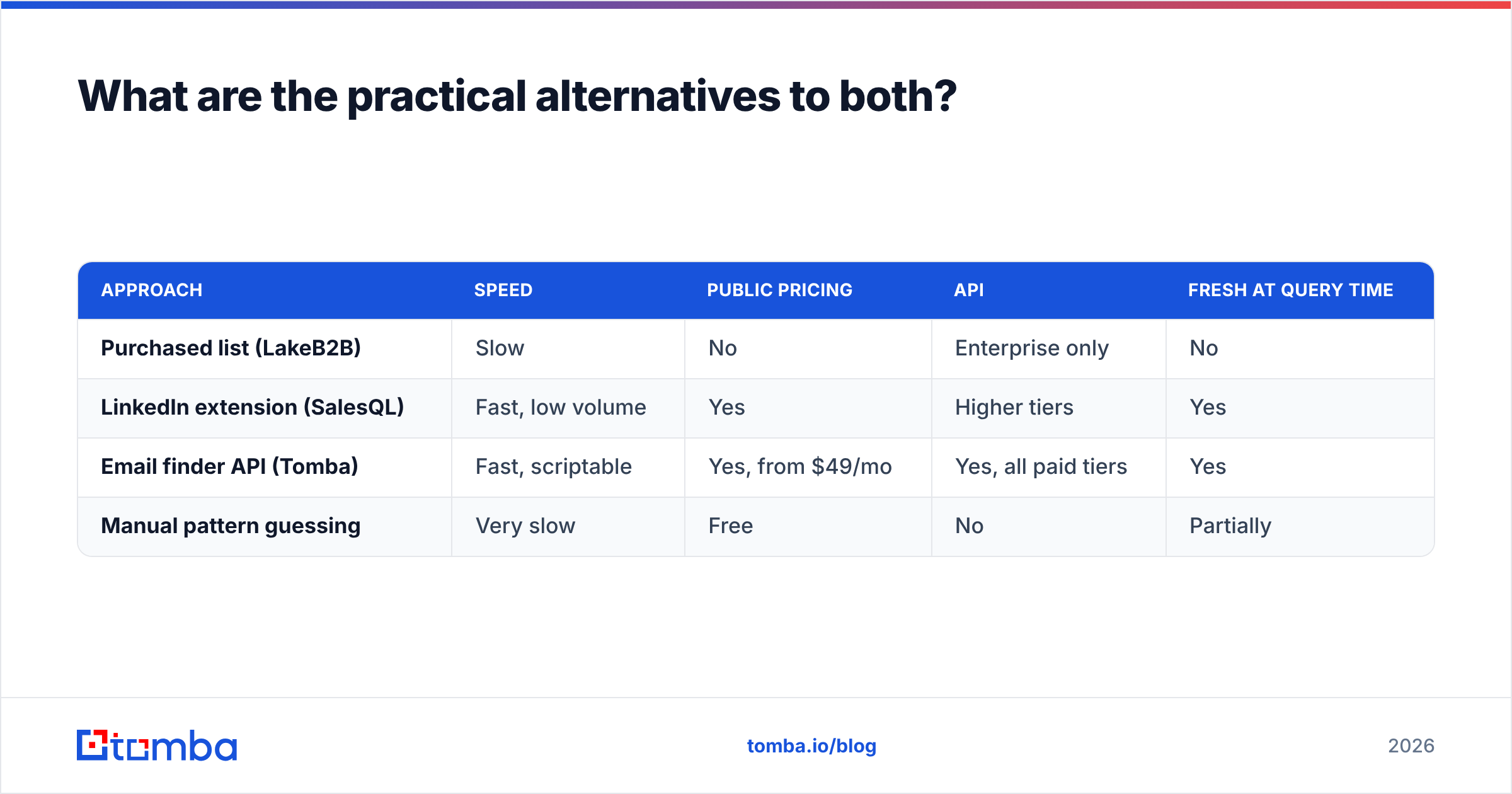
If the head-to-head leaves you unconvinced — a common outcome, because these two products barely overlap — the middle of the market is where most teams land.
| Approach | Speed | Public pricing | API | Fresh at query time |
|---|---|---|---|---|
| Purchased list (LakeB2B) | Slow | No | Enterprise only | No |
| LinkedIn extension (SalesQL) | Fast, low volume | Yes | Higher tiers | Yes |
| Email finder API (Tomba) | Fast, scriptable | Yes, from $49/mo | Yes, all paid tiers | Yes |
| Manual pattern guessing | Very slow | Free | No | Partially |
The email-finder-API model exists precisely because the other two leave a gap. You get on-demand lookup like an extension, but you can run it over 5,000 domains in a batch job instead of 5,000 browser clicks. Tomba's bulk email finder handles the volume case, the LinkedIn finder covers the profile-URL case that SalesQL owns, and the Tomba API covers the case neither vendor serves well at entry pricing.
One more practical note: before you commit to any vendor, test their pattern accuracy on ten companies you already know. Pull the company email pattern for each, then check whether the vendor's output matches. Ten minutes of testing beats a month of reading review sites.
What is the actual verdict on LakeB2B vs SalesQL?#
SalesQL for prospecting, LakeB2B for campaign supply, and an API-based finder if you need both without a sales call.
SalesQL is the better default for the vast majority of readers, because most people evaluating "LakeB2B vs SalesQL" are trying to find a few hundred good contacts this month, not commission a data project. The free tier means the evaluation costs you nothing but an afternoon.
LakeB2B earns its place when the requirement is genuinely a file: big, filtered on attributes LinkedIn does not expose, delivered under contract with compliance language attached. Do not buy it for SDR outbound. Do not skip the sample file.
And whichever you pick, budget for verification. The most expensive list is the one you sent without checking.
Want fresh contact data without a sales call or a Chrome tab full of profiles? Tomba Email Finder returns verified professional emails by domain, name, or company — through the app, a browser extension, or an API you can script against. Start free with 25 searches a month, or move to Starter at $49/mo when your outbound outgrows manual lookup.
Related guides#
// get started
Find, verify and enrich your first contacts today
Start on the free plan with 25 searches a month, then scale when your team is ready.
Free plan · No credit card required · GDPR & CCPA
// about the author