Laserfocus Pricing, Reviews, Pros and Cons: 2026 Breakdown
Laserfocus sells speed on top of Salesforce — a keyboard-driven, spreadsheet-style layer for reps who hate clicking. Here's what it costs, what reviewers actually praise, and the three situations where it is the wrong purchase.
TL;DR
- Laserfocus is not a CRM. It is a fast, spreadsheet-style front end that sits on top of Salesforce so reps can update pipeline in bulk instead of clicking through record pages.
- Pricing is per seat, per month, billed monthly or annually, with a free trial and no usage meter. Budget for it as a rep productivity line item, not a data line item.
- Reviews consistently praise speed, keyboard shortcuts, and bulk editing. The recurring complaints are Salesforce-only lock-in, limited reporting depth, and the fact that it inherits whatever mess already lives in your CRM.
- It is worth it when you have 5+ AEs, a real Salesforce instance, and rep hours lost to admin. It is a bad buy if you are on HubSpot/Pipedrive, pre-CRM, or if your actual problem is empty contact fields.
- Pair it with a contact-data source. A faster UI on stale records just gets you to the wrong answer quicker.
What is Laserfocus, and who is it actually for?#
Think of Laserfocus like a keyboard-first cockpit bolted onto a plane you already own. The plane is Salesforce. Laserfocus does not fly anywhere new — it just replaces the hundred switches you have to reach for with a layout you can drive without looking down.
Concretely: Laserfocus renders your Salesforce opportunities, accounts, contacts, and activities as a filterable grid. You edit inline, you edit in bulk, you jump between records with shortcuts, and every change writes straight back to Salesforce. There is no second source of truth, no sync job to babysit, no "Laserfocus database" that drifts from your CRM overnight.
The buyer persona is narrow and obvious once you see the product:
- Sales managers who spend Monday chasing reps for close dates and next steps.
- AEs carrying 40–120 open opportunities who lose 30–60 minutes a day to record-page loading.
- RevOps leads who have already accepted that Salesforce hygiene will never be fixed by training alone, and want to reduce the cost of compliance instead.
If none of those describe you, the rest of this post will still tell you what Laserfocus costs — but the honest answer is that you are not the customer.

How does Laserfocus pricing actually work?#
Laserfocus prices per user, per month, on a flat subscription. There is no credit meter, no per-record charge, and no data consumption fee — because Laserfocus does not sell you data. You are paying for interface and time saved.
Because vendor pricing pages change without notice, treat any number you read in a blog post (including this one) as a starting point and confirm on the official Laserfocus site before you build a budget. What does not change is the shape of the cost, and that is what you should model:
- Per-seat, not per-org. Every rep who touches the grid needs a license. A 12-person team costs 12× a 1-person team — there is no org-wide flat rate to negotiate down to at SMB scale.
- Annual commitment discounts. Like most seat-based SaaS, the monthly list price drops meaningfully if you prepay for a year. Expect roughly a 15–25% delta, which is the standard band across this category.
- Salesforce license is a prerequisite, not included. Laserfocus rides on your existing Salesforce Sales Cloud seats. If a rep does not have a Salesforce license, Laserfocus cannot give them one. Your real per-rep cost is Salesforce + Laserfocus.
- No data enrichment in the price. Emails, phone numbers, firmographics — none of that comes with the subscription. That is a separate line item, and a real one.
- Trial before card. A free trial is standard here, and you should use the whole thing. The value is entirely about whether reps adopt it, and you cannot know that from a demo.
- Admin/setup time. Budget a few hours of RevOps time to map fields, build the views your team will actually live in, and decide which objects are exposed.
The trap in seat-based tooling is that the sticker price looks small next to Salesforce, so nobody models it. Twelve seats at $40 is $5,760 a year for a UI layer. That is a real number and it deserves a real ROI case: if it saves each rep 30 minutes a day, it pays for itself many times over; if adoption stalls at 40%, you are paying for shelfware.
What does a full "Salesforce speed stack" cost per rep?#
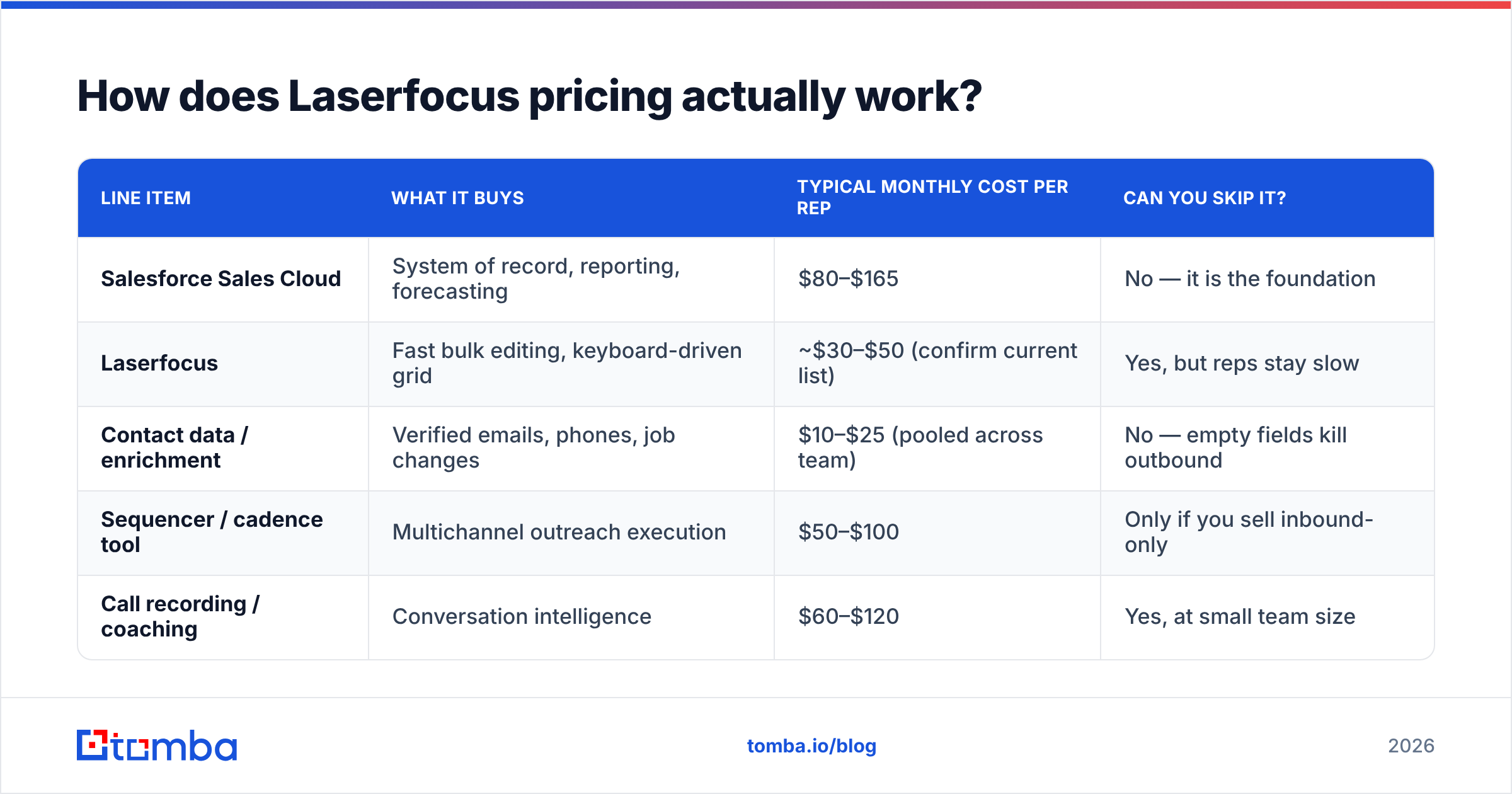
| Line item | What it buys | Typical monthly cost per rep | Can you skip it? |
|---|---|---|---|
| Salesforce Sales Cloud | System of record, reporting, forecasting | $80–$165 | No — it is the foundation |
| Laserfocus | Fast bulk editing, keyboard-driven grid | ~$30–$50 (confirm current list) | Yes, but reps stay slow |
| Contact data / enrichment | Verified emails, phones, job changes | $10–$25 (pooled across team) | No — empty fields kill outbound |
| Sequencer / cadence tool | Multichannel outreach execution | $50–$100 | Only if you sell inbound-only |
| Call recording / coaching | Conversation intelligence | $60–$120 | Yes, at small team size |
The point of that table is not the exact figures — it is the ratio. Laserfocus is one of the cheapest lines in a modern sales stack, and also one of the easiest to under-use. Price it against rep hours, not against other software.
What do Laserfocus reviews say?#
Public review volume for Laserfocus is thinner than for category giants, which is normal for a focused European tool with a specific ICP. Check the current listings on G2 and Capterra rather than trusting any static summary — but the themes in user feedback have been stable for years:
What reviewers reliably praise
- Speed. This is the single most common word in positive reviews. Loading a grid of 80 opportunities and editing close dates inline is a different experience from Salesforce list views.
- Bulk editing. Updating stage, close date, next step, or owner across dozens of records in one pass is the killer feature, and it is genuinely well executed.
- Keyboard shortcuts. Power users describe it the way developers describe a good text editor — once your hands learn it, going back hurts.
- Zero sync anxiety. Because it writes directly to Salesforce, there is no "which system is right?" conversation.
- Support responsiveness. Small-vendor advantage. Reviewers mention getting real humans quickly.
What reviewers reliably criticize
- Salesforce-only. If your company migrates off Salesforce, Laserfocus goes with it. There is no hedge here.
- Reporting depth. It is an editing surface, not an analytics platform. Forecast modeling, attribution, and executive dashboards still live in Salesforce or a BI tool.
- Customization ceiling. Heavily customized Salesforce orgs — deep validation rules, exotic record types, complex page layouts — sometimes hit edges the grid does not express well.
- Per-seat cost at scale. At 40+ reps the line item stops being rounding-error money, and procurement starts asking what it replaces. Usually the answer is "nothing," which is a hard conversation.
- It does not fix your data. Several reviewers arrive expecting a hygiene tool and find a hygiene accelerator. Blank fields stay blank; they are just blank faster.
That last point is the one worth sitting with. A grid that lets you update 200 opportunities in four minutes is enormously valuable when the underlying records are complete. When 40% of your contacts have no valid email address, you have not bought a solution — you have bought a better view of the problem.
What are the real pros and cons of Laserfocus?#
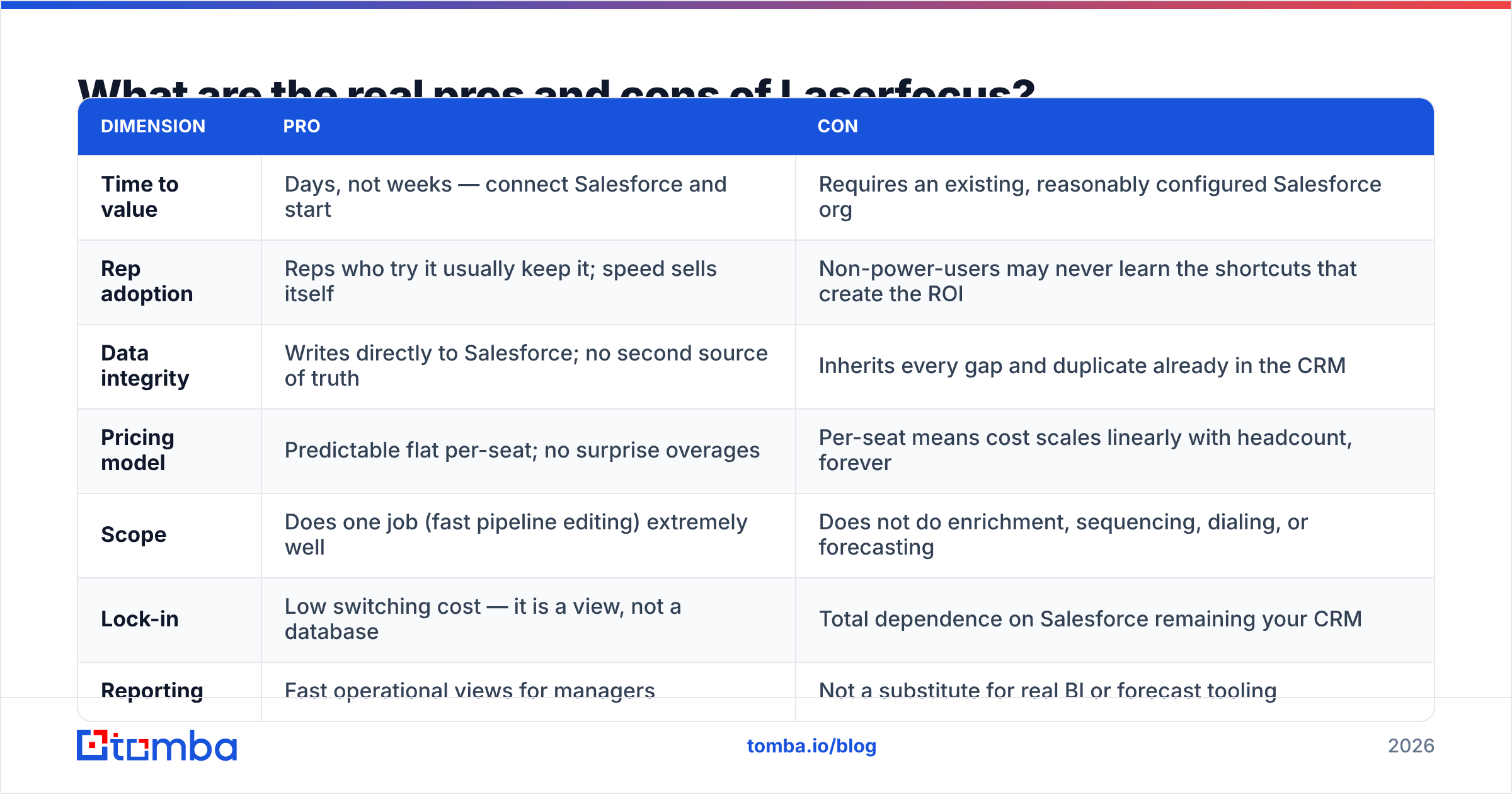
| Dimension | Pro | Con |
|---|---|---|
| Time to value | Days, not weeks — connect Salesforce and start | Requires an existing, reasonably configured Salesforce org |
| Rep adoption | Reps who try it usually keep it; speed sells itself | Non-power-users may never learn the shortcuts that create the ROI |
| Data integrity | Writes directly to Salesforce; no second source of truth | Inherits every gap and duplicate already in the CRM |
| Pricing model | Predictable flat per-seat; no surprise overages | Per-seat means cost scales linearly with headcount, forever |
| Scope | Does one job (fast pipeline editing) extremely well | Does not do enrichment, sequencing, dialing, or forecasting |
| Lock-in | Low switching cost — it is a view, not a database | Total dependence on Salesforce remaining your CRM |
| Reporting | Fast operational views for managers | Not a substitute for real BI or forecast tooling |
How does Laserfocus compare to the alternatives?#
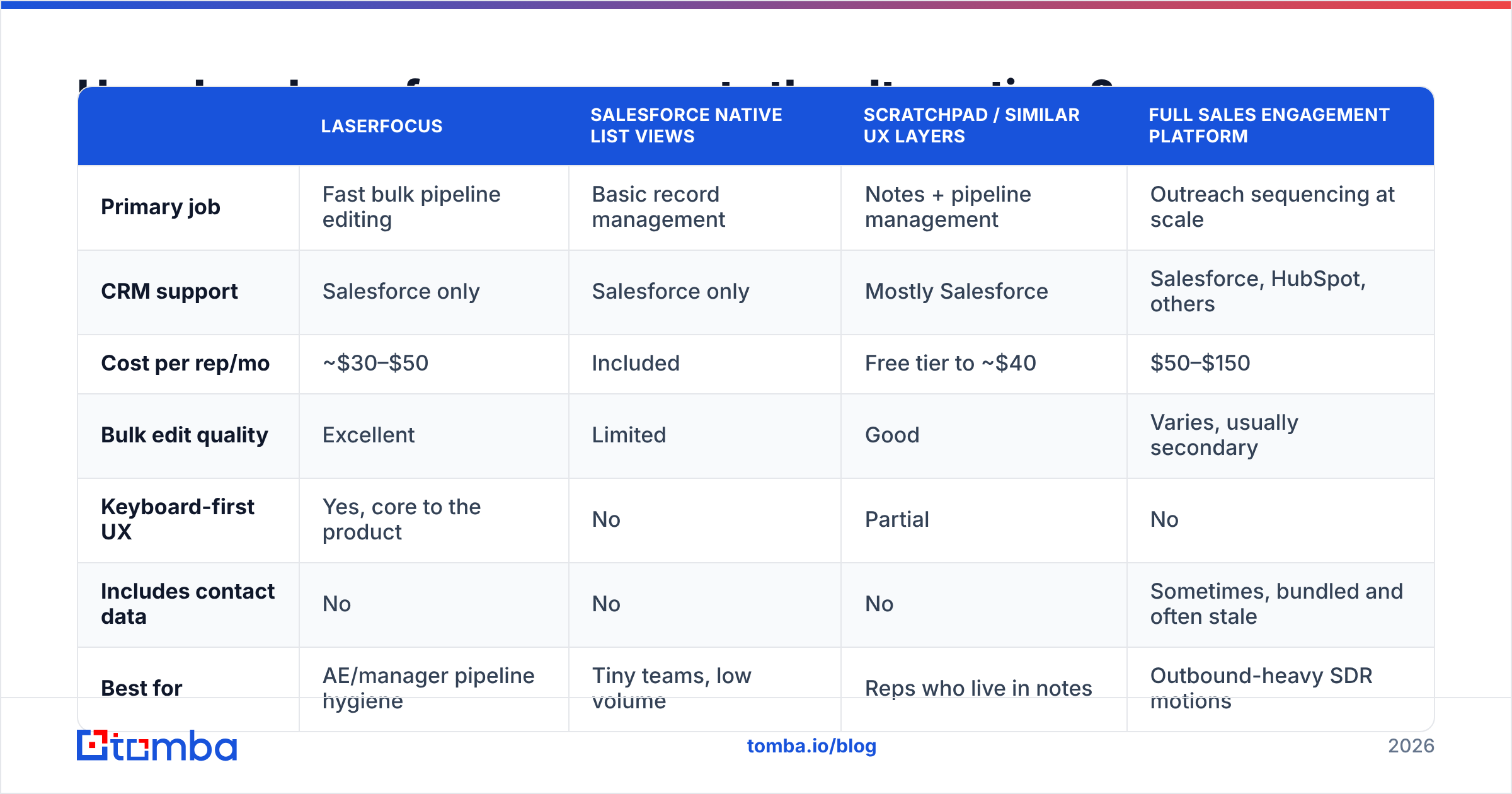
Laserfocus competes in an awkward space: it is up against free Salesforce features, other Salesforce UX layers, and — indirectly — the data tools teams buy when they misdiagnose their problem. Here is the honest positioning:
| Laserfocus | Salesforce native list views | Scratchpad / similar UX layers | Full sales engagement platform | |
|---|---|---|---|---|
| Primary job | Fast bulk pipeline editing | Basic record management | Notes + pipeline management | Outreach sequencing at scale |
| CRM support | Salesforce only | Salesforce only | Mostly Salesforce | Salesforce, HubSpot, others |
| Cost per rep/mo | ~$30–$50 | Included | Free tier to ~$40 | $50–$150 |
| Bulk edit quality | Excellent | Limited | Good | Varies, usually secondary |
| Keyboard-first UX | Yes, core to the product | No | Partial | No |
| Includes contact data | No | No | No | Sometimes, bundled and often stale |
| Best for | AE/manager pipeline hygiene | Tiny teams, low volume | Reps who live in notes | Outbound-heavy SDR motions |
Two observations that matter more than the grid itself.
First, Laserfocus and a sequencer are not substitutes. Teams sometimes compare them because both cost about the same per rep. They solve opposite halves of the job: one makes recording work cheaper, one makes doing work faster. If you are choosing between them, you are choosing between hygiene and volume — a strategy question, not a tooling question.
Second, none of these tools create contact data. Every product in that table assumes someone already put a valid email address in the record. That assumption is the most expensive one in B2B sales, and it fails constantly — roughly a fifth to a quarter of B2B contact records decay every year through job changes alone.
Is Laserfocus worth it for your team?#
Here is the decision framework, stated plainly.
Buy Laserfocus if:
- You run Salesforce and will still run it in 24 months.
- You have at least five quota-carrying reps whose time is worth more than $40/month in saved admin.
- Your pipeline reviews already involve a spreadsheet export, because that is exactly the workflow Laserfocus replaces.
- Your CRM records are mostly complete, and the bottleneck is editing them, not filling them.
Do not buy Laserfocus if:
- You are on HubSpot, Pipedrive, Close, or anything else. It will not help you.
- You have fewer than three reps. Salesforce list views and a disciplined Monday meeting will do.
- Your honest diagnosis is "we do not have enough qualified contacts." A faster grid does not create pipeline.
- Your Salesforce org is so customized that half your workflow lives in validation rules and Flows.
That third bullet is where most teams actually are. Before you spend on a UI layer, run a simple audit: export 500 contacts from your CRM and check how many have a deliverable email address. If the number is under 70%, your money belongs in data before it belongs in interface. Run the list through an email verifier and you will have the answer in under ten minutes.
What should you budget alongside Laserfocus?#
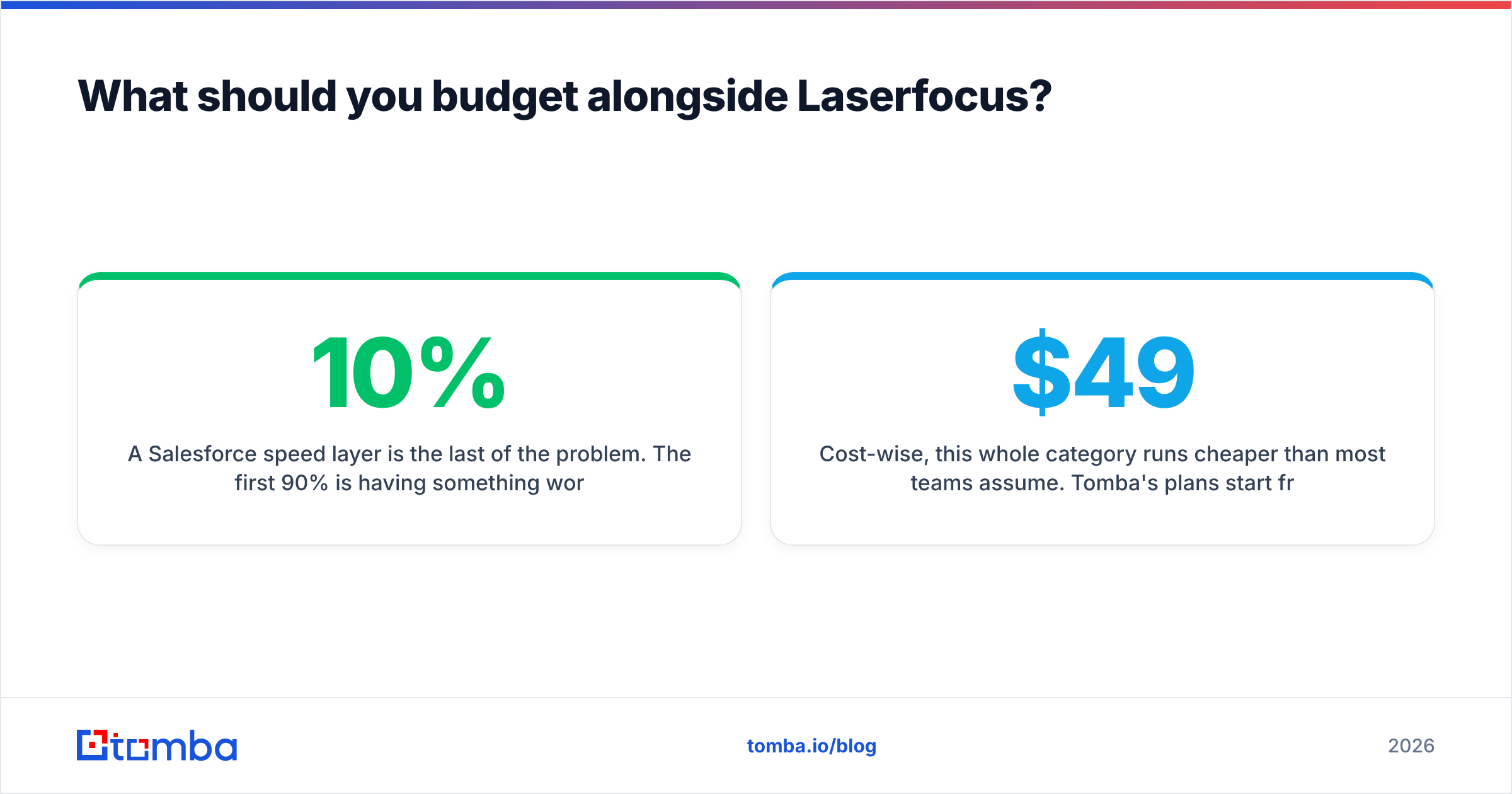
A Salesforce speed layer is the last 10% of the problem. The first 90% is having something worth editing. Three companion line items are worth pricing at the same time:
- Contact discovery. When a rep opens an account record with three contacts and needs seven, someone has to find the other four. A domain search that returns every reachable address at a company turns a 20-minute manual hunt into one query.
- Ongoing verification. Decay is continuous, not one-time. Verifying before send protects your sender reputation and keeps bounce rates in the safe band.
- Enrichment into the CRM. Job title, seniority, company size, and phone number should populate automatically. If reps are typing that in — even in a fast grid — you have automated the wrong step. A data enrichment layer writing into Salesforce makes the Laserfocus grid dramatically more useful, because there is finally something in the columns.
Cost-wise, this whole category runs cheaper than most teams assume. Tomba's plans start free at 25 searches per month, with Starter at $49/mo, Growth at $99/mo, and Pro at $249/mo — pooled across the team rather than charged per seat. You can see the full breakdown on the Tomba pricing page. Compared with per-rep tooling, pooled data credits scale far more gently as you hire.
Frequently asked questions#
Does Laserfocus replace Salesforce? No. It is a view layer. Remove Laserfocus and your data is untouched in Salesforce — which is also why switching costs are low in both directions.
Is there a free plan? There is a trial. Treat it as an adoption test, not a feature test: give it to your three most and three least process-disciplined reps and see who is still using it in week three.
Does it work with HubSpot or Pipedrive? No. Salesforce only. This is the single biggest disqualifier.
Will it clean up my CRM data? It makes cleanup faster, not automatic. Blank fields, duplicates, and bounced emails all survive the migration to a nicer interface.
Is it worth it at 3 reps? Rarely. The math works from roughly five reps upward, when the aggregate hours saved clear the annual spend with room to spare.
Where to start if your problem is data, not speed#
Conclusion first: buy Laserfocus if reps are drowning in Salesforce clicks, and buy a data layer if reps are drowning in empty fields. Most teams have the second problem and shop for the first.
If your pipeline reviews keep surfacing accounts with no named contact, no verified email, and no phone number, start there. Tomba's Email Finder returns verified professional addresses from a name and domain, with a confidence score and the sources behind it — so the record your rep opens in any interface, fast or slow, is actually worth working. Start on the free tier, run your worst 100 accounts through it, and see how much of your pipeline problem was never a UI problem at all.
Related guides#
// get started
Find, verify and enrich your first contacts today
Start on the free plan with 25 searches a month, then scale when your team is ready.
Free plan · No credit card required · GDPR & CCPA
// about the author