Lead Capture: The 2026 Guide to Forms, Data, and Follow-Up
Most teams obsess over traffic and then lose the lead at the form. Here is how lead capture actually works in 2026 — the methods, the conversion benchmarks, the field-count math, and the handoff that quietly kills pipeline.
TL;DR
- Lead capture is the moment you convert anonymous interest into a contactable record. Everything upstream (ads, SEO, events) is wasted if this step leaks.
- Form length is the single biggest lever most teams ignore: cutting from 11+ fields to 3-4 typically moves conversion by double digits, and you can recover the missing data through enrichment instead of asking for it.
- The highest-ROI capture channels in 2026 are not forms at all — they are website visitor identification, chat, and in-product triggers that never interrupt the user.
- Roughly 95-98% of your traffic never fills anything in. Anonymous-visitor resolution is how you capture that group without adding friction.
- Speed of follow-up beats volume of capture. A lead contacted in under five minutes is dramatically more likely to convert than one contacted the next day — so route, verify, and enrich at capture time, not in a weekly batch.
What is lead capture, and how is it different from lead generation?#
Lead capture is the specific act of collecting a usable contact record — an email, a phone number, a company — from someone who has shown interest. Lead generation is the whole machine that creates that interest.
Think of it like fishing. Lead generation is choosing the lake, the bait, and the season. Lead capture is the net. You can pick a perfect lake and still go home empty-handed if your net has holes in it. Most B2B teams spend 90% of their budget on the lake and almost nothing on the net.
Technically, capture is the handoff point between two systems: an anonymous session (cookies, page views, ad click IDs) and an identified record in your CRM. That handoff is where data quality problems get born. A typo'd email, a missing company field, a duplicate record, or a lead that sits unrouted for 48 hours — all of it starts here. Lead generation as a discipline has matured enormously, but capture mechanics have barely changed since 2015 at most companies.
The practical definition to work from: a lead is captured when you have (1) a contactable identifier, (2) enough context to route it, and (3) permission to use it. Miss any one of the three and you have a row in a database, not a lead.
What are the main lead capture methods in 2026?#
There are six patterns that matter. Everything else is a variation.
- Gated content forms — an ebook, benchmark report, or template behind a form. Still the default for demand gen, still the highest-friction option, and increasingly ignored by senior buyers who will not trade an email for a PDF.
- Demo and pricing requests — low volume, extremely high intent. These convert at 2-10x the rate of content forms and deserve your shortest form and fastest routing.
- Website visitor identification — resolving anonymous traffic to companies (and sometimes people) without any form at all. This is the fastest-growing category because it captures the 95%+ who never convert.
- Conversational capture — chat widgets, qualification bots, and scheduling links that collect fields inside a conversation rather than a block of inputs. Higher completion because each question feels smaller.
- Product-led capture — free tools, calculators, trials, and freemium signups. The user gets value first; the email is a byproduct, not a toll.
- Offline and event capture — badge scans, webinar registrations, and list uploads. High volume, notoriously dirty data, needs verification before it ever touches a sequence.
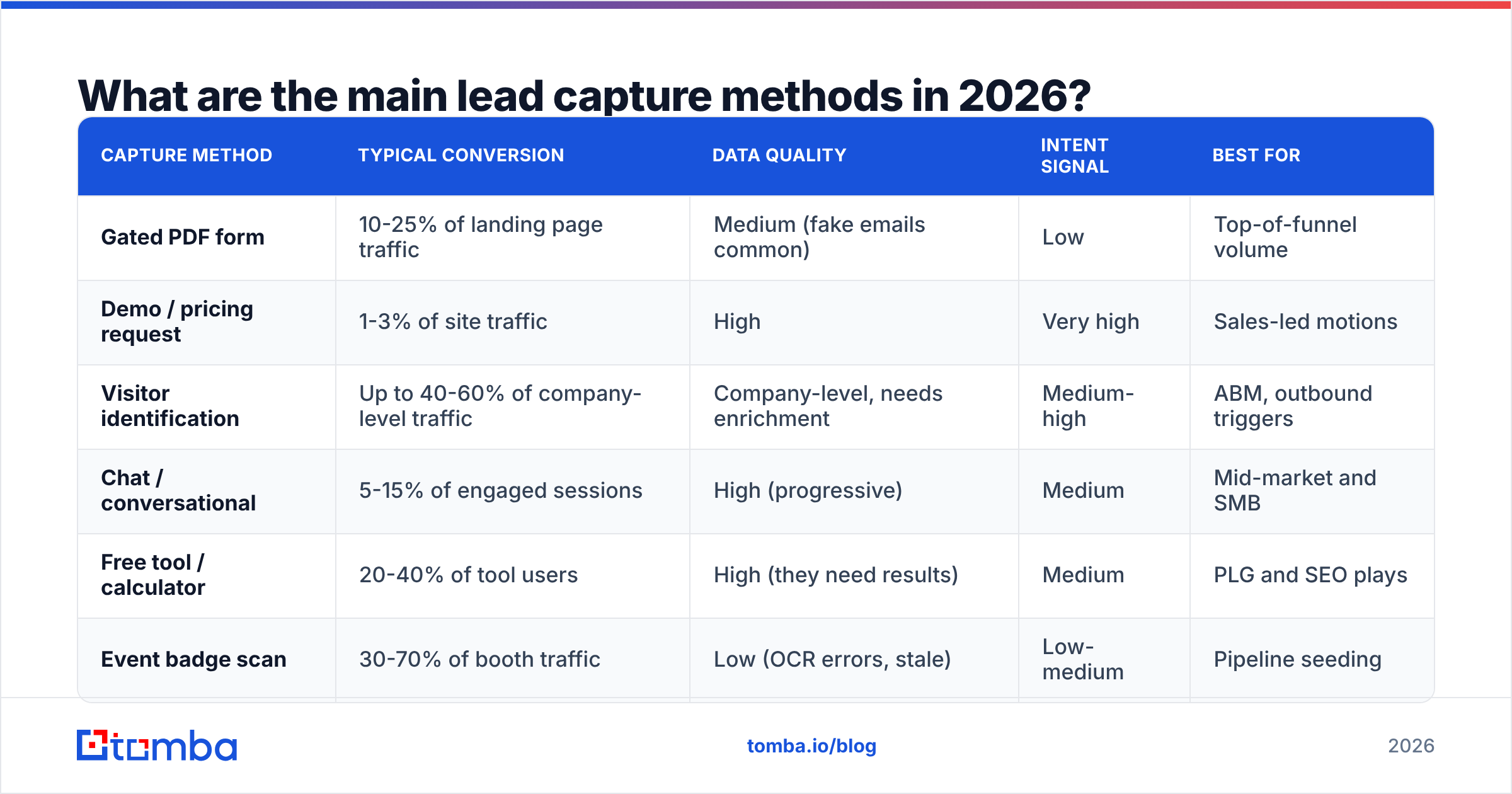
Here is how they compare on the dimensions that actually drive decisions:
| Capture method | Typical conversion | Data quality | Intent signal | Best for |
|---|---|---|---|---|
| Gated PDF form | 10-25% of landing page traffic | Medium (fake emails common) | Low | Top-of-funnel volume |
| Demo / pricing request | 1-3% of site traffic | High | Very high | Sales-led motions |
| Visitor identification | Up to 40-60% of company-level traffic | Company-level, needs enrichment | Medium-high | ABM, outbound triggers |
| Chat / conversational | 5-15% of engaged sessions | High (progressive) | Medium | Mid-market and SMB |
| Free tool / calculator | 20-40% of tool users | High (they need results) | Medium | PLG and SEO plays |
| Event badge scan | 30-70% of booth traffic | Low (OCR errors, stale) | Low-medium | Pipeline seeding |
Two things jump out. First, no method wins on every axis — the mix is the strategy. Second, the methods with the best data quality are the ones where the user needs something back from you. If the exchange is genuinely valuable, people give you real information.

How many form fields should you actually ask for?#
Fewer than you think, and the math is not subtle.
Every additional field is a decision point where someone can quit. Aggregated benchmark data from marketing platforms — HubSpot's marketing statistics library is the most-cited public source — consistently shows completion rates falling as field count rises, with the steepest drop after about four fields. Phone number fields are the worst offenders: adding one often costs more conversions than any other single input.
The counter-argument from sales is legitimate: "I can't work a lead with just an email." True. But the answer is not to ask the prospect. The answer is to ask your data provider.
This is the core insight of modern lead capture:
- Collect the minimum viable identifier. Usually a work email. Sometimes just a company domain.
- Enrich the rest server-side. Job title, seniority, company size, industry, tech stack, and phone number can all be appended after submission through data enrichment rather than requested on the form.
- Verify before you route. A bounced email is worse than no email — it damages sender reputation and pollutes your CRM. Run every captured address through an email verifier at the point of submission.
- Score with the enriched record, not the submitted one. Routing rules built on self-reported company size are routing rules built on guesses.
A three-field form plus enrichment gives you a richer record than an eleven-field form, because enrichment data is normalized and the eleven-field form never got filled out in the first place.
One caveat worth naming: enrichment coverage is not 100% for anyone. Expect strong coverage on established B2B companies and weaker coverage on tiny startups, solo consultants, and certain regions. Build your routing to degrade gracefully when a field comes back empty rather than dropping the lead.
Why do most lead capture systems leak revenue?#
The leak is almost never the form. It is the four minutes after the form.
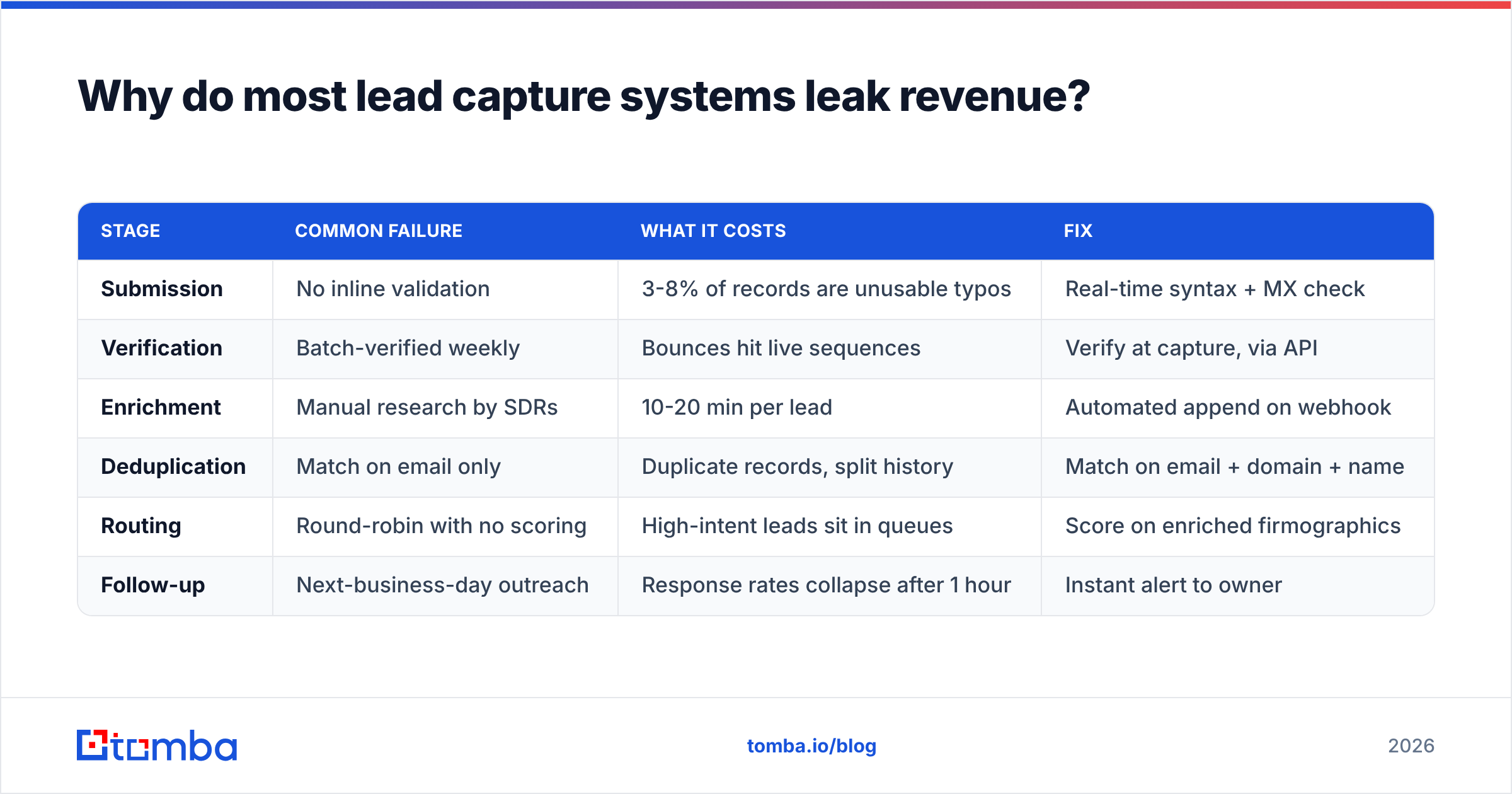
Here is the failure chain in most mid-market stacks:
| Stage | Common failure | What it costs | Fix |
|---|---|---|---|
| Submission | No inline validation | 3-8% of records are unusable typos | Real-time syntax + MX check |
| Verification | Batch-verified weekly | Bounces hit live sequences | Verify at capture, via API |
| Enrichment | Manual research by SDRs | 10-20 min per lead | Automated append on webhook |
| Deduplication | Match on email only | Duplicate records, split history | Match on email + domain + name |
| Routing | Round-robin with no scoring | High-intent leads sit in queues | Score on enriched firmographics |
| Follow-up | Next-business-day outreach | Response rates collapse after 1 hour | Instant alert to owner |
Notice that only one row is a marketing problem. The rest are operations. That is why revenue operations teams now own lead capture in most companies above 50 employees — the value is created in the plumbing, not the landing page copy.
The most expensive single failure is speed. Every serious study of inbound lead response since the original MIT/InsideSales research has found the same shape: contact attempts made within five minutes of submission convert at multiples of attempts made hours later. If your enrichment step adds two days because it runs as a nightly batch, your enrichment is costing you more than it delivers. Do it inline, over an API, in the same request that writes the CRM record.
What does a modern lead capture stack look like?#
You need four layers. Most teams have one and a half.
Layer 1 — Capture surfaces. Forms, chat, calendar links, free tools, and visitor identification. The goal here is coverage across intent levels, not perfection on any one surface.
Layer 2 — Resolution and validation. Turn whatever arrived into a clean, deduplicated, verified record. This is where an email finder matters even for inbound: when you resolve an anonymous visitor to a company, you still need the right person's address at that company before you can act.
Layer 3 — Enrichment and scoring. Append firmographics and contact data, then apply your MQL definition against real data rather than form inputs.
Layer 4 — Activation. Route to an owner, fire a Slack alert, enroll in a sequence, or push to ads for retargeting. Connect it through your existing HubSpot integration or equivalent so nothing lives in a spreadsheet.
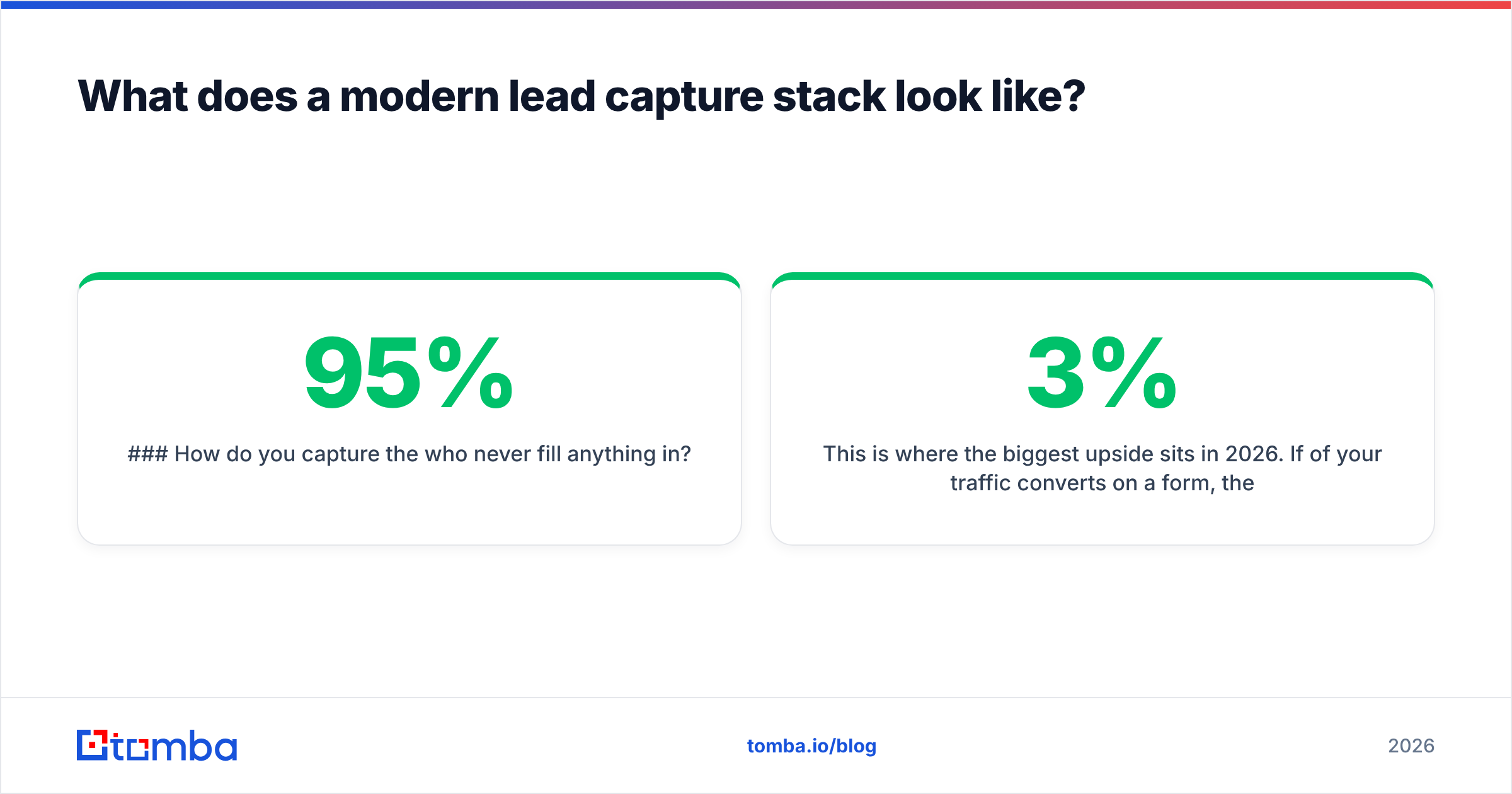
How do you capture the 95% who never fill anything in?#
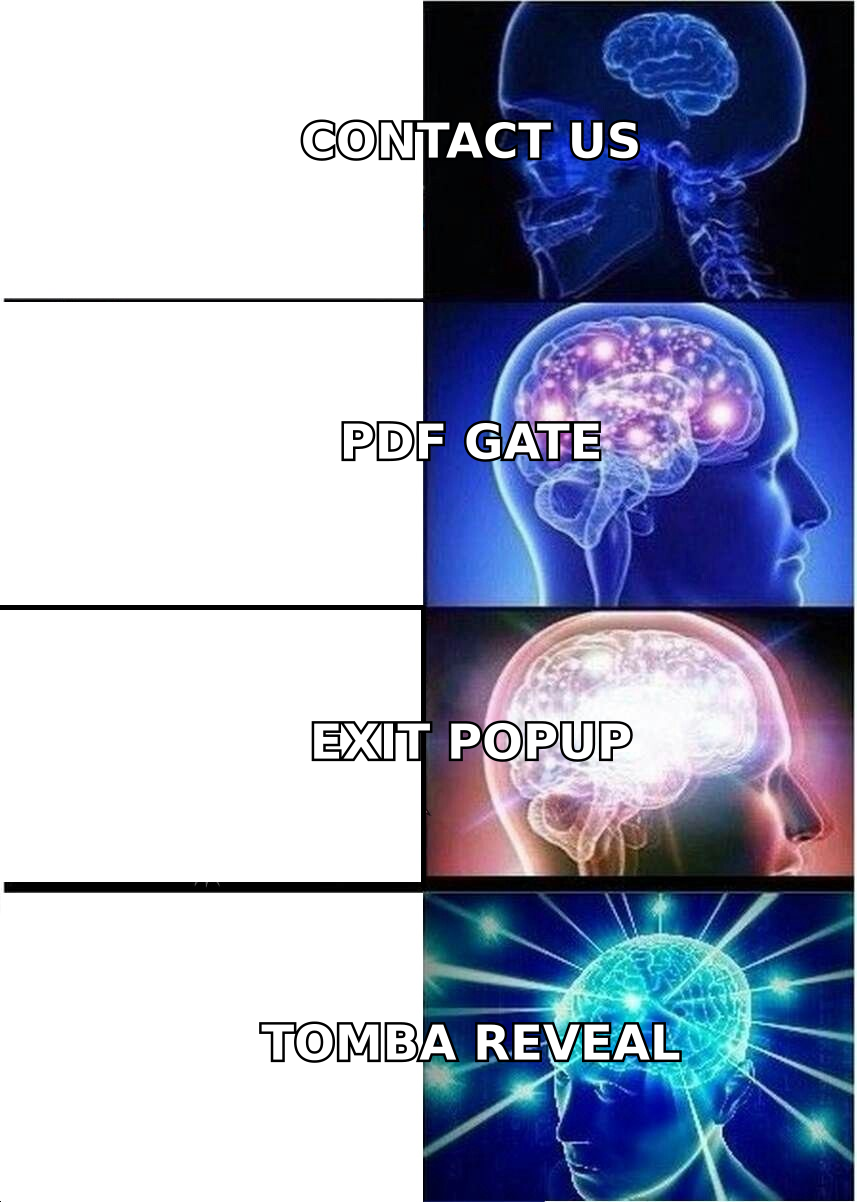
This is where the biggest upside sits in 2026. If 3% of your traffic converts on a form, the other 97% still told you something: which pages they read, how long they stayed, and — through IP and device resolution — which company they work for.
Website visitor reveal turns that anonymous session into a company record, which you then enrich into a set of contacts worth reaching out to. The workflow looks like this:
- A logistics company visits your pricing page three times in a week.
- Visitor identification resolves the session to the company domain.
- Domain search returns the relevant contacts — VP Operations, Head of Procurement.
- Verification confirms which addresses are safe to send to.
- An SDR gets an alert referencing the actual pages viewed.
That is not cold outbound. It is warm capture of demand that already exists but refused to fill in your form. The compliance caveat matters: company-level identification from IP data is treated differently from personal data in most jurisdictions, and under GDPR your legitimate-interest basis, notice, and opt-out handling all need to be documented before you turn this on in the EU. Talk to whoever owns privacy at your company first.
Which lead capture tools should you compare?#
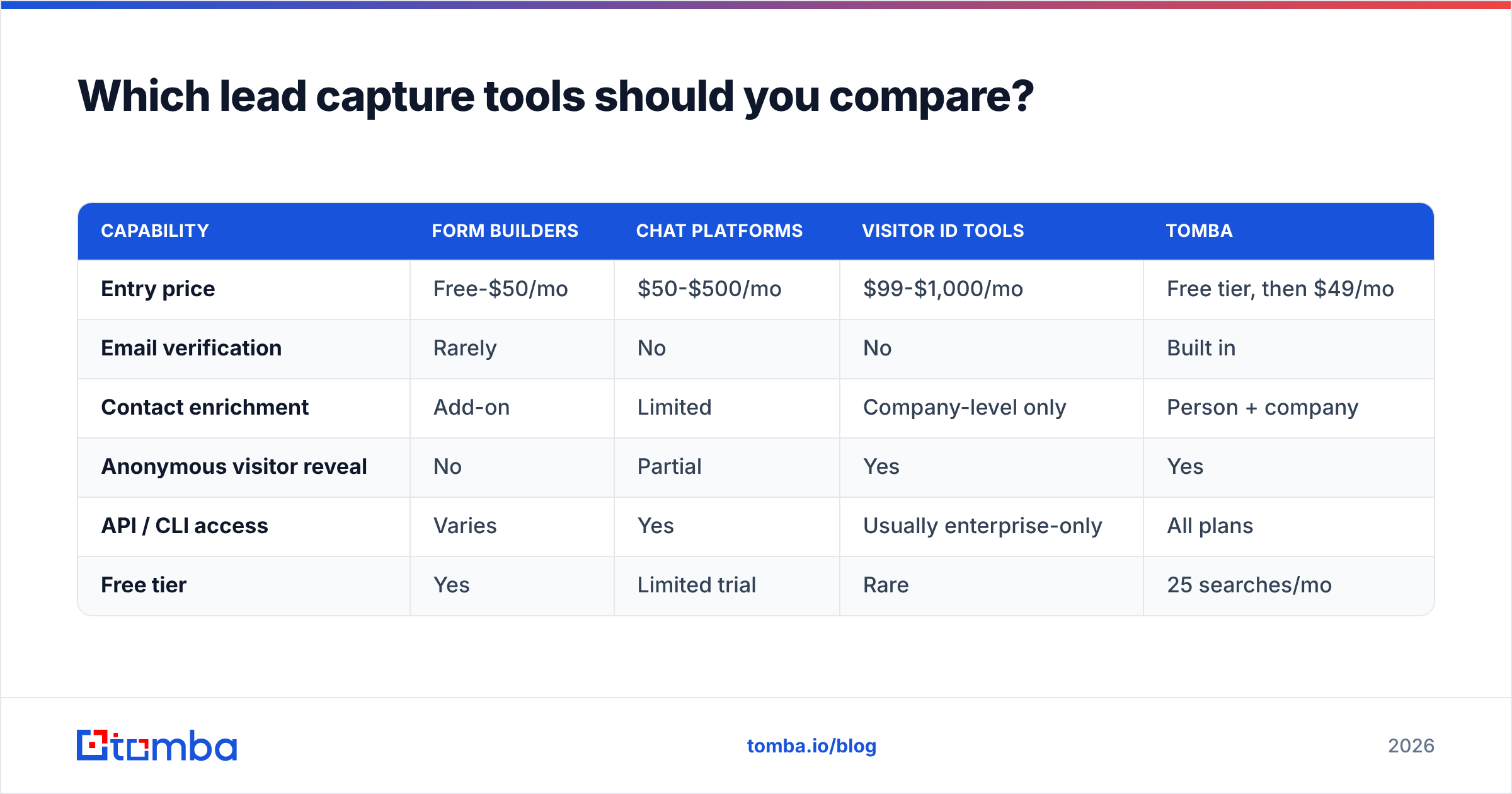
Vendor categories blur constantly, so compare on the job to be done rather than the label. Independent review aggregation on G2 is useful for support and onboarding signals, but pricing pages tell you more about fit.
| Capability | Form builders | Chat platforms | Visitor ID tools | Tomba |
|---|---|---|---|---|
| Entry price | Free-$50/mo | $50-$500/mo | $99-$1,000/mo | Free tier, then $49/mo |
| Email verification | Rarely | No | No | Built in |
| Contact enrichment | Add-on | Limited | Company-level only | Person + company |
| Anonymous visitor reveal | No | Partial | Yes | Yes |
| API / CLI access | Varies | Yes | Usually enterprise-only | All plans |
| Free tier | Yes | Limited trial | Rare | 25 searches/mo |
The honest read: you will likely run two or three of these together. A form builder captures, a verification and enrichment layer cleans and completes, and a visitor identification layer covers the non-converters. What you should refuse to pay for twice is enrichment — if three tools in your stack each bill you per enriched contact, consolidate. Check current Tomba pricing against your existing per-credit costs before adding another line item.
How do you measure lead capture performance?#
Four metrics, tracked weekly:
- Capture rate by surface — conversions divided by qualified sessions, segmented per form, per tool, per channel. Aggregate site conversion rate hides everything useful.
- Record completeness — percentage of captured leads with a verified email, a title, and a company size. If this is below 80% after enrichment, your capture design is the problem.
- Time to first touch — median minutes from submission to first human or automated contact. Target under five minutes for high-intent surfaces.
- Capture-to-opportunity rate — the only number that proves the net is catching fish worth keeping. Track it by surface so you can kill the ones producing noise.
If you only instrument one, make it record completeness. It is the earliest indicator that your forms are asking for the wrong things, and it predicts your downstream response rate better than raw volume ever will.
Where should you start this quarter?#
Pick the shortest path to a measurable win:
- Cut your highest-traffic form to three fields and enrich the rest. Measure for two weeks.
- Add verification at the point of capture so nothing unverified enters a sequence.
- Turn on visitor identification for your pricing and product pages only — highest intent, lowest noise.
- Set a five-minute alert on demo requests, routed to a named owner, not a shared inbox.
None of these require a replatform. All four are configuration changes you can ship inside a sprint.
The pattern underneath all of them is the same: stop asking prospects for data you can look up yourself. Every field you remove is friction removed, and every field you append automatically is a field that is actually accurate.
Start with the data layer. Tomba Email Finder gives you verified professional email addresses by name, domain, or company — so a three-field form or an anonymous company visit still ends up as a complete, sendable, routable record. The free tier includes 25 searches a month, and paid plans start at $49/mo with full API access on every tier. Shorten the form, keep the data, and let your follow-up speed do the rest.
Related guides#
// get started
Find, verify and enrich your first contacts today
Start on the free plan with 25 searches a month, then scale when your team is ready.
Free plan · No credit card required · GDPR & CCPA
// about the author