Lead Capture Integration: How to Connect Forms to Your CRM in 2026
Most lead capture setups lose 20-40% of inbound leads between the form and the CRM. Here's how the integration layer actually works, what breaks it, and how to fix routing, enrichment, and dedupe.
TL;DR
- A lead capture integration is the plumbing between where a lead raises their hand (form, chat, webinar, ad) and where your team acts on it (CRM, sequencer, Slack). Most teams treat it as a one-time Zapier setup and then quietly leak leads for years.
- The three failure points that cost the most revenue: routing delay (lead sits unassigned), dirty data (typo'd or role-based emails that bounce), and duplicates (same person entering three times through three forms).
- Speed-to-lead is still the single highest-leverage variable. Responding inside five minutes versus 30 minutes changes qualification odds by roughly an order of magnitude — and integration latency is usually what eats those minutes.
- Enrichment at the point of capture lets you shrink forms to 2-3 fields and still get company size, industry, and title. Fewer fields means higher conversion; enrichment recovers the data you stopped asking for.
- Build order that works: capture → validate → enrich → dedupe → score → route → notify. Skip validation and every downstream step inherits the garbage.
What is a lead capture integration?#
A lead capture integration is the connective tissue between your capture surfaces and your systems of action. Think of it like the baggage handling system at an airport. Passengers (leads) check bags at dozens of counters (forms, chat widgets, webinar registrations, ad lead forms). The handling system has to scan each bag, sort it, catch the mislabeled ones, and get it onto the right plane before departure. Nobody thanks the baggage system when it works. Everyone notices when a bag ends up in Denver.
Technically, it's a pipeline with five or six discrete stages, each of which can be a different vendor or a single platform:
- Capture surface — the form, chat widget, calendar booking, webinar registration, LinkedIn Lead Gen Form, or Google Ads lead extension where the submission originates.
- Transport layer — webhook, native connector, iPaaS (Zapier, Make, Workato), or a direct API call that moves the payload.
- Validation and enrichment — real-time email verification, firmographic lookup, and appending fields the form didn't ask for.
- Deduplication and matching — checking the incoming record against existing contacts, accounts, and open opportunities.
- Scoring and routing — assigning a fit/intent score, then handing the record to the right owner by territory, segment, or round-robin.
- Notification and action — Slack ping, task creation, sequence enrollment, or instant scheduling.
The mistake most teams make is collapsing stages 3 through 5 into "the CRM will handle it." Salesforce and HubSpot both have native dedupe and routing, but neither validates an email address at submission time, and neither enriches a record with data you never collected.
How does lead capture integration actually work end to end?#
Walk a single submission through the pipe and the failure points become obvious.
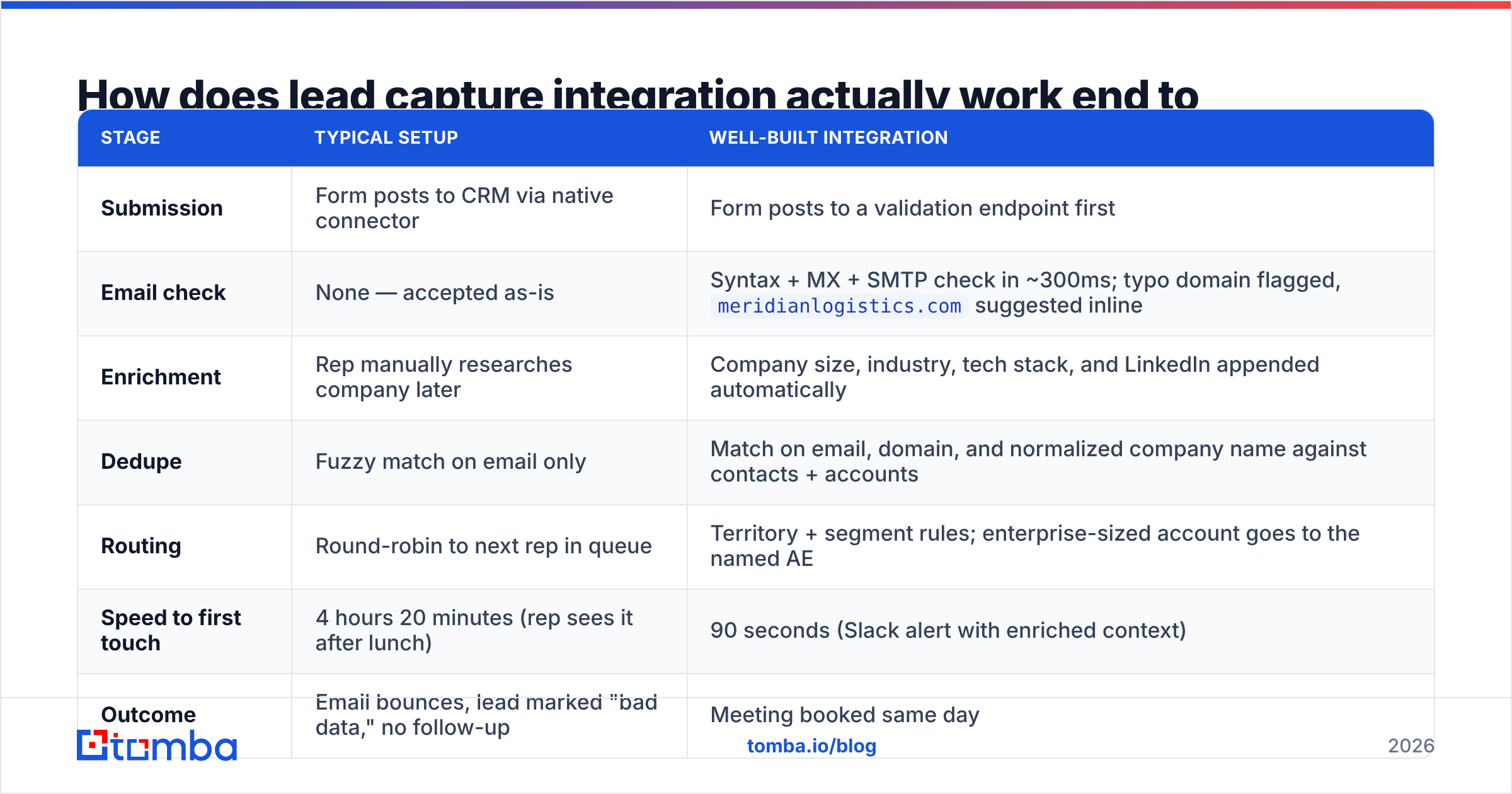
A VP of Operations at a 400-person logistics company fills out your "Request a Demo" form at 2:14 PM. She types sarah.okonkwo@meridianlogistcs.com — one transposed character in the domain. Here's what happens in a well-built pipeline versus a typical one:
| Stage | Typical setup | Well-built integration |
|---|---|---|
| Submission | Form posts to CRM via native connector | Form posts to a validation endpoint first |
| Email check | None — accepted as-is | Syntax + MX + SMTP check in ~300ms; typo domain flagged, meridianlogistics.com suggested inline |
| Enrichment | Rep manually researches company later | Company size, industry, tech stack, and LinkedIn appended automatically |
| Dedupe | Fuzzy match on email only | Match on email, domain, and normalized company name against contacts + accounts |
| Routing | Round-robin to next rep in queue | Territory + segment rules; enterprise-sized account goes to the named AE |
| Speed to first touch | 4 hours 20 minutes (rep sees it after lunch) | 90 seconds (Slack alert with enriched context) |
| Outcome | Email bounces, lead marked "bad data," no follow-up | Meeting booked same day |
That's one lead. Multiply by a quarter's inbound volume and the gap between those two columns is the entire difference between "inbound doesn't work for us" and a functioning pipeline.
The validation step deserves emphasis because it's the cheapest and most skipped. An email verifier call at submission time costs a fraction of a cent and catches typos, disposable domains, and dead mailboxes before they ever enter the CRM. Once a bad address is in the database, it pollutes bounce rates, damages sender reputation, and triggers the "our data is bad" narrative that kills trust in marketing-sourced leads.
Why do so many lead capture integrations leak?#
Four reasons, in rough order of how much revenue they destroy.
1. Silent webhook failures. Zapier and Make both retry on failure, but they don't retry forever, and they don't always alert loudly. A task that errors on a malformed payload at 11 PM Friday can drop submissions all weekend. If you use an iPaaS in production, you need a dead-letter queue and an actual alert channel — not just the email digest nobody reads.
2. Field mapping drift. Someone adds a picklist value to the form. The CRM field doesn't have it. The record either fails to create or silently writes null. This happens constantly in teams where marketing owns the form and RevOps owns the CRM schema, with no change process between them.
3. Duplicate explosion. The same buyer downloads a whitepaper, registers for a webinar, and books a demo over six weeks — using a work email, a personal Gmail, and a slightly different company spelling. Without a matching layer, that's three contact records, three owners, and two reps emailing the same person on the same day.
4. Over-long forms. Every additional required field drops conversion. Teams ask for company size, industry, and job title because the routing rules need them. Enrichment removes that tradeoff: ask for work email and name, derive the rest. HubSpot's research on form length has consistently shown the conversion penalty of longer forms, and the math rarely favors asking.

What should you look for in an integration approach?#
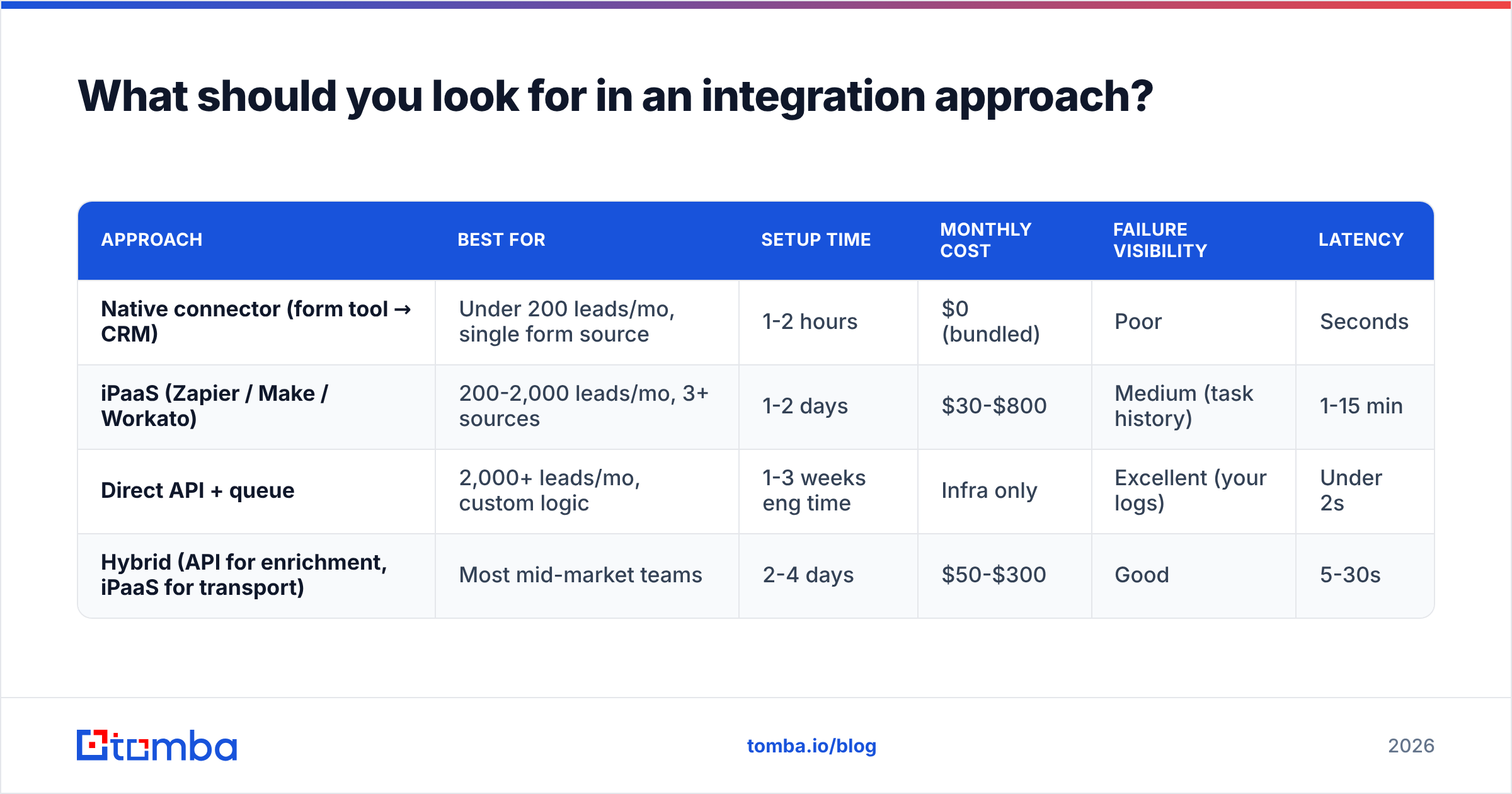
There are three viable architectures, and the right one depends on volume and engineering availability.
| Approach | Best for | Setup time | Monthly cost | Failure visibility | Latency |
|---|---|---|---|---|---|
| Native connector (form tool → CRM) | Under 200 leads/mo, single form source | 1-2 hours | $0 (bundled) | Poor | Seconds |
| iPaaS (Zapier / Make / Workato) | 200-2,000 leads/mo, 3+ sources | 1-2 days | $30-$800 | Medium (task history) | 1-15 min |
| Direct API + queue | 2,000+ leads/mo, custom logic | 1-3 weeks eng time | Infra only | Excellent (your logs) | Under 2s |
| Hybrid (API for enrichment, iPaaS for transport) | Most mid-market teams | 2-4 days | $50-$300 | Good | 5-30s |
The hybrid row is where most B2B teams land and should land. You keep the iPaaS for transport because rebuilding connectors to eight SaaS tools is not a good use of engineering time, but you call enrichment and verification APIs directly so the data quality step is fast and observable.
For the enrichment call itself, the criteria that actually matter:
- Coverage on your ICP, not global coverage. A provider with 500M records is irrelevant if it's thin on 50-500 employee companies in DACH. Test against a sample of 200 of your own closed-won accounts before buying.
- Response latency under 500ms. Anything slower and you either block form submission or have to go async, which complicates routing.
- Confidence scores, not just values. You need to know whether the returned email is verified or pattern-guessed so routing rules can branch on it.
- Bulk plus real-time on the same credits. You'll want bulk enrichment for backfilling the existing database and real-time for new submissions.
- Transparent sourcing. Ask where the data comes from and how often it's refreshed. Providers that won't answer this create compliance risk under GDPR and CCPA.
- Sane rate limits and retries. Traffic spikes during campaigns. A provider that 429s during your webinar is worse than no provider.
How do you enrich leads at the point of capture?#
The pattern is straightforward: capture the minimum, derive the rest.
Ask for work email and first/last name. That's it for a demo request form. From the email domain you can resolve the company, and from the company you can pull employee count, industry, revenue band, location, and tech stack. From the name plus domain you can confirm title and LinkedIn profile.
A concrete implementation:
- On submit, fire the payload to your endpoint before the thank-you page renders.
- Validate the email synchronously. If it fails syntax or MX, return an inline error and let the user correct it. This alone recovers 2-4% of submissions that would otherwise be dead on arrival.
- Fire enrichment async — company lookup by domain, person lookup by email. Write results back to the CRM record within a few seconds.
- Branch on company size. Enterprise-sized accounts get routed to named AE ownership and a same-hour Slack alert. SMB goes to a sequence.
- Flag role-based addresses (
info@,sales@,contact@) differently. They're not worthless, but they shouldn't be treated as a named buyer and shouldn't go into a personalized sequence.
If your capture surface is outbound-adjacent — say you're identifying companies visiting your pricing page and want contacts at those companies — the pattern inverts. You start with a domain and need people. That's what domain search handles: give it meridianlogistics.com and get back the contacts with departments and confidence scores, which you can then filter to the roles you actually sell to.
For teams running website visitor reveal, this is the whole workflow: anonymous traffic → identified company → relevant contacts → verified emails → CRM. It's lead capture without a form, and it uses the same validation and enrichment layer.
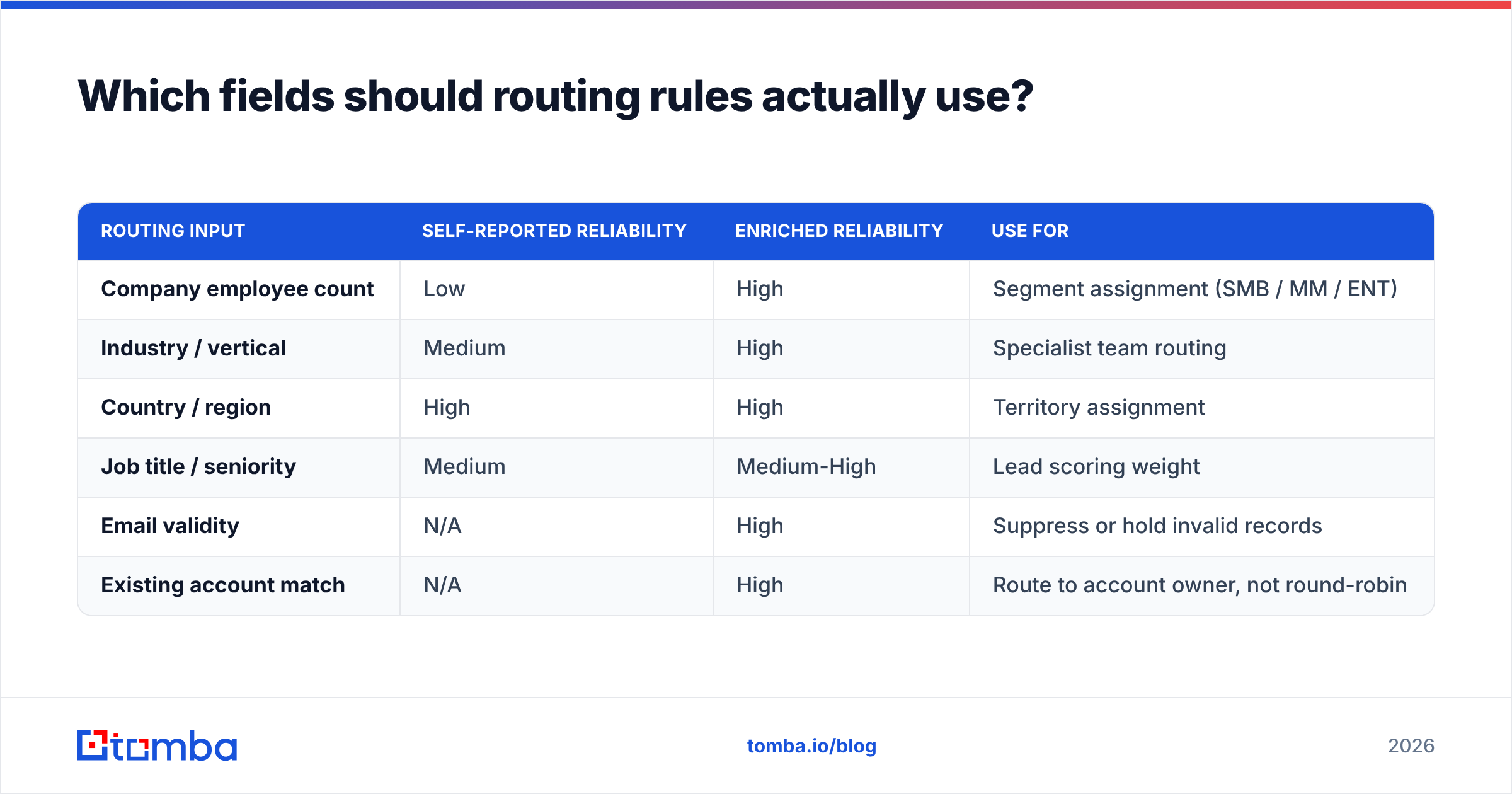
Which fields should routing rules actually use?#
Routing breaks when it depends on fields the form can't reliably collect. Self-reported company size is notoriously wrong — people guess, or pick the first option, or their definition of "company" is their department.
Build routing on enriched fields wherever possible:
| Routing input | Self-reported reliability | Enriched reliability | Use for |
|---|---|---|---|
| Company employee count | Low | High | Segment assignment (SMB / MM / ENT) |
| Industry / vertical | Medium | High | Specialist team routing |
| Country / region | High | High | Territory assignment |
| Job title / seniority | Medium | Medium-High | Lead scoring weight |
| Email validity | N/A | High | Suppress or hold invalid records |
| Existing account match | N/A | High | Route to account owner, not round-robin |
That last row is the one teams forget. If the submitting company already has an open opportunity or an assigned CSM, the lead should never hit the round-robin queue. Matching on email domain against existing accounts is a five-minute rule that prevents the most embarrassing category of outreach — cold-emailing a current customer.
Worth reading alongside this: Salesforce's lead management documentation covers the native assignment-rule mechanics, and independent reviews on G2's lead capture category are useful for seeing which integrations users actually complain about in practice.
How do you measure whether the integration is working?#
Four metrics, tracked weekly. If you're not measuring these, you don't know whether your pipeline leaks.
- Capture-to-CRM completion rate. Count form submissions at the source (form tool analytics) and CRM records created. The gap is your leak. A healthy pipeline runs above 98%. Anything below 95% means webhooks are failing silently.
- Median time from submission to first human touch. Not average — median, because one rep on PTO skews the mean. Target under 15 minutes for high-intent forms.
- Bounce rate on inbound-sourced contacts. If inbound leads bounce above 3%, validation isn't running or isn't running before CRM write.
- Duplicate creation rate. New contacts created per week that match an existing record on email or domain+name. Above 5% and your matching logic needs work.
Instrument these as a single dashboard, not four reports nobody opens. And run a synthetic test submission daily — a scheduled job that submits a real form and verifies the record lands, enriched and routed, within your SLA. That catches silent breakage in hours instead of weeks.
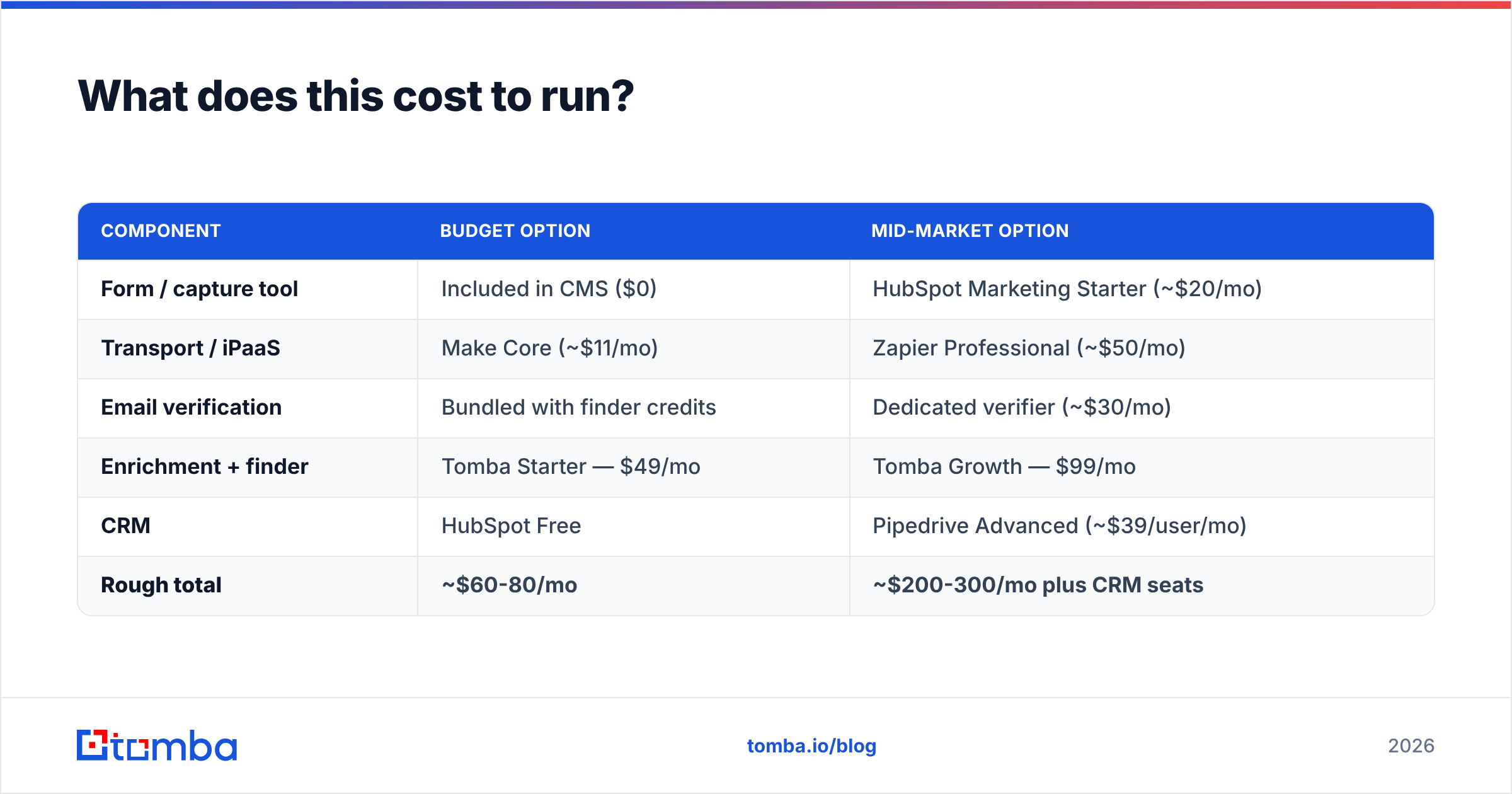
What does this cost to run?#
Ballpark monthly costs for a team handling 1,000 inbound leads per month:
| Component | Budget option | Mid-market option |
|---|---|---|
| Form / capture tool | Included in CMS ($0) | HubSpot Marketing Starter (~$20/mo) |
| Transport / iPaaS | Make Core (~$11/mo) | Zapier Professional (~$50/mo) |
| Email verification | Bundled with finder credits | Dedicated verifier (~$30/mo) |
| Enrichment + finder | Tomba Starter — $49/mo | Tomba Growth — $99/mo |
| CRM | HubSpot Free | Pipedrive Advanced (~$39/user/mo) |
| Rough total | ~$60-80/mo | ~$200-300/mo plus CRM seats |
The enrichment line is the one that pays for itself fastest. At $99/mo for the Growth tier, recovering even two additional qualified meetings per month covers it many times over for most B2B ACVs. Tomba also runs a free tier at 25 searches/month if you want to test coverage against your ICP before committing — which, per the criteria above, you should.
Note that some teams prefer buying pre-built contact lists rather than enriching inbound. Providers like BookYourData serve that use case well, and the two approaches complement each other: purchased lists fuel outbound, enrichment cleans and completes inbound. They solve different halves of the same data problem.
What's the build order?#
If you're starting from scratch or rebuilding, do it in this sequence. Each step depends on the one before it.
- Instrument first. Add counters at capture and at CRM write before changing anything. You can't tell whether you fixed the leak if you never measured it.
- Add validation. Real-time email check at submission. Fastest win, lowest effort, immediately improves every downstream metric.
- Add matching. Dedupe against existing contacts and accounts before creating anything new.
- Add enrichment. Now that records are clean and unique, append firmographics.
- Rewrite routing to use enriched fields. Not before — routing on unenriched data just automates bad decisions faster.
- Add alerting. Slack for high-intent, dead-letter queue monitoring for failures, daily synthetic test.
- Shorten the forms. Last step, because it only works once enrichment is reliably filling the gaps. Cut required fields to email and name and watch conversion rise.
Teams that do this in the wrong order — usually starting with routing rules and fancy scoring — end up with sophisticated logic operating on unreliable inputs. Clean the water before you build the filtration system.
Getting started#
The highest-ROI piece of a lead capture integration is the data layer: verifying every address at capture and filling in the fields you stopped asking for. That's where leaked leads come back.
Tomba's Email Finder handles the finder and verification side of that layer, with a REST API built for exactly this kind of inline call, plus native connectors for HubSpot, Pipedrive, Salesforce, Zapier, and Make if you'd rather not write the integration yourself. Start on the free tier, run 25 lookups against your own closed-won list, and see what coverage looks like on your actual ICP before you decide anything.
Related guides#
// get started
Find, verify and enrich your first contacts today
Start on the free plan with 25 searches a month, then scale when your team is ready.
Free plan · No credit card required · GDPR & CCPA
// about the author