Lead Capture Page: The 2026 Guide to Higher Conversions
A lead capture page has one job: turn a click into a contact you can actually reach. Here is the structure, form length, and data-quality checks that separate 3% pages from 20% pages.

TL;DR
- A lead capture page is a single-purpose page whose only success metric is a submitted, reachable contact — not a click, not a scroll, not a session.
- Field count matters less than field cost. Three easy fields beat three hard ones, and one email field plus enrichment usually beats both.
- Median B2B lead capture conversion sits around 3–6%. Pages above 15% almost always trade form length for enrichment on the back end.
- A 20% conversion rate on unverifiable emails is worse than a 6% rate on verified ones. Measure "reachable leads per 1,000 visitors," not raw submits.
- Build the page in whatever tool your team already knows. Spend the saved time on the post-submit pipeline: verification, enrichment, routing, and speed-to-lead.
What is a lead capture page?#
A lead capture page is a standalone page built around one conversion action: handing over contact details. Think of it as the front door of a shop with no windows to browse through. Every element on the page either helps the visitor walk through that door, or it is clutter.
That single-purpose constraint is what separates it from the rest of your site. A homepage serves twelve audiences. A pricing page serves buyers in evaluation. A lead capture page serves exactly one visitor, arriving from one source, with one offer in front of them.
The offer is the currency. Nobody submits an email address for the privilege of "learning more." They submit because something on the other side is worth more to them than the inbox friction: a benchmark report, a calculator result, a trial, a spot on a waitlist, a quote.
How is a lead capture page different from a landing page or squeeze page?#
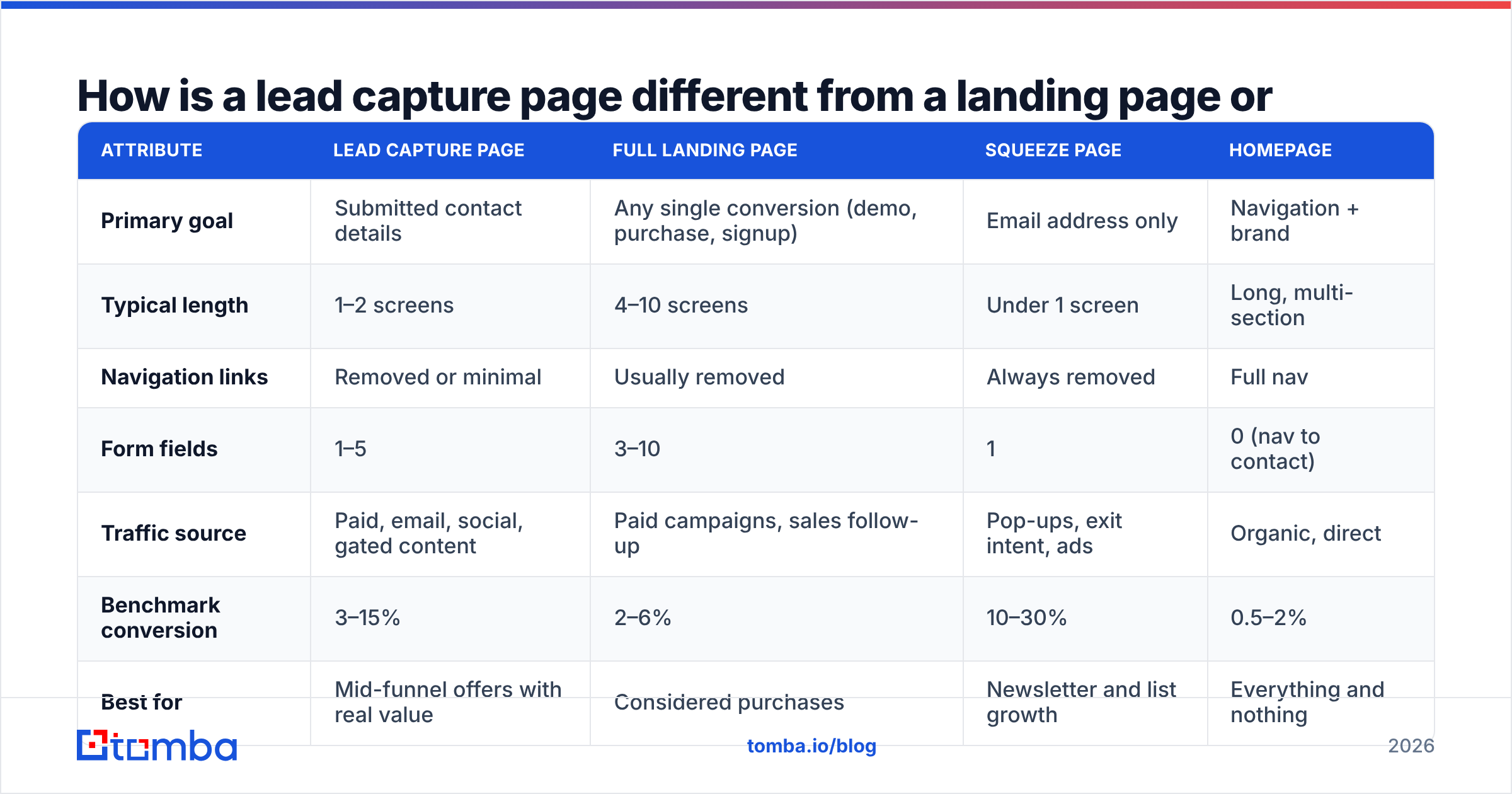
The terms get used interchangeably and it causes real problems in planning meetings, because the three formats have different success criteria.
| Attribute | Lead capture page | Full landing page | Squeeze page | Homepage |
|---|---|---|---|---|
| Primary goal | Submitted contact details | Any single conversion (demo, purchase, signup) | Email address only | Navigation + brand |
| Typical length | 1–2 screens | 4–10 screens | Under 1 screen | Long, multi-section |
| Navigation links | Removed or minimal | Usually removed | Always removed | Full nav |
| Form fields | 1–5 | 3–10 | 1 | 0 (nav to contact) |
| Traffic source | Paid, email, social, gated content | Paid campaigns, sales follow-up | Pop-ups, exit intent, ads | Organic, direct |
| Benchmark conversion | 3–15% | 2–6% | 10–30% | 0.5–2% |
| Best for | Mid-funnel offers with real value | Considered purchases | Newsletter and list growth | Everything and nothing |
The practical takeaway: pick the format by where the visitor is in the buying process, not by what your page builder calls its template. A cold ad audience needs a squeeze-style ask. A visitor arriving from a comparison article can tolerate five fields because they have already invested attention.
What are the six parts of a lead capture page that converts?#
Every page that performs well has the same skeleton. The copy changes, the order rarely does.
- A specific headline that names the outcome, not the asset. "Download our guide" is an asset. "Cut your cold email bounce rate below 2%" is an outcome. The asset is how you deliver it; the outcome is why anyone cares.
- A message-match hero that echoes the ad or link they clicked. If the LinkedIn ad said "2026 SaaS pricing benchmarks," the H1 says "2026 SaaS pricing benchmarks." Mismatched scent is the single most common cause of high bounce on paid traffic.
- Three to five proof units placed above the form. Logos, a named quote with a job title, a number you can defend, or a screenshot of the actual deliverable. Generic five-star badges do nothing; a visible preview of page 4 of the report does a lot.
- A form with a visible, honest cost. State how many fields there are, what happens after submission, and whether a human will call. Ambiguity about "what happens next" kills more conversions than one extra field ever will.
- One CTA, repeated, in the visitor's language. "Get the benchmark data" outperforms "Submit" because it restates the value at the moment of commitment. Repeat it at the bottom for mobile scrollers.
- A risk-reducer directly under the button. "No credit card," "one email, unsubscribe in a click," or a plain-language privacy line. It recovers a meaningful slice of hesitant clicks at zero design cost.
Remove anything that does not fit one of those six jobs. Site navigation, footer link farms, related blog carousels, a chat widget that covers the CTA on mobile — each is an exit you built yourself.

How many form fields should a lead capture page have?#
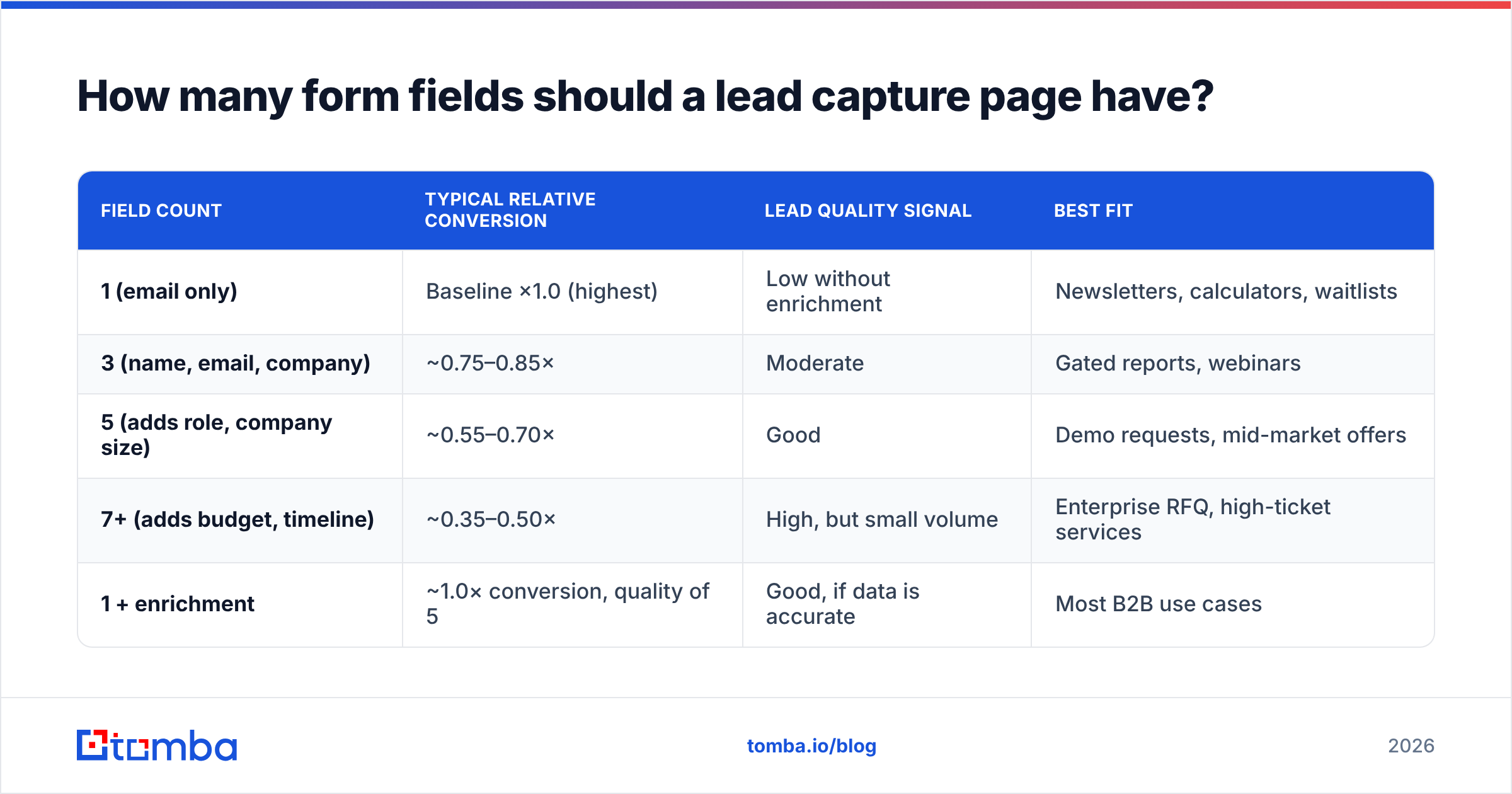
Fewer fields raise submission rate and lower average lead quality. That trade is real, but it is also smaller than most teams assume, because the relationship is not linear — it depends on how hard each field is to answer.
| Field count | Typical relative conversion | Lead quality signal | Best fit |
|---|---|---|---|
| 1 (email only) | Baseline ×1.0 (highest) | Low without enrichment | Newsletters, calculators, waitlists |
| 3 (name, email, company) | ~0.75–0.85× | Moderate | Gated reports, webinars |
| 5 (adds role, company size) | ~0.55–0.70× | Good | Demo requests, mid-market offers |
| 7+ (adds budget, timeline) | ~0.35–0.50× | High, but small volume | Enterprise RFQ, high-ticket services |
| 1 + enrichment | ~1.0× conversion, quality of 5 | Good, if data is accurate | Most B2B use cases |
That last row is the interesting one. Asking for a work email and deriving the rest — company, domain, headcount, role, industry — moves the data-collection burden off your visitor and onto your stack. Contact enrichment is what makes a one-field form viable for a sales team that still needs firmographics for routing.
Three practical rules that hold across most tests:
- Ask only for what changes the next action. If "how did you hear about us" does not alter routing, follow-up, or pricing, delete it. It is analytics theater.
- Hard fields cost more than long fields. "Phone number" and "annual budget" depress conversion far more than "last name," even though all three are one line.
- Split the ask across time. Collect email on the page, collect qualification on the thank-you page or the first reply. Post-submit questions are answered by people who have already committed.
What counts as a good lead capture page conversion rate in 2026?#
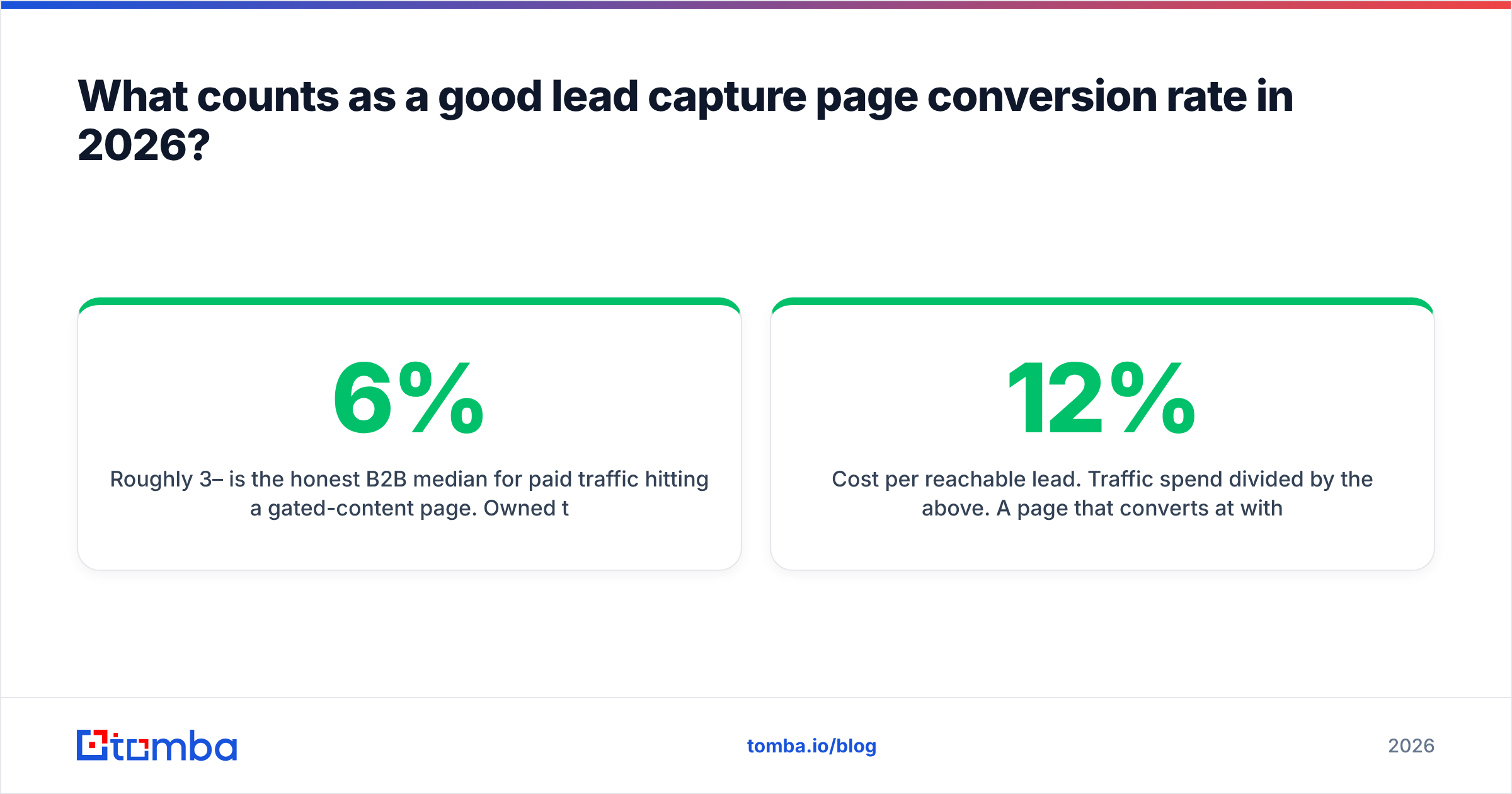
Roughly 3–6% is the honest B2B median for paid traffic hitting a gated-content page. Owned traffic — newsletter, existing customers, retargeting — runs two to four times higher. Industry-wide benchmark studies like Unbounce's conversion benchmark work and the ongoing marketing statistics roundups from HubSpot consistently show the same spread: a wide middle, with sector variance larger than most design differences.
Before you chase a number, fix the denominator problem. Three metrics tell you more than conversion rate alone:
- Reachable leads per 1,000 visitors. Submits that survive email verification. This is the only number that maps to pipeline.
- Cost per reachable lead. Traffic spend divided by the above. A page that converts at 12% with 30% junk addresses is more expensive than it looks.
- Time to first touch. Response speed still dominates conversion-to-opportunity rates. A page that feeds a CRM in seconds beats a prettier page that feeds a weekly CSV export.
Page speed belongs in the same conversation. Core Web Vitals thresholds published on web.dev are a reasonable floor: if your Largest Contentful Paint is over 2.5 seconds on mobile, you are losing conversions before anyone reads your headline. Hero video and a six-font stack are usually the culprits.
Why do high-converting pages still produce bad pipeline?#
Because a form accepts any string with an @ in it. Typos, role addresses, disposable domains, and deliberately fake entries all count as conversions in your dashboard and as zeroes in your pipeline.
The fix is a two-stage gate.
Stage one, at submit time. Run a real-time syntax and MX check before the thank-you page renders. Catching gmial.com while the visitor is still on the page recovers a lead you would otherwise lose entirely. A lightweight free email checker is enough to see how the logic behaves before you wire it into the form.
Stage two, before the record hits your sequences. Full verification of deliverability, catch-all status, and role-address detection. Running submissions through an email verifier protects your sender reputation, which matters far more than it did five years ago now that Gmail and Yahoo enforce hard complaint-rate thresholds on bulk senders. A capture page that quietly feeds 15% bad addresses into your outreach tool is not a lead source, it is a deliverability liability.
Then enrich. Turn the one field you collected into the five you actually needed for routing, scoring, and personalization.

Which lead capture page builder should you use?#
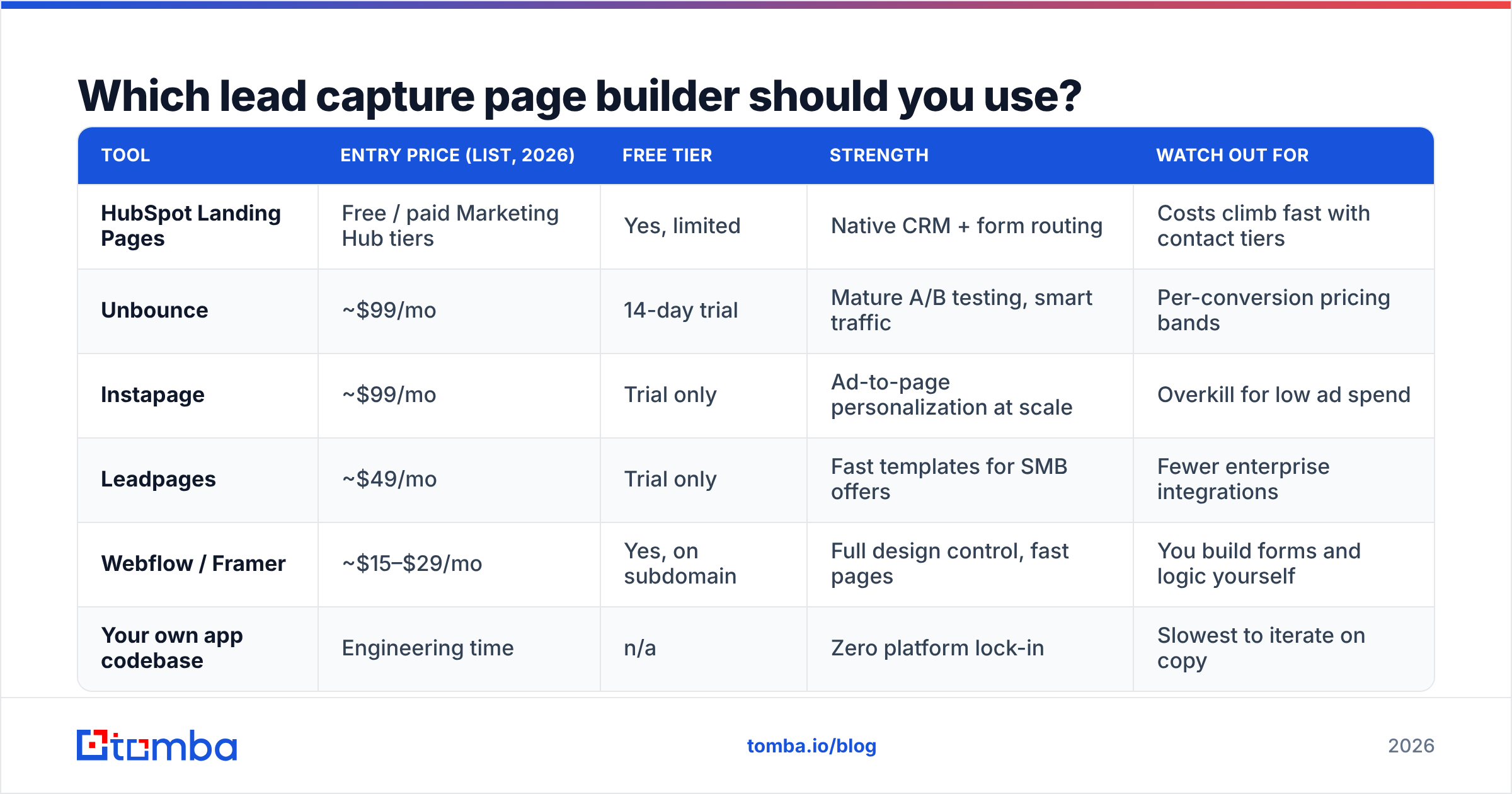
Honestly: the one your team can ship in an afternoon. Builder choice explains very little of the variance in conversion outcomes. Copy, offer, and traffic match explain most of it. That said, the constraints differ enough to matter at scale.
| Tool | Entry price (list, 2026) | Free tier | Strength | Watch out for |
|---|---|---|---|---|
| HubSpot Landing Pages | Free / paid Marketing Hub tiers | Yes, limited | Native CRM + form routing | Costs climb fast with contact tiers |
| Unbounce | ~$99/mo | 14-day trial | Mature A/B testing, smart traffic | Per-conversion pricing bands |
| Instapage | ~$99/mo | Trial only | Ad-to-page personalization at scale | Overkill for low ad spend |
| Leadpages | ~$49/mo | Trial only | Fast templates for SMB offers | Fewer enterprise integrations |
| Webflow / Framer | ~$15–$29/mo | Yes, on subdomain | Full design control, fast pages | You build forms and logic yourself |
| Your own app codebase | Engineering time | n/a | Zero platform lock-in | Slowest to iterate on copy |
Verify current pricing on each vendor's site before you budget; these tiers move. Independent review data on G2 is useful for spotting where a tool's support or reporting quietly disappoints, which specs pages never tell you.
What genuinely matters in the selection: can the form post to your CRM in real time, can you fire a verification call before the record lands, and can a marketer change the headline without filing a ticket. If a builder fails any of those three, its template gallery is irrelevant.
How do you test a lead capture page without wasting traffic?#
Sequence your tests by expected effect size. Most teams do the opposite and start with button colors.
- Offer. Swap the deliverable entirely. A benchmark dataset versus a 20-page PDF can move conversion by 2–5×. Nothing else comes close.
- Headline and message match. Rewrite the H1 to mirror the top-performing ad copy exactly.
- Form length. Remove two fields and replace them with enrichment. Compare reachable leads, not submits.
- Proof placement. Move the strongest quote or logo row above the fold.
- CTA microcopy. Outcome verbs versus generic verbs. Small but reliably positive.
- Layout and visual polish. Real, but last. Ship it after the above have plateaued.
On statistical hygiene: do not call a test at 40 conversions. For a page converting at 5%, detecting a realistic 20% relative lift needs thousands of visitors per variant. If your traffic cannot support that in four weeks, stop A/B testing and make bigger, judgment-led changes instead. Sequential guesswork on a low-traffic page is just superstition with a dashboard.
Also test the plumbing, not only the pixels. Submit a real lead yourself once a week. Confirm it reaches the CRM, hits the right owner, triggers the right sequence, and that the confirmation email actually lands in the inbox rather than Promotions.
What are the most common lead capture page mistakes?#
- Gating something that should be ungated. If a competitor publishes the same content freely, your form is a tax on reading, and the market will route around it.
- Sending paid traffic to the homepage. Still the single most expensive mistake in B2B advertising.
- Asking for a phone number you will never dial. Every unused field is pure conversion loss.
- No mobile pass. Sticky headers, autofocus that triggers a keyboard jump, and buttons under the fold destroy mobile submits.
- Thank-you pages that thank and nothing else. That page is prime real estate for the second ask: book a call, join the community, answer one qualification question.
- No verification step. You will discover the damage when your domain reputation drops, which is roughly three months too late.
- Treating the page as done. A capture page is an asset you revisit quarterly as offers and audiences change.
Where should you start this week?#
Pick your highest-traffic capture page and do three things: cut the form to email plus one field, add real-time verification at submit, and enrich the record before it reaches your sequences. That combination typically raises submits and raises quality at the same time, which is rare in conversion work.
Once the page is collecting clean addresses, the same discipline applies to the outbound side of your funnel. Tomba Email Finder finds and verifies professional email addresses by name, company, or domain, so inbound captures and outbound prospecting run on one consistent, verified contact layer instead of two lists that disagree. The free tier covers 25 searches a month for testing, and paid plans start at $49/mo — see Tomba pricing for the full breakdown. Start with your existing capture list, run it through verification, and find out how many of your "leads" were ever reachable in the first place.
Related guides#
// get started
Find, verify and enrich your first contacts today
Start on the free plan with 25 searches a month, then scale when your team is ready.
Free plan · No credit card required · GDPR & CCPA
// about the author