Lead Capture Tool: How to Pick One That Actually Converts
Most lead capture tools collect emails. Few collect leads you can actually sell to. Here's how the categories differ, what they cost in 2026, and how to spot the data gap before it kills your pipeline.
TL;DR
- A lead capture tool is anything that converts anonymous attention into a contact record you can act on — forms, popups, chat widgets, visitor identification, and enrichment layers all count.
- The biggest cost in 2026 is not the software. It is the 95-98% of traffic that never fills in a form, plus the junk records that do.
- Form-first tools (HubSpot, Typeform, OptinMonster) win on ease. Visitor-ID and enrichment tools (Tomba Reveal, Albacross, Clearbit) win on volume. Most teams need one of each.
- Capture without verification is a deliverability problem waiting to happen. Bounce rates above 3-5% start hurting your sender reputation across the whole domain.
- Budget shape matters more than sticker price: pick based on the cost per usable contact, not the cost per submission.
What is a lead capture tool, exactly?#
A lead capture tool is any software that takes an anonymous visitor, prospect, or list and turns them into a structured contact record — name, email, company, role — that your sales or marketing system can work.
That definition is deliberately wide, because the market is wide. Four different product categories all sell themselves as "lead capture," and they solve very different problems:
- Form and popup builders — embedded forms, exit-intent modals, gated content. The visitor gives you their details voluntarily. High intent, low volume.
- Conversational capture — chat widgets, qualification bots, scheduling links. Captures mid-session, usually with better conversion than static forms.
- Visitor identification — resolves anonymous traffic to a company (and sometimes a person) via IP and device signals. No visitor action required. High volume, lower intent.
- Prospecting and enrichment — finds or completes contact data from a name, domain, or partial record. Not "capture" in the classic sense, but it is what makes captured records usable.
Most buyers start in category 1, hit a ceiling, and then discover they needed 3 and 4 all along. The ceiling is mathematical: if 2% of your traffic fills in a form, a form builder can at most double a very small number. The other 98% walks out unidentified.
Why do most lead capture tools underdeliver?#
Three reasons, and none of them show up in a demo.
The volume ceiling. Industry benchmarks for B2B landing pages put conversion in the 2-6% range depending on offer and traffic source. That means a form-only stack is throwing away nineteen out of twenty visitors. You can A/B test the button color forever and not change the order of magnitude.
The data gap. A captured record with an email and nothing else is not a lead — it is a string. Your rep still needs company size, role, tech stack, and phone number before they can write a relevant first line. If your capture tool does not enrich, someone on your team is doing that manually at roughly 4-7 minutes per record.
The quality tax. Free-text form fields attract typos, role accounts, disposable addresses, and outright fake entries. Sending to that list unfiltered pushes your bounce rate up, and once bounces cross the 3-5% band, mailbox providers start treating your whole sending domain with suspicion. Google and Yahoo's bulk sender requirements made a hard spam-complaint threshold explicit; bounce discipline is the same idea applied to invalid addresses. Running submissions through an email verifier at the point of capture is the cheapest fix available.
The pattern is consistent: teams over-invest in the capture widget and under-invest in what happens to the record three seconds later.
Which type of lead capture tool fits which situation?#
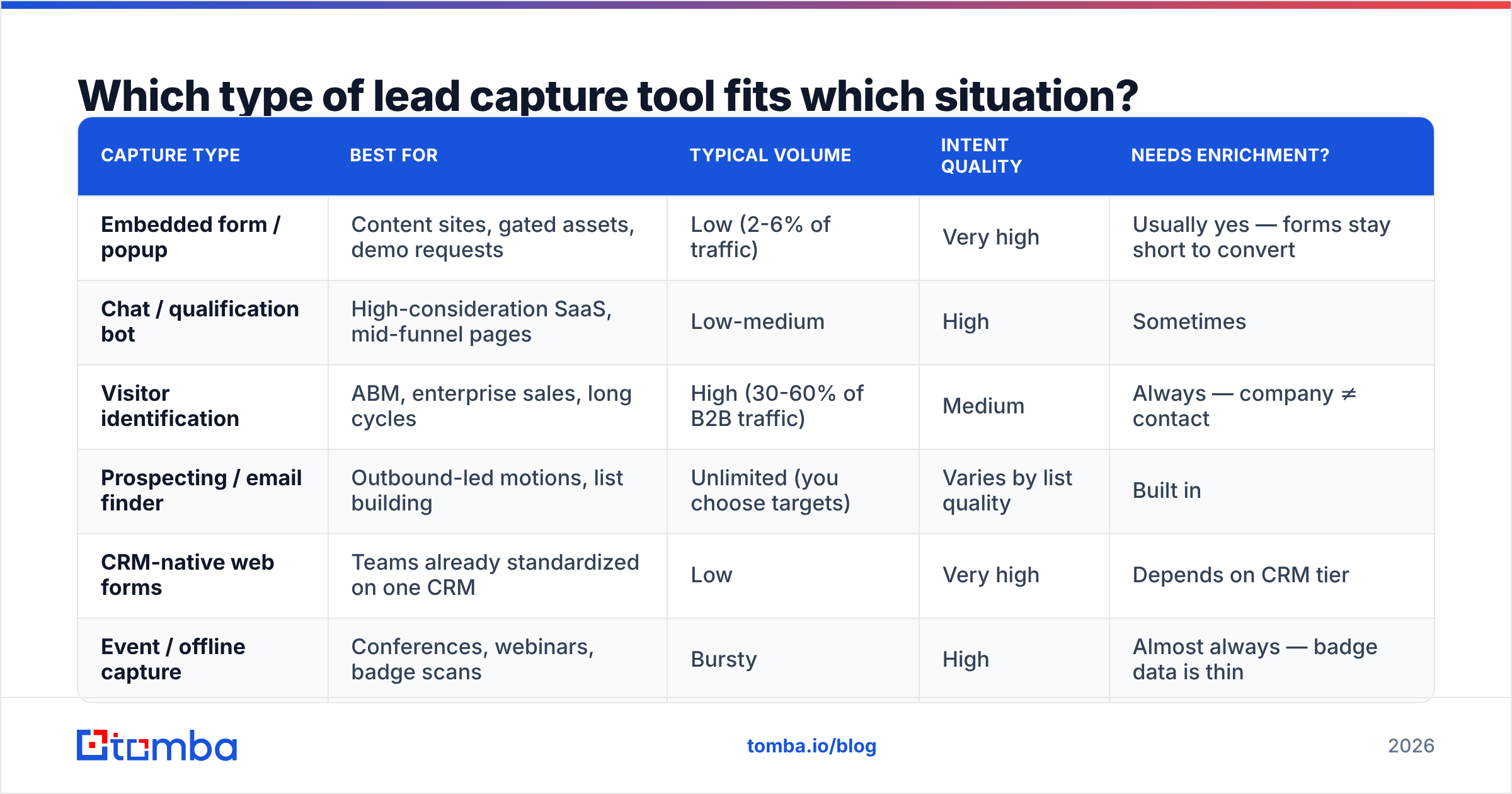
Use this as a routing table rather than a ranking. The right answer depends on where your traffic comes from and how long your sales cycle is.
| Capture type | Best for | Typical volume | Intent quality | Needs enrichment? |
|---|---|---|---|---|
| Embedded form / popup | Content sites, gated assets, demo requests | Low (2-6% of traffic) | Very high | Usually yes — forms stay short to convert |
| Chat / qualification bot | High-consideration SaaS, mid-funnel pages | Low-medium | High | Sometimes |
| Visitor identification | ABM, enterprise sales, long cycles | High (30-60% of B2B traffic) | Medium | Always — company ≠ contact |
| Prospecting / email finder | Outbound-led motions, list building | Unlimited (you choose targets) | Varies by list quality | Built in |
| CRM-native web forms | Teams already standardized on one CRM | Low | Very high | Depends on CRM tier |
| Event / offline capture | Conferences, webinars, badge scans | Bursty | High | Almost always — badge data is thin |
A practical read of that table: if your sales cycle is longer than 30 days and your ACV is above roughly $10k, visitor identification pays for itself faster than any form optimization. If you sell self-serve at $50/month, forms and chat are the whole game and visitor ID is a distraction.
How do the main lead capture tools compare in 2026?#
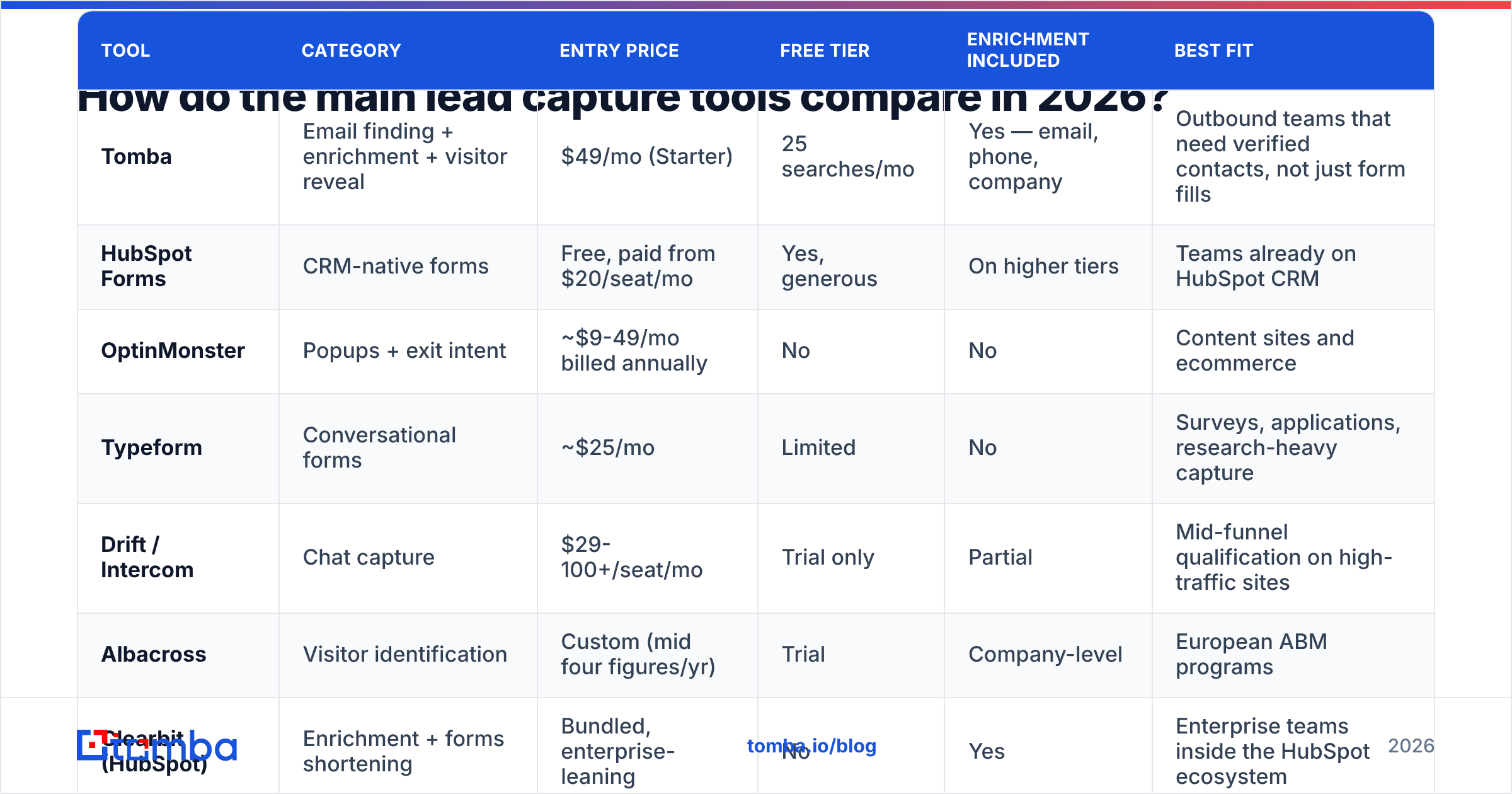
Pricing below reflects publicly listed entry tiers as of early 2026. Vendors change plans frequently — check the source before you commit budget.
| Tool | Category | Entry price | Free tier | Enrichment included | Best fit |
|---|---|---|---|---|---|
| Tomba | Email finding + enrichment + visitor reveal | $49/mo (Starter) | 25 searches/mo | Yes — email, phone, company | Outbound teams that need verified contacts, not just form fills |
| HubSpot Forms | CRM-native forms | Free, paid from $20/seat/mo | Yes, generous | On higher tiers | Teams already on HubSpot CRM |
| OptinMonster | Popups + exit intent | ~$9-49/mo billed annually | No | No | Content sites and ecommerce |
| Typeform | Conversational forms | ~$25/mo | Limited | No | Surveys, applications, research-heavy capture |
| Drift / Intercom | Chat capture | $29-100+/seat/mo | Trial only | Partial | Mid-funnel qualification on high-traffic sites |
| Albacross | Visitor identification | Custom (mid four figures/yr) | Trial | Company-level | European ABM programs |
| Clearbit (HubSpot) | Enrichment + forms shortening | Bundled, enterprise-leaning | No | Yes | Enterprise teams inside the HubSpot ecosystem |
| BookYourData | Prebuilt B2B contact lists | Pay-as-you-go credits | Sample credits | Yes — verified list data | Teams that want ready-made targeted lists without scraping |
Two honest notes on that table. First, the cheap end (OptinMonster, Typeform) is genuinely cheap because it does one narrow job well — do not expect either to hand you a sales-ready record. Second, the "custom pricing" vendors typically start in the $6,000-$15,000/year range for mid-market, which is a different budget conversation entirely.
If you want the ready-made-list route rather than building capture infrastructure, BookYourData is a reasonable peer in that lane — it solves the "I need 5,000 verified contacts by Friday" problem that no popup builder can touch. Tomba solves the adjacent problem: continuously finding and verifying contacts at the account and person level as your target list evolves.

What should you actually evaluate before buying?#
Skip the feature matrix the vendor sends you. Evaluate these six things instead, in this order:
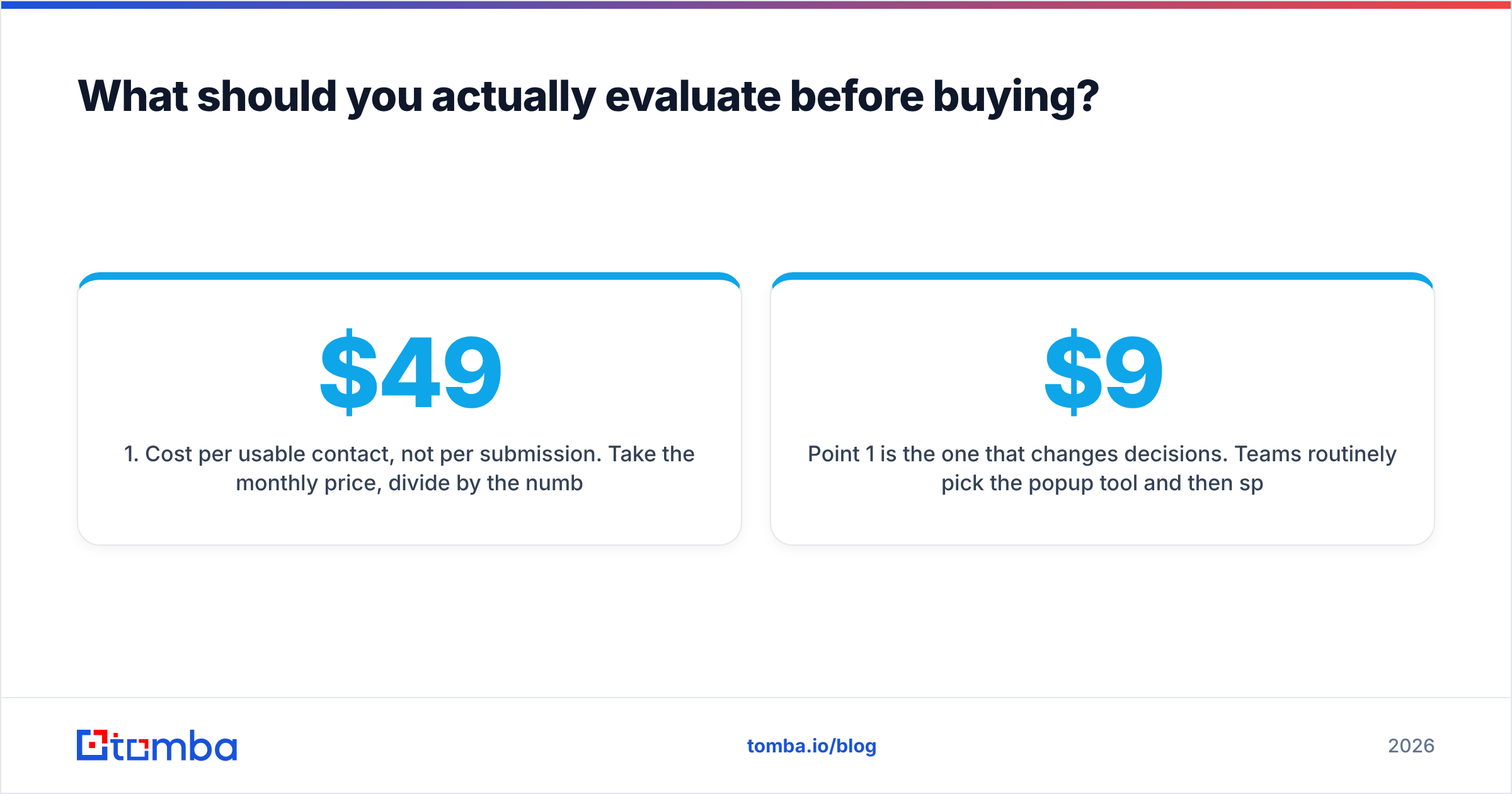
- Cost per usable contact, not per submission. Take the monthly price, divide by the number of records that pass verification and have enough fields for a rep to act. A $49 tool that yields 400 usable contacts beats a $9 tool that yields 60.
- Verification at the point of capture. Does the tool reject invalid, role-based, and disposable addresses before they hit your CRM, or does it happily store
asdf@asdf.com? Ask for the syntax-vs-SMTP distinction specifically — many tools only do the former. - Catch-all handling. A large share of corporate domains accept all mail, which makes standard verification return "unknown." Tools with a dedicated catch-all verifier give you a confidence score instead of a shrug.
- Native destination, not just Zapier. A webhook is fine until it fails silently at 2am. Check for first-party connectors to your actual stack — see what a real integrations list looks like versus a "connects to 5,000 apps via Zapier" claim.
- Data provenance. Where does enrichment data come from, and when was it last refreshed? Vendors that publish their data sources are easier to trust than those that say "proprietary."
- Export and ownership terms. Can you export everything, in full, on day one of cancellation? Some visitor-ID vendors restrict export to keep you subscribed.
Point 1 is the one that changes decisions. Teams routinely pick the $9 popup tool and then spend 15 hours a month manually researching the records it produces — which, at any reasonable loaded hourly cost, makes it the most expensive option in the stack.
Is a lead capture tool enough on its own?#
No, and this is where most stacks break.
Capture gets you a record. Three things have to happen after that before the record produces revenue:
- Enrichment — fill in company, headcount, role, tech, and phone. A first name and an email is not enough to personalize anything. Data enrichment closes that gap automatically at write time.
- Verification — confirm the address is deliverable before it enters a sequence. This protects your sender reputation, which is a shared asset across every campaign you run.
- Routing — get the record to the right rep, in the right sequence, within minutes. Response-time research from HubSpot and others has consistently shown that contact rates drop sharply after the first hour.
A useful mental model: the capture tool is the front door, enrichment is the receptionist who figures out who walked in, and verification is the bouncer who stops the fake IDs. Buying only the door and wondering why nothing happens is the most common failure mode in this category.
For teams running outbound alongside inbound, the split usually looks like this: a form tool handles inbound demo requests, a domain search or email finder handles the target accounts that never visit your site, and both streams feed the same verified CRM pipeline. Neither replaces the other.
What does a working 2026 lead capture stack look like?#
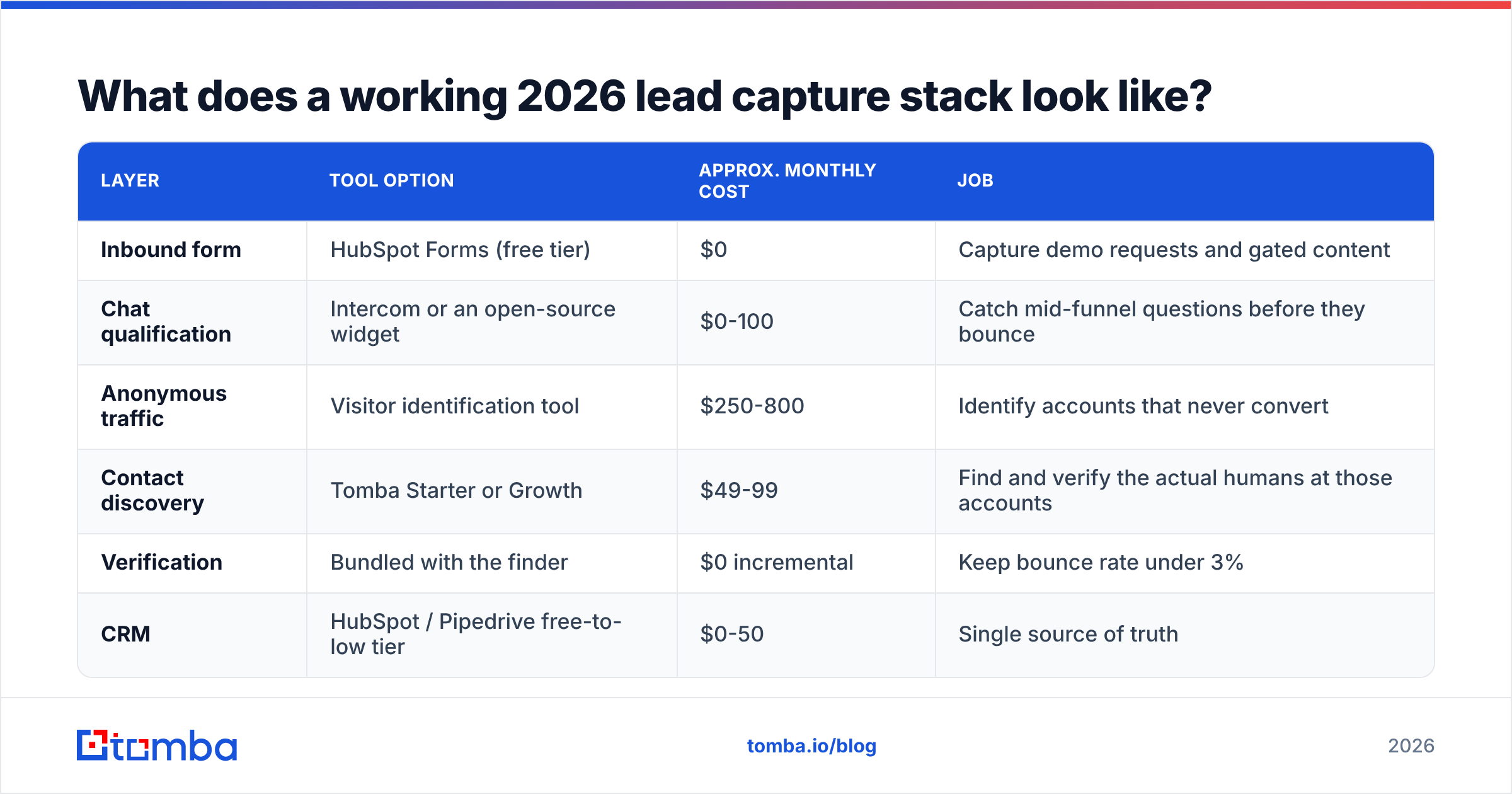
Here is a configuration that holds up for a 5-25 person B2B sales org, with realistic monthly costs:
| Layer | Tool option | Approx. monthly cost | Job |
|---|---|---|---|
| Inbound form | HubSpot Forms (free tier) | $0 | Capture demo requests and gated content |
| Chat qualification | Intercom or an open-source widget | $0-100 | Catch mid-funnel questions before they bounce |
| Anonymous traffic | Visitor identification tool | $250-800 | Identify accounts that never convert |
| Contact discovery | Tomba Starter or Growth | $49-99 | Find and verify the actual humans at those accounts |
| Verification | Bundled with the finder | $0 incremental | Keep bounce rate under 3% |
| CRM | HubSpot / Pipedrive free-to-low tier | $0-50 | Single source of truth |
Total realistic spend: roughly $300-1,050/month. The expensive line is always visitor identification, which is why you should validate that it produces pipeline before committing annually — ask for a 30-day pilot with a named-account match report, not a raw visitor count.
If your traffic is under about 3,000 sessions a month, drop the visitor-ID layer entirely. There is not enough volume for the match rates to matter, and the money is better spent on outbound contact discovery, where you control the target list rather than waiting for the right company to wander in.
How do you keep captured leads from decaying?#
B2B contact data decays at roughly 25-30% per year — people change jobs, companies rebrand, domains migrate. A lead you captured in January is meaningfully less reliable by October.
Three habits keep the database honest:
- Re-verify quarterly. Run your active list through bulk verify before any large campaign. It costs a fraction of the deliverability damage a stale list causes.
- Suppress hard bounces permanently. One hard bounce means the address is dead. Keeping it in rotation for "one more try" is how domains get blocklisted.
- Track the source field. Record which capture mechanism produced each contact. After two quarters you will know, with numbers, whether your exit-intent popup or your outbound finder produces more closed revenue — and you can kill the loser without guessing.
Independent review sites like G2 and Capterra are useful for checking whether a vendor's churn stories match their sales pitch; read the two- and three-star reviews first, since those are where the real limitations get described. Vendor documentation — for example HubSpot's own forms documentation — is the other place to verify what a tier actually includes before a sales call reframes it.
The bottom line#
Buy the capture widget that matches your traffic, but budget for what happens next. A form tool with no verification and no enrichment produces a list, not a pipeline. The teams that consistently beat their peers on cost per meeting are the ones who treat capture, enrichment, and verification as one system with one number attached: cost per contact a rep can actually call.
If your gap is on the discovery side — you know which companies you want but not which humans to email — start with the Tomba Email Finder. It finds professional addresses by domain, name, or company, verifies them before they reach your CRM, and returns the enrichment fields your reps need to write a first line worth reading. The free tier gives you 25 searches a month to test it against your own target list, and Tomba pricing starts at $49/month once you are ready to scale. Run it against ten accounts you already know well — if the results match reality, they will match on the accounts you do not know yet.
Related guides#
// get started
Find, verify and enrich your first contacts today
Start on the free plan with 25 searches a month, then scale when your team is ready.
Free plan · No credit card required · GDPR & CCPA
// about the author