Lead Carrot Pricing 2026: Reviews, Pros and Cons Compared
Lead Carrot promises local-business leads with decision-maker contacts attached. Here's what it actually costs in 2026, what reviewers praise and complain about, and how it holds up against verified-data alternatives.
TL;DR — Lead Carrot pricing in 2026
- Lead Carrot pricing is simple: one main plan, one monthly fee, built for agencies that sell to local businesses.
- The plan is often listed near $97 a month. Check leadcarrot.io before you buy. The vendor does not post a full plan chart.
- Reviewers like the "audit-style" data. Each lead comes with a business name, a category, website signals, and a contact.
- The same reviewers flag stale listings and high bounce rates on scraped emails.
- Sticker price is not the real cost. What counts is the cost per usable contact, after you strip out duplicates, closed shops, and dead inboxes.
- If you sell to B2B firms rather than storefronts, an email finder and verifier fits better. Tomba starts at $49/mo, with a free tier of 25 searches.
What is Lead Carrot, and who is it for?#
Lead Carrot fills a narrow niche. It finds local businesses with a visible problem: no website, a slow or non-mobile site, a thin Google listing, a missing tracking pixel. Then it hands you a contact so you can pitch the fix.
That framing shapes how you should read Lead Carrot pricing. You are not buying a broad B2B database. You are buying one workflow: find a local business with a weak spot, then pitch the service that fixes it.
The typical buyer is a solo agency owner, a web design freelancer, or a small outbound team. The play is high volume and low ticket. If you sell $500 to $3,000 retainers to dentists, plumbers, gyms, and diners, the tool is aimed at you. If you sell $40k software to VPs of Engineering, it is not. No plan tier will fix that gap.
Check the official site at leadcarrot.io for the current feature set. Tools in this class change fast, and old review posts go stale fast.
How much does Lead Carrot cost in 2026?#
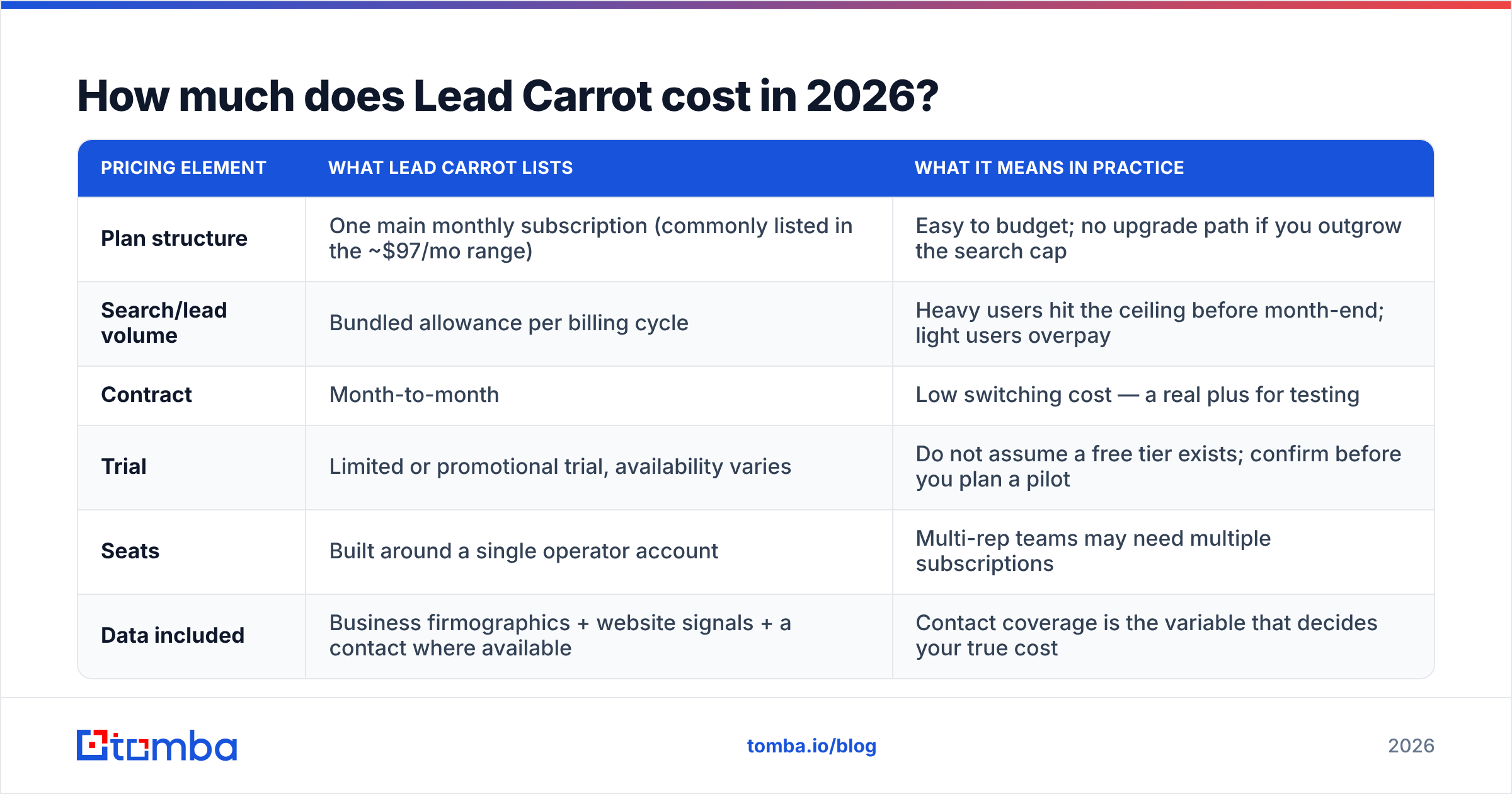
Lead Carrot pricing stays simple on purpose. There is one main plan, not a five-step ladder. That helps solo operators who hate credit math. It hurts anyone who has to plan spend at volume.
The vendor does not post a detailed public matrix. So read the table below as a guide to what you pay for. Then confirm the live numbers on the vendor's own page before you commit.
| Pricing element | What Lead Carrot lists | What it means in practice |
|---|---|---|
| Plan structure | One main monthly plan (often listed near $97/mo) | Easy to budget; no upgrade path once you hit the cap |
| Search/lead volume | A bundled allowance per billing cycle | Heavy users hit the ceiling early; light users overpay |
| Contract | Month to month | Low switching cost, so testing is cheap |
| Trial | Limited or promo trial, varies | Do not assume a free tier; confirm before you plan a pilot |
| Seats | Built around one operator account | Teams may need more than one plan |
| Data included | Firmographics, website signals, a contact where available | Contact coverage decides your true cost |
The headline number is easy to swallow. The number that matters sits further down: contact coverage. Say a plan surfaces 2,000 businesses but attaches a working email to only 600 of them. That is not a 2,000-lead plan.
How to work out your real cost per lead#
Run this math before you subscribe, not after.
- Start with monthly spend. Your plan fee is the top of the sum.
- Subtract duplicates. Local lists overlap a lot by area and category. Expect 10% to 25% overlap in the same metro.
- Subtract dead businesses. Local listings lag real life. Closures, new names, and new owners pad your count.
- Subtract dead emails. This is the big one. Scraped
info@andcontact@addresses often land in a form-fed inbox nobody reads. Many just bounce. - Divide by what is left. Spend divided by live, non-duplicate contacts is your real cost per lead.
Most teams find the true cost per usable contact is two to four times the naive math. That is not a flaw unique to Lead Carrot pricing. It is the tax on every scraped local dataset. But it decides whether the plan is a bargain or a leak.
What do Lead Carrot reviews actually say?#
Review coverage is thin next to the big platforms. So read what exists with care, and do not just count stars. Cross-check the listings on G2 and Capterra. Weigh fresh reviews far above three-year-old ones. Data quality here shifts each time a scraping source changes.
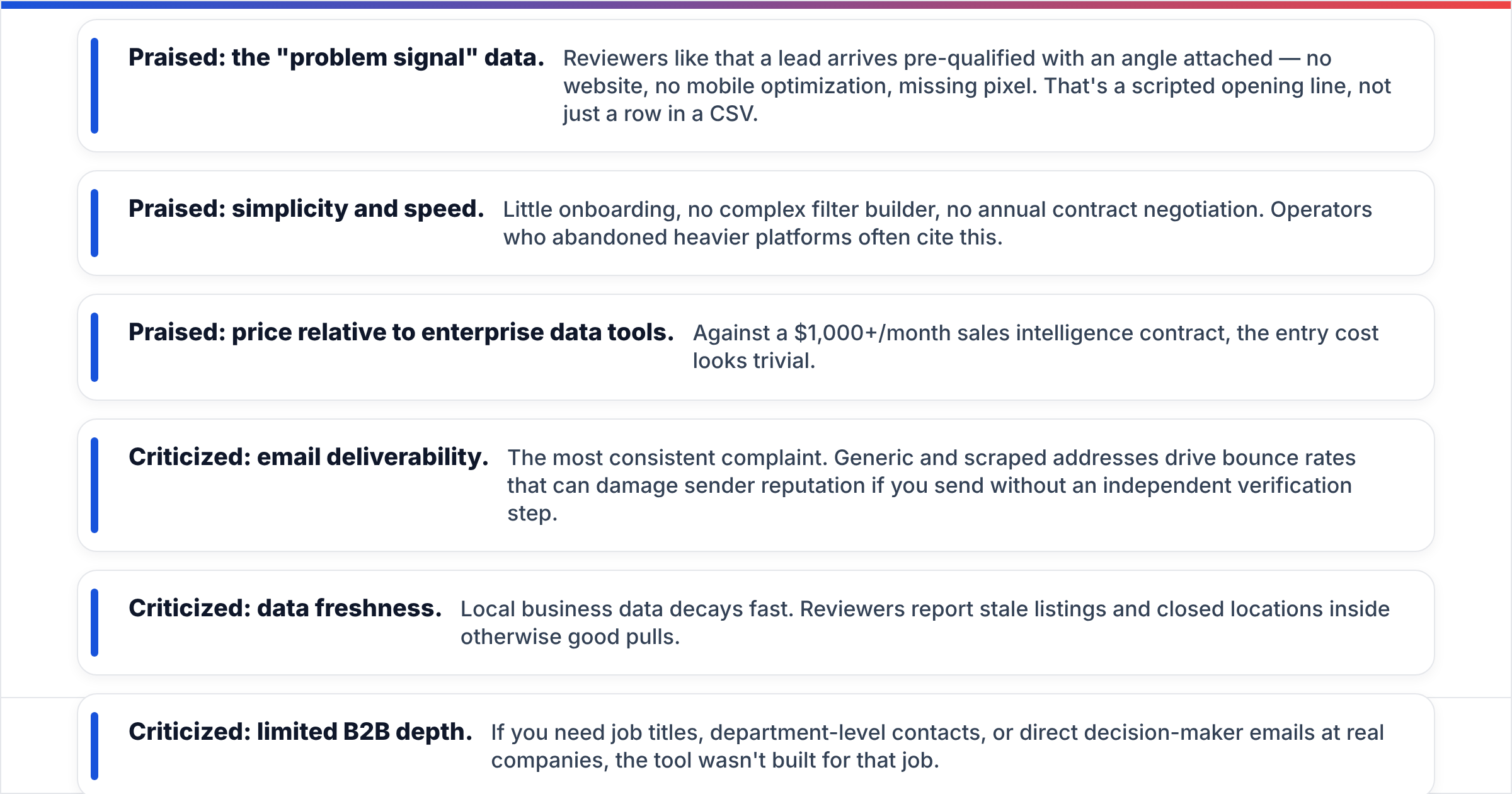
The themes repeat in a clear pattern:
- Praised: the problem signal. A lead arrives with an angle attached: no website, no mobile version, no pixel. That is a first line for your email, not just a row in a CSV.
- Praised: speed and simplicity. Little setup, no complex filter builder, no long contract talk. Operators who quit heavier tools often cite this.
- Praised: the price next to big data tools. Against a $1,000/mo sales data contract, Lead Carrot pricing looks tiny.
- Criticized: emails that bounce. This is the top complaint. Generic scraped addresses push bounce rates up. That can hurt your sender reputation if you send with no check of your own.
- Criticized: stale data. Local business data decays fast. Reviewers report old listings and closed shops inside good pulls.
- Criticized: thin B2B depth. If you need job titles, team-level contacts, or direct emails for decision makers, the tool was not built for it.
None of this rules out the tool for its core job. These are the normal limits of a local scraper. The question is whether your outbound motion can absorb them.
Is the data clean enough for cold email?#
Here is the honest answer. The business data is good enough to qualify a prospect. The contact data is not good enough to email without a check first.
Those are two different bars. Mixing them up is how agencies burn a sending domain in week three.
Generic inboxes like info@, office@, and hello@ are the normal output of local scraping. They exist. They sometimes take mail. They almost never reach the owner. Many are dead, are role traps, or sit on catch-all domains that accept everything and deliver nothing.
Run any scraped list through an email verifier before it reaches your sequencer. Handle catch-all domains on their own with a catch-all verifier. A pre-send check costs a fraction of a cent per record. It guards the one asset that drives your outbound revenue: your domain's ability to land in an inbox.

If your bounce rate on a fresh list goes past about 3%, stop sending. Mailbox providers read that as a sign you bought or scraped the data. The damage lasts well past the campaign. The basics are covered in our guide to email deliverability.
How does Lead Carrot pricing compare to the alternatives?#
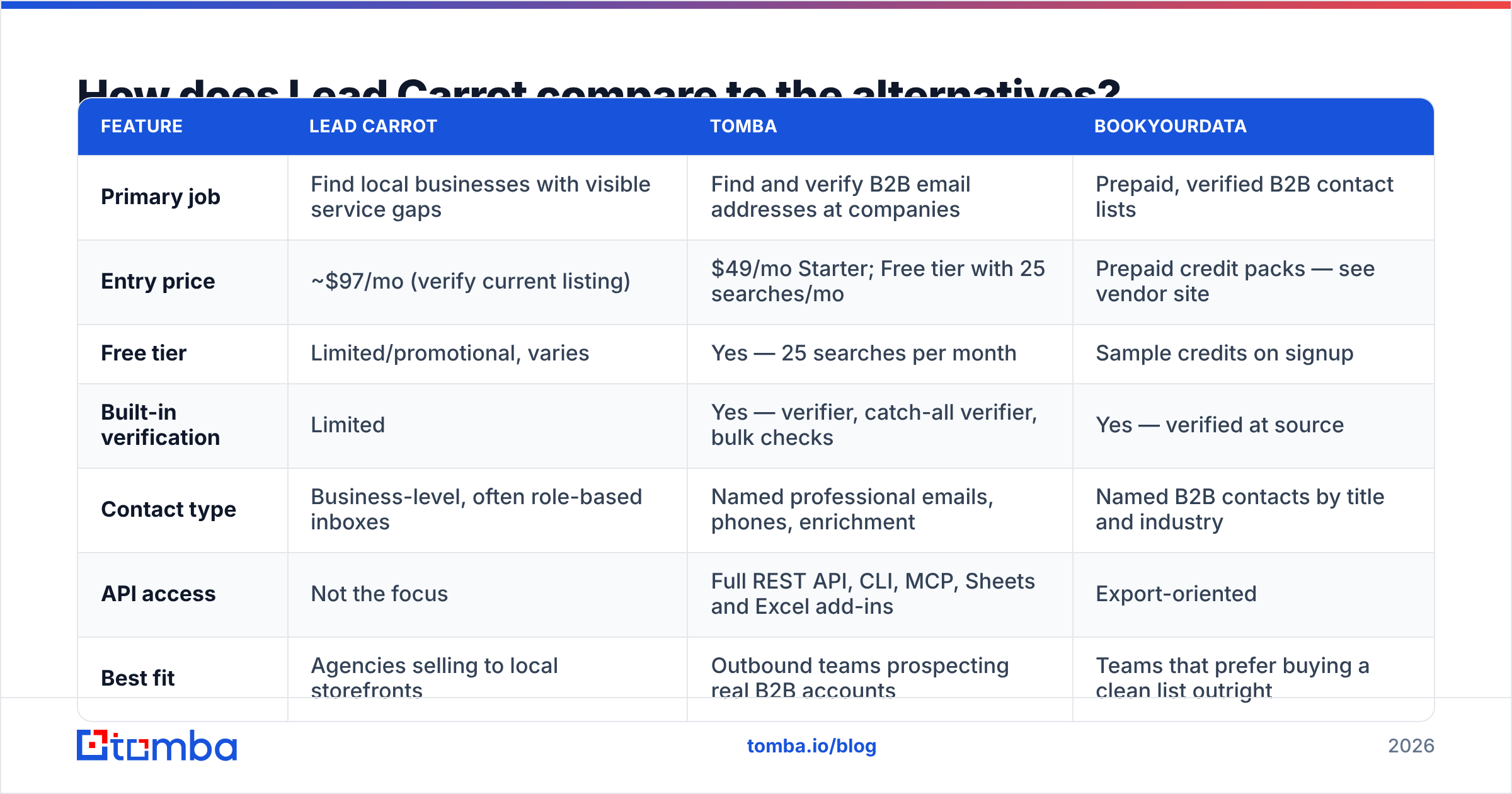
Lead Carrot sits in an odd spot. It is part local scraper, part contact database. The right rival depends on which half of the job you care about.
| Feature | Lead Carrot | Tomba | BookYourData |
|---|---|---|---|
| Primary job | Find local businesses with visible service gaps | Find and verify B2B email addresses at companies | Prepaid, verified B2B contact lists |
| Entry price | ~$97/mo (verify current listing) | $49/mo Starter; free tier with 25 searches/mo | Prepaid credit packs — see vendor site |
| Free tier | Limited or promo, varies | Yes — 25 searches per month | Sample credits on signup |
| Built-in verification | Limited | Yes — verifier, catch-all verifier, bulk checks | Yes — verified at source |
| Contact type | Business level, often role-based inboxes | Named work emails, phones, enrichment | Named contacts by title and industry |
| API access | Not the focus | Full REST API, CLI, MCP, Sheets and Excel add-ins | Export oriented |
| Best fit | Agencies selling to local storefronts | Outbound teams prospecting B2B accounts | Teams that prefer to buy a clean list |
BookYourData suits you if you would rather buy a finished, verified list than run searches yourself. It is a different way to buy, and it has real perks for one-off campaigns where you want no monthly fee at all.
Tomba fits better when your prospecting is account led. You know the firms you want. You need the right person's verified address. The domain search flow does most of what a local scraper does for B2B targets, with a check built in. Point it at a company domain, then get the pattern and the people. Full Tomba pricing runs Free, $49 Starter, $99 Growth, $249 Pro, and custom Enterprise.
What are Lead Carrot's biggest pros and cons?#
Pros
- Angle-first lead data. Knowing why a prospect needs you beats another 500 rows of names.
- Low commitment. Month-to-month billing means a 30-day test costs one month, not a year.
- Built for a real niche. Big sales tools ignore local agencies. This one speaks their language.
- Short learning curve. You can build a usable prospect list on day one with no training call.
Cons
- Contact quality is the weak link. Scraped, role-based addresses need your own check before any send.
- A ceiling on volume. One bundled allowance limits teams that grow past a single operator.
- Thin public detail. Lead Carrot pricing is less transparent than rival pages, which makes budgets harder.
- Narrow fit. It does local prospecting well and general B2B poorly.
- No real enrichment layer. If you need titles, seniority, or tech stack, you will bolt on a second tool. At that point, compare the cost of the whole stack.
Who should buy Lead Carrot, and who should skip it?#
Buy it if: you sell web, SEO, ads, or review services to local businesses. You run high-volume outreach, and a 40% contact rate is fine. You value a ready-made pitch angle over exact contact data. You already check emails before you send.
Skip it if: your buyers are software firms, agencies, or makers, and you need a named decision maker. Skip it if you need CRM-grade enrichment, or seats for a multi-rep team, or if you send from a domain you cannot risk.
Some agencies sell to both local and B2B. They tend to run two tools: a local scraper for storefronts, and a finder plus verifier for the rest. That combo often costs less than forcing one tool to do both jobs badly. It helps even more when the second tool has a free tier for slow months.
What is the smarter way to control cost per lead?#
Whichever tool you pick, three habits cut your true cost per lead more than any coupon.
- Check every address before you send. A bounce costs you twice: once in spend, once in reputation.
- Dedupe across sources. Merge two lists with no dedupe pass and you inflate cost per lead. You also look sloppy when one prospect gets two emails.
- Enrich only what you will use. Paying to enrich 5,000 records when your team can work 400 a month is the most common waste in outbound.
At high volume, the bulk email finder does find-and-check in one pass. The Tomba API wires the check into your CRM or scraper output, so no raw address ever reaches your sequencer.
The bottom line on Lead Carrot pricing#
Lead Carrot pricing is fair for exactly one buyer: the local agency that needs a pitch angle more than it needs perfect contact data. For that buyer, one closed retainer pays for the plan.
For everyone else, the math breaks once you add up checks, duplicates, and the gap between a business record and a person who will read your email.
If you sell to real companies with real job titles, start with the contact layer, not the scraping layer. The Tomba Email Finder finds work emails by domain, name, or company. It checks them before they reach your sequencer. It starts free at 25 searches a month, so you can test it on your own target list first. Run your 25 best-fit accounts through it this week. Compare the live-contact rate against what you pay today. That test, not a pricing page, should decide your stack.
Related guides#
// get started
Find, verify and enrich your first contacts today
Start on the free plan with 25 searches a month, then scale when your team is ready.
Free plan · No credit card required · GDPR & CCPA
// about the author