Lead Carrot vs Nymeria (2026): Which Lead Data Tool Wins?
Lead Carrot scrapes local businesses. Nymeria enriches LinkedIn profiles. They solve different problems, and picking the wrong one burns a quarter of pipeline. Here is the honest breakdown.
TL;DR
- Lead Carrot and Nymeria are not really competitors. Lead Carrot builds lists of local businesses (dentists, roofers, gyms) from public web sources. Nymeria enriches individual professionals, mostly from LinkedIn profiles.
- Pick Lead Carrot if you sell services to brick-and-mortar SMBs and need company-level contacts fast. Pick Nymeria if you sell to named job titles at tech or mid-market companies.
- Neither tool is strong at the boring middle step: verifying that the address you pulled still accepts mail. Budget for a separate email verifier either way.
- Published entry pricing is in the same ballpark (roughly $40-$50/mo for both, at the time of writing), but the credit math is very different. Lead Carrot sells access to a list database; Nymeria sells per-contact reveals.
- If you need both motions — domain-level discovery and person-level enrichment — a single API-first platform like Tomba usually costs less than stacking two point tools.
What are Lead Carrot and Nymeria, exactly?#
They are both "lead data" tools, which is one of the least useful categories in B2B software because it covers at least four separate jobs. Here is the honest split.
Lead Carrot (leadcarrot.io) is a local lead generation tool aimed at agencies and freelancers. You search a niche and a city — "chiropractors in Austin" — and it returns business records pulled from public listings and websites: business name, site URL, phone, generic email, and signals like whether the site is mobile-friendly or running a particular plugin. Those signals are the actual product. Agencies use them as the pitch hook ("your site has no SSL cert").
Nymeria (nymeria.io) is a contact enrichment tool built around a browser extension. You browse a LinkedIn profile or a list of profiles, hit reveal, and it returns work email, personal email, and sometimes a mobile number from its indexed people dataset. It also ships an API and bulk enrichment for people who want to do this at scale rather than one tab at a time.
Five differences that actually change your workflow:
- Unit of data. Lead Carrot's atom is a business. Nymeria's atom is a person. If your ICP is "the marketing director," a business record gets you info@ and nothing else.
- Source of truth. Lead Carrot leans on public business listings and site crawls. Nymeria leans on profile data and an aggregated people index — which is why its coverage tracks LinkedIn presence almost exactly.
- Discovery vs. enrichment. Lead Carrot finds you accounts you did not know existed. Nymeria mostly fills in contacts you already identified. That is a real distinction: one fills the top of the list, the other fills the columns.
- Where it lives. Lead Carrot is a web app you export CSVs from. Nymeria is most useful as a Chrome extension sitting on top of LinkedIn, plus an API for engineering-led teams.
- Who it is built for. Lead Carrot: local marketing agencies, web design shops, SEO resellers. Nymeria: recruiters, SDRs, and growth teams selling to named individuals.
If you read those five and thought "I need both," that is the correct reaction, and it is also the reason this comparison usually ends in a third option.

How do Lead Carrot and Nymeria compare head-to-head?#
Pricing and limits below reflect each vendor's published plans at the time of writing. Both change tiers often — confirm on the vendor page before you buy.
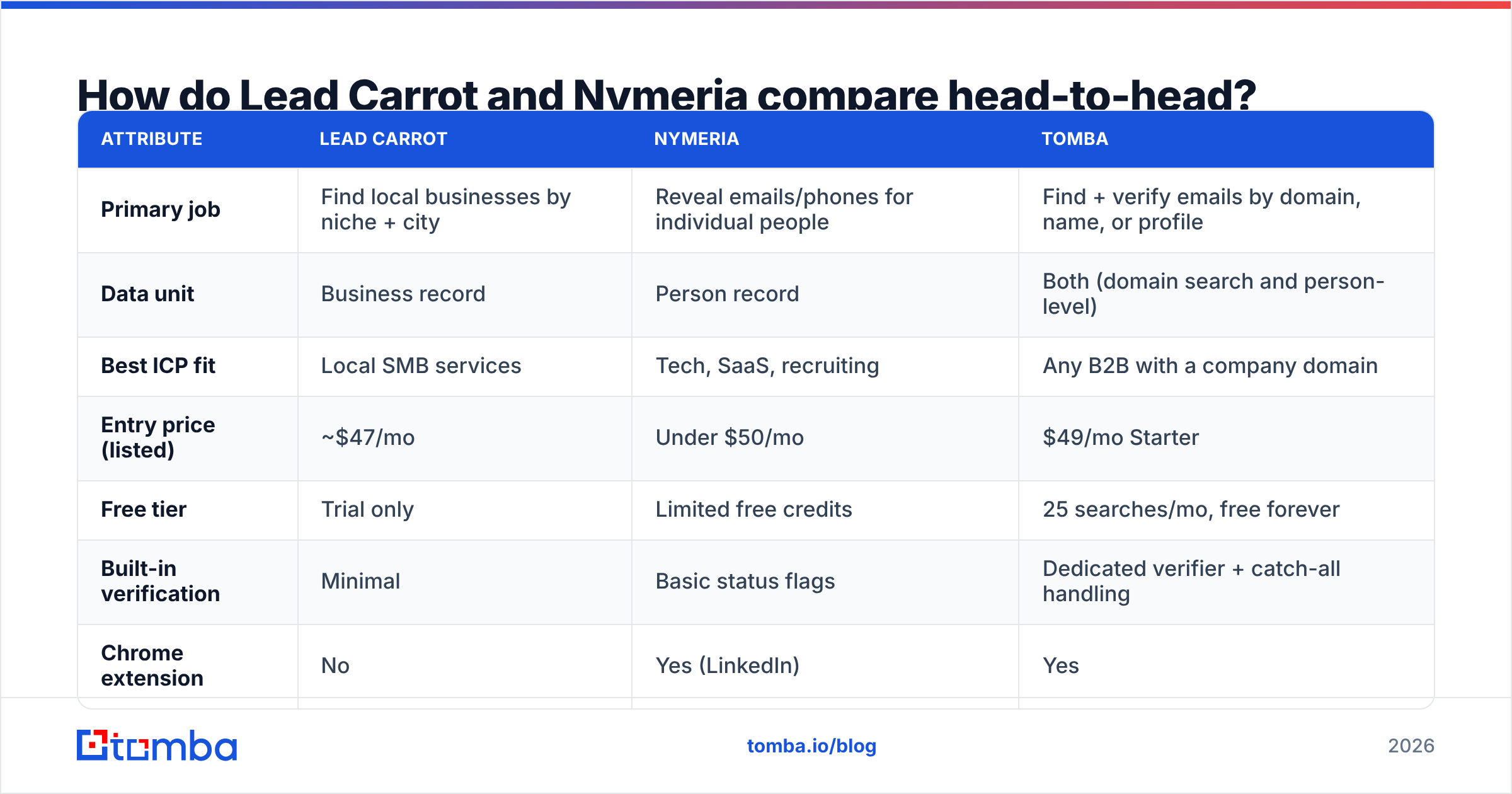
| Attribute | Lead Carrot | Nymeria | Tomba |
|---|---|---|---|
| Primary job | Find local businesses by niche + city | Reveal emails/phones for individual people | Find + verify emails by domain, name, or profile |
| Data unit | Business record | Person record | Both (domain search and person-level) |
| Best ICP fit | Local SMB services | Tech, SaaS, recruiting | Any B2B with a company domain |
| Entry price (listed) | ~$47/mo | Under $50/mo | $49/mo Starter |
| Free tier | Trial only | Limited free credits | 25 searches/mo, free forever |
| Built-in verification | Minimal | Basic status flags | Dedicated verifier + catch-all handling |
| Chrome extension | No | Yes (LinkedIn) | Yes |
| Public API | Limited | Yes | Yes, documented and versioned |
| Phone numbers | Business landlines | Mobile (partial coverage) | Business + mobile via phone finder |
| CSV bulk workflow | Native export | Bulk enrichment | Bulk finder and verifier |
| Typical buyer | Agency owner | SDR / recruiter | RevOps, growth, developers |

The table makes the strategic point clearly: these two tools barely overlap on rows that matter. A Lead Carrot user who switches to Nymeria loses discovery entirely. A Nymeria user who switches to Lead Carrot loses person-level targeting entirely. "Lead Carrot vs Nymeria" is really "local account discovery vs. person enrichment," and you should answer that question about your own motion before you look at a single price page.
Which one finds more usable contact data?#
Wrong question, but here is the useful version of it: which one produces more addresses that survive a send?
Lead Carrot's emails skew heavily generic — info@, contact@, office@. Those addresses are real and they deliver, but they route to a front desk. Reply rates on generic inboxes are structurally low, and many of them are catch-all domains that accept everything and read nothing. If you send to a catch-all without checking it, your bounce rate looks fine and your reply rate looks broken, which is the worst possible feedback loop. Run those through a catch-all verifier before you assume the list is clean.
Nymeria's emails skew personal and role-specific, which is what you want — but coverage is the constraint. If the person keeps a thin LinkedIn profile, or works at a company that does not publish a consistent email pattern, you get a guess or a miss. Personal (non-work) emails also show up in results, and sending B2B outbound to someone's Gmail is a compliance question in the EU under GDPR, not just a deliverability one.

Three practical accuracy rules that apply to both tools:
- Treat any vendor-reported accuracy number as a ceiling, not a floor. It is measured on their sample, not your ICP.
- Measure your own hit rate on 200 records before you buy annual. Export, verify externally, count valid/catch-all/invalid. That ratio is the only number that matters.
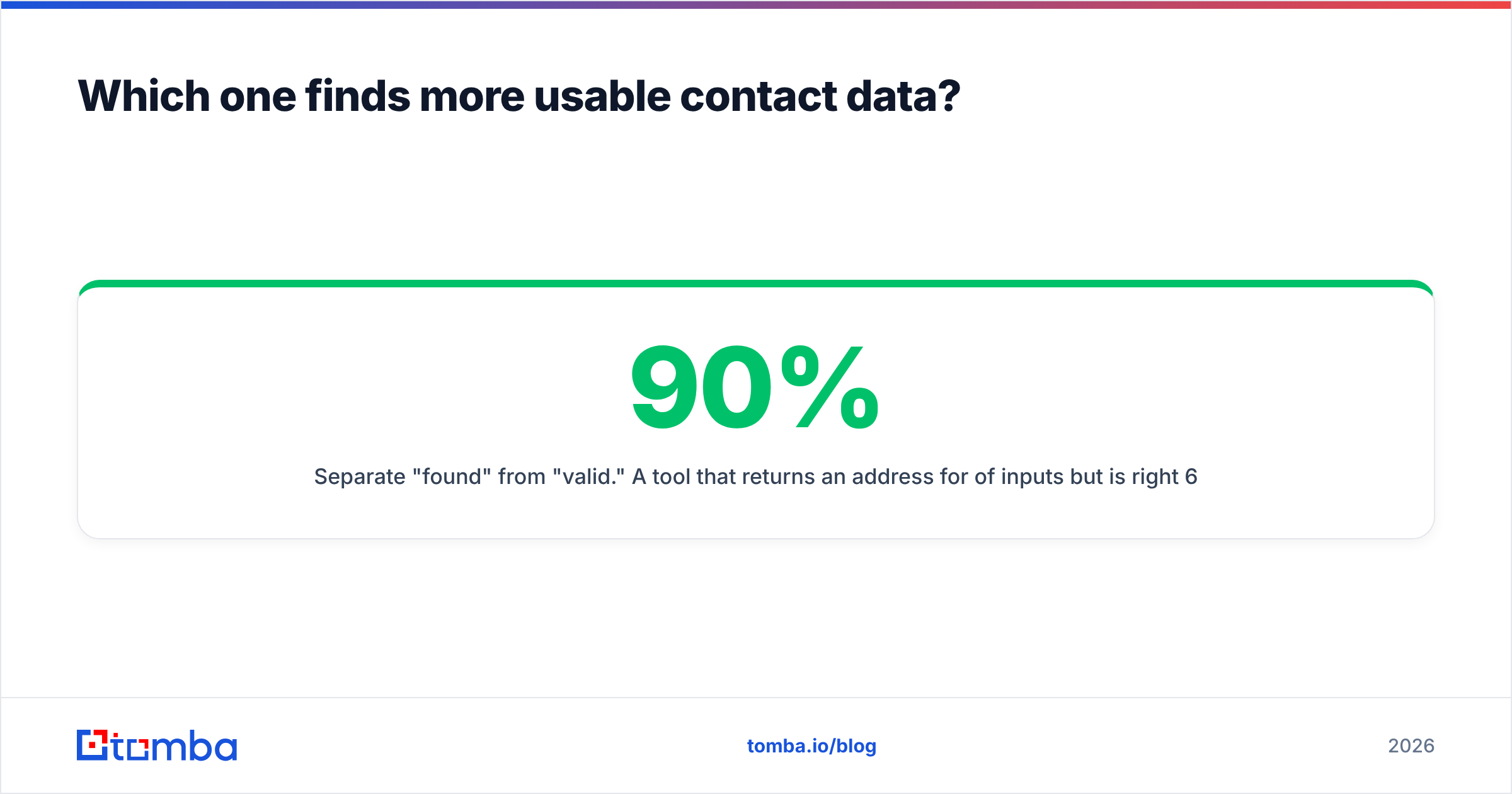
- Separate "found" from "valid." A tool that returns an address for 90% of inputs but is right 60% of the time is worse than one that returns 65% and is right 95% of the time. Your sending reputation pays for the difference.
That last point is where a dedicated domain search plus verification step earns its keep regardless of which list tool you use. Pull the company's actual email pattern from its domain, apply it to the name, then verify — that pipeline is more reliable than trusting any single index.
What does each one actually cost in practice?#
Sticker price is the smallest part of the bill. Here is the fuller picture for a team doing 2,000 new contacts a month.
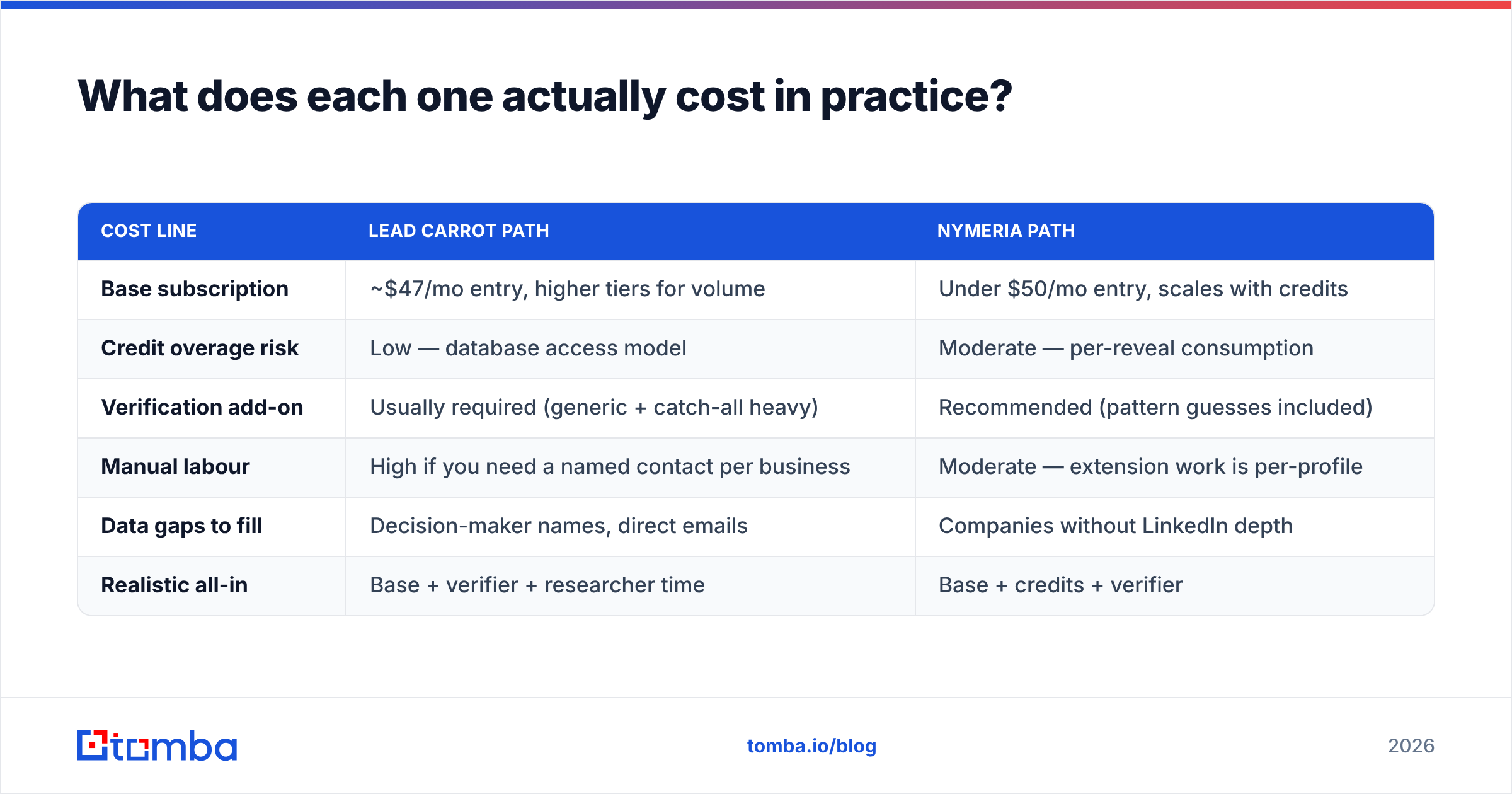
| Cost line | Lead Carrot path | Nymeria path |
|---|---|---|
| Base subscription | ~$47/mo entry, higher tiers for volume | Under $50/mo entry, scales with credits |
| Credit overage risk | Low — database access model | Moderate — per-reveal consumption |
| Verification add-on | Usually required (generic + catch-all heavy) | Recommended (pattern guesses included) |
| Manual labour | High if you need a named contact per business | Moderate — extension work is per-profile |
| Data gaps to fill | Decision-maker names, direct emails | Companies without LinkedIn depth |
| Realistic all-in | Base + verifier + researcher time | Base + credits + verifier |
The hidden cost on the Lead Carrot side is human time: you get the account but not the person, so someone has to find the owner's name and build the address. The hidden cost on the Nymeria side is credit burn on misses and on contacts you never end up emailing.
Compare that to a consolidated stack. Tomba's published pricing runs Free (25 searches/mo), Starter at $49/mo, Growth at $99/mo, Pro at $249/mo, with the finder, verifier, catch-all handling, and enrichment on the same credit pool. Whether that is cheaper for you depends entirely on whether you were going to buy a verifier anyway. Most teams doing real volume do.

Who should pick Lead Carrot?#
Pick Lead Carrot if all three are true:
- Your buyers are local, physical businesses with a storefront and a Google listing.
- Your pitch depends on site or tech signals — no SSL, slow load, missing schema, outdated CMS — because that is Lead Carrot's real differentiator over a generic scraper.
- You are comfortable with generic inboxes plus phone, or you have a cheap way to find the owner's name and build a direct address.
Agencies selling website rebuilds, local SEO, or Google Business Profile management get genuine leverage here. The niche-plus-city search model matches how that business actually prospects.
Skip it if you sell into enterprises, if your ICP is a job title rather than a business type, or if your outbound channel is strictly email to named individuals.
Who should pick Nymeria?#
Pick Nymeria if:
- Your workflow starts on LinkedIn. Sales Navigator search, then reveal, then sequence.
- You need mobile numbers often enough that partial coverage still beats zero.
- You are recruiting, where personal emails are both acceptable and often more effective than work addresses.
- You have engineering capacity to use the API rather than clicking through profiles manually.
Skip it if your target accounts are under-represented on LinkedIn (trades, local services, much of non-English SMB), or if you need to discover accounts rather than enrich a known list.
Where do both tools fall short?#
Three gaps show up in nearly every peer review on G2 for tools in this category, and neither Lead Carrot nor Nymeria fully escapes them.
Gap one: verification is an afterthought. Both return addresses with limited or coarse validity signals. Neither replaces a real SMTP-level check with catch-all logic. If you push unverified data straight into a sequencer, you find out about it via your bounce dashboard.
Gap two: no single pipeline from company to person. Lead Carrot gives you companies. Nymeria gives you people. Going company → decision-maker → verified email in one automated pass requires stitching tools together, usually with a spreadsheet and a virtual assistant in the middle. A bulk email finder that accepts a domain list and returns named, verified contacts collapses those steps.
Gap three: enrichment depth. Neither is a full firmographic enrichment platform. If you need headcount, funding, tech stack, and revenue band to score leads, you will be adding a data enrichment layer on top regardless.
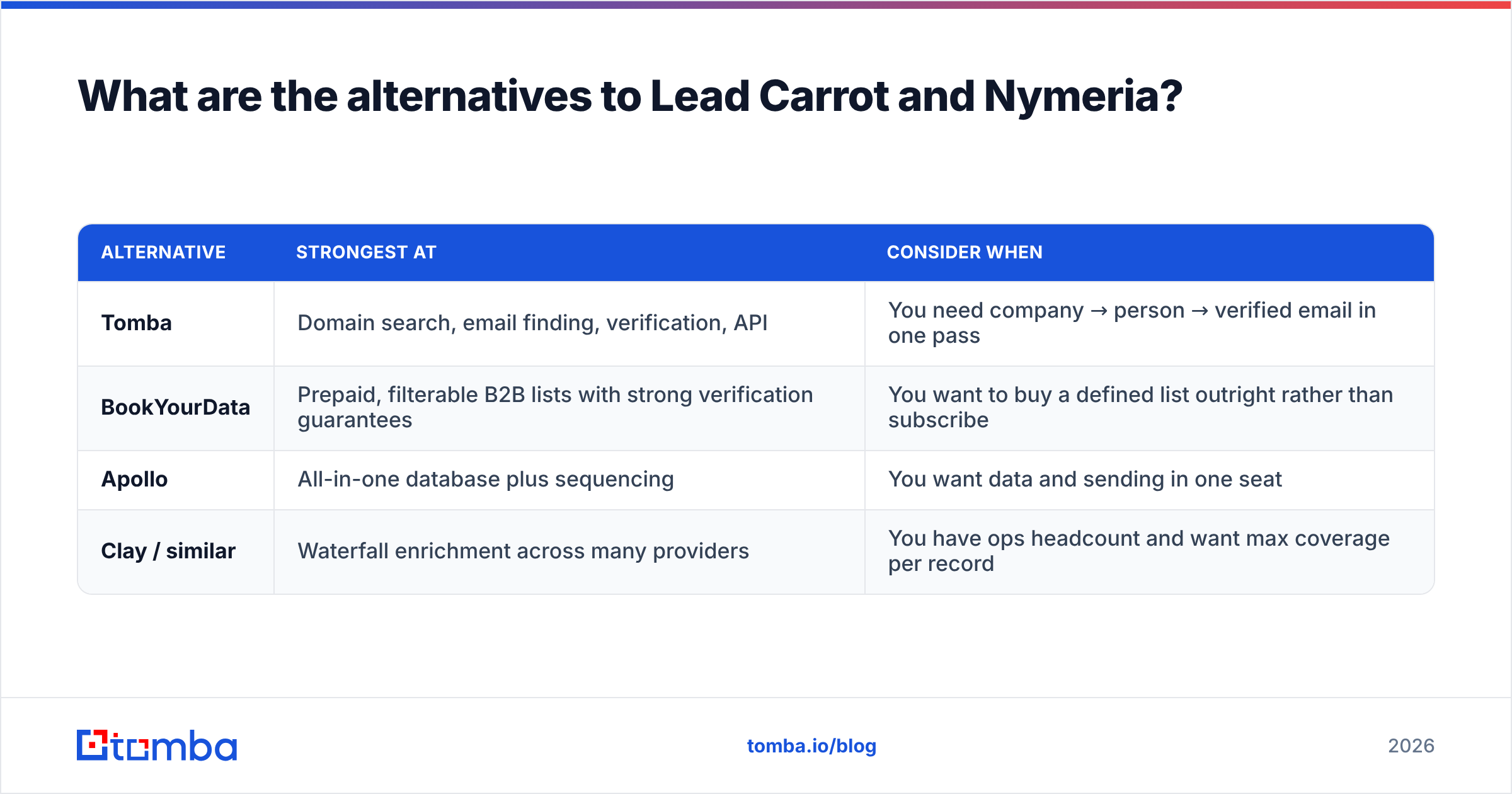
What are the alternatives to Lead Carrot and Nymeria?#
If neither fits cleanly, these are the realistic directions:
| Alternative | Strongest at | Consider when |
|---|---|---|
| Tomba | Domain search, email finding, verification, API | You need company → person → verified email in one pass |
| BookYourData | Prepaid, filterable B2B lists with strong verification guarantees | You want to buy a defined list outright rather than subscribe |
| Apollo | All-in-one database plus sequencing | You want data and sending in one seat |
| Clay / similar | Waterfall enrichment across many providers | You have ops headcount and want max coverage per record |
BookYourData is worth a serious look if your objection to both tools is the subscription model — its pay-as-you-go, filter-then-buy approach suits teams running a few large campaigns a year rather than continuous outbound. Apollo is the volume play, with the usual trade-off: broad coverage, uneven freshness on smaller accounts.
How do you decide in under ten minutes?#
Run this sequence:
- Write down your ICP's atom. Business type, or job title? Business type → Lead Carrot side. Job title → Nymeria side.
- Check LinkedIn density. Search 20 target accounts. If fewer than half have an identifiable decision-maker profile, person-enrichment tools will underperform for you.
- Run a 200-record bake-off. Pull the same 200 accounts through each candidate's trial. Verify every result with a neutral third-party checker — a free email checker is enough for a sample this size.
- Score on valid-and-reachable, not on rows returned. Rows returned is a vanity metric that every vendor optimises for.
- Price the whole stack, not the tool. Base + credits + verifier + the hours someone spends filling gaps.
Most teams that run step 3 honestly discover the same thing: the discovery tool and the enrichment tool each solve half the problem, and the verification step they skipped is what was actually capping reply rates.
The bottom line#
Lead Carrot wins for local, business-level prospecting with a technical pitch hook. Nymeria wins for person-level, LinkedIn-native outreach and recruiting. Neither wins on verification, and neither takes you cleanly from "I know the company" to "I have a verified address for the right human."
If that middle step is where your pipeline actually leaks, start with the Tomba Email Finder. Feed it a domain and a name and it returns the address with a confidence score and the sources behind it; feed it a domain alone and domain search returns the pattern plus known contacts. The free tier gives you 25 searches a month to test it against whatever list you already have — enough to see your real hit rate before you commit a budget line to anything.
Related guides#
// get started
Find, verify and enrich your first contacts today
Start on the free plan with 25 searches a month, then scale when your team is ready.
Free plan · No credit card required · GDPR & CCPA
// about the author