What Is a Lead Finder Tool? A 2026 Buyer's Guide and Comparison
Most lead finder tools look identical on the pricing page and behave nothing alike in production. Here's how to judge accuracy, credit math, and coverage before you sign a 12-month contract.
TL;DR
- A lead finder tool turns a name, domain, or LinkedIn profile into a verified business contact — email, and sometimes phone and firmographics.
- The only two metrics that matter are valid-email rate (what percentage of returned addresses actually deliver) and hit rate (how often the tool returns anything at all). Everything else is packaging.
- Credit models hide the real price. A $49/mo plan that charges credits for failed lookups can cost more than a $99/mo plan that doesn't.
- Databases (pre-scraped records) and finders (live lookups) fail in different ways. Most serious teams run both.
- Tomba's email finder starts free at 25 searches/mo and $49/mo paid, with verification built into the same call instead of billed separately.
What is a lead finder tool?#
A lead finder tool is software that takes a partial identity — a full name plus a company domain, a company domain on its own, or a LinkedIn URL — and returns a reachable business contact for that person.
Think of it like a phone book that rebuilds itself every night. The old phone book was static: printed once, wrong within a month. A modern lead finder tool re-derives the answer at query time from patterns, crawls, and SMTP signals, which is why two tools querying the same person on the same day can disagree.
The category covers four different jobs that vendors bundle inconsistently:
- Email discovery — find
jane.doe@acme.comfrom "Jane Doe" +acme.com. This is the core function and the one you should benchmark hardest. - Email verification — confirm the mailbox exists before you send. Some tools include it; some charge for it as a second product.
- Enrichment — attach job title, seniority, headcount, tech stack, location, and revenue band to a contact you already have.
- List building — pull every findable contact at a domain, or filter a database by industry, size, and geography.
A tool that does one of these well beats a tool that does all four at 60% quality, because a bad address doesn't just waste a credit — it damages the sending domain you spent three months warming.
How does a lead finder tool actually work?#
Under the hood, almost every vendor runs the same four-stage pipeline. Understanding it tells you exactly where a tool will fail you.
- Pattern inference. The tool determines the company's email format (
first.last@,flast@,first@) from known addresses at that domain. If it has never seen an address atacme.com, it guesses from the format distribution across similar companies — and guessing is where accuracy collapses. - Source crawling. Public sources — company sites, press releases, GitHub commits, conference pages, author bylines, WHOIS records — supply confirmed addresses that anchor the pattern. Vendors differ enormously here, which is why coverage varies by region and company size rather than uniformly.
- SMTP validation. The tool opens a conversation with the recipient mail server and asks whether the mailbox exists, without sending anything. This is the single strongest accuracy signal, and it's why a finder without integrated verification is only half a product.
- Confidence scoring. The output gets a score. Treat anything under 90 as a hypothesis, not a contact. Good tools tell you why the score is what it is (pattern-only vs. source-confirmed vs. SMTP-accepted).
The fourth stage is where catch-all domains break everything. A catch-all server accepts mail to any address at the domain, so SMTP validation returns "valid" for asdfgh@acme.com too. Tools that don't flag catch-alls separately will happily sell you a 100%-confidence list that bounces at 30%. Tomba splits this out through a dedicated catch-all verifier rather than burying it in a single green checkmark.

What separates an accurate lead finder tool from a bad one?#
Accuracy claims on vendor sites are close to meaningless because every vendor measures a different denominator. "98% accuracy" usually means of the emails we chose to return, 98% passed our own verifier — which says nothing about the 40% of your list where the tool returned nothing.
Measure these two numbers yourself, on your own ICP:
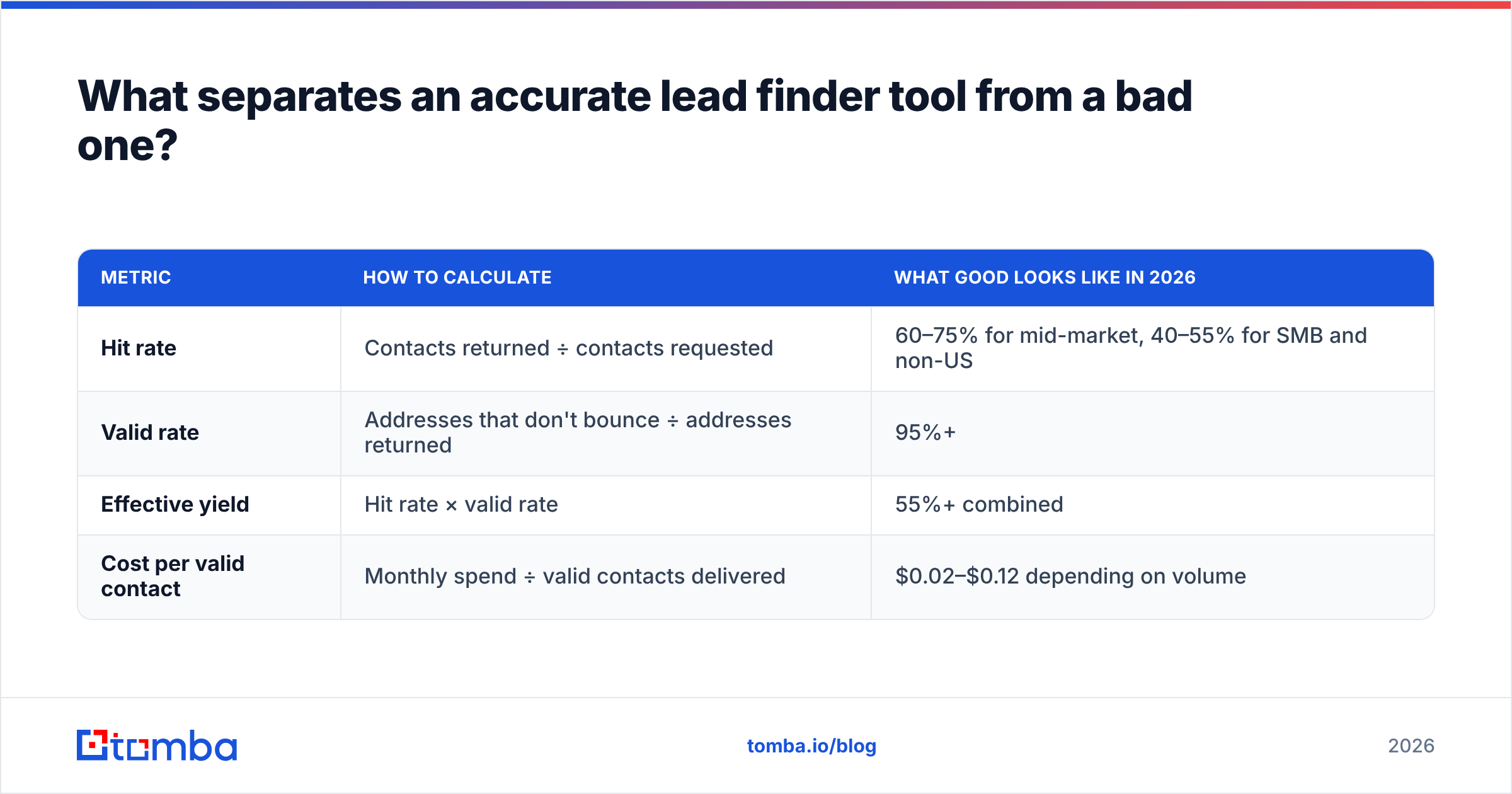
| Metric | How to calculate | What good looks like in 2026 |
|---|---|---|
| Hit rate | Contacts returned ÷ contacts requested | 60–75% for mid-market, 40–55% for SMB and non-US |
| Valid rate | Addresses that don't bounce ÷ addresses returned | 95%+ |
| Effective yield | Hit rate × valid rate | 55%+ combined |
| Cost per valid contact | Monthly spend ÷ valid contacts delivered | $0.02–$0.12 depending on volume |
Effective yield is the number to optimize. A tool with a 90% hit rate and an 80% valid rate (yield: 72%) looks impressive until you realize it just handed you a 20% bounce rate, which is enough to get a domain flagged. A tool with a 65% hit rate and a 97% valid rate (yield: 63%) delivers fewer contacts and keeps you inboxing.

Coverage skew matters as much as headline accuracy. Most databases are heavily weighted toward US tech companies with 50–5,000 employees, because that's where the training data lives. If you sell to German manufacturers, Brazilian logistics firms, or 8-person agencies, run your benchmark on those domains — a tool that scores 70% on the SaaS mid-market can score 25% on a sector where nobody publishes staff emails.
Which lead finder tools are worth comparing in 2026?#
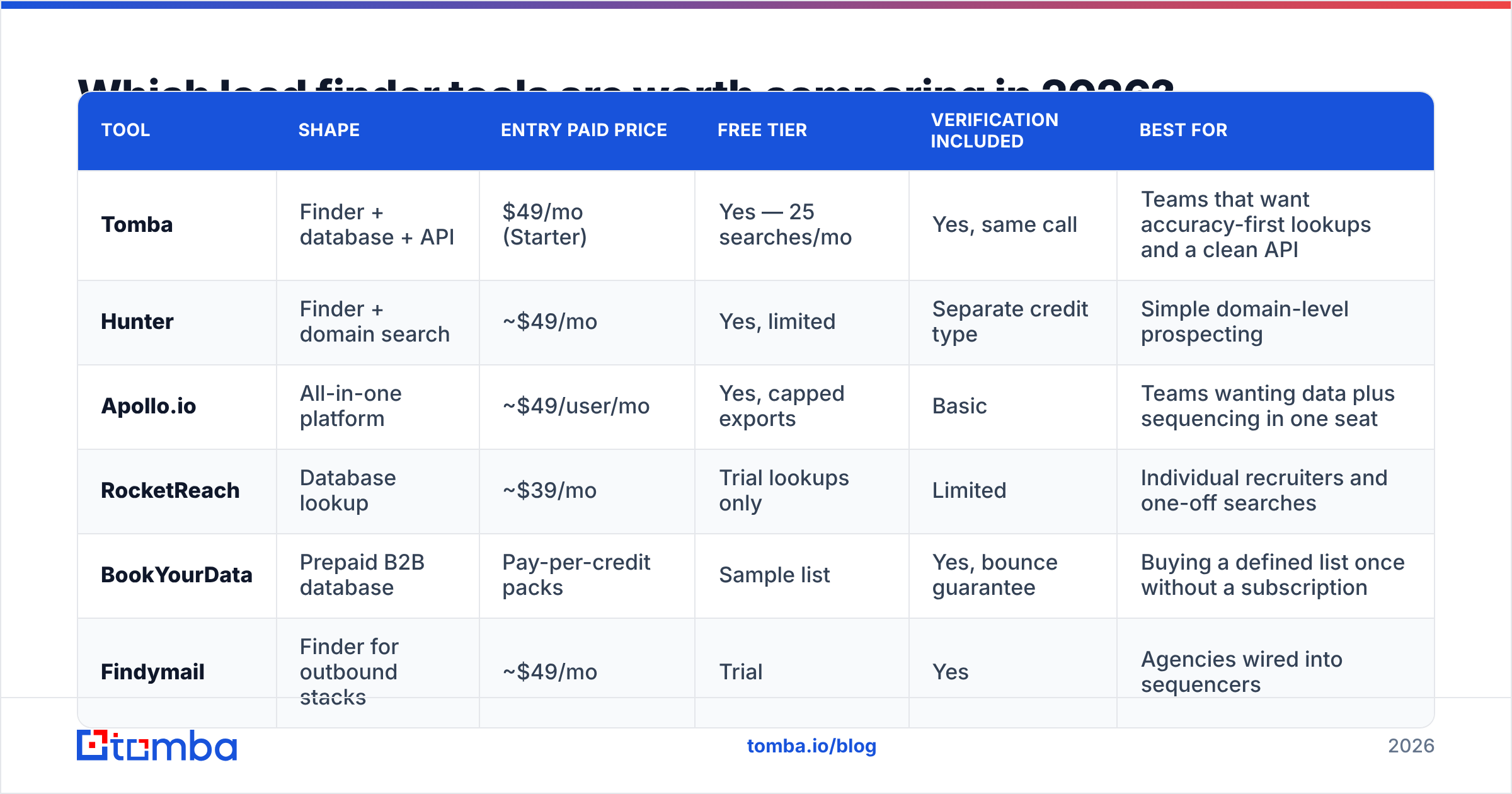
The market splits into three shapes: pure finders (query-based, high accuracy, no browsing), databases (pre-built records you filter and export), and all-in-one sales platforms (data plus sequencing plus dialer). Here's how the main options line up. List prices are the vendors' published entry-level paid tiers at the time of writing — always confirm on their own pricing pages, since tiers change quarterly.
| Tool | Shape | Entry paid price | Free tier | Verification included | Best for |
|---|---|---|---|---|---|
| Tomba | Finder + database + API | $49/mo (Starter) | Yes — 25 searches/mo | Yes, same call | Teams that want accuracy-first lookups and a clean API |
| Hunter | Finder + domain search | ~$49/mo | Yes, limited | Separate credit type | Simple domain-level prospecting |
| Apollo.io | All-in-one platform | ~$49/user/mo | Yes, capped exports | Basic | Teams wanting data plus sequencing in one seat |
| RocketReach | Database lookup | ~$39/mo | Trial lookups only | Limited | Individual recruiters and one-off searches |
| BookYourData | Prepaid B2B database | Pay-per-credit packs | Sample list | Yes, bounce guarantee | Buying a defined list once without a subscription |
| Findymail | Finder for outbound stacks | ~$49/mo | Trial | Yes | Agencies wired into sequencers |
Two structural notes that the table can't show.
First, per-seat versus per-credit changes the math completely. A platform at $49/user/mo is $588/year for one rep and $2,940/year for five — even if reps four and five run 200 lookups each. Credit-pooled tools like Tomba charge for usage, so adding a junior SDR who does light prospecting costs nothing extra. Check Tomba pricing against your seat count before assuming the cheaper sticker wins.
Second, BookYourData occupies a genuinely different slot: prepaid credits with no recurring commitment, which is the right shape when you need one clean 5,000-contact list for a campaign and don't want a subscription sitting on the card afterward. It's a complement to a live finder rather than a substitute — databases give you volume, finders give you freshness.

For a broader view of how buyers rate these categories, the lead intelligence category on G2 is worth ten minutes — filter reviews to your company size, because enterprise and SMB reviewers describe different products.
What does a lead finder tool really cost?#
The sticker price is rarely the bill. Four line items get people:
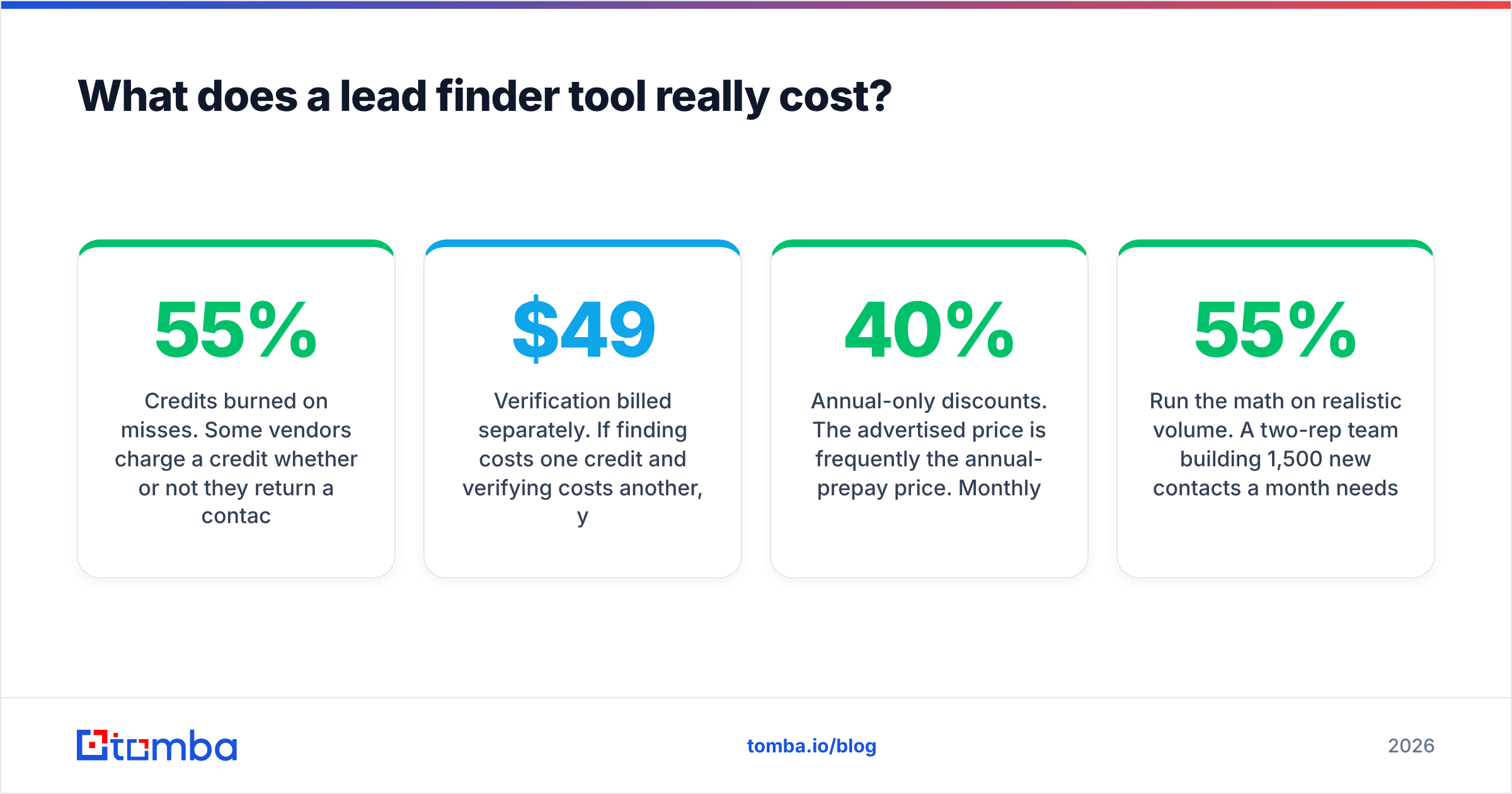
- Credits burned on misses. Some vendors charge a credit whether or not they return a contact. At a 55% hit rate, that doubles your true cost per contact. Ask explicitly: do you charge for null results?
- Verification billed separately. If finding costs one credit and verifying costs another, your $49 plan is really a $98 plan, because you should never send to an unverified address.
- Annual-only discounts. The advertised price is frequently the annual-prepay price. Monthly can be 20–40% higher.
- Export caps. A plan may include 10,000 credits but cap CSV exports at 1,000 rows per month, which quietly forces an upgrade.
Run the math on realistic volume. A two-rep team building 1,500 new contacts a month needs roughly 2,700 lookups at a 55% hit rate, plus verification. On a per-credit tool at $99/mo that's comfortable. On a per-seat platform with export caps, it's two seats plus an overage. The bulk email finder route — upload a CSV of names and domains, get back verified contacts — is usually the cheapest per-contact path once you're past a few hundred rows a month.
How do you test a lead finder tool before you commit?#
Never buy on a demo. Demos are run on the vendor's best-covered accounts. Run this five-step benchmark instead — it takes about an hour and it has settled more purchasing arguments than any feature matrix.
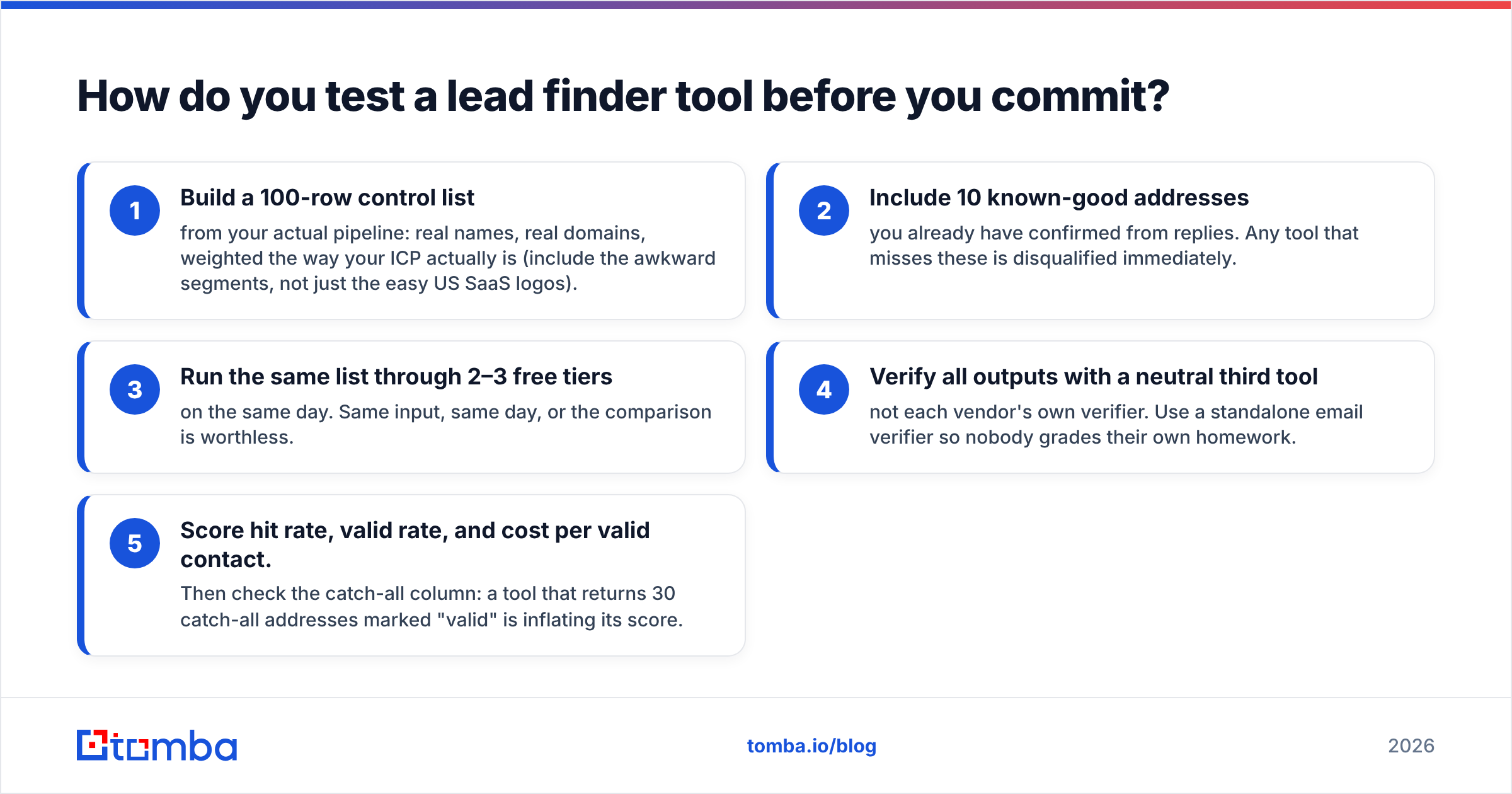
- Build a 100-row control list from your actual pipeline: real names, real domains, weighted the way your ICP actually is (include the awkward segments, not just the easy US SaaS logos).
- Include 10 known-good addresses you already have confirmed from replies. Any tool that misses these is disqualified immediately.
- Run the same list through 2–3 free tiers on the same day. Same input, same day, or the comparison is worthless.
- Verify all outputs with a neutral third tool — not each vendor's own verifier. Use a standalone email verifier so nobody grades their own homework.
- Score hit rate, valid rate, and cost per valid contact. Then check the catch-all column: a tool that returns 30 catch-all addresses marked "valid" is inflating its score.
One more check people skip: send a 50-address pilot campaign through the winner and watch the bounce rate in your sending platform. Providers report bounces the way the receiving server actually behaved, which is the only verdict that counts. Anything above 3% means your data source is wrong, not your copy — HubSpot's sales tooling guidance is a reasonable baseline for what healthy outbound hygiene looks like alongside the data layer.
Do you need a database, a finder, or both?#
Conclusion first: if you prospect continuously, you need both, and you should sequence them.
Databases are fast and broad. You filter by industry, headcount, and geography and get 5,000 rows in ten seconds. The cost is staleness — a snapshot taken at scrape time, aging at roughly 25–30% per year as people change jobs. Fine for building a target universe; dangerous for anything you're about to email cold.
Finders are slow and narrow but current. They resolve one identity at a time against live signals, which is why they hold up on recently-hired contacts a database hasn't caught up with. Platforms like Apollo blur the line by attaching a sequencer on top, which is convenient but couples your data quality to your sending tool — when you switch sequencers, you lose the data layer too.
The practical workflow most efficient teams land on:
- Use a database or domain search to define the universe and map org structure.
- Use a finder to resolve the specific people you'll actually contact, at the moment you contact them.
- Run data enrichment on inbound and CRM records separately, since those need firmographics more than they need discovery.
- Re-verify anything older than 90 days before it re-enters a sequence.
Decoupling the data layer from the sending layer is also a hedge. If your data lives behind a stable API, switching sequencers, CRMs, or agencies costs you a weekend of integration work instead of a rebuild.
What should you do next?#
Pick the tool that wins your benchmark, not the one that wins the review-site badge. Build the 100-row control list, run it through two or three free tiers this week, and score hit rate times valid rate. That single number will make the decision for you in under an hour.
If you want a starting point that doesn't cost anything to evaluate: the Tomba Email Finder gives you 25 searches a month free, runs verification inside the same lookup instead of billing it twice, and flags catch-all domains explicitly rather than hiding them behind a green checkmark. Paid plans start at $49/mo with pooled credits, so adding teammates doesn't multiply the bill. Run your control list through it, compare the effective yield against whatever you're using now, and let the bounce rate settle the argument.
Related guides#
// get started
Find, verify and enrich your first contacts today
Start on the free plan with 25 searches a month, then scale when your team is ready.
Free plan · No credit card required · GDPR & CCPA
// about the author