Lead Kahuna vs OneMoreLead: Which Lead Tool Fits Your Pipeline?
One scrapes local business leads from public sources. The other sells verified B2B contacts by credit. Here's where each one wins, where it costs you, and how to choose.
TL;DR
- Lead Kahuna scrapes and collects leads from public web sources. It's built for agencies and freelancers who sell to local businesses such as dentists, roofers, restaurants and gyms.
- OneMoreLead is a credit-based B2B contact database (55M+ verified prospects, according to the vendor). It's built for SDRs and founders who target decision-makers at companies by title, industry and headcount.
- In third-party reviews, Lead Kahuna's plans start around $97–$127/month. OneMoreLead starts at $99/month for 250 email and phone credits.
- Choose Lead Kahuna if your buyer is the owner of a local business. Choose OneMoreLead if your buyer is a VP at a 200-person SaaS company.
- Neither tool removes the need to verify emails before you send. Budget for a verification step either way.
What are Lead Kahuna and OneMoreLead, in one sentence each?#
These two tools show up in the same "lead generation software" searches, but they solve different problems. Pick the wrong one and you'll pay for data that doesn't match your ideal customer profile.
Lead Kahuna is lead-harvesting software. It pulls business listings, contact details, social profiles and other data points from public sources. Reviews of version 4.0 say it aggregates "80+ data points" per lead. You then research, segment and export those leads to your CRM or autoresponder. Think of it as a very fast research assistant that works through directories and maps listings for you.
OneMoreLead is a prospecting database. You filter a pre-built index of B2B contacts by job title, seniority, industry, location, company size and technology. Then you spend credits to reveal verified emails and phone numbers. Think of it as a library catalogue: the records already exist, and you pay each time you check one out.
That difference is the whole comparison. Lead Kahuna collects data on demand. OneMoreLead sells access to data it has already compiled and verified.
How do the two tools actually work?#
Before you compare features, you need the core mechanics. Here's what happens when you run a search in each tool:
- Source of the data. Lead Kahuna queries public web sources (business listings, websites, social profiles) at the moment you search. OneMoreLead searches its own stored database of people and companies.
- Who you get. Lead Kahuna mostly returns businesses: a company name, a generic phone line, a website, and whatever emails are published on the site (often info@ or contact@). OneMoreLead returns people: named contacts with titles, direct dials and personal work emails.
- Freshness. Scraped data is as fresh as the public page it came from, and some of those pages were last edited in 2019. Database data is as fresh as the vendor's last refresh cycle. Both can go stale, in different ways.
- Verification. OneMoreLead says it verifies emails and phone numbers before you reveal them. Lead Kahuna includes contact validation, but role-based and scraped addresses are more likely to bounce or land in low-engagement inboxes.
- Cost model. Lead Kahuna's tiers are subscription-based, so the more you scrape, the cheaper each lead gets. OneMoreLead is credit-based: every revealed contact uses a credit, so each lead has a fixed cost.
If you sell a $300/month SEO retainer to plumbers, point 2 favours Lead Kahuna. The business owner often is the contact, and the published email reaches them. If you sell a $30k/year platform to heads of RevOps, point 2 favours OneMoreLead. The info@ inbox at a mid-market company won't get you a meeting.

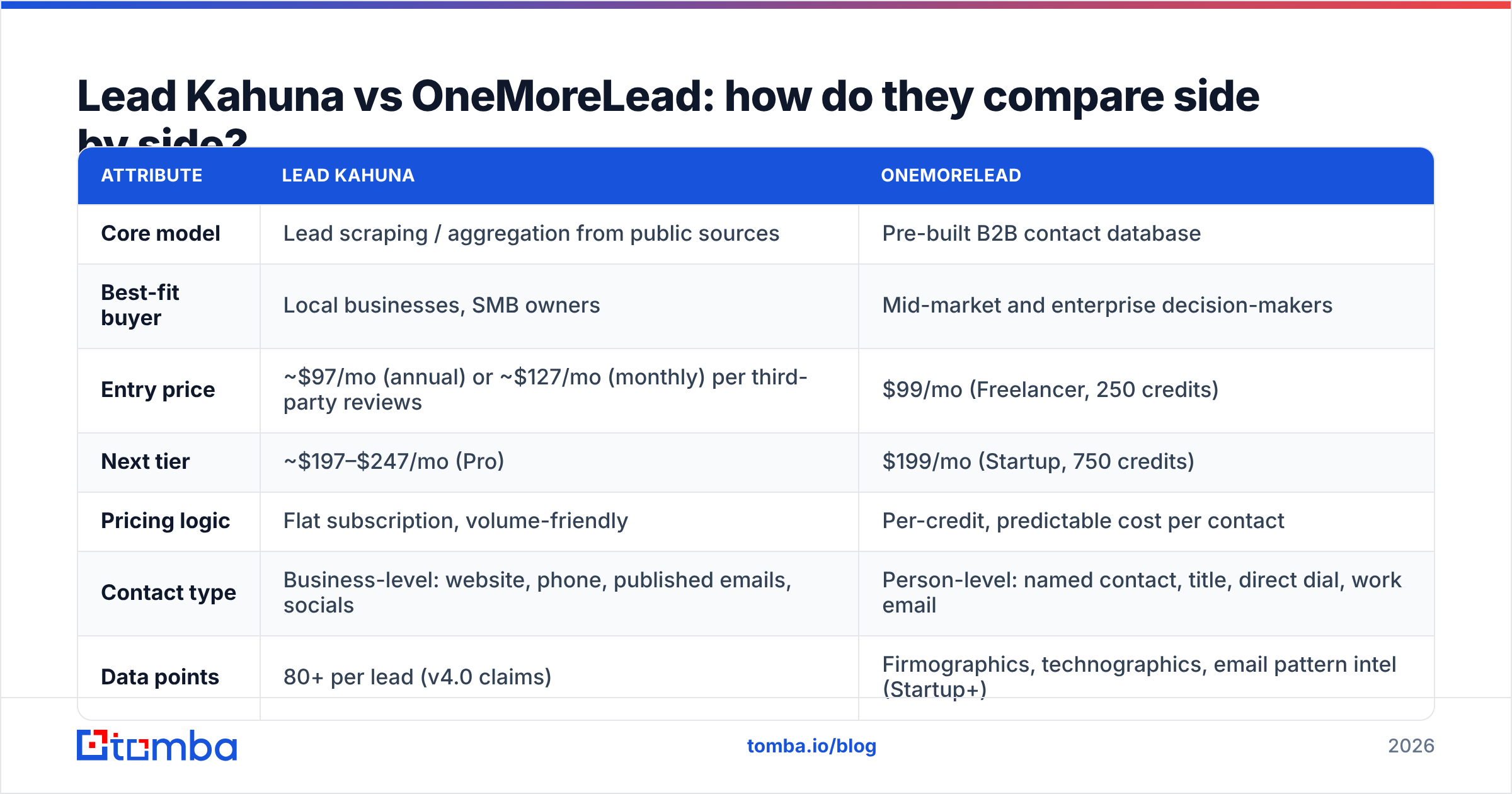
Lead Kahuna vs OneMoreLead: how do they compare side by side?#
Here's the head-to-head on the attributes that matter when you're deciding where to spend your prospecting budget. Pricing comes from public third-party reviews and vendor pages at the time of writing. Check each vendor's site before you buy, because lead-tool pricing changes often.
| Attribute | Lead Kahuna | OneMoreLead |
|---|---|---|
| Core model | Lead scraping / aggregation from public sources | Pre-built B2B contact database |
| Best-fit buyer | Local businesses, SMB owners | Mid-market and enterprise decision-makers |
| Entry price | ~$97/mo (annual) or ~$127/mo (monthly) per third-party reviews | $99/mo (Freelancer, 250 credits) |
| Next tier | ~$197–$247/mo (Pro) | $199/mo (Startup, 750 credits) |
| Pricing logic | Flat subscription, volume-friendly | Per-credit, predictable cost per contact |
| Contact type | Business-level: website, phone, published emails, socials | Person-level: named contact, title, direct dial, work email |
| Data points | 80+ per lead (v4.0 claims) | Firmographics, technographics, email pattern intel (Startup+) |
| Verification | Contact validation included | Verified email and phone at reveal |
| Enrichment / API | CRM and autoresponder export | Enrichment API on Startup plan |
| Contract | Subscription | No contract on entry plan |
| Main weakness | Generic inboxes, uneven B2B depth | Credit burn on large lists, thinner local-SMB coverage |
A few things stand out.
Cost per usable contact is not the same as cost per lead. Lead Kahuna can return thousands of rows for the price of one month. If 40% of those rows only have a generic info@ address, your real cost per reachable decision-maker goes up fast. OneMoreLead's $99 for 250 credits works out to about $0.40 per contact. It looks expensive until you remember that each credit is meant to be a named, verified person.
Filters decide the result. OneMoreLead's Startup tier adds advanced search filters and a technologies filter. That lets you build a list like "companies using HubSpot, 50–200 employees, Head of Marketing, US". Lead Kahuna's search is organised around business category and location, such as "roofers in Austin, TX". Each one is precise within its own world.
Which one has better data accuracy?#
For B2B person-level data, OneMoreLead has the structural advantage. For local-business coverage, Lead Kahuna does. But "accuracy" means different things here.
With a database like OneMoreLead, the question is decay. B2B contact data goes stale as people change jobs, and companies get acquired or rebrand domains. Industry estimates of annual B2B data decay usually fall around 20–30%, which is why credible vendors re-verify on reveal. Look at OneMoreLead's reviews on G2 and you'll see the usual pattern for databases: strong comments on list-building speed, mixed comments on coverage in niche regions or industries.
With a scraper like Lead Kahuna, the question is provenance. Scraped data is only as good as the page it came from. A dentist's website footer may still list a receptionist who left three years ago. Maps listings are usually current for phone numbers but rarely include a named owner's email. Web scraping as a method has no built-in quality control. You get what's published, and published isn't the same as current.
Whichever you choose, run the export through an email verifier before it reaches your sequencer. That's non-negotiable if you send from a primary domain. A bounce rate above 2–3% is enough to hurt your sender reputation for weeks.
Is Lead Kahuna better than OneMoreLead for agencies?#
For most local-service agencies, yes.
If you run a web design, SEO, PPC or reputation-management agency selling to local SMBs, Lead Kahuna fits your workflow better:
- Your buyer publishes their contact info. Small businesses want to be found, so their phone, email and address are on their site and their maps listing.
- Volume matters more than seniority. You're sending 500 personalised audits a week, not 50 hyper-researched enterprise emails.
- Flat pricing scales. Pulling every restaurant in three metro areas doesn't cost you per row.
- Extra data points sell the pitch. Reviews, social presence and missing website features become your cold-email hook ("You have 4.1 stars but no booking link").
OneMoreLead can technically find some local businesses. But local-SMB owners are underrepresented in most B2B databases, because those databases are built around LinkedIn-style professional profiles at structured companies.
Is OneMoreLead better than Lead Kahuna for SaaS and B2B outbound?#
For outbound to companies with org charts, yes, clearly.
If you're an SDR, founder or growth lead selling software or services to companies with 20+ employees, OneMoreLead is the better fit:
- You need the person, not the company. "Acme Corp" isn't a prospect. "Jane Doe, VP Sales at Acme Corp" is.
- Title and seniority filters are table stakes. Multi-threading an account means reaching the champion, the economic buyer and the end user separately.
- Direct dials change your call connect rates. A switchboard number rarely gets you past the gatekeeper.
- Technographic filters sharpen the list. Targeting companies that already run a complementary or competing tool is one of the highest-intent filters in outbound.
The trade-off is credit burn. If you enrich 3,000 contacts a month, you'll outgrow the Freelancer plan quickly, and your cost per contact becomes the key number to watch.

What are the pros and cons of each tool?#
Lead Kahuna pros
- Strong for local and SMB lead lists by category and geography
- Flat subscription makes high-volume pulls affordable
- Many data points per business (social, reviews, website signals) you can use to personalise outreach
- Exports straight to CRMs and autoresponders
Lead Kahuna cons
- Many results are business-level, not person-level
- Role-based and scraped emails increase bounce and spam-trap risk
- Not built for title-based B2B targeting
- Pricing sits higher than some entry-level B2B tools if you only need a few hundred contacts
OneMoreLead pros
- Person-level contacts with titles, direct dials and verified emails
- Clear credit-based pricing starting at $99/month, no contract
- Advanced filters, technographics and an enrichment API on the Startup plan
- Faster path from ICP definition to a sequence-ready list
OneMoreLead cons
- Credits run out fast on large campaigns
- Coverage thins out for very small local businesses and some regions
- Like every database, subject to job-change decay between refreshes
Where does a dedicated email finder fit in?#
Here's the gap neither tool fully closes. You often already know who you want to reach, from a LinkedIn search, a conference attendee list, a target account list from your CRM, or a competitor's customer page. You don't need another list. You need the email for a specific name at a specific domain.
That's what an email finder does. You enter a first name, last name and company domain, and the tool returns the most likely address with a confidence score and source. It pairs well with both tools:
- With Lead Kahuna: you scrape a local business and get the owner's name from their "About" page, but only an info@ email. An email finder turns "Maria Lopez, owner, lopezdental.com" into a direct address.
- With OneMoreLead: you search a target account and the database has no record for the one stakeholder you need. Domain search lists every known address at that company and shows the email pattern, so you can fill the gap without spending more database credits.
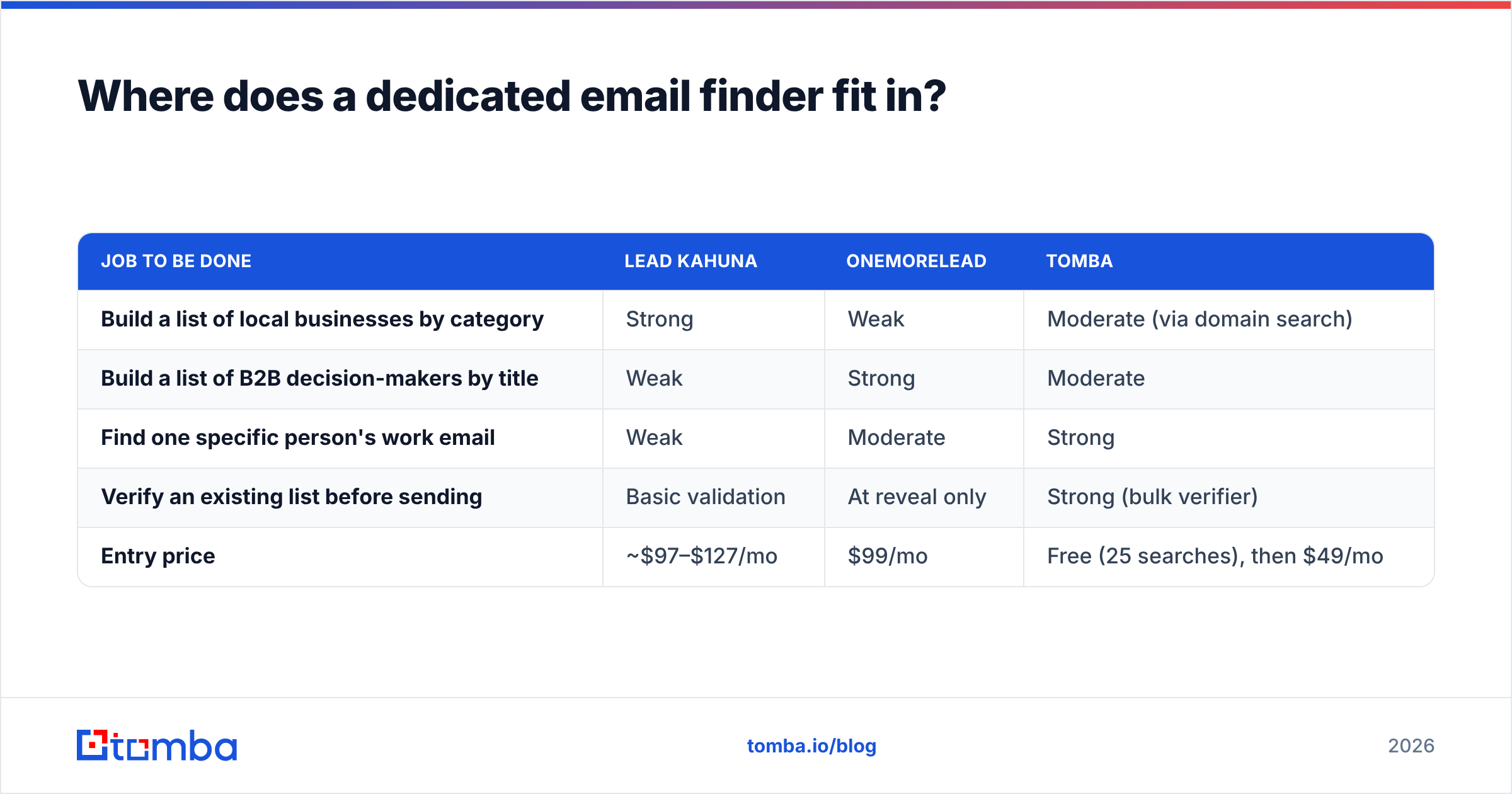
Here's how the three approaches compare by job to be done:
| Job to be done | Lead Kahuna | OneMoreLead | Tomba |
|---|---|---|---|
| Build a list of local businesses by category | Strong | Weak | Moderate (via domain search) |
| Build a list of B2B decision-makers by title | Weak | Strong | Moderate |
| Find one specific person's work email | Weak | Moderate | Strong |
| Verify an existing list before sending | Basic validation | At reveal only | Strong (bulk verifier) |
| Entry price | ~$97–$127/mo | $99/mo | Free (25 searches), then $49/mo |
For reference, Tomba pricing starts with a free tier of 25 searches per month. Paid plans are Starter at $49/month, Growth at $99/month and Pro at $249/month, with custom Enterprise pricing above that. Many teams run a list tool (scraper or database) and an email finder/verifier side by side for this reason: one tool builds the list, the other finds and verifies the missing emails.
How should you decide between Lead Kahuna and OneMoreLead?#
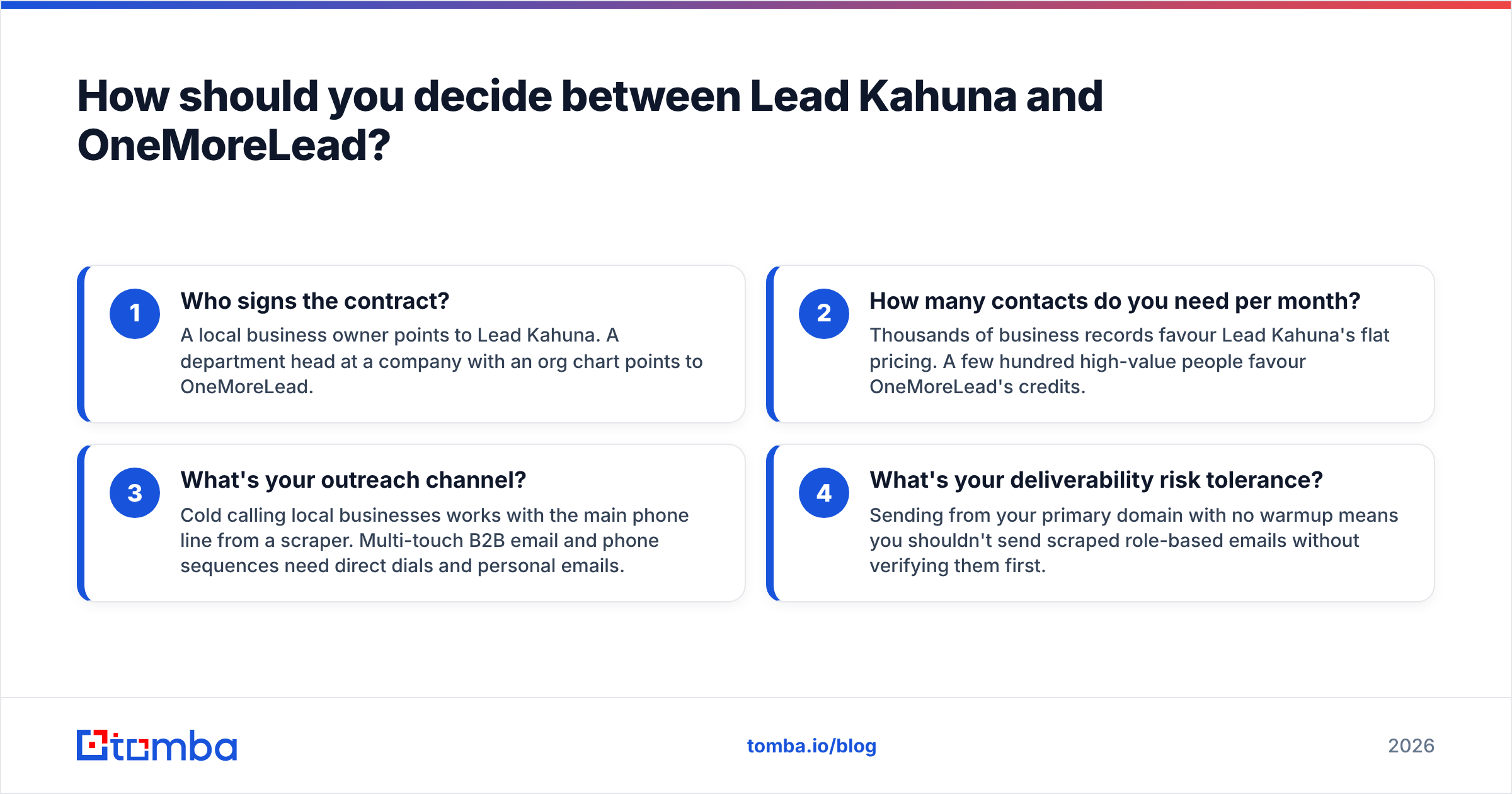
Answer these four questions and the choice usually becomes obvious:
- Who signs the contract? A local business owner points to Lead Kahuna. A department head at a company with an org chart points to OneMoreLead.
- How many contacts do you need per month? Thousands of business records favour Lead Kahuna's flat pricing. A few hundred high-value people favour OneMoreLead's credits.
- What's your outreach channel? Cold calling local businesses works with the main phone line from a scraper. Multi-touch B2B email and phone sequences need direct dials and personal emails.
- What's your deliverability risk tolerance? Sending from your primary domain with no warmup means you shouldn't send scraped role-based emails without verifying them first.
If your answers are split, say an agency that sells to local SMBs and to mid-market franchise groups, you don't need both subscriptions on day one. Start with the tool that matches your highest-revenue segment, and fill the gaps with a pay-as-you-go email finder.
The verdict: which wins in 2026?#
Lead Kahuna wins for local-business lead generation. It collects a lot of business data cheaply, and the extra data points give you real personalisation hooks for agency pitches.
OneMoreLead wins for B2B outbound. Person-level, verified contacts with title and technographic filters are what modern SDR workflows need, and the $99 entry point with no contract keeps the risk low.
Treat either one as the list builder, not the whole stack. Your reply rate depends on reaching the right person at a working address. That comes down to finding the named decision-maker and verifying the email before it hits your sequencer.
If you want to close that gap, try Tomba Email Finder. Enter a name and company domain and get a verified professional email with its source and confidence score. The free tier gives you 25 searches a month, so you can test it on the leads you just pulled from Lead Kahuna or OneMoreLead before you commit to a plan.
Related guides#
// get started
Find, verify and enrich your first contacts today
Start on the free plan with 25 searches a month, then scale when your team is ready.
Free plan · No credit card required · GDPR & CCPA
// about the author