Lead Kahuna vs SignalHire: Local Scraper or Contact Finder in 2026?
Lead Kahuna scrapes local-business listings from your desktop. SignalHire unlocks named contacts from profiles. They solve different problems, so here is how to tell which one your pipeline needs.
TL;DR
- Lead Kahuna is a Windows desktop scraper. It pulls local-business listings (name, address, phone, website, and often a generic email) and suits agencies selling to SMBs in specific towns.
- SignalHire is a cloud contact finder. It unlocks named people's emails and phone numbers from professional profiles through a browser extension, bulk upload, or API, and suits recruiters and outbound teams targeting decision-makers.
- On pricing: Lead Kahuna is sold as an annual license (third-party listings put it around $299/year). SignalHire uses monthly credits, from a free 5-credit tier up to recruiter plans of several hundred dollars a month.
- Neither tool verifies emails as rigorously as a dedicated verifier does. Whichever you pick, run the list through a verification step before sending.
- Pick Lead Kahuna if your buyer is "the plumber in Leeds." Pick SignalHire if your buyer is "the VP of Engineering at a 500-person SaaS company."
What is the real difference between Lead Kahuna and SignalHire?#
The short answer is that these two tools collect different kinds of data. Most "Lead Kahuna vs SignalHire" searches come from people who assume both are email finders. Only one of them really is.
Lead Kahuna is desktop software that crawls public business listings and websites for a keyword and a location, such as "dentists in Austin." You get back a spreadsheet of businesses: company name, street address, main phone line, website, and any email it can scrape from that website. The unit of data is the business, and the emails are usually info@, contact@, or office@.
SignalHire is a SaaS contact-enrichment platform. You land on someone's professional profile, or upload a list of names and companies, and SignalHire returns that person's work email, personal email, and sometimes a direct phone number. The unit of data is the individual.
That split drives the rest of this comparison. When a team feels one of these tools "doesn't work," it's usually because they bought the one built for the other job.
How do Lead Kahuna and SignalHire compare feature by feature?#
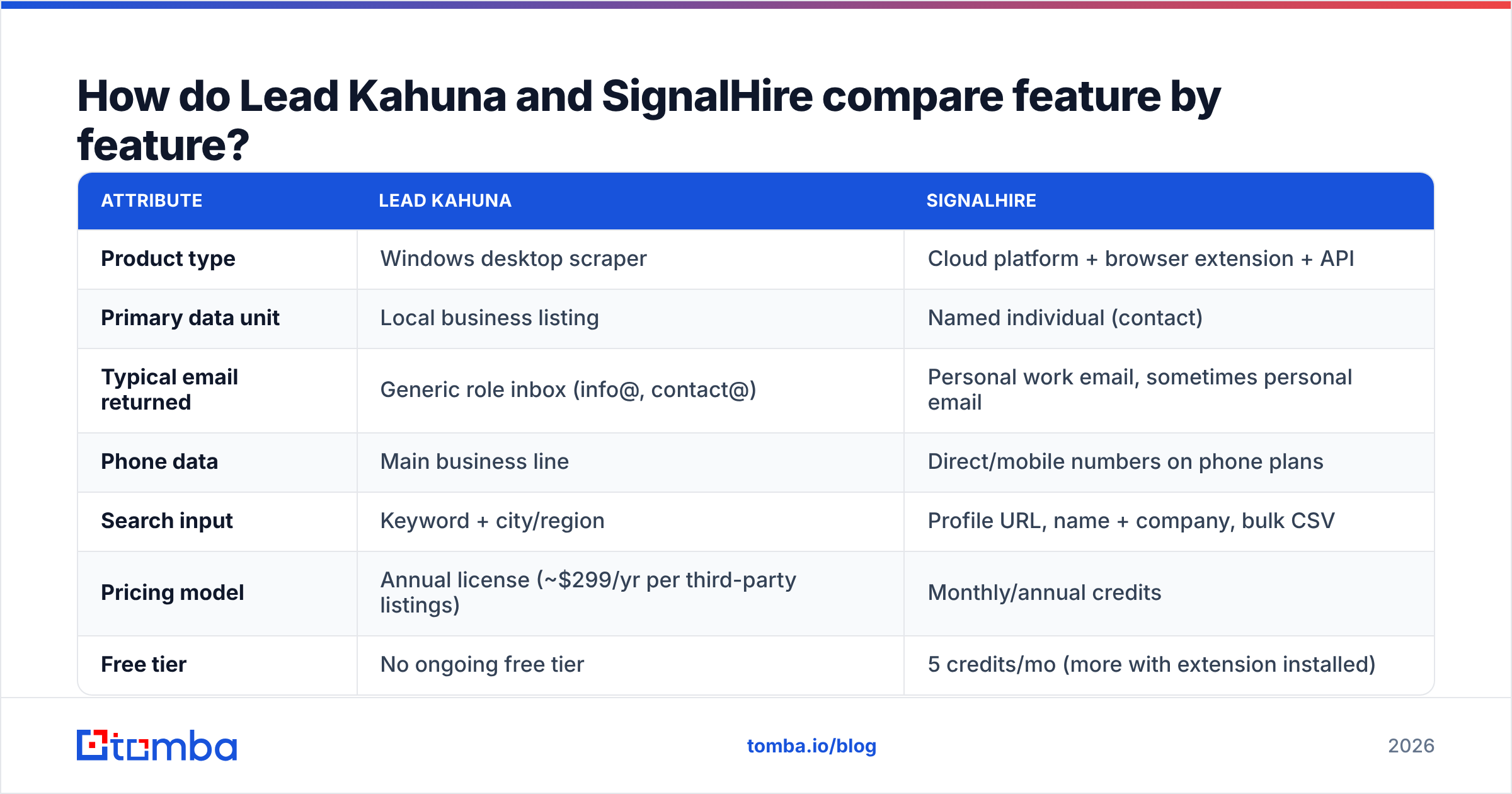
| Attribute | Lead Kahuna | SignalHire |
|---|---|---|
| Product type | Windows desktop scraper | Cloud platform + browser extension + API |
| Primary data unit | Local business listing | Named individual (contact) |
| Typical email returned | Generic role inbox (info@, contact@) | Personal work email, sometimes personal email |
| Phone data | Main business line | Direct/mobile numbers on phone plans |
| Search input | Keyword + city/region | Profile URL, name + company, bulk CSV |
| Pricing model | Annual license (~$299/yr per third-party listings) | Monthly/annual credits |
| Free tier | No ongoing free tier | 5 credits/mo (more with extension installed) |
| Volume limits | Throttled daily without your own proxies | Limited by credit balance |
| API access | No public API | Yes, REST API |
| Built-in outreach | Basic email/call from inside the app | No sequencing; export or CRM sync |
| Best for | Local SEO/web agencies, SMB service sellers | Recruiters, SDRs targeting named buyers |
| OS requirement | Windows | Any browser |
Two rows deserve more detail.
Volume limits. Third-party reviews report that Lead Kahuna throttles you to roughly 150 leads per day unless you plug in your own proxies. That's there to keep the underlying sources from blocking you, but it means that if you need real volume, you're also paying for and managing a proxy provider. SignalHire has no scraping ceiling of that kind. Your only limit is how many credits you've bought.
API access. SignalHire has an API, so you can call it from a CRM workflow, a Clay table, or your own scripts. Lead Kahuna runs on your own machine and exports files. If your RevOps team wants enrichment to happen automatically when a lead record is created, only one of these tools can do that.
How are the pricing models of Lead Kahuna and SignalHire structured?#
The two vendors charge in very different ways, which makes a direct price comparison misleading.
Lead Kahuna sells a license. Public listings put it at about $299 for a year of use. After that, each scrape costs you nothing extra, which is appealing if you run many local searches. The license fee isn't the whole cost, though:
- Proxies if you want more than the default daily throughput
- A Windows machine (or VM) to run it on
- Your time spent cleaning results, because scraped listings contain duplicates, closed businesses, and dead websites
- A verification pass, because scraped role inboxes bounce more often than you'd expect
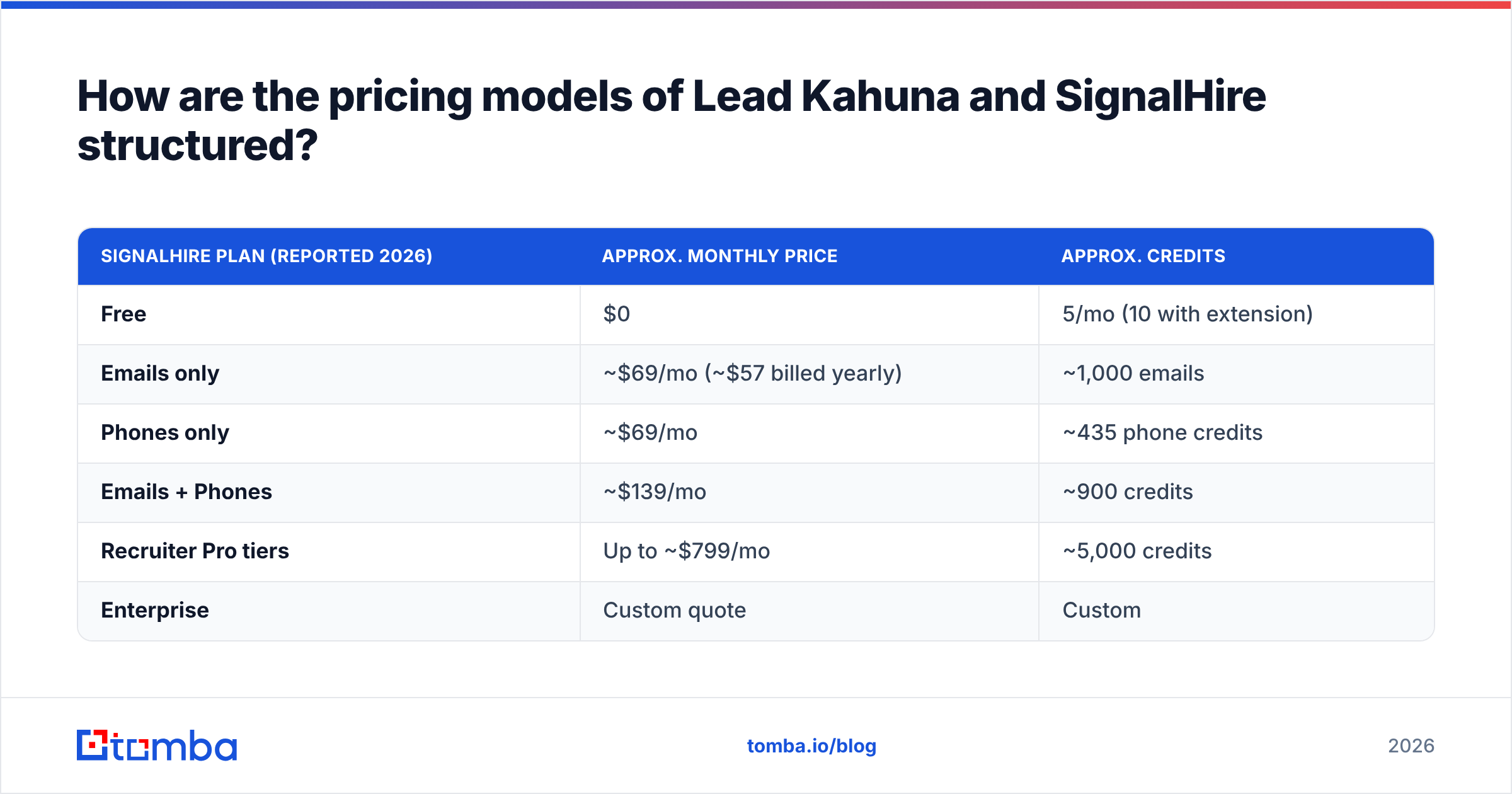
SignalHire sells credits. Pricing roundups published in 2026 report roughly the following. Always confirm on the vendor's own page, because SignalHire shows different numbers depending on region and billing toggle:
| SignalHire plan (reported 2026) | Approx. monthly price | Approx. credits |
|---|---|---|
| Free | $0 | 5/mo (10 with extension) |
| Emails only | ~1,000 emails | |
| Phones only | ~$69/mo | ~435 phone credits |
| Emails + Phones | ~$139/mo | ~900 credits |
| Recruiter Pro tiers | Up to ~$799/mo | ~5,000 credits |
| Enterprise | Custom quote | Custom |
Sources for these figures include G2's SignalHire pricing page and several independent pricing breakdowns. The key point is that phone data costs far more per contact than email data. If you need mobiles, budget two to three times more per lead.
Here's a rough way to decide. If you'll touch fewer than ~300 named contacts a month, SignalHire's entry plans cost less than a Lead Kahuna license plus proxies. If you want thousands of local business listings and don't care about named contacts, Lead Kahuna's flat fee will cost less per row.
Which tool gives more accurate email data?#
Accuracy here means "the email doesn't bounce and reaches someone who can say yes." By that standard, both tools have weak spots.
Lead Kahuna's accuracy problem is relevance, not deliverability alone. An info@ address scraped from a live website will often deliver, but it lands in a shared inbox that a receptionist triages. Your reply rate on those addresses will be much lower than on a named owner's inbox. Scraped listings also go stale. Local businesses close, move, and change domains all the time, and directory data lags behind.
SignalHire's accuracy problem is freshness of person data. People change jobs, and a work email found for someone who left eight months ago will hard-bounce. SignalHire does check the emails it returns, but user reviews on sites like G2 regularly mention a share of returned emails bouncing or being personal addresses rather than work ones. That's typical for the category, not a flaw peculiar to SignalHire.
In practice:
- Treat both outputs as unverified. Run every list through an email verifier before sending. It's the cheapest protection your sending domain has.
- Watch catch-all domains. Many SMB domains accept all mail at the server, so a basic SMTP check reads "valid" even when the mailbox doesn't exist. Flag catch-alls and send to them in smaller batches.
- Prefer named contacts over role inboxes whenever the deal size justifies the extra cost per lead.
- Re-verify anything older than 90 days. Both local listings and job-title data decay faster than most teams assume.
Who should choose Lead Kahuna?#
Lead Kahuna makes sense when your buyer is a local business and the business itself is the decision-maker. In a five-person company, the owner often reads info@ too.
Good fits:
- Web design and local SEO agencies pitching "your site isn't mobile-friendly" to restaurants, clinics, and trades in a set region
- Home-services lead sellers building lists of contractors by city
- Franchise and territory sales teams mapping every competitor or prospect within a radius
- Freelancers on a fixed budget who prefer a one-off yearly cost to a subscription
Poor fits:
- Anyone selling to mid-market or enterprise companies, where
info@goes nowhere - Mac-only teams, unless you run a Windows VM
- Teams that need enrichment inside a CRM automatically
Who should choose SignalHire?#
SignalHire makes sense when you need to reach a specific person and you already know roughly who that person is.
Good fits:
- Recruiters and talent sourcers. This is SignalHire's core market, and the recruiter plans are priced accordingly.
- SDRs and AEs building account-based lists who need a direct line to a named champion
- Founders doing founder-led sales who find prospects on professional networks and want their emails in one click
- Ops teams that want to enrich inbound form fills through an API
Poor fits:
- Anyone who needs to reach thousands of local SMBs where the "person" doesn't have a public profile
- Teams on tight budgets that need phone numbers at volume, because phone credits get expensive quickly
- Buyers who expect unlimited lookups. Credits run out, and heavy months can push you into a bigger plan.

What are the pros and cons of each tool?#
| Lead Kahuna | SignalHire | |
|---|---|---|
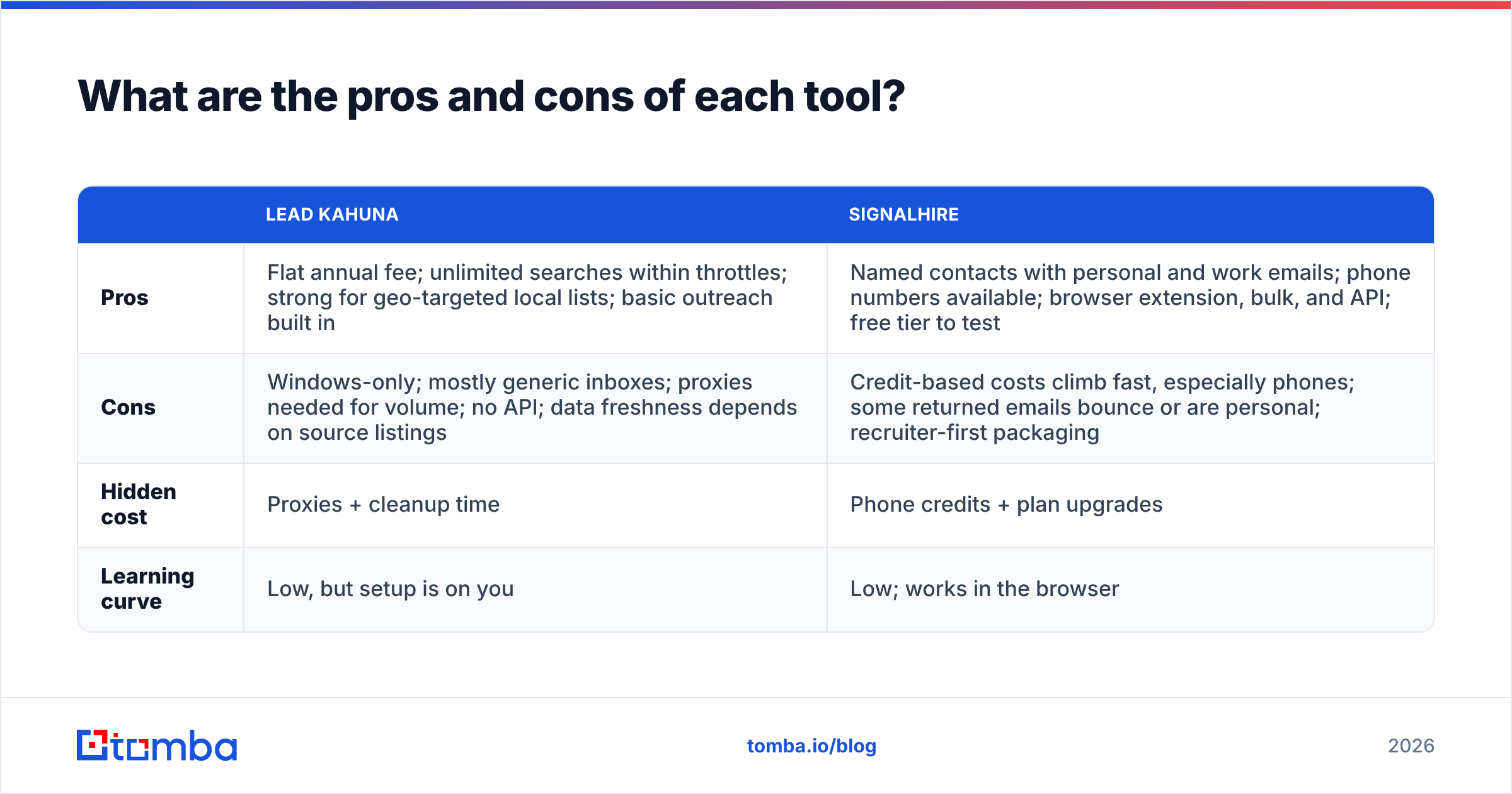
| Pros | Flat annual fee; unlimited searches within throttles; strong for geo-targeted local lists; basic outreach built in | Named contacts with personal and work emails; phone numbers available; browser extension, bulk, and API; free tier to test |
| Cons | Windows-only; mostly generic inboxes; proxies needed for volume; no API; data freshness depends on source listings | Credit-based costs climb fast, especially phones; some returned emails bounce or are personal; recruiter-first packaging |
| Hidden cost | Proxies + cleanup time | Phone credits + plan upgrades |
| Learning curve | Low, but setup is on you | Low; works in the browser |
Is there a better option than both?#
It depends on what you're missing. If you picked Lead Kahuna for local lists but need the owner's email rather than info@, you need a second step: take each website from your export and run a domain search to see every published email on that domain along with its source. You'll often find the owner or office manager listed by name.
If you're considering SignalHire but mainly need work emails rather than recruiter-grade personal contact data, a dedicated email finder built around company domains is usually cheaper per valid address. It also returns the source pages where each email was found, so you can check it yourself before sending.
That's where Tomba fits. It isn't a Google Maps scraper and it isn't a recruiter database. It sits between the two:
- Find by name + domain for named decision-makers (the SignalHire use case)
- Domain search to turn a list of local-business websites into named contacts (the step after Lead Kahuna)
- Built-in verification, including catch-all handling, so you aren't bolting on a separate tool
- API, Google Sheets, Chrome extension, and CRM integrations, so enrichment runs where your team already works
Pricing is published and predictable: a free tier with 25 searches a month, then Starter at $49/mo, Growth at $99/mo, and Pro at $249/mo, with Enterprise on a custom quote. See Tomba pricing for current credit allowances.
To be fair to both vendors: if you run an agency that only sells to local trades and you're happy with role inboxes, Lead Kahuna's flat fee is hard to beat. If you're a recruiting team that needs personal mobiles for passive candidates, SignalHire's recruiter tiers are built for exactly that. A domain-first email finder is the better fit when your target is a named B2B buyer and deliverability matters more than the raw number of rows you collect.
How do you run a clean workflow with either tool?#
Whichever tool you choose, the workflow that protects your sender reputation looks the same:
- Define the target unit first. Decide whether you're reaching a business or a person. That choice alone tells you which tool to use.
- Pull the raw list. Use Lead Kahuna for geo + category, SignalHire for profile or name + company.
- Deduplicate and normalise. Strip duplicate domains, closed businesses, and obvious personal addresses if you only want work contacts.
- Upgrade role inboxes to named contacts where the deal size justifies it, using a domain search or name-based email lookup.
- Verify everything. Remove invalids, quarantine catch-alls, and send only to verified addresses in your first batch.
- Sync to your CRM with source metadata so you can re-verify on a schedule instead of re-buying the same data.
Following those steps usually matters more than which of the two tools you bought. Most bounce-rate problems blamed on "bad data" come from skipping steps 3 and 5.
Lead Kahuna vs SignalHire: which should you pick?#
Choose Lead Kahuna if you sell to small local businesses, work on Windows, want a flat annual cost, and accept that most emails will be generic inboxes.
Choose SignalHire if you need named people, especially candidates or specific decision-makers, and you're comfortable paying per credit, with phone data at a premium.
Choose neither on its own if you need verified work emails for named B2B buyers at a predictable monthly cost. That's a job for a domain-based email finder with verification built in.
If your list is full of company websites and you need the right person's inbox rather than info@, try Tomba Email Finder. Enter a name and a domain, or a domain alone, and you get verified professional emails with their public sources attached. The free tier gives you 25 searches a month to test it on your own prospects before you spend anything.
Related guides#
// get started
Find, verify and enrich your first contacts today
Start on the free plan with 25 searches a month, then scale when your team is ready.
Free plan · No credit card required · GDPR & CCPA
// about the author