Lead Kahuna vs UpLead: Local Scraper or Verified B2B Database?
Lead Kahuna is a $299/year desktop scraper for local-business leads. UpLead is a verified B2B contact database with a 95% accuracy guarantee. Here is which one fits your outbound, and when neither is the right call.
TL;DR
- Lead Kahuna is a Windows desktop scraper you license once a year (from about $299/year at the time of writing). It pulls local-business listings, websites, phone numbers and any emails it can find on public pages. It fits agencies selling to SMBs like dentists, roofers and restaurants.
- UpLead is a cloud B2B contact database with role, seniority, industry and technographic filters. It verifies emails in real time and guarantees 95% accuracy. Paid plans start at $99/month (or $74/month billed annually) for 170 credits.
- The difference that matters: Lead Kahuna mostly returns generic inboxes like
info@andcontact@. UpLead returns named decision-makers with verified emails and direct dials. - Cost per lead: Lead Kahuna is close to free per record once you've paid for the license. UpLead costs roughly $0.44–$0.58 per contact on its self-serve plans, and unused credits don't roll over.
- Our pick: Choose Lead Kahuna for high-volume local SMB lists on a tight budget. Choose UpLead for B2B outbound to specific job titles. If you already have target companies and only need the right person's email, a pay-as-you-go email finder is often cheaper than either.
What is the real difference between Lead Kahuna and UpLead?#
The two tools look alike on a "lead generation" shortlist, but they are built for different jobs.
Think of Lead Kahuna as a fishing net you own. You install it on a Windows machine, type in a keyword and a location ("HVAC contractors, Denver"), and it collects business listings from search engines, directories and company websites. You get the business name, address, phone, website and whatever email addresses appear on the site. You pay once for the year and run it as often as you want, within the tool's limits.
UpLead works more like a library card. You don't collect anything yourself. You search a database that UpLead already maintains, filter by job title, seniority, company size, industry, revenue or tech stack, and spend a credit to unlock each contact. Each credit returns a person, not just a business: a VP of Marketing with a verified work email and often a mobile number.
So the question in "Lead Kahuna vs UpLead" usually isn't which tool is better. It's what you sell and who has to read your email.
How do Lead Kahuna and UpLead compare side by side?#
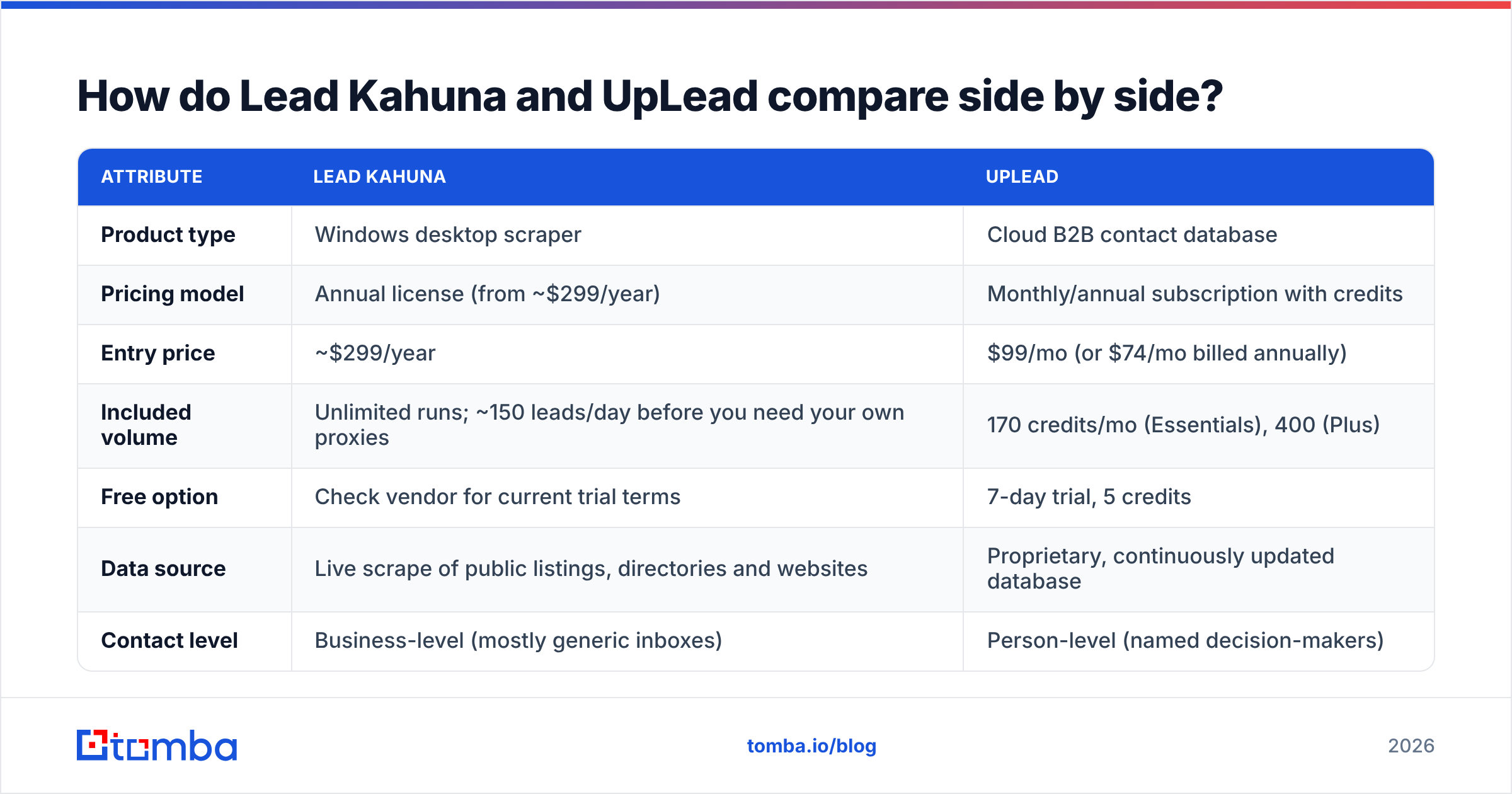
The table below covers the attributes buyers ask about most. Pricing reflects publicly listed plans at the time of writing. Both vendors change packaging, so confirm on the UpLead website and the Lead Kahuna homepage before you buy.
| Attribute | Lead Kahuna | UpLead |
|---|---|---|
| Product type | Windows desktop scraper | Cloud B2B contact database |
| Pricing model | Annual license (from ~$299/year) | Monthly/annual subscription with credits |
| Entry price | ~$299/year | $99/mo (or $74/mo billed annually) |
| Included volume | Unlimited runs; ~150 leads/day before you need your own proxies | 170 credits/mo (Essentials), 400 (Plus) |
| Free option | Check vendor for current trial terms | 7-day trial, 5 credits |
| Data source | Live scrape of public listings, directories and websites | Proprietary, continuously updated database |
| Contact level | Business-level (mostly generic inboxes) | Person-level (named decision-makers) |
| Email verification | None built in; you verify separately | Real-time verification, 95% accuracy guarantee |
| Phone data | Main business line from listings | Direct dials and mobiles on many records |
| Filters | Keyword + location | Title, seniority, industry, headcount, revenue, technographics |
| Multi-user | Per-machine license | Single user on Essentials/Plus; teams need Professional |
| Best for | Agencies prospecting local SMBs | B2B SaaS, services and mid-market outbound |

Which tool gives you more accurate emails?#
For named B2B contacts, UpLead wins clearly. That's what it was designed for.
UpLead checks emails at the moment you unlock them and backs this with a 95% accuracy guarantee. If an email bounces as invalid, you get the credit back. Few vendors in the category offer that, and it's one of the reasons UpLead scores well for data quality in UpLead reviews on G2.
Lead Kahuna's accuracy depends on the source, and here that's a strength and a weakness at once. The data is scraped live, so a plumber's phone number or website is usually current. But the emails are whatever the site publishes: info@, office@, bookings@. Those addresses usually do exist. They just rarely reach the owner, and many shared inboxes are filtered aggressively. Lead Kahuna also doesn't verify emails, so a scraped list needs a pass through an email verifier before it goes near your sending domain.

In short:
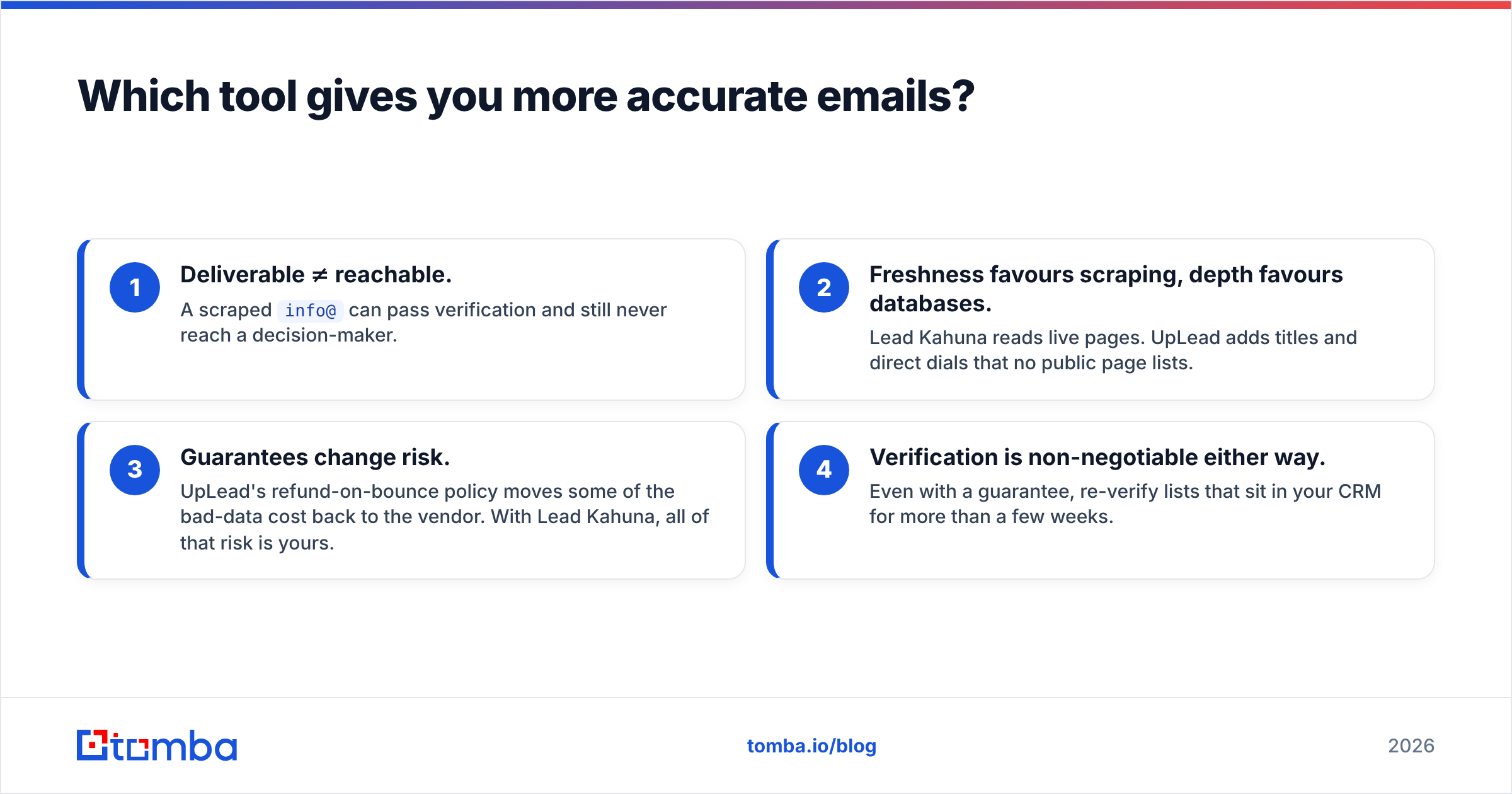
- Deliverable ≠ reachable. A scraped
info@can pass verification and still never reach a decision-maker. - Freshness favours scraping, depth favours databases. Lead Kahuna reads live pages. UpLead adds titles and direct dials that no public page lists.
- Guarantees change risk. UpLead's refund-on-bounce policy moves some of the bad-data cost back to the vendor. With Lead Kahuna, all of that risk is yours.
- Verification is non-negotiable either way. Even with a guarantee, re-verify lists that sit in your CRM for more than a few weeks.

Is Lead Kahuna cheaper than UpLead?#
On a per-record basis, Lead Kahuna is much cheaper. Once you've paid for the license, each extra listing costs almost nothing. If you pull 150 records a day for a year, the license works out to fractions of a cent per row.
That number is misleading, though, for three reasons:
- Proxies cost extra. To go beyond roughly 150 leads per day, Lead Kahuna expects you to plug in your own proxies. Residential proxy plans cost money every month and take some technical setup.
- Verification costs extra. Scraped emails need cleaning. Budget for a verification tool, or your bounce rate will damage your sender reputation.
- Enrichment costs extra. If you need the owner's name and personal work email rather than
info@, you'll pay for a second tool to find it.
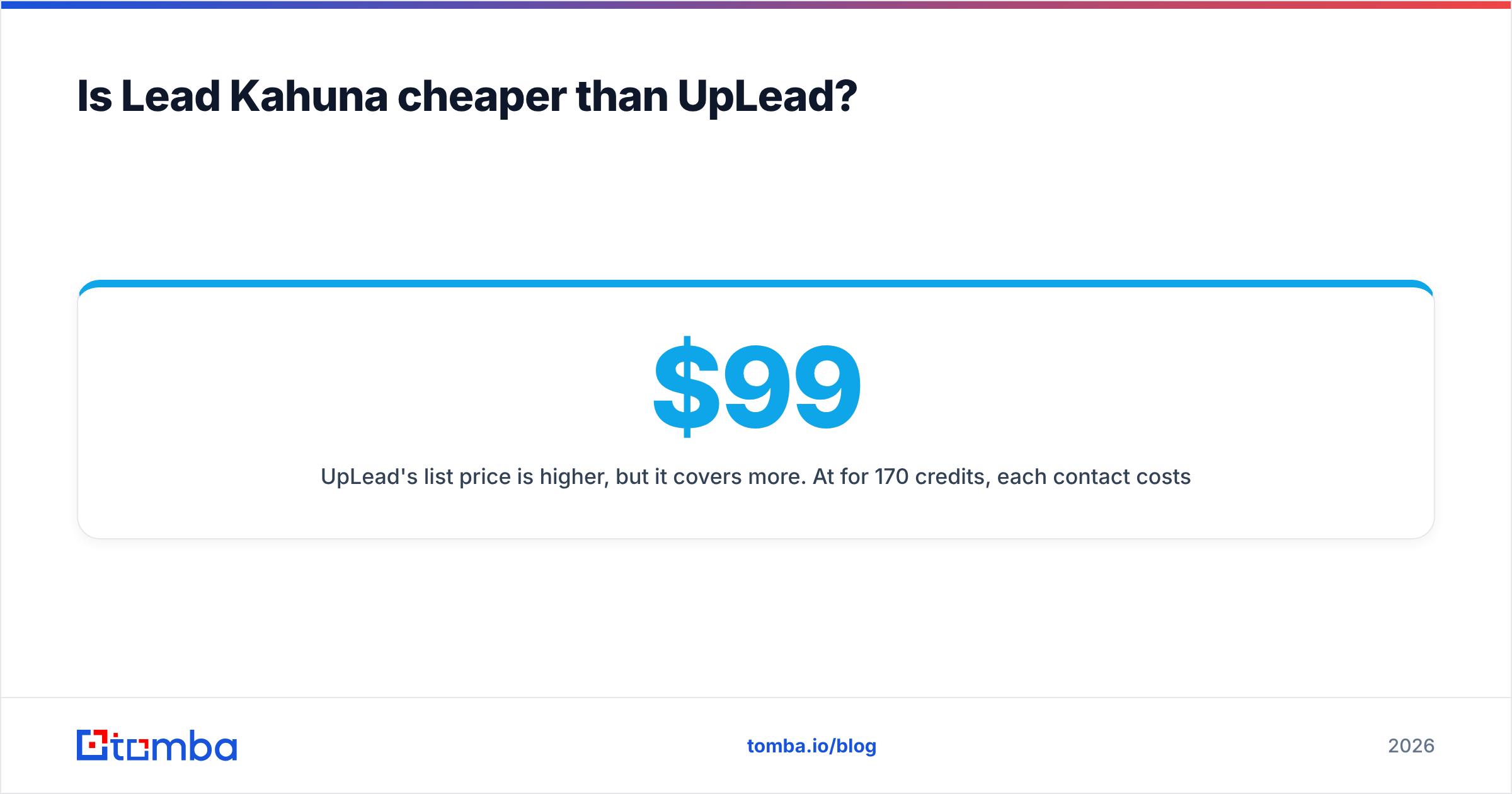
UpLead's list price is higher, but it covers more. At $99/month for 170 credits, each contact costs about $0.58. On the annual Essentials plan it's about $0.44, and Plus ($199/month for 400 credits) lands near $0.50. Each credit gets you a named person with a verified email and, often, a phone number. The catches: credits don't roll over on the self-serve plans, and Essentials and Plus are single-seat. A three-rep team has to move to the Professional plan, which is custom-quoted and billed annually.
The honest cost comparison: For 5,000 local SMB businesses a month, Lead Kahuna is far cheaper. For 300 named VPs of Sales at 50–500-person SaaS companies, UpLead is cheaper, because Lead Kahuna can't produce that list.
Who should choose Lead Kahuna?#
Lead Kahuna fits a specific buyer well:
- Marketing and web agencies selling to local businesses. If your offer is "we'll fix your Google Business Profile" or "we'll rebuild your website," the business owner often reads the main inbox.
info@is a reasonable place to start. - Teams whose outreach starts with a phone call. Local listings reliably include the main business number. Pair it with a dialer and you have a cold-calling list.
- Budget-constrained solo operators. A single annual payment with no per-record fees is predictable, and there's no data contract to renegotiate.
- Niche geographies. Some large B2B databases cover small local businesses thinly. A live scrape of Google results for "veterinary clinics in Tucson" can surface records a database misses.
Where it struggles: anything that needs a job title, company-size filter, technographic filter or a named person. It's also Windows-only, so Mac users need a VM or a separate machine.
Who should choose UpLead?#
UpLead is the better fit when your buyer is a role, not a storefront:
- B2B SaaS and services teams prospecting by title ("Head of RevOps at 200–1,000-employee fintechs").
- Account-based outbound where you need several stakeholders at one account, with direct dials for multi-channel sequences.
- Teams sensitive to bounce rates. Built-in verification and the accuracy guarantee protect your domain from the start.
- CRM-centric workflows. UpLead offers a Chrome extension and native integrations with major CRMs such as HubSpot and Salesforce, so contacts can go straight into your pipeline.
Where it struggles: small teams feel the 170-credit ceiling quickly, unused credits expire, and adding a second seat means an annual Professional contract. Hyper-local SMB coverage is also thinner than a live scrape.

What does a real workflow look like with each tool?#
Here is how each tool usually fits into a working prospecting stack.
Lead Kahuna workflow (local agency):
- Run a keyword + city scrape ("med spas, Austin") and export to CSV.
- Remove duplicate rows and chains you don't want.
- Verify every email and drop invalids and risky catch-alls.
- For high-value accounts, look up the owner's name on the website or LinkedIn, then find their direct email.
- Load into your sequencer with a phone step for records that only have a generic inbox.
UpLead workflow (B2B outbound):
- Build a search: title, seniority, industry, headcount, location, tech stack.
- Preview results (free) and unlock only the contacts that match your ICP.
- Push to CRM or export to your sequencer. Emails are already verified at unlock.
- Re-verify anything older than 30–60 days before a new campaign.
Step 4 of the Lead Kahuna workflow is where most agencies lose time. Getting from "Bright Smile Dental, info@brightsmile.com" to "Dr. Patel, the owner" is a separate job, and it's where a dedicated email finder earns its cost. If you know the company domain, a domain search will often show named staff emails and the company's email pattern in a single lookup.
Is there a better option than both?#
It depends on what you're missing.
If your problem is finding companies, Lead Kahuna (local) or UpLead (B2B) is the right tool. Both are good at building the "who" list.
If your problem is reaching the right person at companies you've already picked, both tools are a detour. You don't need a scraper or a 170-credit database subscription. You need a way to turn "first name + last name + domain" into a verified address, at a price that fits how many lookups you actually do.
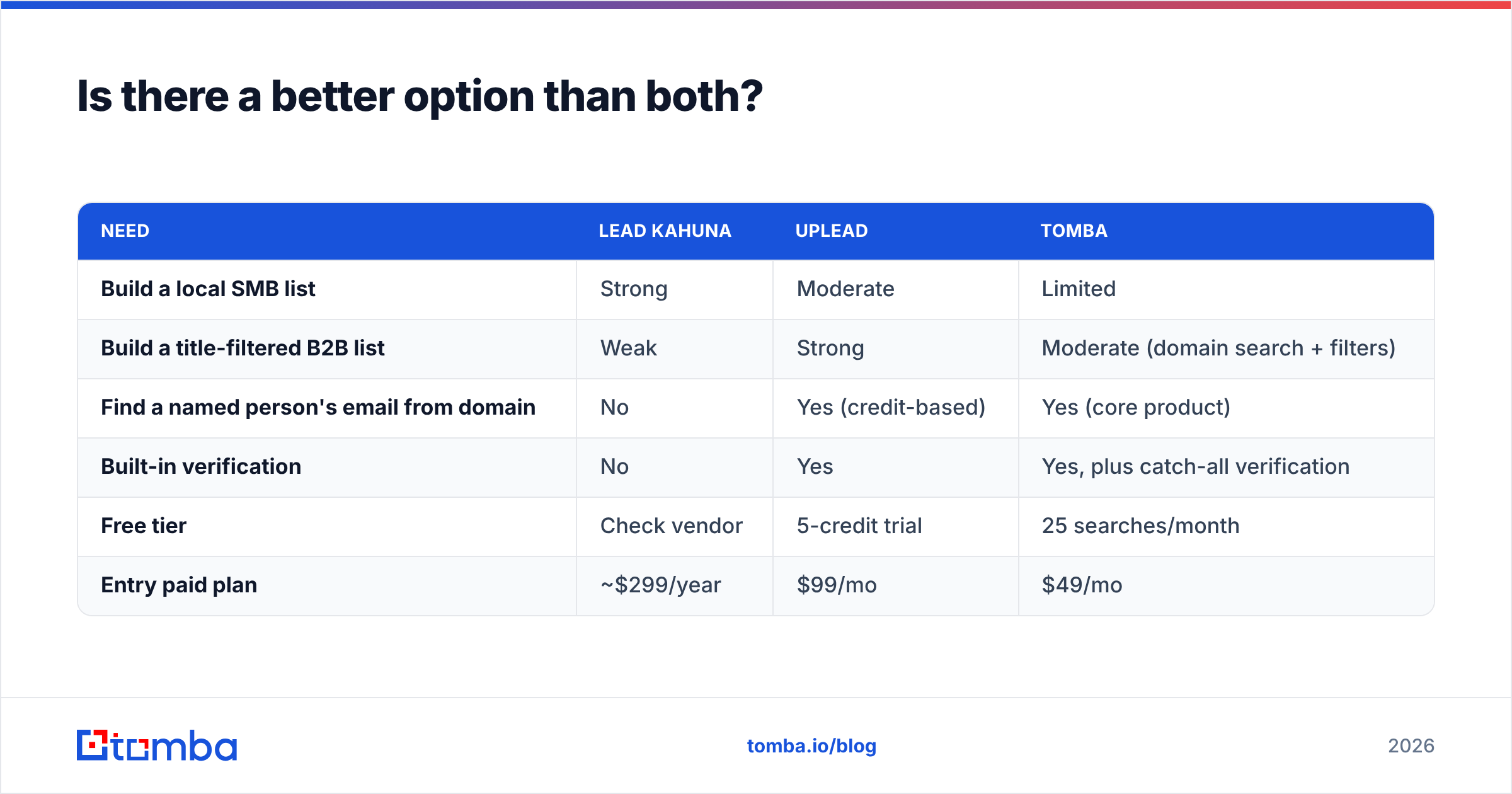
That's where an email-finder-first tool like Tomba fits alongside either option:
| Need | Lead Kahuna | UpLead | Tomba |
|---|---|---|---|
| Build a local SMB list | Strong | Moderate | Limited |
| Build a title-filtered B2B list | Weak | Strong | Moderate (domain search + filters) |
| Find a named person's email from domain | No | Yes (credit-based) | Yes (core product) |
| Built-in verification | No | Yes | Yes, plus catch-all verification |
| Free tier | Check vendor | 5-credit trial | 25 searches/month |
| Entry paid plan | ~$299/year | $99/mo | $49/mo |
For many teams, the practical stack is Lead Kahuna or UpLead to decide which companies to target, and a dedicated finder plus verifier to get the right inbox. See Tomba pricing to check whether the credit volumes fit your monthly lookup count.
Lead Kahuna vs UpLead: what's the final verdict?#
Choose Lead Kahuna if you sell to local businesses, a generic inbox or main phone line is an acceptable first touch, and you want a fixed annual cost with no per-record fees. Budget separately for proxies and email verification.
Choose UpLead if you sell B2B to specific roles, you need verified emails and direct dials from day one, and you can use 170–400 contacts a month (or you're ready for an annual Professional contract with seats for your team).
Choose neither as your only tool if your list of target accounts already exists. In that case you're paying for discovery you don't need, and a focused email finder will get you to the decision-maker faster and at lower cost.
Frequently asked questions#
Does Lead Kahuna verify emails? No verification is built in. Lead Kahuna returns emails as they appear on public pages. Run the export through a verifier before sending to protect your domain's reputation.
Does UpLead have a free plan? UpLead offers a 7-day free trial with 5 credits rather than a permanent free tier. Paid plans start at $99/month, or $74/month billed annually.
Can Lead Kahuna find decision-maker emails?
Only when the decision-maker's email is published on the website. Most scraped results are generic inboxes like info@ or contact@.
Do UpLead credits roll over? Not on the Essentials or Plus plans. Unused credits expire at the end of each billing period, so match the plan to what you actually use each month.
Which is better for cold calling? For local SMBs, Lead Kahuna's scraped main lines are enough. For B2B, UpLead's direct dials and mobiles connect you to the actual person far more often.
Ready to reach the person, not the inbox?#
Whichever tool builds your list, the step that decides reply rates is getting a verified email for the actual decision-maker. Tomba Email Finder finds a professional email from a name and a company domain, verifies it, and handles catch-all domains. Plans start with a free tier of 25 searches a month and a $49/month Starter plan. Use it after a Lead Kahuna scrape to replace info@ with the owner's inbox, or next to UpLead when your credits run out mid-month.
Related guides#
// get started
Find, verify and enrich your first contacts today
Start on the free plan with 25 searches a month, then scale when your team is ready.
Free plan · No credit card required · GDPR & CCPA
// about the author