Lead Liaison Alternatives: 7 Better-Fit Tools for 2026
Lead Liaison packs visitor tracking, lead scoring, and email automation into one platform, but quote-only pricing and a steep setup push many teams to look elsewhere. Here are 7 alternatives and who each one suits.
TL;DR
- Lead Liaison is a capable all-in-one revenue platform: marketing automation, lead scoring, website visitor tracking, and event lead capture. But it's quote-only and takes real effort to set up.
- HubSpot Marketing Hub is the safest swap for most SMBs. ActiveCampaign is the budget pick. Salesforce Account Engagement and Marketo Engage fit enterprise teams already on Salesforce or Adobe.
- If you mostly used Lead Liaison to identify and enrich leads (not to run nurture programs), you can get most of that value from a lighter data tool plus your existing CRM.
- Decide on three things first: CRM fit, how much lead scoring you need, and whether you need event or field-marketing features.
- Before you move, clean and verify your contact list. Moving bounced addresses into a new platform starts it off with a damaged sender reputation.
What is Lead Liaison, and why are teams looking for alternatives?#
Lead Liaison calls itself "Revenue Generation Software." In practice it's a marketing automation suite built for B2B teams. It combines email marketing, lead scoring and grading, website visitor tracking, lead routing, and a strong set of trade-show and field-marketing tools (lead capture apps, event management, even direct-mail integrations).
Mid-market B2B companies that want one vendor for everything like it. Reviewers on G2 often praise its support team and how many features you get for the money.
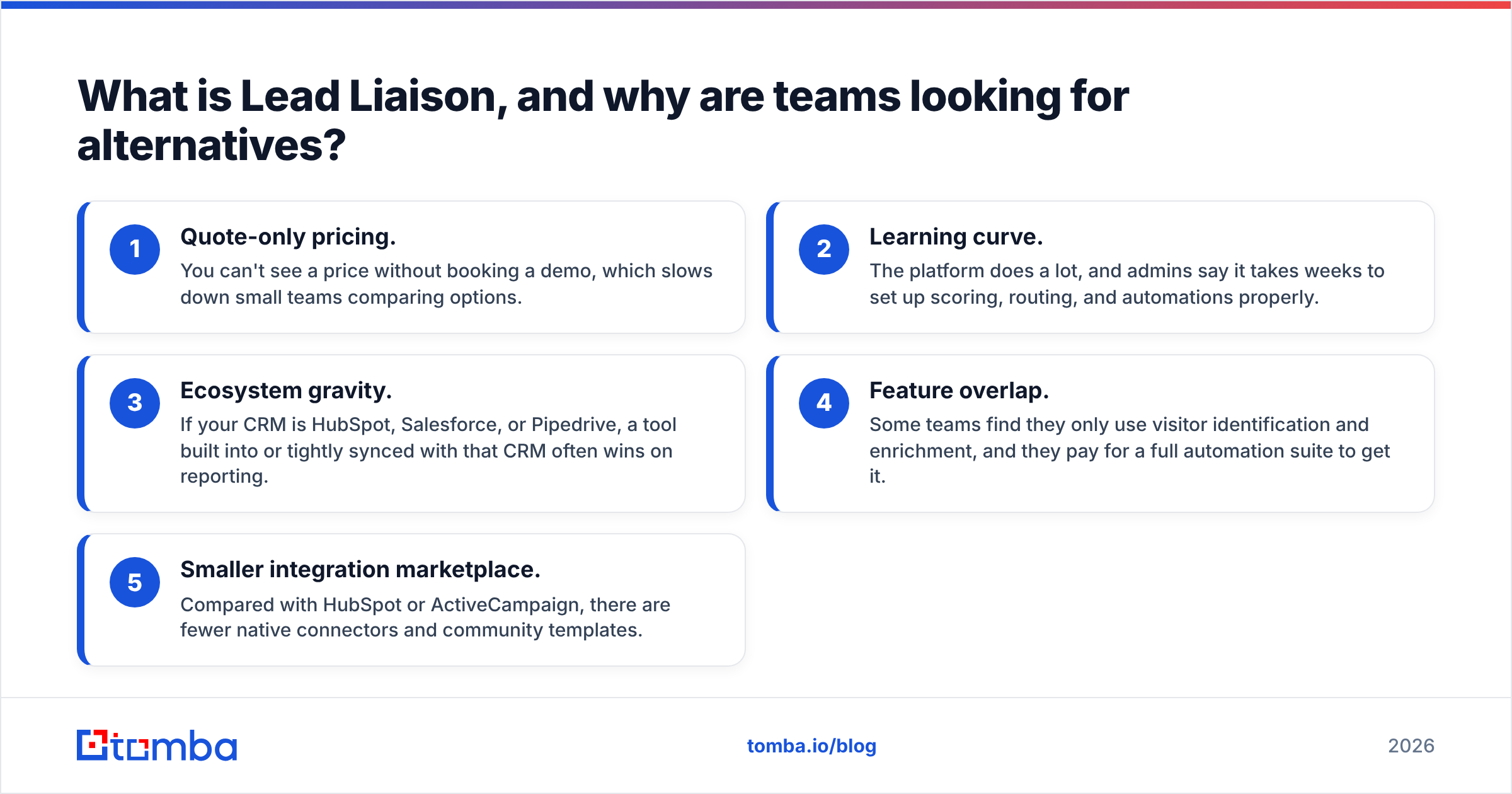
So why do people search for Lead Liaison alternatives? The same reasons come up again and again:
- Quote-only pricing. You can't see a price without booking a demo, which slows down small teams comparing options.
- Learning curve. The platform does a lot, and admins say it takes weeks to set up scoring, routing, and automations properly.
- Ecosystem gravity. If your CRM is HubSpot, Salesforce, or Pipedrive, a tool built into or tightly synced with that CRM often wins on reporting.
- Feature overlap. Some teams find they only use visitor identification and enrichment, and they pay for a full automation suite to get it.
- Smaller integration marketplace. Compared with HubSpot or ActiveCampaign, there are fewer native connectors and community templates.
None of that makes Lead Liaison a bad product. It means the right choice depends on what you actually use it for.

What should you look for in a Lead Liaison alternative?#
Think of switching marketing automation tools like moving house. Before you look at listings, you need to know how many bedrooms you actually use. Map your current Lead Liaison usage against these five capabilities before you compare vendors:
- Email automation and nurture. Multi-step drip campaigns, branching logic, A/B testing, and deliverability tooling. This is the core job for most buyers.
- Lead scoring and grading. Behavioral scoring (opens, page visits, form fills) plus fit grading (title, industry, company size). If sales relies on a marketing qualified lead threshold, this can't slip.
- Website visitor identification. Reverse-IP lookup to show which companies visit your site, ideally tied to known contacts.
- CRM sync and routing. Two-way sync with field-level control, owner assignment, and round-robin routing.
- Data quality and enrichment. Filling in missing emails, phone numbers, titles, and firmographics so scoring rules have data to work with.
Most teams use two or three of these heavily and hardly touch the rest. That gap is where you'll save money.
What are the best Lead Liaison alternatives in 2026?#
Here's the shortlist. Pricing reflects publicly listed entry points at the time of writing. Vendors change plans often, so check before you buy.
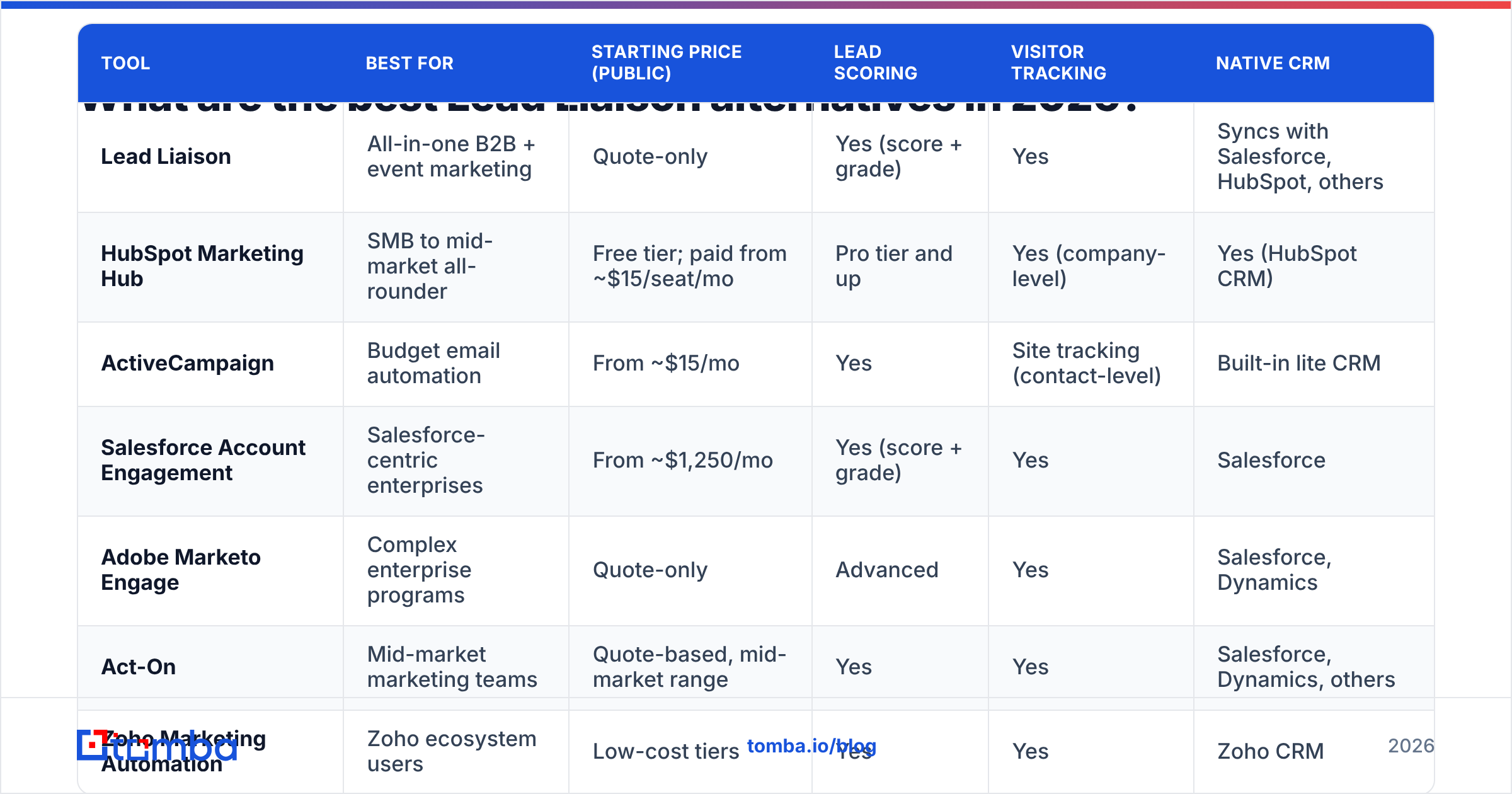
| Tool | Best for | Starting price (public) | Lead scoring | Visitor tracking | Native CRM |
|---|---|---|---|---|---|
| Lead Liaison | All-in-one B2B + event marketing | Quote-only | Yes (score + grade) | Yes | Syncs with Salesforce, HubSpot, others |
| HubSpot Marketing Hub | SMB to mid-market all-rounder | Free tier; paid from ~$15/seat/mo | Pro tier and up | Yes (company-level) | Yes (HubSpot CRM) |
| ActiveCampaign | Budget email automation | From ~$15/mo | Yes | Site tracking (contact-level) | Built-in lite CRM |
| Salesforce Account Engagement | Salesforce-centric enterprises | From ~$1,250/mo | Yes (score + grade) | Yes | Salesforce |
| Adobe Marketo Engage | Complex enterprise programs | Quote-only | Advanced | Yes | Salesforce, Dynamics |
| Act-On | Mid-market marketing teams | Quote-based, mid-market range | Yes | Yes | Salesforce, Dynamics, others |
| Zoho Marketing Automation | Zoho ecosystem users | Low-cost tiers | Yes | Yes | Zoho CRM |
| Tomba + your CRM | Lead identification and enrichment | Free (25 searches); Starter $49/mo | Via your CRM | Yes (Tomba Reveal) | HubSpot, Salesforce, Pipedrive |
1. HubSpot Marketing Hub: best overall replacement#
HubSpot Marketing Hub is where most teams leaving Lead Liaison end up. Email automation, forms, landing pages, and the CRM all share one database, so attribution reporting works without much setup.
Strengths: Huge integration marketplace, an easy editor, a free CRM to start on, and transparent pricing on the lower tiers. Watch out for: Real automation workflows and lead scoring live in the Professional tier, and the price jumps sharply there. Contact-based pricing also grows as your database grows.
Pick it if: You want one ecosystem and your team would rather configure than customize.
2. ActiveCampaign: best budget alternative#
ActiveCampaign gives you a strong automation builder at a fraction of enterprise prices. Its visual workflow editor is one of the best around, and contact-level site tracking and lead scoring are available on mid-tier plans.
Strengths: Cheap to start, deep automation logic, solid deliverability, and 900+ integrations. Watch out for: Its B2B reporting (account-based views, multi-touch attribution) is thinner than Lead Liaison's, and there's no company-level visitor identification out of the box.
Pick it if: You're a small team focused on nurture sequences and don't need field-marketing features.
3. Salesforce Marketing Cloud Account Engagement (formerly Pardot): best for Salesforce shops#
If your sales team lives in Salesforce, Account Engagement is the closest match to Lead Liaison's scoring-plus-grading model. It works inside Salesforce objects, which your RevOps team will appreciate.
Strengths: Native Salesforce sync, mature scoring and grading, B2B-focused attribution. Watch out for: A high entry price, and an editor that feels dated next to newer tools. You'll likely need a Salesforce admin.
Pick it if: Salesforce is your source of truth and you have admin capacity.
4. Adobe Marketo Engage: best for complex enterprise programs#
Marketo is the heavyweight. Nested programs, advanced revenue attribution, and very detailed scoring models make it the default for large demand-gen teams.
Strengths: Handles huge databases and complicated program logic, with strong ABM add-ons. Watch out for: Quote-only pricing (like Lead Liaison), a long implementation, and it usually needs a dedicated Marketo operations person.
Pick it if: You're an enterprise with a marketing ops team and multi-region campaigns.
5. Act-On: best mid-market middle ground#
Act-On sits between ActiveCampaign and the enterprise tools. It covers B2B email automation, scoring, and web tracking with less admin overhead than Marketo.
Strengths: B2B-oriented features, adaptive journeys, reasonable onboarding. Watch out for: A smaller ecosystem than HubSpot, and pricing isn't fully transparent.
Pick it if: You want Lead Liaison-style features with a simpler interface.
6. Zoho Marketing Automation: best for Zoho users#
Already running Zoho CRM? Zoho Marketing Automation shares the same data model, is cheap, and covers scoring, journeys, and web tracking.
Strengths: Low cost and tight Zoho integration. Watch out for: It's much less compelling if you aren't on Zoho, and the interface is busy.
7. Tomba + your existing CRM: best if you mainly need lead data#
This one is a different kind of alternative. A lot of teams find their main use of Lead Liaison was answering "who is this lead and how do I reach them?" rather than running complex nurture programs. If that's you, a data layer plus the automation already in your CRM may be enough.
Tomba covers the identification side: Tomba Reveal for anonymous website traffic, an email finder to get verified addresses by name and domain, and data enrichment to add titles, company size, and social profiles to existing records. Records flow into HubSpot, Salesforce, or Pipedrive through native integrations.
Strengths: Transparent pricing (free tier with 25 searches/month, then $49, $99, and $249/mo plans), fast setup, and it cleans the data your scoring rules depend on. Watch out for: Tomba is not a marketing automation platform. It doesn't build email nurture journeys or landing pages, so pair it with HubSpot, ActiveCampaign, or your CRM's sequences.
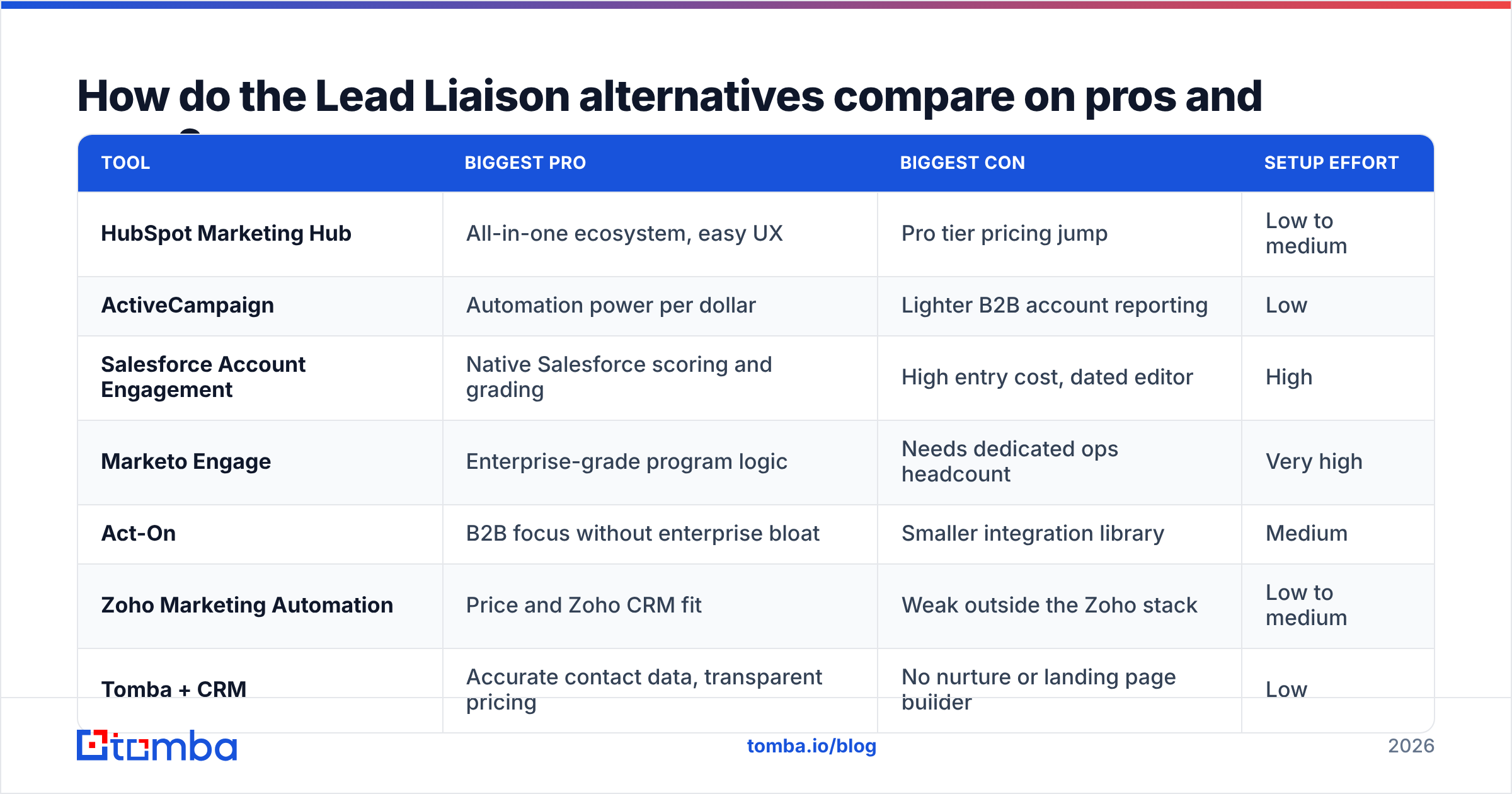
How do the Lead Liaison alternatives compare on pros and cons?#
| Tool | Biggest pro | Biggest con | Setup effort |
|---|---|---|---|
| HubSpot Marketing Hub | All-in-one ecosystem, easy UX | Pro tier pricing jump | Low to medium |
| ActiveCampaign | Automation power per dollar | Lighter B2B account reporting | Low |
| Salesforce Account Engagement | Native Salesforce scoring and grading | High entry cost, dated editor | High |
| Marketo Engage | Enterprise-grade program logic | Needs dedicated ops headcount | Very high |
| Act-On | B2B focus without enterprise bloat | Smaller integration library | Medium |
| Zoho Marketing Automation | Price and Zoho CRM fit | Weak outside the Zoho stack | Low to medium |
| Tomba + CRM | Accurate contact data, transparent pricing | No nurture or landing page builder | Low |

Is Lead Liaison better than HubSpot?#
It depends on which job you're hiring the tool for.
Lead Liaison wins if you run many trade shows and field events. Its event lead capture, badge scanning workflows, and direct-mail triggers are hard to match without stitching together three or four add-ons in HubSpot. Buyers also regularly praise its support.
HubSpot wins on ease of use, the size of its ecosystem, and CRM-native reporting. If your sales team already works in HubSpot CRM, a separate automation tool means sync rules to maintain and fields to map. Keeping it all in one place removes that work.
A simple way to decide: if events drive more than a quarter of your pipeline, take a hard look before leaving Lead Liaison. If inbound and email nurture drive most of it, HubSpot is usually the smoother path.
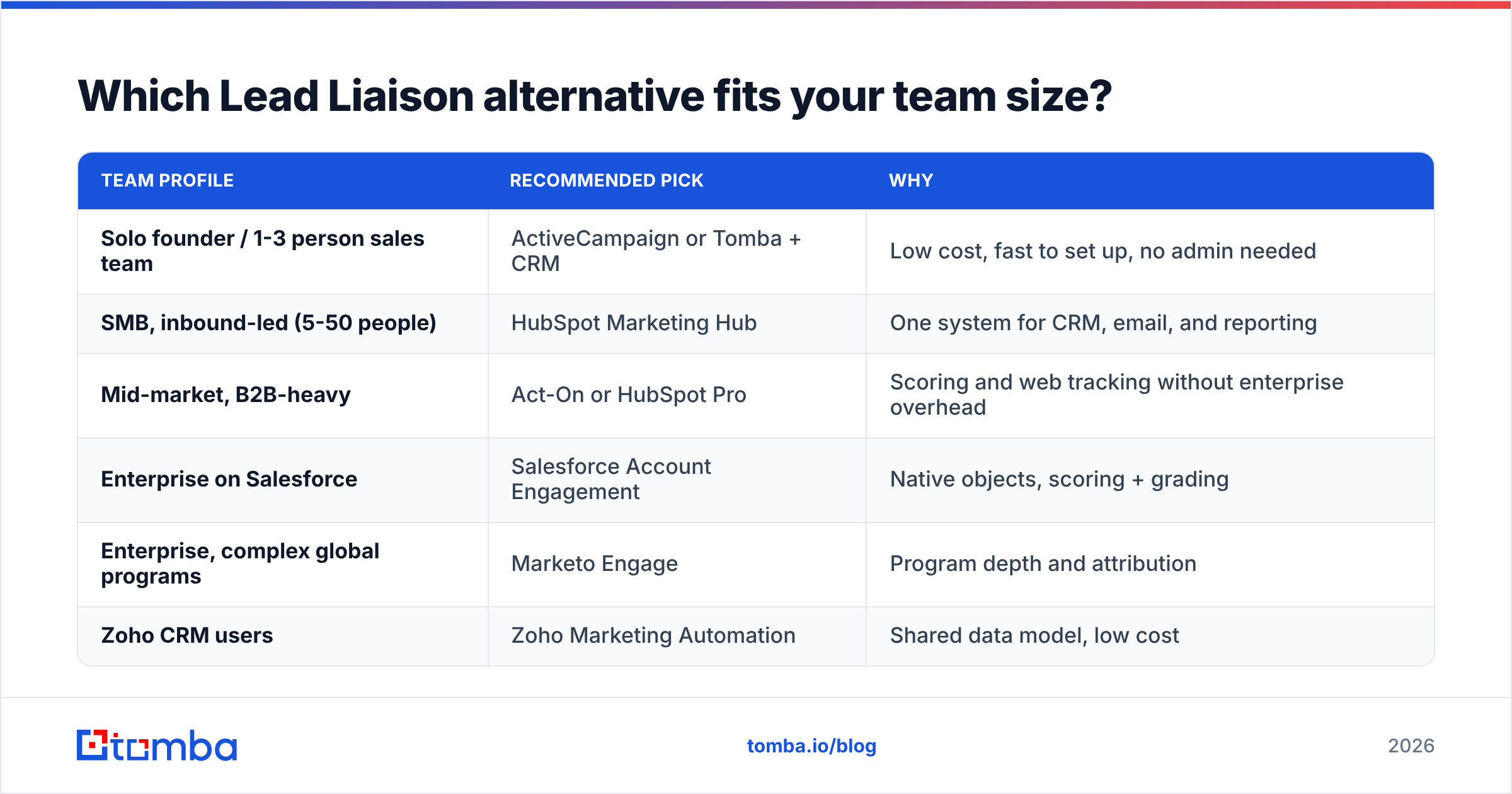
Which Lead Liaison alternative fits your team size?#
| Team profile | Recommended pick | Why |
|---|---|---|
| Solo founder / 1-3 person sales team | ActiveCampaign or Tomba + CRM | Low cost, fast to set up, no admin needed |
| SMB, inbound-led (5-50 people) | HubSpot Marketing Hub | One system for CRM, email, and reporting |
| Mid-market, B2B-heavy | Act-On or HubSpot Pro | Scoring and web tracking without enterprise overhead |
| Enterprise on Salesforce | Salesforce Account Engagement | Native objects, scoring + grading |
| Enterprise, complex global programs | Marketo Engage | Program depth and attribution |
| Zoho CRM users | Zoho Marketing Automation | Shared data model, low cost |
How do you migrate off Lead Liaison without losing pipeline?#
Switching platforms is where teams lose data, scoring history, and sender reputation. Follow this sequence:
- Export everything first. Contacts, custom fields, scoring values, activity history, and suppression lists. Your suppression and unsubscribe lists matter most, because re-emailing people who opted out is a compliance risk.
- Audit and verify your list. Remove hard bounces and role accounts, and run every address through an email verifier. A new sending domain or IP has no reputation yet, and a 5%+ bounce rate in your first campaigns can land you in spam for weeks.
- Enrich the gaps. Scoring models break when job title or company size fields are empty. Fill those in before import so your new scoring rules work from day one.
- Rebuild scoring from scratch, not by copying. Treat the migration as a chance to check your thresholds against actual closed-won data rather than carrying over old guesses.
- Warm up gradually. Start with your most engaged segment, then expand. Watch bounce and complaint rates daily for the first two weeks.
- Run both systems briefly. Keep Lead Liaison active for 2-4 weeks so in-flight nurture sequences finish cleanly.
Step 2 is the one teams skip, and it's the one that hurts them. A platform migration is the best time to clean your data, because you're already touching every record.
What does a Lead Liaison alternative actually cost in year one?#
Subscription price is only part of the cost. When you compare Lead Liaison alternatives, budget for:
- Platform fees. Tiered by contacts, seats, or both. HubSpot and ActiveCampaign scale with contacts. Account Engagement and Marketo have high base fees.
- Onboarding. Enterprise tools often charge a mandatory onboarding fee or need a partner agency.
- Admin time. A Marketo or Account Engagement instance usually needs a part-time or full-time operator. That's often the biggest hidden cost.
- Data. None of these tools finds new contact data well on its own. You'll still need an enrichment or email-finding source, which is where a tool with clear Tomba pricing tiers keeps that line item predictable.
- Add-ons. ABM modules, extra seats, dedicated IPs, and premium support all add up.
A realistic year-one total for a 10-person SMB can range from a few thousand dollars (ActiveCampaign plus a data tool) to well over $30,000 (enterprise automation plus implementation). Get written quotes that include every add-on before you commit.
Which Lead Liaison alternative should you choose?#
Here's the short version:
- Want one ecosystem that just works? HubSpot Marketing Hub.
- Tight budget and nurture-focused? ActiveCampaign.
- Salesforce is your source of truth? Salesforce Account Engagement.
- Enterprise with a marketing ops team? Marketo Engage.
- Mid-market B2B, want simplicity? Act-On.
- All-in on Zoho? Zoho Marketing Automation.
- Mostly needed to identify and enrich leads? A data tool like Tomba plus your CRM.
Whichever platform you pick, it can only work with the data you give it. Scoring rules, routing, and nurture branches all depend on accurate emails and complete firmographics. If you're rebuilding your lead database during the switch, Tomba Email Finder lets you find and verify professional email addresses by name, domain, or company, then push them straight into HubSpot, Salesforce, or Pipedrive. Start on the free plan with 25 searches a month and see how much of your list you can fill in before your new platform goes live.
Related guides#
// get started
Find, verify and enrich your first contacts today
Start on the free plan with 25 searches a month, then scale when your team is ready.
Free plan · No credit card required · GDPR & CCPA
// about the author