Lead411 vs Mailtester Ninja: Which B2B Email Tool Wins in 2026?
One is a full contact database with intent data. The other is a bare-bones verifier that costs almost nothing. Here is how Lead411 and Mailtester Ninja actually compare, and which one belongs in your outbound stack.
TL;DR
- These two tools do not compete directly. Lead411 is a B2B contact database with intent data and direct dials. Mailtester Ninja is a low-cost email verification engine. Comparing them head-to-head only makes sense once you know which job you are hiring for.
- Pick Lead411 if you need to discover accounts and contacts you do not already have, and your team values intent signals and phone numbers enough to pay per seat.
- Pick Mailtester Ninja if you already have lists and just need them cleaned before they hit your sending infrastructure, at the lowest possible cost per record.
- The gap neither fills cleanly: on-demand, API-driven email finding plus verification in one billable action, without a per-seat license.
- Real cost is the deciding factor. A seat-based database and a per-credit verifier produce wildly different bills at the same volume. Model both before you sign anything.
What are Lead411 and Mailtester Ninja, actually?#
They solve different halves of the same problem.
Lead411 is a sales intelligence platform. You search a database of companies and people, filter by title, industry, headcount, technology, or growth signals, and export verified emails and direct-dial phone numbers. Its differentiator over the past few years has been buyer intent data (sourced through Bombora) plus "unlimited" export positioning on certain plans, which is aimed squarely at teams tired of credit anxiety.
Mailtester Ninja is an email verification service. You give it an address, it tells you whether a mailbox exists, whether the domain is catch-all, and whether the address is risky. It got popular in cold email communities for one reason: it is dramatically cheaper than the incumbent verifiers, with a usable free tier and an API that people wire into Clay tables, Make scenarios, and homegrown scripts.
So the honest framing of Lead411 vs Mailtester Ninja is not "which tool is better." It is: do you have a data-sourcing problem or a data-hygiene problem? Most teams that ask this question actually have both, which is why the third option at the end of this post matters.
How do the two tools differ in practice?#
Five differences decide the outcome for most buyers:
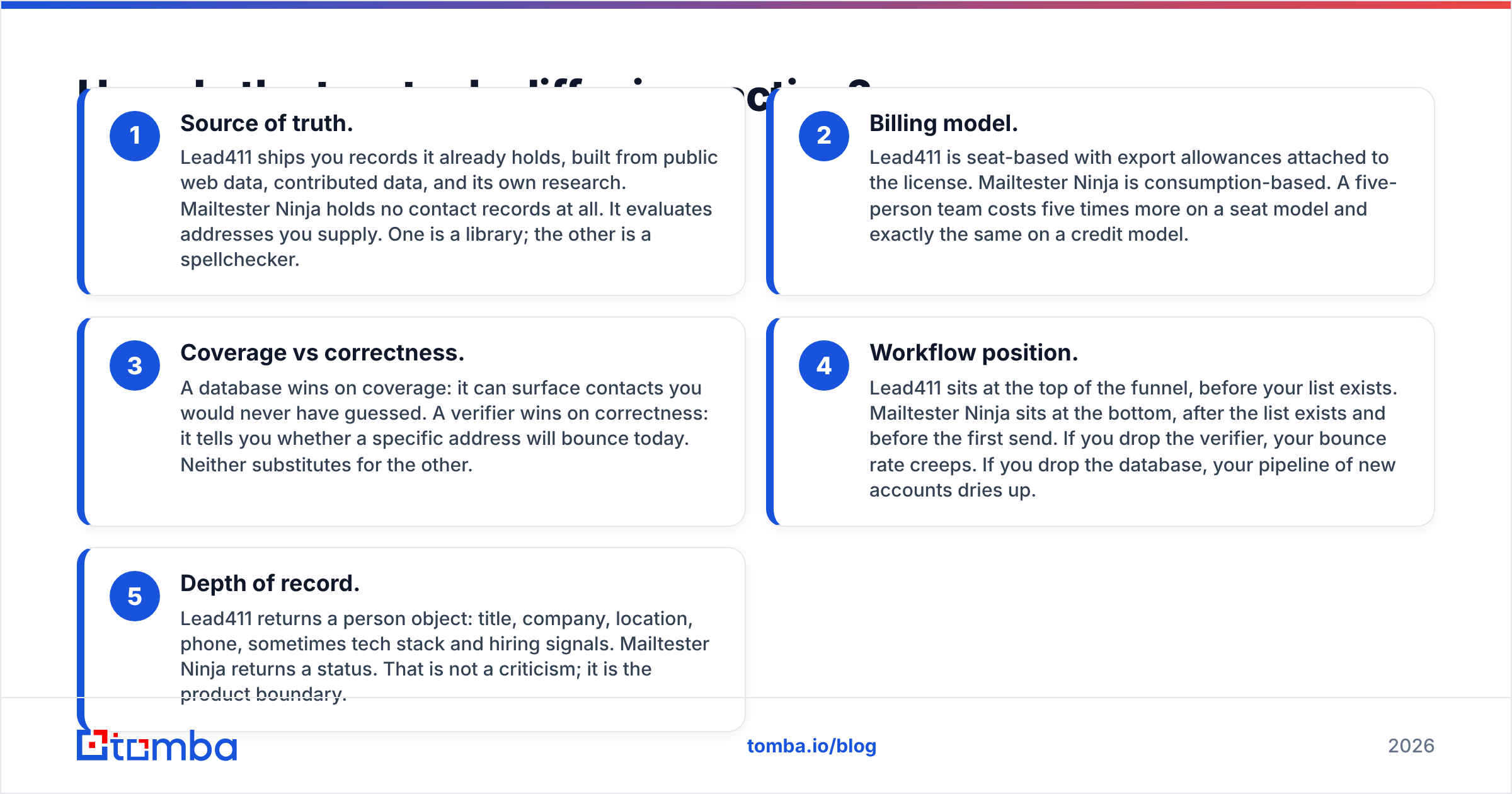
- Source of truth. Lead411 ships you records it already holds, built from public web data, contributed data, and its own research. Mailtester Ninja holds no contact records at all. It evaluates addresses you supply. One is a library; the other is a spellchecker.
- Billing model. Lead411 is seat-based with export allowances attached to the license. Mailtester Ninja is consumption-based. A five-person team costs five times more on a seat model and exactly the same on a credit model.
- Coverage vs correctness. A database wins on coverage: it can surface contacts you would never have guessed. A verifier wins on correctness: it tells you whether a specific address will bounce today. Neither substitutes for the other.
- Workflow position. Lead411 sits at the top of the funnel, before your list exists. Mailtester Ninja sits at the bottom, after the list exists and before the first send. If you drop the verifier, your bounce rate creeps. If you drop the database, your pipeline of new accounts dries up.
- Depth of record. Lead411 returns a person object: title, company, location, phone, sometimes tech stack and hiring signals. Mailtester Ninja returns a status. That is not a criticism; it is the product boundary.

Keep that split in mind while reading every table below. A feature Lead411 "has" that Mailtester Ninja "lacks" is usually not a gap. It is a category difference.
Which one has better data accuracy?#
Different definitions of accuracy apply, which is why vendor-published numbers rarely settle the argument.
Lead411 markets accuracy on its contact records: is this person still at this company, is the title current, is the direct dial real. That kind of accuracy decays with time. B2B contact data goes stale at roughly 25 to 30 percent per year in most industry estimates, driven by job changes and company churn, so any database's real-world hit rate depends heavily on how recently a given record was touched.
Mailtester Ninja markets accuracy on its verdicts: when it says "valid," does mail actually land. That is a narrower and more testable claim. The hard part for any verifier is catch-all domains, where the receiving server accepts everything at the SMTP layer and reveals nothing. Every verifier handles catch-alls differently, and that single behaviour explains most of the disagreement when you run the same list through two services. If you are evaluating verifiers, build a control list of 200 addresses you know the truth about, including at least 50 on catch-all domains, and score the tools on that. Vendor accuracy pages are marketing; your control list is evidence.

Two practical notes. First, a database that returns a "verified" email has usually verified it at ingestion, not at export time, so a fresh verification pass before sending is still worth it even when you paid for a premium record. Second, if a large share of your target accounts run catch-all domains (common in enterprise and in Microsoft 365 estates), you need a dedicated catch-all verifier rather than a binary valid/invalid check, or you will discard reachable prospects.
Lead411 vs Mailtester Ninja: the full comparison#
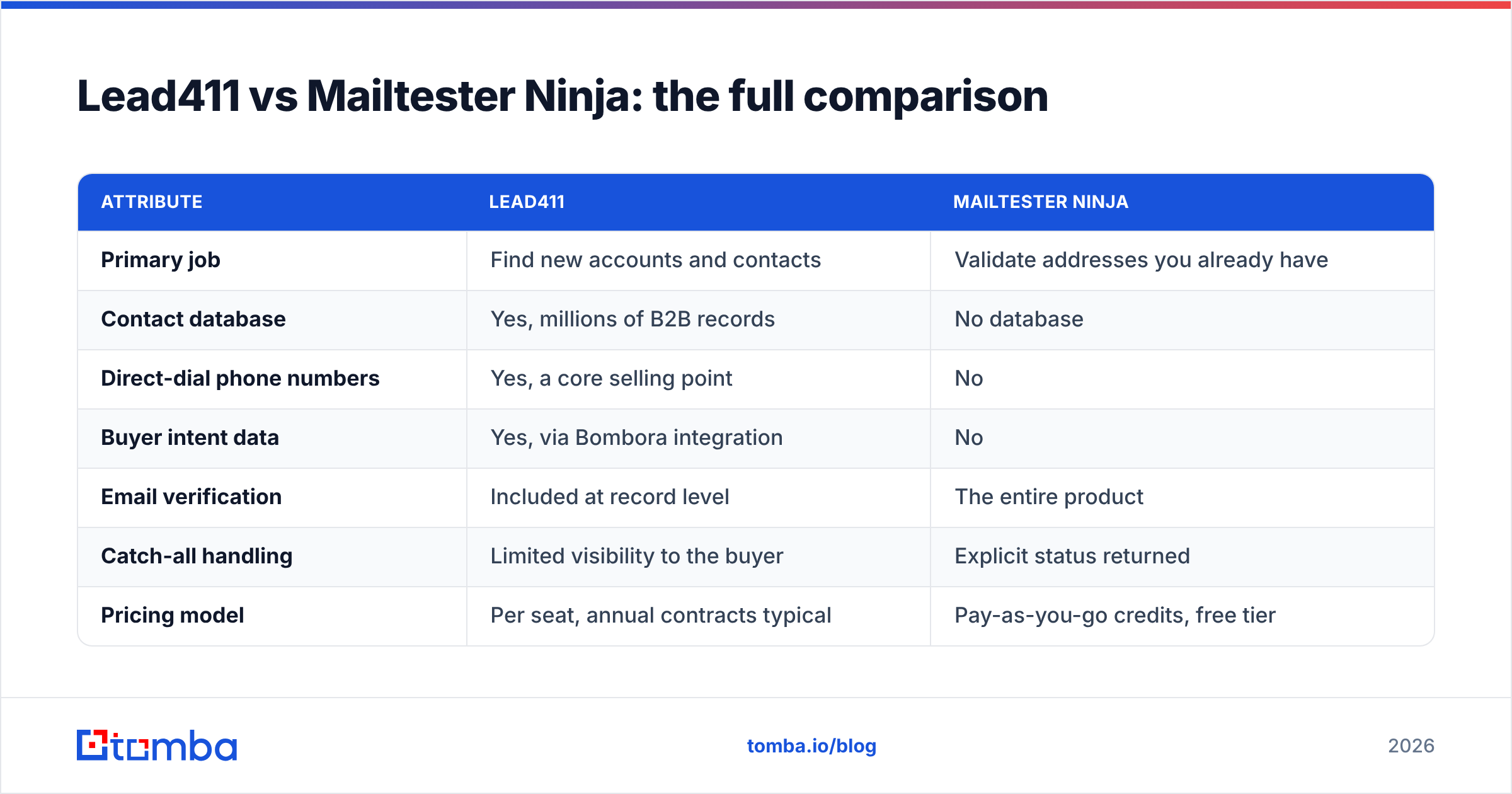
Here is the side-by-side on the attributes that actually change a buying decision.
| Attribute | Lead411 | Mailtester Ninja |
|---|---|---|
| Primary job | Find new accounts and contacts | Validate addresses you already have |
| Contact database | Yes, millions of B2B records | No database |
| Direct-dial phone numbers | Yes, a core selling point | No |
| Buyer intent data | Yes, via Bombora integration | No |
| Email verification | Included at record level | The entire product |
| Catch-all handling | Limited visibility to the buyer | Explicit status returned |
| Pricing model | Per seat, annual contracts typical | Pay-as-you-go credits, free tier |
| Typical entry cost | Around $99 per user per month on annual billing | Cents-per-thousand territory |
| API access | Available, usually on higher tiers | Available, central to the product |
| Best for | AE and SDR teams sourcing net-new | Ops, agencies, anyone cleaning lists |
| Weakest point | Cost scales with headcount, not usage | Gives you no new contacts |

Pricing on both sides moves, and Lead411 in particular quotes by plan, seat count, and term length. Treat the numbers above as orientation and confirm on each vendor's current pricing page before budgeting. Independent review platforms like G2 are useful for sanity-checking whether the list price matches what buyers actually pay, since discounting on annual sales-intelligence contracts is common.
What does each one really cost at your volume?#
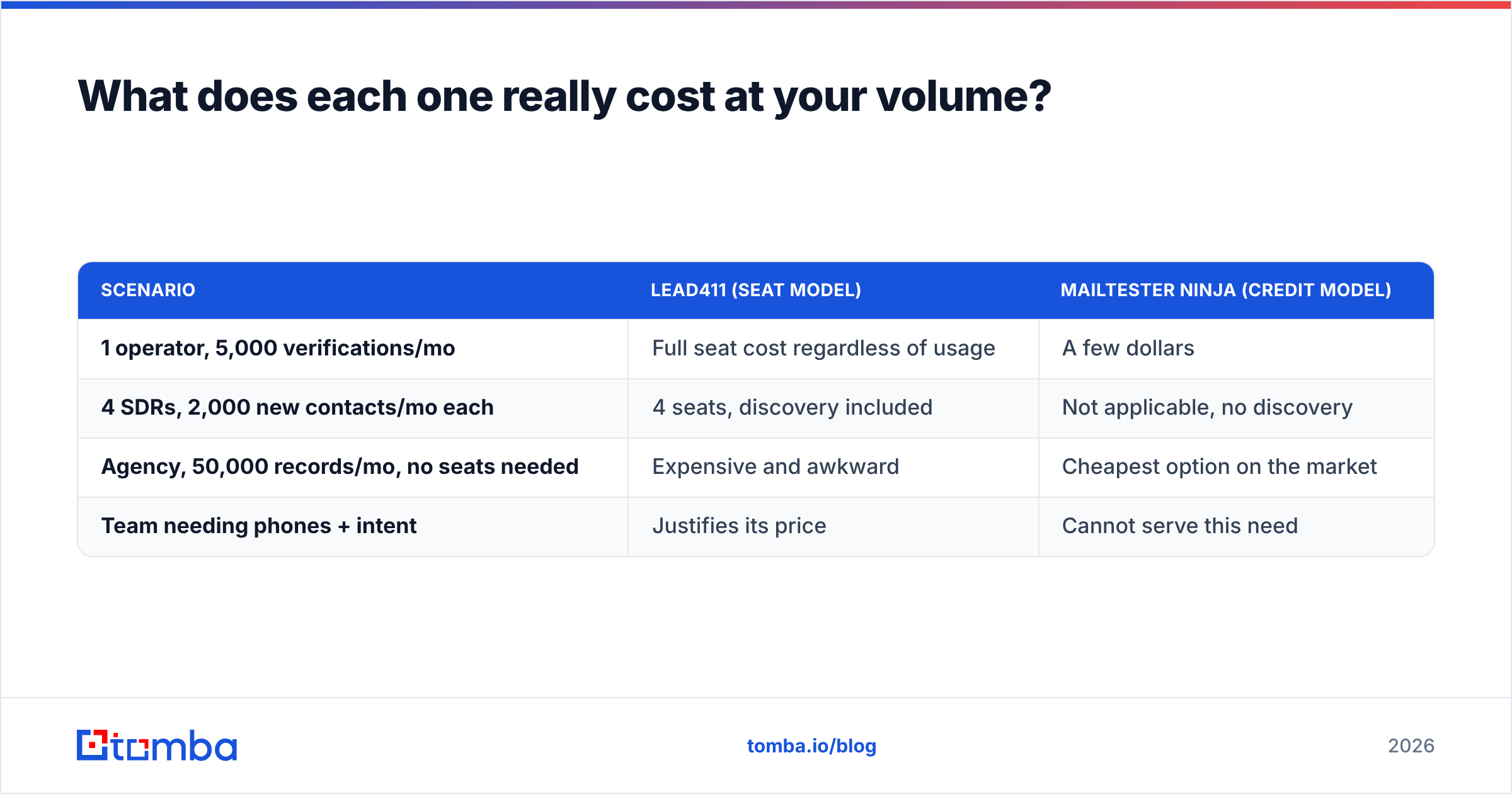
Run the arithmetic on your own numbers, because the two models cross over at a predictable point.
| Scenario | Lead411 (seat model) | Mailtester Ninja (credit model) |
|---|---|---|
| 1 operator, 5,000 verifications/mo | Full seat cost regardless of usage | A few dollars |
| 4 SDRs, 2,000 new contacts/mo each | 4 seats, discovery included | Not applicable, no discovery |
| Agency, 50,000 records/mo, no seats needed | Expensive and awkward | Cheapest option on the market |
| Team needing phones + intent | Justifies its price | Cannot serve this need |
The pattern: seat-based pricing punishes low-usage seats and rewards heavy individual users. Credit-based pricing punishes nobody but buys you less. An agency verifying 50,000 addresses a month for six clients would burn thousands of dollars on a per-seat contract for a job a verifier does for pocket change. A four-person SDR team sourcing net-new accounts every day gets real value from a seat license and would get nothing from a verifier alone.
The trap is buying the expensive tool for the cheap job. Plenty of teams pay for a full sales-intelligence license and then use it mostly to look up emails one at a time, which is a per-lookup cost of absurd proportions once you divide the annual contract by actual usage. Audit your export logs before you renew.
Do you need both tools, or is there a third option?#
Most teams that seriously compare Lead411 vs Mailtester Ninja end up running both, and then discover the seams.
The seams look like this. Your database returns a contact. You export to CSV. You push the CSV to the verifier. You wait. You re-import the cleaned file. You reconcile the rows that dropped. You do this again next week. Every handoff is a place where records get lost, duplicated, or silently stale, and every handoff is human time that does not scale with list size.

The alternative is collapsing find-and-verify into a single call. That is the design most modern stacks converge on: you pass a name and a domain, you get back an address with a confidence score and a verification status attached, and nothing touches a spreadsheet in between. Tomba works this way. The email finder resolves the address, the email verifier confirms deliverability, and the Tomba API exposes both so your enrichment runs inside your CRM or your workflow tool instead of on someone's desktop.
Where that matters most:
- Enrichment on form fill. A lead submits a work email; you enrich the record and verify in the same request, before it hits the CRM.
- CRM hygiene sweeps. Re-verify an existing contact table on a schedule rather than exporting it to a third-party dashboard.
- Scraped or event lists. You have names and companies but no addresses. A verifier cannot help you. A database may not have those specific people. Pattern-based finding plus verification does.
- Multi-seat teams that only need lookups. Usage-based pricing means a nine-person team that runs 3,000 lookups a month pays for 3,000 lookups, not nine licenses.
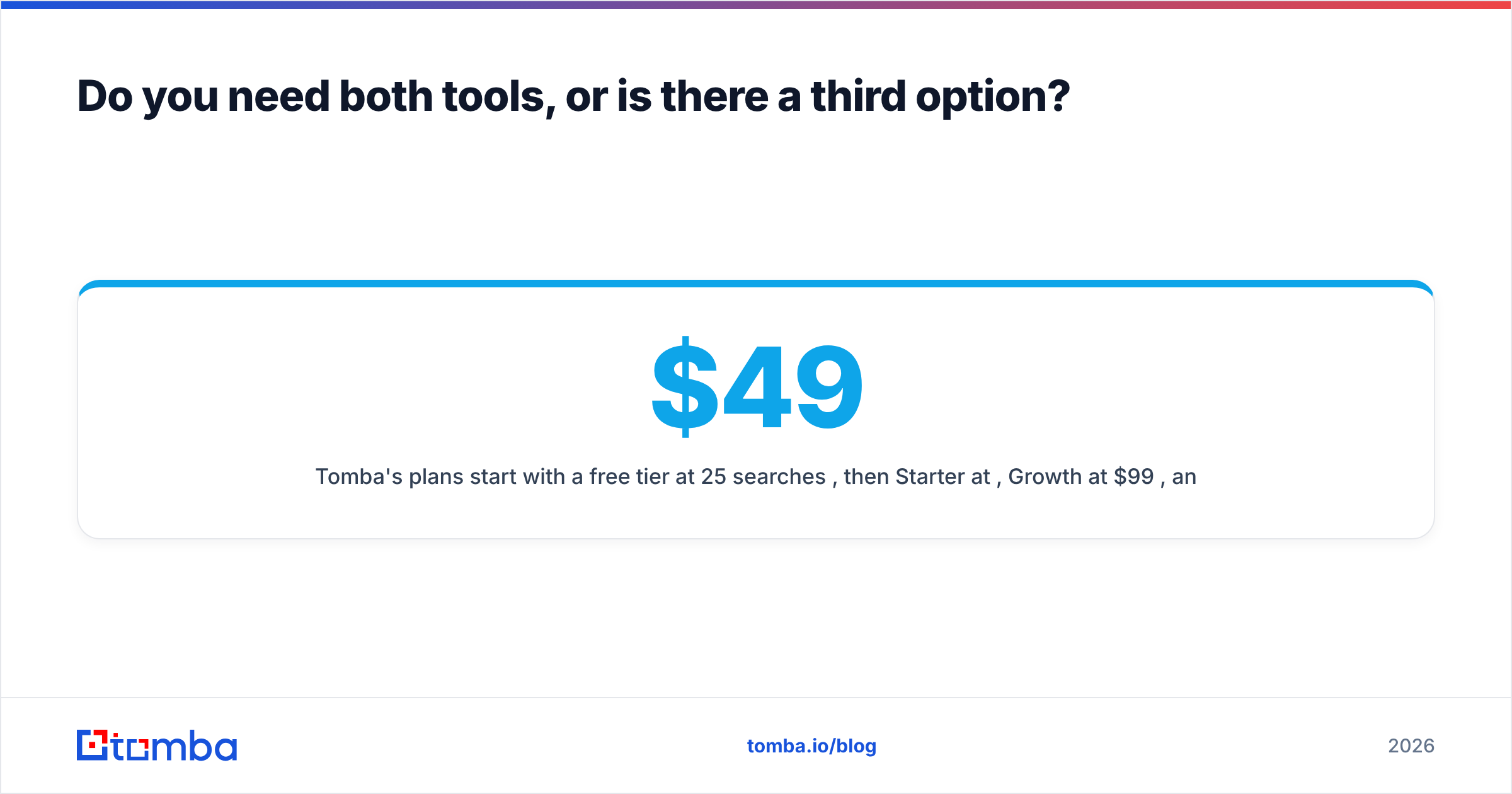
Tomba's plans start with a free tier at 25 searches per month, then Starter at $49/mo, Growth at $99/mo, and Pro at $249/mo, with Enterprise quoted custom. Full details are on the Tomba pricing page. The comparison worth making is not "Tomba is cheaper than Lead411," because they are not the same product. It is: what share of your Lead411 spend is going toward discovery you genuinely need, versus lookups you could run for a fraction of the price?
Which should you choose?#
Match the tool to the constraint you actually have.
Choose Lead411 if your bottleneck is not knowing who to contact. You need a searchable universe of companies and people, direct dials matter to your motion, and intent data would change which accounts your reps touch this week. Accept the seat model and make sure every seat is used, because idle seats are the fastest way to a bad renewal conversation.
Choose Mailtester Ninja if your bottleneck is bounce rate. You have lists from scraping, events, partners, or an aging CRM, and you need them clean before they touch a sending domain you have spent months warming. It does one thing, it does it cheaply, and there is no reason to overpay for that job.
Choose an API-first finder plus verifier if your bottleneck is the workflow between the two. You want one billable action instead of two tools and a CSV shuttle, you want usage-based costs, and you want enrichment running inside systems your team already lives in.
Run more than one if your volumes justify it. There is no prize for tool minimalism. A database for discovery, a cheap verifier for bulk hygiene, and an API for real-time enrichment is a perfectly sane three-part stack, as long as you can name what each one is for.
One last check before you buy: ask each vendor where the data comes from and how often it is refreshed. Sales intelligence buyers rarely ask, and the answer separates serious providers from resellers. Tomba publishes its data sources for exactly this reason, and you should expect the same transparency from anyone asking for an annual commitment.
Ready to cut the CSV shuttle out of your stack?#
If your team is paying seat prices for what is mostly email lookup, start with the Tomba Email Finder. Search by domain, name, or company, get a confidence score and verification status on every result, and wire the same logic into your CRM through the API when you are ready to automate it. The free tier gives you 25 searches a month to test against your own control list, which is the only benchmark that should decide this for you.
Related guides#
// get started
Find, verify and enrich your first contacts today
Start on the free plan with 25 searches a month, then scale when your team is ready.
Free plan · No credit card required · GDPR & CCPA
// about the author