Lead411 vs VerifyEmailAddress.com: Which Tool Wins in 2026?
One is a four-figure sales intelligence suite. The other is a free box you paste a single address into. Here is where Lead411 vs VerifyEmailAddress.com actually overlap, where they don't, and which one belongs in your outbound stack.
TL;DR
Lead411 vs VerifyEmailAddress.com is not a fair fight, and that is the point. One tool builds your list. The other checks a single address you already have.
- They are not really competitors. Lead411 is a paid B2B sales intelligence database that finds contacts: emails, direct dials, intent signals. VerifyEmailAddress.com is a free single-address checker that tests an email you already have.
- Need net-new prospects? Only a database can do that job. The free checker has nothing to search.
- Need one quick check before you hit send? The free page does it in three seconds. A four-figure annual contract for that is overkill.
- The real gap sits in the middle. Bulk verification, catch-all handling, and API access. Neither tool covers all three well.
- Budget check. Lead411 publishes seats near $99/user/month on annual billing. A finder-plus-verifier stack like Tomba starts at $49/mo with a free tier, and free single checks stay free everywhere.
Lead411 vs VerifyEmailAddress.com: what does each tool do?#
Think of it like building a guest list for a dinner party. Lead411 is the agency that hands you 5,000 names, phone numbers, and addresses that match your ideal guest. VerifyEmailAddress.com is the doorman who tells you whether one address on that list is a real house. You need both jobs done. They are not the same purchase.
Here is the honest breakdown of what each one is built to do:
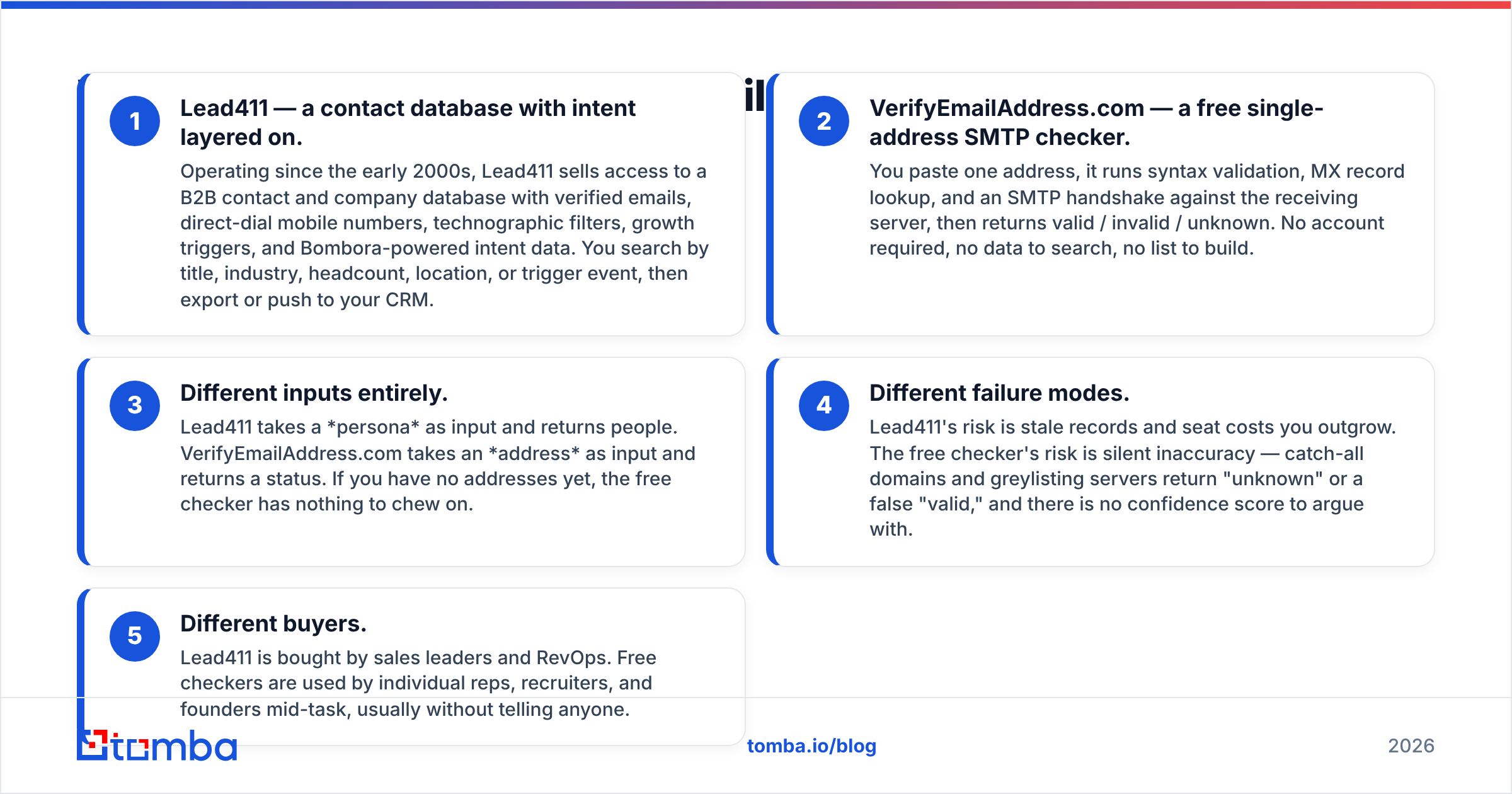
- Lead411 — a contact database with intent layered on. Lead411 has been running since the early 2000s. It sells access to a B2B contact and company database with verified emails, direct-dial mobile numbers, technographic filters, growth triggers, and Bombora-powered intent data. You search by title, industry, headcount, location, or trigger event. Then you export the list or push it to your CRM.
- VerifyEmailAddress.com — a free single-address SMTP checker. You paste one address. It runs syntax validation, an MX record lookup, and an SMTP handshake against the receiving server. Then it returns valid, invalid, or unknown. No account, no database to search, no list to build.
Three more differences show up once you put Lead411 vs VerifyEmailAddress.com side by side:
- The inputs differ. Lead411 takes a persona and returns people. VerifyEmailAddress.com takes an address and returns a status. If you have no addresses yet, the free checker has nothing to chew on.
- The failure modes differ. Lead411 risks stale records and seat costs you outgrow. The free checker risks quiet errors instead. Catch-all domains and greylisting servers return "unknown" or a false "valid," and there is no confidence score to argue with.
- The buyers differ. Sales leaders and RevOps buy Lead411. Reps, recruiters, and founders use free checkers mid-task, usually without telling anyone.

That framing matters. Most "Lead411 vs VerifyEmailAddress.com" searches come from someone asking whether a paid platform is worth it when a free tool seems to do "the email thing." It doesn't. They solve adjacent problems.
Lead411 vs VerifyEmailAddress.com: the head-to-head table#

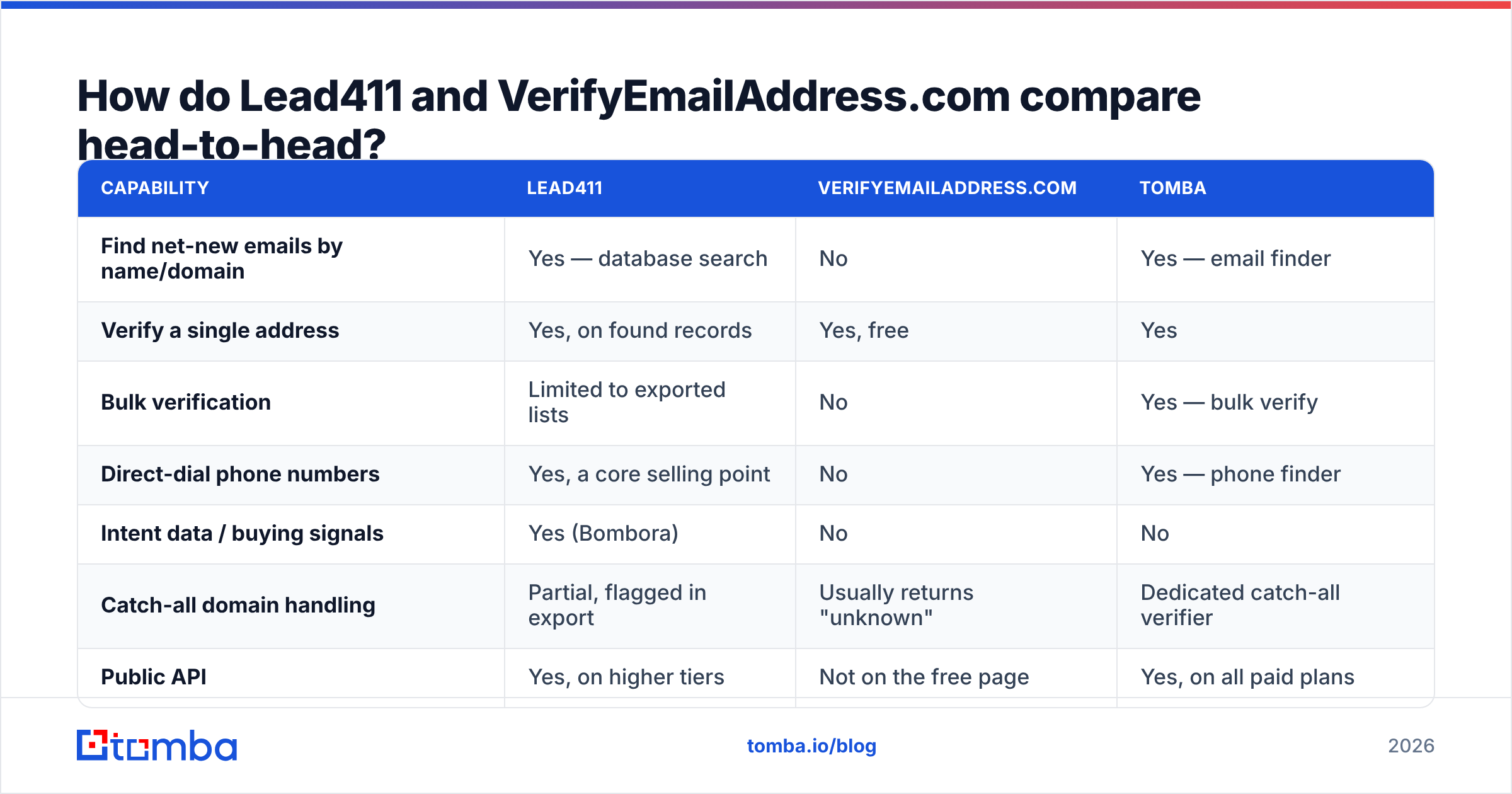
| Capability | Lead411 | VerifyEmailAddress.com | Tomba |
|---|---|---|---|
| Find net-new emails by name/domain | Yes — database search | No | Yes — email finder |
| Verify a single address | Yes, on found records | Yes, free | Yes |
| Bulk verification | Limited to exported lists | No | Yes — bulk verify |
| Direct-dial phone numbers | Yes, a core selling point | No | Yes — phone finder |
| Intent data / buying signals | Yes (Bombora) | No | No |
| Catch-all domain handling | Partial, flagged in export | Usually returns "unknown" | Dedicated catch-all verifier |
| Public API | Yes, on higher tiers | Not on the free page | Yes, on all paid plans |
| CRM integrations | Salesforce, HubSpot, Pipedrive, more | None | HubSpot, Salesforce, Pipedrive, Zapier |
| Free tier | Trial only | Entirely free, rate-limited | 25 searches/mo, no card |
| Entry price (2026) | ~$99/user/mo, annual billing | $0 | $49/mo |
Two things jump out of that table. First, the free checker's column is mostly empty. That is not a criticism; that is the product. Second, Lead411's column is nearly full, and you pay for the whole column whether you use the intent data or not.
Always confirm current numbers on the vendor's own pricing page before you budget. Sales intelligence pricing moves, gets bundled, and is often quote-only above the entry tier. Peer reviews on G2 are the fastest way to check whether the seat cost lands well for teams your size.
Which one is more accurate at email validation?#

Accuracy in Lead411 vs VerifyEmailAddress.com is really two questions, and people keep merging them.
Question one: is this address real? Both tools run the same basic checks: syntax, domain MX records, and an SMTP mailbox probe. On a normal Google Workspace or Microsoft 365 domain that answers honestly, the free checker and the paid platform will usually agree. The free tool is not worse at this narrow task.
Question two: is this the right person, and is the address current? This is where a database earns its money. Lead411 refreshes its records, adds contributor data, and runs re-verification passes. So a record carries provenance: this person, this title, this company, last confirmed on this date. VerifyEmailAddress.com has no idea who owns the mailbox it just pinged. It confirms that a mailbox exists. It cannot tell you the VP of Engineering left four months ago.
Both tools stumble on catch-all domains. Those servers accept mail for any address at the domain. An SMTP probe cannot tell a real mailbox from a wildcard, so you get "unknown," "accept-all," or an optimistic "valid" that bounces a week later.
Free checkers usually shrug at that. Paid platforms flag it and leave the call to you. Purpose-built verification layers go one step further. They apply pattern and engagement signals to resolve some of those unknowns, which is what a catch-all finder is for.
A practical accuracy routine, whichever tool you use:
- Treat any record older than 90 days as suspect. People change jobs.
- Never send to a bulk list without a fresh verification pass, even when the source claims it is verified.
- Move "unknown" and "catch-all" results into a separate, slower sequence. Keep them out of your main send.
- Watch bounce rate per source, not in total. One bad supplier hides inside a good average.
What does each one cost in 2026?#
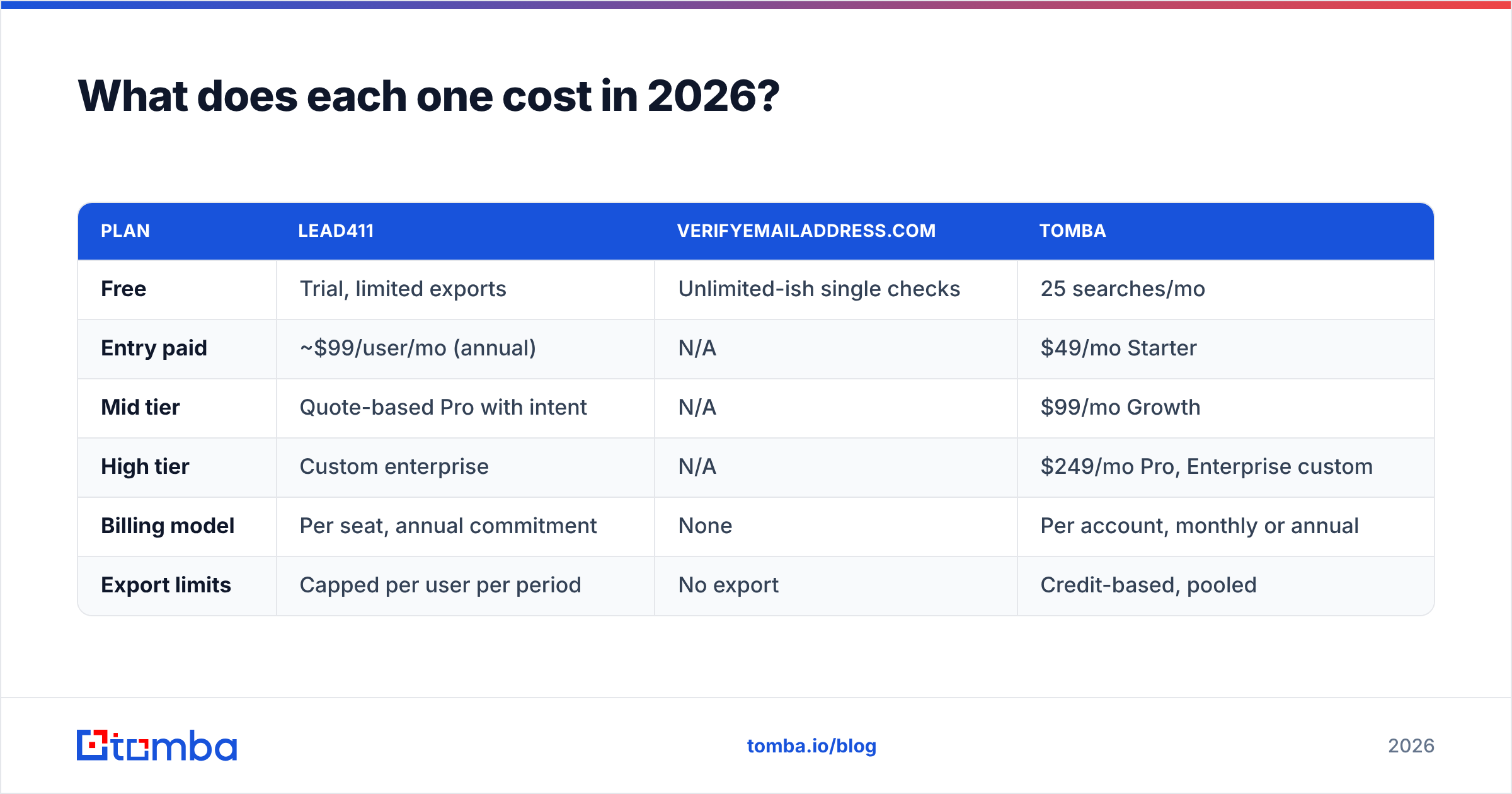
| Plan | Lead411 | VerifyEmailAddress.com | Tomba |
|---|---|---|---|
| Free | Trial, limited exports | Unlimited-ish single checks | 25 searches/mo |
| Entry paid | ~$99/user/mo (annual) | N/A | $49/mo Starter |
| Mid tier | Quote-based Pro with intent | N/A | $99/mo Growth |
| High tier | Custom enterprise | N/A | $249/mo Pro, Enterprise custom |
| Billing model | Per seat, annual commitment | None | Per account, monthly or annual |
| Export limits | Capped per user per period | No export | Credit-based, pooled |
Price is where Lead411 vs VerifyEmailAddress.com stops being a close call. But the structure matters more than the headline number. Lead411 charges per seat. Five reps means roughly five times the bill, even when only two of them prospect seriously.
Credit-pooled tools charge for what you use instead. A small team with one heavy user and four light ones pays once. Run your own seat math before you compare sticker prices — the Tomba pricing page is a pooled-credit reference point.
And the free checker really does cost zero. That is why it survives. Nobody expenses it, nobody approves it, a rep just uses it.

When should you pick Lead411?#
Pick Lead411 when your bottleneck is who to contact, not whether the address works. Specifically:
- You need direct dials. Mobile numbers are hard to source, and Lead411 leans into them. If your motion is call-first, that alone can pay for the seat.
- Intent data changes your sequencing. If your team really works Bombora surge topics, you are buying a workflow, not a list.
- You sell into North American mid-market. That is where the database is strongest, by most user accounts. Coverage outside that profile deserves a trial before you sign an annual deal.
- You want one vendor and one invoice. Consolidation has real operational value, even at a premium.
Skip it in three cases: you are a two-person team sending 100 targeted emails a month, your ICP is international, or you already have your target accounts and only need addresses for known names. That last case is a domain search job, not a database subscription.
When is VerifyEmailAddress.com enough?#
More often than vendors like to admit. It is the right tool when:
- You have a handful of addresses and want a quick gut check before an important send.
- Someone gave you a business card or an email signature and you want to confirm the mailbox exists.
- You are debugging a single bounce and want to see whether the domain even resolves.
- You have zero budget and zero volume.
It stops being enough the moment you have a list. There is no bulk upload, no API, no dedup, no result history, and no way to feed the verdict into your sequencer. Pasting 400 addresses one at a time is not a workflow. It is a punishment. At that point you want a bulk email verifier with an export, plus a free email checker for the odd one-off.
What is the workflow both tools are missing?#
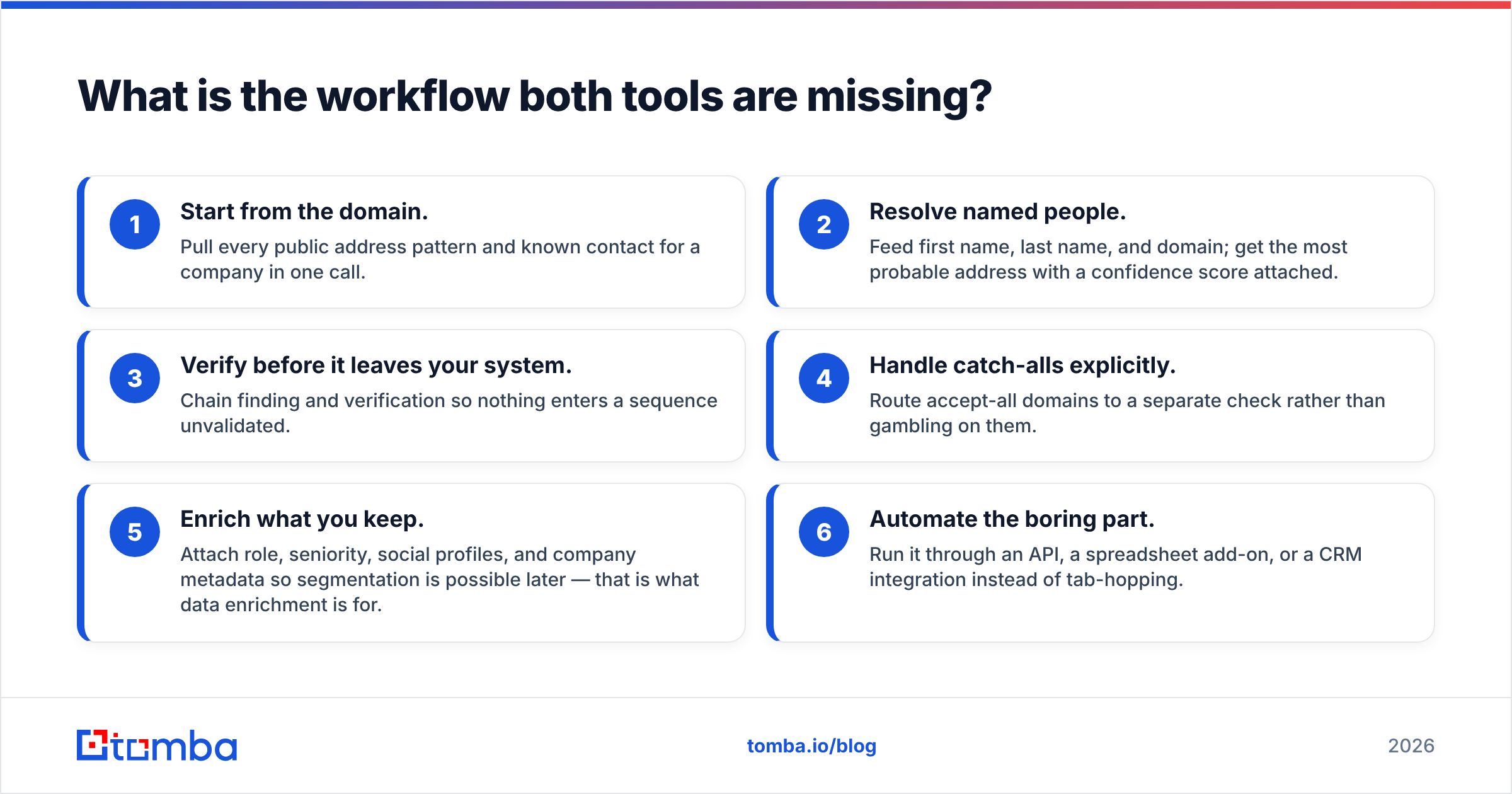
Here is the uncomfortable middle. The Lead411 vs VerifyEmailAddress.com debate hides a third job that neither side sells well. A very common outbound setup looks like this: you already know your target accounts, from a CRM, a conference list, a funding-round scrape, or a partner intro. You do not need intent data. You do not need a 450-million-record database. You need a first name, last name, and domain turned into a verified address, at volume, through an API, without paying per seat.
Neither Lead411 nor a free single-address checker fits that shape. Lead411 oversells it. The free checker undersells it by a mile.
That workflow is the design centre of a focused finder-plus-verifier stack:
- Start from the domain. Pull every public address pattern and known contact for a company in one call.
- Resolve named people. Feed first name, last name, and domain. Get the most probable address with a confidence score attached.
- Verify before it leaves your system. Chain finding and verification so nothing enters a sequence unvalidated.
- Handle catch-alls explicitly. Route accept-all domains to a separate check rather than gambling on them.
- Enrich what you keep. Attach role, seniority, social profiles, and company metadata so you can segment later. That is what data enrichment is for.
- Automate the boring part. Run it through an API, a spreadsheet add-on, or a CRM integration instead of tab-hopping.
Vendors sit at different points on this chain. Lead411 owns steps 1, 2, and 5, with intent on top and a seat-based bill. Free checkers own a sliver of step 3. Peers like BookYourData take another angle again: prepaid, downloadable B2B lists with a per-record guarantee. That suits teams who want to buy data outright rather than subscribe to a search interface. All three are valid answers to different questions.
Lead411 vs VerifyEmailAddress.com: which should you actually buy?#
If you need contacts you don't have yet: Lead411, or a comparable database. The free checker is not an option. It is a different category.
If you need to test one address right now: VerifyEmailAddress.com. Paying $1,200 a year for that would be absurd.
If you need verified addresses for accounts you already know, at volume, via API: neither. You want a dedicated finder and verifier with pooled credits. Keep your $99-per-seat budget for the reps who genuinely need intent data.
The decision gets easier when you stop treating this as a versus and start treating it as a stack. Most healthy outbound teams run a database for discovery, a finder for named-contact resolution, and a verifier as the last gate before send. Trying to collapse all three into one line item is how you end up either overpaying or bouncing.
Lead411 vs VerifyEmailAddress.com FAQ#
Is VerifyEmailAddress.com accurate enough on its own?#
For one address at a time, usually yes. It runs the same syntax, MX, and SMTP checks a paid tool runs. It falls down on catch-all domains, and it falls down on lists, where you get no bulk upload and no confidence score.
Does Lead411 verify emails too?#
Yes, on the records it sells. Verification is bundled into the database. It is not a standalone service for addresses you bring yourself.
Which is cheaper, Lead411 vs VerifyEmailAddress.com?#
The free checker, obviously. It costs nothing. The fairer question is cost per verified, sendable contact. Lead411 starts near $99 per user per month on annual billing, and that bill grows with seats, not with usage.
Can I use both together?#
Yes, and plenty of teams do. Use a database to build the list. Run a final verification pass before anything enters a sequence. Add a finder with an API when you already know the names you want to reach.
Start with the part you can test for free#
If your bottleneck is turning known names and domains into verified, sendable addresses — not buying another seat-based intelligence suite — start with the Tomba Email Finder. The free tier gives you 25 searches a month with no card. Paid plans start at $49/mo with pooled credits instead of per-seat billing. Finding, verification, and catch-all checks all run through the same API, so nothing reaches your sequencer unvalidated. Run 25 of your hardest contacts through it, compare the hit rate against whatever you pay for today, and let the bounce rate decide.
Related guides#
// get started
Find, verify and enrich your first contacts today
Start on the free plan with 25 searches a month, then scale when your team is ready.
Free plan · No credit card required · GDPR & CCPA
// about the author