Lead411 vs VerifyEmail.io: Which B2B Email Tool Wins?
Lead411 sells you contacts. VerifyEmail.io tells you which ones are real. Here's an honest look at where each one earns its budget line — and where buying both is the wrong call.
Lead411 vs VerifyEmail.io is the wrong fight. One builds your list. The other keeps it clean. Here's how to tell which one you actually need.
TL;DR
- Lead411 and VerifyEmail.io are not really competitors. Lead411 is a B2B contact and intent database you buy seats for; VerifyEmail.io is a verification API you buy credits for.
- If you need net-new contacts with job titles, funding signals and direct dials, Lead411 is the relevant tool. If you already have addresses and need bounce protection, VerifyEmail.io is the relevant tool.
- Lead411 pricing is seat-based and annual-contract-shaped (roughly $99/user/month on published plans, enterprise quoted). VerifyEmail.io is pay-per-verification, fractions of a cent at volume.
- Buying both means paying twice for overlapping work — most database vendors already run some validation, and most verifiers can't find you a single new contact.
- If your actual job is "find the right person's email and know it's deliverable before I send," a finder-plus-verifier stack like Tomba (free tier, then $49/mo) collapses the two line items into one.
What is Lead411?#
Lead411 is a B2B sales intelligence platform: a searchable database of companies and contacts, wrapped in filters for title, industry, headcount, revenue, technology stack and location. On top of that sit buyer intent signals and "growth intent" triggers like recent funding rounds and hiring spikes.
The pitch is unlimited-ish access. Lead411's headline plans advertise unlimited contact and company views within fair-use limits. That is a real differentiator. Credit-metered rivals make you ration exports at the end of the month. You get emails, direct dial phone numbers, LinkedIn URLs, employee counts and firmographics, and you push them into your CRM or sequencer.
What Lead411 is not: a deliverability tool. It ships records with a claimed verification status. But once a record leaves the platform and sits in your CSV for six weeks, that status is a historical claim, not a live check. That gap is exactly the one verification vendors sell into.
Who it fits: SDR teams and demand-gen marketers. They need volume of net-new accounts and contacts, and they care about intent timing more than per-record cost.
What is VerifyEmail.io?#
VerifyEmail.io sits at the opposite end of the pipeline. It takes an email address you already have and tells you whether sending to it is safe. Syntax check, domain and MX record lookup, disposable-domain detection, role-account flagging (info@, sales@, support@). It also runs an SMTP-level probe that asks the receiving server whether the inbox exists.
You use it in three places. Cleaning a purchased or scraped list before import. Validating form submissions in real time via API, so junk never enters your CRM. Re-validating a dormant segment before you reactivate it.
The output is a status — valid, invalid, catch-all/accept-all, unknown, disposable, role. Your job is to decide which buckets you send to. Most teams send to valid, drop invalid and disposable, and make a judgment call on catch-all.
Who it fits: anyone with an existing list and a bounce rate problem. Which, at some point, is everyone running cold outbound.
Lead411 vs VerifyEmail.io: are they even competitors?#
Short answer: no. Framing Lead411 vs VerifyEmail.io as a head-to-head is the most common mistake in this comparison.
Think of it like buying a car versus buying insurance. Lead411 is the car — it gets you somewhere you couldn't otherwise go. VerifyEmail.io is the insurance — it doesn't move you an inch, but it stops one bad day from wrecking the whole thing. Asking "which is better" is a category error. Asking "which do I need right now, and do I need both" is the real question.
Here's how the two map to the actual stages of an outbound motion:
- Sourcing — who should I contact? Lead411 owns this. Filter by ICP, pull the account list, pull the people. VerifyEmail.io has no database to search.
- Contact discovery — what's their email? Lead411 owns this too. An email finder or domain search does the same job without the seat license.
- Validation — will this address bounce? VerifyEmail.io owns this. Lead411 ships a status flag. A live check at send time is a stronger guarantee.
- Enrichment — what else do I know? Lead411 is strong here: firmographics, intent, tech stack. VerifyEmail.io returns deliverability data only.
- Ongoing hygiene — is my CRM rotting? VerifyEmail.io owns this. B2B data decays 2-2.5% a month, so a March clean is stale by September.
- Cost model — how do I get billed? Lead411 bills per seat per year. VerifyEmail.io bills per address checked. Not substitutable.
If you only take one thing from this post: the overlap between these two products is roughly 5%, and that 5% is the verification flag Lead411 attaches to its records.

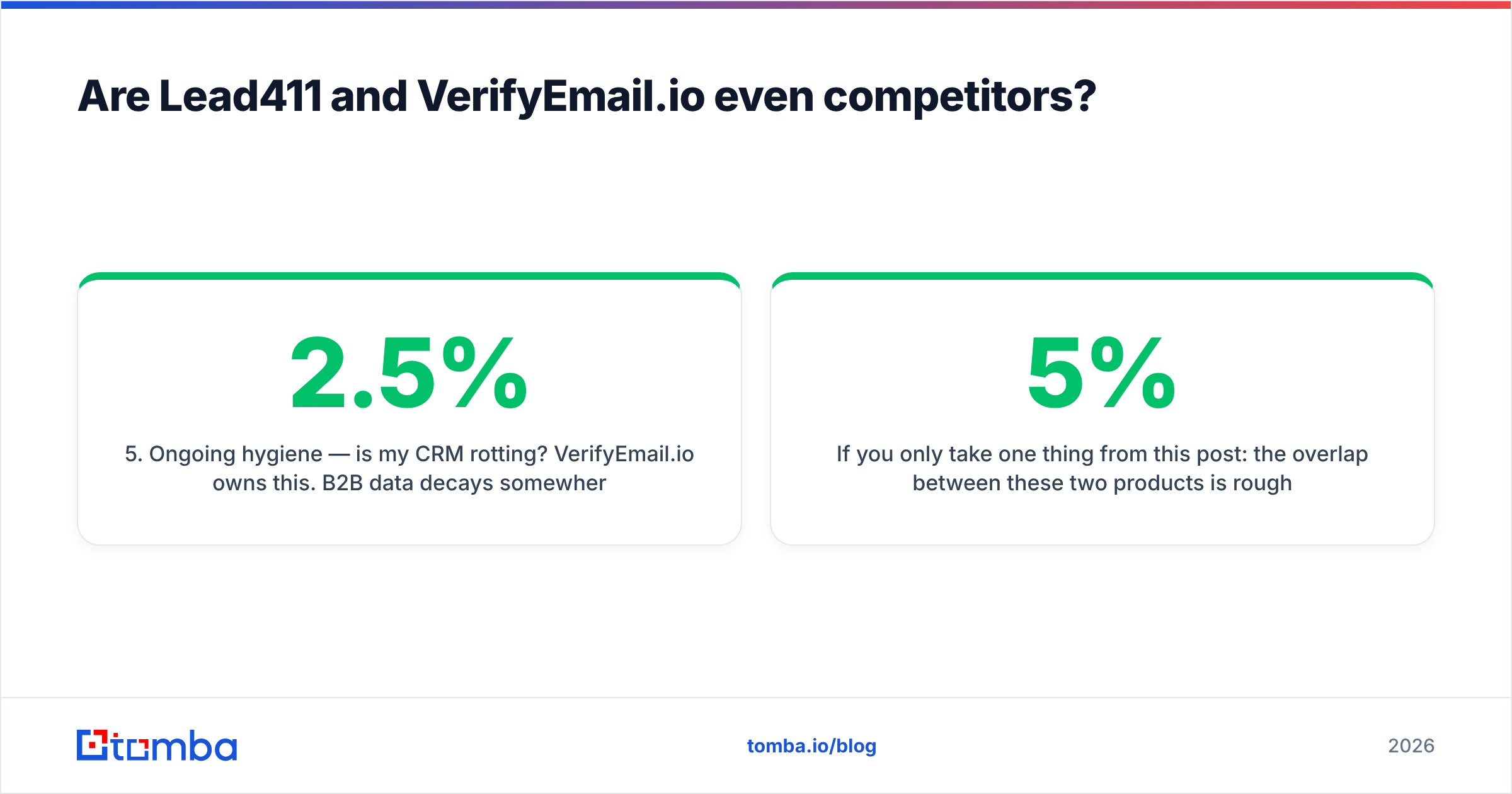
Lead411 vs VerifyEmail.io: feature-by-feature comparison#
| Capability | Lead411 | VerifyEmail.io | Tomba |
|---|---|---|---|
| Searchable B2B contact database | Yes — core product | No | Yes (B2B database) |
| Find email from name + domain | Yes, via record lookup | No | Yes |
| Real-time SMTP verification | Partial (status flag on record) | Yes — core product | Yes |
| Catch-all domain handling | Flagged, limited resolution | Flagged as accept-all | Dedicated catch-all verifier |
| Direct dial phone numbers | Yes | No | Yes (phone finder) |
| Buyer intent / hiring signals | Yes — key differentiator | No | No |
| Bulk list processing | Export-based | Yes, file + API | Yes (bulk email finder) |
| Public API | Yes, higher tiers | Yes — core delivery method | Yes (Tomba API) |
| Chrome extension | Yes | No | Yes |
| Free entry point | Trial only | Limited free credits | 25 searches/mo, no card |
| Billing model | Per seat, annual | Per verification credit | Per search, monthly plans |
The pattern is obvious once it's in a grid. Lead411's column is full in the sourcing rows and thin in the hygiene rows. VerifyEmail.io's column is the mirror image. Neither column is complete on its own. Teams running both end up with two contracts, two dashboards and a CSV shuttle between them.

Which one is more accurate — and is that even the same question?#
Accuracy means two different things here. Conflating them is how teams end up disappointed.
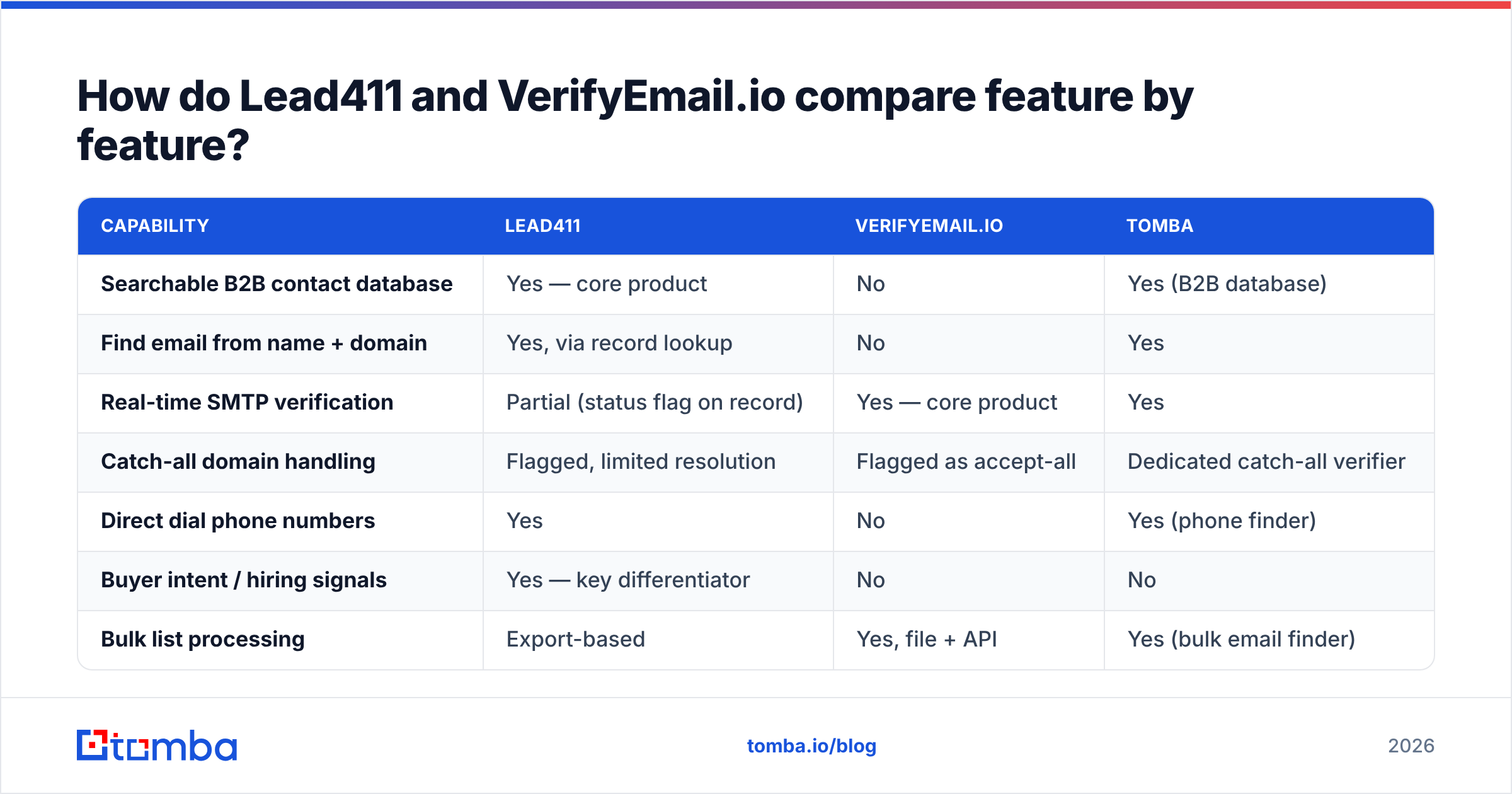
Lead411's accuracy question is "is this the right person, and is this address theirs?" That's a coverage-and-freshness problem. A database can be 95% deliverable and still be wrong for you. Half the contacts may have left the company. Or your ICP is a segment the vendor under-indexes — non-US mid-market, say, or engineering titles at sub-50-person companies. Lead411 reviews well on North American coverage and on the intent layer. Independent reviews on G2 tend to flag international coverage and contract flexibility as the softer spots.
VerifyEmail.io's accuracy question is "will this specific address accept mail today?" That's a narrower, more testable claim. Modern verifiers cluster tightly, and most land in the 95-99% range on clean, non-catch-all domains. The differentiation happens in the ugly cases: catch-all domains, greylisting servers, Microsoft 365 tenants that accept everything at SMTP time and bounce later. A verifier that returns "unknown" on 15% of your list is technically honest but operationally useless. You still have to decide what to do with those addresses.

That catch-all bucket deserves its own paragraph, because it's where most real-world bounce damage hides. A catch-all domain accepts every address at the SMTP handshake, so a basic verifier can't tell sarah.chen@acme.com from asdfgh@acme.com. Plain verifiers mark both accept-all and hand the problem back to you. Tools with a dedicated catch-all finder go further. They cross-reference known patterns and source evidence to say which specific mailbox is real. If a meaningful chunk of your ICP runs catch-all — common in enterprise and in anything running an email security gateway — this single capability matters more than a half-point difference in headline accuracy.

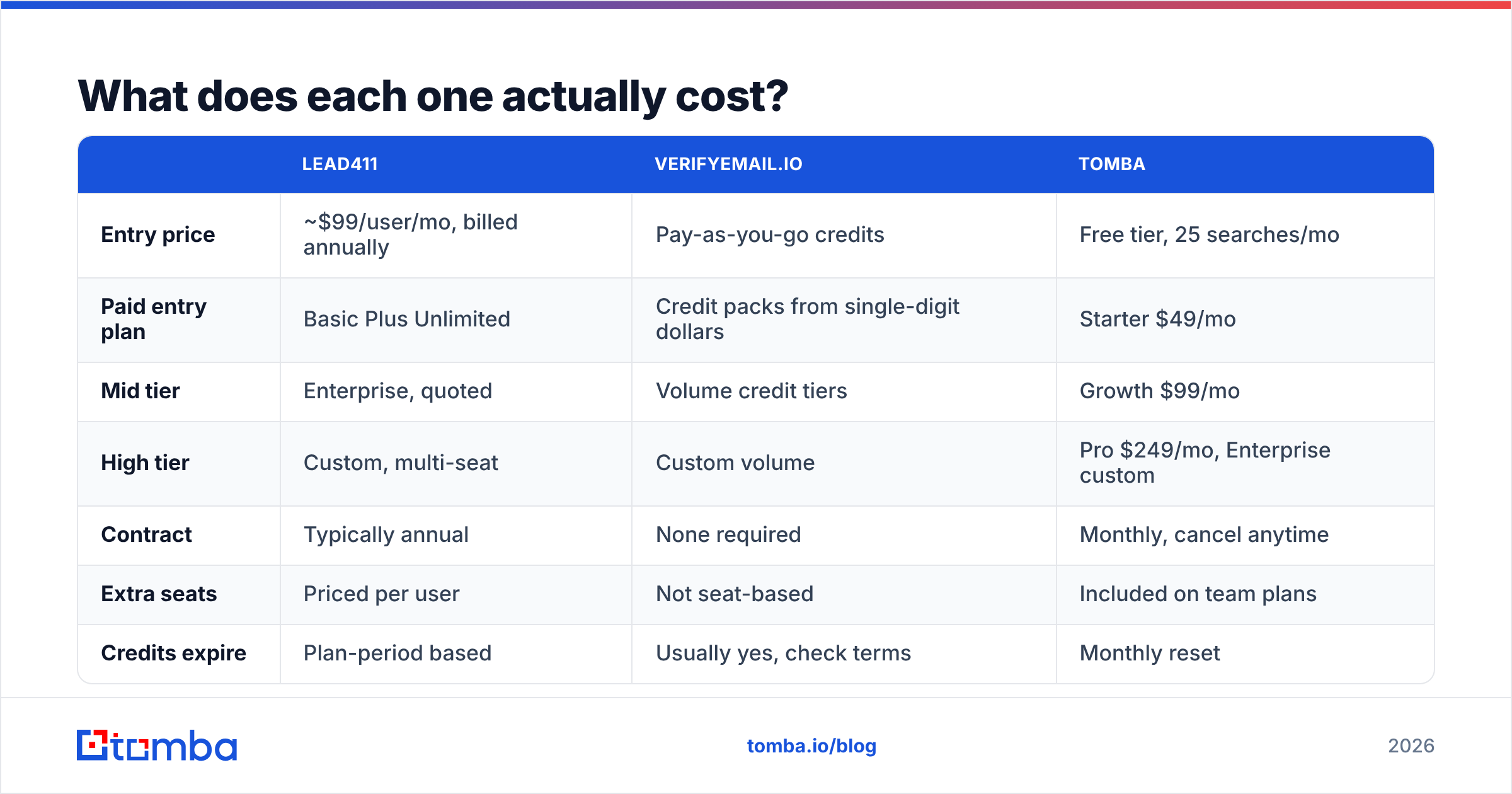
What does each one actually cost?#
| Lead411 | VerifyEmail.io | Tomba | |
|---|---|---|---|
| Entry price | ~$99/user/mo, billed annually | Pay-as-you-go credits | Free tier, 25 searches/mo |
| Paid entry plan | Basic Plus Unlimited | Credit packs from single-digit dollars | Starter $49/mo |
| Mid tier | Enterprise, quoted | Volume credit tiers | Growth $99/mo |
| High tier | Custom, multi-seat | Custom volume | Pro $249/mo, Enterprise custom |
| Contract | Typically annual | None required | Monthly, cancel anytime |
| Extra seats | Priced per user | Not seat-based | Included on team plans |
| Credits expire | Plan-period based | Usually yes, check terms | Monthly reset |
Check both vendors' current pages before budgeting. Published SaaS pricing moves, and Lead411's enterprise tiers are quote-driven by design. Tomba's numbers are fixed and public on the Tomba pricing page.
The cost comparison that matters isn't sticker price, it's cost per usable contact. Run this math before you sign anything:
- Take the annual Lead411 contract, divide by the number of contacts you'll realistically export and work in a year. Not the unlimited theoretical number — the number your reps can actually sequence.
- Add verification cost on top if you're double-checking exports.
- Compare against a per-search model where you only pay for lookups you actually run.
Teams with two or three SDRs burning through 500-1,000 contacts a month often find the seat-based unlimited model doesn't pay for itself. Teams with eight reps hammering a large TAM usually find it does. The break-even is real and it's worth ten minutes in a spreadsheet.
When should you choose Lead411?#
Pick Lead411 when the bottleneck is knowing who to contact, not reaching them.
- Your ICP is US-centric mid-market or enterprise, where Lead411's coverage is strongest.
- You want intent data — hiring signals, funding events, technology adoption — driving account prioritization rather than a static list.
- You have enough reps that per-seat unlimited beats per-record pricing.
- You need direct dials alongside email because your motion is genuinely multi-channel. If phone is central, also look at how a standalone phone validator handles line-type and portability checks. A wrong-number dial costs more rep time than a bounced email.
- You're comfortable with an annual commitment. If you're not, that's a real objection — ask about monthly terms explicitly rather than assuming.
Skip it when your market is primarily outside North America, when you're a solo founder or two-person team, or when your prospecting is reactive (inbound enrichment, event lists, referral follow-up) rather than TAM-sweeping.
When should you choose VerifyEmail.io?#
Pick VerifyEmail.io when the bottleneck is list quality, not list supply.
- You've inherited a list — from a conference, a partner, an old CRM export, a previous agency — and have no idea how much of it is alive.
- Your bounce rate has crept above 2-3% and your sender reputation is starting to cost you inbox placement. Google and Microsoft both tightened bulk-sender enforcement, and bounce rate is one of the fastest levers you control.
- You want real-time validation on signup forms so typo'd and disposable addresses never enter the database.
- You need a cheap, no-contract API you can drop into a workflow without a procurement cycle.
Skip it when you don't have a list yet. Verification on an empty database is a solution looking for a problem. A lot of teams buy the verifier first because it's cheap, then discover the expensive part — finding the right contacts — is still ahead of them.
Is there a tool that does both without two contracts?#
Yes, and this is where the two-product framing breaks down for most small and mid-sized teams.
The workflow you actually want is: identify the company, find the right person, get their address, confirm it's deliverable, push it to your sequencer. Lead411 covers the first three steps and hands you a claimed status. VerifyEmail.io covers the fourth and knows nothing about the first three. Stitching them together means an export, an upload, a wait, a download, a re-import — every single time.
Combined platforms close that loop in one API call. With Tomba you run a domain search to map a company's addresses and format pattern, then use the email finder for named prospects. Every result comes back with a verification status from the email verifier already attached. Catch-all domains route through dedicated resolution instead of returning a shrug. If you work from a spreadsheet, the Google Sheets add-on and bulk email finder handle list-scale work without a CSV round trip.
What you give up: Tomba doesn't sell buyer intent data or hiring triggers. If intent signals are the reason you're evaluating Lead411, that's a legitimate reason to buy Lead411 — and neither this post nor a verifier changes that. Be honest with yourself about whether you'll actually operationalize intent data. A lot of teams pay for it and never build the plays that use it.
Also worth noting: Lead411 and VerifyEmail.io are both respectable at what they do. The criticism in this post isn't of either product's quality — it's of the stack shape. Two tools, two bills and a manual handoff is a tax you pay every week, and most teams under 20 reps don't need to pay it.
What's the honest verdict?#
Choose Lead411 if intent data and North American coverage drive your pipeline, you have the seat count to justify annual per-user pricing, and you're fine adding a verification step downstream.
Choose VerifyEmail.io if you already have contacts and need a cheap, contract-free way to stop bouncing. It does one job and does it competently.
Choose neither, and take a combined platform, if what you actually need is "find the right person and confirm the address works" — because that's one job, not two, and splitting it across two vendors adds cost and latency without adding accuracy.
Start with the free tier of the Tomba Email Finder — 25 searches a month, no card required — and run it against 20 contacts you already know are good. Compare the hit rate and the verification statuses against whatever you're paying for now. If the numbers hold, Starter at $49/mo replaces two line items with one. If they don't, you've lost ten minutes and learned something concrete about your own data. That's a better basis for a purchase decision than any comparison post, including this one.
Related guides#
// get started
Find, verify and enrich your first contacts today
Start on the free plan with 25 searches a month, then scale when your team is ready.
Free plan · No credit card required · GDPR & CCPA
// about the author