LeadEngineAI vs Nymeria: Which B2B Contact Data Tool Wins?
Two very different takes on B2B contact data: one leans on AI-assisted prospecting workflows, the other on a developer-friendly enrichment API. Here's how LeadEngineAI and Nymeria actually compare — and when neither is the right call.
TL;DR
- LeadEngineAI sells an AI-assisted prospecting workflow: describe an ICP, get a built list with enriched contacts. It optimises for speed-to-list, not for raw data depth.
- Nymeria is closer to a contact-data utility: a browser extension plus a clean API that returns emails, phones, and social profiles for a person or company you already identified.
- Neither is a full outbound suite. LeadEngineAI leans list-building; Nymeria leans enrichment-on-demand for developers and recruiters.
- Verification is the real differentiator. A tool that returns an address without an SMTP-level status is handing you a guess, and guesses are what wreck sender reputation.
- If you mainly need high-accuracy B2B emails with verification built into the same call, a dedicated email finder is usually cheaper per usable contact than either.
What are LeadEngineAI and Nymeria?#
They solve adjacent problems, which is exactly why people confuse them.
LeadEngineAI positions itself in the AI-prospecting category: you describe the kind of company and role you want, the system assembles a target list, and it attaches contact data plus AI-generated context (company summaries, suggested angles, sometimes first-line copy). The pitch is compression — replace a researcher, a list-builder, and a junior SDR's first hour with one prompt.
Nymeria (nymeria.io) comes from a different lineage. It started as a people-data service: point it at a LinkedIn profile, a name plus company, or an existing email, and it returns whatever contact attributes it holds — work email, personal email, phone, social handles. It has a well-documented API and a Chrome extension, and it's popular with recruiters and technical teams who want data returned as JSON rather than a dashboard experience.
The practical translation:
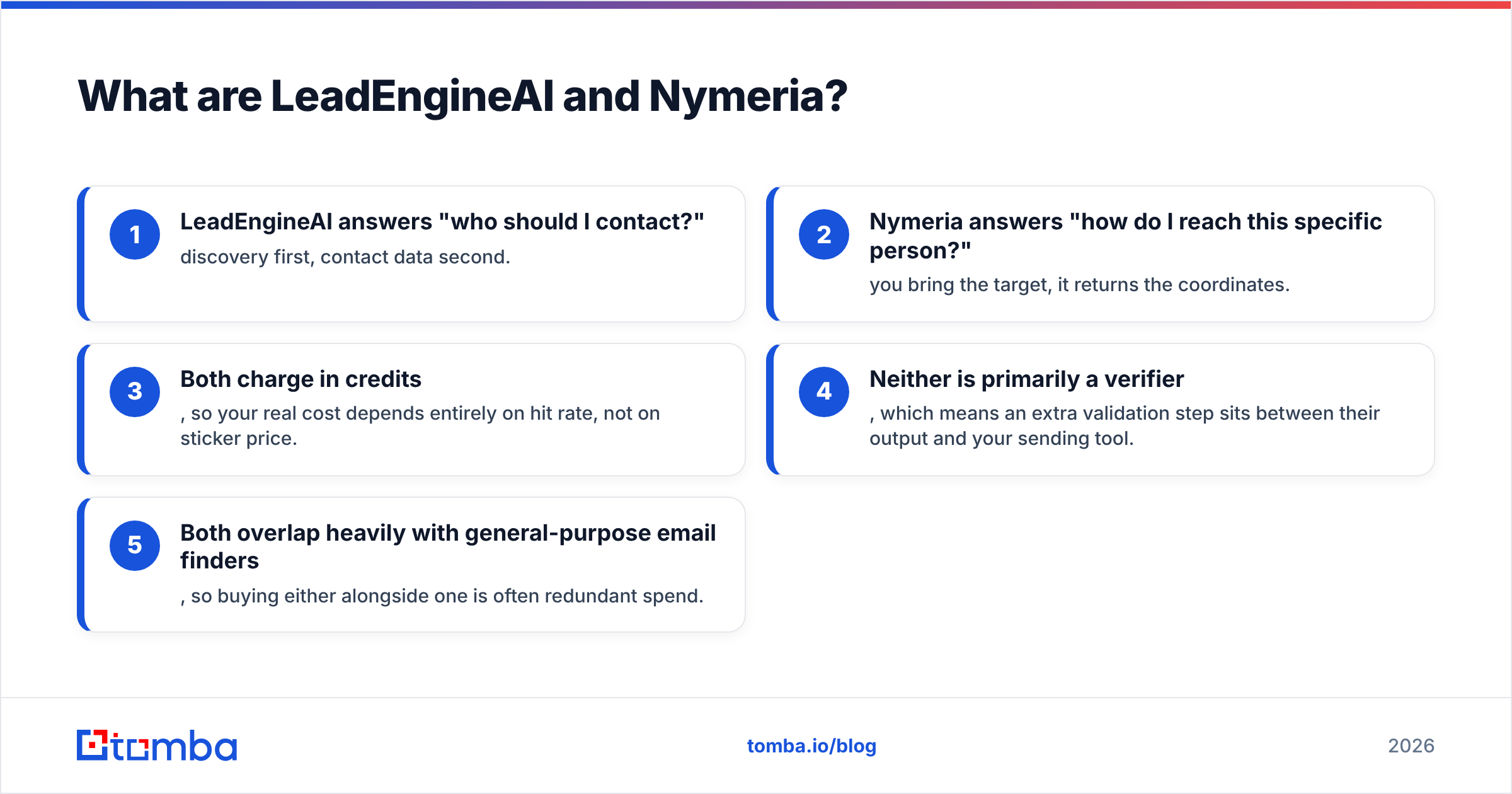
- LeadEngineAI answers "who should I contact?" — discovery first, contact data second.
- Nymeria answers "how do I reach this specific person?" — you bring the target, it returns the coordinates.
- Both charge in credits, so your real cost depends entirely on hit rate, not on sticker price.
- Neither is primarily a verifier, which means an extra validation step sits between their output and your sending tool.
- Both overlap heavily with general-purpose email finders, so buying either alongside one is often redundant spend.

How do LeadEngineAI and Nymeria compare head-to-head?#
Here's the honest side-by-side. Pricing in this category changes often — treat the numbers as directional and confirm on each vendor's own page before you buy.
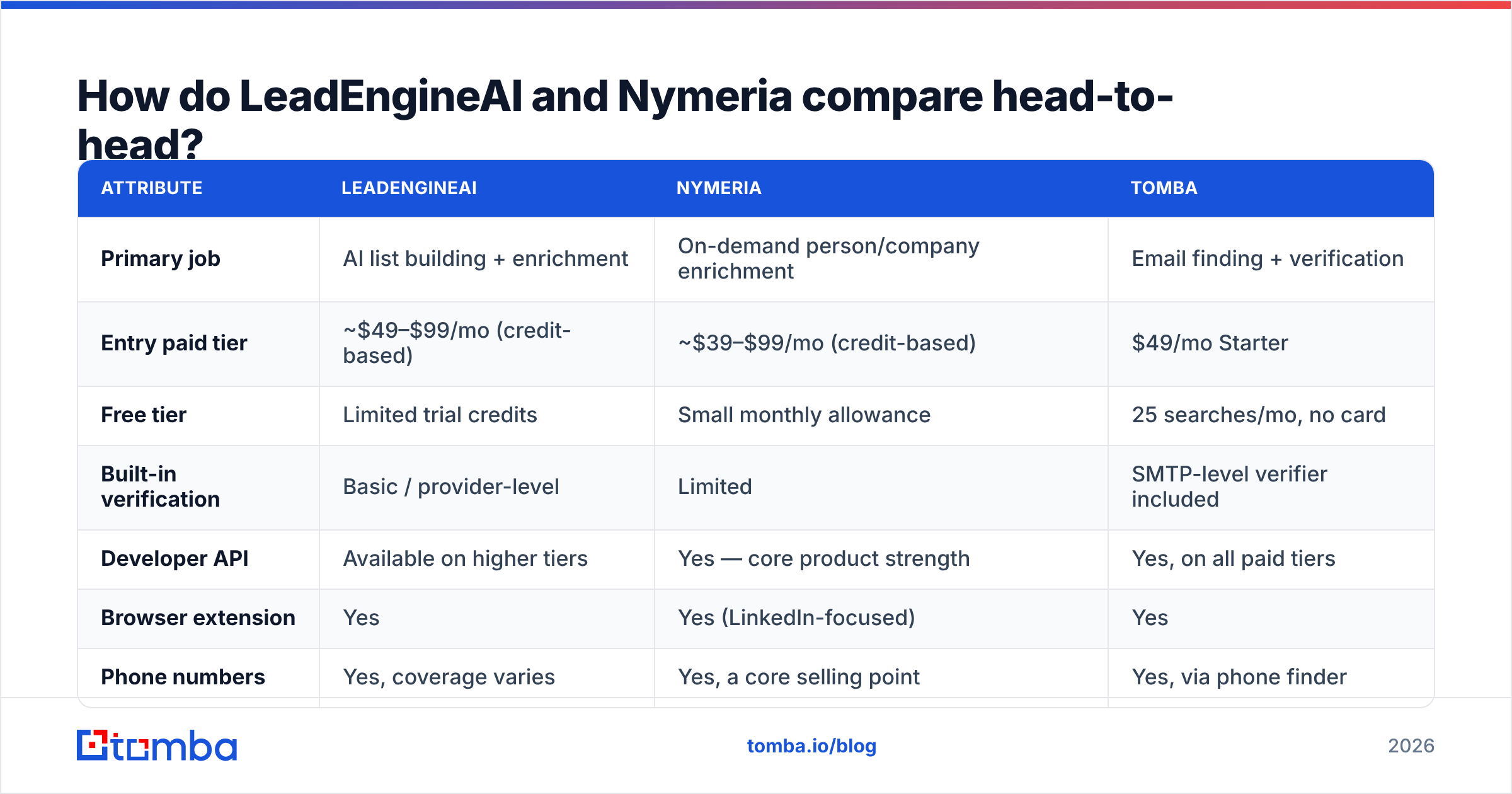
| Attribute | LeadEngineAI | Nymeria | Tomba |
|---|---|---|---|
| Primary job | AI list building + enrichment | On-demand person/company enrichment | Email finding + verification |
| Entry paid tier | ~$49–$99/mo (credit-based) | ~$39–$99/mo (credit-based) | $49/mo Starter |
| Free tier | Limited trial credits | Small monthly allowance | 25 searches/mo, no card |
| Built-in verification | Basic / provider-level | Limited | SMTP-level verifier included |
| Developer API | Available on higher tiers | Yes — core product strength | Yes, on all paid tiers |
| Browser extension | Yes | Yes (LinkedIn-focused) | Yes |
| Phone numbers | Yes, coverage varies | Yes, a core selling point | Yes, via phone finder |
| Bulk processing | Yes, list-oriented | Via API batching | Yes, CSV bulk + API |
| Best fit | Teams with no ICP list yet | Recruiters, devs, enrichment pipelines | Outbound teams that send at volume |

The table hides one thing worth saying out loud: these tools rarely compete for the same budget line. LeadEngineAI competes with Apollo-style list platforms. Nymeria competes with enrichment APIs. If you're comparing them directly, you probably haven't decided which problem you actually have — and that's the more useful question.
Which one has better data accuracy?#
Accuracy claims in this market are close to meaningless without a definition, so start by rejecting the marketing framing.
Vendors report accuracy in at least three incompatible ways:
- Coverage rate — what percentage of your input rows returned any email. High numbers here are easy to fake by returning pattern guesses.
- Deliverability rate — what percentage of returned emails don't hard bounce. This is the number that matters, and it's the one least often published.
- Match rate — whether the returned email belongs to the right person. Common failure mode: two people named J. Smith at the same company.
LeadEngineAI's accuracy is inherited from whichever upstream providers it aggregates, plus its own pattern inference. That's not a knock — most tools in the AI-prospecting layer are aggregators — but it means accuracy varies dramatically by geography and company size. US-based mid-market SaaS tends to be strong. European SMBs and anything below 20 employees degrades fast.
Nymeria's strength is depth per person: when it has a record, it often has more attributes than competitors, including personal emails and mobile numbers. Its weakness is the flip side — coverage skews toward profiles with a strong public footprint. If your ICP is a plant manager at a 60-person industrial supplier in Ohio with no LinkedIn activity since 2019, expect thinner results.

The operational fix is the same regardless of vendor: never send to an unverified address. Run every export through an email verifier that performs SMTP-level checks and flags catch-all domains separately, then suppress anything that isn't a clean valid. Catch-all domains deserve their own bucket — they'll accept everything at the SMTP handshake and silently discard later, which is how a "0% bounce rate" campaign generates zero replies.

How does pricing actually work in both tools?#
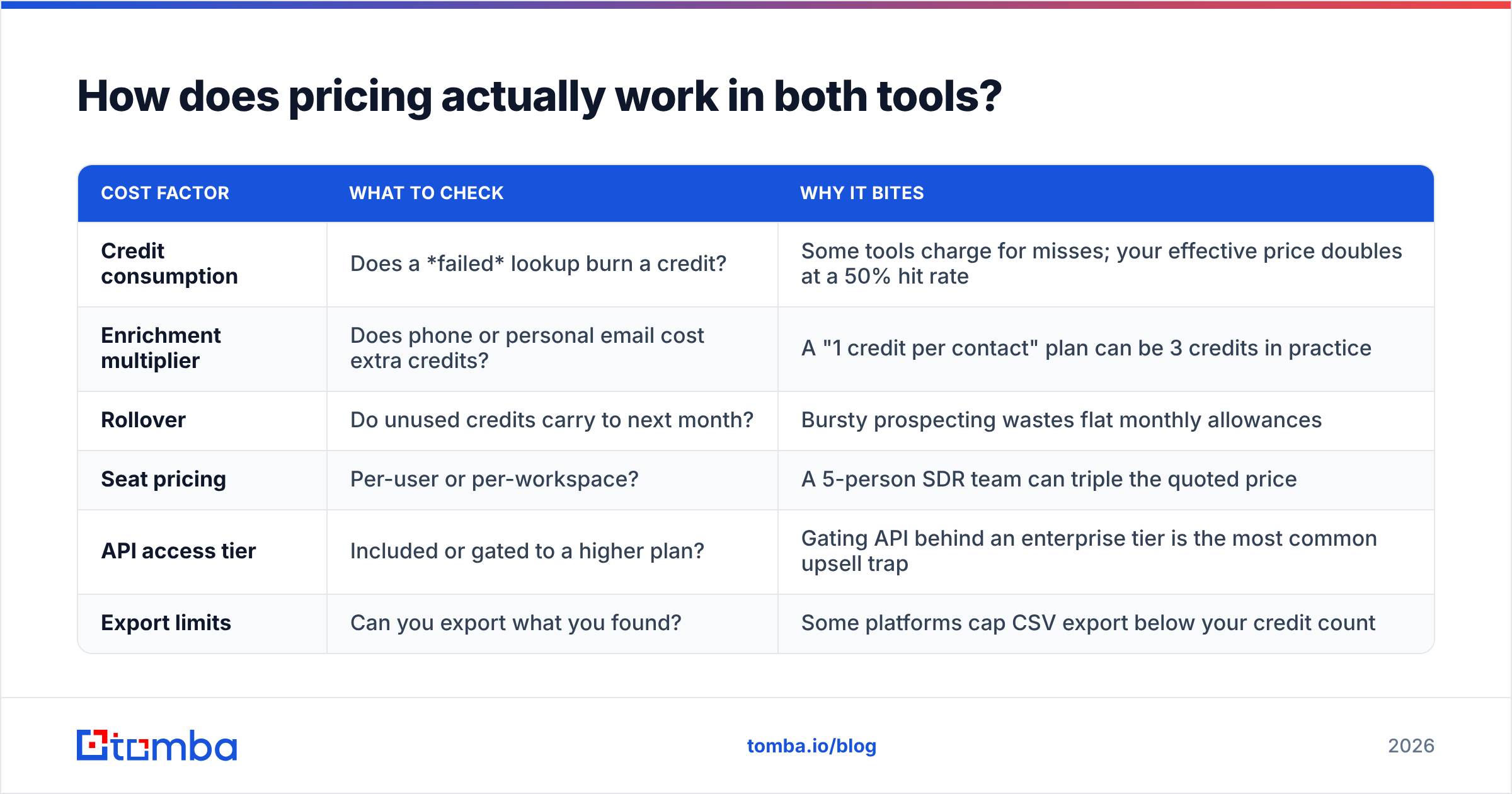
Both use credits, and credits are where the comparison gets slippery.
| Cost factor | What to check | Why it bites |
|---|---|---|
| Credit consumption | Does a failed lookup burn a credit? | Some tools charge for misses; your effective price doubles at a 50% hit rate |
| Enrichment multiplier | Does phone or personal email cost extra credits? | A "1 credit per contact" plan can be 3 credits in practice |
| Rollover | Do unused credits carry to next month? | Bursty prospecting wastes flat monthly allowances |
| Seat pricing | Per-user or per-workspace? | A 5-person SDR team can triple the quoted price |
| API access tier | Included or gated to a higher plan? | Gating API behind an enterprise tier is the most common upsell trap |
| Export limits | Can you export what you found? | Some platforms cap CSV export below your credit count |
Do the arithmetic on cost-per-verified-contact, not cost-per-credit. If a $99/month plan gives you 2,000 credits, burns credits on misses, hits 55%, and 12% of the hits bounce verification, your real cost is roughly $0.10 per usable contact — double the advertised rate. Run that same calculation on every tool in your shortlist and the ranking often flips.
For reference, Tomba pricing runs Free (25 searches/month), Starter at $49/mo, Growth at $99/mo, and Pro at $249/mo, with API access on paid tiers rather than reserved for enterprise contracts. Whether that beats either competitor depends entirely on your hit rate against your specific ICP — which is why the free tiers exist.
Who should choose LeadEngineAI?#
Pick LeadEngineAI if most of these are true:
- You don't have a target list yet. The AI list-building step is genuinely the value; if you already have accounts in your CRM, you're paying for a feature you won't use.
- Your ICP is well-represented in mainstream B2B data — US/UK tech, SaaS, agencies, professional services at 20–500 employees.
- You want context, not just contacts. The generated company summaries and angle suggestions save real research time for a small team without a researcher.
- You're comfortable with an opaque data supply chain. Aggregators don't always disclose sources; if your compliance team cares, ask for documentation first.
Skip it if you have a mature CRM, a defined account list, or a niche vertical. In those cases you're buying discovery you don't need and paying a premium for it.
Who should choose Nymeria?#
Pick Nymeria if:
- You work profile-first. Recruiters and founder-led sales teams who live inside LinkedIn get the most from the extension workflow. See our take on LinkedIn outreach for how that fits a broader sequence.
- You need personal emails and mobiles, not just work addresses. That's a real differentiator, with the caveat that personal-data usage carries GDPR and CCPA obligations you must handle deliberately.
- You're building a pipeline, not clicking a dashboard. The API is clean and the docs are readable — it slots into an enrichment job without much wrangling.
- Volume is moderate. Credit-based per-person enrichment gets expensive at tens of thousands of records; at that scale a bulk-oriented provider wins on unit economics.
Skip it if your primary need is domain-wide discovery — "give me every marketing contact at these 400 companies." That's a domain search job, and per-person enrichment is the wrong shape for it.
What should your evaluation process look like?#
Don't trust anyone's benchmark, including this post. Run a controlled bake-off — it takes an afternoon.
- Build a 100-row golden list. Real targets from your actual ICP, not a clean sample. Include the awkward segments: small companies, non-English domains, generic names.
- Run the same list through every candidate's free tier. LeadEngineAI, Nymeria, Tomba, whatever else is on the shortlist. Same inputs, same day.
- Measure three numbers per tool: coverage (rows returned), verified-valid rate (after independent SMTP verification), and cost in credits consumed — including credits burned on misses.
- Send a real 50-contact test campaign from a warmed domain. Track hard bounces at 48 hours. This is the only number that survives contact with reality.
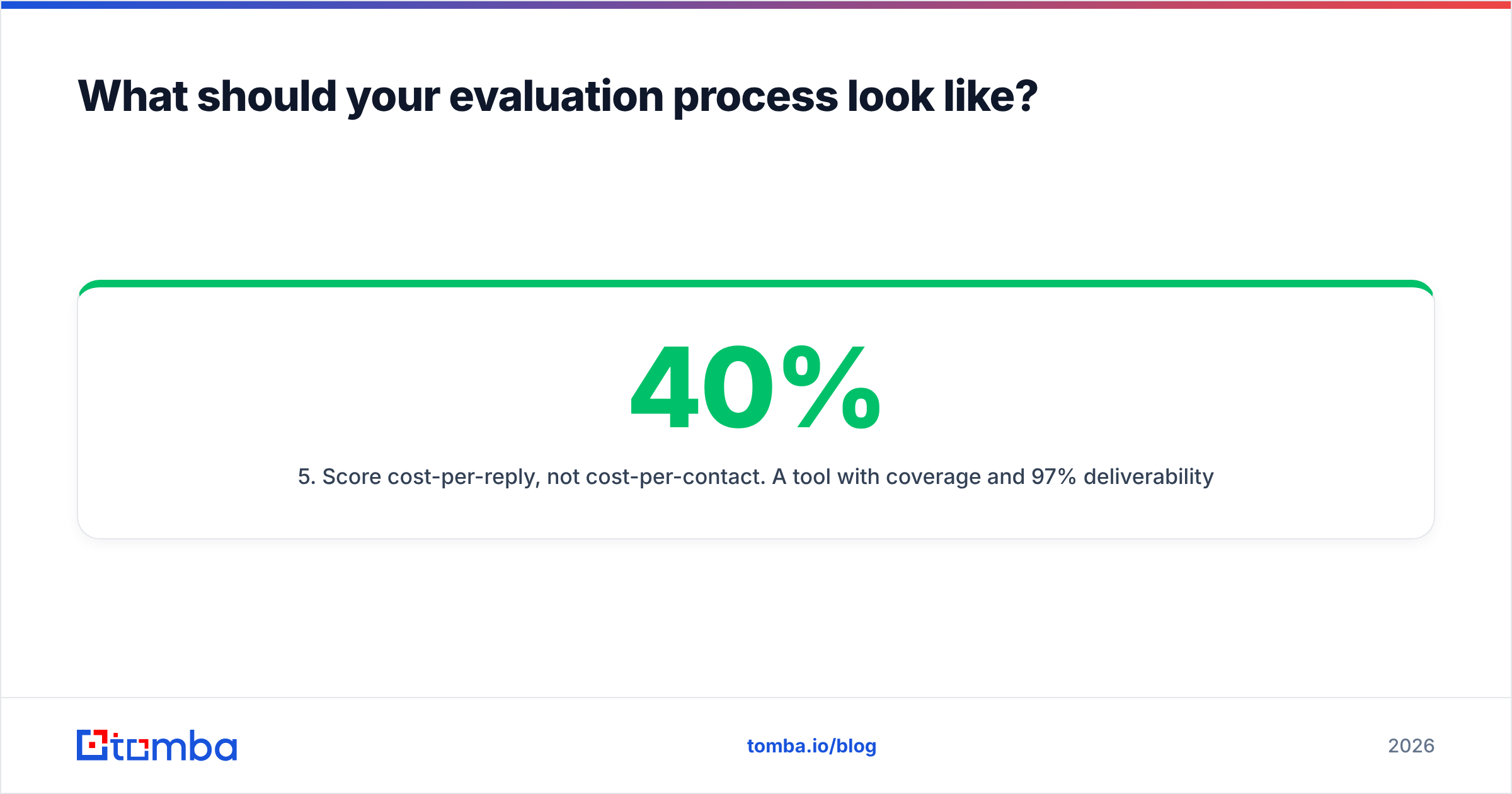
- Score cost-per-reply, not cost-per-contact. A tool with 40% coverage and 97% deliverability beats one with 80% coverage and 70% deliverability, every time.
- Check the exit path. Can you export raw data? Is the API stable? Vendor lock-in on your contact database is a slow-motion problem.
Third-party review aggregates like G2 are useful for spotting support and billing complaints — patterns in one-star reviews tell you more than the average score — but they won't tell you which tool covers your vertical. Only your own list will. And once the list is clean, the work shifts to sequencing and follow-up discipline, where resources like the HubSpot sales blog are more useful than another data vendor.
What's the verdict on LeadEngineAI vs Nymeria?#
Neither wins outright, because they're answering different questions. LeadEngineAI wins if you need a list built from scratch and your ICP sits in well-covered mainstream B2B. Nymeria wins if you already know your targets, need depth per person including mobile numbers, and want an API rather than a UI.
Where both leave a gap is the boring middle: high-volume, verified work-email discovery across a defined set of domains, with catch-all handling that doesn't quietly poison your sender reputation. That's a specialist job, and specialist tools do it more cheaply than generalists — usually by a wide margin once you price it per usable contact.
One more thing worth flagging: adding a third data vendor rarely fixes a pipeline problem. If your reply rates are low with clean data, the constraint is targeting or messaging, not coverage. Tool-shopping is a comfortable way to avoid that diagnosis.
Ready to test your list against a verified source?#
Take the 100-row golden list from the process above and run it through the Tomba Email Finder. The free tier gives you 25 searches a month with no card required — enough to benchmark a meaningful sample against whatever LeadEngineAI or Nymeria returned for the same rows. Every result comes back with a verification status and source attribution, so you can see why an address was returned, not just that it was. Compare the verified-valid rate and the cost per usable contact, then decide with your own numbers instead of anyone's marketing page.
Related guides#
// get started
Find, verify and enrich your first contacts today
Start on the free plan with 25 searches a month, then scale when your team is ready.
Free plan · No credit card required · GDPR & CCPA
// about the author