LeadEngineAI vs ReachFast: Which B2B Tool Wins in 2026?
LeadEngineAI and ReachFast both promise AI-powered B2B contact data. We break down accuracy, credit math, pricing traps, and which one actually fits your outbound motion in 2026.
LeadEngineAI vs ReachFast is a close call on paper. Both sell AI-powered B2B contact data. Both promise verified emails and faster prospecting. This guide shows where each one wins, what a credit actually costs you, and how to settle the question in one afternoon.
TL;DR
- Both tools sit in the same bucket: AI-flavoured B2B contact discovery that promises "verified" emails. They differ in how they source data and how hard they bill you for it.
- Neither vendor publishes an audited accuracy benchmark. Treat every "98% accurate" claim as marketing until you test it on your own list.
- Credit models matter more than headline price. A $49 plan that charges for failed lookups costs more than a $99 plan that only charges for hits.
- If your bottleneck is finding and verifying work emails, a dedicated finder/verifier stack (Tomba, for example) usually beats an all-in-one on cost per usable contact.
- Run the same 100-contact test list through both before you buy. Your own ICP is the only benchmark that counts.
What are LeadEngineAI and ReachFast?#
Both tools live in the B2B lead intelligence category. That is the same shelf as Apollo, RocketReach, Lusha and dozens of newer AI-branded entrants. G2's lead intelligence listings map the category well. Start there rather than on a vendor homepage, because you get to see how buyers rate these products.
LeadEngineAI sells itself as an AI-first prospecting engine. You describe your ideal customer in plain English. The platform builds the list, adds emails and company data, then hands it to your sequencer or CRM. The "AI" layer is mostly query translation and scoring. It turns a prompt into filters, then ranks the output.
ReachFast sells speed. The pitch is fewer clicks between "I found this person on LinkedIn" and "the email is in my sequence." Tools in this lane lean on a browser extension plus a bulk upload path. Filtering is lighter than in a full database product.
That distinction — list building versus contact capture — is the single most useful lens for this comparison. It predicts almost everything else: pricing shape, credit behaviour, and where each tool falls apart.
One honest caveat up front. Both are smaller, fast-moving products. Neither publishes a third-party accuracy audit, and both have changed packaging more than once. Nothing below is a spec sheet copied from a vendor deck. It is a framework for judging them, plus the hard numbers that do exist. Check current pricing on each vendor's own page before you commit budget.
LeadEngineAI vs ReachFast: the head-to-head comparison#
Here is the practical comparison — the attributes that change your cost per meeting, not the ones that look good on a feature grid.
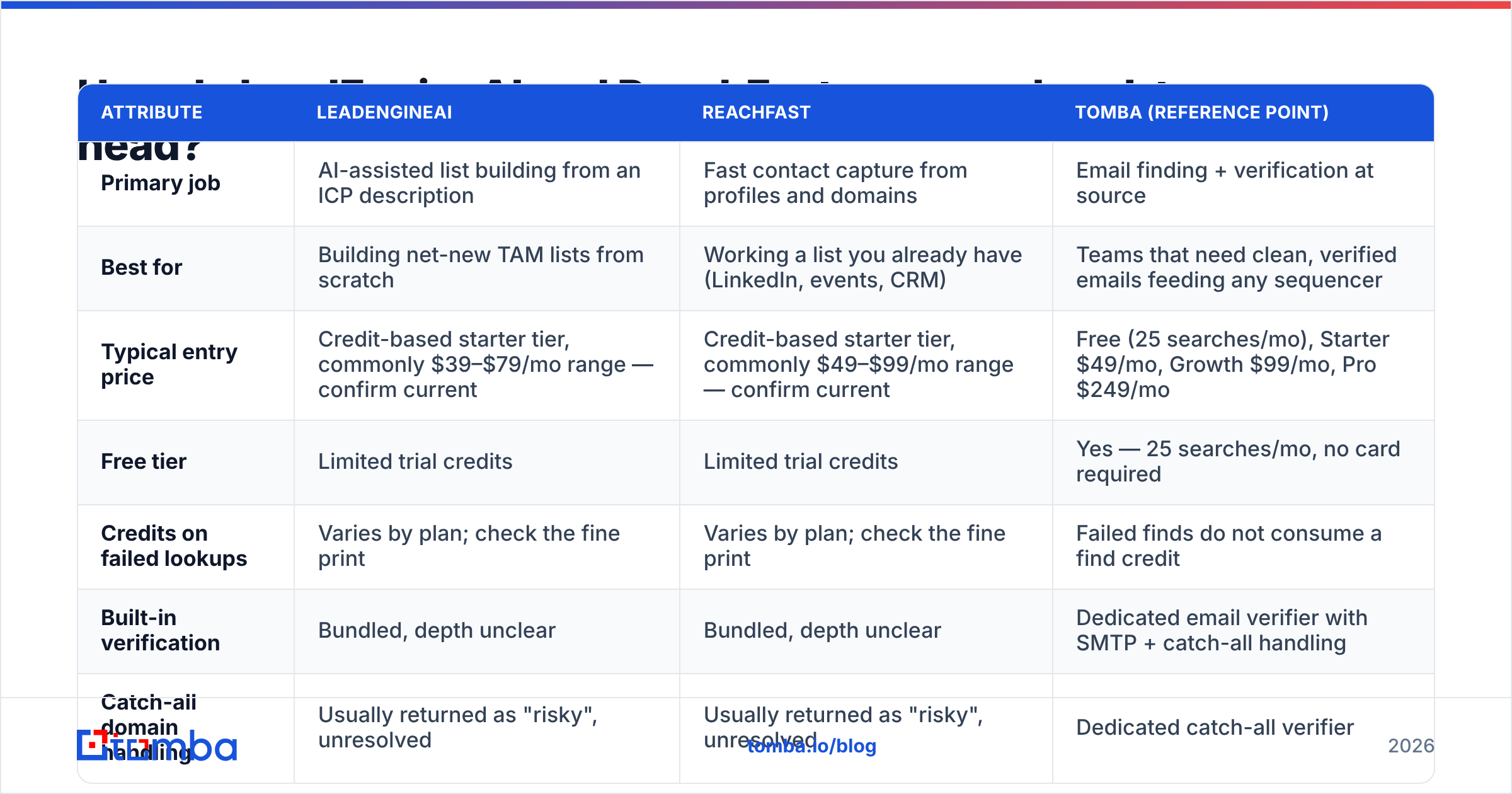
| Attribute | LeadEngineAI | ReachFast | Tomba (reference point) |
|---|---|---|---|
| Primary job | AI-assisted list building from an ICP description | Fast contact capture from profiles and domains | Email finding + verification at source |
| Best for | Building net-new TAM lists from scratch | Working a list you already have (LinkedIn, events, CRM) | Teams that need clean, verified emails feeding any sequencer |
| Typical entry price | Credit-based starter tier, commonly $39–$79/mo range — confirm current | Credit-based starter tier, commonly $49–$99/mo range — confirm current | Free (25 searches/mo), Starter $49/mo, Growth $99/mo, Pro $249/mo |
| Free tier | Limited trial credits | Limited trial credits | Yes — 25 searches/mo, no card required |
| Credits on failed lookups | Varies by plan; check the fine print | Varies by plan; check the fine print | Failed finds do not consume a find credit |
| Built-in verification | Bundled, depth unclear | Bundled, depth unclear | Dedicated email verifier with SMTP + catch-all handling |
| Catch-all domain handling | Usually returned as "risky", unresolved | Usually returned as "risky", unresolved | Dedicated catch-all verifier |
| Native sending / sequencing | Light or via integration | Light or via integration | None — pairs with Instantly, Smartlead, HubSpot, etc. |
| API access | On higher tiers | On higher tiers | Tomba API available across paid tiers |
| Bulk processing | Yes, credit-metered | Yes, credit-metered | Bulk email finder and bulk verify |

Two things jump out of that grid.
First, the two products overlap far more than their marketing suggests. Strip the AI framing off LeadEngineAI and both are credit-metered contact databases with an extraction layer on top. Picking on "which has better data" alone is a dead end. Neither vendor will answer that honestly, and the answer shifts by country and industry anyway.
Second, neither is a full outbound stack. You still need a sender, a warmup routine, and a CRM. Budget for that before you compare the $20/month difference between their starter plans.
Which one has better email accuracy?#
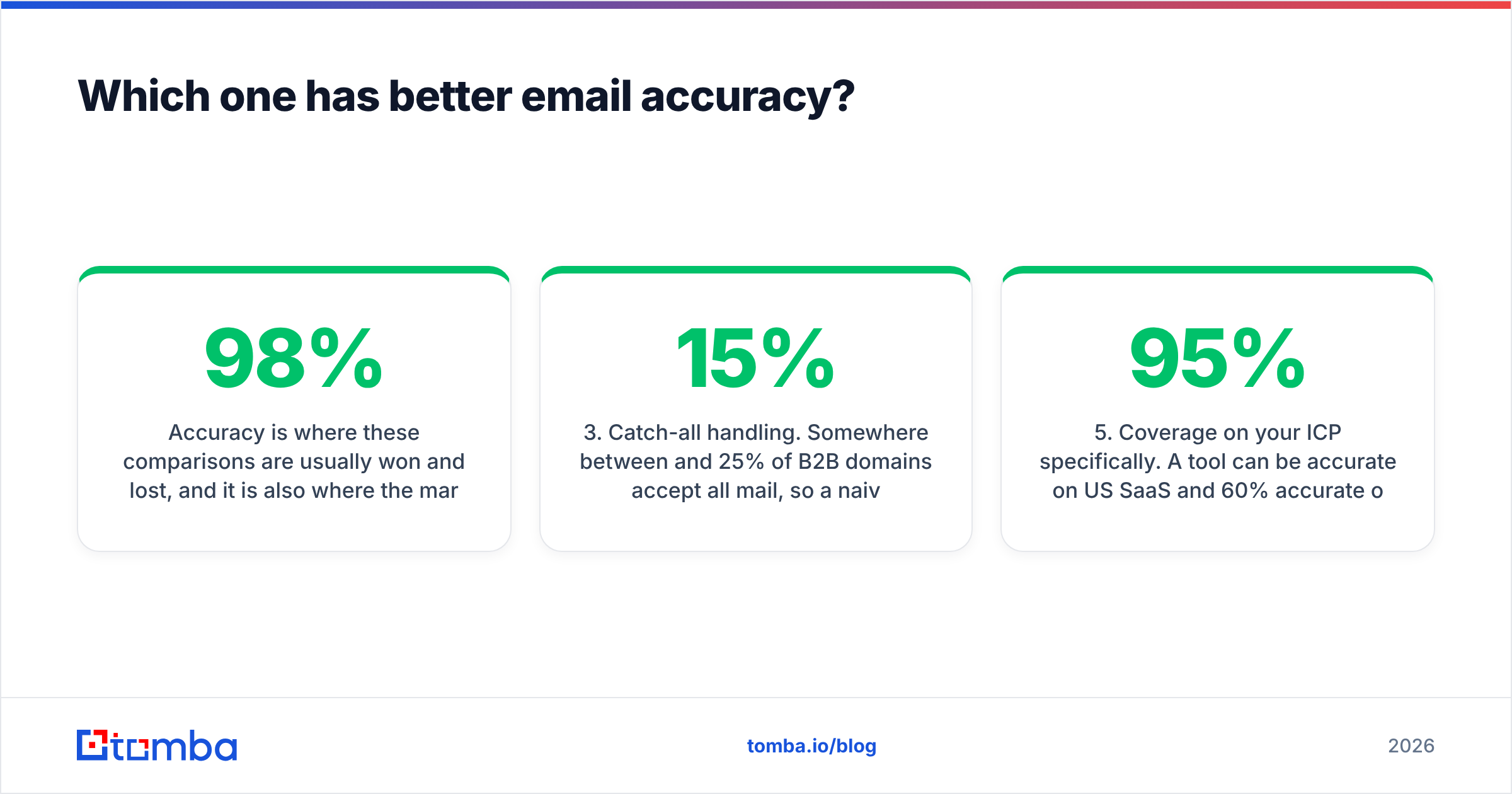
Accuracy usually decides these comparisons. It is also where the marketing is least trustworthy. A "98% accuracy" claim almost always means the pass rate of emails the tool chose to return. It says nothing about coverage of your list. Those are very different numbers.
Here is what genuinely drives the result you'll see:
- Source diversity. Tools that only pattern-guess (
first.last@domain.com) collapse on companies with odd formats. Tools that mix crawled public sources, verified user contributions and pattern inference hold up much better. Ask each vendor where the data comes from. Tomba documents its data sources in public. Expect the same openness from anyone you pay. - Verification depth at return time. Syntax + MX check is table stakes and proves almost nothing. Real verification runs an SMTP handshake, handles greylisting, retries, and separates "invalid" from "unknown." If a tool returns everything as "valid," it isn't verifying — it's rounding up.
Those two points are about the data itself. The next three are about timing and fit.
- Catch-all handling. Between 15% and 25% of B2B domains accept all mail. A naive verifier marks them "risky." You then send blind or throw away real prospects. How a tool resolves catch-alls is the biggest hidden accuracy differentiator in 2026.
- Recency of the record. A correct email from 2023 is a wrong email today. Roughly a quarter of B2B contact records decay each year through job changes alone. Ask when the record was last confirmed, not whether it's "verified."
- Coverage on your ICP specifically. A tool can be 95% accurate on US SaaS and 60% accurate on German manufacturing. Your segment is the only benchmark that matters.

One test settles LeadEngineAI vs ReachFast, and it takes an afternoon. Take 100 contacts whose emails you already know. Strip the emails. Run the names and domains through both tools plus one control tool. Score three columns: found, correct, and wrongly confident. That last column is the expensive one. A tool that returns nothing costs you a credit. A tool that returns a wrong address with confidence costs you sender reputation.
Is LeadEngineAI or ReachFast better for cold outreach at volume?#
Volume changes the math entirely. At 50 contacts a month, pick whichever UI you like. At 5,000 a month, three things decide it.
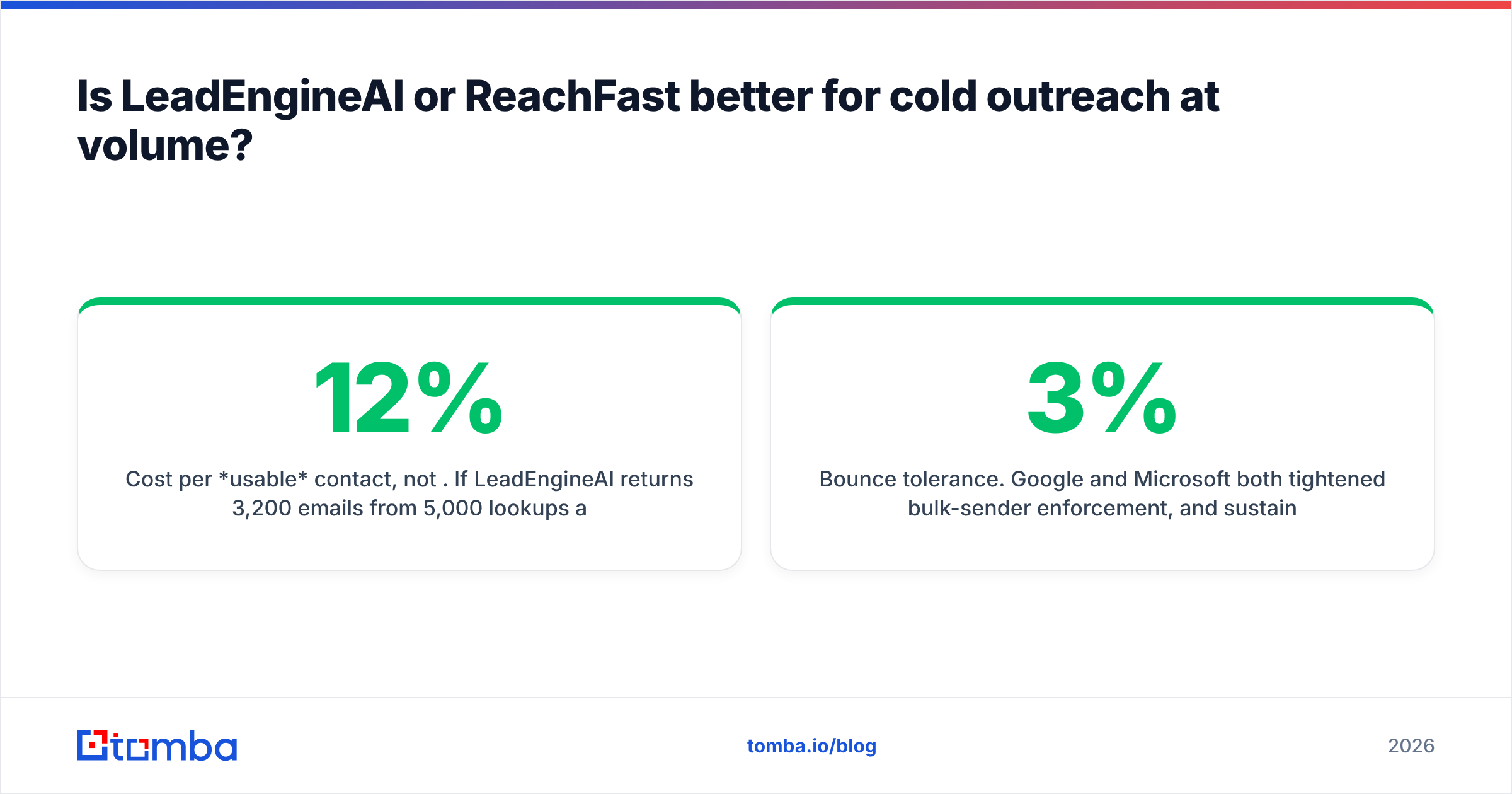
Cost per usable contact, not per credit. Say LeadEngineAI returns 3,200 emails from 5,000 lookups and 12% bounce. Your usable count is ~2,816. If ReachFast returns 2,900 with a 4% bounce rate, that's ~2,784. Effectively a tie, at very different credit spend. Always divide plan cost by deliverable contacts.
Bounce tolerance. Google and Microsoft have both tightened bulk-sender rules. Hold bounces above roughly 2–3% and inbox placement drops. Read HubSpot's guidance on email deliverability next to your own postmaster data. A cheap tool with a 10% bounce rate is not cheap. It is a slow-motion domain burn.
API and automation fit. At volume you stop using the UI. You want a documented endpoint, sane rate limits and predictable error codes, so enrichment runs on a schedule instead of a human. Both tools gate API access behind higher tiers. That is normal. Just make sure the tier you're pricing includes it.

What does each one actually cost?#
Credit models are where B2B data tools quietly extract margin. Four patterns to check before you sign anything:
- Does a failed lookup consume a credit? This is the biggest silent cost. On a 40% hit-rate segment, charging for misses roughly doubles your real price.
- Do verification and finding draw from the same pool? If yes, verifying a list you already own eats your discovery budget.
- Do credits roll over? Most don't. Seasonal outbound teams overpay badly here.
- Is export capped separately from credits? Some tools let you find 10,000 contacts but only export 2,000 per month.
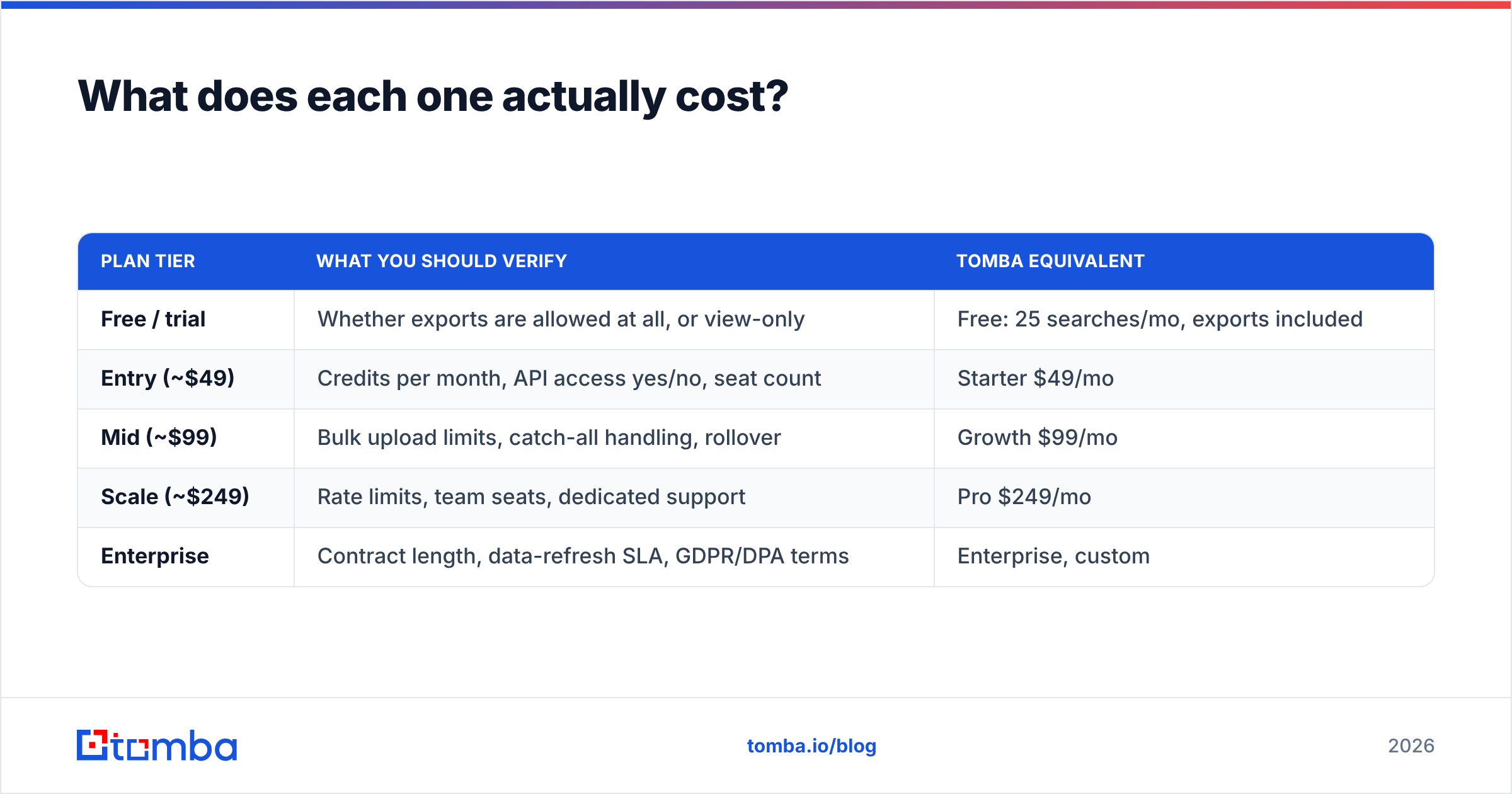
For reference, here is a plan-shape comparison against a known-quantity price list:
| Plan tier | What you should verify | Tomba equivalent |
|---|---|---|
| Free / trial | Whether exports are allowed at all, or view-only | Free: 25 searches/mo, exports included |
| Entry (~$49) | Credits per month, API access yes/no, seat count | Starter $49/mo |
| Mid (~$99) | Bulk upload limits, catch-all handling, rollover | Growth $99/mo |
| Scale (~$249) | Rate limits, team seats, dedicated support | Pro $249/mo |
| Enterprise | Contract length, data-refresh SLA, GDPR/DPA terms | Enterprise, custom |
You can see the full Tomba pricing breakdown for the exact credit allocations. The point of the table isn't that one vendor is cheaper. It's that "$49" means nothing until you know what a credit buys.
Are there better alternatives to both?#
Possibly, depending on what's actually broken in your pipeline.
If your problem is data quality, not list size, an all-in-one is the wrong shape. A focused email finder plus a real verifier will feed any sequencer you like. That combination usually costs less per booked meeting than one bundled vendor. You also dodge the classic trap: switching sequencers means losing your data provider.
If you want prebuilt, pre-verified lists rather than self-serve lookups, BookYourData is a solid option. It sells curated B2B contact lists with verification guarantees. That is a different buying motion from credit-metered search, and it suits teams who would rather buy a segment than build one.
If you need phone numbers alongside email, check coverage carefully. Most email-first tools bolt on mobile numbers with thin coverage outside the US. A dedicated phone finder deserves its own test. Don't assume the bundled numbers are usable.
If you're enriching an existing CRM rather than prospecting, look at enrichment-specific tooling. Running a full prospecting subscription to clean 4,000 stale HubSpot records is an expensive way to solve a data enrichment problem.
LeadEngineAI vs ReachFast: which should you choose?#
Choose LeadEngineAI if you build net-new lists from a loose ICP. The prompt-to-list workflow has to be worth the credit-metered discovery. It fits a founder or first AE who doesn't yet know which 2,000 companies to target.
Choose ReachFast if you already know who you want. Your bottleneck is getting their details into a sequence fast. Extension capture beats database filtering when your targeting comes from events, LinkedIn Sales Navigator saved searches, or inbound signals.
Choose neither — and build a finder + verifier + sequencer stack if you send more than a few thousand emails a month. You keep deliverability under control and can swap parts without re-platforming. Most mature outbound teams land there after their second tool migration.
Whatever you pick, run the 100-contact test first. It costs an afternoon, and it is the only comparison in this article that's actually about your business.
Ready to test data quality instead of reading claims about it? Start with the Tomba Email Finder. The free tier gives you 25 searches a month with no card. That is enough to run a real LeadEngineAI vs ReachFast head-to-head, or to test anything else on your shortlist. Feed it your 25 hardest prospects. Check the hit rate and the bounce rate. Let the numbers decide.
Related guides#
// get started
Find, verify and enrich your first contacts today
Start on the free plan with 25 searches a month, then scale when your team is ready.
Free plan · No credit card required · GDPR & CCPA
// about the author