LeadEngineAI vs RocketReach: Which Finds More Emails?
LeadEngineAI sells AI-assisted lead discovery. RocketReach sells one of the biggest contact databases in B2B. We compare data sourcing, accuracy, export limits and real cost per usable email.
LeadEngineAI vs RocketReach comes down to one question: where does the email come from? RocketReach hands you a stored record. LeadEngineAI builds the list on the fly. This guide compares both on data sourcing, accuracy, price and real cost per usable email.
TL;DR
- RocketReach is database-first. It stores a huge index of people, emails and phone numbers. You query it by name, company or LinkedIn URL. Breadth is the selling point.
- LeadEngineAI is AI-first. You describe your ideal customer in plain English. It builds the list and adds contact data. Speed is the selling point.
- The real LeadEngineAI vs RocketReach question is not AI vs database. It is where the email comes from, and whether anyone checked it the day you exported it.
- Both bill in credits. Both can charge you for data you can never send to. Budget by cost per usable email, not sticker price.
- Need only accurate work emails? A finder like Tomba (free tier, then $49/mo) is usually cheaper than database pricing.
What are LeadEngineAI and RocketReach?#
Before you compare LeadEngineAI vs RocketReach on price, know what each one is. Think of a library and a research assistant.
RocketReach is the library. It keeps a large stored index of work profiles: emails, direct dials, job titles and company data. You walk in with a query — this person, this company, this LinkedIn URL. You get back what the shelf holds. RocketReach has been in this market since 2015. It is one of the better-known names in contact data, with a long review history on G2.
LeadEngineAI is the research assistant. You describe who you want — "Series A fintech firms in the UK, heads of RevOps, 50–200 staff". It reads the brief, builds the account list, finds the people and adds contact details. The pitch is that you skip filters.
Both end in the same place: a CSV your sequencer will mail. That is the only output that matters, so every LeadEngineAI vs RocketReach test should point straight at it.
How does each one actually find an email address?#
Most LeadEngineAI vs RocketReach write-ups skip this question. It explains nearly every accuracy gap you will see.
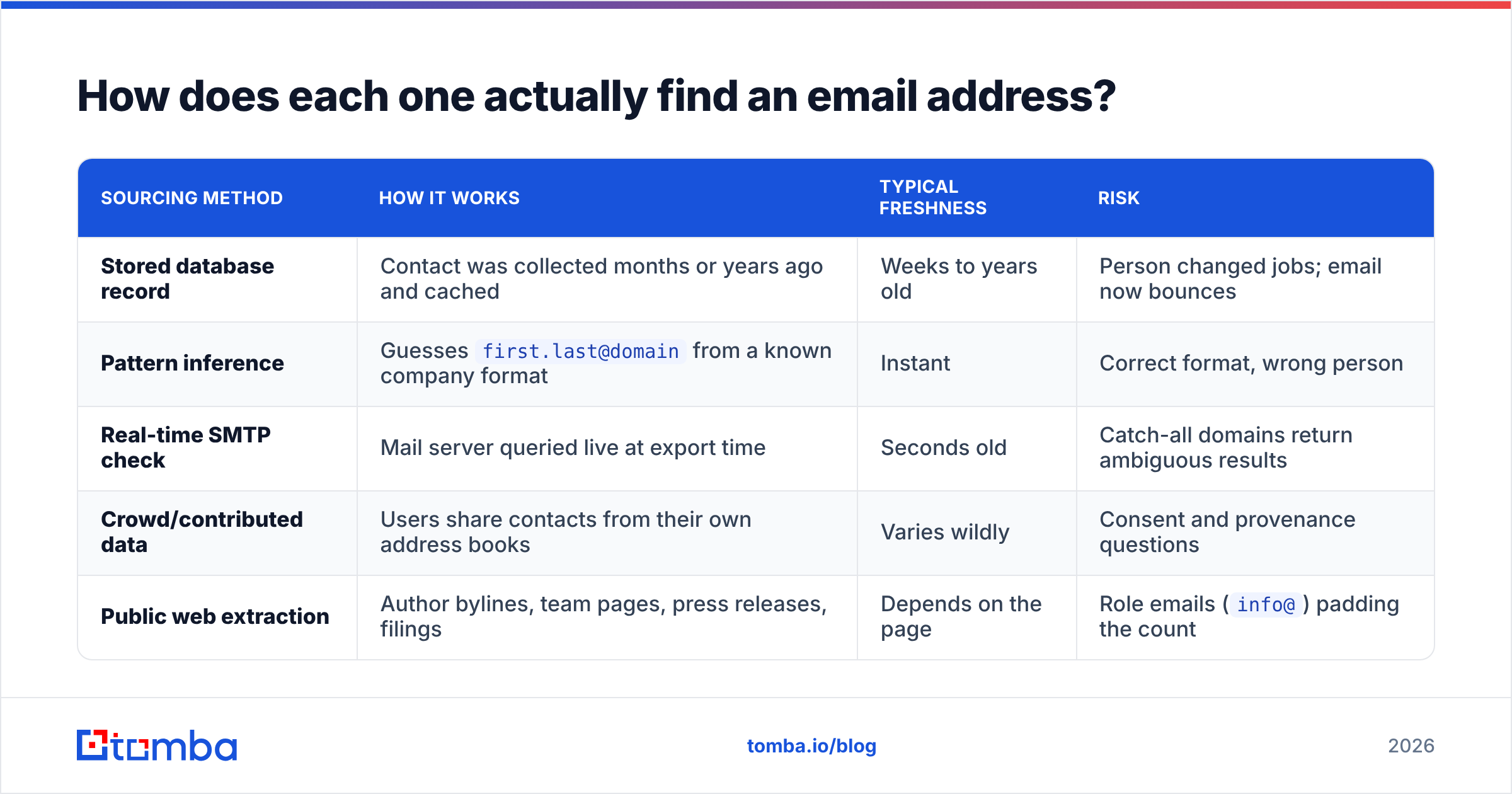
| Sourcing method | How it works | Typical freshness | Risk |
|---|---|---|---|
| Stored database record | Contact was collected months or years ago and cached | Weeks to years old | Person changed jobs; email now bounces |
| Pattern inference | Guesses first.last@domain from a known company format |
Instant | Correct format, wrong person |
| Real-time SMTP check | Mail server queried live at export time | Seconds old | Catch-all domains return ambiguous results |
| Crowd/contributed data | Users share contacts from their own address books | Varies wildly | Consent and provenance questions |
| Public web extraction | Author bylines, team pages, press releases, filings | Depends on the page | Role emails (info@) padding the count |
Here is where LeadEngineAI vs RocketReach split. RocketReach leans on the first and last rows. It runs a large cached index built from public web pages, plus licensed and shared data. LeadEngineAI leans on the second and third rows: pattern inference plus a check step, often run by third-party providers behind the scenes.
Neither way is wrong. They just fail in different ways. A stored record fails quietly. It looks complete and sure of itself, and it is three job changes old. Inference fails loudly. You get a bounce within the hour, which at least tells you something.
So run an independent email verifier pass over both exports. Skip that step and you are grading each vendor on its own homework.
Which one is more accurate in practice?#
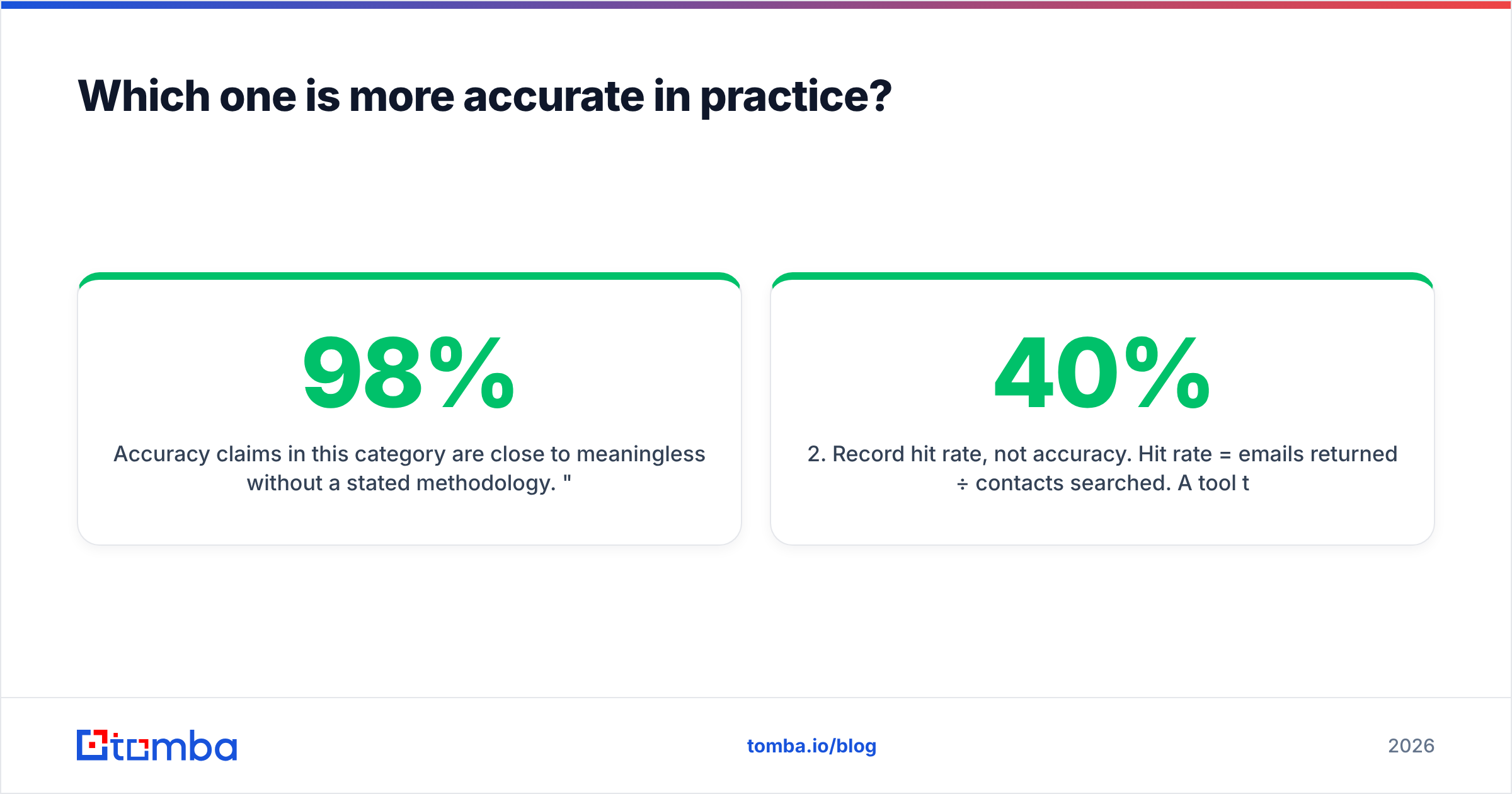
Accuracy sits at the heart of any LeadEngineAI vs RocketReach comparison. But claims here mean little without a stated method. "98% accurate" usually means "98% of the emails we chose to return passed our own syntax and MX check". It does not mean 98% of the people you searched for got a mail that landed.
Run your own test instead. It takes an afternoon:
- Build a fixed list of 200 real prospects. Same names, same firms, same seniority mix for both tools. No cherry-picking.
- Record hit rate, not accuracy. Hit rate is emails returned ÷ contacts searched. A tool that returns nothing for 40% of your list has a coverage problem, however clean the rest is.
- Re-verify every address with a neutral third-party verifier. Count valid, catch-all, risky and invalid on their own.
- Strip role accounts.
sales@,info@andcontact@inflate hit rates and sink reply rates. - Divide total spend by valid, non-role emails. That number — cost per usable email — is your real price.

Two patterns repeat when we run this test across contact-data vendors. Database-first tools like RocketReach win on coverage of well-known firms. They lose ground on firms under about 50 staff, where the public trail is thin. AI-native tools win on speed to first list. They lose ground on catch-all domains, where a guess cannot be confirmed and the tool must choose between a guess and nothing.
Does a big share of your market sit on catch-all domains? That is common in enterprise and in European mid-market. Then you need a tool with a real catch-all verifier, not one that quietly marks those addresses "valid" and hands you the bounce risk.

How does LeadEngineAI vs RocketReach pricing compare in 2026?#
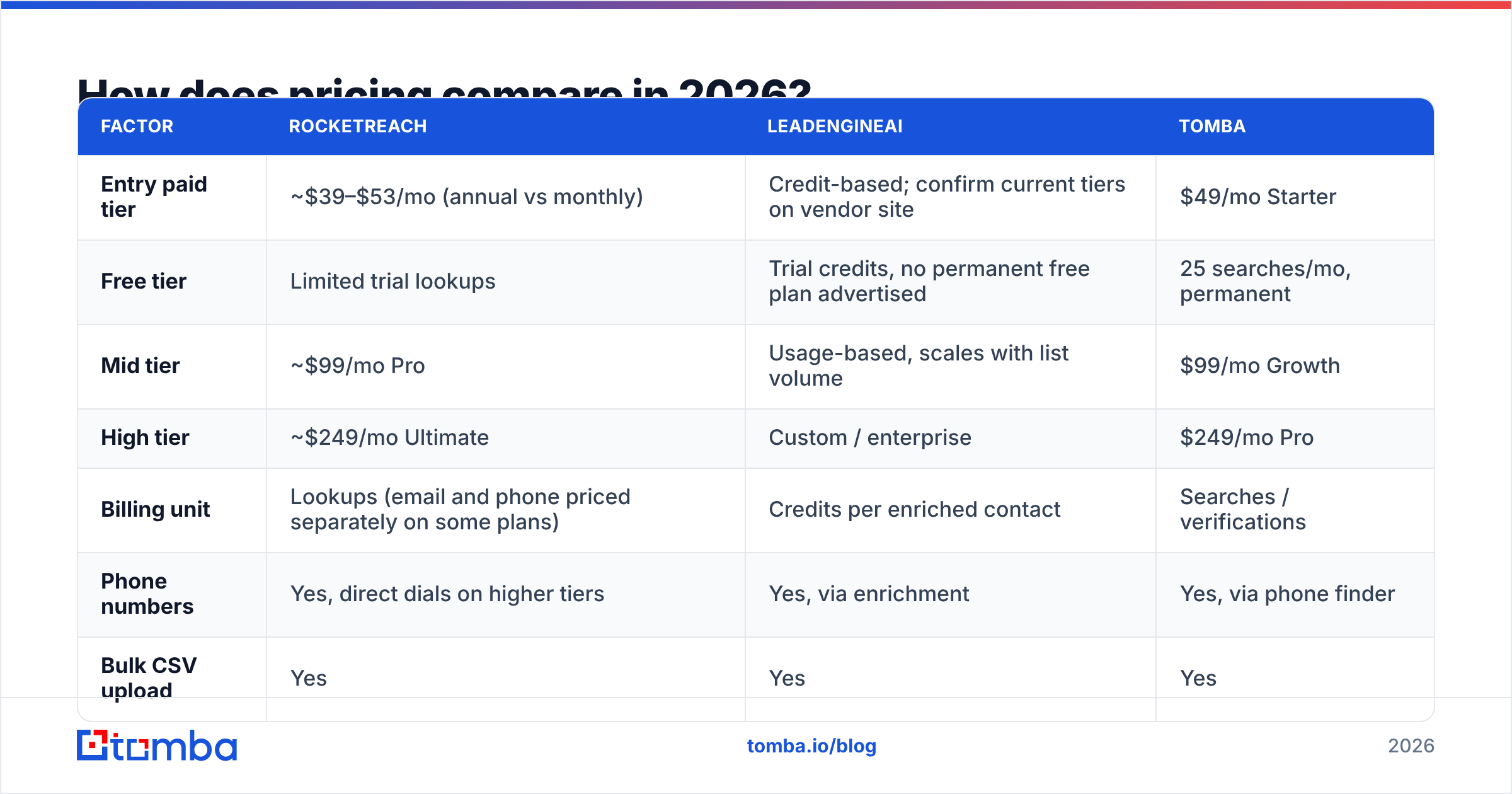
LeadEngineAI vs RocketReach pricing moves often. Treat the figures below as list price at the time of writing, and check each vendor's own page before you buy. The structure matters more than the exact dollar amount.
| Factor | RocketReach | LeadEngineAI | Tomba |
|---|---|---|---|
| Entry paid tier | ~$39–$53/mo (annual vs monthly) | Credit-based; confirm current tiers on vendor site | $49/mo Starter |
| Free tier | Limited trial lookups | Trial credits, no permanent free plan advertised | 25 searches/mo, permanent |
| Mid tier | ~$99/mo Pro | Usage-based, scales with list volume | $99/mo Growth |
| High tier | ~$249/mo Ultimate | Custom / enterprise | $249/mo Pro |
| Billing unit | Lookups (email and phone priced separately on some plans) | Credits per enriched contact | Searches / verifications |
| Phone numbers | Yes, direct dials on higher tiers | Yes, via enrichment | Yes, via phone finder |
| Bulk CSV upload | Yes | Yes | Yes |
| Public API | Yes | Yes | Yes, documented at tomba.io/api |
| Annual commitment for best price | Usually required | Usually required | Not required |
Watch for three cost traps, whichever tool you pick:
- Annual-only discounts. Headline prices are almost always the yearly rate split over twelve months. The month-to-month number is often 25–40% higher. Compare like for like.
- Credits that expire each month. Unused lookups rarely roll over. If your prospecting is lumpy — heavy in Q1, light in Q3 — you buy capacity you will burn.
- Paying twice for one contact. Some tools charge a credit for a lookup that returns nothing. Others charge once for the email and again for the phone number. Read the credit policy, not the pricing page.

Which tool fits which team?#
There is no universal winner. The LeadEngineAI vs RocketReach answer depends on the shape of your motion.
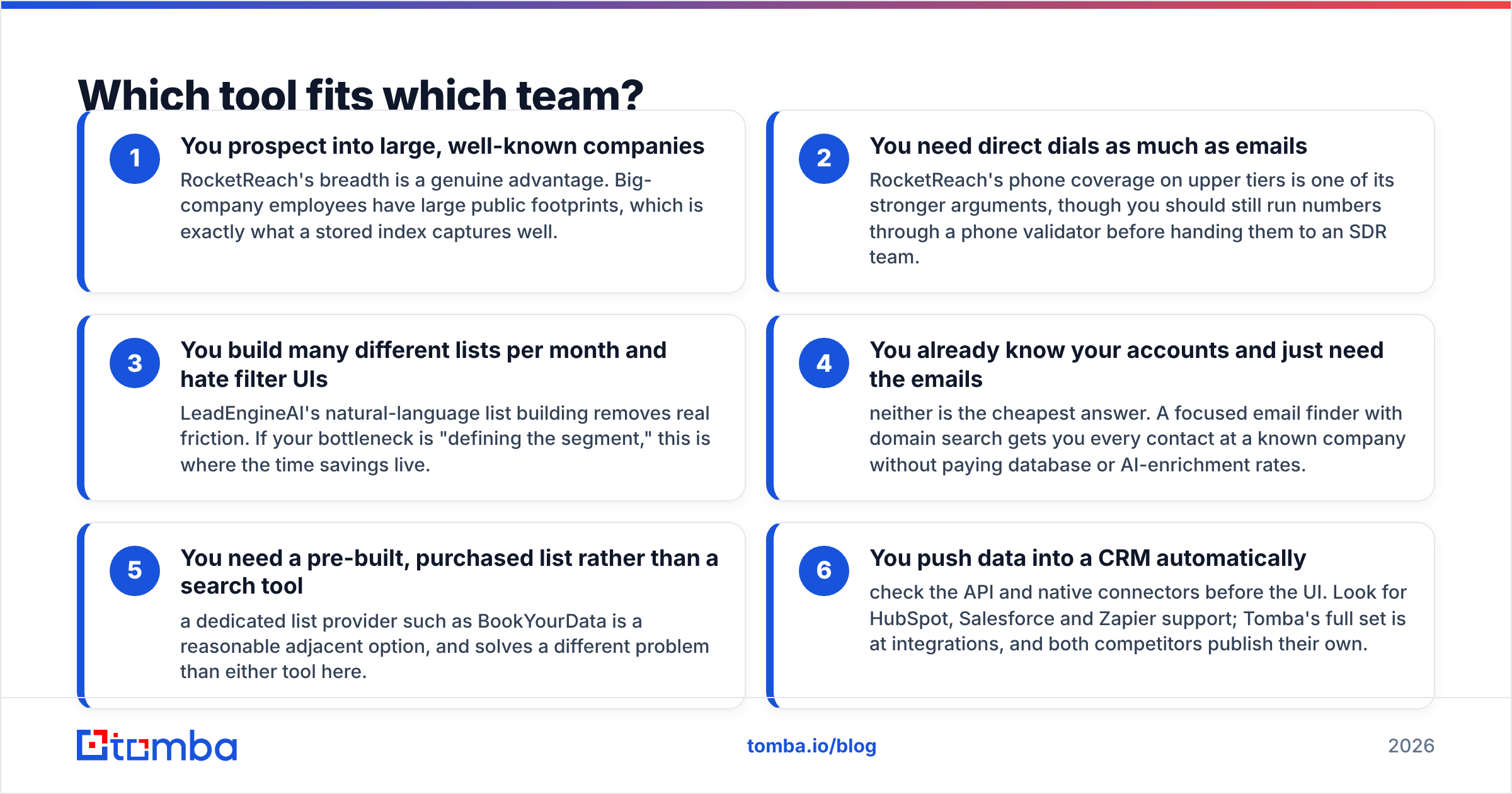
Pick RocketReach when:
- You sell into large, well-known firms. Breadth is a real edge here. Big-company staff leave a wide public trail, and that is what a stored index captures well.
- You need direct dials as much as emails. Phone coverage on the upper tiers is one of its stronger arguments. Still run those numbers through a phone validator before you hand them to an SDR team.
Pick LeadEngineAI when:
- You build many lists a month and hate filter UIs. Plain-English list building removes real friction. If your bottleneck is defining the segment, this is where the hours come back.
- You test new segments often. A fast first draft of a list beats a perfect one you never get around to building.
Pick neither when:
- You already know your accounts. A focused email finder with domain search gets you every contact at a known company. You skip both database and AI-enrichment rates.
- You want a pre-built list, not a search tool. A list provider such as BookYourData is a fair adjacent option, and it solves a different problem than either tool here.
- You push data into a CRM. Check the API and native connectors before the UI. Look for HubSpot, Salesforce and Zapier support. Tomba's full set is at integrations, and both rivals publish their own.
What about compliance and where the data comes from?#
Compliance rarely drives a LeadEngineAI vs RocketReach pick. Then legal asks where your list came from, and suddenly it does.
Any B2B contact tool that touches Europe or the UK is handling personal data. Under GDPR, a work email that names a person counts as personal data. The "it's only a work email" defence does not exist. Legitimate interest is the usual lawful basis for B2B outreach. It still needs a written balancing test and a working opt-out. Read the ICO's guidance on direct marketing rather than any vendor's summary of it.
Put these questions to both vendors in writing:
- Where does each field come from — public web, licensed, shared, or guessed?
- Is there a source trail per record, or only a blanket claim?
- How fast is a record deleted on request? Does that reach buyers who already exported it?
- Were shared contacts collected with consent from the contacts, or only from the contributor?
Shared-data models are common in this market. They are also where the awkward answers live. Vendors that publish their sourcing in the open — Tomba sets out its approach on our data — make buying talks much shorter.
Is a dedicated email finder a better buy than either?#
Often, yes. Most LeadEngineAI vs RocketReach head-to-heads never make this argument.
Both tools are bundles. You pay for discovery, enrichment, contact data, phone numbers, and in some cases sequencing. Do you already have a source of accounts — your CRM, an intent tool, a conference list, LinkedIn Sales Navigator? Then half the bundle is dead weight. You fund features you never use with credits you could spend on verified addresses.
The unbundled stack looks like this:
- Accounts come from wherever you source them today.
- Emails come from a finder priced per search, with bulk lookups for volume.
- Verification is a separate step. Never take it from the vendor that guessed the address.
- Enrichment runs only on records that pass the check, so you never enrich a bounce.
The maths is simple. Say 30% of a bundled tool's emails fail an independent check. Your real cost per usable email is then about 1.4x the sticker price. And that is before the damage to your domain from the bad ones you missed.

What's the verdict on LeadEngineAI vs RocketReach?#
Pick RocketReach if you sell to mid-market and enterprise, you need direct dials as well as emails, and you value a mature product over speed. Coverage on well-known firms is the strongest thing it sells.
Pick LeadEngineAI if your bottleneck is building segments, not reaching them. It suits teams that build many small lists, and teams happy to run their own checks on whatever comes back.
Pick neither if you already know your target accounts. Both tools are overpriced for that job. The honest answer is that you need a finder and a verifier, not a platform.
Whichever way the LeadEngineAI vs RocketReach call goes, test it the same way. Run your own 200-contact list. Strip role accounts. Verify with a third party. Then work out cost per usable email. Every vendor in this market — including the one that wrote this post — should be judged on that number.
Ready to test it yourself? Run the same 200 prospects through Tomba's Email Finder. Compare the valid rate against the tool you use today. The free tier covers 25 searches a month with no card. Paid plans start at $49/mo — see full Tomba pricing for volume tiers and API access. If the numbers do not beat your current tool on cost per usable email, you have lost an afternoon and gained a benchmark.
Related guides#
// get started
Find, verify and enrich your first contacts today
Start on the free plan with 25 searches a month, then scale when your team is ready.
Free plan · No credit card required · GDPR & CCPA
// about the author