LeadEngineAI vs SalesBlink: Which Outbound Tool Wins in 2026?
Both promise AI-run outbound on autopilot, but they solve different halves of the problem. Here's an honest breakdown of pricing, data quality, deliverability controls, and which one actually fits your team.
TL;DR: LeadEngineAI vs SalesBlink in one minute
- SalesBlink is the older sequencer. It has shipped since 2020. One plan covers sequences, inbox rotation, warmup, and a booking page.
- LeadEngineAI is the AI-first newcomer. It writes the copy and builds the campaign. Fewer docs, fewer reviews, faster roadmap.
- Neither is a real data vendor. Both bundle contact search. In both, it is the weak spot. Bring your own verified list.
- The price gap is small. Add inboxes, warmup, and credits. The two land in the same range.
- Best setup. A separate data layer, plus the sequencer your reps will actually open.
What is LeadEngineAI vs SalesBlink, and why does the comparison keep coming up?#
The LeadEngineAI vs SalesBlink question comes up for one reason. Both tools sell the same line: "AI runs your outbound from prospect to reply." That line hides a real gap in how they are built.
SalesBlink is a cold outreach tool. The sequence engine is the core of it. You get multi-step campaigns, branching, inbox rotation, warmup, and a booking page. Contact search is there, but it is a side feature.
LeadEngineAI sits higher up the funnel. The AI does the research. It writes the first email. It builds the campaign for you. Less dashboard, more autopilot. That helps a founder with no sales rep. It hurts a team that needs control and an audit trail.
So the real LeadEngineAI vs SalesBlink choice is not about feature counts. Do you want a sequencer you drive, or an agent you watch?

How do LeadEngineAI and SalesBlink compare feature by feature?#
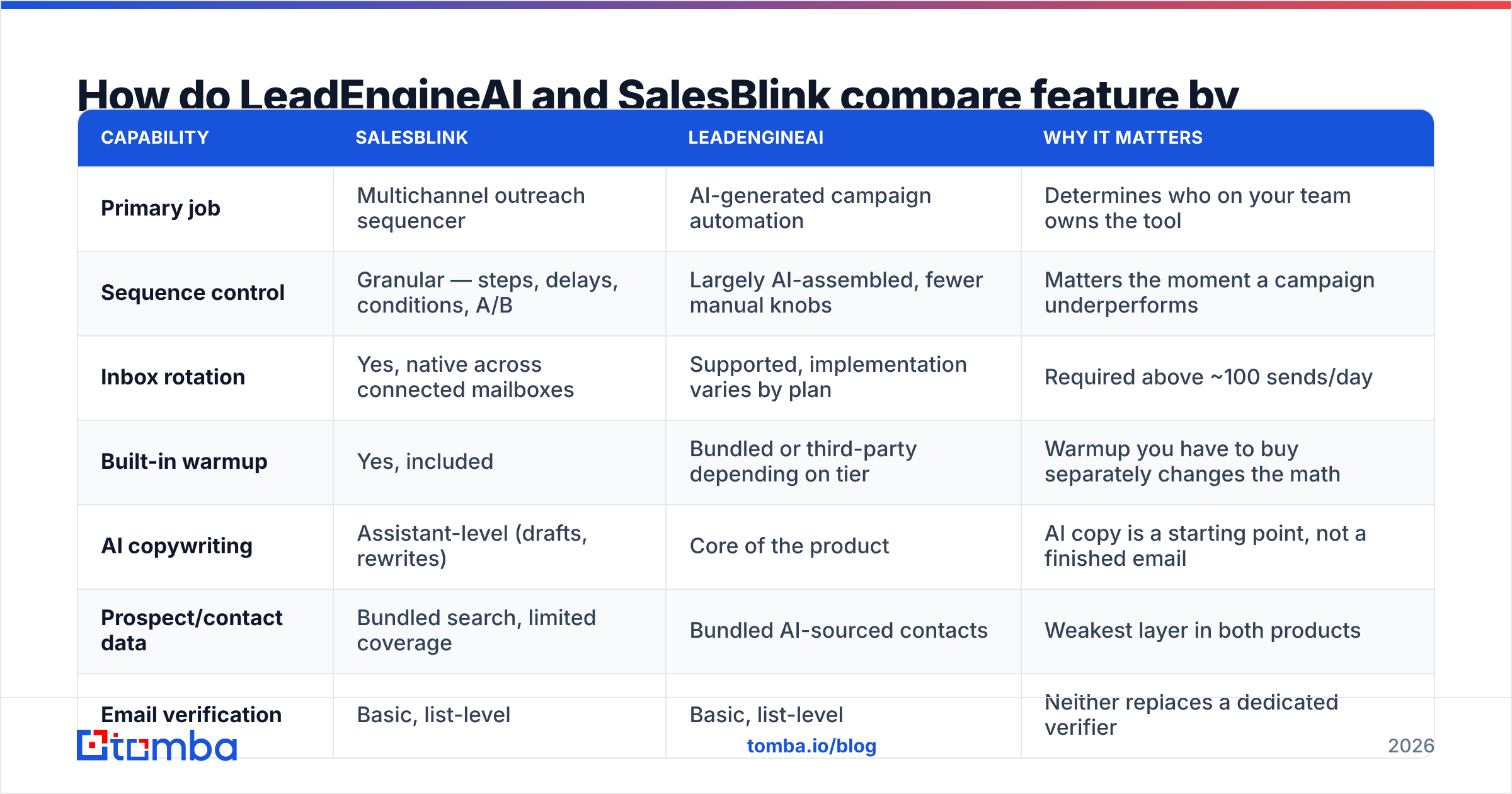
| Capability | SalesBlink | LeadEngineAI | Why it matters |
|---|---|---|---|
| Primary job | Multichannel outreach sequencer | AI-generated campaign automation | Determines who on your team owns the tool |
| Sequence control | Granular — steps, delays, conditions, A/B | Largely AI-assembled, fewer manual knobs | Matters the moment a campaign underperforms |
| Inbox rotation | Yes, native across connected mailboxes | Supported, implementation varies by plan | Required above ~100 sends/day |
| Built-in warmup | Yes, included | Bundled or third-party depending on tier | Warmup you have to buy separately changes the math |
| AI copywriting | Assistant-level (drafts, rewrites) | Core of the product | AI copy is a starting point, not a finished email |
| Prospect/contact data | Bundled search, limited coverage | Bundled AI-sourced contacts | Weakest layer in both products |
| Email verification | Basic, list-level | Basic, list-level | Neither replaces a dedicated verifier |
| Meeting booking | Native scheduler included | Usually via calendar integration | Saves one subscription if native |
| CRM sync | HubSpot, Pipedrive, Zapier | Zapier-first, native list shorter | Check your CRM before committing |
| Maturity signal | Years of public reviews on G2 | Newer entrant, smaller review base | Review depth is a real risk indicator |
| Best fit | 2-20 rep outbound teams | Solo founders, lean GTM teams |
Two things stand out in the LeadEngineAI vs SalesBlink feature list.
First, SalesBlink wins on the sending stack. Warmup, rotation, and booking live in one place. That means fewer tools and fewer surprise bills. Anyone who has renewed three vendors at once knows the pain.
Second, LeadEngineAI wins on speed. Say nobody on your team has written a cold email in months. An AI that drafts the whole sequence gets you sending on day one. That is a real edge. Just treat the draft as a draft.
Which one costs more in practice?#
Both tools change their prices, so check before you buy. The shape of the cost curve does not change. That shape is what trips teams up.
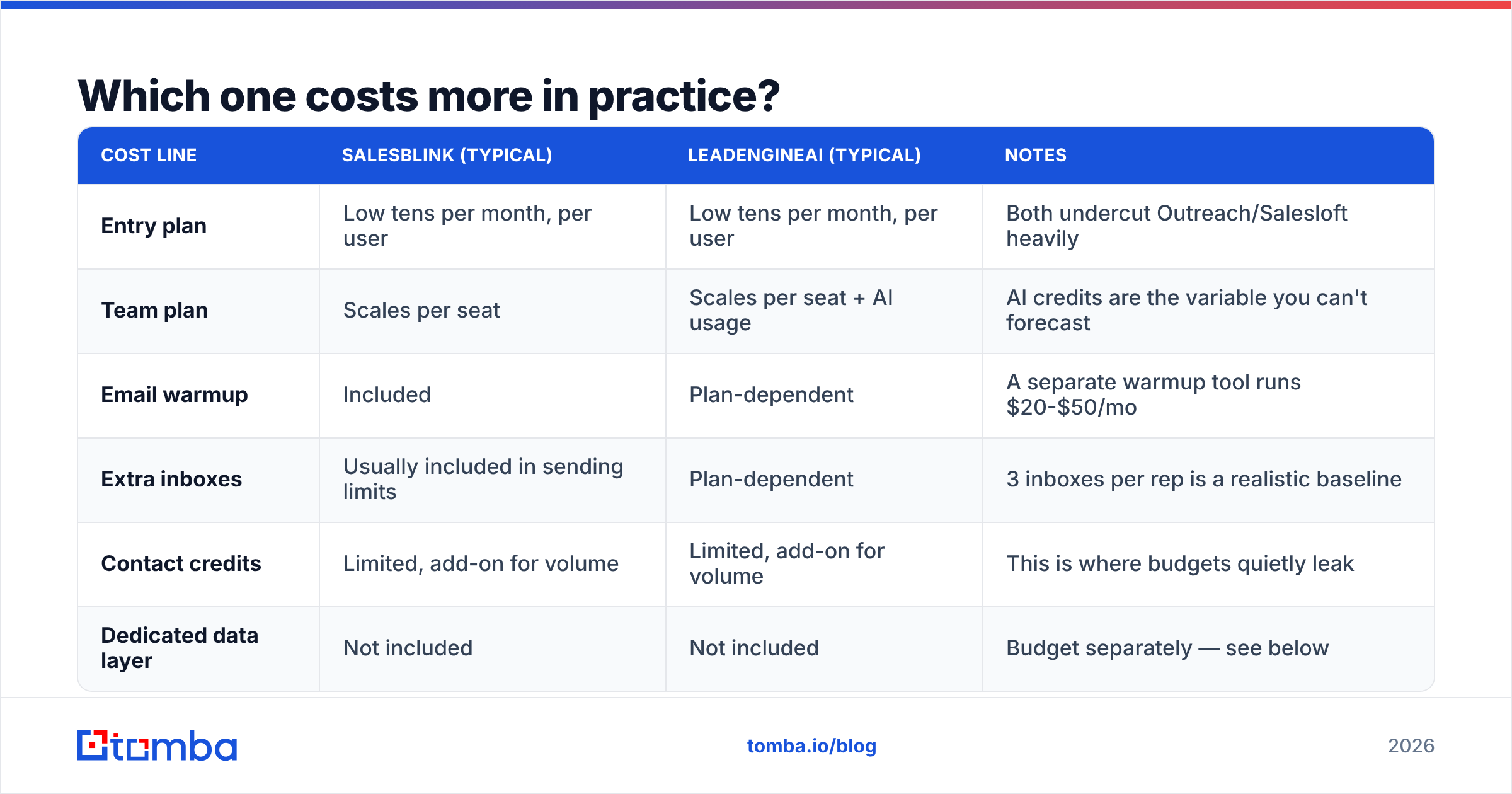
| Cost line | SalesBlink (typical) | LeadEngineAI (typical) | Notes |
|---|---|---|---|
| Entry plan | Low tens per month, per user | Low tens per month, per user | Both undercut Outreach/Salesloft heavily |
| Team plan | Scales per seat | Scales per seat + AI usage | AI credits are the variable you can't forecast |
| Email warmup | Included | Plan-dependent | A separate warmup tool runs $20-$50/mo |
| Extra inboxes | Usually included in sending limits | Plan-dependent | 3 inboxes per rep is a realistic baseline |
| Contact credits | Limited, add-on for volume | Limited, add-on for volume | This is where budgets quietly leak |
| Dedicated data layer | Not included | Not included | Budget separately — see below |
Here is the honest read. The sequencer is rarely your biggest outbound cost. Three reps sending 150 emails a day might spend $150 to $300 a month on it. The contact data to feed them can cost more than that.
Most LeadEngineAI vs SalesBlink write-ups skip this trade. Sequencer plans are cheap and much the same. Good contact data is neither. Buy data from a sending tool and you pay a high rate for thin coverage.
For reference, Tomba pricing starts free with 25 searches a month. Starter is $49/mo, Growth is $99/mo, and Pro is $249/mo. Splitting "find the contacts" from "send the emails" tends to cost less. The quality gap is not subtle either.
Which one gives you better data quality?#
Neither one. Plan around that.
This is the biggest finding in any LeadEngineAI vs SalesBlink review. Vendor pages never say it out loud. Both bundle contact search because buyers ask for it on demos. Neither was built as a data company. Their lists are smaller and refreshed less often.
Here is where that shows up in your numbers.
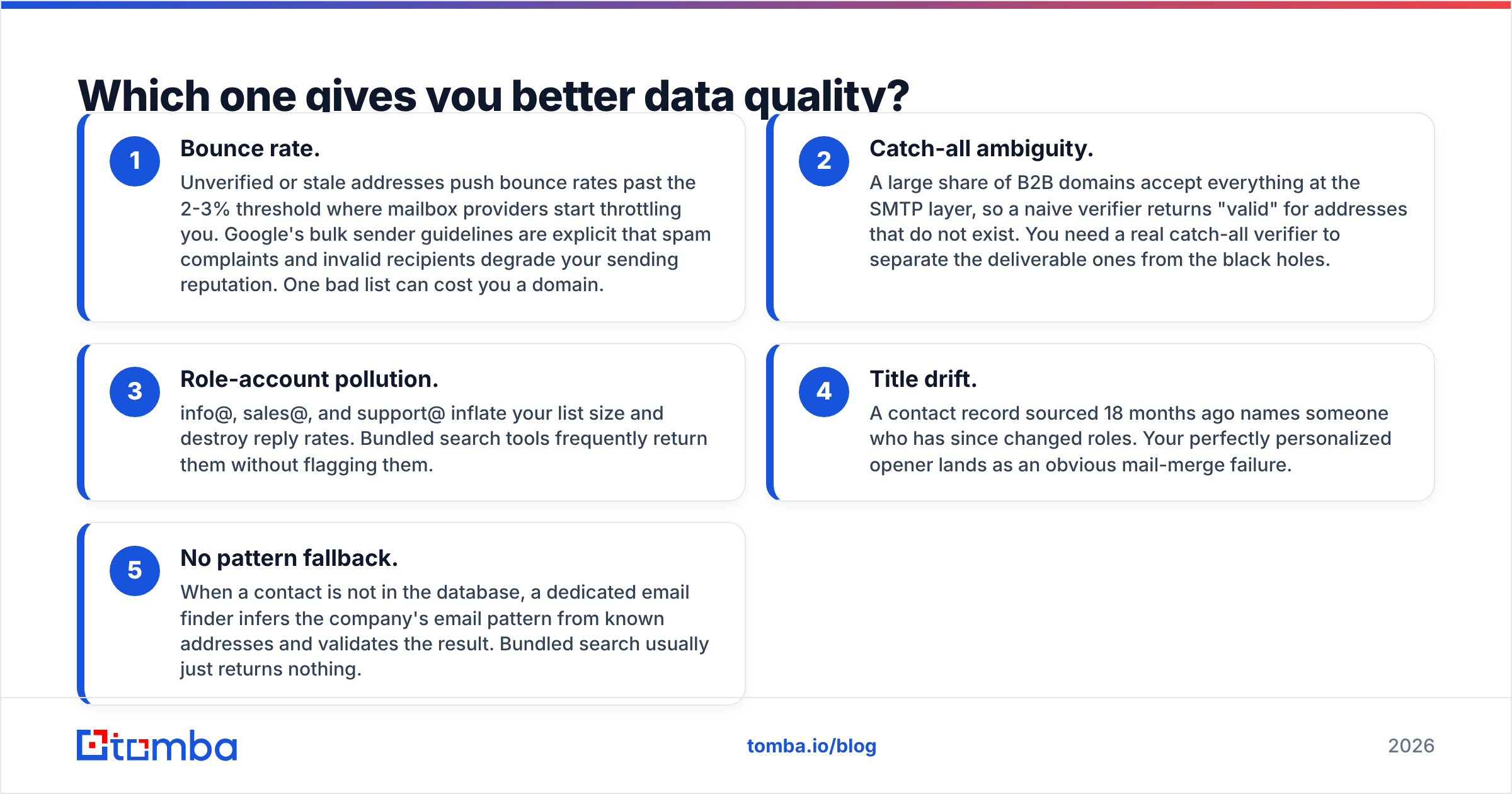
- Bounce rate. Old addresses push bounces past 2% or 3%. Past that line, inbox providers throttle you. Google's bulk sender guidelines say so plainly. One bad list can cost you a domain.
- Catch-all domains. Many B2B servers accept every address. A basic check then marks dead ones as valid. Use a real catch-all verifier instead.
- Role accounts. info@, sales@, and support@ pad your list. They also sink your reply rate. Bundled search hands them over unflagged.
The next two cost you replies rather than domains.
- Title drift. A record from 18 months ago names someone who has moved on. Your warm opener now reads like a mail merge.
- No fallback. When a contact is missing, a good email finder guesses the company pattern and tests it. Bundled search just returns nothing.
The fix is boring. Source and verify contacts in a tool built for that job. Then push the clean list into your sequencer. Run it through an email verifier before the first send. A 30-second check guards a domain you spent months warming.
Which one is safer for deliverability?#
SalesBlink has the edge here. The reason is structure, not clever code.
Deliverability is where the LeadEngineAI vs SalesBlink gap gets practical. Four things drive it: setup records, list hygiene, volume per inbox, and replies. A sequencer helps with two of them. It can hurt the other two, because it makes big blasts easy.
What SalesBlink does well. Warmup and rotation spread 450 daily sends across nine inboxes at 50 each. That beats hammering one inbox. Warmup inside the same tool also keeps one view of each inbox.
Where LeadEngineAI needs a minder. AI-built campaigns ramp volume faster than a person would. Say it builds a 2,000-contact push from a loose target list. If warmup lags, you find out from your spam rate. That is not an AI flaw. Volume simply ran ahead of the setup.
The basics stay the same either way. Publish a correct SPF record. Set up DKIM and DMARC. Send from a second domain, not your main one. Keep daily volume per inbox low for six weeks. No feature makes up for skipping those steps. HubSpot's deliverability guide covers the details in plain words.
Who should pick LeadEngineAI, and who should pick SalesBlink?#
Match the tool to your limit, not to the feature list.
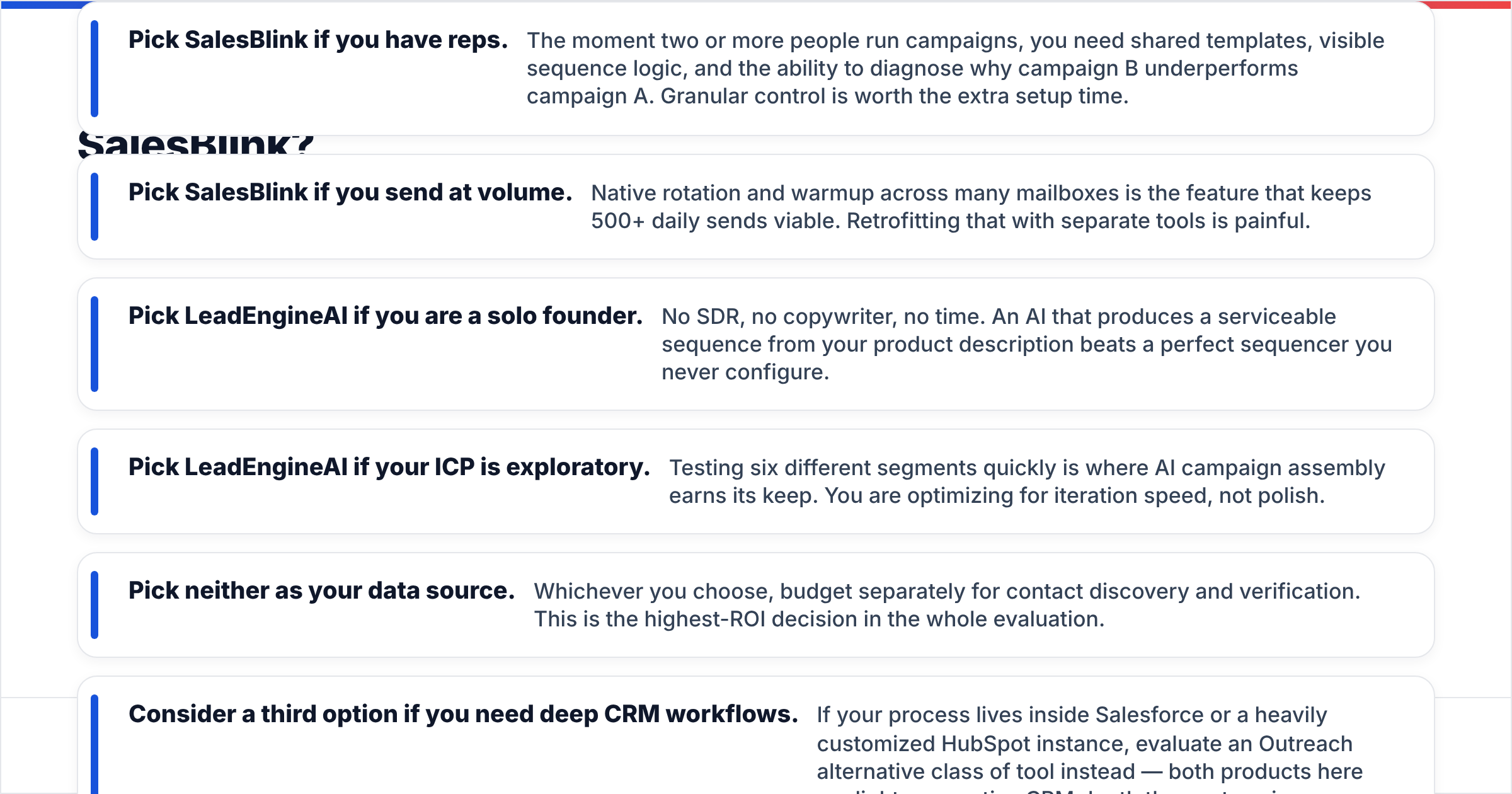
- Pick SalesBlink if you have reps. Two or more people need shared templates and clear sequence logic. You also need to see why one campaign beat another.
- Pick SalesBlink if you send a lot. Built-in rotation and warmup keep 500 daily sends alive. Bolting that on later is painful.
- Pick LeadEngineAI if you work alone. No rep, no writer, no time. A decent auto-built sequence beats a perfect one you never set up.
- Pick LeadEngineAI if your target list is still fuzzy. Testing six segments fast is where AI assembly pays off.
Two rules hold no matter how the LeadEngineAI vs SalesBlink call goes.
- Pick neither as your data source. Budget on its own for finding and checking contacts. It is the highest-payoff call here.
- Look wider if you live in the CRM. Deep Salesforce or HubSpot work points to an Outreach alternative. Both tools here are light on native CRM depth.
What does a sane 2026 outbound stack look like?#
Three layers, kept apart. Swap one without rebuilding the rest.
Layer 1 — Data. Find and check contacts before they hit a sequence. Map an account with domain search. Use an email finder for named people. Use a verifier to kill bounces. Add data enrichment for title, company size, and tech stack. This layer sets your ceiling.
Layer 2 — Sending. SalesBlink or LeadEngineAI sits here. Warm inboxes, rotation, sequence logic, reply detection. Pick on team size and control, then move on.
Layer 3 — Revenue. Your CRM, your booking page, your reports. Both tools sync here. Check that your CRM is natively supported. Zapier-only sync gets pricey at volume.
The LeadEngineAI vs SalesBlink decision only touches layer 2. Keep the layers apart, because tools churn. Sequencers get bought, reprice, or fall behind. Your contact data and your CRM should outlive them.
Frequently asked questions#
Is LeadEngineAI or SalesBlink better for cold email? Short answer: SalesBlink for control and volume, LeadEngineAI for speed. Both need clean, verified lists to work.
Do either of them replace a dedicated email finder? No. Their bundled search has thinner coverage and weaker checks. Treat it as a convenience, not a data source.
Can I use both? Yes. Some teams test segments in LeadEngineAI and run winners in SalesBlink. That is one more bill, but the workflow holds.
What bounce rate should I target? Under 2%. Above 3%, inbox providers start to throttle you. A check before send is the cheapest insurance around.
Where to start#
Fix the input first. No sequencer can improve the addresses you feed it.
Start with the Tomba Email Finder. Pull verified addresses by domain, name, or company. Check each one before it enters a sequence. Export straight into SalesBlink or LeadEngineAI. The free tier gives you 25 searches a month. Starter is $49/mo when you are ready to scale. Get the data layer right, and the LeadEngineAI vs SalesBlink choice stops being risky.
Related guides#
// get started
Find, verify and enrich your first contacts today
Start on the free plan with 25 searches a month, then scale when your team is ready.
Free plan · No credit card required · GDPR & CCPA
// about the author