LeadEngineAI vs Smartlead: Full 2026 Comparison Guide
LeadEngineAI bundles AI campaign writing with sending credits. Smartlead sells unlimited mailboxes and rotation. Here's how the two compare on price, deliverability, and data — and which one actually fits your outbound motion.
LeadEngineAI vs Smartlead in one line: Smartlead sells sending power. LeadEngineAI sells a metered, AI-assisted workflow. Neither one finds your leads for you.
TL;DR
- Smartlead is a sending tool. Every plan gets unlimited mailboxes, unlimited warmup, and inbox rotation. That starts at $39/mo. It does not find leads.
- LeadEngineAI runs on credits. Sends, AI copy, and automation steps all draw from one pool. Unused credits roll over.
- Neither tool fixes your data. Both assume you bring a verified list. Bad addresses hurt your sender score either way.
- Price gaps are misleading. Smartlead's add-ons stack up fast. Credits are simple, but easy to burn.
- Our read: Smartlead for volume and agencies. LeadEngineAI for lean teams.
LeadEngineAI vs Smartlead: what are these tools?#
Both tools are cold email sequencers. But they were built on different bets.
Smartlead was built for high volume. Connect as many mailboxes as you like. The platform warms them all. Then it rotates sends across them. No single inbox carries enough volume to get flagged. Every plan includes unlimited email accounts and unlimited warmup. That is why agencies flocked to it. One plan can power dozens of client domains.
LeadEngineAI (at LeadEngine.ai) is built the other way. It does not sell seats or mailbox caps. It meters your use in credits. A plain send costs one credit. Add AI copy, a branch, or an enrichment step, and the same send costs more. Unused credits roll forward. That is rare in this market. Its entry tier, Ignite, bundles sending and campaign writing in one package.
So the LeadEngineAI vs Smartlead split comes down to one thing. Smartlead sells you capacity. LeadEngineAI sells you a metered workflow, plus help with the copy.
LeadEngineAI vs Smartlead: how do they differ?#
Four gaps change your daily work.
- Billing. Smartlead charges in fixed tiers, by contact and by send volume. LeadEngineAI charges per credit. Simple campaigns stay cheap. AI-heavy ones burn credits fast.
- Mailboxes. Unlimited mailboxes is Smartlead's best card. Run 40 accounts across eight domains and the math is not close.
- AI depth. LeadEngineAI treats AI campaign writing as a core feature. Smartlead has AI too, but its focus is inbox mechanics.
- Agency tools. Smartlead has client workspaces and whitelabel. They cost extra, but they work and they are well tested. LeadEngineAI is younger here.
Two more gaps show up after you sign up.
- Budget. A fixed tier is easy to plan. A credit pool is easy to blow in week one. Rollover softens that.
- Proof. Smartlead has thousands of reviews on G2. LeadEngineAI has far fewer. You will lean on your own trial instead.
LeadEngineAI vs Smartlead pricing: which is cheaper in 2026?#
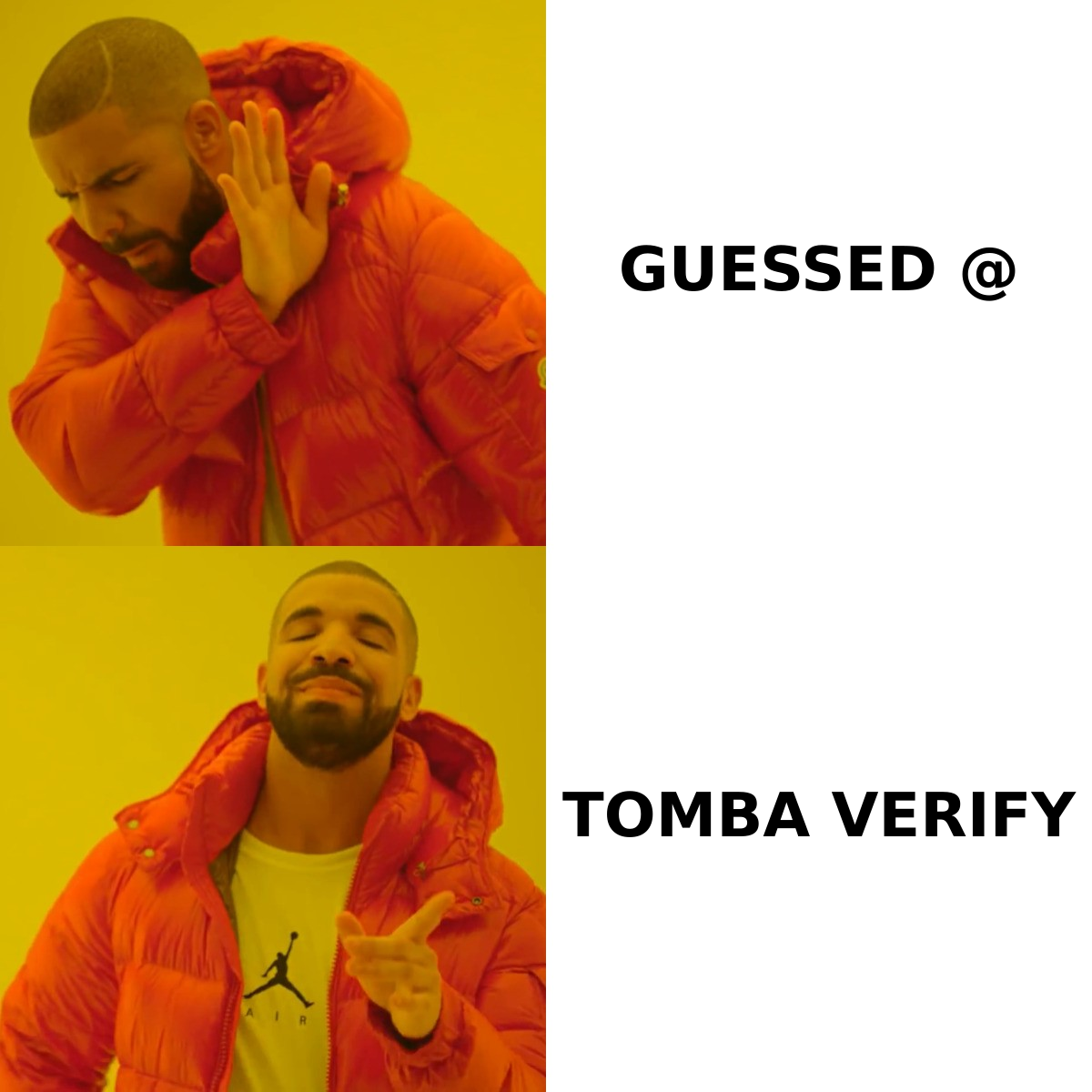
Prices move. Treat this as a snapshot. Check each vendor's page before you buy.
| Dimension | Smartlead | LeadEngineAI |
|---|---|---|
| Entry price | $39/mo (Base) | Credit-based, Ignite tier |
| Mid tier | $94/mo Pro — 30,000 contacts, 90,000 sends | Higher credit allotment |
| High tier | $174/mo Unlimited Smart, $379/mo Unlimited Prime | Custom / larger credit packs |
| Email accounts | Unlimited on every plan | Not the main limit — credits are |
| Warmup | Unlimited, included | Included |
| Unused allowance | Expires monthly | Rolls over |
| Notable add-ons | SmartDelivery, client workspaces, whitelabel, verified prospect credits | AI and automation steps cost extra credits per send |
| Annual discount | ~17% | Check current terms |
| Best-fit buyer | Agencies, high-volume SDR teams | Lean teams that want AI help |
One honest note on Smartlead. Several reviews say the real cost lands at three to five times the base plan. Dedicated domains, SmartDelivery, verify credits, and whitelabel all add up. That is not a knock on Smartlead. The whole category works this way. Your sequencer is one line item. Mailboxes, domains, and data are the rest.
LeadEngineAI flips the risk. Add-on invoices will not shock you. But an AI-heavy sequence can eat credits fast. Map your real campaign first. Count the steps. Count how many use AI or a branch. Then check the published credit logic and size your plan.
LeadEngineAI vs Smartlead: which one lands more email?#
Neither. Not in the way that counts. Inbox placement is not a feature you buy. It comes from list quality, domain setup, a slow ramp, and replies.
Both tools give you mechanics. Warmup pools. Inbox rotation. Send throttling. DNS checks. Smartlead goes deeper here, above all on rotation and its SmartDelivery placement tests. LeadEngineAI covers the basics.
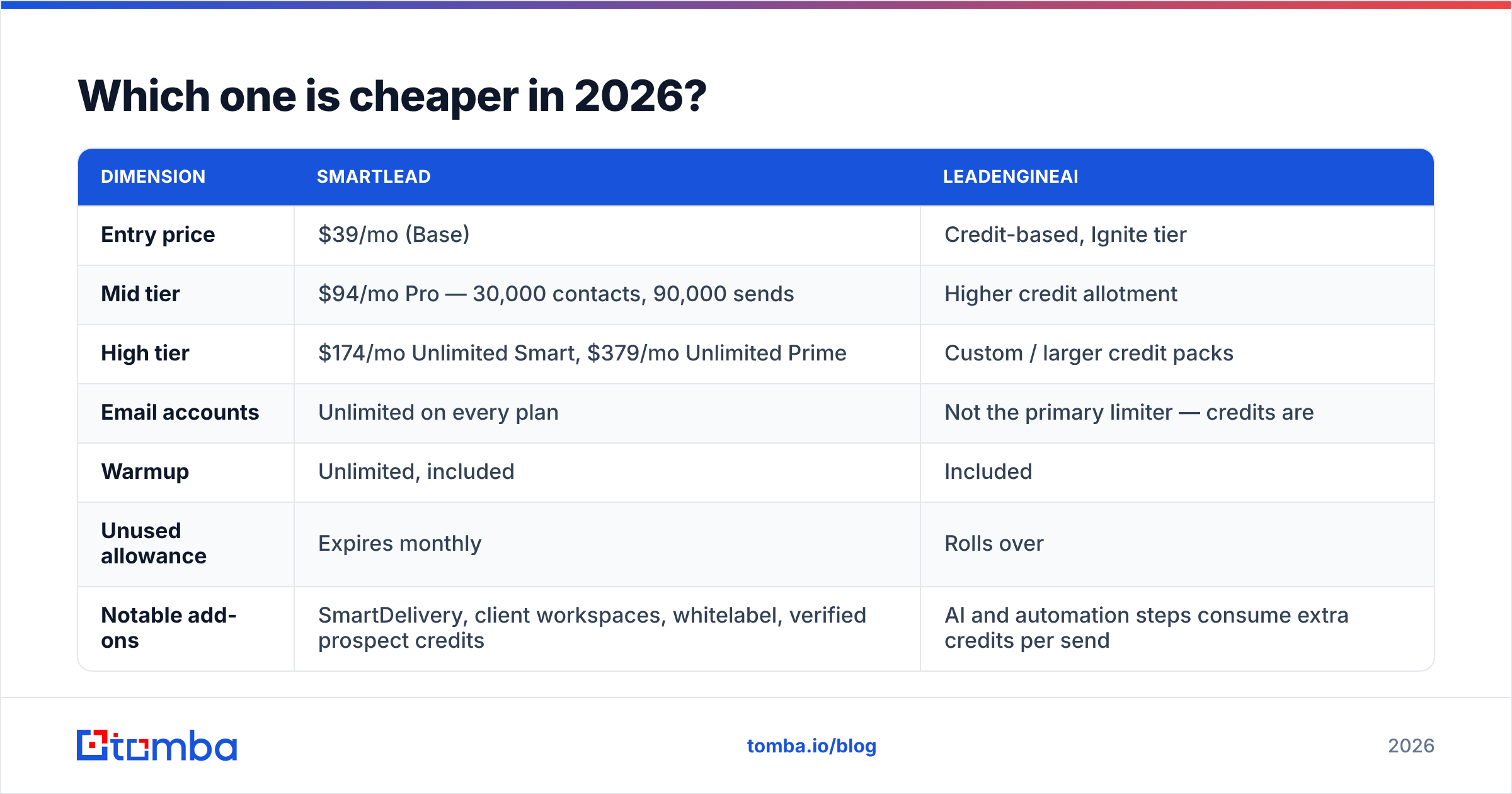
One thing beats all of that. Who is on your list. Google and Microsoft tightened their bulk sender rules. A spam complaint rate above 0.3% gets your mail throttled or binned. Slick rotation will not save you. Google spells this out in its bulk sender guidelines. Hard bounces from old or guessed addresses get you there fastest.
Three things move the needle more than any tool setting:
- Bounce rate under 2%. Verify every address before it enters a sequence, not after.
- Signed domains. Publish SPF, DKIM, and DMARC on every sending domain. Run an SPF checker on each one first.
- Relevance. A 1% reply rate on a bad list hurts your sender reputation more than any tech slip.
Both tools will send junk at scale. Know that before you spend a month on feature lists.
Does either tool find leads for you?#
No. Most buyers learn this in week two.
Smartlead is a sequencer. It imports CSVs, links to your CRM, and sends. It sells verified prospect credits as an add-on. But finding leads is not its job. LeadEngineAI helps with copy and automation, not sourcing.
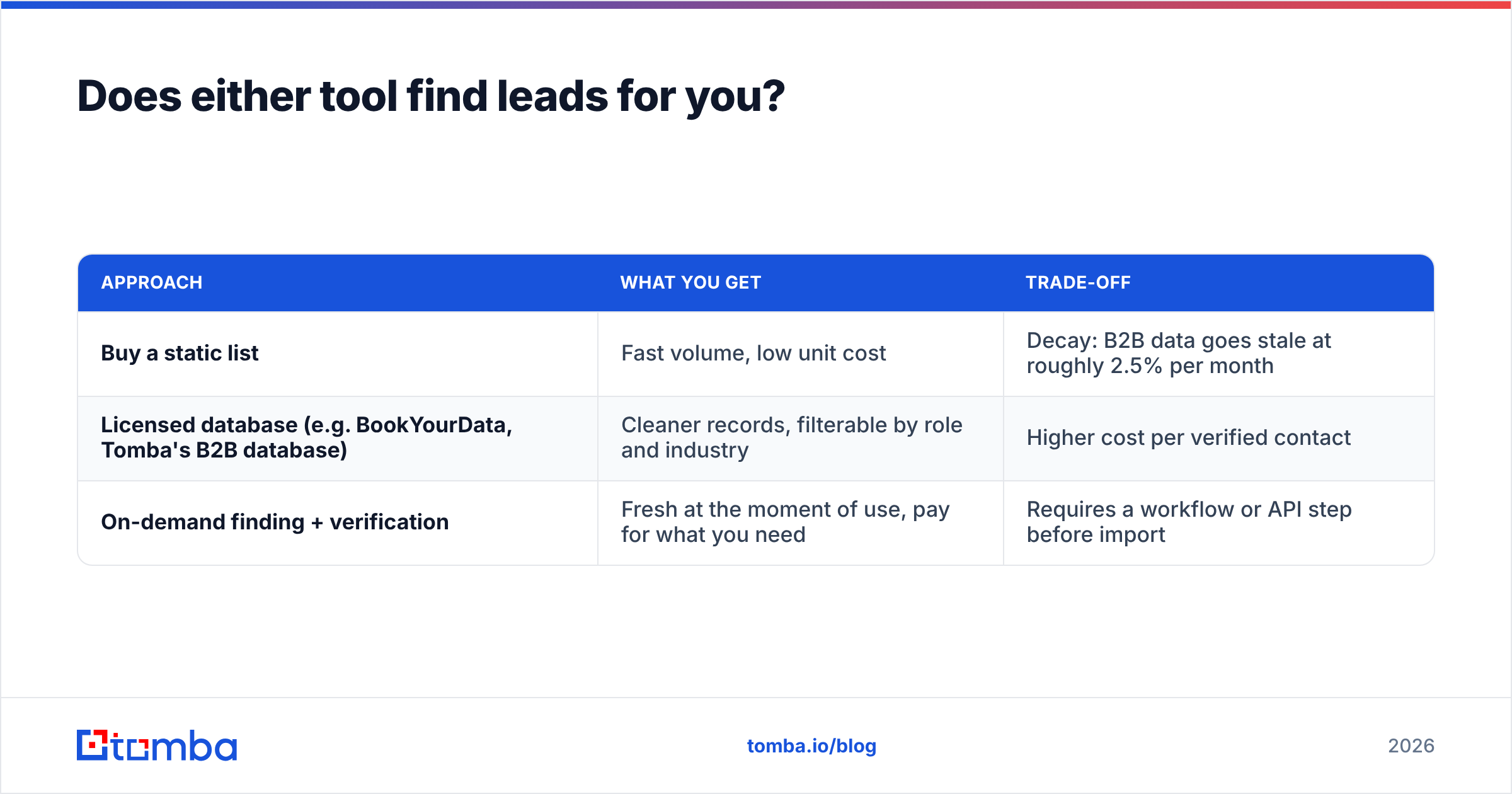
So you need a third layer: a data source. You have three options.
| Approach | What you get | Trade-off |
|---|---|---|
| Buy a static list | Fast volume, low unit cost | Decay: B2B data goes stale at about 2.5% per month |
| Licensed database (e.g. BookYourData, Tomba's B2B database) | Cleaner records, filter by role and industry | Higher cost per verified contact |
| On-demand finding + verification | Fresh at the moment of use, pay for what you need | Needs a workflow or API step before import |
The third row is where an email finder fits. You do not buy 50,000 contacts and hope 70% still work. You turn names and domains into addresses as you build the campaign. Then you run each one through an email verifier before it reaches either tool.
For account-based work, domain search is faster. Give it a company domain. Get back verified addresses and the firm's email pattern. Now you can fill gaps for people no database has yet. Catch-all domains fool simple SMTP checks, so a catch-all verifier keeps those records from padding your bounce rate.

Who should choose Smartlead?#
Pick Smartlead if:
- You run an agency. You need client workspaces, whitelabel, and dozens of sending accounts. Cost per mailbox is hard to beat.
- Your volume is high and steady. At tens of thousands of sends a month, rotation keeps you out of spam.
- You want the biggest user base in this market. When something breaks, someone has posted the fix.
- You treat the plan as a base cost, not the whole cost. Budget for domains, mailboxes, verify credits, and placement tests.
Who should choose LeadEngineAI?#
Pick LeadEngineAI if:
- You are a small team or solo founder. You want writing and sending in one place.
- Your sending is bursty. Heavy one month, light the next. Rollover means you skip paying for idle capacity.
- You want AI-assisted campaigns built in, not pasted from another tool.
- You run a handful of sending domains at most. Then unlimited mailboxes buys you nothing.
Still torn? Run the same 200 contacts through both trials. Use the same copy. Compare reply rate, not open rate. Opens are noisy in 2026. Replies are not. Track them against your usual response rate.
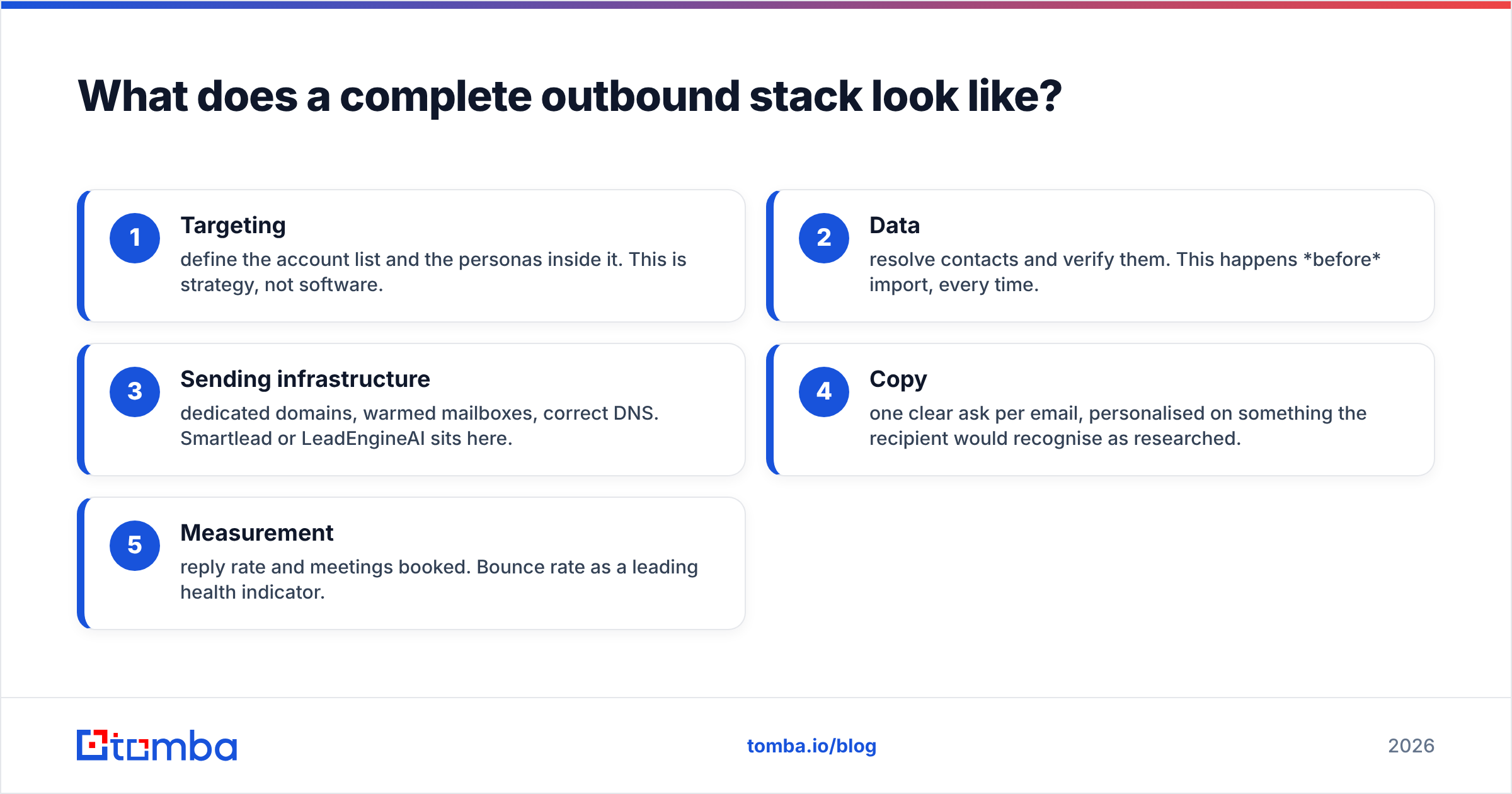
What does a full outbound stack look like?#
The sequencer changes. The layers around it do not.
- Targeting. Pick the accounts and the roles inside them. That is strategy, not software.
- Data. Find contacts and verify them. This happens before import, every time.
- Sending. Own domains, warm mailboxes, clean DNS. Smartlead or LeadEngineAI sits here.
- Copy. One clear ask per email. Personalize on something the reader will notice.
- Measure. Reply rate and meetings booked. Watch bounce rate as an early warning.
Most teams overspend on step 3 and skimp on step 2. A $379/mo plan aimed at a nine-month-old list will lose. A $39/mo plan aimed at 500 fresh, verified contacts will win. Every time.
LeadEngineAI vs Smartlead: the verdict#
Smartlead wins on cost per mailbox. LeadEngineAI wins on simplicity.
Run an agency or a large SDR team? Smartlead is the safer pick. Its mailbox math and mature rotation hold up, as long as you budget for the add-ons. Run a lean team with swingy volume? LeadEngineAI's credit model is kinder. You also skip stitching four tools together.
Neither choice fixes your data. Both tools are amplifiers. They make your list louder, not better.
Fix that first. Start with Tomba Email Finder. Turn names and domains into verified addresses. Then push a clean list into the tool you picked. The free tier gives you 25 searches a month. Paid plans start at $49/mo. See full Tomba pricing, or wire the API straight into your import step. Fix the list first. Then argue about the sequencer.
Related guides#
// get started
Find, verify and enrich your first contacts today
Start on the free plan with 25 searches a month, then scale when your team is ready.
Free plan · No credit card required · GDPR & CCPA
// about the author