LeadEngineAI vs Supersend: Which Outbound Tool Wins in 2026?
LeadEngineAI promises AI-sourced leads on autopilot. Supersend runs email and LinkedIn sequences from one inbox. They solve different halves of outbound — here is which half you actually need, and what neither one fixes.
LeadEngineAI vs Supersend is the wrong fight to pick. One tool finds the contacts. The other sends to them. This guide shows which half of outbound you are actually missing, and what neither tool fixes.
TL;DR
These two are not direct substitutes. LeadEngineAI leans toward AI-assisted lead sourcing and list building. Supersend leans toward multichannel sequencing — email plus LinkedIn — from one sending layer.
Buy for your bottleneck. If you do not know who to contact, a sourcing tool helps. If you cannot reach people at scale without burning domains, a sender helps. Teams that guess wrong pay for both anyway.
Neither treats contact data as a core product. It is a bundled convenience. That is where bounce rates come from.
Both sit in the entry-SaaS range. Expect roughly $50–$150 a month for a single seat. Above that, pricing scales per seat or per inbox. Check the vendor page before you budget, because both change tiers often.
The durable fix is to split the data layer from the sending layer. Source and verify contacts with a dedicated provider. Then push clean records into whichever sequencer you prefer.
What are LeadEngineAI and Supersend?#
Start with the category, not the feature list. Outbound tooling splits into three layers. Every vendor claims more of them than it owns:
The data layer — finding the person, the company, the email address, and the phone number. Then proving the address is real before you send.
The sending layer — inboxes, warmup, sequence logic, multichannel steps, reply detection, and deliverability hygiene.
The orchestration layer — CRM sync, routing, reporting, and attribution back to pipeline.
LeadEngineAI sits in layer one with an AI wrapper on top. You describe your ideal customer profile in plain language. The platform then assembles a list of matching companies and contacts, often with enrichment attached. The pitch is speed: no filter puzzles, no manual scraping.
Supersend (supersend.io) lives in layer two. It runs email and LinkedIn touches inside one sequence. You get high-volume inbox connections, warmup, and conditional steps. The pitch is consolidation: stop paying for a separate sender, a separate LinkedIn tool, and a separate warmup service.
Comparing them head-to-head is a bit like comparing a supplier to a delivery fleet. Both are necessary. Neither replaces the other.
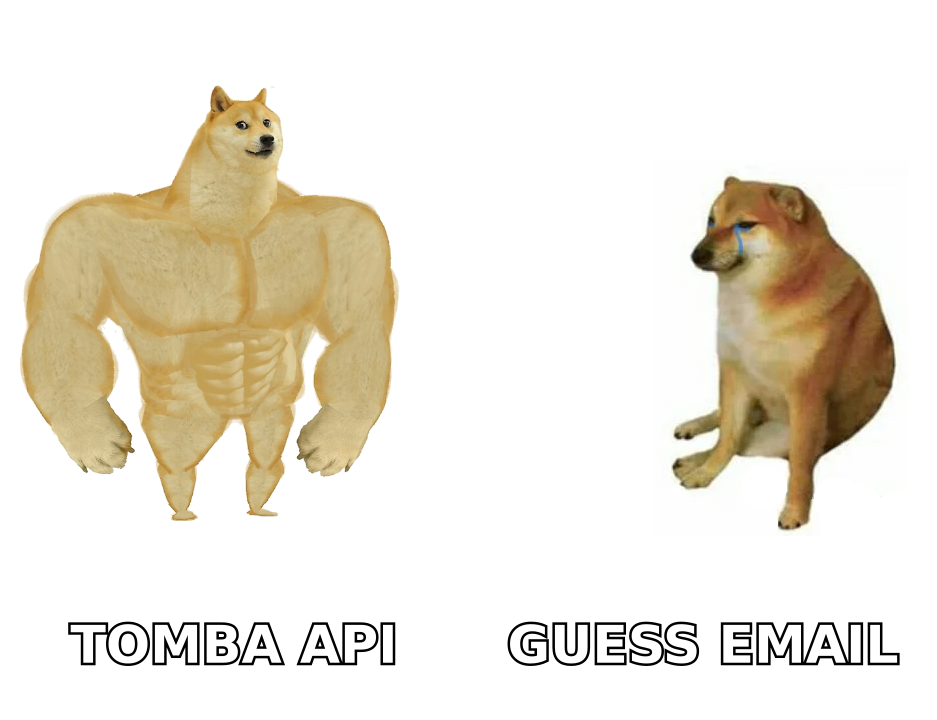
LeadEngineAI vs Supersend: how do they compare head-to-head?#
Here is the honest side-by-side. Treat the feature rows as directional. Both vendors ship changes monthly, and neither publishes a fixed feature matrix you can cite forever.
| Dimension | LeadEngineAI | Supersend |
|---|---|---|
| Primary job | AI-assisted lead sourcing and list building | Multichannel sequencing (email + LinkedIn) |
| Core user | Founder, SDR, growth marketer building lists | SDR team, agency running volume outbound |
| Contact data | Bundled, sourced from aggregated providers | Minimal; expects you to bring your own list |
| Email sending | Limited or absent | Core capability, multi-inbox rotation |
| LinkedIn automation | Not the focus | Native sequence step |
| Warmup | No | Included or tightly integrated |
| Verification depth | Basic validity flag | Not a data tool; relies on your list quality |
| Typical entry price | Low-to-mid double digits per month | Low-to-mid double digits per month, scales per inbox/seat |
| Best-case outcome | You stop manually building lists | You stop paying for three separate tools |
| Failure mode | Stale or unverified contacts inflate bounces | Great sequences fired at bad data |
Notice the last two rows. Both tools fail in the same place, from opposite directions. LeadEngineAI can hand you a list that looks complete and bounces at 12%. Supersend will deliver your campaign to that same bad list at high volume. That damages a sending domain faster than doing nothing at all.
Which one fits your outbound bottleneck?#
Diagnose before you buy. Five scenarios cover most B2B teams:
You have a clear ICP but no list. Say you want Series-A fintech VPs of Engineering in the UK. Building that list eats six hours a week. A sourcing tool like LeadEngineAI earns its fee here, as long as you verify the output before sending.
You have a list, but reply rates are bad and bounces are rising. More leads will not help. You need verification, better segmentation, and sequence hygiene. Supersend helps with the sending mechanics. A dedicated email verifier helps with the rest.
You run email and LinkedIn, and the handoff is manual. This is Supersend's home turf. Running both channels in one workflow removes a real operational cost.
You are an agency running many clients. You need inbox isolation, per-client reporting, and predictable per-seat costs. Sending platforms handle this better than sourcing platforms, which usually meter credits instead of seats.
You need contact data inside your own product or workflow. Neither tool is API-first the way a data vendor is. To resolve emails inside a script, a CRM automation, or an internal app, you want an email finder API, not a sequencer.
If two or more of those describe you, budget for two tools. That is not a failure of either vendor. It is how the stack is shaped.
How do they handle data quality and email verification?#
This is where the comparison gets uncomfortable for both.
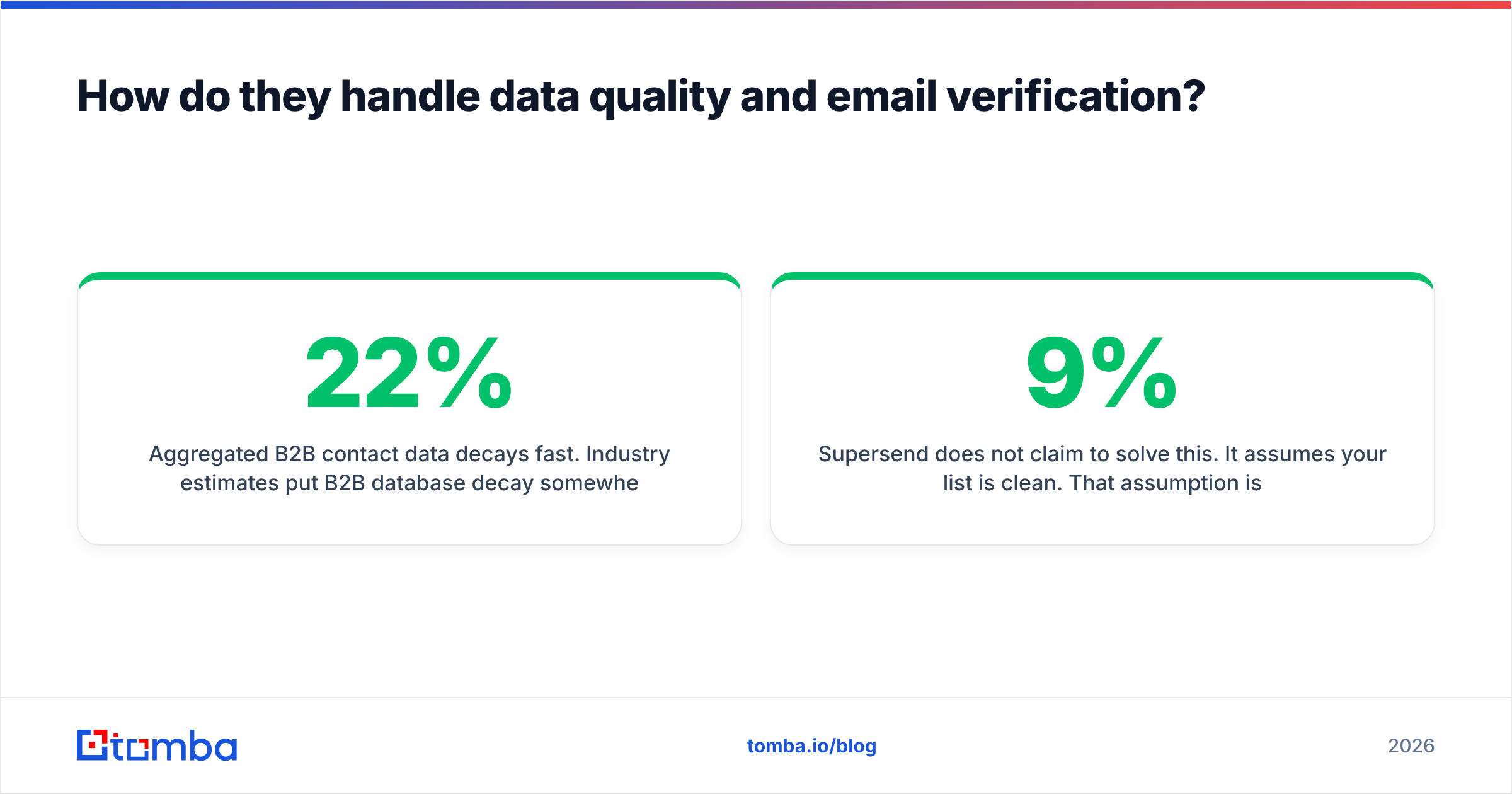
Aggregated B2B contact data goes stale fast. Industry estimates put B2B database decay between 22% and 30% per year. People change jobs, companies rename, and domains migrate. Any tool that shows you a contact record without re-checking it is showing you a cached guess.
Sourcing tools like LeadEngineAI usually return an address with a confidence label. A confidence label is not verification. Real verification means an SMTP-level check against the receiving server at the moment you plan to send. It also means catch-all detection for domains that accept everything and reject it quietly later.
Supersend does not claim to solve this. It assumes your list is clean. That assumption is the most common reason cold email programs collapse in month two. The sequence works and the copy works, but the domain gets throttled because 9% of recipients did not exist.
Two habits fix most of it:
Verify at send time, not at import time. A list verified 60 days ago is a list you have not verified.
Treat catch-all domains as their own bucket. Run them through a catch-all verifier. Then cap the volume you send into them, rather than excluding or trusting them blindly.
Google and Microsoft have both tightened bulk sender rules. The published Gmail sender guidelines now treat spam-complaint rate as a hard, enforced threshold. Bad data is no longer just wasted spend. It is a deliverability liability.
What do they cost in 2026?#
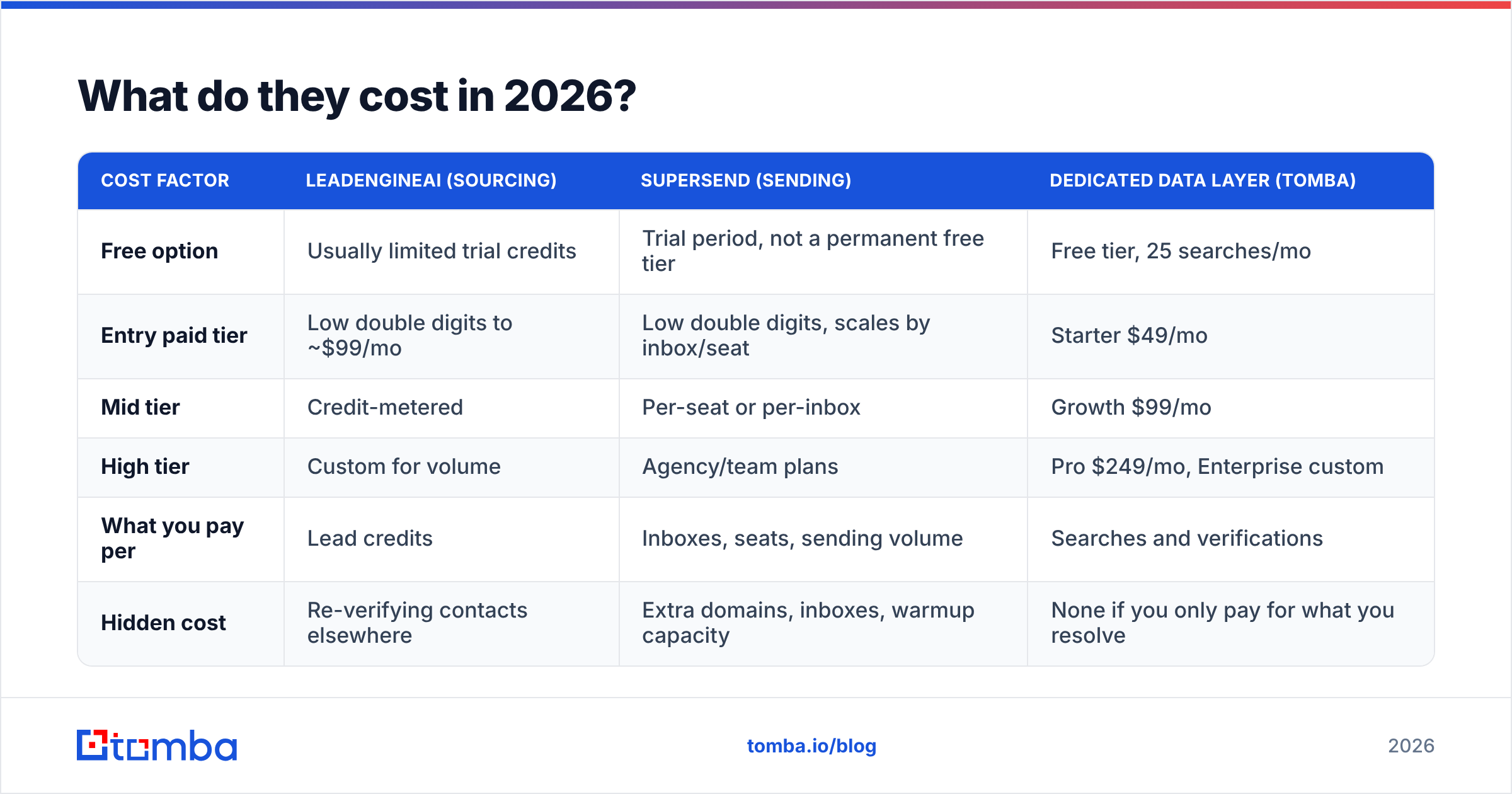
Published pricing for both products sits in the accessible range, which is part of the appeal. The table below is a planning framework, not a quote. Check the current numbers on each vendor's own pricing page first, because both have repriced within the last year.
| Cost factor | LeadEngineAI (sourcing) | Supersend (sending) | Dedicated data layer (Tomba) |
|---|---|---|---|
| Free option | Usually limited trial credits | Trial period, not a permanent free tier | Free tier, 25 searches/mo |
| Entry paid tier | Low double digits to ~$99/mo | Low double digits, scales by inbox/seat | Starter $49/mo |
| Mid tier | Credit-metered | Per-seat or per-inbox | Growth $99/mo |
| High tier | Custom for volume | Agency/team plans | Pro $249/mo, Enterprise custom |
| What you pay per | Lead credits | Inboxes, seats, sending volume | Searches and verifications |
| Hidden cost | Re-verifying contacts elsewhere | Extra domains, inboxes, warmup capacity | None if you only pay for what you resolve |
In any LeadEngineAI vs Supersend cost comparison, the hidden-cost row matters more than the headline price. A $59 sourcing subscription that produces a list you must re-verify is not a $59 subscription. It is $59 plus a verification bill plus the bounces you missed. Compare total cost to first real reply, not sticker price.
Full Tomba pricing is public if you want a concrete baseline for the data-layer column.

Is Supersend better than LeadEngineAI for multichannel outreach?#
Yes, and it is not close. But that is a category statement, not a quality judgment.
Multichannel sequencing needs things a sourcing tool has no reason to build. Inbox rotation logic. Send-time throttling. Reply and bounce detection that pauses a sequence. LinkedIn session management. Warmup that ramps a new domain slowly. Supersend builds toward all of that. LeadEngineAI does not compete there.
Flip it around and the same logic holds. Asking Supersend to build a segmented list of 2,000 verified operations leaders at logistics companies is like asking a delivery fleet to manufacture the goods.
The better question is not "which is better." It is "which layer costs me the most right now." Check your own numbers:
Bounce rate above 3% → data layer problem. No sequencer fixes it.
Deliverability collapsing after week two → sending layer problem. More leads make it worse.
Plenty of sends, few positive replies → targeting or copy problem. Neither tool fixes copy. A subject line tester and tighter segmentation will move the number more than a platform switch.
Reps spending over five hours a week on list building → sourcing problem, and the clearest case for an AI list builder.
What does a sensible 2026 stack look like?#
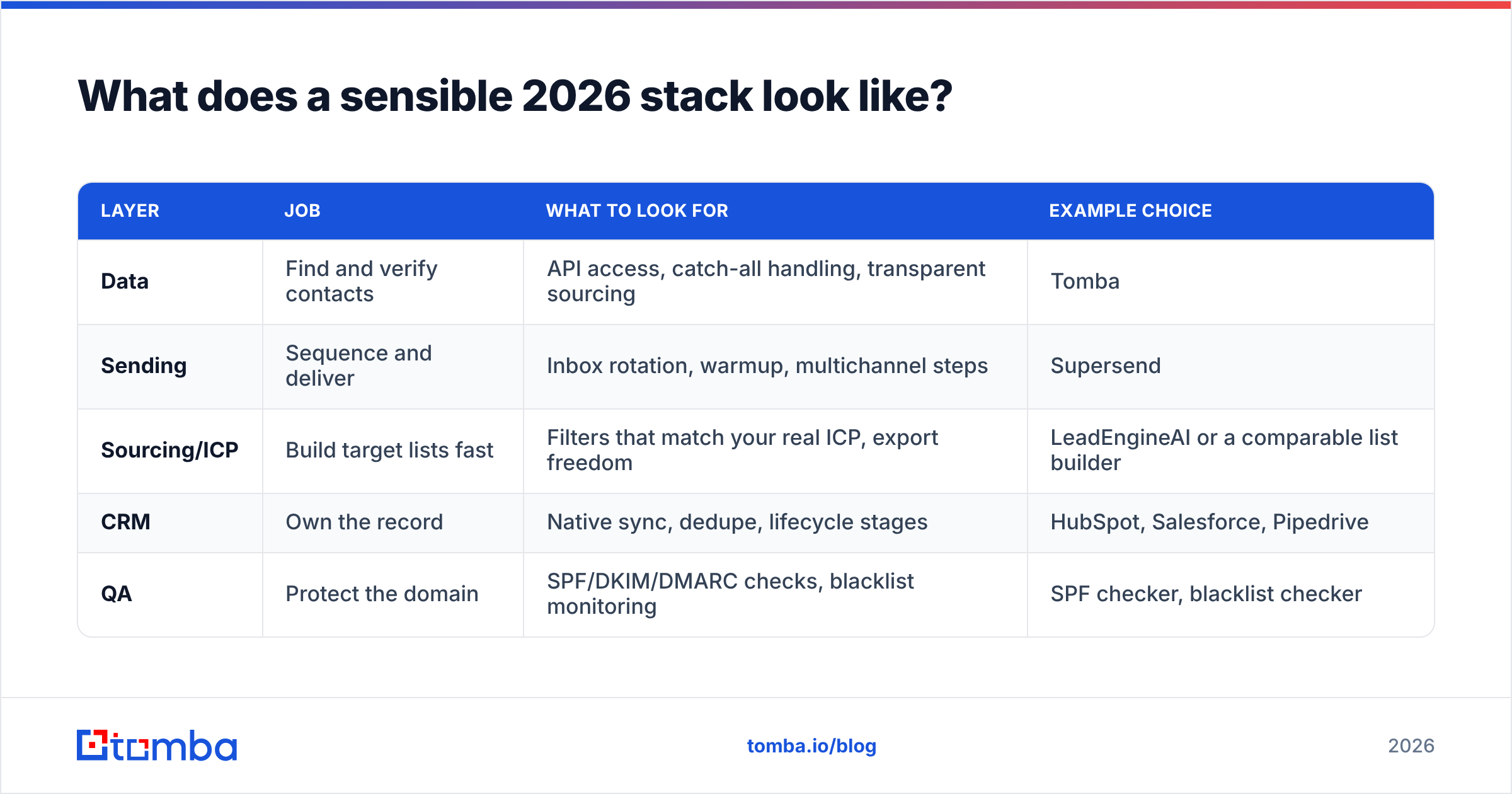
The teams with the best outbound economics tend to land on the same shape. They also refuse to let one vendor own two layers badly.
| Layer | Job | What to look for | Example choice |
|---|---|---|---|
| Data | Find and verify contacts | API access, catch-all handling, transparent sourcing | Tomba |
| Sending | Sequence and deliver | Inbox rotation, warmup, multichannel steps | Supersend |
| Sourcing/ICP | Build target lists fast | Filters that match your real ICP, export freedom | LeadEngineAI or a comparable list builder |
| CRM | Own the record | Native sync, dedupe, lifecycle stages | HubSpot, Salesforce, Pipedrive |
| QA | Protect the domain | SPF/DKIM/DMARC checks, blacklist monitoring | SPF checker, blacklist checker |
Two implementation notes that save real money:
Export freedom is a buying criterion. A sourcing tool that will not let you export a full record is a rental, not an asset. If you cannot move your list out, you cannot re-verify it elsewhere. You are then stuck with whatever quality that vendor ships next quarter.
Verification belongs at the boundary, not in the middle. Verify on the way into your CRM, then again on the way into a campaign. A verification credit costs a rounding error next to a throttled domain. Also cross-check vendor claims against review data on G2 before you trust a published accuracy figure. Self-reported accuracy is marketing. Aggregated user reviews are evidence.
If you already run a CRM as the system of record, a native HubSpot integration removes the CSV shuttle. Resolve the contact, verify it, and write it straight to the record.
So which should you choose?#
Choose Supersend if your lists are already decent and your problem is operational. That means too many tools, manual LinkedIn steps, messy inboxes, or agency clients that need isolation. You will get the most out of it if you feed it verified data.
Choose LeadEngineAI if list building eats your week and you want AI to turn ICP definition into a prompt. Budget separately for verification. Assume the output needs a quality pass before it touches a domain you care about.
Choose neither, first, if your bounce rate is the real problem. Fix the data layer before you add another platform. It is the cheapest fix available, and the only one that compounds. Every downstream tool performs better on clean records. None of them perform well on dirty ones.
So the real answer to LeadEngineAI vs Supersend is often a third one: fix the data underneath both. Whichever sequencer you land on, the contact data decides the outcome. Tomba's Email Finder resolves professional addresses by name, domain, or company. It verifies them before you export, and hands you clean records you can push into Supersend, LeadEngineAI, or any CRM. Start on the free tier with 25 searches a month. Move to Starter at $49/month when the volume justifies it — no annual commitment needed to find out whether your data layer was the bottleneck all along.
Related guides#
// get started
Find, verify and enrich your first contacts today
Start on the free plan with 25 searches a month, then scale when your team is ready.
Free plan · No credit card required · GDPR & CCPA
// about the author