LeadEngineAI vs TailorMails (2026): Which Outbound Tool Wins?
Two AI outbound tools, two very different jobs. Here is how LeadEngineAI and TailorMails compare on lead data, personalization, pricing and deliverability, and when neither one is the right answer.
TL;DR
- LeadEngineAI and TailorMails are not really competitors. One is built to find and score prospects; the other is built to write the message once you have them.
- If your pipeline problem is "I don't have enough qualified names," a lead engine helps. If it's "my open rates are fine but nobody replies," a personalization writer helps.
- Both tools sit on top of contact data they did not verify themselves. That is where most teams lose money, because unverified addresses bounce and bounces cost you the inbox.
- Neither category replaces a dedicated finder/verifier layer. The cheapest fix for reply rates is usually a clean list, not a cleverer first line.
- Our pick: run a verified data layer first, then add whichever of the two solves your actual bottleneck. Buying both before you have clean data is the classic way to burn a quarter.
Before we start: both of these are small, fast-moving products. Feature sets and price cards change monthly, and neither publishes the kind of third-party audit you'd get from an enterprise vendor. Treat every number below as a directional comparison and confirm current terms on the vendor's own site before you sign anything.
What is LeadEngineAI?#
LeadEngineAI belongs to the "AI lead engine" category: you describe an ideal customer profile in plain language, and the system returns a list of companies and contacts it thinks match, usually with some scoring or intent signal attached. The pitch is that you stop writing boolean filter strings and start writing sentences.
Under the hood, tools in this category almost always combine three things: a licensed or scraped company database, an enrichment step that attaches contacts to those companies, and an LLM layer that interprets your prompt and ranks the output. The AI is doing the interpretation and the scoring. It is rarely doing the data collection.
That distinction matters more than the marketing suggests. An AI lead engine is only as good as the database beneath it. If the underlying contact records are 18 months stale, a brilliant scoring model will confidently hand you a perfectly ranked list of people who left the company last year.
What is TailorMails?#
TailorMails sits at the other end of the workflow. You feed it prospects you already have, and it generates personalized email copy — first lines, full sequences, or variants — by reading public signals about the person and their company: LinkedIn activity, site copy, recent news, job postings.
The category promise is straightforward: reps spend 10 to 20 minutes researching each prospect manually, so automate the research and the writing. Output quality varies enormously based on how much public signal exists about a given prospect. A VP of Sales who posts weekly gets a great first line. A plant manager with no digital footprint gets a generic compliment about the company website.
Personalization tools are also the most sensitive to the "AI slop" problem. When every vendor in a market uses the same class of model on the same public signals, prospects start recognizing the pattern. HubSpot's sales research has been flagging this shift for a while: personalization that feels automated now underperforms plain, short, direct outreach. That doesn't kill the category, but it changes what "good" looks like.

How do LeadEngineAI and TailorMails compare head-to-head?#
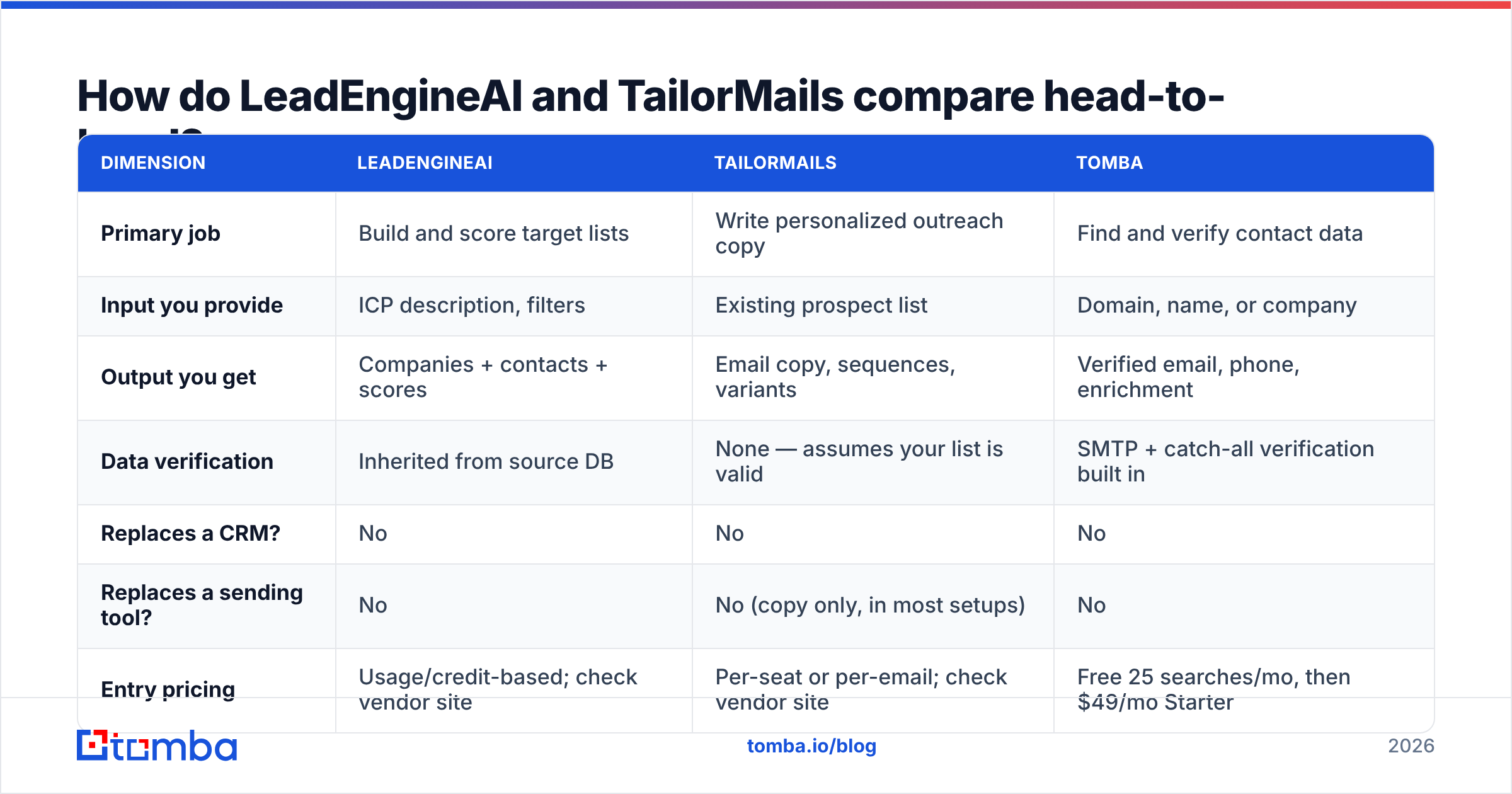
| Dimension | LeadEngineAI | TailorMails | Tomba |
|---|---|---|---|
| Primary job | Build and score target lists | Write personalized outreach copy | Find and verify contact data |
| Input you provide | ICP description, filters | Existing prospect list | Domain, name, or company |
| Output you get | Companies + contacts + scores | Email copy, sequences, variants | Verified email, phone, enrichment |
| Data verification | Inherited from source DB | None — assumes your list is valid | SMTP + catch-all verification built in |
| Replaces a CRM? | No | No | No |
| Replaces a sending tool? | No | No (copy only, in most setups) | No |
| Entry pricing | Usage/credit-based; check vendor site | Per-seat or per-email; check vendor site | Free 25 searches/mo, then $49/mo Starter |
| Best fit | Teams with no list-building motion | Teams with lists but weak reply rates | Any team whose bounce rate is above 3% |
The honest read: these two products overlap by about 15%. Comparing them as substitutes is like comparing a flour supplier to an oven. You'll notice both rows where the answer is "check the vendor site" — neither company publishes a stable, public, all-in price at the time of writing, which is itself a data point when you're budgeting.
Which one gives you better lead data?#
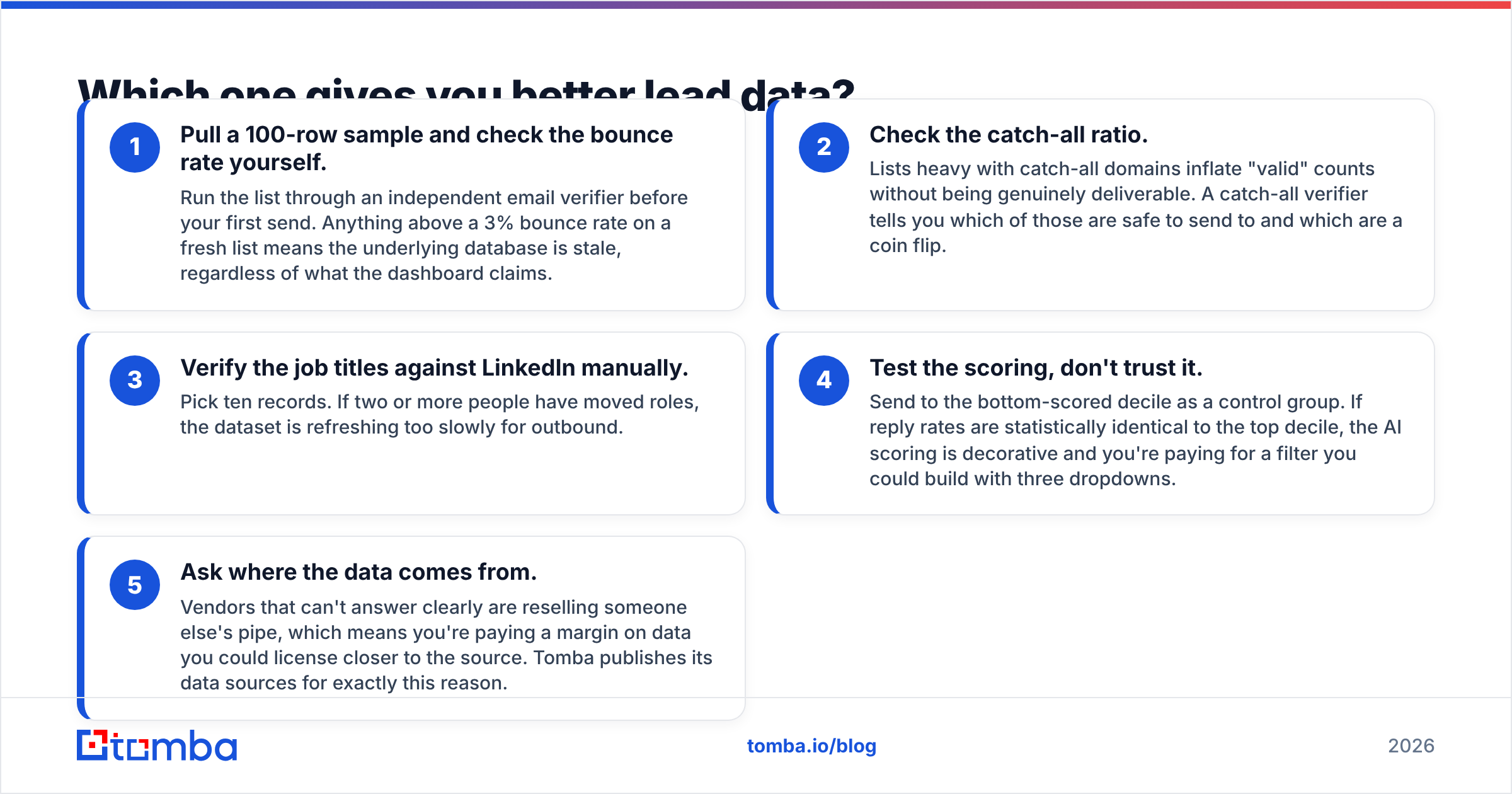
LeadEngineAI wins this by default, because TailorMails isn't in the data business. But "wins by default" is not the same as "good enough to send from." Here's how to evaluate any AI lead engine's output before you trust it:
- Pull a 100-row sample and check the bounce rate yourself. Run the list through an independent email verifier before your first send. Anything above a 3% bounce rate on a fresh list means the underlying database is stale, regardless of what the dashboard claims.
- Check the catch-all ratio. Lists heavy with catch-all domains inflate "valid" counts without being genuinely deliverable. A catch-all verifier tells you which of those are safe to send to and which are a coin flip.
- Verify the job titles against LinkedIn manually. Pick ten records. If two or more people have moved roles, the dataset is refreshing too slowly for outbound.
- Test the scoring, don't trust it. Send to the bottom-scored decile as a control group. If reply rates are statistically identical to the top decile, the AI scoring is decorative and you're paying for a filter you could build with three dropdowns.
- Ask where the data comes from. Vendors that can't answer clearly are reselling someone else's pipe, which means you're paying a margin on data you could license closer to the source. Tomba publishes its data sources for exactly this reason.
That fifth point separates the categories most cleanly. Data-first tools are accountable for accuracy. AI-workflow tools are accountable for convenience, and they pass accuracy risk to you.
Which one writes better cold emails?#
TailorMails, obviously — but the interesting question is whether AI-written personalization beats a well-written human template at scale. Three things we'd hold any personalization tool to:
- Does it avoid the tells? "I noticed you recently..." and "Congrats on the funding round" are now pattern-matched by buyers within half a second. If the output leads with those, it's not personalization, it's a costume.
- Does it degrade gracefully? When there is no public signal about a prospect, the tool should fall back to a clean, short, value-led message — not invent a compliment. Hallucinated personalization is worse than none.
- Can you control length? Most high-performing cold emails land between 50 and 125 words. Tools that produce three-paragraph essays with a personalized opener are optimizing for the wrong thing.
If you want a baseline to beat before you pay anyone, run your current best message through a free subject line tester and rewrite the body by hand. A surprising number of teams discover their reply-rate problem was a targeting problem wearing a copywriting mask.
What do they actually cost once you add everything up?#
Neither tool is expensive in isolation. The cost problem in AI outbound is that nobody buys one tool — they buy four, and each one charges per credit.
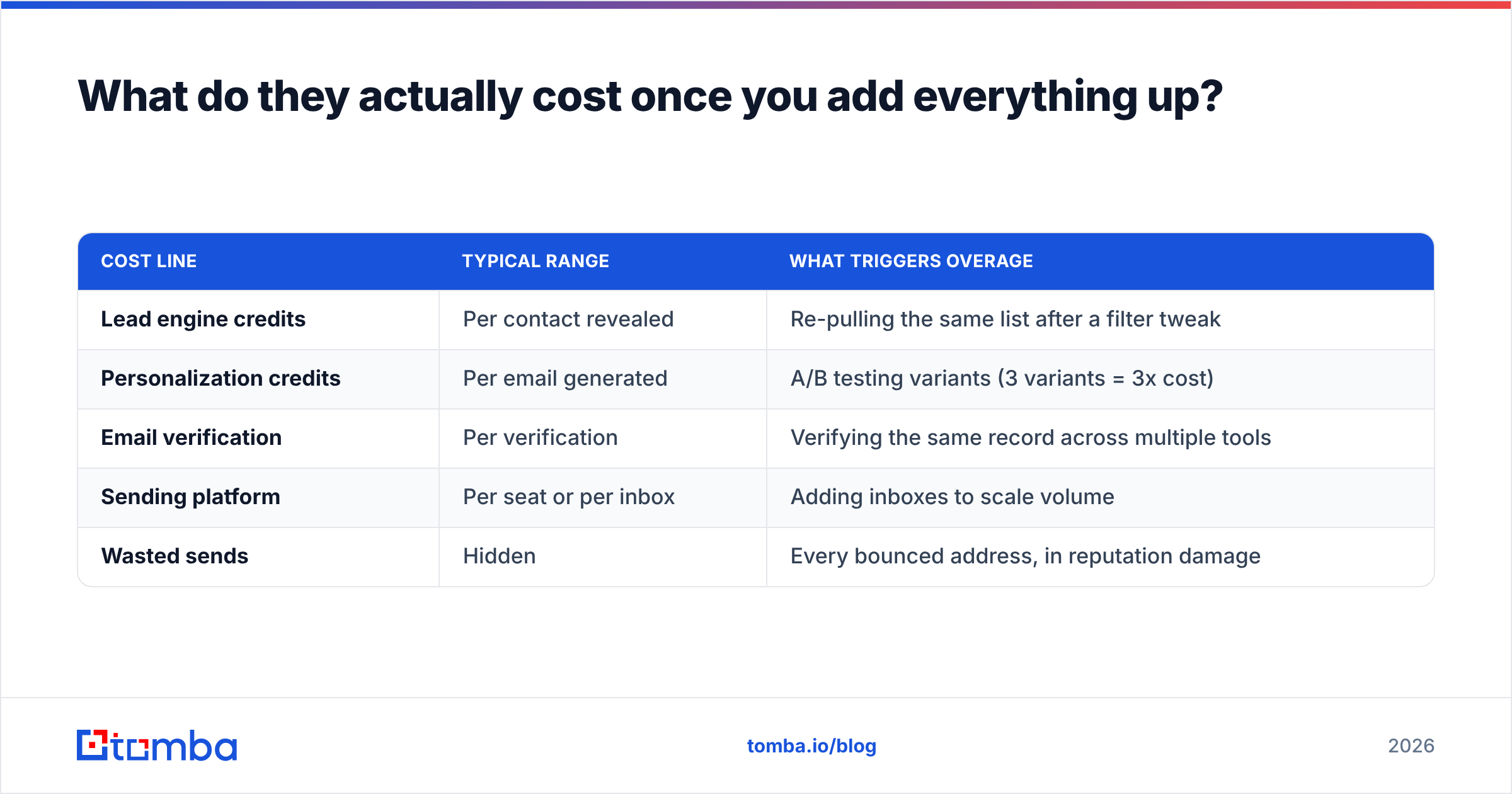
| Cost line | Typical range | What triggers overage |
|---|---|---|
| Lead engine credits | Per contact revealed | Re-pulling the same list after a filter tweak |
| Personalization credits | Per email generated | A/B testing variants (3 variants = 3x cost) |
| Email verification | Per verification | Verifying the same record across multiple tools |
| Sending platform | Per seat or per inbox | Adding inboxes to scale volume |
| Wasted sends | Hidden | Every bounced address, in reputation damage |
That last row is the one nobody budgets for. A 12% bounce rate on a 5,000-address campaign isn't 600 wasted emails — it's a damaged sending domain that suppresses the other 4,400. Google and Microsoft both tightened bulk sender requirements, and sender reputation is now the gate that determines whether any of this tooling produces revenue.

Stack all four line items and a two-rep team routinely lands north of $600/month before a single meeting is booked. For comparison, Tomba pricing starts at a free tier with 25 searches per month, $49/mo for Starter, $99/mo for Growth, and $249/mo for Pro — because it covers one job (data) rather than bundling four.
Do either of them protect your deliverability?#
No, and this is the most important thing to understand about the whole category.
An AI lead engine hands you addresses. A personalization tool hands you copy. Neither one checks SPF, DKIM, or DMARC alignment on your sending domain, neither warms your inboxes, and neither stops you from mailing a 2019 address that has since been converted into a spam trap. Spam traps are recycled addresses that mailbox providers use to identify senders working from stale lists — hitting a handful is enough to land you on a blocklist.
If you're going to spend money on AI outbound, spend the first $50 on infrastructure hygiene. Confirm your SPF record resolves correctly, check whether your domain or IP appears on a blocklist, and verify every address before it enters a sequence. None of that is glamorous. All of it outperforms a better first line.
Peer review on both products is still thin — worth reading whatever exists on G2's sales intelligence category before committing, since sample sizes in the single digits tell you more about who left the review than about the product.
Which should you pick?#
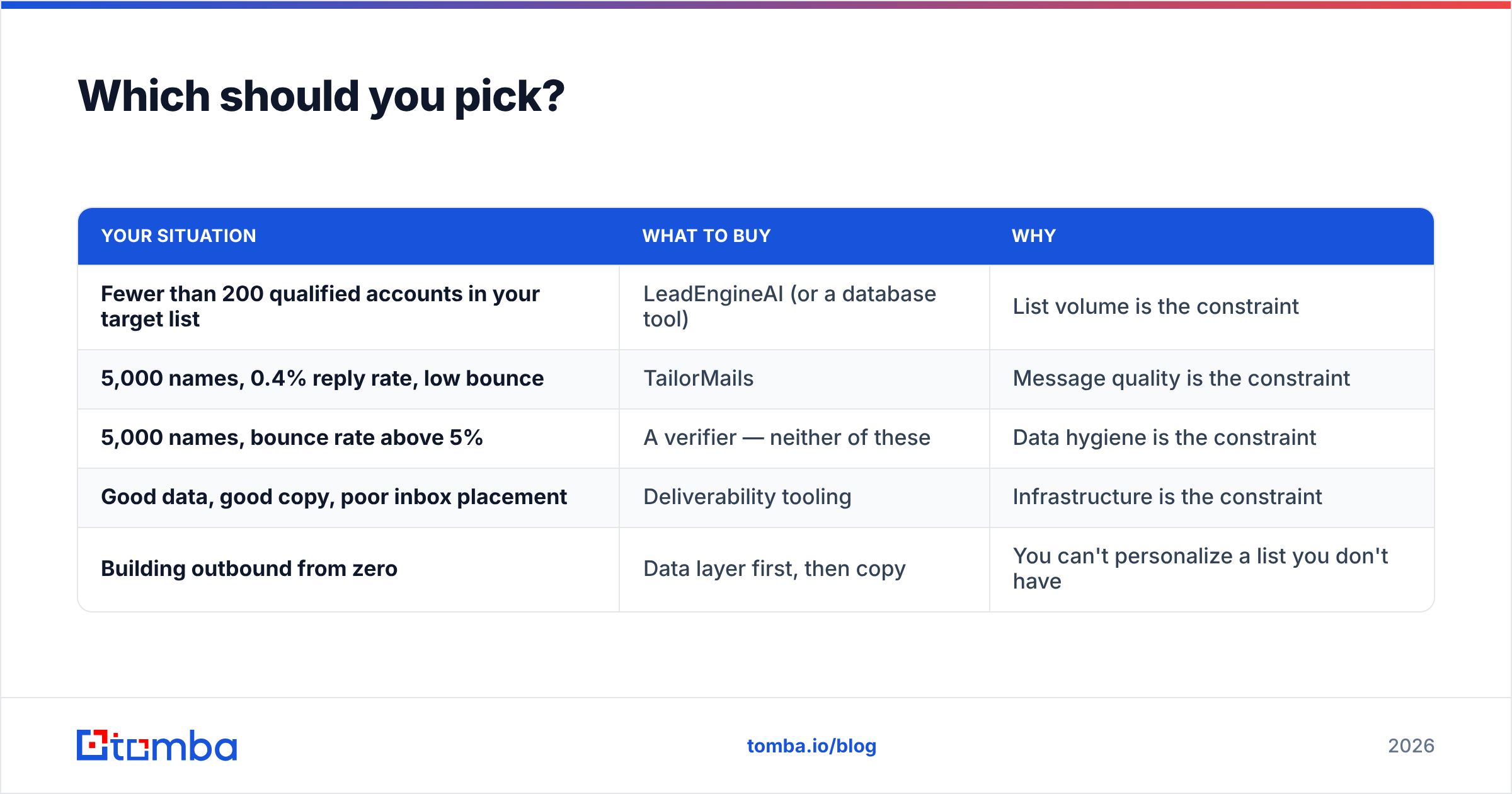
Diagnose the bottleneck first, then buy.
| Your situation | What to buy | Why |
|---|---|---|
| Fewer than 200 qualified accounts in your target list | LeadEngineAI (or a database tool) | List volume is the constraint |
| 5,000 names, 0.4% reply rate, low bounce | TailorMails | Message quality is the constraint |
| 5,000 names, bounce rate above 5% | A verifier — neither of these | Data hygiene is the constraint |
| Good data, good copy, poor inbox placement | Deliverability tooling | Infrastructure is the constraint |
| Building outbound from zero | Data layer first, then copy | You can't personalize a list you don't have |
The failure mode we see most often: a team with a bounce problem buys a personalization tool, reply rates stay flat because half the sends never arrive, and six months later the AI category gets blamed for a plumbing issue.
Can you use both together?#
Yes, and for a mid-market team running high-volume outbound, the sequence usually looks like: lead engine builds the account list → verification layer cleans it → personalization layer writes the copy → sending platform delivers it. Four tools, four bills, one workflow.
If you'd rather compress that, look for tools with an API so you can move records between steps without CSV exports. The Tomba API is designed to slot into exactly this position — it takes whatever your lead engine produced, returns verified addresses with confidence scores, and hands clean records to your writing and sending layers. Vendors like BookYourData approach the same problem from the pre-built-list angle, which suits teams that want to buy a segment outright rather than build one query by query. Both routes are legitimate; pick based on whether your ICP is stable or changes every quarter.
Where does that leave the verdict?#
LeadEngineAI vs TailorMails isn't a fight — it's two halves of a workflow, and picking "the winner" mostly reveals which half of your funnel is broken. If you can only fund one this quarter, fund the one that matches your constraint, and measure the constraint before you decide.
What neither tool does is guarantee that the addresses in your sequence are real. That's the layer that makes everything downstream work, and it's the cheapest layer to fix.
Start with the Tomba Email Finder — find professional email addresses by domain, name, or company, with verification built into the same call. The free tier gives you 25 searches a month, which is enough to sample-test any list a lead engine hands you before you commit budget to it. Clean your data first; the clever first line works a lot better when it actually lands in an inbox.
Related guides#
// get started
Find, verify and enrich your first contacts today
Start on the free plan with 25 searches a month, then scale when your team is ready.
Free plan · No credit card required · GDPR & CCPA
// about the author