LeadEngineAI vs Vocus.io: Which Sales Tool Wins in 2026?
One is an AI lead engine that builds your list. The other is a Gmail layer that helps you send. Here is an honest breakdown of where each one earns its seat in your stack, and where both leave gaps.
LeadEngineAI vs Vocus.io is a comparison of two tools that barely overlap. One builds your list. The other sends the email. Here is where each one earns its seat, and where both leave a gap.
TL;DR
- They are not competitors. LeadEngineAI works at the top of the funnel: it finds and enriches prospects with AI. Vocus.io works at the bottom: it sends, tracks, and follows up from Gmail.
- If your problem is "I don't have enough good contacts," a Gmail extension will not fix it. An AI list builder will not fix inconsistent follow-up either.
- Vocus.io is the cheaper, more predictable buy: a per-seat Gmail layer with tracking, templates, mail merge, and scheduling. It assumes you already have a list.
- LeadEngineAI-style platforms sell volume and automation. That is where data decay bites. Verify any AI-sourced list before it touches your sending domain.
- Most teams end up with three line items, not two: a data source, a verifier, and a sender. Tomba covers the first two at $49/mo on Starter.
What are LeadEngineAI and Vocus.io, really?#
They solve different halves of the same sentence: find the right person, then reach them well.
Vocus.io is a Gmail-native sales toolkit. It installs as a Chrome extension and lives inside the inbox you already use. The feature set is stable and unglamorous in a good way. You get open and click tracking, email templates with snippets, mail merge campaigns, and automated follow-up sequences. You also get send-later scheduling, a meeting link, and CRM sync into Salesforce, HubSpot, or Pipedrive. You can see the current feature list on vocus.io. Nothing in that list generates a prospect. Vocus.io assumes the contact already exists in your spreadsheet or CRM.
LeadEngineAI belongs to the newer wave of AI lead generation platforms. You describe your ideal customer profile in plain language. The system then builds a target list, enriches it with firmographic and contact data, scores it, and often drafts the outreach too. This category exploded between 2023 and 2026, and G2's AI sales assistant category now lists dozens of tools making near-identical promises. The pitch is easy to like: fewer manual steps between "we should sell to Series B fintechs in the UK" and "here are 900 named contacts with emails."
One honest caveat before you go further. Vocus.io has been around long enough to have a stable feature set and a public pricing page. LeadEngineAI is younger and far less reviewed by third parties. AI lead platforms in this bracket also change their packaging often. Treat every number below as directional, and confirm the current terms on the vendor's own site before you sign.
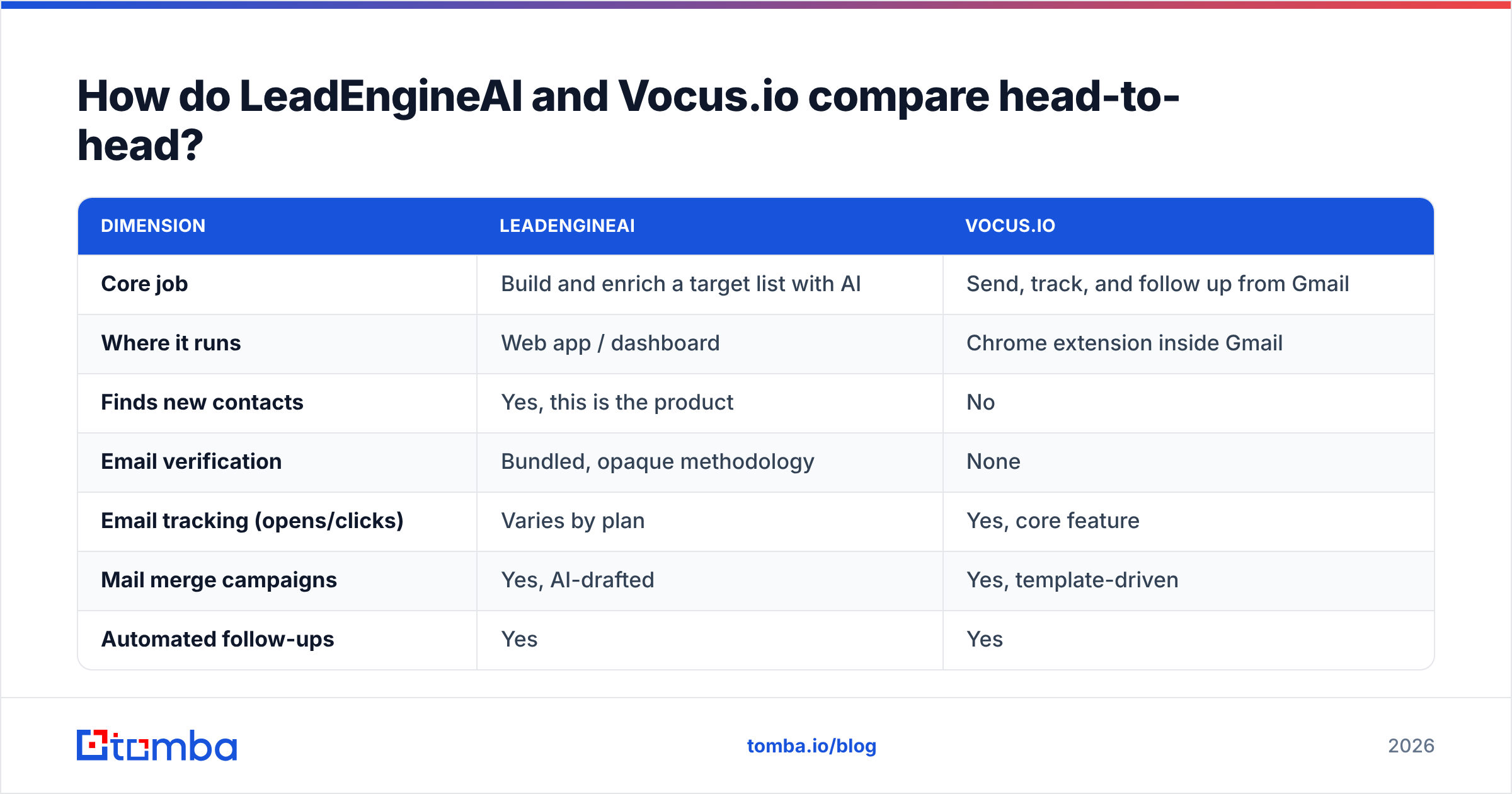
LeadEngineAI vs Vocus.io: how do they compare head-to-head?#
| Dimension | LeadEngineAI | Vocus.io |
|---|---|---|
| Core job | Build and enrich a target list with AI | Send, track, and follow up from Gmail |
| Where it runs | Web app / dashboard | Chrome extension inside Gmail |
| Finds new contacts | Yes, this is the product | No |
| Email verification | Bundled, opaque methodology | None |
| Email tracking (opens/clicks) | Varies by plan | Yes, core feature |
| Mail merge campaigns | Yes, AI-drafted | Yes, template-driven |
| Automated follow-ups | Yes | Yes |
| Meeting scheduler | Usually not | Yes |
| CRM sync | Varies | Salesforce, HubSpot, Pipedrive |
| Pricing model | Credit-based, often quote-gated | Flat per user, published |
| Best for | Teams with no list | Teams with a list and no process |
| Biggest risk | Unverified AI-sourced data | Nothing to send to |
The table makes the real decision obvious. These tools overlap on maybe two rows out of twelve. If you are seriously evaluating both, you have a gap in your stack that neither one fills alone.

Which one gives you better contact data?#
Vocus.io gives you none, and it does not claim to. That is a scope statement, not a criticism. The question only matters for LeadEngineAI. For any AI list builder, the answer rests on two things the marketing page rarely separates: where the data comes from, and what happens to it before it reaches you.
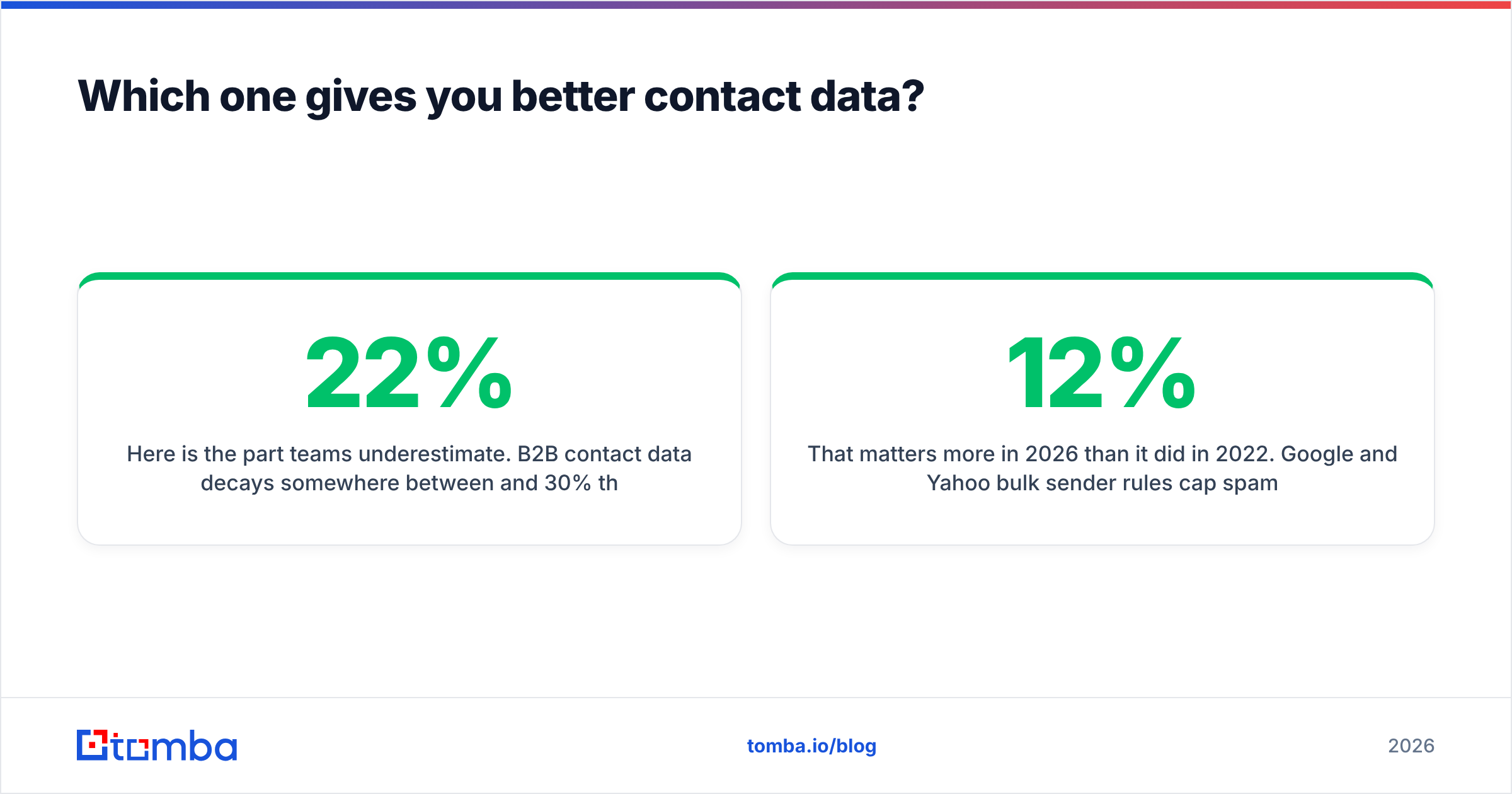
Here is the part teams underestimate. B2B contact data decays 22% to 30% per year through job changes, rebrands, and domain migrations. Say an AI platform found a contact three months ago and parked it in a shared pool. That record has a real chance of being stale. When the same platform drafts the email and schedules the send, nothing catches the bad address until your bounce rate does.
That matters more in 2026 than it did in 2022. Google and Yahoo bulk sender rules cap spam complaints and punish high bounce rates at the gateway. A 12% bounce rate no longer just wastes credits. It degrades sender reputation on the domain you also use for customer email.
Three things to check before you trust any AI-sourced list:
- Source transparency. Does the vendor explain where records come from (public web, partner networks, user contributions) or just say "proprietary AI"? Vagueness here usually means resale of the same commodity databases everyone else buys. Tomba publishes its data sources for exactly this reason.
- Verification at delivery, not at ingest. A record verified six months ago when it entered the database is not a verified record today. Ask when the last SMTP check ran on the specific rows you are about to export.
- Catch-all handling. Roughly one in five corporate domains accepts everything at the MX layer, so a naive check marks garbage as valid. A real catch-all verifier uses pattern confidence and secondary signals instead of shrugging.
Two commercial terms to pin down before you sign:
- Credit accounting on failures. Some platforms charge a credit for every lookup, including the ones that return nothing usable. Over a 5,000-row export that difference is real money.
- Export rights. Can you take the list with you if you churn, or does the data live and die inside the vendor's UI? Credit-based AI platforms are increasingly restrictive here.
If a vendor cannot answer the first three points in a sales call, price them as a lead suggestion engine, not a data provider. Budget for a separate email verifier on top.
What does each one actually cost?#
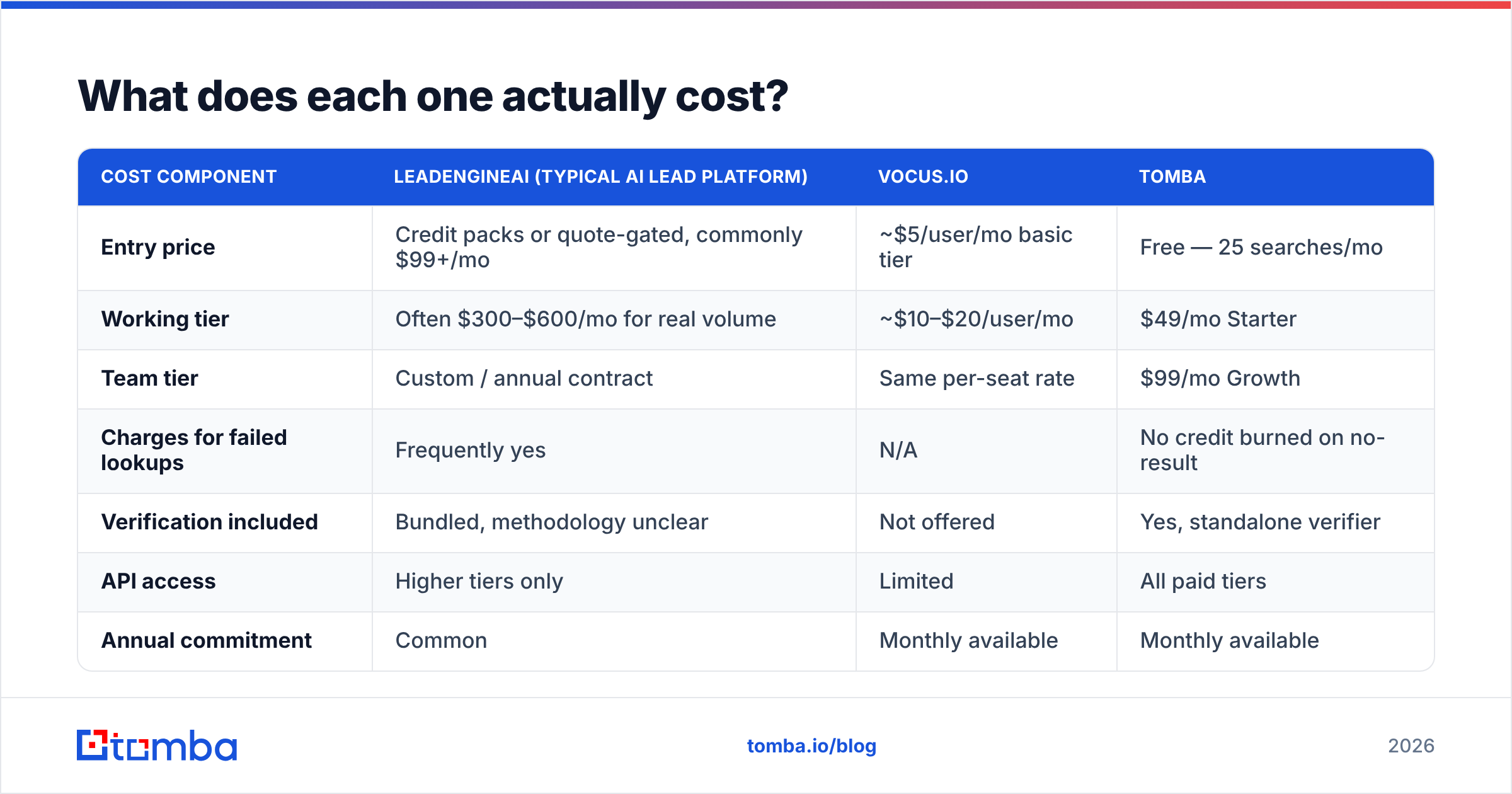
| Cost component | LeadEngineAI (typical AI lead platform) | Vocus.io | Tomba |
|---|---|---|---|
| Entry price | Credit packs or quote-gated, commonly $99+/mo | ~$5/user/mo basic tier | Free — 25 searches/mo |
| Working tier | Often $300–$600/mo for real volume | ~$10–$20/user/mo | $49/mo Starter |
| Team tier | Custom / annual contract | Same per-seat rate | $99/mo Growth |
| Charges for failed lookups | Frequently yes | N/A | No credit burned on no-result |
| Verification included | Bundled, methodology unclear | Not offered | Yes, standalone verifier |
| API access | Higher tiers only | Limited | All paid tiers |
| Annual commitment | Common | Monthly available | Monthly available |
Two patterns to notice.
First, per-seat pricing and credit pricing fail in opposite directions. Vocus.io costs the same whether you send 50 emails or 5,000. That makes it cheap for high-volume senders and slightly overpriced for a rep who emails twice a week. Credit-based AI platforms invert that. The sticker price looks fine until a campaign burns 8,000 credits in a week and you buy an overage pack mid-quarter.
Second, "verification included" does a lot of unexamined work in AI platform pricing. Bundled verification with no published method is a claim, not a control. If you cannot see the deliverability status per row, you are paying for confidence rather than accuracy. Compare that with transparent Tomba pricing, where finding and verifying are separate, auditable steps.
Is LeadEngineAI better than Vocus.io?#
Only if your bottleneck is list building. Here is the honest routing:
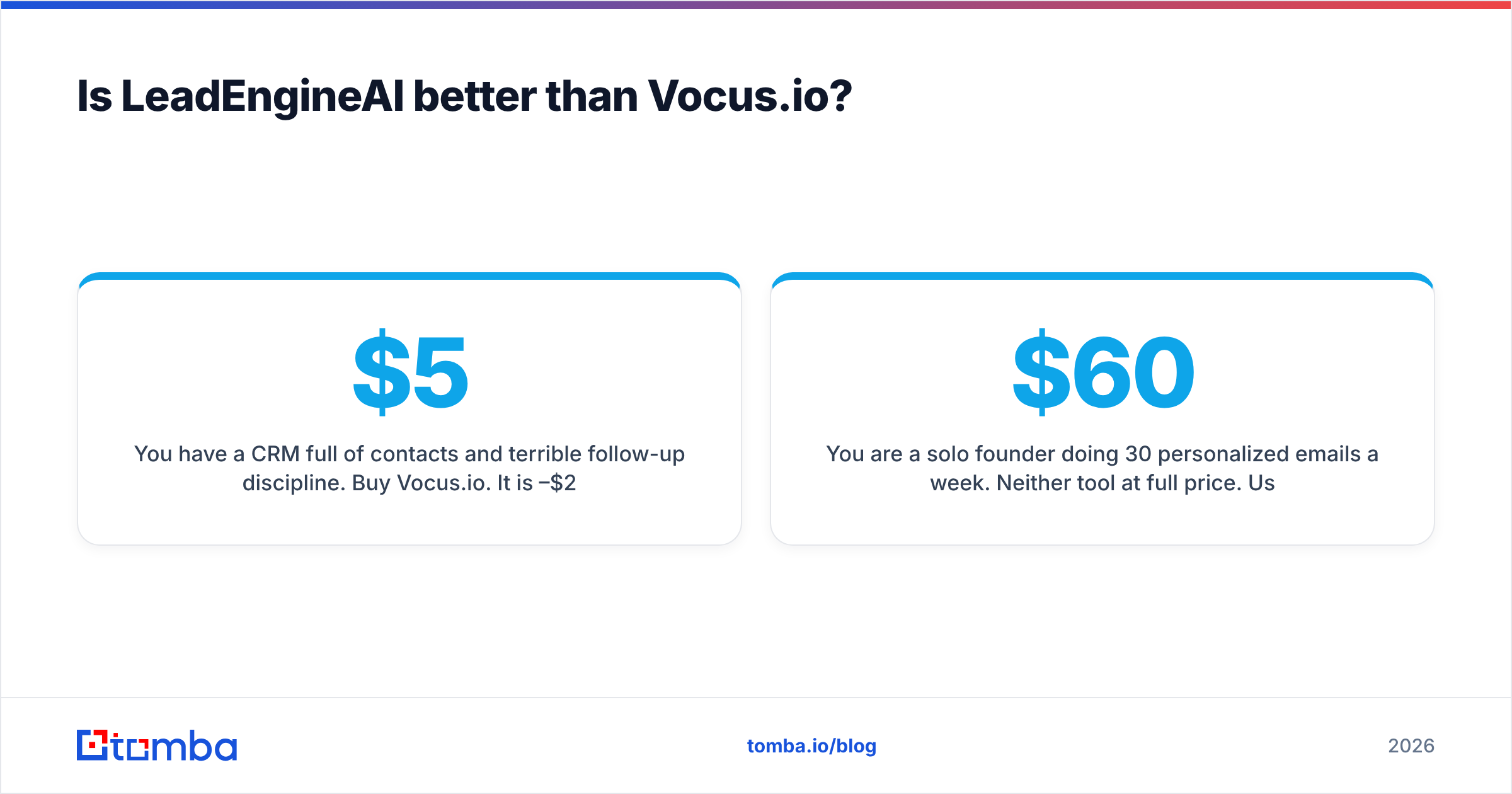
- You have a CRM full of contacts and terrible follow-up discipline. Buy Vocus.io. It costs $5–$20 per seat, installs in three minutes, and fixes the real problem. An AI lead engine here would cost $400/mo to make an existing problem bigger.
- You have a clear ICP, a working sequence, and an empty list. A lead generation platform is the right shape of purchase. Validate its data before you commit annually.
- You are a solo founder sending 30 personalized emails a week. Neither tool at full price. Use a Gmail extension plus a focused email finder and keep the spend under $60/mo.
Two more cases worth naming:
- You run multi-channel outbound at scale. You will outgrow Vocus.io's Gmail-bound model. It is genuinely good at what it does, but it is not a sequencer built for 20 mailboxes and inbox rotation.
- You need phone as well as email. Neither tool is strong here. Pair with a dedicated phone finder instead of accepting whatever mobile numbers an AI platform attaches to a record.
There is a third framing worth naming. Vocus.io's real competition is not LeadEngineAI. It is HubSpot Sales Hub's free tier and the tracking features now baked into most CRMs. HubSpot's sales blog has documented that consolidation for years. It is why standalone Gmail extensions compete on price and simplicity rather than feature depth. Vocus.io wins that fight on cost, and on not requiring you to live inside a CRM.

What should you pair either tool with?#
Assume three layers, not one product.
Layer 1 — Sourcing. You need names and companies matching your ICP. An AI lead platform does this. So does LinkedIn Sales Navigator plus a LinkedIn finder, often at a fraction of the cost and with more control over targeting.
Layer 2 — Contact resolution and verification. This is the layer that decides whether your campaign lands. Take your company list and run domain search to pull every public address at the target domain, along with the company's email pattern. Then verify each one. For a full list, bulk email finder handles CSVs in one pass instead of row-by-row.
Layer 3 — Sending and tracking. Vocus.io if you live in Gmail and want low cost. A dedicated sequencer if you run multiple mailboxes.
Split the layers deliberately rather than buying one all-in-one platform. The reason is replaceability. Sending tools change every two years as deliverability rules shift, and your contact data should not be hostage to that churn. Keep sourcing and verification independent, and you can swap the sending layer without re-buying your list.
One practical workflow works well with either tool. Export your target accounts as domains and run them through domain search to get patterns and existing contacts. Verify the full set. Drop only the valid and catch-all-confident rows into your sending tool, and keep the risky and unknown rows in a separate list for LinkedIn or phone. Your bounce rate stays under 2% and your sending domain keeps its reputation.
How do you test both before committing?#
Run the same 100-account cohort through each and measure outcomes, not features.
Pick 100 companies you genuinely want as customers. For the AI platform, ask it to source contacts for those exact accounts and export the result. Then run that same export through an independent verifier and record three numbers: percent valid, percent invalid, percent unknown or catch-all. Anything above 8% invalid on a fresh export is a data quality problem, not a rounding error.
Then send. Use Vocus.io or whatever sender you prefer, with identical copy across both cohorts so the only variable is data. Track bounce rate, reply rate, and spam complaints for 14 days. A list that produces a 9% reply rate at a 1% bounce is worth three times one that produces 4% replies at 7% bounces, whatever the dashboard looks like.
Do not skip the free tiers. Vocus.io offers a trial, and Tomba's free plan gives 25 searches a month. That is enough to spot-check whether a paid platform's "verified" export holds up. If 15 of 25 spot checks disagree with the vendor's status, you have your answer before spending a dollar.
The bottom line#
LeadEngineAI vs Vocus.io only becomes a real decision once you name your bottleneck. The two tools answer different questions. Vocus.io is a well-scoped, inexpensive Gmail layer for tracking, templates, and follow-ups, and it never pretends to be a data provider. AI lead engines promise to remove list building, and sometimes they deliver. The verification gap they leave behind is where campaigns quietly die.
Whichever sender you land on, the data layer decides your results. Start with the Tomba Email Finder to build a list you can trust. Find addresses by domain, name, or company, then verify every one before it enters your sequence. Your bounce rate stays low, and deliverability never becomes the thing you debug at quarter end. The free tier covers 25 searches a month, and Starter is $49/mo when you are ready to scale.
Related guides#
// get started
Find, verify and enrich your first contacts today
Start on the free plan with 25 searches a month, then scale when your team is ready.
Free plan · No credit card required · GDPR & CCPA
// about the author