LeadFuze vs Tomba 2026: Pricing, Accuracy, and Which to Pick
LeadFuze sells you a lead list. Tomba sells you an email-finding engine. Here is how the two actually compare on pricing, data freshness, verification, and API access in 2026 — and which one fits your outbound motion.
TL;DR
- LeadFuze is a list builder. You describe an audience ("VP Marketing, SaaS, 50-200 employees, US"), and its Fuzebot assembles a list of people with emails attached. You buy leads.
- Tomba is an email-finding engine. You bring a name, a domain, or a LinkedIn URL, and it returns the verified address plus a confidence score. You buy lookups.
- Price gap is real. Tomba starts at $49/mo with a free tier of 25 searches; LeadFuze's published entry plan sits around $147/mo, with the unlimited tier near $397/mo.
- Pick LeadFuze if you have no target list and want software to invent one for you. Pick Tomba if you already know who you want to reach and need accurate, verified contact data at volume — especially via API.
- Many teams run both: LeadFuze (or any database) for discovery, Tomba for verification and enrichment before the list ever touches a sending tool.
What are LeadFuze and Tomba, exactly?#
They solve adjacent problems, and conflating them is the most common mistake buyers make.
LeadFuze launched in 2014 as a lead-generation database. Its pitch is aggregation: hundreds of millions of contact records, searchable by role, industry, headcount, location, technology used, and hiring signals. The differentiator is Fuzebot, an automation layer that keeps adding new leads matching your saved search criteria and deduplicates against lists you already own. Output flows to CSV or straight into a CRM.
Tomba runs the opposite direction. It starts from an identifier you already have — a company domain, a person's full name, a LinkedIn profile, an article byline — and resolves it to a working email address. The email finder is the core product; domain search, catch-all verification, phone lookup, and enrichment sit around it. There is no "build me an audience" button, and that is deliberate.
So the honest framing of LeadFuze vs Tomba is not "which tool is better." It is: do you need someone to tell you who to email, or do you need the address for people you've already identified?

How do the two data models actually differ?#
This is the section that determines whether you'll be happy six months in.
- Snapshot vs on-demand. LeadFuze serves records from an indexed store. The record was correct when it was ingested. Tomba resolves the address at request time, checking pattern logic and mail-server response in the moment. On-demand wins on freshness; an index wins on speed and breadth.
- Discovery vs resolution. LeadFuze answers "who should I contact?" Tomba answers "what is this specific person's email?" If your ICP is already defined by a partner list, a conference attendee export, or your own CRM, discovery is wasted spend.
- Coverage shape. Databases skew toward large, well-documented US companies with heavy web footprints. Real-time finders tend to hold up better on mid-market, non-US, and recently rebranded domains, where an index goes stale fast.
- Verification depth. Every serious vendor claims "verified." What matters is whether catch-all domains are handled honestly. Tomba separates catch-all results into their own bucket via the catch-all verifier instead of quietly marking them valid — a distinction that shows up directly in your bounce rate.
- Unit economics. Leads and lookups are not interchangeable units. A 500-lead plan is 500 people. A 1,000-credit search plan can cover far more people if you're resolving known targets, or far fewer if you burn credits on failed lookups. Read the credit-rollover and failed-search policies before you compare price tags.
LeadFuze vs Tomba: how does pricing compare?#
Here is the head-to-head on commercial terms. LeadFuze figures reflect publicly listed pricing at the time of writing — verify on their site, since list-builder vendors change tiers often.
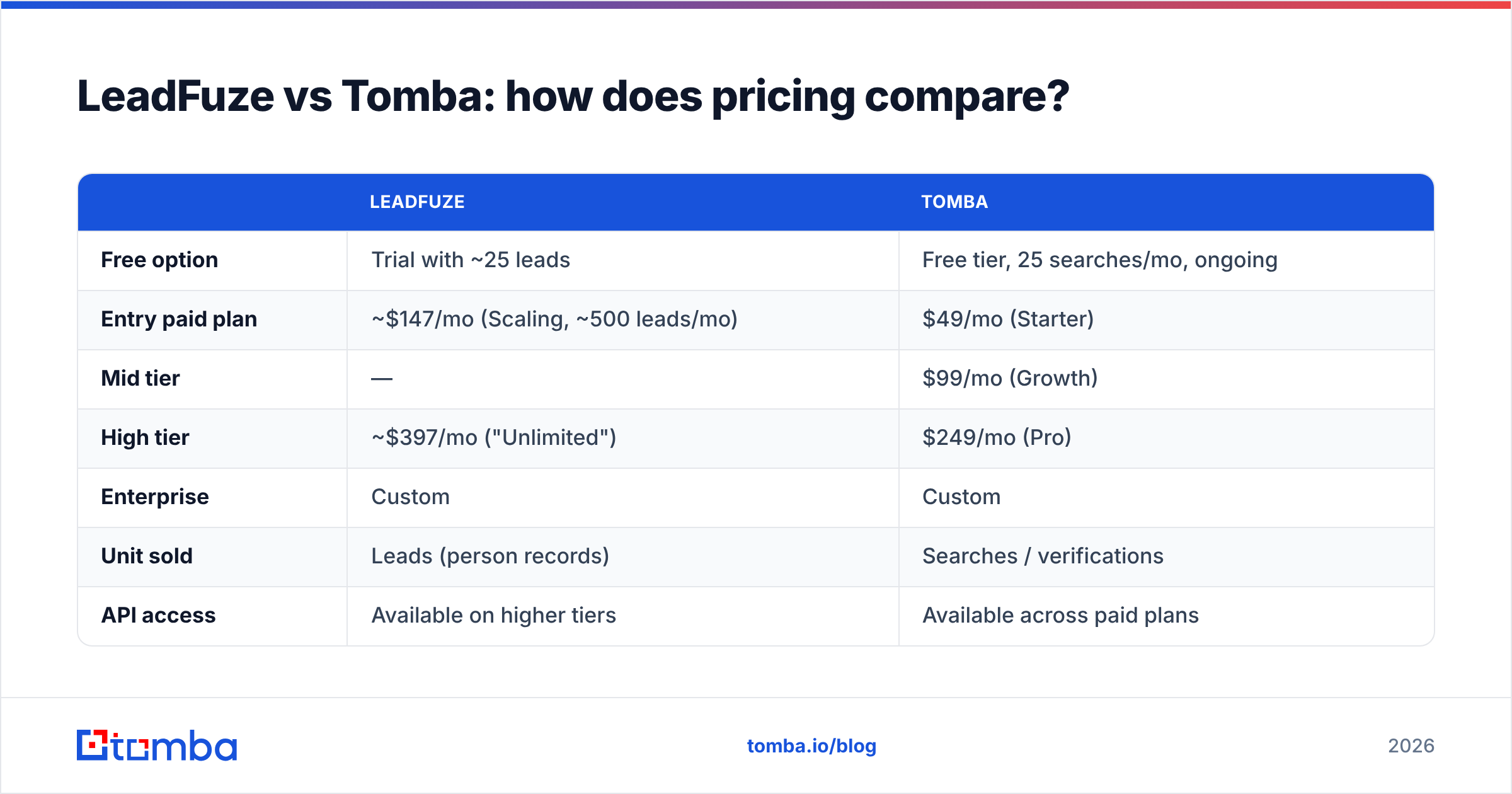
| LeadFuze | Tomba | |
|---|---|---|
| Free option | Trial with ~25 leads | Free tier, 25 searches/mo, ongoing |
| Entry paid plan | ~$147/mo (Scaling, ~500 leads/mo) | $49/mo (Starter) |
| Mid tier | — | $99/mo (Growth) |
| High tier | ~$397/mo ("Unlimited") | $249/mo (Pro) |
| Enterprise | Custom | Custom |
| Unit sold | Leads (person records) | Searches / verifications |
| API access | Available on higher tiers | Available across paid plans |
| Annual discount | Yes | Yes |
The spread matters most at the bottom of the range. A two-person agency testing outbound can run Tomba at $49/mo and spend the difference on a sending tool and a domain warmup budget. The same team on LeadFuze is committing roughly 3x before sending a single email. Current numbers are on the Tomba pricing page.
Where LeadFuze earns its premium: if you genuinely have no list and no list-building process, $147/mo for a system that produces a qualified audience every week is cheaper than a junior SDR doing the same job in spreadsheets. That is a real job-to-be-done, and it is not one Tomba performs.
Which one returns more valid emails?#
Accuracy claims in this category are close to meaningless without a shared test set, so treat every marketing number — ours included — as a hypothesis to validate on your ICP.

What holds up across most independent tests:
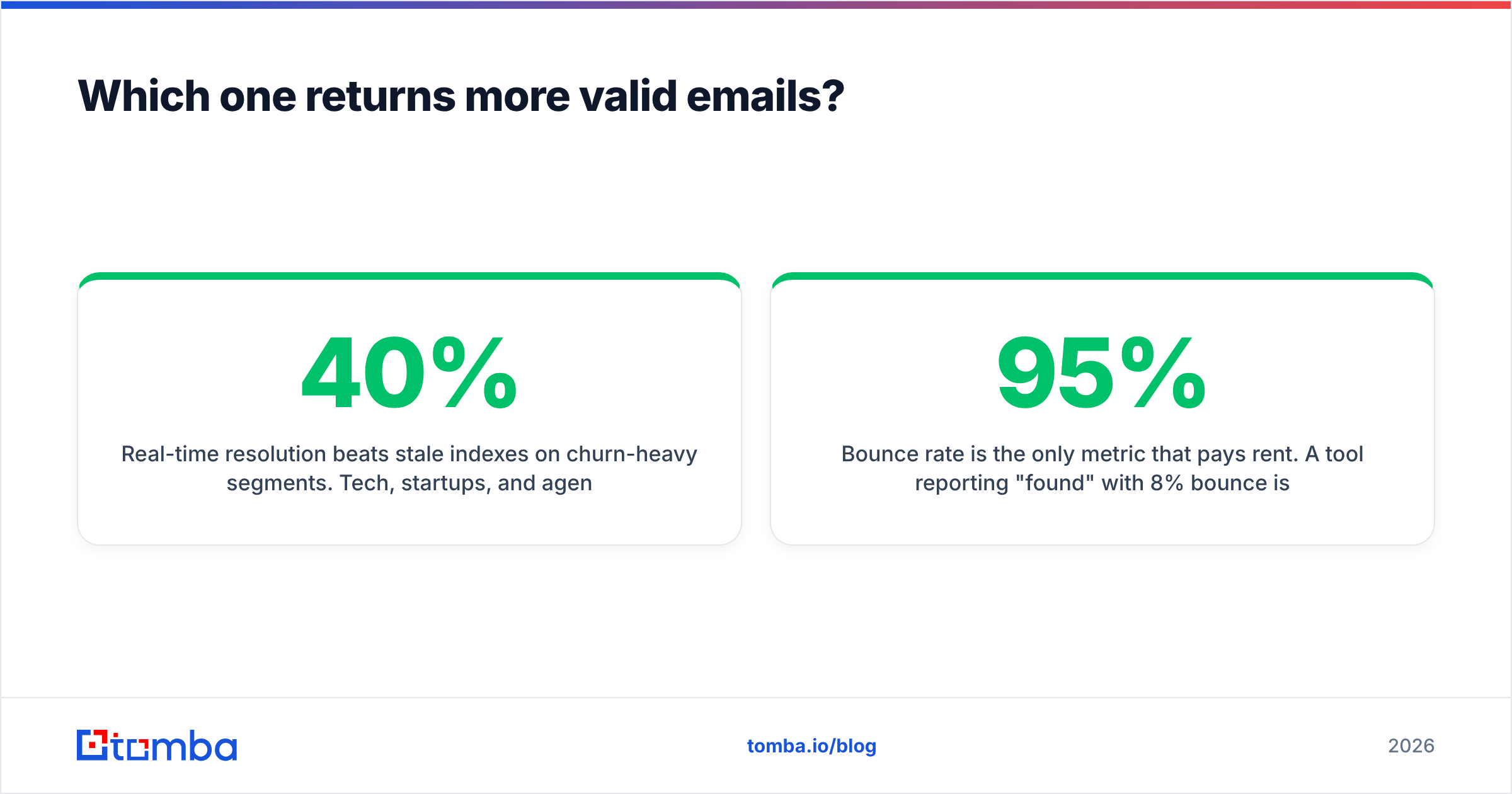
- Real-time resolution beats stale indexes on churn-heavy segments. Tech, startups, and agencies see 20-40% annual role turnover. A record cached eight months ago is a coin flip.
- Indexes beat real-time on obscure or low-footprint targets. If a person has almost no web presence but was once captured in a data co-op, the database has them and the finder does not.
- Bounce rate is the only metric that pays rent. A tool reporting 95% "found" with 8% bounce is worse than one reporting 78% found with 1.2% bounce. Found-rate is a vanity number; deliverability is the P&L.
How to run the test properly: take 100 contacts you already have confirmed addresses for (past customers, inbound demo requests, people who have replied to you). Strip the emails. Run the list through both tools. Score on three axes — resolved correctly, resolved wrongly, and honestly returned as unknown. The third column is the one most buyers ignore, and it is the one that protects your sender reputation. Tools that guess to inflate coverage will cost you a domain eventually.
Then verify whatever survives. Even a perfect finder should be paired with an email verifier pass immediately before send, because records decay between sourcing and sending.
What does the full feature comparison look like?#

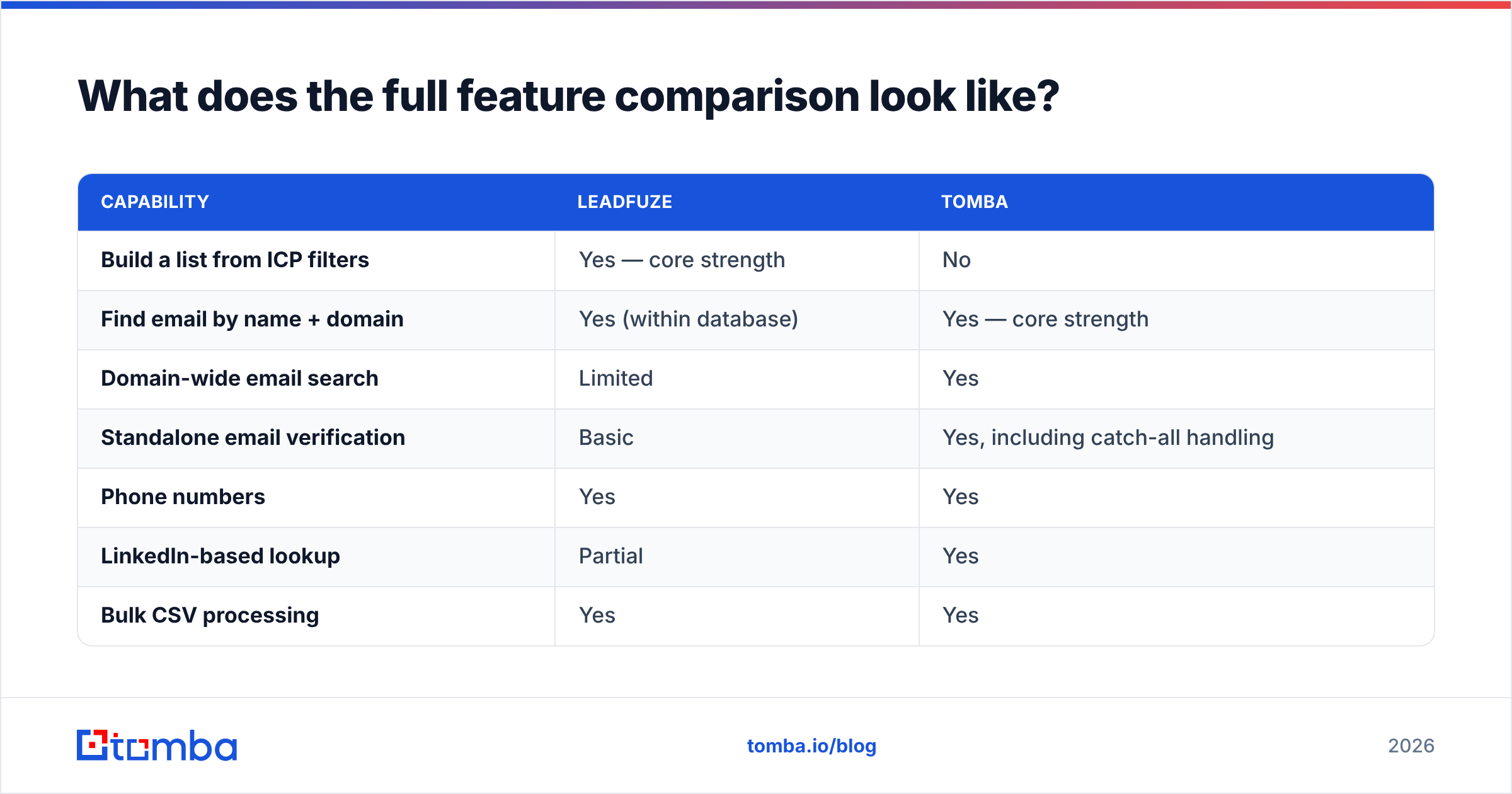
| Capability | LeadFuze | Tomba |
|---|---|---|
| Build a list from ICP filters | Yes — core strength | No |
| Find email by name + domain | Yes (within database) | Yes — core strength |
| Domain-wide email search | Limited | Yes |
| Standalone email verification | Basic | Yes, including catch-all handling |
| Phone numbers | Yes | Yes |
| LinkedIn-based lookup | Partial | Yes |
| Bulk CSV processing | Yes | Yes |
| Public API | Higher tiers | All paid tiers |
| Chrome extension | Yes | Yes |
| Google Sheets / Excel add-on | Via integrations | Native add-ons |
| CRM sync (HubSpot, Salesforce, Pipedrive) | Yes | Yes |
| Automated list top-ups | Yes (Fuzebot) | No |
| Website visitor identification | No | Yes |
Two rows deserve commentary.
API access tier-gating. If you are building anything programmatic — enrichment on form submit, a nightly CRM hygiene job, an agent that researches accounts — being forced onto a top-tier plan to get API keys changes the math entirely. The Tomba API is available from the paid entry plan, along with a CLI and MCP server for agent workflows. LeadFuze's API is positioned for higher tiers.
Automated top-ups. Fuzebot is genuinely useful and Tomba has no equivalent. If your growth model is "keep feeding the sequence machine with fresh names in a fixed ICP," that automation is worth paying for.

Who should choose LeadFuze?#
Be honest about your situation. LeadFuze is the right call when:
- You don't have a target list and don't want to build one. No CRM history, no event exports, no partner lists — just an ICP description in your head.
- Your ICP is US-centric mid-market or enterprise. That is where aggregated databases are densest.
- Filter-based discovery is your bottleneck, not data accuracy. If your SDRs spend their week researching who rather than how to reach them, a list builder removes the actual constraint.
- You want set-and-forget list replenishment. Fuzebot's continuous top-up with dedupe against existing lists is a real workflow advantage.
- Budget is not the binding constraint. At $147-$397/mo you need enough pipeline value to justify the line item.
Check current user sentiment on G2 before committing — list-builder data quality varies noticeably by vertical, and reviewers usually say which vertical they're in.
Who should choose Tomba?#
Tomba is the better fit when:
- You already know your targets. Conference lists, LinkedIn Sales Navigator exports, podcast guests, GitHub contributors, job-board postings, your own churned accounts. Discovery is solved; resolution is not.
- Volume is lumpy. A $49/mo floor with a genuine free tier lets you scale up and down without renegotiating a contract. The bulk email finder handles spikes without a plan change.
- You need an API, CLI, or agent integration. Programmatic enrichment is a first-class use case, not a top-tier upsell.
- Non-US or SMB targets dominate your pipeline. Real-time resolution degrades more gracefully than a stale index outside the US enterprise core.
- Deliverability is a board-level concern. Catch-all separation, confidence scoring, and a dedicated verifier mean fewer sends into the dark.
Can you run both — and should you?#
Yes, and for well-funded outbound teams it is usually the correct architecture.
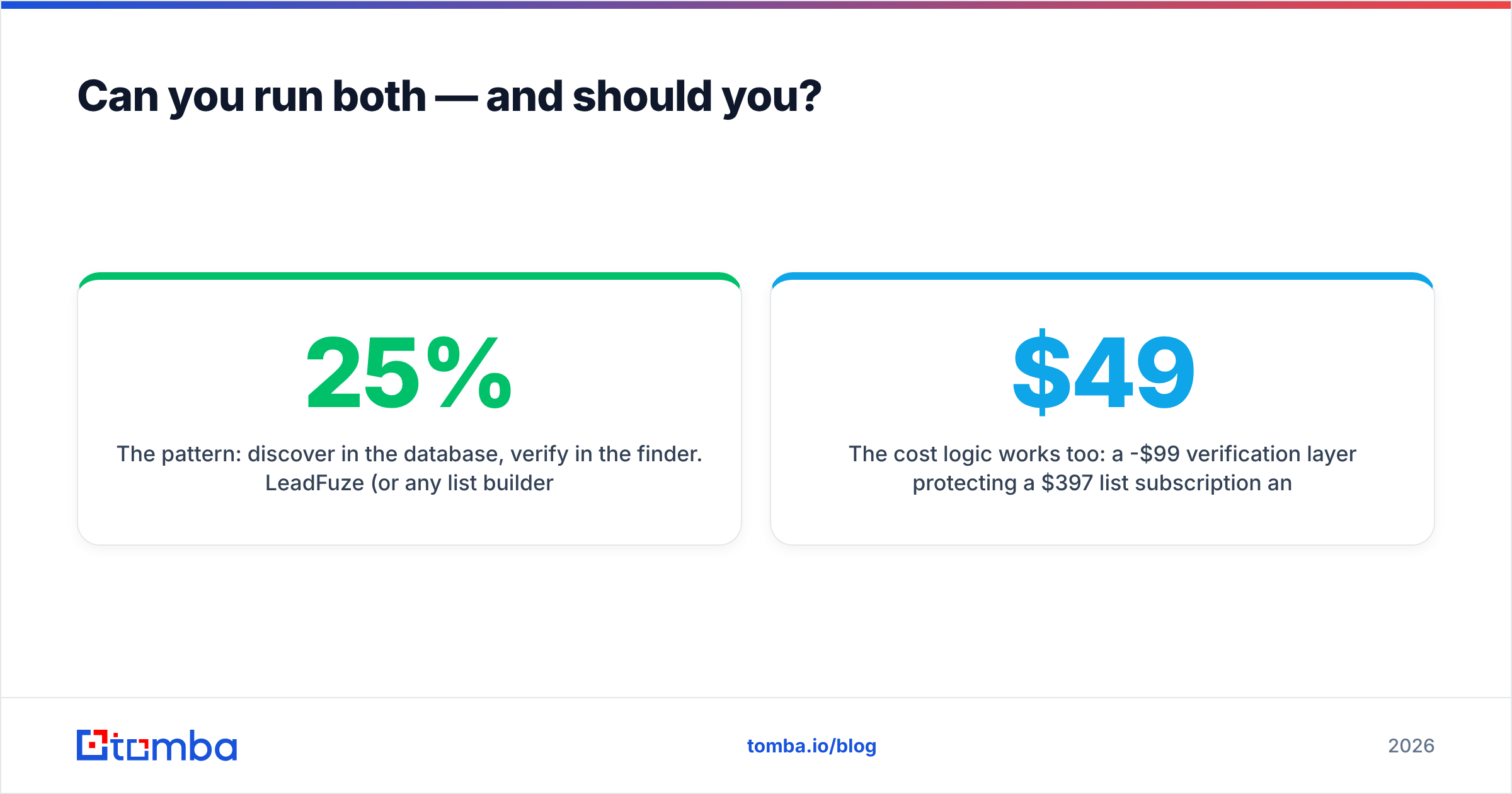
The pattern: discover in the database, verify in the finder. LeadFuze (or any list builder) produces the raw audience. Before that list enters a sending tool, push it through verification and re-resolution. You'll typically find 10-25% of a freshly exported list has at least one stale or unverifiable address. Catching those pre-send is the difference between a 0.8% bounce rate and a 4% one — and, per HubSpot's deliverability guidance, bounce rate is among the fastest ways to damage sender reputation.
The cost logic works too: a $49-$99/mo verification layer protecting a $397/mo list subscription and a sending domain you've spent months warming is cheap insurance.
Where running both is wrong: if you already have a defined target list, adding a list builder just produces more names for a team that can't work the ones it has. Volume is rarely the constraint people think it is.
What should you test before you buy either?#
Run a 48-hour bake-off. It costs almost nothing and settles the argument.
- Assemble a 100-contact truth set from people you have confirmed addresses for.
- Run both tools blind on names + domains only.
- Score three buckets: correct, wrong, honestly unknown. Weight "wrong" heavily — it's the expensive one.
- Send a small real campaign (50 contacts each) and compare actual bounce rates, not reported confidence scores.
- Test the API, even if you don't think you need it. Rate limits, response shapes, and error handling tell you more about engineering quality than any landing page.
- Check a segment you expect to be hard: non-English domains, sub-50-employee companies, or a recently acquired brand. Every tool looks good on Fortune 500 marketing leaders.
The verdict#
If your problem is "I don't know who to email," LeadFuze solves a problem Tomba doesn't attempt, and the price is defensible. If your problem is "I know exactly who to email and I need the address to be right," Tomba does that job for roughly a third of the entry cost, with API access included from the first paid tier and verification built for catch-all reality rather than marketing optics.
Most teams overestimate how much discovery they need and underestimate how fast contact data rots.
Start with the Tomba Email Finder on the free tier — 25 searches, no card — and run it against a list you already trust. If the addresses come back right, you've just found out that the expensive part of your stack was solving a problem you didn't have.
Related guides#
// get started
Find, verify and enrich your first contacts today
Start on the free plan with 25 searches a month, then scale when your team is ready.
Free plan · No credit card required · GDPR & CCPA
// about the author