LeadGenius vs Skrapp: Which B2B Data Tool Wins in 2026?
LeadGenius sells managed, human-verified data on annual contracts. Skrapp sells self-serve LinkedIn email finding for a monthly fee. They barely compete — here's how to tell which one your team actually needs.
TL;DR
- These two tools are not really competitors. LeadGenius is a managed data service with human researchers and annual contracts. Skrapp is a $49-ish/month self-serve email finder built around LinkedIn. Picking between them is mostly a budget-and-ops decision, not a feature decision.
- LeadGenius wins on custom fields. If you need "companies that just hired a Head of RevOps and run Shopify Plus in DACH," a human-in-the-loop vendor is the only realistic answer.
- Skrapp wins on speed and price. Install the Chrome extension, scrape a LinkedIn Sales Navigator list, export to CSV. Done in an afternoon, no procurement call.
- Both have a verification gap. LeadGenius verifies at delivery; Skrapp's bulk output still needs a second pass before you load a sequence. Run any list through a dedicated email verifier regardless of source.
- If you want Skrapp's self-serve model with deeper coverage and an API, tools like Tomba sit in the middle: free tier at 25 searches/month, $49/mo Starter, and programmatic access from day one.
What are LeadGenius and Skrapp, exactly?#
Short version: LeadGenius is a data service; Skrapp is a data tool.
LeadGenius has been around since the early 2010s and built its business on a hybrid model — machine crawling plus a distributed network of human researchers who verify and enrich records on request. You don't log in and run searches. You scope a project with an account team, define the firmographic and custom attributes you need, and receive a delivered dataset (or a continuous feed into your CRM). Pricing is quote-based and contracts are typically annual.
Skrapp is the opposite philosophy. It's a browser extension plus a web app that finds business emails from LinkedIn profiles, LinkedIn/Sales Navigator search results, and company domains. You pay monthly, you get a credit allowance, and you do the work yourself. Setup takes about four minutes.
That difference — bought service versus operated tool — drives every other comparison below. A team evaluating both at once usually hasn't decided whether it wants to own prospecting data operations or outsource them.
How do LeadGenius and Skrapp actually source their data?#
This is where the two diverge hardest, and it explains the price gap.
- LeadGenius — machine crawl plus human researchers. Bots collect a first pass from public web sources; human researchers then validate, fill gaps, and build custom attributes that no database has as a standard field. That labor is the product, and it's why the invoice looks like a services contract rather than a SaaS subscription.
- Skrapp — pattern inference plus a proprietary index. Skrapp derives company email patterns (first.last@, f.last@, etc.), matches them to names pulled from LinkedIn profiles, and checks the result against its own stored index and SMTP-level signals. Fast, cheap, and quite good on mid-size companies with predictable formats.
- LeadGenius — bespoke schema. You can ask for fields like "number of retail locations," "uses Klaviyo," or "posted a job for a bilingual CSM in the last 30 days." A researcher goes and finds it.
- Skrapp — fixed schema. Name, title, company, domain, email, sometimes LinkedIn URL. What you see is what you get.
- Both — verification is a step, not a guarantee. Neither vendor can promise a deliverable inbox on a catch-all domain without an extra check. That's a category-wide limit, not a knock on either tool. A catch-all verifier is the only way to get past it with any confidence.
- Refresh cadence differs. Managed delivery means your file is accurate on the delivery date and decays from there unless you pay for a refresh cycle. Self-serve means you re-pull when you need it, which is cheaper but pushes the work onto your SDRs.
What do LeadGenius and Skrapp cost in 2026?#
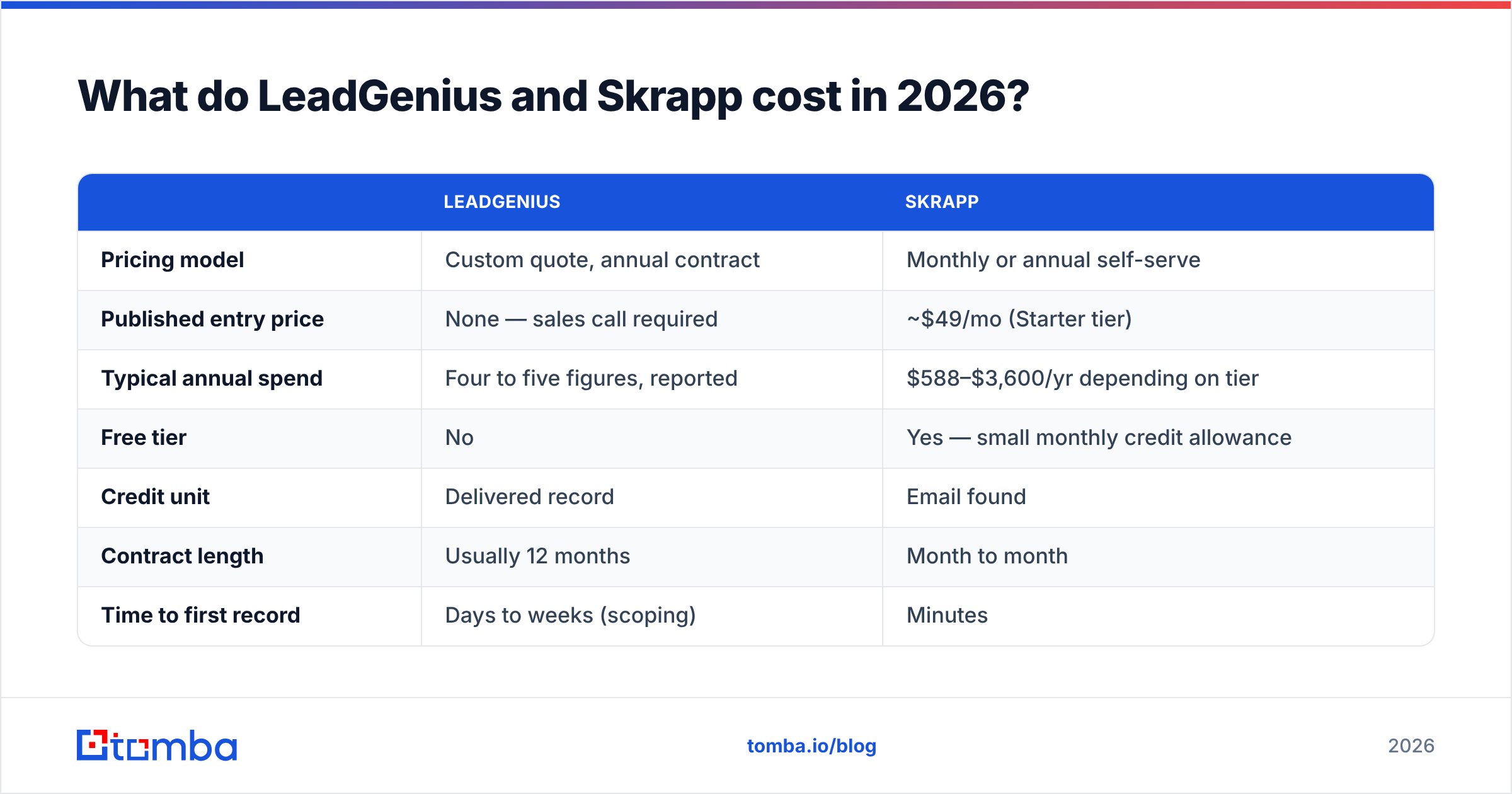
Skrapp publishes its tiers; LeadGenius does not. Anything quoted for LeadGenius below comes from buyer reports on review sites rather than a published price sheet, so treat it as a range, not a quote.
| LeadGenius | Skrapp | |
|---|---|---|
| Pricing model | Custom quote, annual contract | Monthly or annual self-serve |
| Published entry price | None — sales call required | ~$49/mo (Starter tier) |
| Typical annual spend | Four to five figures, reported | $588–$3,600/yr depending on tier |
| Free tier | No | Yes — small monthly credit allowance |
| Credit unit | Delivered record | Email found |
| Contract length | Usually 12 months | Month to month |
| Time to first record | Days to weeks (scoping) | Minutes |
| Who operates it | Vendor's research team | You |
The honest read: if your whole prospecting data budget is under $500/month, LeadGenius isn't on your list. If you're buying 50,000 hand-verified records with six custom attributes for an ABM program, Skrapp isn't on your list either. Most teams that think they're choosing between the two are actually choosing between "hire a data vendor" and "give the SDR team a tool."
For reference on where self-serve pricing generally lands, Tomba pricing runs a free tier at 25 searches/month, $49/mo Starter, $99/mo Growth, and $249/mo Pro — the same band Skrapp competes in, which is why the two get compared more often than either gets compared to LeadGenius.
Which one is more accurate?#
Accuracy is the wrong single number to chase. What matters is accuracy on your segment.

Pattern-based finders like Skrapp perform best where email formats are consistent and the company has enough public footprint to confirm the pattern — think 50–5,000 employee B2B companies in North America and Western Europe. Hit rates in that band are genuinely strong, and the tool is honest about returning nothing rather than guessing when confidence is low.
Where pattern inference degrades:
- Sub-20-employee companies using personal-ish aliases or founder@ addresses.
- Catch-all domains, where SMTP accepts everything and the verification signal is worthless without a secondary method.
- Non-Latin name markets (Japan, Korea, parts of the Middle East), where transliteration breaks the pattern match.
- Recently acquired companies still migrating between two domains.
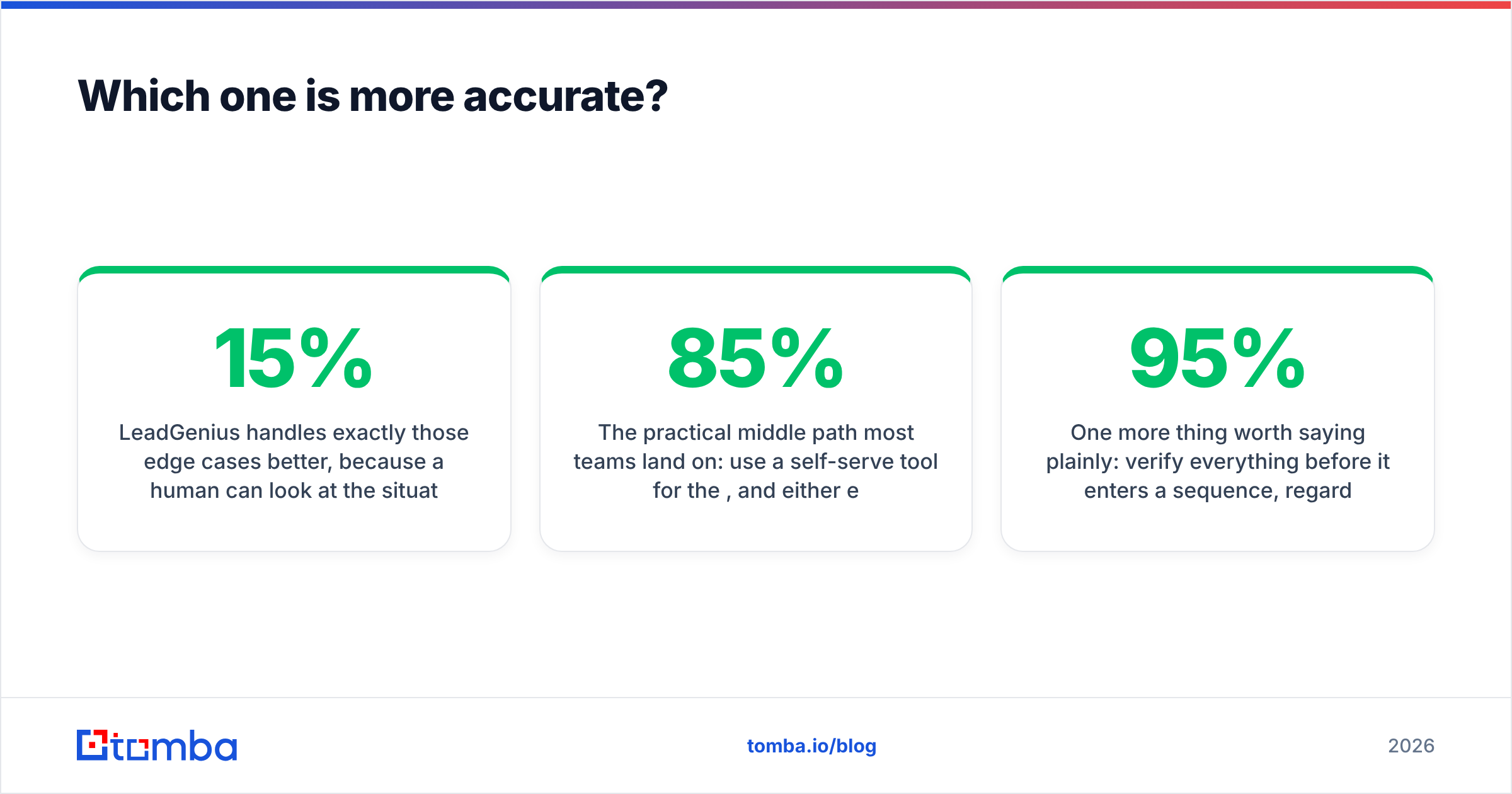
LeadGenius handles exactly those edge cases better, because a human can look at the situation and resolve it. That's the entire value proposition. You're paying for judgment on the 15% of records that automation gets wrong.
The practical middle path most teams land on: use a self-serve tool for the 85%, and either escalate the remainder to a research vendor or simply accept a lower hit rate on hard segments. Paying LeadGenius rates for records a $49 tool would have found is how data budgets get wasted.
One more thing worth saying plainly: verify everything before it enters a sequence, regardless of source. A 95%-accurate list that's six weeks old is not a 95%-accurate list anymore. Bounce rates above 3% start damaging sender reputation, and no vendor's delivery guarantee covers the damage.
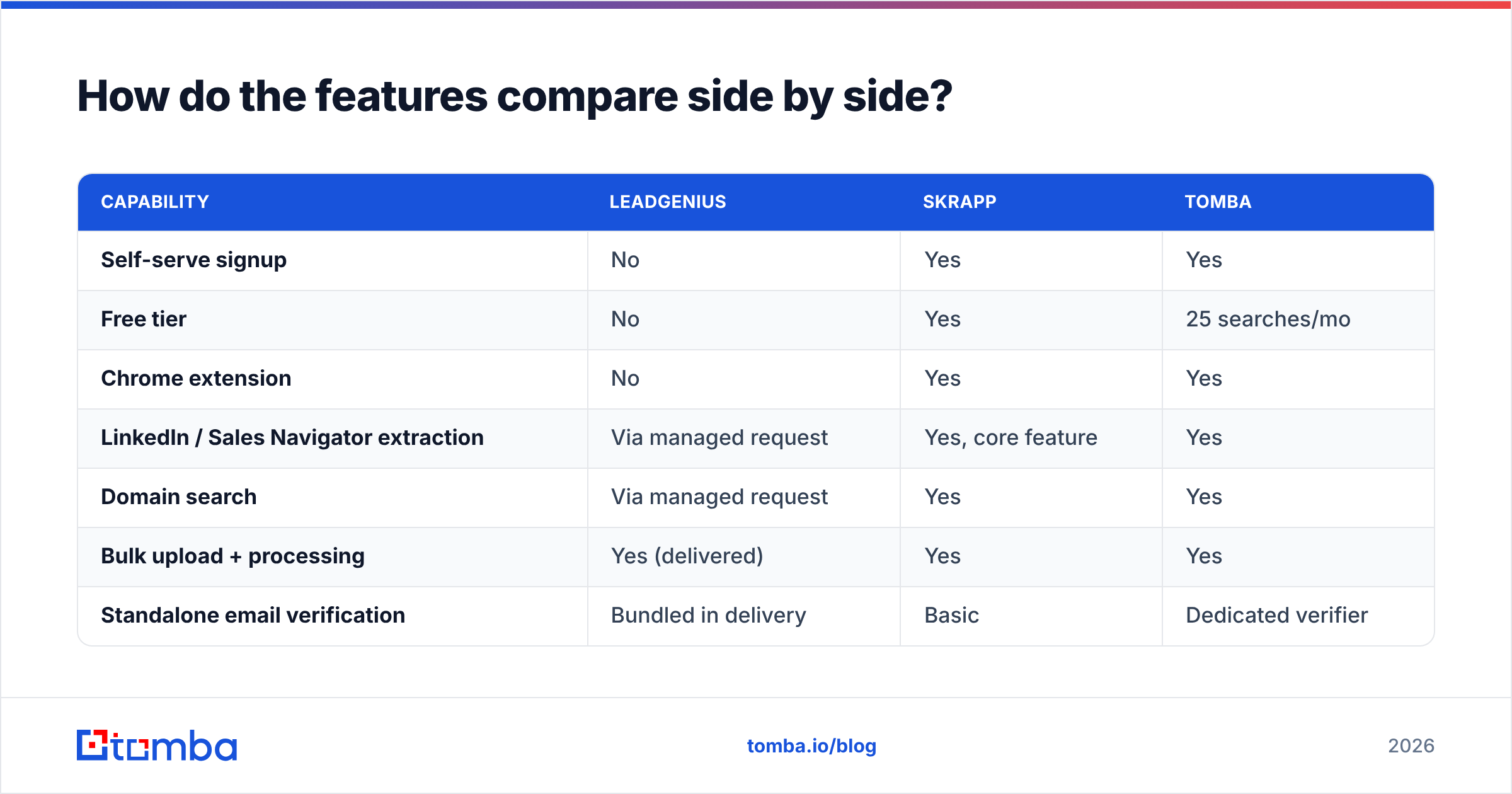
How do the features compare side by side?#

| Capability | LeadGenius | Skrapp | Tomba |
|---|---|---|---|
| Self-serve signup | No | Yes | Yes |
| Free tier | No | Yes | 25 searches/mo |
| Chrome extension | No | Yes | Yes |
| LinkedIn / Sales Navigator extraction | Via managed request | Yes, core feature | Yes |
| Domain search | Via managed request | Yes | Yes |
| Bulk upload + processing | Yes (delivered) | Yes | Yes |
| Standalone email verification | Bundled in delivery | Basic | Dedicated verifier |
| Catch-all handling | Human-resolved | Limited | Dedicated catch-all verifier |
| Public API | Limited / enterprise | Yes | Yes, full REST API |
| Phone numbers | Yes, on request | No | Yes |
| Custom research attributes | Yes — the core product | No | No |
| CRM sync | Managed integration | Export / Zapier | Native HubSpot, Salesforce, Pipedrive |
| Entry price | Quote only | ~$49/mo | $49/mo (free tier below) |
The column that matters most is usually API access. If you're building enrichment into a signup flow, a lead-routing workflow, or an internal scoring model, a managed delivery service creates a batch-shaped dependency you'll fight forever. A email finder API with per-call pricing fits that job far better. If you're buying a one-time list for an ABM campaign, the API doesn't matter at all and the research quality does.

Who should actually buy LeadGenius?#
Buy LeadGenius if three things are true at once:
- Your ICP is defined by attributes no database carries. Store counts, equipment installed, regulatory licenses, specific tech deployments below the level a tech-graph vendor tracks.
- You have budget authority for an annual data contract and someone internally who owns the vendor relationship.
- Volume is meaningful. Managed research has fixed overhead. A 500-record project doesn't amortize it; a 50,000-record program does.
Marketplaces like G2 show the pattern in reviews: buyers who praise LeadGenius are almost always describing a custom-attribute problem, not an "I need emails" problem. Buyers who complain are usually describing turnaround time and the cost of change requests mid-project — the standard friction of any services engagement.
If you only need standard firmographics plus verified emails, you are overpaying by a large multiple.
Who should actually use Skrapp?#
Use Skrapp if:
- LinkedIn is your prospecting surface. Sales Navigator search → extension → list → CSV is a genuinely fast loop.
- Your volume is a few thousand contacts a month or less, within the tier caps.
- You want month-to-month with no procurement. SDR managers can expense it.
- Your targets are mid-market Western B2B companies with predictable email formats.
Where Skrapp users tend to churn out: credit caps arriving faster than expected, thin coverage outside its sweet spot, verification that isn't strong enough to skip a second tool, and API limitations when the workflow graduates from manual to automated. Those are the four reasons people start searching for a LinkedIn email extractor with more headroom.
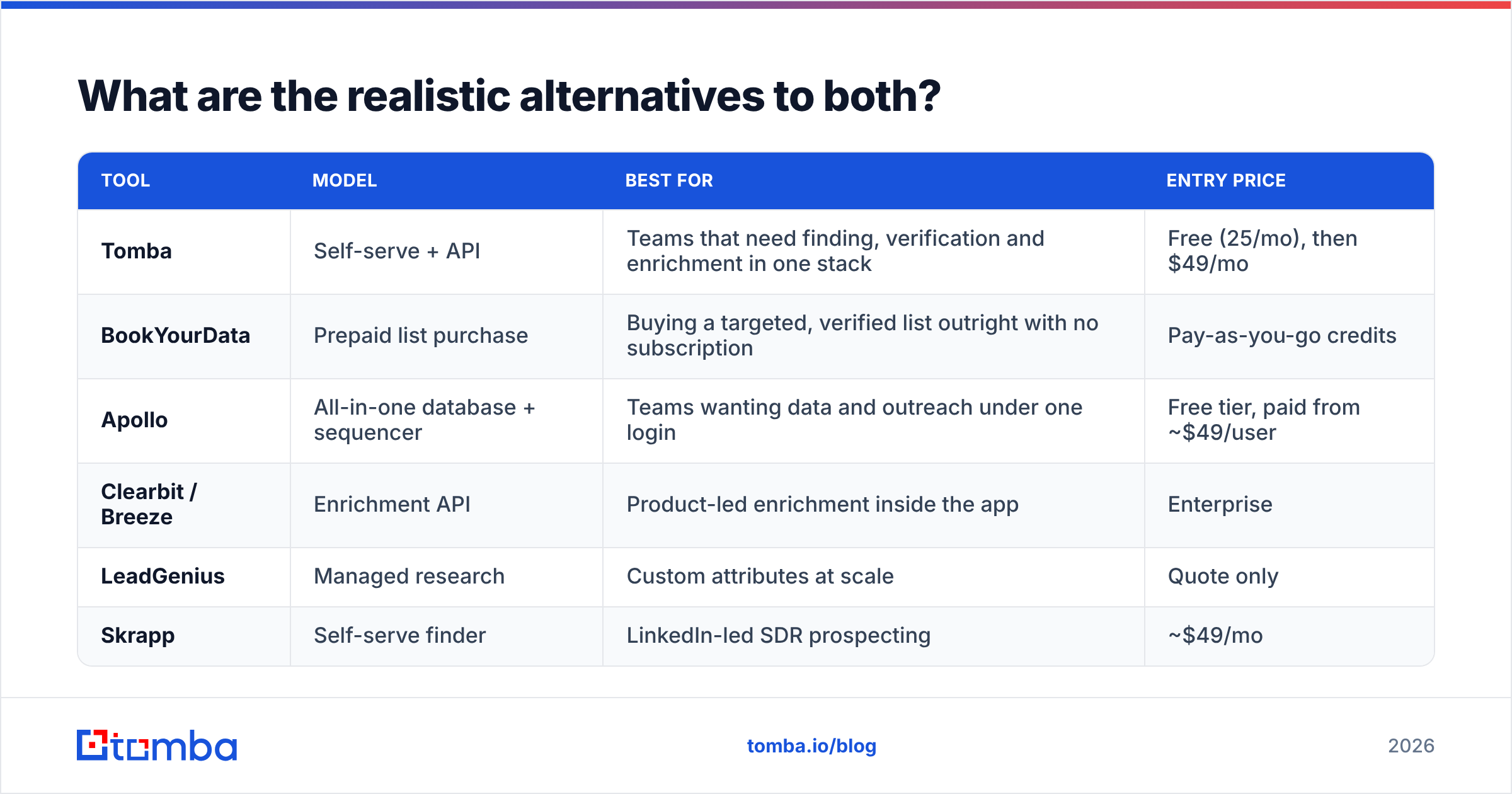
What are the realistic alternatives to both?#
Most teams don't end up at either extreme. The middle of the market is crowded for a reason.
| Tool | Model | Best for | Entry price |
|---|---|---|---|
| Tomba | Self-serve + API | Teams that need finding, verification and enrichment in one stack | Free (25/mo), then $49/mo |
| BookYourData | Prepaid list purchase | Buying a targeted, verified list outright with no subscription | Pay-as-you-go credits |
| Apollo | All-in-one database + sequencer | Teams wanting data and outreach under one login | Free tier, paid from ~$49/user |
| Clearbit / Breeze | Enrichment API | Product-led enrichment inside the app | Enterprise |
| LeadGenius | Managed research | Custom attributes at scale | Quote only |
| Skrapp | Self-serve finder | LinkedIn-led SDR prospecting | ~$49/mo |
A few notes on that table. BookYourData is worth a look specifically when you want to buy a bounded, verified list rather than rent a search tool — the prepaid model avoids the subscription-you-forgot-to-cancel problem, and the targeting filters are solid. Apollo bundles sequencing, which is either a feature or a lock-in depending on your stack; if you've already standardized on Instantly or Smartlead, you're paying for a sequencer twice.
Tomba sits where most Skrapp evaluators actually want to land: self-serve, API-first, with domain search, verification, catch-all handling, phone data and bulk email finder processing in the same account, so a list doesn't have to tour three vendors before it's usable.
How should you decide in the next 30 minutes?#
Run this sequence:
- Write down one target account and the five fields you need about it. If any field is something a human would have to go look up, LeadGenius is in scope. If all five are standard firmographics plus contact info, it isn't.
- Estimate monthly contact volume. Under 2,000 → self-serve. Over 20,000 with custom fields → managed. In between → self-serve plus selective outsourcing.
- Check whether anything automated needs this data. A signup-flow enrichment, a routing rule, a scoring model — any of those means API-first, which rules managed delivery out as the primary source.
- Test coverage on 50 real accounts, not 50 famous ones. Every tool nails Salesforce and Stripe. Use accounts from your actual pipeline.
- Verify the test output independently. Run the results through a second verifier and count true bounces. A tool that returns 90 addresses with 70 valid is worse than one that returns 75 with 73 valid.
- Price the whole workflow, not the tool. Finder + verifier + enrichment + SDR hours. The cheapest line item frequently produces the most expensive workflow.
Step 4 is the one teams skip, and it's the one that predicts satisfaction six months later.
What's the verdict on LeadGenius vs Skrapp?#
Different products for different buyers. LeadGenius is the right call when your competitive edge comes from knowing something about accounts that isn't in any commercial database, and you have the budget and patience for a research engagement. Skrapp is the right call when your SDRs live in Sales Navigator, your volume is modest, and you need something working before the end of the day.
If your answer is "Skrapp's model, but I keep hitting its limits" — coverage outside Western mid-market, credit caps, weak catch-all handling, or an API you've outgrown — that gap is exactly where a broader self-serve platform belongs.
Start with the Tomba Email Finder: 25 free searches a month with no card, a verified-first result model that tells you when it isn't confident, catch-all verification built in, and a full REST API on every paid plan from $49/mo. Run your 50-account test against it alongside whichever of these two you're leaning toward, count the true valid addresses, and let the bounce rate pick the winner instead of the sales deck.
Related guides#
// get started
Find, verify and enrich your first contacts today
Start on the free plan with 25 searches a month, then scale when your team is ready.
Free plan · No credit card required · GDPR & CCPA
// about the author