LeadGibbon vs LeadsForge (2026): Which B2B Data Tool Wins?
LeadGibbon sells static list exports; LeadsForge sells AI-prompt list building. Neither verifies like a dedicated finder. Here's the honest head-to-head, with pricing, accuracy, and the case for a third option.
TL;DR
- LeadGibbon is a list-export tool: you filter a B2B database by title, industry, and size, then push a CSV or a Google Sheet. It is cheap, simple, and shallow.
- LeadsForge is the newer AI-prompt approach: you describe your ICP in plain English and it assembles a list. Faster to start, harder to audit.
- Neither tool is primarily a verification engine. Both hand you emails from a static store, and both lean on you to clean the list before you send.
- If your bounce rate is the metric that decides whether the campaign lives, pair either tool with a real email verifier — or replace both with a finder that verifies at lookup time.
- Budget reality: LeadGibbon starts around $49/mo for a few thousand credits, LeadsForge sits in the $49–$99/mo range depending on the plan, and Tomba's pricing starts at $49/mo with a free 25-search tier to test accuracy first.
What are LeadGibbon and LeadsForge, exactly?#
They solve the same problem from opposite ends.
LeadGibbon is a classic database-plus-filters product. You open a search panel, tick boxes for job title, company headcount, industry, and geography, and it returns rows. Its signature feature is the Google Sheets export — the list lands in a sheet your SDR can work from in about ninety seconds. There's a Chrome extension for pulling contacts off LinkedIn profiles too. The mental model is a phone book with a good index.
LeadsForge flips it. Instead of filters, you type something like "VP of Engineering at Series B fintech companies in Germany with 50–200 employees" and the system interprets the prompt, queries its data, and builds the list. It markets itself as an "AI sales agent" for list building. The mental model is a research assistant who sometimes guesses.
Both are aimed at the same buyer: a small outbound team that wants contacts without a Sales Navigator seat and without an enterprise data contract.
The important thing neither markets loudly: both are resellers of aggregated data at the end of the day. The freshness of what you get depends on when their source last refreshed that record, not on whether that mailbox accepts mail today.

How do LeadGibbon and LeadsForge compare head to head?#
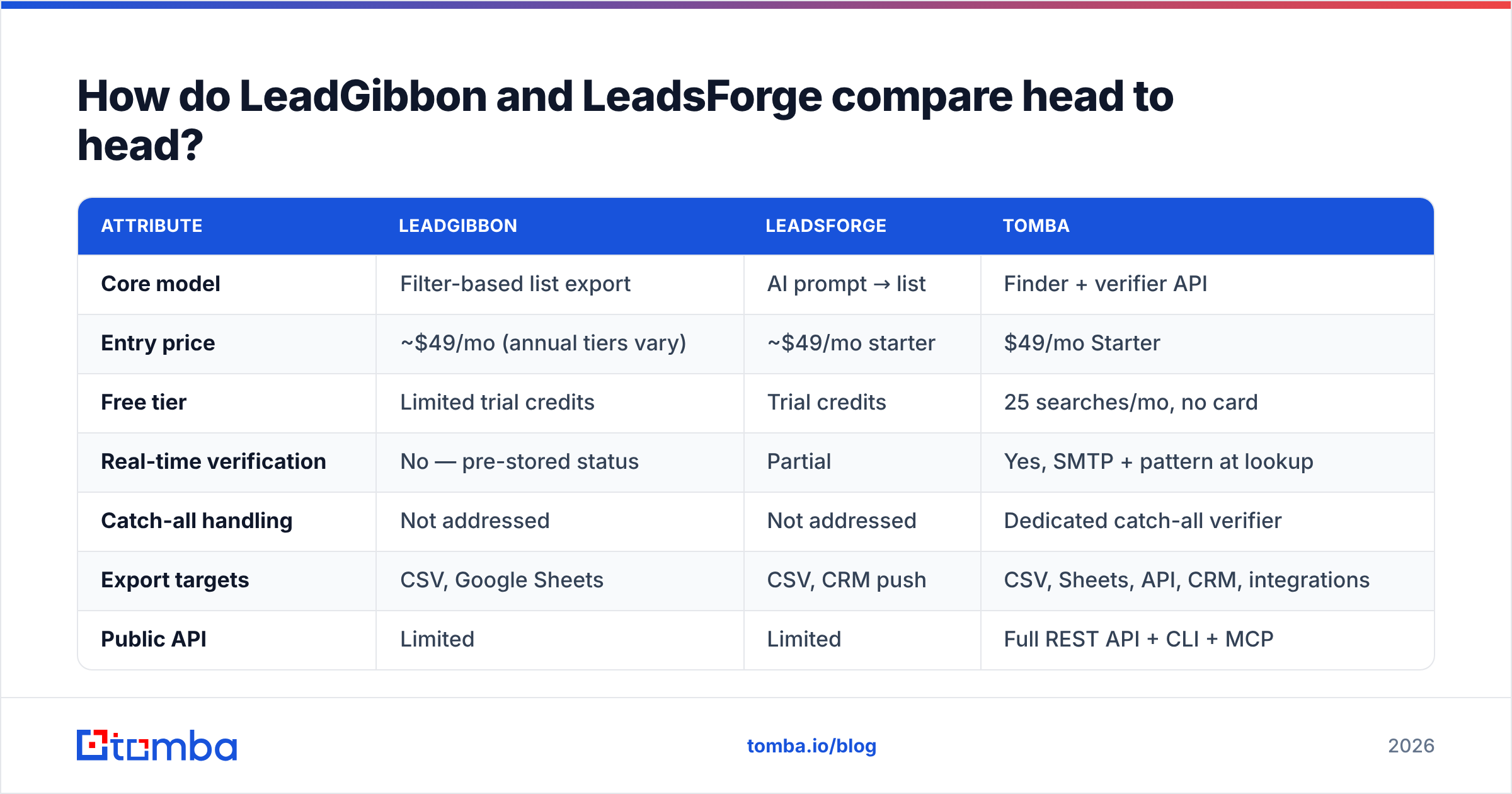
| Attribute | LeadGibbon | LeadsForge | Tomba |
|---|---|---|---|
| Core model | Filter-based list export | AI prompt → list | Finder + verifier API |
| Entry price | ~$49/mo (annual tiers vary) | ~$49/mo starter | $49/mo Starter |
| Free tier | Limited trial credits | Trial credits | 25 searches/mo, no card |
| Real-time verification | No — pre-stored status | Partial | Yes, SMTP + pattern at lookup |
| Catch-all handling | Not addressed | Not addressed | Dedicated catch-all verifier |
| Export targets | CSV, Google Sheets | CSV, CRM push | CSV, Sheets, API, CRM, integrations |
| Public API | Limited | Limited | Full REST API + CLI + MCP |
| Phone numbers | Some records | Some records | Phone finder + validator |
| Best for | Cheap bulk list pulls | Fast ICP experiments | Accuracy-first outbound at scale |
Read that table with one question in mind: where does the risk sit? With LeadGibbon, risk sits in staleness — a title from eighteen months ago is still a title. With LeadsForge, risk sits in interpretation — the prompt that felt precise to you may have been loosely matched by the model. With a verification-first tool, the risk moves to coverage: you get fewer rows, but the rows you get are likelier to land.
Is LeadGibbon's Google Sheets export actually a differentiator?#
Yes, but a smaller one than it was in 2021.
The Sheets workflow genuinely removes friction. You filter, you click, the list is in a tab your team already lives in, and nobody has to think about CSV encoding. For a two-person agency running a hundred-lead-a-week motion, that's real.
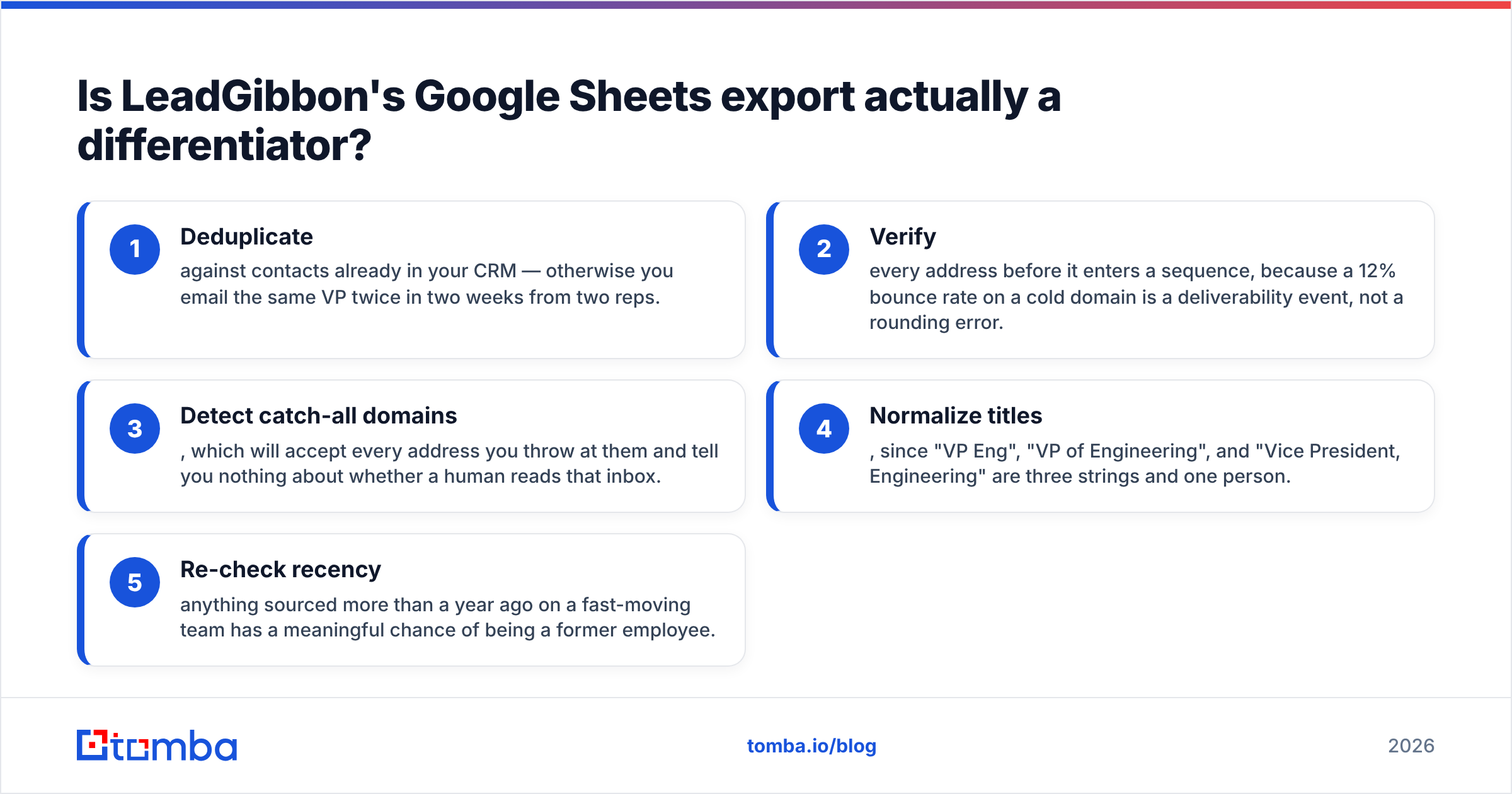
The problem is what happens next. A sheet full of unverified addresses is a liability dressed as an asset. You still need to:
- Deduplicate against contacts already in your CRM — otherwise you email the same VP twice in two weeks from two reps.
- Verify every address before it enters a sequence, because a 12% bounce rate on a cold domain is a deliverability event, not a rounding error.
- Detect catch-all domains, which will accept every address you throw at them and tell you nothing about whether a human reads that inbox.
- Normalize titles, since "VP Eng", "VP of Engineering", and "Vice President, Engineering" are three strings and one person.
- Re-check recency — anything sourced more than a year ago on a fast-moving team has a meaningful chance of being a former employee.
None of that is unique to LeadGibbon. It's the tax on every list-export product. But it does mean the "ninety seconds to a sheet" pitch is really "ninety seconds to a sheet, plus an hour of cleanup." Tools like bulk verify exist precisely to collapse that hour.
Does LeadsForge's AI prompt search find better leads?#
It finds different leads, faster. Whether they're better depends on how much you trust a natural-language query you cannot inspect.
The upside is genuine. Filter UIs force your ICP into whatever dimensions the vendor decided to index. If your actual ICP is "companies that just hired their first RevOps person," no dropdown captures that. A prompt can at least attempt it.
The downside is auditability. When a filter-based search returns 340 rows, you know exactly why each row is there — it matched five boolean conditions. When a prompt returns 340 rows, you know the model thought they matched. Those are different epistemic situations, and the second one is harder to debug when your reply rate craters.
A practical test before you commit: run the same ICP through both tools and through a straight domain search on twenty companies you already know well. Count how many contacts each returns that you can independently confirm still work there. That number — confirmable, current contacts per dollar — is the only benchmark that matters. Vendor-published accuracy percentages, as G2 reviewers will tell you across this whole category, are marketing numbers.
What about pricing — which one is cheaper in practice?#
Sticker price and effective price diverge sharply here.
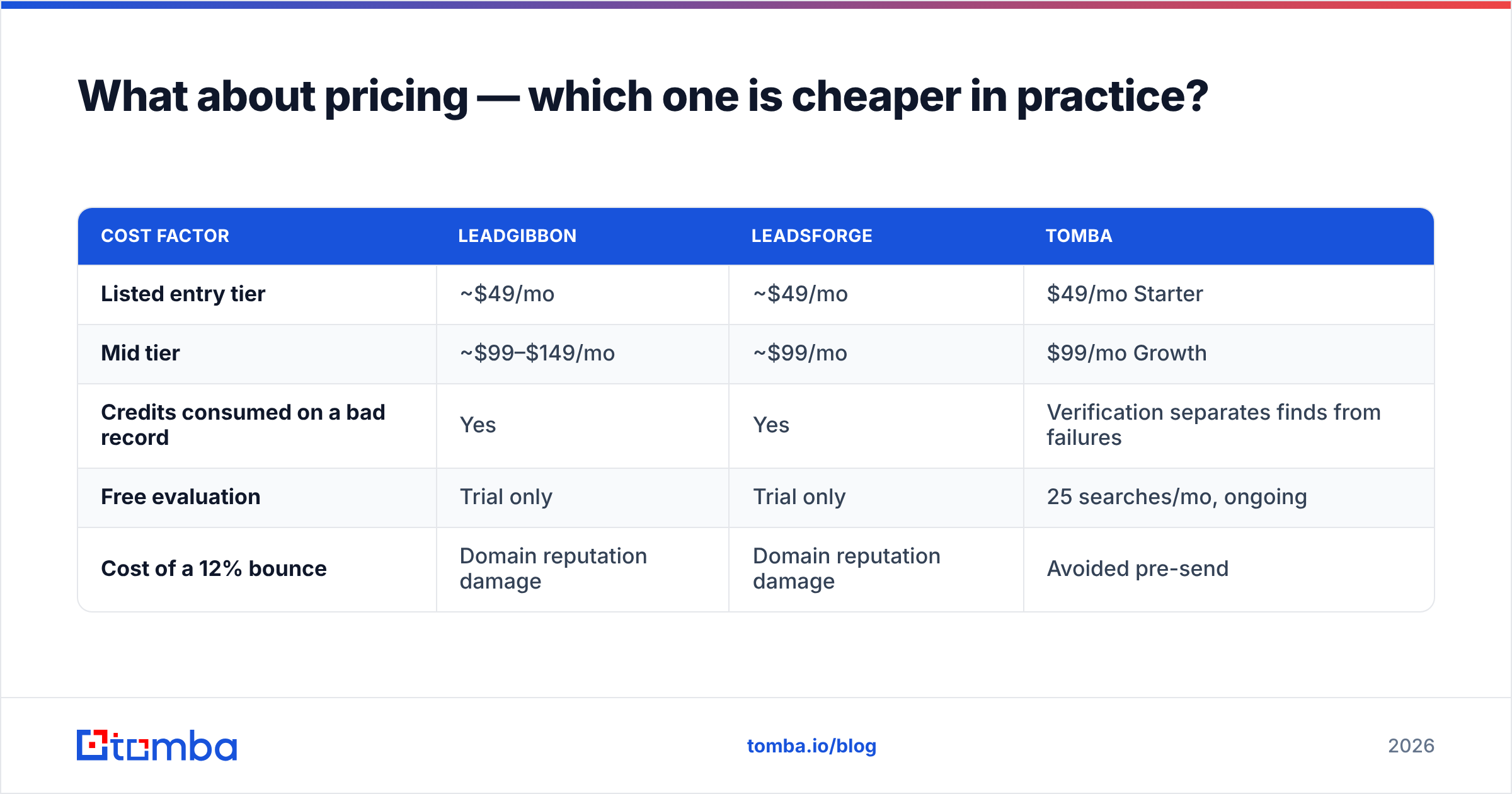
| Cost factor | LeadGibbon | LeadsForge | Tomba |
|---|---|---|---|
| Listed entry tier | ~$49/mo | ~$49/mo | $49/mo Starter |
| Mid tier | ~$99–$149/mo | ~$99/mo | $99/mo Growth |
| Credits consumed on a bad record | Yes | Yes | Verification separates finds from failures |
| Free evaluation | Trial only | Trial only | 25 searches/mo, ongoing |
| Cost of a 12% bounce | Domain reputation damage | Domain reputation damage | Avoided pre-send |
The line that people skip is row three. If a tool charges you a credit for a returned address regardless of whether that address is deliverable, your real cost per usable contact is the sticker price divided by your accuracy rate. At 70% accuracy, a $0.02 credit is really $0.029. At 92%, it's $0.022. Over 50,000 contacts a year that gap is roughly $350 — not catastrophic, but the reputation cost of the bounces is the part that actually hurts.
Worth noting for fairness: the "cheap list export" category has a respectable end. BookYourData sells pay-as-you-go B2B lists with a stated accuracy guarantee and no subscription lock-in, which is a cleaner deal structure than a monthly credit treadmill if your outbound is seasonal. If you're comparing LeadGibbon and LeadsForge purely on cost-per-list, it belongs in the shortlist.

Which tool should you pick for cold outbound in 2026?#
Here's the honest segmentation.
Pick LeadGibbon if: you run a low-volume, high-touch motion, your ICP maps cleanly onto standard firmographic filters, you live in Google Sheets, and you already own a verification step. It is the least surprising tool of the three. You will know exactly what you bought.
Pick LeadsForge if: your ICP is weird — defined by a trigger, a tech stack, or a hiring signal rather than a headcount band — and you're willing to spot-check output manually. Treat it as a hypothesis generator, not a source of truth. Run it on a narrow prompt, verify aggressively, and expand only once the reply data supports it.
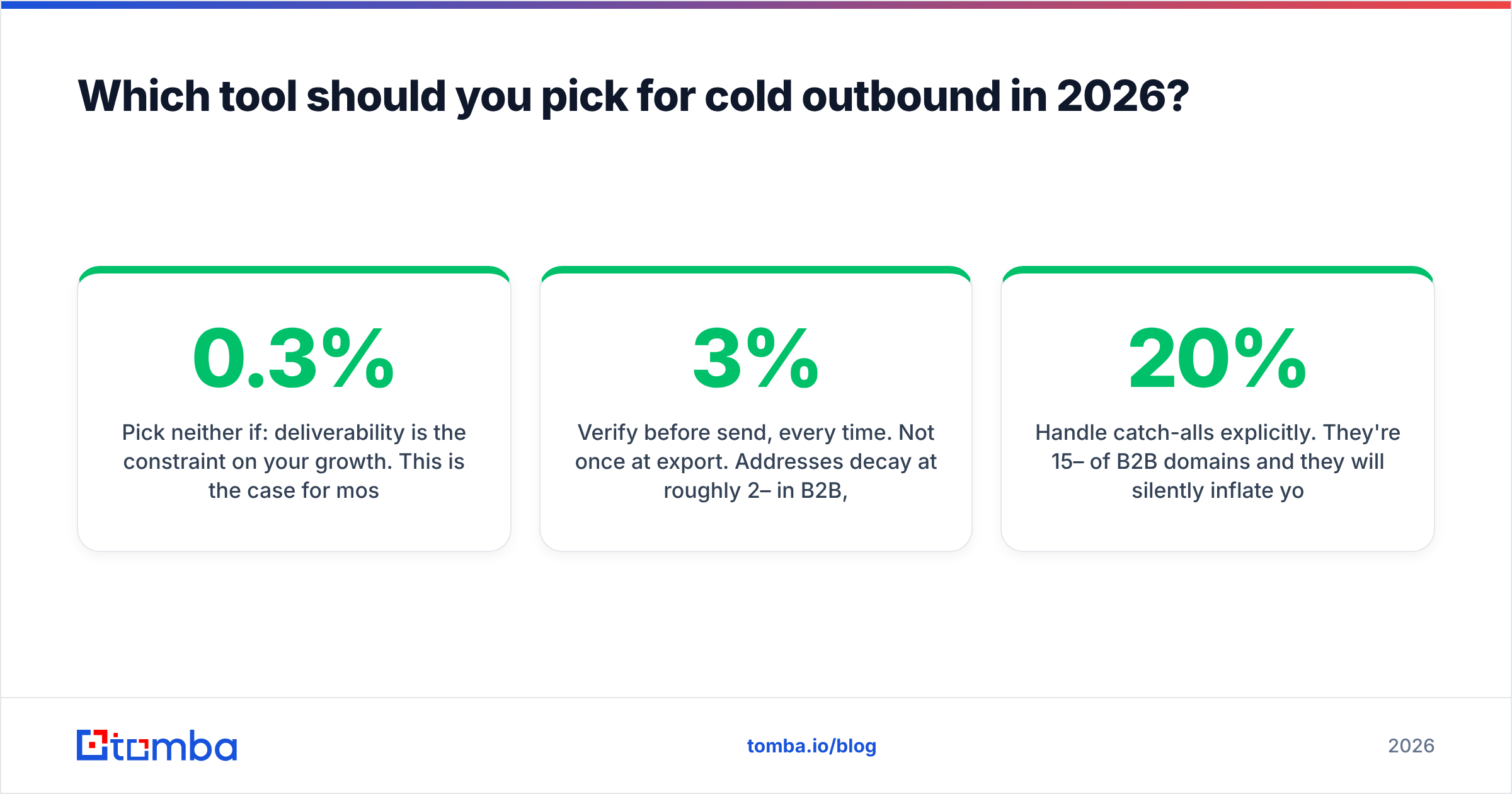
Pick neither if: deliverability is the constraint on your growth. This is the case for most teams sending more than 500 cold emails a week in 2026. Google and Yahoo's bulk-sender requirements pushed the acceptable complaint threshold to 0.3%, and every major ESP now treats bounce rate as a first-class reputation input. Under those rules, "here's a list, good luck" is not a product — it's half a product.
The alternative architecture looks like this:
- Source at the account level. Start from a target account list you actually built, not a database dump. Use domain search to enumerate who works there.
- Find at the person level. Given a name and a domain, resolve the address with pattern inference plus live checks rather than a stored row.
- Verify before send, every time. Not once at export. Addresses decay at roughly 2–3% per month in B2B, which compounds fast on a list you exported in March and are sending in September.
- Enrich only what converts. Spend enrichment credits on accounts that replied, not on the whole list up front.
- Handle catch-alls explicitly. They're 15–20% of B2B domains and they will silently inflate your "valid" count if your tool treats accept-all as valid.
That sequence costs more thinking and less money than bulk exporting, and it is the difference between a sending domain that lasts two years and one that lasts two months. HubSpot's own deliverability guidance makes the same point from the marketer's side: list hygiene beats list volume, consistently.
How do you migrate off a list-export workflow without losing pipeline?#
Do it in parallel, not as a cutover.
Keep your existing LeadGibbon or LeadsForge subscription running for one more billing cycle. In that cycle, take your next 500-contact batch and split it. Send 250 through your current process untouched. Run the other 250 through a verification pass first, dropping anything that comes back invalid or unknown-catch-all.
Then compare four numbers across the two cohorts: bounce rate, delivery rate, reply rate, and meetings booked per 100 sent. If the verified cohort doesn't beat the raw cohort on at least three of four, your data source was better than average and you can stay. If it does — and in most tests it does, usually by a wide margin on bounce and a meaningful margin on reply — you have the evidence to change vendors without an argument.
Two operational notes for the migration:
- Don't re-verify your entire historical database on day one. Verify on use. A contact you're not emailing this quarter doesn't need credits spent on it.
- Wire the check into the workflow, not a person's to-do list. A verification step that requires someone to remember it will be skipped inside three weeks. Use the Tomba API, a Zapier integration, or a Sheets add-on so it runs whether anyone remembers or not.
What's the verdict on LeadGibbon vs LeadsForge?#
LeadGibbon wins on predictability and workflow simplicity. LeadsForge wins on ICP flexibility and speed to a first list. Both lose on the dimension that determines whether cold outbound works in 2026, which is whether the address you send to is live at the moment you send.
If you only remember one thing: the tool that finds the contact and the tool that verifies the contact should not be an afterthought bolted onto each other. When they're the same system, the verification happens by default. When they're two systems, it happens when someone remembers.
Run the split test. Let the bounce rate decide.
Ready to see the accuracy difference on your own list? Start with the Tomba Email Finder — 25 free searches a month, no card required. Drop in twenty domains you already know, compare what comes back against what your current list tool gave you, and make the call on evidence instead of a pricing page. If the numbers favor your current vendor, keep them. If they don't, Starter is $49/mo and the API will wire into whatever sequencer you're already running.
Related guides#
// get started
Find, verify and enrich your first contacts today
Start on the free plan with 25 searches a month, then scale when your team is ready.
Free plan · No credit card required · GDPR & CCPA
// about the author