LeadGibbon vs Salesbot: Which B2B Lead Tool Wins in 2026?
One sells you verified contact lists. The other automates the conversation after you have them. Here is the honest breakdown of where each tool earns its keep — and where a dedicated email finder beats both.
TL;DR#
- These two tools are not actually competitors. LeadGibbon is a B2B contact database and list-building tool. Salesbot is an AI conversation layer — chat, qualification, and automated follow-up. Comparing them head-to-head only makes sense because teams keep landing on both in the same budget conversation.
- Pick LeadGibbon if your bottleneck is "I don't have enough contacts." Pick Salesbot if your bottleneck is "I have contacts, but nobody replies fast enough."
- Neither one solves data decay. LeadGibbon's records still age out; Salesbot will happily automate a conversation with an inbox that no longer exists.
- The cheapest failure mode in both cases is a bad email. A 20% bounce rate torches your sender reputation before either tool gets a chance to help.
- Most teams end up with a third component: a dedicated finder/verifier layer (Tomba, and peers like BookYourData for pre-built lists) sitting upstream of whatever outreach engine they run.
What are LeadGibbon and Salesbot, exactly?#
Start here, because the naming confuses people.
LeadGibbon is a lead data product. You search a database of B2B contacts, filter by title, company, industry, or location, and export a list with emails and company attributes. It also markets a LinkedIn-side workflow — you look at a profile or a search result and pull contact data out of it. The core promise is volume of accurate records, exportable to CSV or your CRM.
Salesbot sits at the other end of the funnel. It is an AI sales agent: it handles inbound chat, qualifies the person talking to it, books meetings, and runs automated follow-up sequences. The core promise is response speed and coverage without adding headcount.
So the honest framing for leadgibbon vs salesbot is not "which is better." It is "which gap in your pipeline is currently costing you the most money." If you can't name 500 qualified people to contact this month, a conversation engine has nothing to talk to. If you're sitting on 12,000 unworked contacts and a two-day average response time, buying another database is procrastination.

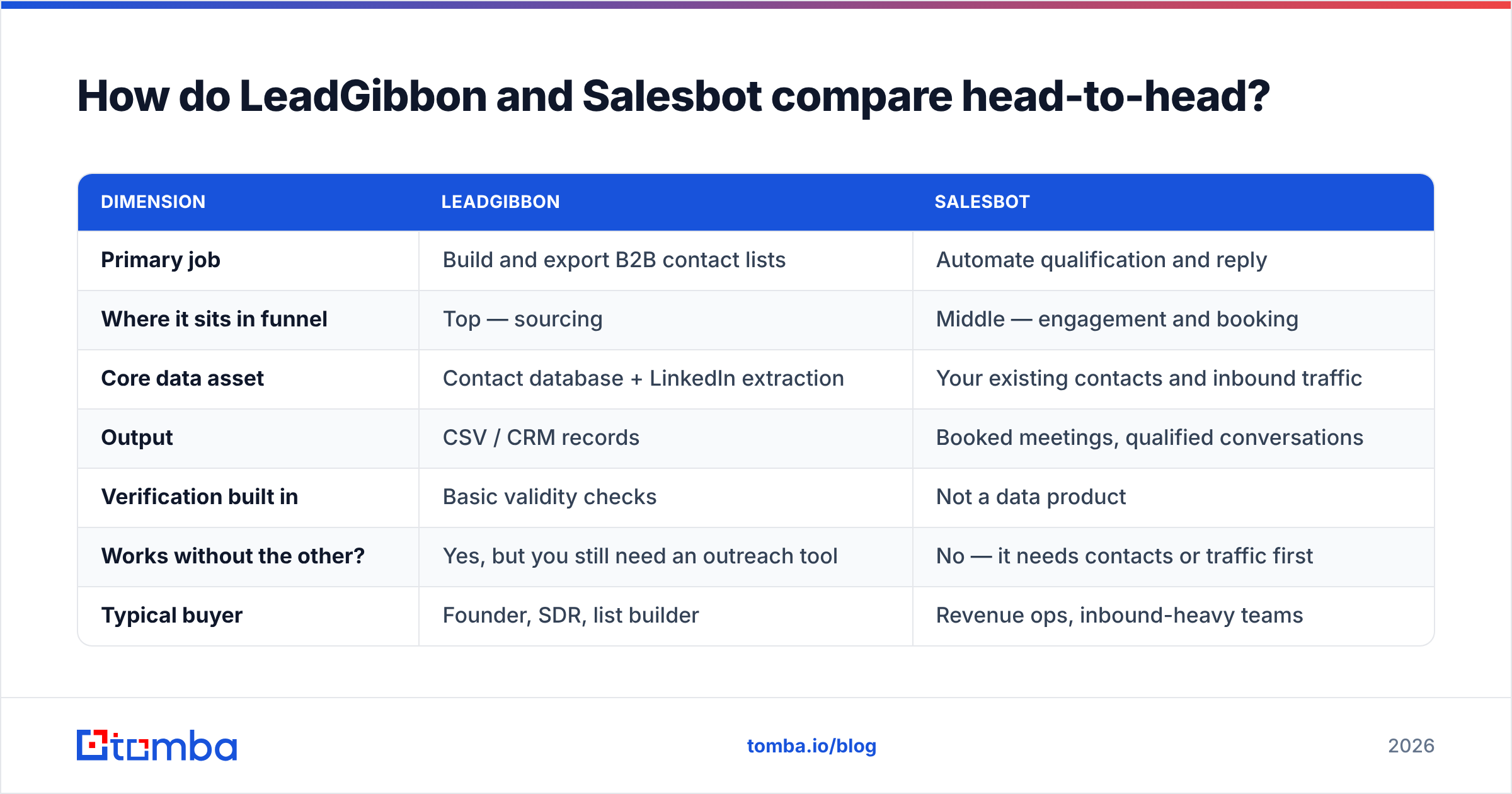
How do LeadGibbon and Salesbot compare head-to-head?#
Vendors change plans and packaging frequently, so treat the pricing column as directional and confirm on the vendor's own page before you buy. Everything else here is structural and stable.
| Dimension | LeadGibbon | Salesbot |
|---|---|---|
| Primary job | Build and export B2B contact lists | Automate qualification and reply |
| Where it sits in funnel | Top — sourcing | Middle — engagement and booking |
| Core data asset | Contact database + LinkedIn extraction | Your existing contacts and inbound traffic |
| Output | CSV / CRM records | Booked meetings, qualified conversations |
| Verification built in | Basic validity checks | Not a data product |
| Works without the other? | Yes, but you still need an outreach tool | No — it needs contacts or traffic first |
| Typical buyer | Founder, SDR, list builder | Revenue ops, inbound-heavy teams |
| Pricing model | Credit/seat tiers, monthly | Usage/seat, often higher entry point |
| Best-case use | Cold outbound into a new ICP | Fast inbound coverage across time zones |
| Worst-case use | You already have the list | You have nobody to talk to |
The table makes the decision obvious in most cases. The interesting question is what happens when you already run both — and that's where the third layer shows up.
What does LeadGibbon actually do well?#
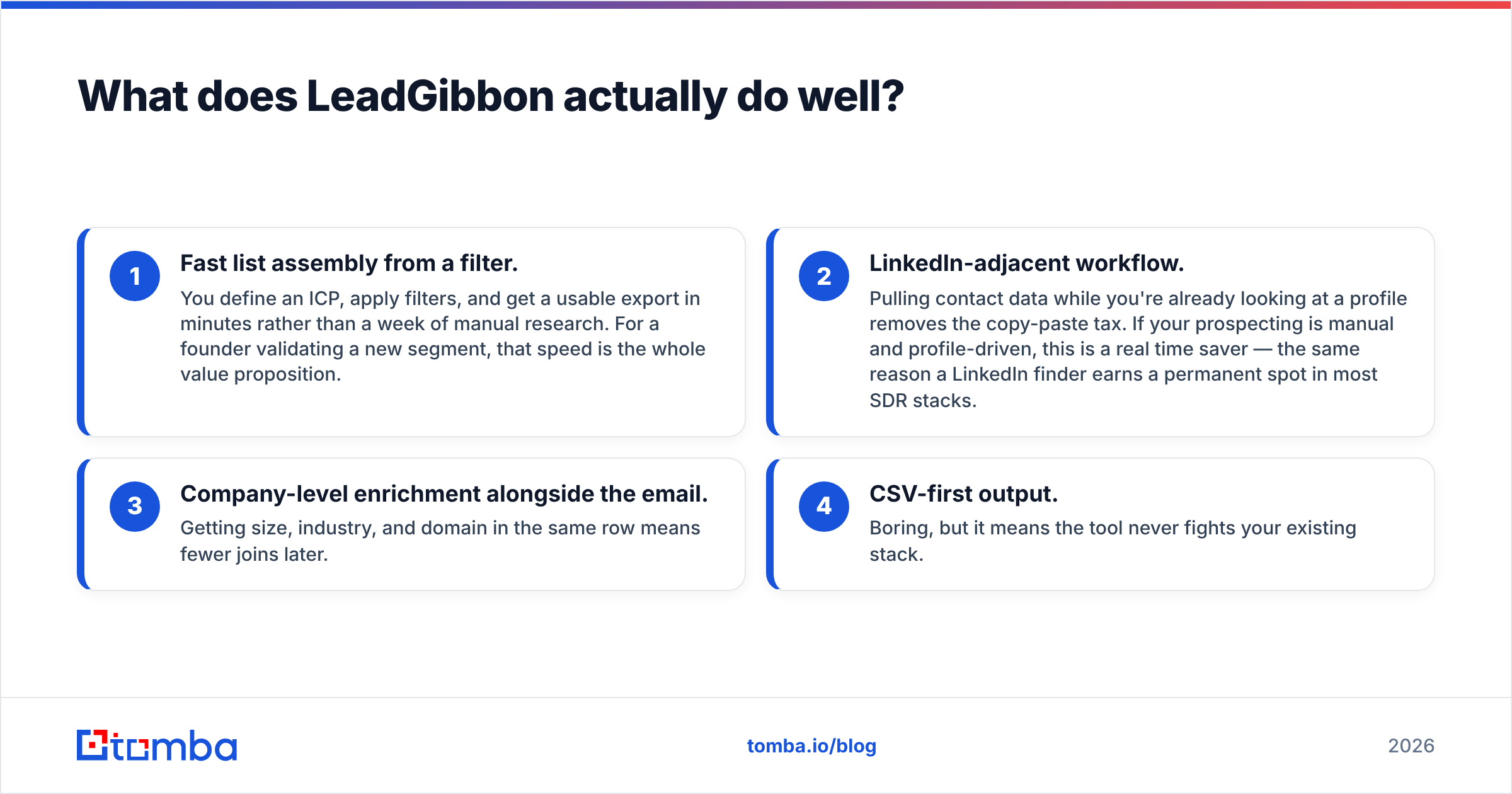
Four things, in order of how often they matter:
- Fast list assembly from a filter. You define an ICP, apply filters, and get a usable export in minutes rather than a week of manual research. For a founder validating a new segment, that speed is the whole value proposition.
- LinkedIn-adjacent workflow. Pulling contact data while you're already looking at a profile removes the copy-paste tax. If your prospecting is manual and profile-driven, this is a real time saver — the same reason a LinkedIn finder earns a permanent spot in most SDR stacks.
- Company-level enrichment alongside the email. Getting size, industry, and domain in the same row means fewer joins later.
- CSV-first output. Boring, but it means the tool never fights your existing stack.
And the honest limitations:
- Database coverage is uneven by geography and seniority. Every database vendor is strong somewhere and thin somewhere else. Test your ICP with a trial before committing to an annual plan — not a generic US mid-market search that every vendor optimizes for.
- Freshness is the silent tax. B2B contact data decays at roughly 2–3% per month as people change jobs. A list exported in January is meaningfully worse by June. That decay hits every database vendor equally, which is exactly why a standalone email verifier step before send is non-negotiable rather than optional.
- It doesn't send anything. You still need a sequencer.
Where does Salesbot fit in the stack?#
Salesbot's value is a function of one number: how much qualified attention you're currently dropping on the floor.
If you have meaningful inbound — demo requests, chat sessions, form fills — and your median response time is measured in hours, an AI agent that responds in seconds is straightforwardly accretive. Research from HubSpot and others has hammered the same point for a decade: speed-to-lead is one of the highest-leverage variables in conversion, and it degrades sharply after the first few minutes.
Where it underperforms expectations:
- Pure outbound teams. An AI agent is not a prospecting tool. It doesn't find anyone.
- Complex, multi-stakeholder enterprise deals. The bot can qualify and route; it can't navigate a six-person buying committee.
- Low-volume, high-ACV motions. If you send 40 emails a month to named accounts, automation isn't your constraint — research quality is.
One practical warning: automated follow-up amplifies whatever data quality you feed it. A sequence that fires five times into a dead mailbox generates five hard bounces. Five thousand contacts with a 15% invalid rate produces enough bounce volume to visibly damage sender reputation inside a single week. Automation makes good data better and bad data catastrophic.
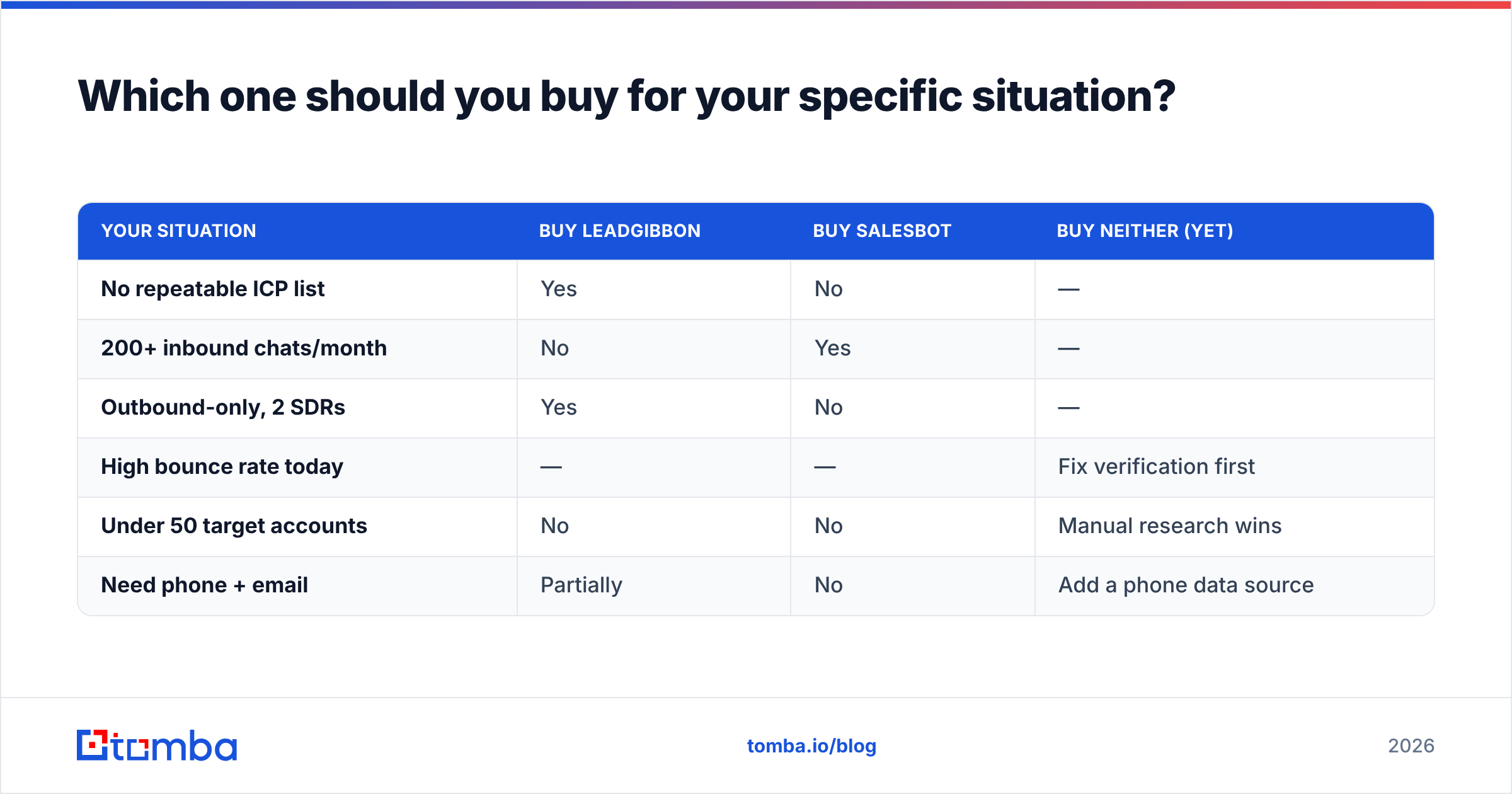
Which one should you buy for your specific situation?#
| Your situation | Buy LeadGibbon | Buy Salesbot | Buy neither (yet) |
|---|---|---|---|
| No repeatable ICP list | Yes | No | — |
| 200+ inbound chats/month | No | Yes | — |
| Outbound-only, 2 SDRs | Yes | No | — |
| High bounce rate today | — | — | Fix verification first |
| Under 50 target accounts | No | No | Manual research wins |
| Need phone + email | Partially | No | Add a phone data source |
That fourth row is the one teams skip. If your current bounce rate is above 5%, buying either tool is spending money to scale a problem. Run a cleanup pass on what you already own, then buy.
How do you judge the data quality behind any of these tools?#
Ignore the marketing percentage on the homepage. Every vendor in this category claims 95%+ accuracy, and the number is unfalsifiable without a defined test. Run your own:
- Sample 200 records from your real ICP. Not a generic search — your actual titles, your actual geographies, your actual company sizes. Vendor performance varies enormously across segments.
- Verify them independently. Use a verification service that is not the vendor selling you the list. Self-graded homework is worthless here. A free email checker handles a spot check; bulk needs an API.
- Separate "valid" from "catch-all." Catch-all domains accept everything at SMTP time, so a naive verifier marks them valid and your bounce rate finds out later. A dedicated catch-all verifier is the difference between a real 97% and a fake one.
- Send a small warm-up batch and measure hard bounces. This is the only ground truth. Everything before it is a proxy.
- Re-test the same vendor in 90 days. Coverage changes. So does freshness. Annual contracts signed off a single good trial are how teams end up stuck with a decaying asset.
Is there a better third option than either tool?#
For most teams, yes — and it's usually not a replacement for both, it's a correction to the sequence.
The failure pattern goes like this: buy a database, export 10,000 rows, load them into a sequencer or an AI agent, send, watch deliverability collapse, blame the sequencer. The missing step is a finder-and-verify layer that operates on demand, per target, rather than on a bulk export from six months ago.
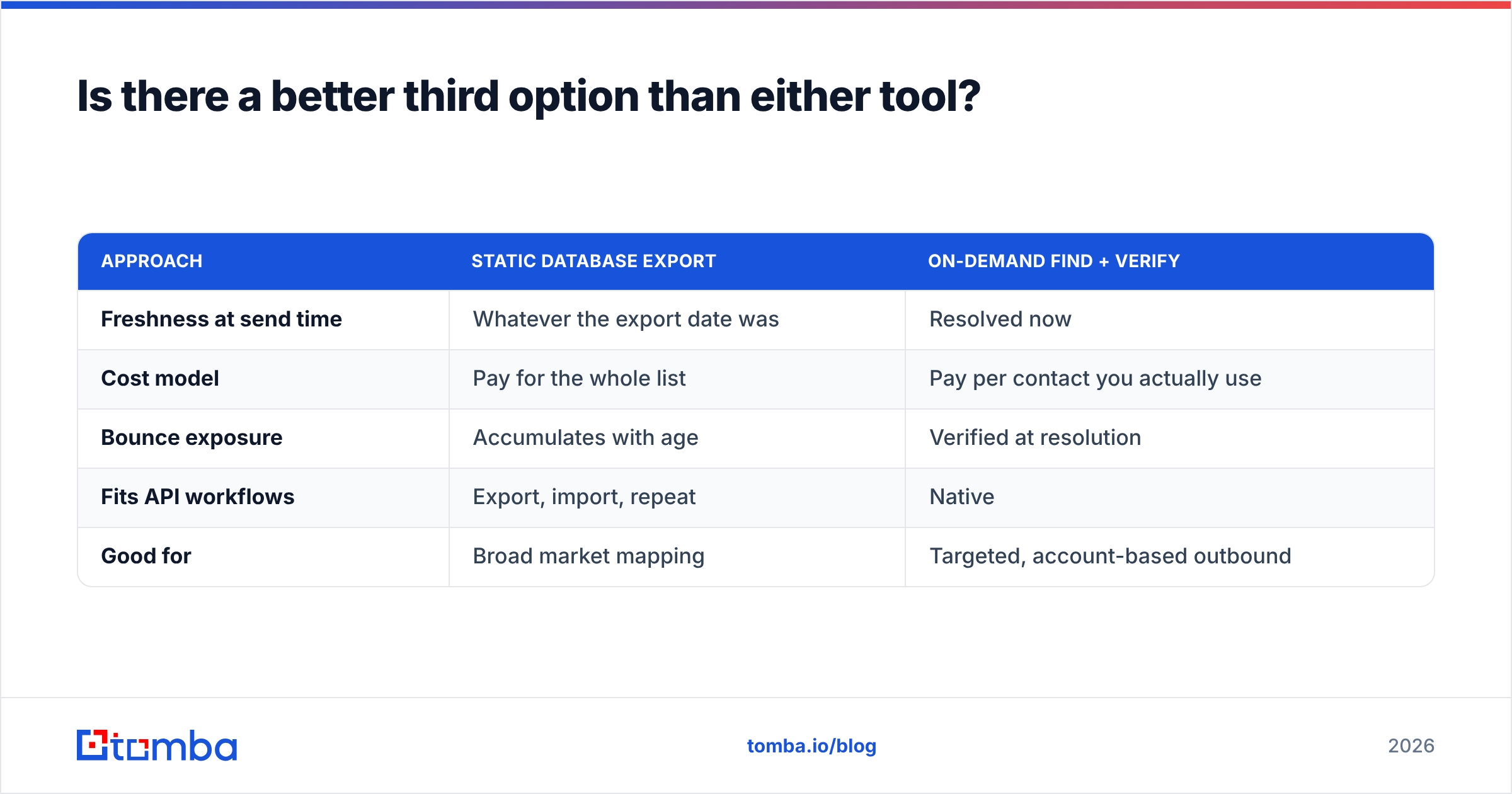
That's the argument for a dedicated email-finding platform. Instead of licensing a static database and hoping it stays current, you resolve contacts at the moment you need them:
| Approach | Static database export | On-demand find + verify |
|---|---|---|
| Freshness at send time | Whatever the export date was | Resolved now |
| Cost model | Pay for the whole list | Pay per contact you actually use |
| Bounce exposure | Accumulates with age | Verified at resolution |
| Fits API workflows | Export, import, repeat | Native |
| Good for | Broad market mapping | Targeted, account-based outbound |
Tomba sits on the on-demand side. You give it a name and a domain, or just a domain, and it returns verified professional addresses — plus a domain search for mapping an entire company, and data enrichment to fill out the rest of the record. Pricing starts with a free tier at 25 searches/month, then $49/mo (Starter), $99/mo (Growth), and $249/mo (Pro), with Enterprise custom — the full breakdown is on the Tomba pricing page.
To be fair to the static-list model: it is not obsolete. If you're doing market sizing, territory planning, or a genuine broad-market campaign across thousands of accounts, buying a curated list is faster and often cheaper per record. Vendors like BookYourData have built a solid reputation exactly there — pre-built, filtered B2B lists with a straightforward pay-as-you-go structure that suits one-off campaigns well. The mistake isn't buying a list; it's only buying a list and skipping verification before send.
And if you want independent signal rather than vendor claims, the review volume on G2 is a reasonable sanity check on support responsiveness and billing surprises — two things no feature table ever captures.
What does a sane 2026 stack look like?#
Three layers, in this order:
- Find and verify — resolve the contact at the moment you need it, and verify before it ever enters a sequence. This is where a purpose-built finder belongs.
- Source at volume, selectively — a database or list vendor for broad market coverage, always passed through layer 1 before send.
- Engage — sequencer for outbound, AI agent for inbound. Salesbot lives here. So does whatever sequencing tool you already pay for.
Teams that run these out of order — engage before verify, or source before defining the ICP — burn budget and domain reputation in roughly equal measure. The order is the whole strategy.
A quick gut-check: if your reply rate is under 2% and your bounce rate is over 5%, no tool on this page fixes your problem. Clean the data first. A bulk verify pass over your existing list costs less than one month of either product and usually moves deliverability more.
The verdict#
LeadGibbon wins if you need contacts and don't have them. Salesbot wins if you have contacts and inbound volume but can't respond fast enough. They solve different problems and the "versus" framing is mostly an artifact of shared budget lines.
But if you're evaluating either one because your outbound isn't producing pipeline, look at your bounce rate before you look at either tool. Data quality is upstream of everything, and it's the one variable where a fix produces measurable results inside a week rather than a quarter.
Start with a clean contact layer. Try the Tomba Email Finder free — 25 searches a month, no card — and run it against 200 accounts from your real ICP. Compare the verified-valid rate against whatever list you're working from today. If Tomba wins, you've found your bottleneck. If it doesn't, you've just saved yourself a subscription.
Related guides#
// get started
Find, verify and enrich your first contacts today
Start on the free plan with 25 searches a month, then scale when your team is ready.
Free plan · No credit card required · GDPR & CCPA
// about the author