LeadGibbon vs UpLead (2026): Which B2B Data Tool Wins?
LeadGibbon and UpLead both sell verified B2B contacts, but they solve different problems. Here's an honest breakdown of coverage, credits, accuracy claims and real cost per usable email in 2026.
TL;DR
- LeadGibbon is a list-building tool. It shines when you already know the companies or LinkedIn profiles you want and need emails appended fast. Its entry plan is cheap, its database is small.
- UpLead is a searchable B2B database. You filter 50+ attributes across ~155M contacts, then pay a credit per reveal. Its published accuracy guarantee is 95%, backed by real-time verification at export.
- Credits are the real price. UpLead's Essentials tier publishes ~170 credits/month at $99. That's roughly $0.58 per contact before any bounce. LeadGibbon's cheaper entry tier buys volume but thinner firmographics.
- Neither is a great verifier. Both verify at reveal; neither is built for cleaning a 40k-row list you already own.
- The honest third path: if you mostly need accurate emails by domain or name rather than a discovery database, a dedicated email finder like Tomba costs less per usable address — Starter is $49/mo with a free tier to test first.
What are LeadGibbon and UpLead, exactly?#
They get compared constantly because both promise "verified B2B contacts," but they sit at opposite ends of the prospecting workflow.
- LeadGibbon = append and export. You bring a target list — a LinkedIn Sales Navigator search, a set of company domains, a conference attendee sheet — and LeadGibbon finds and appends business emails. Its Chrome extension is the primary interface for most users.
- UpLead = discover and filter. You start with nothing but an ICP definition. Industry, headcount, revenue, technology installed, location, job title, seniority. You build the list inside UpLead, then unlock contacts.
- Different credit economics. LeadGibbon's pricing has historically been volume-first at a low entry point. UpLead prices for depth: fewer credits, richer records (direct dials, technographics, intent on higher tiers).
- Different failure modes. LeadGibbon fails when the person isn't discoverable from the source you fed it. UpLead fails when your niche is under-covered in its database — and you still burn credits finding that out.
- Overlapping verification. Both claim verification at the moment of reveal. Neither markets itself as a standalone email verifier for lists you imported from somewhere else.
If you remember one thing: LeadGibbon answers "what's this person's email?" and UpLead answers "who should I be emailing?" Buying the wrong one is how teams end up paying twice.

How do LeadGibbon and UpLead compare head-to-head?#
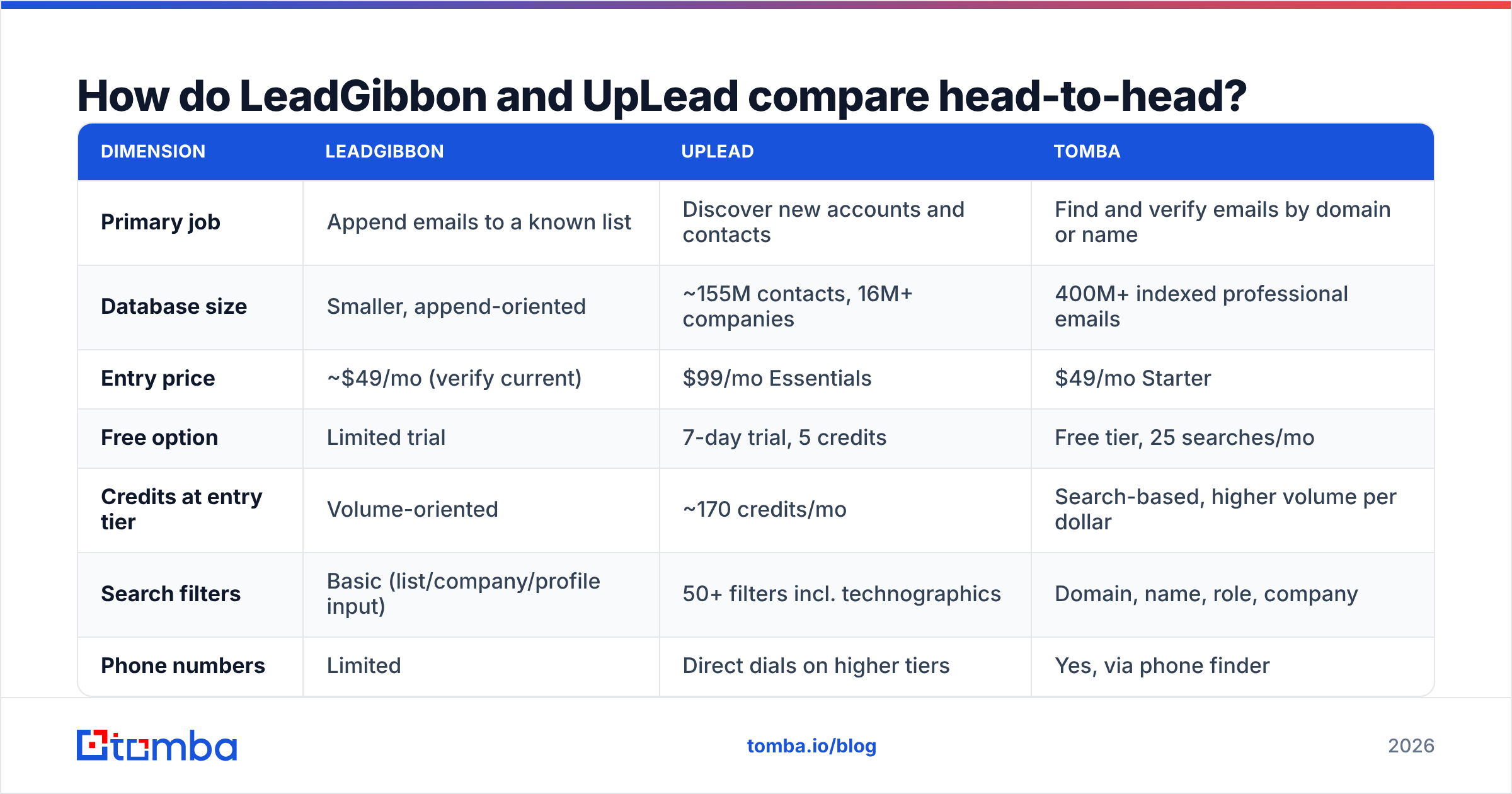
Here's the practical comparison. Pricing reflects what each vendor published at the time of writing — both change tiers regularly, so confirm on uplead.com and leadgibbon.com before you commit annually.
| Dimension | LeadGibbon | UpLead | Tomba |
|---|---|---|---|
| Primary job | Append emails to a known list | Discover new accounts and contacts | Find and verify emails by domain or name |
| Database size | Smaller, append-oriented | ~155M contacts, 16M+ companies | 400M+ indexed professional emails |
| Entry price | ~$49/mo (verify current) | $99/mo Essentials | $49/mo Starter |
| Free option | Limited trial | 7-day trial, 5 credits | Free tier, 25 searches/mo |
| Credits at entry tier | Volume-oriented | ~170 credits/mo | Search-based, higher volume per dollar |
| Search filters | Basic (list/company/profile input) | 50+ filters incl. technographics | Domain, name, role, company |
| Phone numbers | Limited | Direct dials on higher tiers | Yes, via phone finder |
| Intent data | No | Yes (higher tiers, Bombora-sourced) | No |
| Bulk processing | Yes | Yes, with credit spend | Yes, bulk finder and verifier |
| API access | Limited | Yes | Yes, documented REST API |
| Catch-all handling | Marked, not resolved | Marked, not resolved | Dedicated catch-all verifier |
| Best for | SDRs with an existing target list | Marketers building ICP lists from scratch | Teams who need accurate emails at low cost per address |
The row that decides most purchases is credits at entry tier. UpLead's Essentials plan is excellent value per record because the records are rich — firmographics, LinkedIn URL, sometimes a direct dial. But 170 credits is roughly one week of a single SDR's prospecting. Teams routinely blow through it by day nine and either upgrade or stall.
LeadGibbon flips that: more emails for less money, fewer attributes attached. If your sequence only needs first name, company and email, the extra fields on an UpLead record are fields you're paying for and not using.
How accurate is the data in each?#
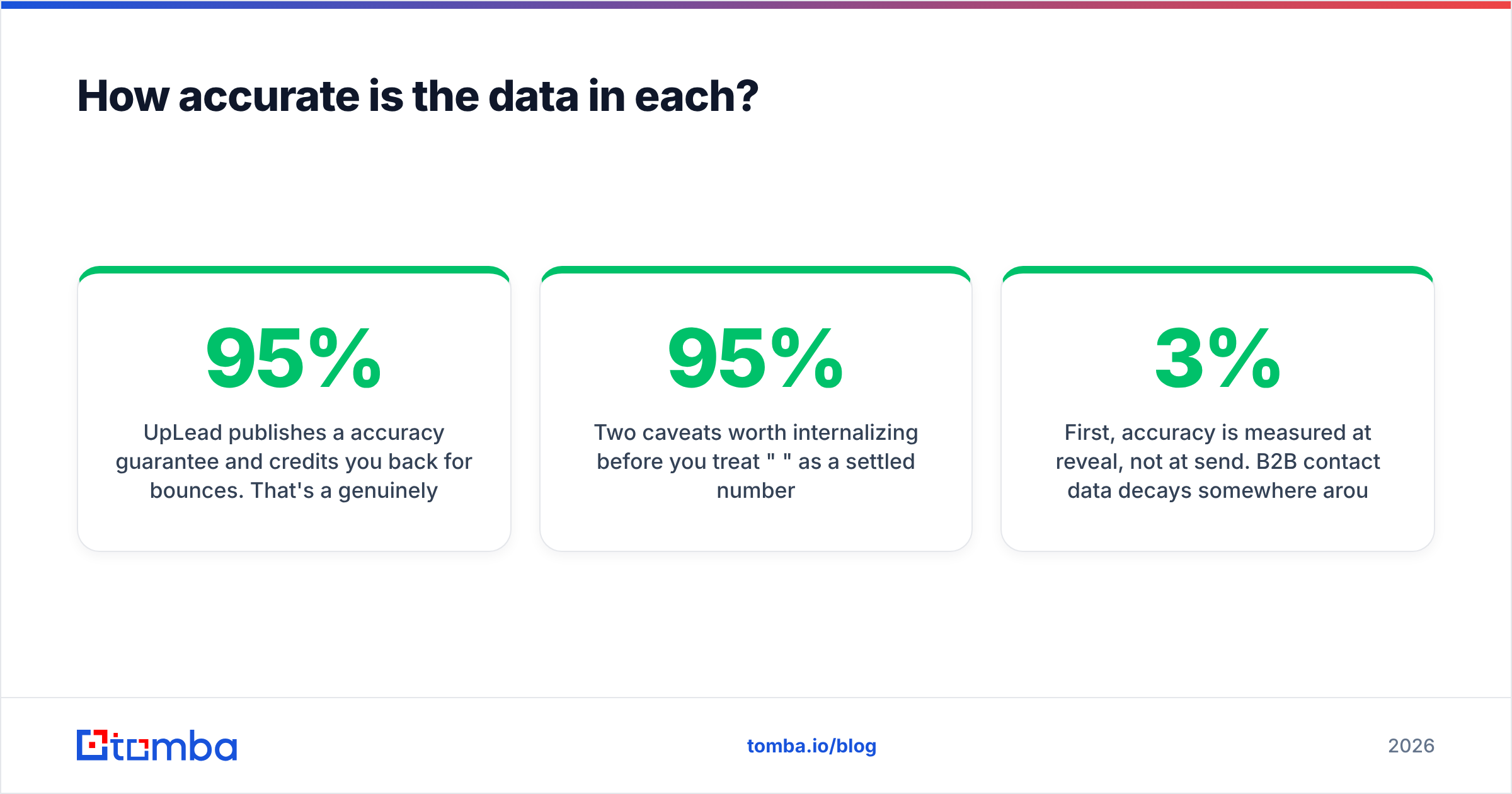
UpLead publishes a 95% accuracy guarantee and credits you back for bounces. That's a genuinely good policy and it's the single strongest argument for the platform. LeadGibbon makes verification claims too but with a less formalized refund mechanism.
Two caveats worth internalizing before you treat "95%" as a settled number:
First, accuracy is measured at reveal, not at send. B2B contact data decays somewhere around 2.5–3% per month as people change jobs. A record verified the day you exported it and emailed six weeks later is materially riskier than the guarantee implies. Any vendor's accuracy figure is a snapshot.
Second, catch-all domains distort every benchmark. A large share of enterprise domains accept all mail at the SMTP layer, so no verifier can confirm the specific mailbox exists. Vendors handle this differently: some mark catch-alls "risky" and exclude them from the accuracy denominator, some count them as valid. Two tools reporting the same percentage can be doing very different math. If your ICP skews enterprise, run exports through a catch-all verifier before they hit your sequencer.

Practical rule: whichever tool you buy, treat its output as probably good rather than certified good. A cheap second-pass verification on every export costs pennies per thousand and protects the thing that actually matters — your sender reputation. One bad 3,000-record send can take a domain weeks to recover from.
What does each actually cost per usable email?#
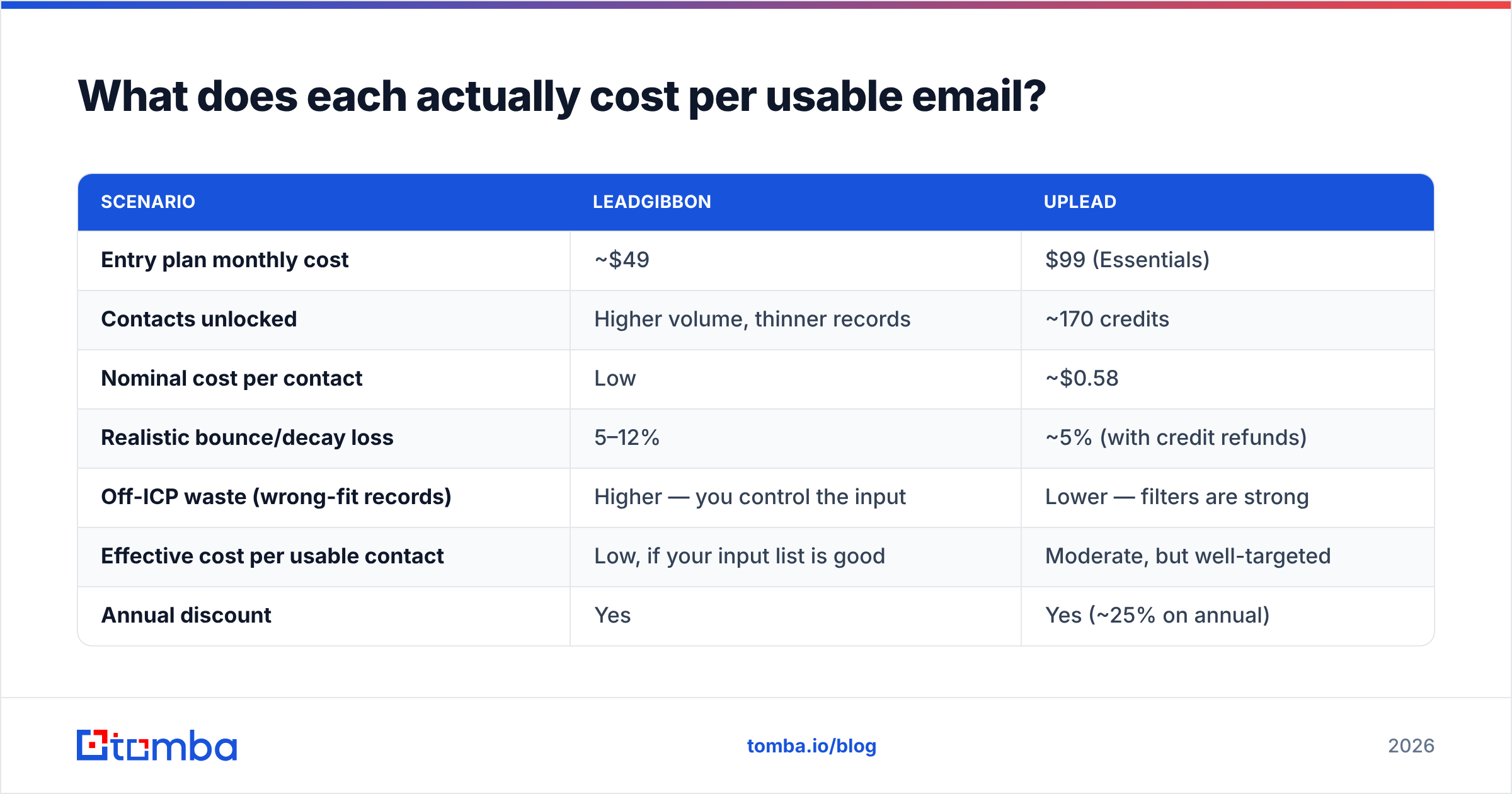
List price is misleading. The number to compute is cost per contact that both exists and matches your ICP.
| Scenario | LeadGibbon | UpLead |
|---|---|---|
| Entry plan monthly cost | ~$49 | $99 (Essentials) |
| Contacts unlocked | Higher volume, thinner records | ~170 credits |
| Nominal cost per contact | Low | ~$0.58 |
| Realistic bounce/decay loss | 5–12% | ~5% (with credit refunds) |
| Off-ICP waste (wrong-fit records) | Higher — you control the input | Lower — filters are strong |
| Effective cost per usable contact | Low, if your input list is good | Moderate, but well-targeted |
| Annual discount | Yes | Yes (~25% on annual) |
Read that table as a trade, not a winner. UpLead costs more per record and wastes fewer of them. LeadGibbon costs less per record and shifts targeting work onto you. If your SDR spends two hours a day building the source list manually, UpLead's filters may be cheaper than LeadGibbon once you price the labor.
Where the math breaks for both: high-volume outbound. At 5,000 contacts a month, UpLead's credit model pushes you into custom Professional pricing, and LeadGibbon's database depth starts limiting you. That's the volume band where teams typically split the stack — a discovery tool for targeting, plus a cheaper high-throughput finder for the actual email addresses. A bulk email finder running against a domain list is usually the lowest-cost leg of that setup.

Which one should you pick for your workflow?#
- Pick UpLead if you're building lists from scratch, your ICP is defined by firmographics or tech stack, you value intent signals, and 170–400 contacts a month is genuinely enough. Marketing teams running quarterly ABM pushes fit this perfectly.
- Pick LeadGibbon if your prospecting starts on LinkedIn or from a company list you already own, you need volume over attributes, and budget is tight. Solo founders and small SDR teams fit this.
- Pick neither if your actual bottleneck is email accuracy rather than discovery. If you already know the 800 companies you want, paying for a discovery database is paying for a feature you won't open.
- Split the stack if you're above ~3,000 contacts/month. Use one tool for targeting and a dedicated finder + verifier for throughput. It's almost always cheaper than upgrading a single platform into its enterprise tier.
A quick diagnostic: open your last completed campaign. If more than a third of the list came from a saved LinkedIn search or a conference PDF, you're a LeadGibbon-shaped buyer. If you built it by filtering industry and headcount, you're an UpLead-shaped buyer.
How do LeadGibbon and UpLead compare to the alternatives?#
Neither tool exists in a vacuum, and the "email finder" category has consolidated hard since 2024. Apollo bundles discovery with sequencing. Clearbit went enrichment-and-API. ZoomInfo owns the enterprise tier at enterprise prices. BookYourData sells verified prebuilt lists with a pay-as-you-go model, which is a legitimately strong fit if you want data without a subscription at all — worth a look before you sign an annual contract with anyone.

Where Tomba lands in this set is narrower and, honestly, that's the point. It isn't an intent-data platform and it doesn't try to be a sequencer. It does four things: find an email from a name and domain, find emails by domain for a whole company, verify addresses including catch-alls, and enrich the result with role and social data. Starter is $49/mo, Growth $99/mo, Pro $249/mo, and there's a free tier at 25 searches a month — enough to test accuracy against a list you already know the answers to, which is the only benchmark that matters. Full Tomba pricing is public, no demo call required.
The comparison that's fair:
| If your bottleneck is... | Best fit |
|---|---|
| "I don't know who to target" | UpLead |
| "I have the list, I need emails" | LeadGibbon or Tomba |
| "My bounce rate is over 5%" | A dedicated verifier |
| "I need 10k+ emails/month cheaply" | Bulk finder + verifier stack |
| "I need buying-intent signals" | UpLead (higher tiers) |
Check third-party review volume too — G2 is the useful source here, less for the star ratings than for the complaint patterns. Filter to 2-star reviews and read what people actually churned over. For most contact-data tools it's the same two things: coverage gaps in specific verticals, and credits expiring unused.
What questions should you ask before buying either?#
Do unused credits roll over? Most plans in this category expire monthly. If your outbound is lumpy — a big push in March, quiet in April — monthly expiry can waste 30% of what you paid for.
What's the refund process for bounces? UpLead's guarantee is the clearest in the category, but confirm the window and whether it applies to catch-alls. A guarantee you have to file a ticket for within 7 days is worth less than the marketing page suggests.
Can you test before annual? Never buy annual on a 7-day, 5-credit trial. Five credits tells you nothing about coverage in your vertical. Run at least 50 known-answer lookups — contacts whose emails you can independently confirm — and measure the hit rate yourself.
Does it export cleanly into your stack? Check the CRM path specifically. A CSV-only workflow adds a manual step to every campaign, and manual steps are where lists go stale.
What happens at 10x volume? Ask for the price at your 12-month projected volume, not your current one. Credit-based pricing scales non-linearly and the jump from mid-tier to enterprise is often 3–4x.
The bottom line#
UpLead wins on targeting depth and has the more credible accuracy guarantee. LeadGibbon wins on cost per email when you already know who you want. Most teams comparing LeadGibbon vs UpLead are actually comparing two answers to a question they haven't asked precisely enough — discovery and resolution are separate problems, and buying one tool for both means overpaying for half of it.
If your real problem is the second one — you have the companies, you have the names, you need addresses that don't bounce — start with the Tomba Email Finder. Run the free tier's 25 searches against contacts you can already verify, compare the hit rate to whatever you're paying for now, and let the number decide. Starter is $49/mo if it holds up, and nothing if it doesn't.
Related guides#
// get started
Find, verify and enrich your first contacts today
Start on the free plan with 25 searches a month, then scale when your team is ready.
Free plan · No credit card required · GDPR & CCPA
// about the author