LeadGibbon vs Wiza (2026): Which Lead Finder Actually Wins?
LeadGibbon and Wiza both turn LinkedIn searches into email lists, but they charge for it in very different ways. Here's how their data, verification, export limits, and real cost per usable contact stack up in 2026.
LeadGibbon vs Wiza is a choice between two ways of getting contact data. One scrapes and checks it live from LinkedIn. The other serves it from a stored list. Here is how the two compare in 2026.
TL;DR
- Wiza is a LinkedIn-first scraper and verifier. You run a Sales Navigator or LinkedIn search, and Wiza exports it as a list with verified emails. Higher plans add mobile numbers.
- LeadGibbon is closer to a light B2B list database with a LinkedIn extension bolted on. You filter for contacts, then push them to Google Sheets or CSV.
- If your whole workflow starts inside LinkedIn, Wiza wins on ease and data freshness. If you want a searchable database and simple sheet exports, LeadGibbon is the cheaper mental model.
Two more things to weigh:
- Neither tool is built for API-driven enrichment at scale. Both charge by seat and credit. Cost per usable contact climbs fast once you pass a few thousand lookups a month.
- Before you commit, run the same 100 contacts through both. Then check the output with a third-party email verifier. The winner is rarely the one with the biggest advertised database.
What are LeadGibbon and Wiza, exactly?#
Both tools solve the same job. They turn a list of people you can see on LinkedIn into a list of people you can email. But they start from opposite ends.
Wiza is a browser extension and web app built around LinkedIn. You save a LinkedIn or Sales Navigator search and hit export. Wiza then runs each profile through its finding-and-checking pipeline. What comes back is a spreadsheet with work emails, personal emails, and job data. You pay per valid result, not per attempt. The pitch is simple: you already know how to build a good LinkedIn search, so you do not learn a new filter language.
LeadGibbon sits on the database side. You search by company, title, industry, or location inside its own interface. Then you reveal the contacts you want and send them straight to Google Sheets. It also ships a LinkedIn extension. But the heart of the product is the stored record, not the live profile.
That one design choice drives almost everything else: price model, data freshness, bounce rates, and how each tool copes when your ICP is unusual.
LeadGibbon vs Wiza: how do they source their data?#
This is the question that decides your bounce rate. It is worth working out before you look at a single price.
Wiza's model is live-at-request. When you export, it goes and finds the email for that profile. Then it checks the address before it charges you. The upside: the record is made the moment you need it, so job-change decay is low. The downside: results depend on what is findable right now. Hit rates swing hard by segment. Big-tech and agency contacts resolve well. Small regional makers often do not.
LeadGibbon's model is stored-and-filtered. Records were gathered earlier and served from an index. The upside: instant results, steady volume, and you can browse before you buy. The downside is decay. B2B contact data goes stale at roughly 2-3% per month as people change roles. A record that is 18 months old has a real chance of being wrong. It may well have been right on the day it was stored.

Neither model is better on its own. What matters is whether the vendor checks the address at delivery time. Live finding with no check hands you confident-looking junk. A stored database with a fresh check at export can beat a live scraper on well-covered segments. Ask both vendors the same thing: "Is this checked the moment I export it, or the moment you stored it?"

On catch-all domains, assume both tools will hand you something they cannot check. Roughly one in five company domains accepts all mail. That makes a standard SMTP check useless. You close that gap with a dedicated catch-all verifier, not with a better scraper.
LeadGibbon vs Wiza: how do the plans and features compare?#
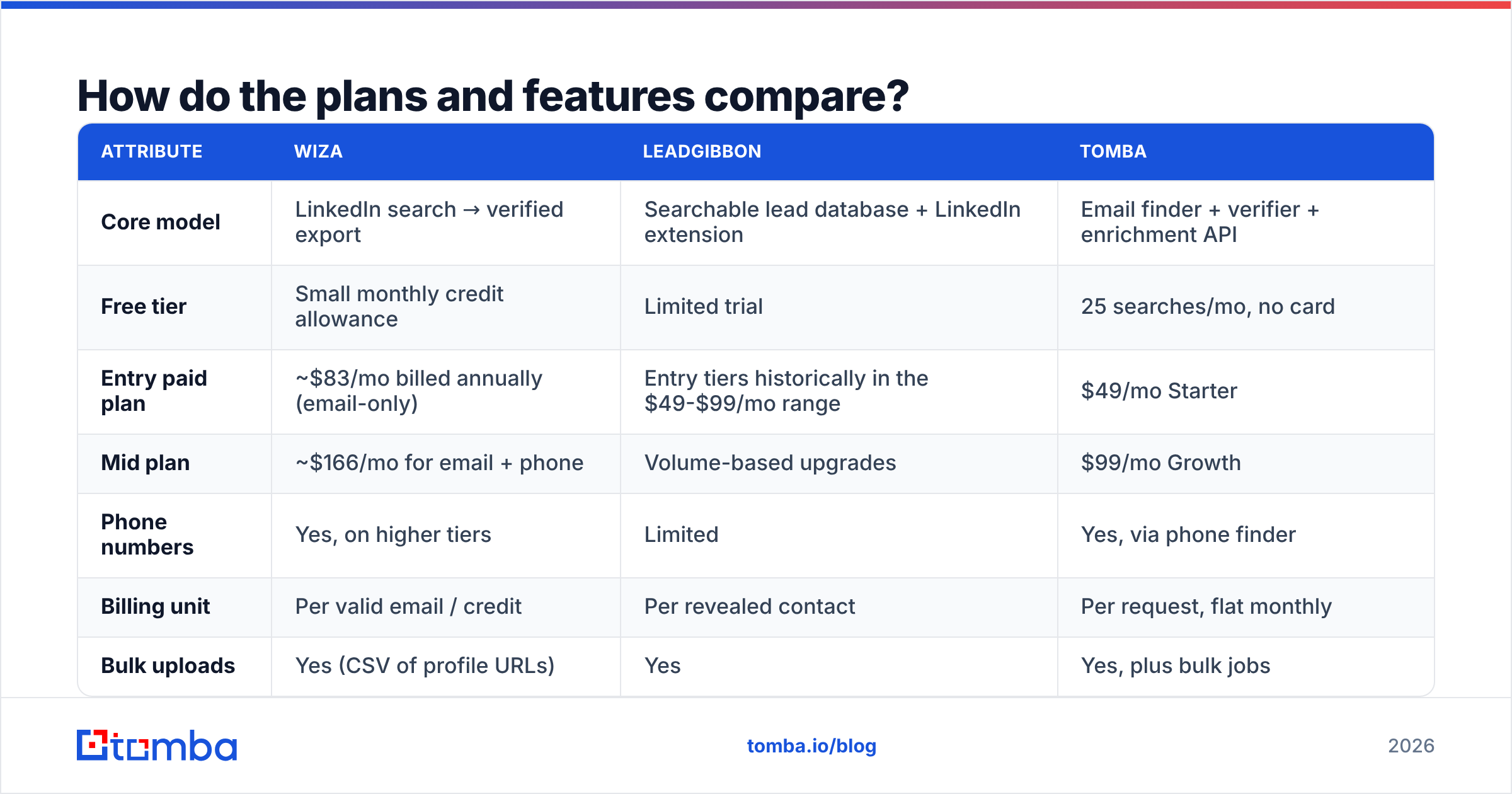
Here is the practical side-by-side. Treat the prices as a guide, not a quote. Both vendors move list pricing and repackage tiers, so check their own pages before you buy.

| Attribute | Wiza | LeadGibbon | Tomba |
|---|---|---|---|
| Core model | LinkedIn search → verified export | Searchable lead database + LinkedIn extension | Email finder + verifier + enrichment API |
| Free tier | Small monthly credit allowance | Limited trial | 25 searches/mo, no card |
| Entry paid plan | ~$83/mo billed annually (email-only) | Entry tiers historically in the $49-$99/mo range | $49/mo Starter |
| Mid plan | ~$166/mo for email + phone | Volume-based upgrades | $99/mo Growth |
| Phone numbers | Yes, on higher tiers | Limited | Yes, via phone finder |
| Billing unit | Per valid email / credit | Per revealed contact | Per request, flat monthly |
| Bulk uploads | Yes (CSV of profile URLs) | Yes | Yes, plus bulk jobs |
| Public API | Limited | Limited | Full REST API, CLI, MCP server |
| Native spreadsheet workflow | CSV export | Google Sheets push | Sheets + Excel add-ins |
| Best for | SDRs living in Sales Navigator | Marketers building static lists | RevOps automating enrichment |
The row that decides most deals is not price. It is the billing unit. Wiza charging per valid email feels fair, and at low volume it is. But "valid" is what Wiza's own checker says it is. You pay for its confidence, not for your inbox results. LeadGibbon charges per revealed contact. You pay for the record whether it still works or not.
A flat-rate plan with your own checking pass in the middle usually beats both once volume rises. That is why Tomba pricing is built around monthly request volume rather than per-record reveals.
Which one is better for LinkedIn-first prospecting?#
Wiza, clearly — if and only if LinkedIn is where your ICP really lives.
Wiza's whole edge is that it inherits LinkedIn's filters. Sales Navigator lets you slice by headcount growth, recent job change, posted content, and seniority. Most stand-alone B2B databases cannot match that. Wiza keeps your targeting and adds contact data on top. For an SDR team running 20-30 saved searches, that is a real workflow win, not a marketing claim.
LeadGibbon's extension exists, but the experience is thinner. You are not going to push a 2,500-profile Sales Navigator export through it at the same speed.
The catch with a LinkedIn-first approach: you inherit LinkedIn's blind spots too. Founders of small firms who have not touched a profile since 2019 will not show up. Neither will technical buyers who keep no presence. Nor whole regions where few people use LinkedIn. For those segments you need domain-level coverage. Start from the company and work inward with domain search rather than starting from a person.
There is also account risk worth naming. Any tool that pulls data from LinkedIn at volume works against LinkedIn's user agreement. The penalty lands on your account, not on the vendor. Tools that read the page you already have open carry less exposure than tools that crawl in the background. But "less" is not "none." If your LinkedIn account is a core asset, weigh that in.
What does each tool actually cost per usable contact?#
Advertised cost per credit is fiction. The number that matters is cost per contact that lands in an inbox and does not bounce.
Work it out like this:
- Start with list price per record. Divide monthly cost by included credits or reveals.
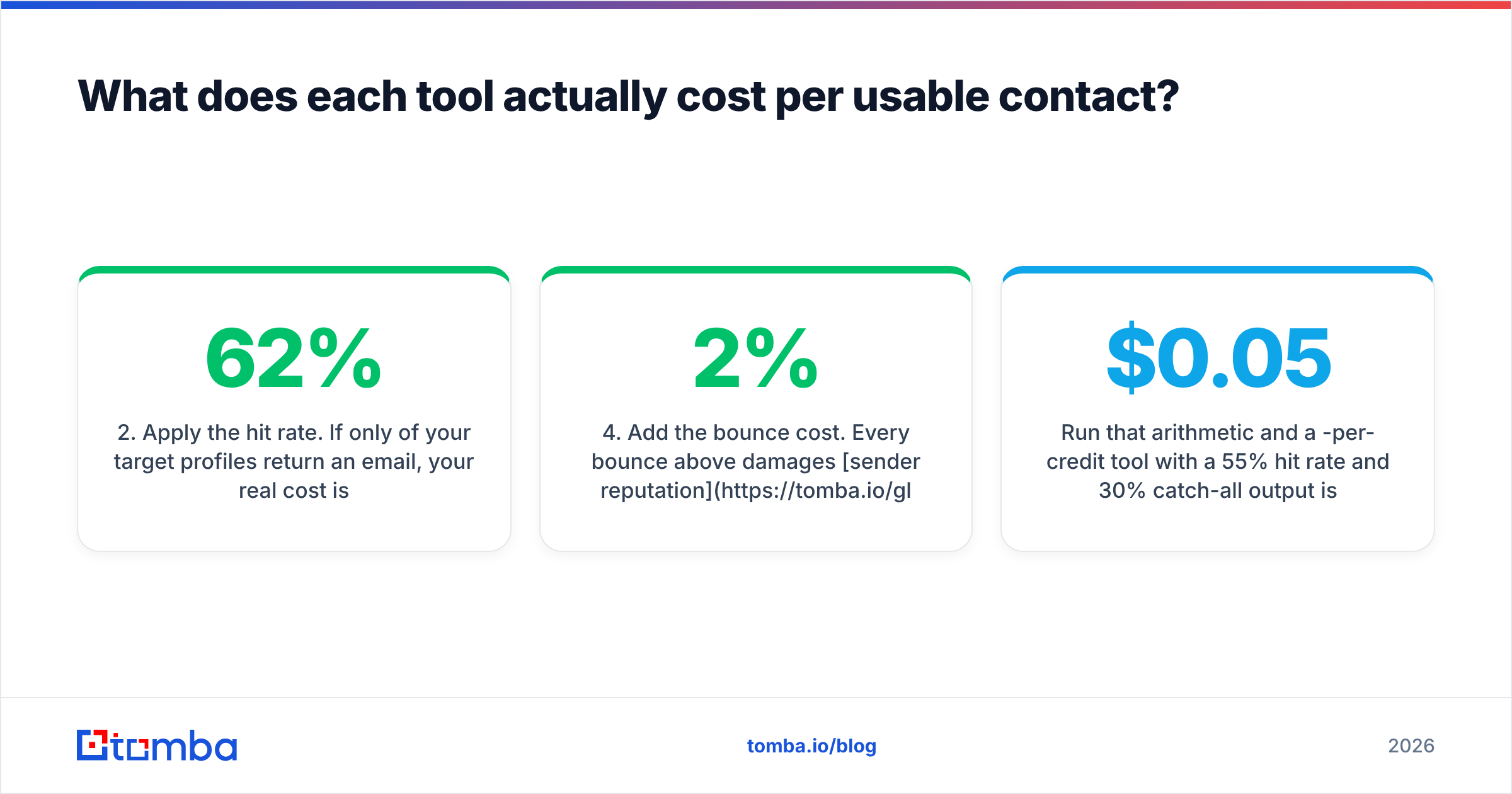
- Apply the hit rate. If only 62% of your target profiles return an email, your real cost is list price ÷ 0.62.
- Subtract unusable results. Role addresses (info@, sales@), catch-all guesses, and personal Gmail addresses you will not cold-email are paid-for waste.
- Add the bounce cost. Every bounce above 2% hurts sender reputation, which drags down the whole campaign — good addresses included.
- Add the checking layer. Most teams run a second verifier over any list before they send, so budget for that too.
Now run that math on a $0.05-per-credit tool with a 55% hit rate and 30% catch-all output. It costs you more than a $0.12-per-credit tool with an 80% hit rate and a clean check. This is also why the review spread on G2 tells you more than headline claims. In both products' reviews, look for gripes about "credits burned on bad data."

Where do both LeadGibbon and Wiza fall short?#
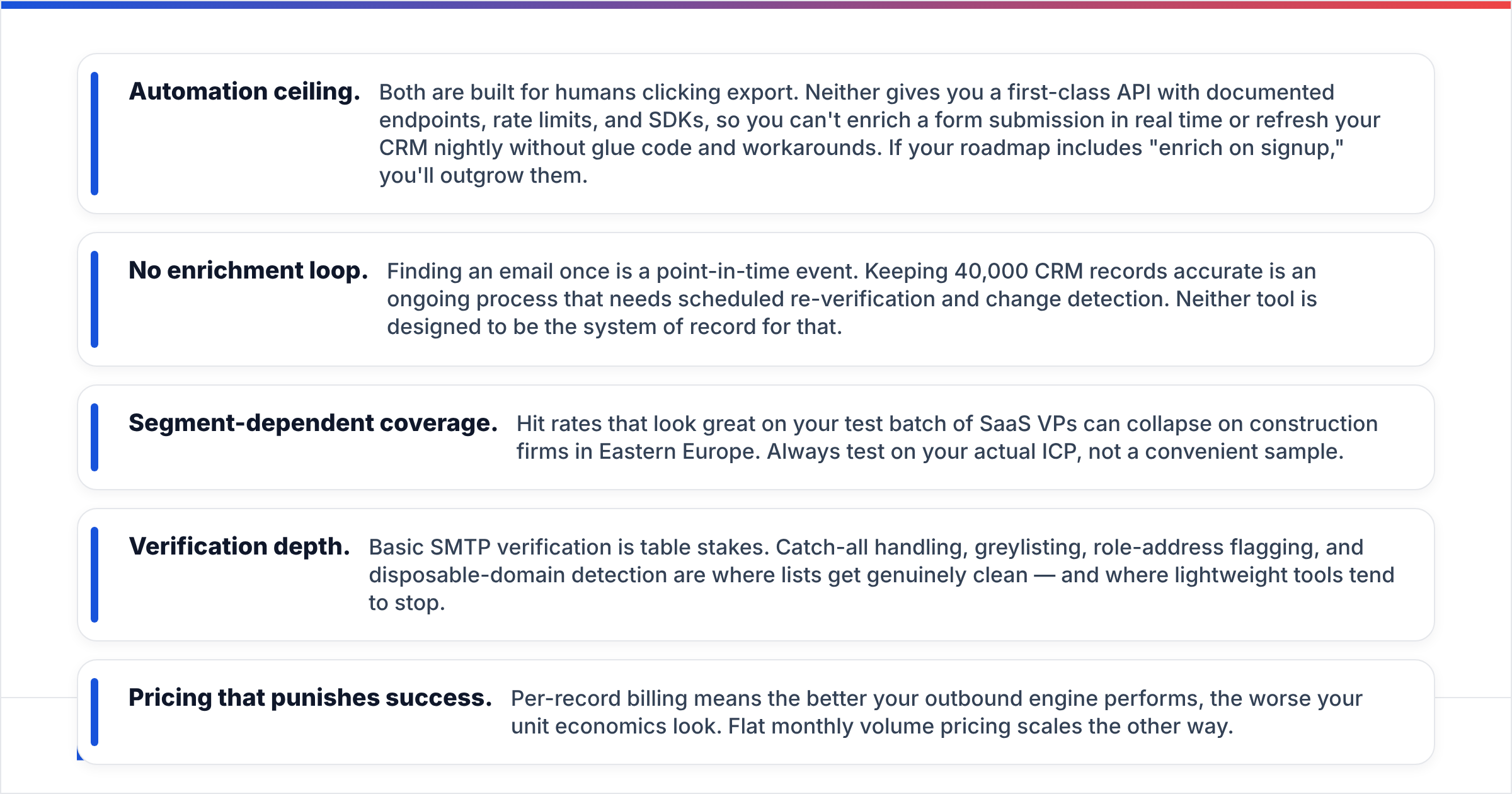
Five limits show up again and again in a LeadGibbon vs Wiza head-to-head. They are why teams add or switch to something else.
- Automation ceiling. Both are built for humans clicking export. Neither gives you a real API with documented endpoints, rate limits, and SDKs. So you cannot enrich a form entry in real time, or refresh your CRM nightly, without glue code. If your roadmap includes "enrich on signup," you will outgrow them.
- No enrichment loop. Finding an email once is a one-off event. Keeping 40,000 CRM records right is an ongoing job. It needs scheduled re-checks and change detection. Neither tool is built to be the system of record for that.
The other three limits are about data quality and price:
- Segment-dependent coverage. Hit rates that look great on a test batch of SaaS VPs can collapse on building firms in Eastern Europe. Always test on your real ICP, not a handy sample.
- Checking depth. A basic SMTP check is table stakes. Catch-all handling, greylisting, role-address flags, and throwaway-domain detection are where lists get truly clean. Light tools tend to stop short of that.
- Pricing that punishes success. Per-record billing means the better your outbound engine works, the worse your unit economics look. Flat monthly volume pricing scales the other way.
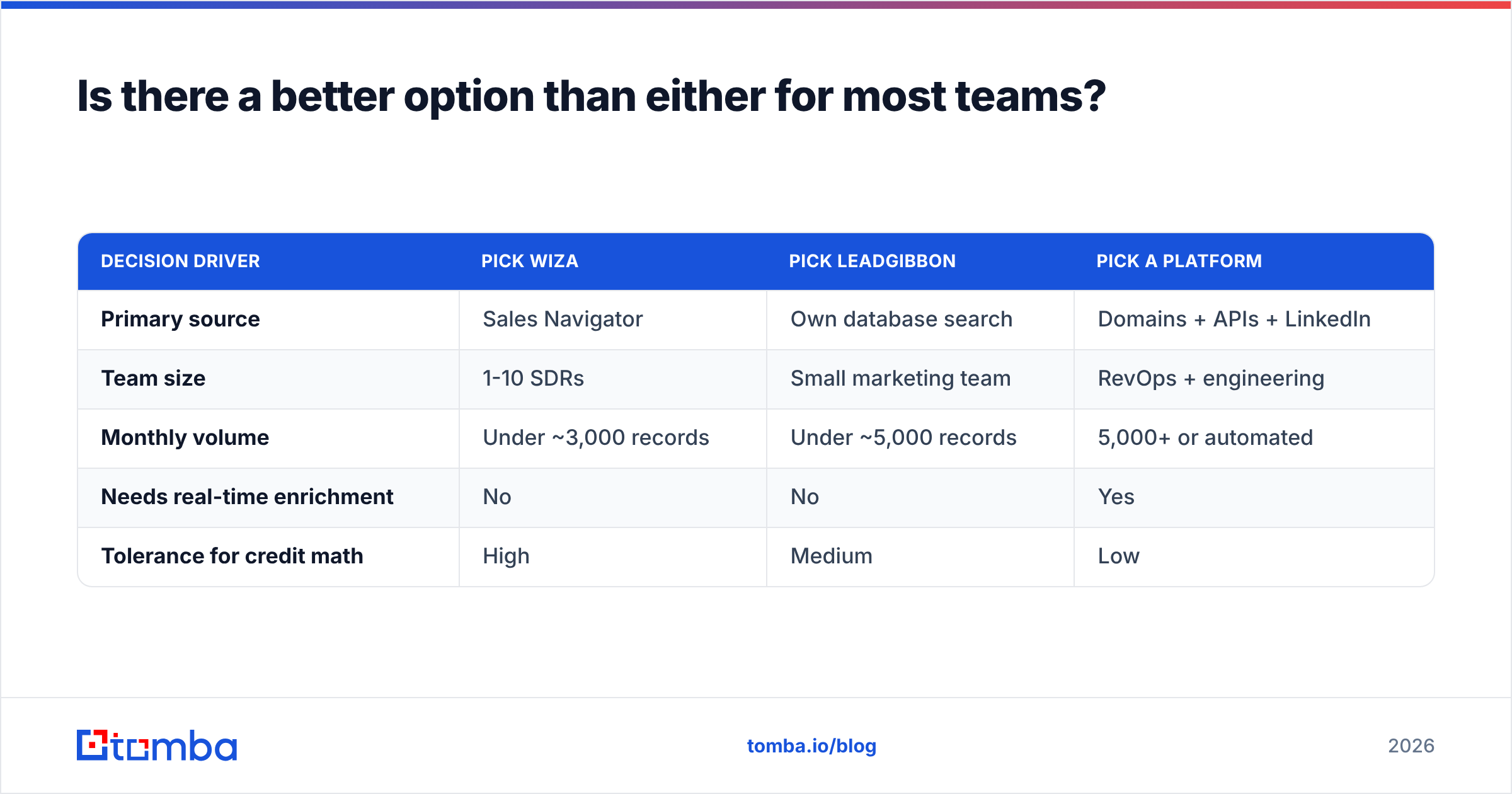
Is there a better option than either for most teams?#
It depends on which failure mode you want to avoid.
Say you want large pre-built, guaranteed lists to load into a nurture sequence. Then a purpose-built data vendor such as BookYourData is a fair peer to weigh against both. It sells per list, with bounce-rate guarantees, instead of per seat. That suits campaign-led teams.
If you want a LinkedIn-native workflow above all else, stay with Wiza and accept the credit model.
If your bottleneck is infrastructure, the answer is a platform, not an extension. You need find, check, and enrich as services your own code can call. Tomba's email finder covers domain, name, and company lookups. The LinkedIn finder resolves contacts from a profile when that is your starting point. The bulk email finder handles batch jobs with no per-reveal pricing. Free tier is 25 searches a month, Starter is $49/mo, Growth $99/mo, Pro $249/mo.
| Decision driver | Pick Wiza | Pick LeadGibbon | Pick a platform |
|---|---|---|---|
| Primary source | Sales Navigator | Own database search | Domains + APIs + LinkedIn |
| Team size | 1-10 SDRs | Small marketing team | RevOps + engineering |
| Monthly volume | Under ~3,000 records | Under ~5,000 records | 5,000+ or automated |
| Needs real-time enrichment | No | No | Yes |
| Tolerance for credit math | High | Medium | Low |
LeadGibbon vs Wiza: which one wins in 2026?#
Wiza wins the head-to-head for LinkedIn-driven outbound. LeadGibbon wins on ease and sheet-native workflow. Neither wins if you need an API.
Wiza is the stronger product when your prospecting starts with a Sales Navigator search and ends with a CSV going into a sequencer. Checking the address before billing you is a fair model at low volume. Phone data on upper tiers is useful. The workflow needs almost no training.
LeadGibbon makes more sense when you want to browse and filter before you commit. It suits teams who want records in Google Sheets with no download step. It also suits teams who do not need the depth of LinkedIn's filters. It is the lighter tool, and for some teams that is exactly right.
Both lose to a platform the moment your needs include "automatically," "nightly," or "on form submit." At that point you are not buying a prospecting extension. You are buying data plumbing. The test changes to API coverage, rate limits, checking depth, and cost at 50,000 records rather than 500.
So the LeadGibbon vs Wiza answer depends on where your workflow starts. Whatever you choose, do the 100-contact bake-off first. Pull the same 100 target profiles and run them through each tool. Then check every result with a third-party verifier. Count how many are deliverable, non-generic, and right for the role. That one test will tell you more than every comparison page on the internet, including this one.
Ready to test the data layer yourself? Start with the Tomba Email Finder — 25 free searches a month, no card required. Every result comes checked, and there is a full API when you are ready to automate. Run your hardest 25 prospects through it and compare the hit rate against whatever you pay for today.
Related guides#
// get started
Find, verify and enrich your first contacts today
Start on the free plan with 25 searches a month, then scale when your team is ready.
Free plan · No credit card required · GDPR & CCPA
// about the author