LeadIQ vs LeadRocks: Features, Pricing and Data Accuracy Compared
LeadIQ is built around rep workflow and CRM sync. LeadRocks is built around cheap bulk contact data. Here's how they compare on accuracy, pricing and fit, and which one fits your team.
- LeadIQ is a prospecting workflow tool. It captures contacts from LinkedIn, syncs them to Salesforce, HubSpot and your sequencer, and adds job-change tracking and AI-written emails. It suits SDR teams on a per-seat budget.
- LeadRocks is a lower-cost B2B contact database and LinkedIn email finder. You buy it for volume at a low price per contact, not for workflow automation.
- On accuracy, both tools return verified and "likely" emails. Plan to run any export through an independent verifier before you send cold email.
- On price, LeadIQ charges per user and gets expensive as you add reps. LeadRocks charges for credits and data access, so it stays cheaper for lean teams that pull lots of contacts.
- Our pick: choose LeadIQ if your bottleneck is rep productivity inside the CRM. Choose LeadRocks if your bottleneck is budget. If you mostly need accurate emails by domain or name at a flat price, look at a dedicated email finder.
What is LeadIQ?#
LeadIQ is a sales prospecting platform built for outbound teams. Most reps use its Chrome extension, which runs on top of LinkedIn and LinkedIn Sales Navigator. You open a profile or a search result, click capture, and LeadIQ looks for the person's work email and phone number. It then pushes the record to your CRM or sequencing tool, so reps don't have to copy and paste.
The product has grown beyond contact lookup into a workflow layer:
- One-click capture from LinkedIn, Sales Navigator and company websites
- CRM and sequencer sync with Salesforce, HubSpot, Outreach and Salesloft, including duplicate checks against existing records
- Job-change tracking, which alerts you when a champion or past customer moves to a new company
- Scribe, LeadIQ's AI email writer, which drafts personalized first touches from profile data
- Team-level usage controls so managers can see who is capturing what
In short, LeadIQ sells saved rep time. The data is necessary, but most of what you pay for is the workflow around it.
What is LeadRocks?#
LeadRocks is a B2B lead database and LinkedIn email finder. It has a smaller brand and a narrower scope than LeadIQ. You search a large contact database by filters such as job title, industry, location and company size, or you use the Chrome extension to pull emails from LinkedIn profiles. You then export the list as CSV.
What sets LeadRocks apart is its pricing. It is aimed at founders, agencies, freelancers and small sales teams that need a lot of contacts and can't justify enterprise per-seat pricing. It doesn't try to become your prospecting operating system. It gives you records and gets out of the way.
That focus is both its strength and its weakness. You get more contacts per dollar. You also get fewer native integrations and less automation, and more of the cleanup falls on you.
How do LeadIQ and LeadRocks differ at their core?#
Before the feature table, it helps to see that the two tools solve different problems. You're not choosing between two versions of the same product. You're choosing between two philosophies:
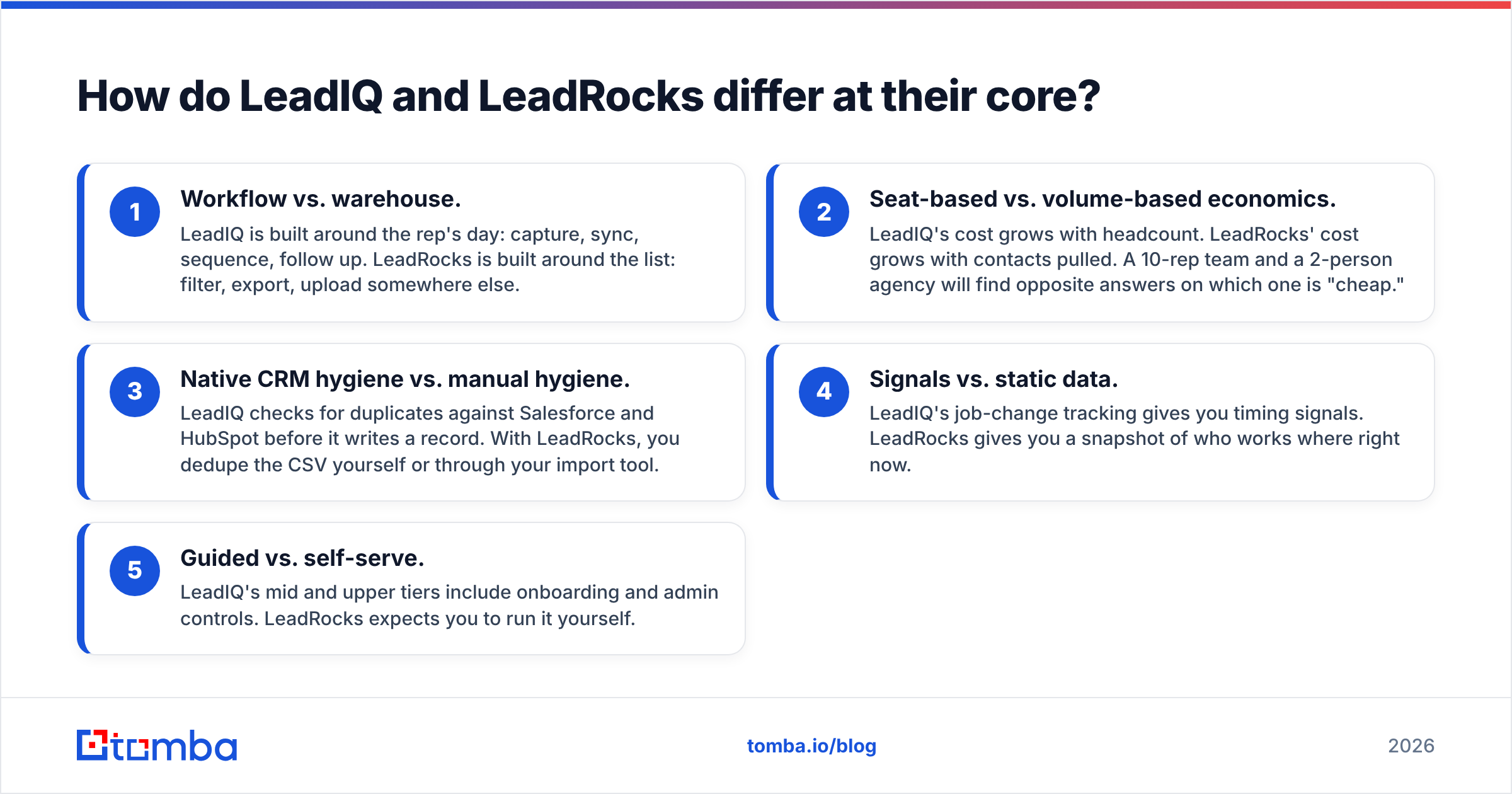
- Workflow vs. warehouse. LeadIQ is built around the rep's day: capture, sync, sequence, follow up. LeadRocks is built around the list: filter, export, upload somewhere else.
- Seat-based vs. volume-based economics. LeadIQ's cost grows with headcount. LeadRocks' cost grows with contacts pulled. A 10-rep team and a 2-person agency will find opposite answers on which one is "cheap."
- Native CRM hygiene vs. manual hygiene. LeadIQ checks for duplicates against Salesforce and HubSpot before it writes a record. With LeadRocks, you dedupe the CSV yourself or through your import tool.
- Signals vs. static data. LeadIQ's job-change tracking gives you timing signals. LeadRocks gives you a snapshot of who works where right now.
- Guided vs. self-serve. LeadIQ's mid and upper tiers include onboarding and admin controls. LeadRocks expects you to run it yourself.
If you keep these five points in mind, most of the "which is better" question answers itself.

How do LeadIQ and LeadRocks compare feature by feature?#
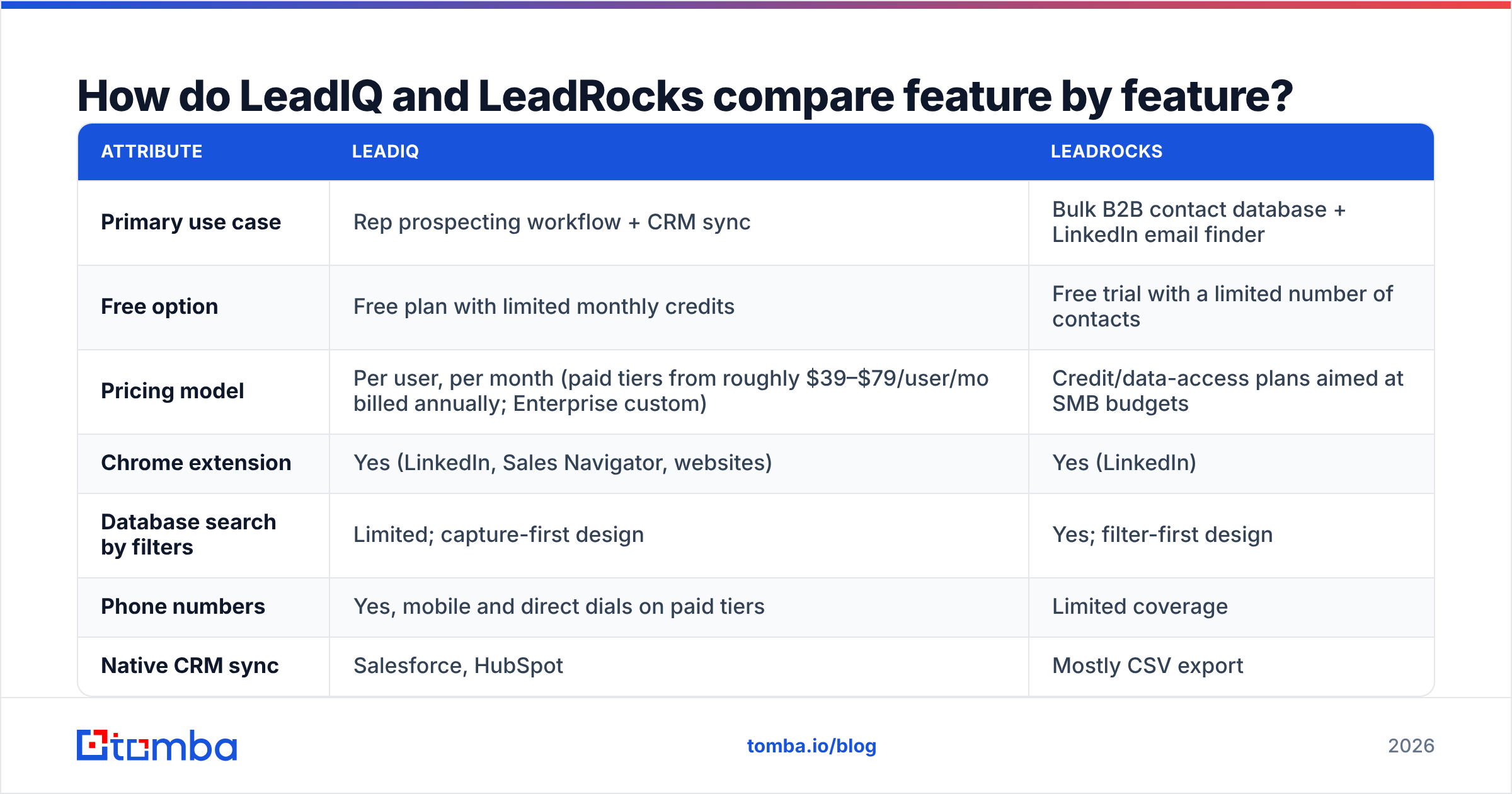
Here's how the two tools compare on the attributes that matter most to outbound teams. Pricing changes often, so treat the figures as directional and confirm them on each vendor's pricing page before you buy.
| Attribute | LeadIQ | LeadRocks |
|---|---|---|
| Primary use case | Rep prospecting workflow + CRM sync | Bulk B2B contact database + LinkedIn email finder |
| Free option | Free plan with limited monthly credits | Free trial with a limited number of contacts |
| Pricing model | Per user, per month (paid tiers from roughly $39–$79/user/mo billed annually; Enterprise custom) | Credit/data-access plans aimed at SMB budgets |
| Chrome extension | Yes (LinkedIn, Sales Navigator, websites) | Yes (LinkedIn) |
| Database search by filters | Limited; capture-first design | Yes; filter-first design |
| Phone numbers | Yes, mobile and direct dials on paid tiers | Limited coverage |
| Native CRM sync | Salesforce, HubSpot | Mostly CSV export |
| Sequencer sync | Outreach, Salesloft, others | Via CSV / third-party tools |
| Job-change alerts | Yes | No |
| AI email writing | Yes (Scribe) | No |
| Duplicate checking | Against CRM before writing | Manual |
| Best for | SDR/BDR teams of 5+ on Salesforce or HubSpot | Founders, agencies, lean teams buying volume |
Two points from the table are worth expanding on.
First, LeadIQ's per-seat model affects your budget more than any feature does. A 10-person SDR team on a mid tier can pass $9,000 a year before anyone buys extra credits. If every rep lives in Salesforce all day, the time saved can justify that. If half the team only prospects a few hours a week, you pay for seats that sit idle.
Second, LeadRocks' filter-first database suits list-building better. If your motion is "build a 2,000-person list of VPs of Finance at 50–500 employee SaaS companies in DACH, then load it into a sequencer," LeadRocks fits that job better than LeadIQ, which is designed around capturing one profile at a time.

Which has more accurate email data, LeadIQ or LeadRocks?#
Neither vendor publishes an independently audited accuracy rate, so be skeptical of any single percentage you read, including on review sites. What you can say with confidence:
- LeadIQ combines several data sources and real-time verification. It generally does well on North American tech and SaaS contacts, the segment most of its customers sell into. Coverage is thinner in some EMEA and APAC mid-market segments, and mobile numbers are less reliable than emails.
- LeadRocks marks emails by verification status. Accuracy on verified records is reasonable. "Unverified" or pattern-guessed records bounce noticeably more often, especially on catch-all domains, and a cheap database will naturally have more of them.

In practice, test with your own ICP. Here's a simple test you can run in an afternoon:
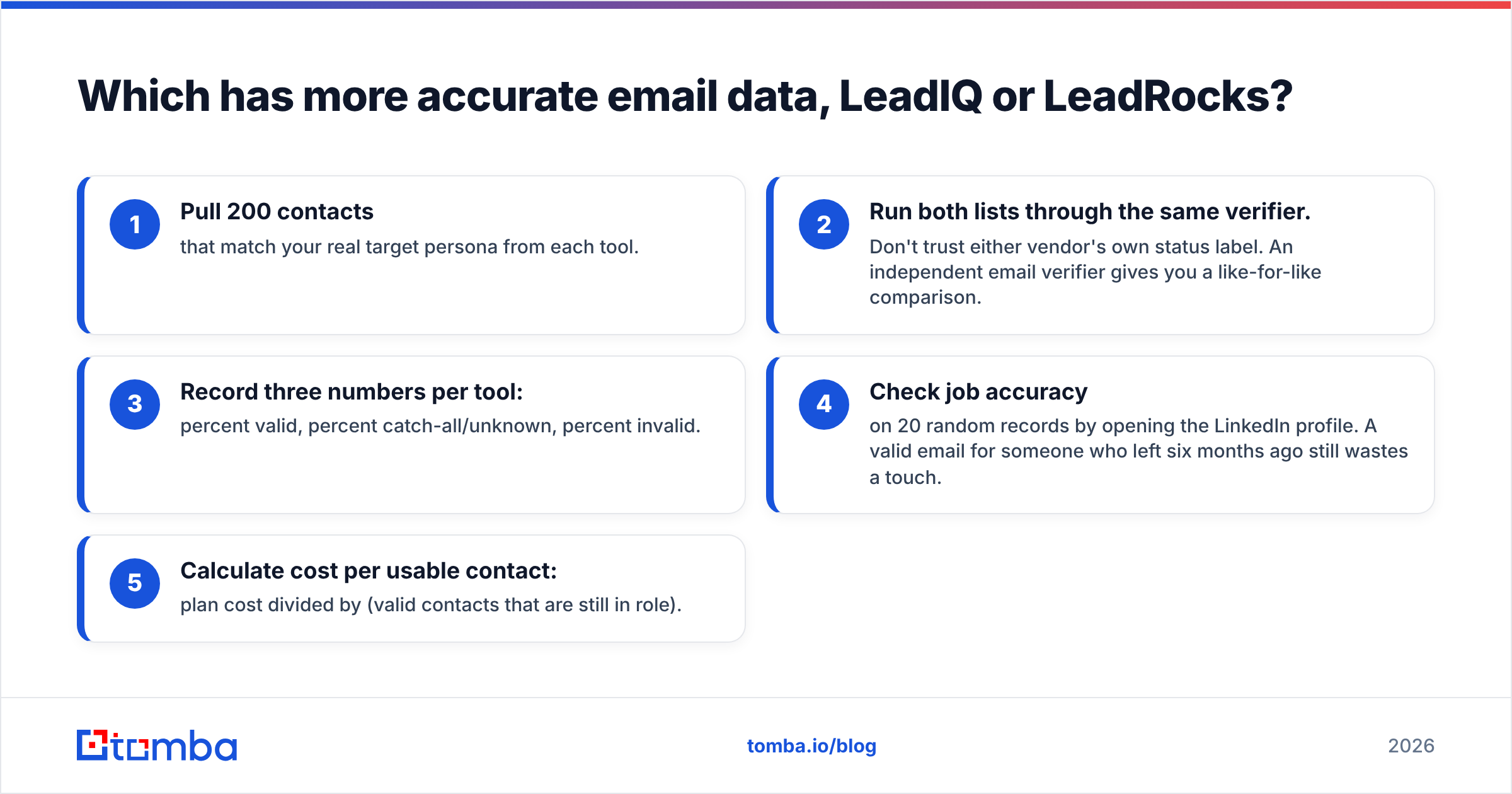
- Pull 200 contacts that match your real target persona from each tool.
- Run both lists through the same verifier. Don't trust either vendor's own status label. An independent email verifier gives you a like-for-like comparison.
- Record three numbers per tool: percent valid, percent catch-all/unknown, percent invalid.
- Check job accuracy on 20 random records by opening the LinkedIn profile. A valid email for someone who left six months ago still wastes a touch.
- Calculate cost per usable contact: plan cost divided by (valid contacts that are still in role).
That last number usually settles the decision. A cheap tool with a 25% invalid rate can cost more per usable contact than an expensive one with 5%, and bounces also hurt your sender reputation.
Is LeadIQ worth the higher price?#
LeadIQ is worth it when rep time is your most expensive resource. Three situations where it clearly pays off:
- You run Salesforce or HubSpot as the system of record and your ops team is tired of duplicate leads and badly formatted imports. LeadIQ's pre-write duplicate check alone can save a RevOps person hours every week.
- Your motion depends on signals. Job-change tracking is one of the highest-converting outbound triggers, because a former champion at a new company already trusts you. LeadRocks has nothing comparable.
- You have a sequencer already. If Outreach or Salesloft runs your cadences, one-click capture into a sequence saves several minutes per prospect, and those minutes add up across a team.
It's harder to justify when:
- You have one or two people doing outbound part-time.
- Your ICP is mainly outside North America and you haven't checked LeadIQ's coverage there.
- You mostly build large lists in bulk rather than working account by account.
If LeadIQ's per-seat economics don't fit, we cover several options in our LeadIQ alternative breakdown.
Is LeadRocks good enough for serious outbound?#
For many teams, yes, as long as you add a verification step. LeadRocks does the part it's built for well: large lists at a low cost. Where teams get into trouble is treating a raw export as ready to send.
A responsible LeadRocks workflow looks like this:
- Export by tight filters. Narrow titles, company size and geography so you aren't paying for contacts you'll never use.
- Verify every export before it reaches your sending tool. Remove invalids, and send catch-alls from a separate, lower-volume inbox.
- Dedupe against your CRM before import, because LeadRocks won't do it for you.
- Enrich the gaps such as missing emails, phones and company data with a second source rather than dropping the rows.
With those steps in place, a small team can run a credible outbound program on LeadRocks for a fraction of LeadIQ's seat cost. Without them, you risk inbox placement problems that no amount of good copy will fix.
The weak spots remain: limited phone data, no native CRM write-back, no signals, and a thinner support layer. If you're a funded startup scaling from 3 to 15 SDRs, you'll probably outgrow it. Check recent user reviews on G2 for both tools before committing, and filter by company size close to yours.

Which should you choose: LeadIQ or LeadRocks?#
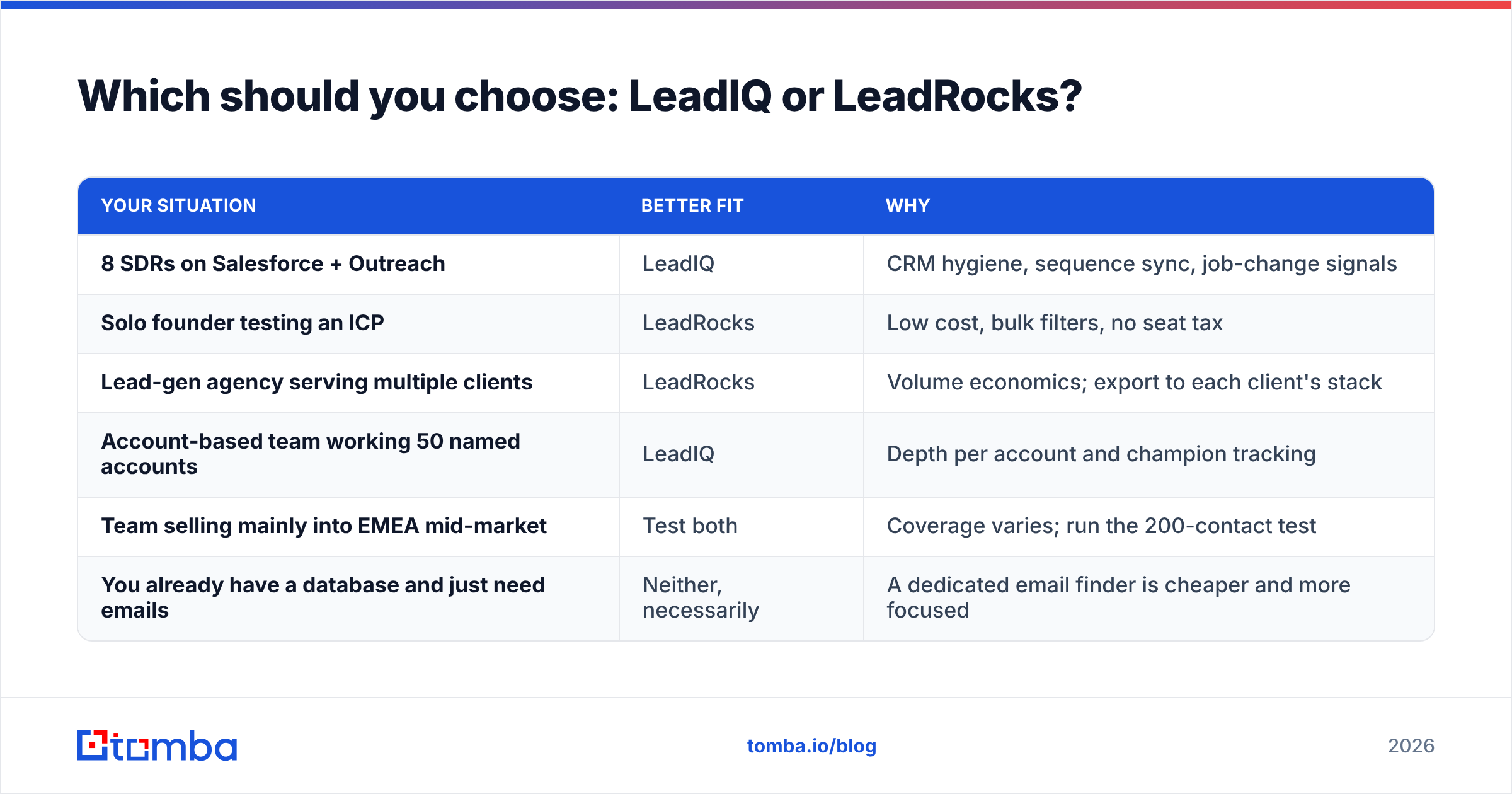
Use the scenario that sounds most like your team:
| Your situation | Better fit | Why |
|---|---|---|
| 8 SDRs on Salesforce + Outreach | LeadIQ | CRM hygiene, sequence sync, job-change signals |
| Solo founder testing an ICP | LeadRocks | Low cost, bulk filters, no seat tax |
| Lead-gen agency serving multiple clients | LeadRocks | Volume economics; export to each client's stack |
| Account-based team working 50 named accounts | LeadIQ | Depth per account and champion tracking |
| Team selling mainly into EMEA mid-market | Test both | Coverage varies; run the 200-contact test |
| You already have a database and just need emails | Neither, necessarily | A dedicated email finder is cheaper and more focused |
The last row is the one most comparison posts skip. A lot of teams buying LeadIQ or LeadRocks don't actually need a database or a workflow layer. They already know which companies and people they want, from Sales Navigator, a CRM, an event list or a target account list. What they're missing is an accurate work email for each name.
For that job, a dedicated email finder that looks up a person by name plus company domain, verifies the result, and runs in bulk or through an API is usually faster and cheaper than either tool here. You can see how flat plan pricing compares with per-seat models on the Tomba pricing page: a free tier with 25 searches a month, then Starter at $49/mo, Growth at $99/mo and Pro at $249/mo, with no per-rep seat multiplier.
What do LeadIQ and LeadRocks both get wrong?#
Both tools share a few blind spots you should plan around:
- Catch-all domains. Many mid-market and enterprise companies accept mail for any address, so a standard SMTP check can't confirm a mailbox exists. Both tools mark these as risky or unknown. Neither resolves them reliably, and you'll need a dedicated catch-all check if those accounts matter to you.
- Data decay. B2B contact data decays roughly 2–3% a month as people change jobs. A list exported in January is noticeably worse by June. Re-verify before every campaign, not once a year.
- Credit accounting. Read the fine print on what uses up a credit: a found email, a phone reveal, an export, a re-lookup. Teams often burn through credits faster than they expected on both platforms.
- Compliance. Both tools process personal data. If you prospect into the EU or UK, make sure your legal basis (usually legitimate interest), opt-out handling and data retention are documented. The vendor's GDPR page doesn't cover your own obligations.
Frequently asked questions#
Is LeadIQ better than LeadRocks?#
LeadIQ is the more complete product, with CRM sync, sequencer integrations, job-change alerts and AI email drafting. LeadRocks is the cheaper option for bulk contact lists. "Better" depends on whether your constraint is rep time or budget.
Does LeadIQ have a free plan?#
Yes. LeadIQ offers a free plan with a small monthly allowance of email and phone credits. It's enough to evaluate the Chrome extension, not enough to run a real outbound program.
Can I use LeadRocks with HubSpot or Salesforce?#
Yes, but mostly through CSV export and import or a third-party automation tool, not a native two-way sync. Dedupe before you import.
How do I check whether exported emails are safe to send?#
Run every list through an independent verifier, send catch-all addresses from lower-volume inboxes, and re-verify any list older than about 60 days.
Bottom line#
LeadIQ and LeadRocks are both legitimate tools that make different trade-offs. LeadIQ gives SDR teams speed, CRM hygiene and timing signals, and charges per seat for it. LeadRocks gives lean teams volume at a low price and leaves hygiene, verification and integration to you. Run the 200-contact test on your own ICP, calculate cost per usable contact, and let that number decide.
If what you really need is accurate, verified work emails for people you've already identified, without per-seat pricing or a database subscription you'll only half use, try the Tomba Email Finder. Enter a name and company domain, or upload a list, and get verified professional emails through the web app, Chrome extension, Google Sheets or API. Start on the free tier with 25 searches a month, then move to Starter at $49/mo when you're ready to scale.
Related guides#
// get started
Find, verify and enrich your first contacts today
Start on the free plan with 25 searches a month, then scale when your team is ready.
Free plan · No credit card required · GDPR & CCPA
// about the author