LeadIQ vs No2Bounce: Prospecting Data vs Email Verification in 2026
LeadIQ captures contacts and pushes them into your CRM. No2Bounce checks whether an address will bounce. Here is how to decide which one your outbound stack is missing, or whether you need both.
TL;DR
- LeadIQ and No2Bounce do different jobs. LeadIQ is a prospecting tool. It captures contacts from LinkedIn and pushes them into your CRM or sequencer. No2Bounce is an email verification service that tells you whether an address you already have is safe to send to.
- Pick LeadIQ if your reps spend their day in LinkedIn Sales Navigator and need emails, phone numbers and job-change alerts synced to Salesforce, HubSpot, Outreach or Salesloft.
- Pick No2Bounce if you already have lists from events, old CRM exports or purchased data and your main problem is bounce rate.
- Many teams use both. They find contacts in one tool and verify them in the other. That means two vendors, two invoices and a CSV handoff in between.
- A combined finder-plus-verifier such as Tomba closes that gap if you don't need LeadIQ's CRM-heavy workflow features.
What is LeadIQ?#
LeadIQ is a B2B prospecting platform built for SDR and AE teams. Its core is a Chrome extension. Open a LinkedIn or Sales Navigator profile, click capture, and LeadIQ returns the person's work email and, where it has one, a direct dial or mobile number. It then sends the record wherever you want it: Salesforce, HubSpot, Outreach, Salesloft, Gmail or a CSV.
Three features set it apart from a plain email finder:
- Capture straight into your tools. Reps don't copy and paste. The contact goes to the CRM with an owner, account association and duplicate checks already done.
- Job-change tracking. LeadIQ watches your past champions and customers and alerts you when they move to a new company. This is one of the best warm-outbound signals you can get.
- Scribe, its AI email writer. It drafts personalised first-touch emails from profile and company data, right inside the capture flow.
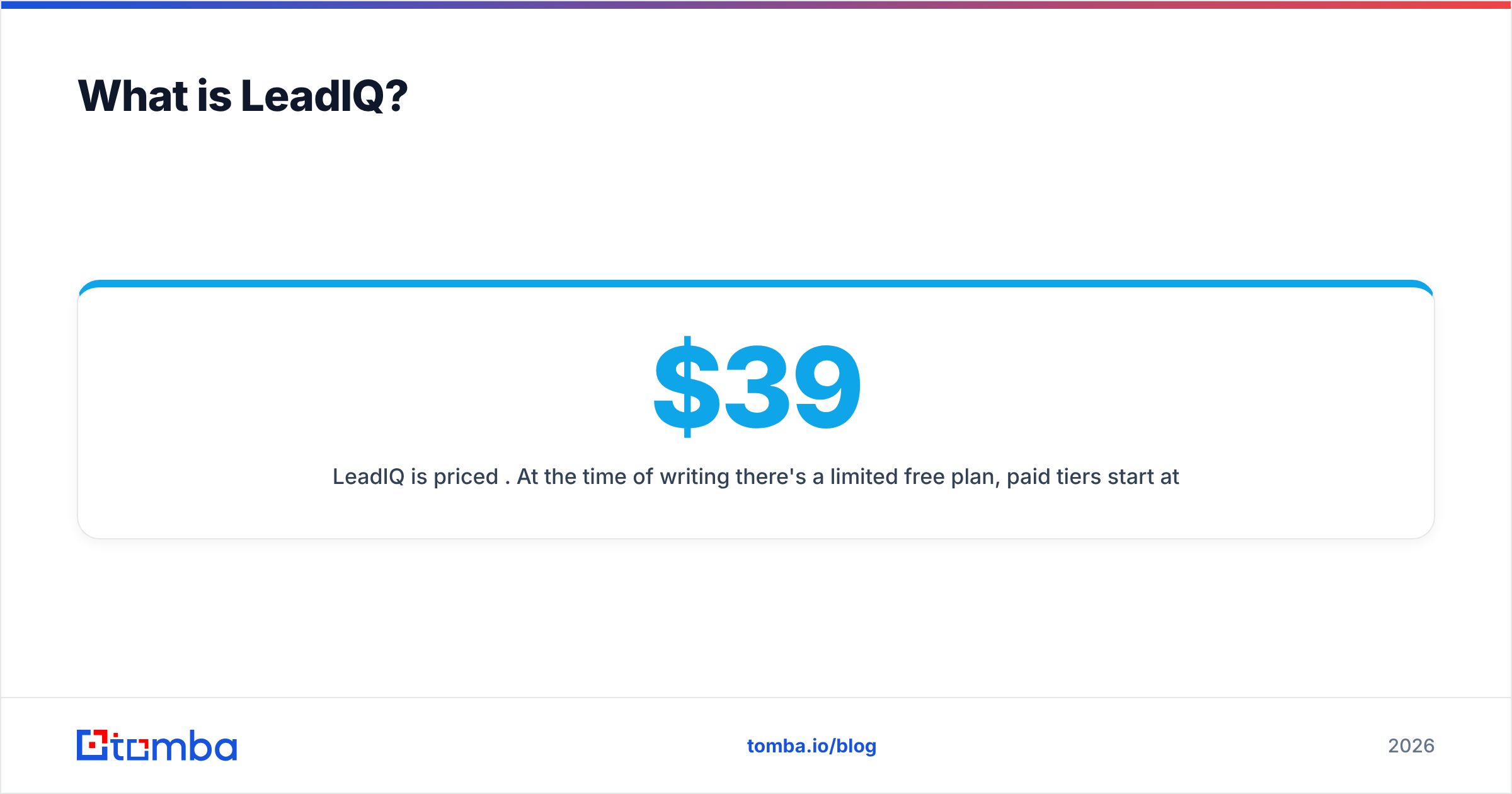
LeadIQ is priced per seat. At the time of writing there's a limited free plan, paid tiers start at roughly $39–$45 per user per month depending on billing cycle, a Pro tier sits around $79+, and Enterprise is custom. Each tier caps email and phone credits. Check LeadIQ's own pricing page before you buy, because the credit allowances change more often than the headline prices.
What is No2Bounce?#
No2Bounce is an email verification service. You upload a list, or call its API, and it sorts each address into buckets: valid, invalid, catch-all/accept-all, disposable, role-based and unknown. The point is simple: remove addresses that would hard-bounce before they hurt your sender reputation.
Its workflow is what you'd expect from a verification-only tool:
- Bulk CSV upload for cleaning whole lists
- Real-time API for checking addresses at the point of capture (signup forms, enrichment pipelines)
- Credit-based pricing with pay-as-you-go packs and higher-volume plans. The per-check cost falls sharply at volume, as it does across the verification category.
- Integrations with common ESPs and automation tools, so verified lists can move without manual exports
No2Bounce doesn't try to be a prospecting database. It won't tell you who the VP of Sales at a given company is. It only tells you whether jane.doe@company.com is worth sending to.
Is LeadIQ vs No2Bounce even a fair comparison?#
It isn't really apples to apples, and that's the most useful thing to understand before choosing. People search "LeadIQ vs No2Bounce" because both sit near the same pain point, which is emails bouncing or not being there at all. The two tools attack it from opposite ends.
A useful comparison is a restaurant. LeadIQ is the supplier bringing ingredients to your kitchen door, sorted and labelled. No2Bounce is the inspector checking that nothing in the fridge has gone off. You can run a kitchen with only one of them, but you're accepting a risk either way.
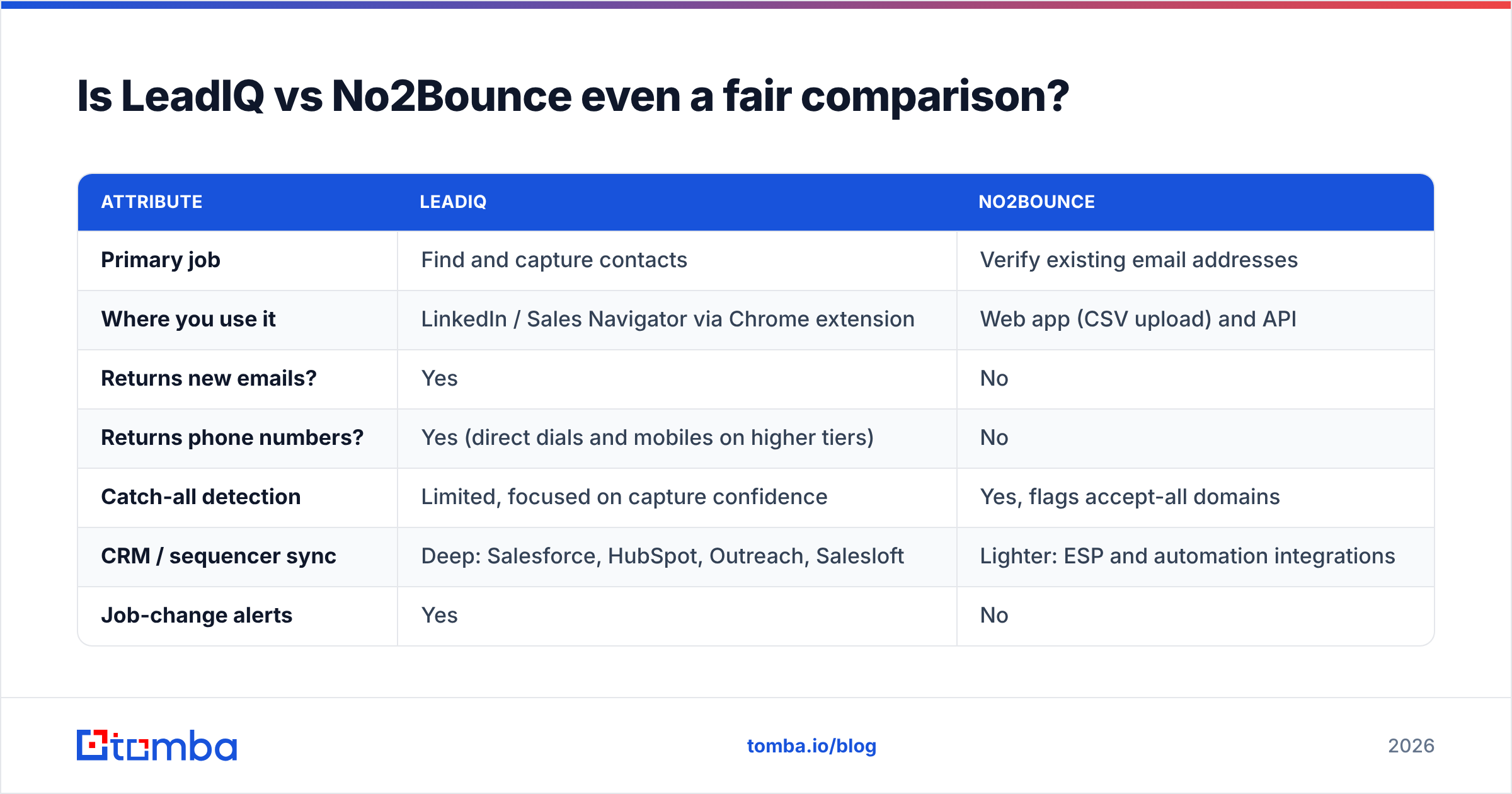
Here's how they line up on the attributes that actually drive a buying decision:
| Attribute | LeadIQ | No2Bounce |
|---|---|---|
| Primary job | Find and capture contacts | Verify existing email addresses |
| Where you use it | LinkedIn / Sales Navigator via Chrome extension | Web app (CSV upload) and API |
| Returns new emails? | Yes | No |
| Returns phone numbers? | Yes (direct dials and mobiles on higher tiers) | No |
| Catch-all detection | Limited, focused on capture confidence | Yes, flags accept-all domains |
| CRM / sequencer sync | Deep: Salesforce, HubSpot, Outreach, Salesloft | Lighter: ESP and automation integrations |
| Job-change alerts | Yes | No |
| AI email writing | Yes (Scribe) | No |
| Pricing model | Per seat, monthly credit caps | Per credit, pay-as-you-go or plan |
| Entry price | Free plan; paid from ~$39–$45/user/mo | Small credit packs; low per-check cost |
| Best buyer | SDR/AE teams doing LinkedIn-led outbound | Marketers, ops and agencies cleaning lists |
If you read the table and think "I need the left column's input and the right column's output," you've found the real question. It isn't which tool is better. It's whether you need one vendor or two.

How accurate is each tool?#
Accuracy means different things for each product, so compare them separately.
For LeadIQ, accuracy means "is the email I captured correct?" LeadIQ verifies addresses as it captures them and only surfaces the ones it considers deliverable, so most reps rarely see an obviously broken email. Coverage is uneven, though. It's strongest for North American tech and SaaS contacts and weaker for SMBs, non-English markets and industries with a thin LinkedIn presence. Phone coverage is patchier than email coverage, which is normal for every vendor in this space. Recent user reviews on G2 are a good way to see how coverage holds up in a specific region or vertical.
For No2Bounce, accuracy means "is the valid/invalid verdict correct?" Verification tools run SMTP-level checks without sending a message, plus syntax, MX, disposable-domain and role-account checks. On standard domains, any mature verifier gets definitive answers right the vast majority of the time. The hard part is catch-all domains. These servers accept every address at the SMTP level, so a basic check can't tell a real inbox from a made-up one. No2Bounce flags these as accept-all rather than calling them valid, which is the honest answer. It also leaves you with a bucket of "maybe" addresses to handle yourself.
That catch-all bucket is where most B2B bounce problems hide. In many B2B lists it's a meaningful share of addresses, especially at mid-market and enterprise companies running Microsoft 365 or custom gateways. If your list is heavy on those domains, you'll want a dedicated catch-all verifier that goes past the SMTP handshake, whichever tool you pick.
How does pricing compare in practice?#
Headline prices hide how differently these two tools bill you.
LeadIQ charges per seat. Five SDRs on a mid-tier plan cost five times the per-user price every month, whether they capture 50 contacts or 500. Credits are capped per tier, and heavy users can hit the ceiling mid-month. The seat model makes sense when the value is in workflow: CRM sync, job-change tracking and Scribe. It gets expensive if all you want is emails.
No2Bounce charges per verification. One ops person can clean 100,000 addresses without paying for any seats. Cost scales with volume, and at volume the cost per check drops to fractions of a cent. You pay nothing for months you don't use it, which suits teams that clean lists before campaigns rather than all the time.
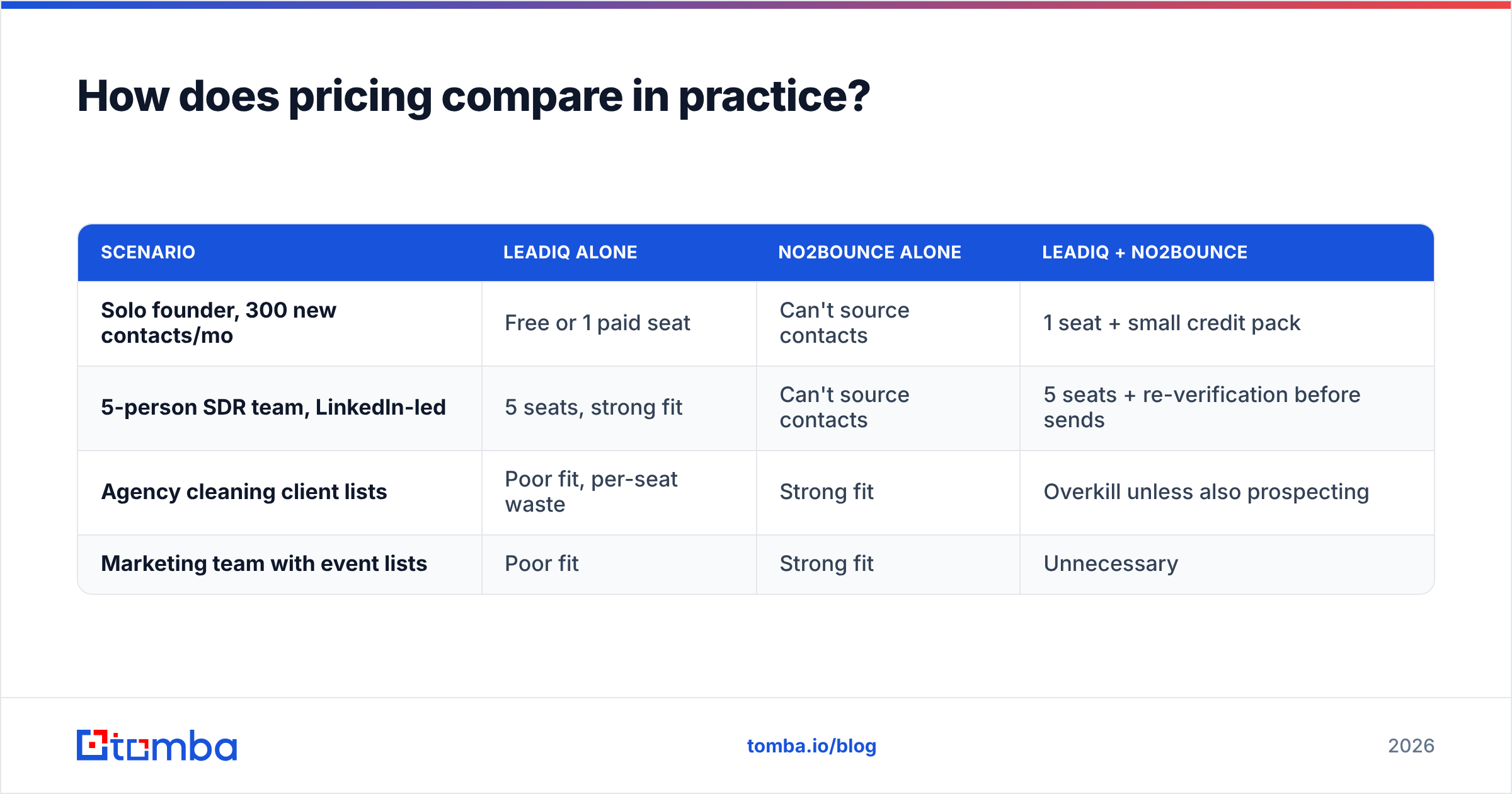
Here's what that means for three common team shapes:
| Scenario | LeadIQ alone | No2Bounce alone | LeadIQ + No2Bounce |
|---|---|---|---|
| Solo founder, 300 new contacts/mo | Free or 1 paid seat | Can't source contacts | 1 seat + small credit pack |
| 5-person SDR team, LinkedIn-led | 5 seats, strong fit | Can't source contacts | 5 seats + re-verification before sends |
| Agency cleaning client lists | Poor fit, per-seat waste | Strong fit | Overkill unless also prospecting |
| Marketing team with event lists | Poor fit | Strong fit | Unnecessary |
The pattern is clear. LeadIQ fits people who need new contacts. No2Bounce fits people who already have contacts.
When should you choose LeadIQ?#
Choose LeadIQ if most of these describe your team:
- Your reps live in Sales Navigator. The capture-from-profile workflow is where LeadIQ saves the most time. If prospecting starts elsewhere, much of that value disappears.
- CRM hygiene matters to your RevOps team. Automatic owner assignment, duplicate checks and account mapping into Salesforce or HubSpot are strong features. Lighter tools usually don't match them.
- You sell into accounts where champions move. Job-change tracking alone can justify the seat price if you have a large base of past buyers.
- You want phone numbers as well as emails. A verification tool can't give you those.
Watch out for per-seat costs as the team grows, credit caps on lower tiers, and the fact that captured emails still go stale. An address that was valid when a rep captured it six months ago may not be valid when the sequence finally sends. LeadIQ users who care about deliverability often re-verify older records before big sends, and that's exactly where a tool like No2Bounce comes in.
If LeadIQ's seat pricing is the sticking point, see our breakdown of the best LeadIQ alternative options for finder-first teams.
When should you choose No2Bounce?#
Choose No2Bounce if most of these describe your situation:
- You already have the data. Webinar registrants, trade-show scans, old CRM exports, purchased lists or partner lists all need cleaning more than enriching.
- Your bounce rate is hurting you. If you're above 2% hard bounces on cold sends, mailbox providers are noticing. Google's and Yahoo's bulk-sender rules have made that threshold less forgiving.
- You need an API check at the point of capture. Checking addresses in real time on signup forms or inside an enrichment pipeline stops bad data before it gets in.
- Volume is lumpy. Pay-as-you-go credits suit teams that clean lists quarterly more than a seat licence does.
Watch out for the catch-all bucket (plan how you'll treat "accept-all" results) and for the obvious limit: No2Bounce won't grow your list. If your pipeline problem is "not enough contacts," a verifier can't fix it.

Do you need both LeadIQ and No2Bounce?#
For a lot of outbound teams, the honest answer is that their current workflow already uses both, or something like both. The typical stack looks like this:
- Find: a rep captures contacts in a prospecting tool
- Store: records sync to the CRM
- Age: weeks or months pass before those contacts get sequenced
- Re-verify: someone exports a segment, runs it through a verifier, and re-imports the results
- Send: the sequencer sends to the cleaned list
Steps 1 and 4 are the LeadIQ and No2Bounce jobs. The trouble is step 4 itself. It's a manual export–verify–import loop that someone has to remember to run, and it's where data gets out of sync. Duplicate records appear, verification statuses get overwritten, and suppression lists drift.
You have three reasonable options:
- Run both tools with an automated bridge. Use Zapier, Make or your CRM's workflow engine to send new or stale records to a verification API. This works well but adds another thing to maintain.
- Rely on the prospecting tool's built-in verification and accept some decay. This is fine for fast-cycle outbound where contacts get emailed within days of capture.
- Consolidate into one tool that finds and verifies. You give up some of LeadIQ's CRM-specific workflow features, and in return you get one data source, one credit pool and one bill.
The right choice depends on how much of LeadIQ's value comes from workflow (CRM sync, job changes, Scribe) and how much comes from the emails themselves. If it's mostly the emails, consolidation usually wins on cost and simplicity.
How does Tomba fit into the LeadIQ vs No2Bounce decision?#
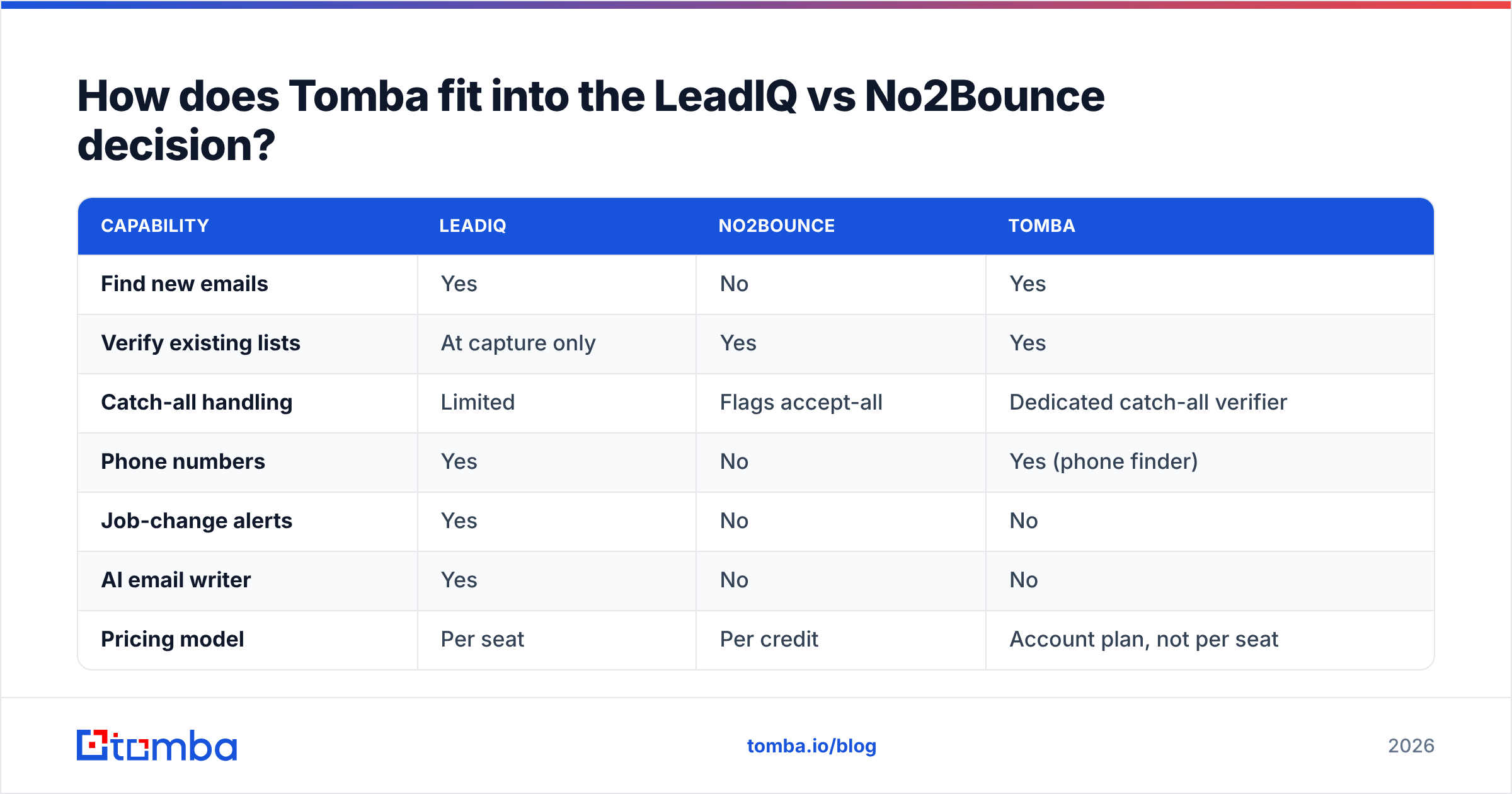
Tomba sits between the two. Its core product is an email finder that works by name plus company, by domain, or from LinkedIn through its browser extension. The email verifier and a dedicated catch-all verifier run in the same account and the same credit system. There's no export–verify–import loop, because verification is part of the find.
Here's how it compares with the two tools in this review:
| Capability | LeadIQ | No2Bounce | Tomba |
|---|---|---|---|
| Find new emails | Yes | No | Yes |
| Verify existing lists | At capture only | Yes | Yes |
| Catch-all handling | Limited | Flags accept-all | Dedicated catch-all verifier |
| Phone numbers | Yes | No | Yes (phone finder) |
| Job-change alerts | Yes | No | No |
| AI email writer | Yes | No | No |
| Pricing model | Per seat | Per credit | Account plan, not per seat |
| Entry paid price | ~$39–$45/user/mo | Credit packs | $49/mo Starter |
| Free tier | Yes, limited | Trial credits | 25 searches/mo |
To be fair to both vendors: if job-change tracking and deep Salesforce or Outreach workflows are central to how your team sells, LeadIQ does things Tomba doesn't try to do. And if you only need to clean lists you already own, a verification-only service like No2Bounce is a lean, focused choice. Tomba makes the most sense when you want finding and verification in one place without paying per seat. That describes most small teams, agencies and founder-led sales motions.
Tomba pricing runs from a free tier (25 searches per month) to Starter at $49/mo, Growth at $99/mo and Pro at $249/mo, with custom Enterprise plans above that.
Which should you pick: LeadIQ or No2Bounce?#
Use this quick decision guide:
- "I need more contacts, and my team prospects on LinkedIn all day." Go with LeadIQ.
- "I have plenty of contacts, and too many of them bounce." Go with No2Bounce.
- "I need more contacts and they need to be verified, but I don't want to pay per seat or manage two tools." Go with a combined finder-plus-verifier.
- "I'm an enterprise team with a strict CRM governance process." Use LeadIQ for capture plus a verification API on a schedule for re-checks.
Whatever you choose, keep an eye on your bounce rate. Mailbox providers such as Google publish sender guidelines that tie hard bounces and spam complaints to inbox placement. Bad data costs you more than a wasted email. It drags down every campaign sent from that domain afterwards.
Ready to find and verify in one step?#
If you liked LeadIQ's contact discovery and No2Bounce's list hygiene but don't want two vendors and a CSV handoff between them, try the Tomba Email Finder. Search by name and company, by domain, or straight from LinkedIn. Every result comes back already verified, and catch-all domains get a dedicated check. You can start on the free tier with 25 searches a month and test it against the contacts your team is chasing this quarter before you commit.
Related guides#
// get started
Find, verify and enrich your first contacts today
Start on the free plan with 25 searches a month, then scale when your team is ready.
Free plan · No credit card required · GDPR & CCPA
// about the author