LeadIQ vs Reachfast: Pricing, Data Quality and Workflow Compared
LeadIQ is a full prospecting workflow with CRM sync and a per-seat price. Reachfast is a leaner, credit-based contact lookup tool. Here's how to tell which one fits your team, and when a third option makes more sense.
TL;DR
- LeadIQ is a prospecting workflow tool. It captures contacts from LinkedIn and Sales Navigator, pushes them into Salesforce, HubSpot, Outreach or Salesloft, and tracks job changes. You pay per seat, and the value grows with team size.
- Reachfast is a leaner contact-lookup tool. You give it a LinkedIn profile or a name plus company, and it returns an email and, where it has one, a phone number. It suits recruiters, founders and small outbound teams who want contact data without a full sales platform.
- Choose LeadIQ if your reps live in a CRM and a sequencer and you need clean, deduplicated data flowing into both.
- Choose Reachfast if you mostly need quick lookups and want to pay for data rather than workflow features.
- Whichever you pick, run the results through a separate verification step before sending. Neither tool's "verified" label removes the need to check bounces yourself.
What is the real difference between LeadIQ and Reachfast?#
These two products solve different problems, even though both show up when you search for "LinkedIn email finder."
LeadIQ is built for SDR and AE teams. The Chrome extension sits on top of LinkedIn and Sales Navigator, captures a prospect in one click, enriches the record with email and phone data, and syncs it to your CRM and sales engagement platform. It also includes job-change tracking (so you know when a champion moves to a new account), AI-assisted email writing (Scribe), and team-level controls over who captures what.
Reachfast has a narrower job. It focuses on returning contact details (mainly work emails and phone numbers) for a person you already know you want to reach. The product is built around speed and simple credit-based use, not around managing a sales team's whole pipeline.
Put simply: LeadIQ is a production line for prospect records. Reachfast is a lookup desk. Deciding between them depends less on whose data is "better" and more on which part of your process is actually the bottleneck.
How do LeadIQ and Reachfast compare feature by feature?#
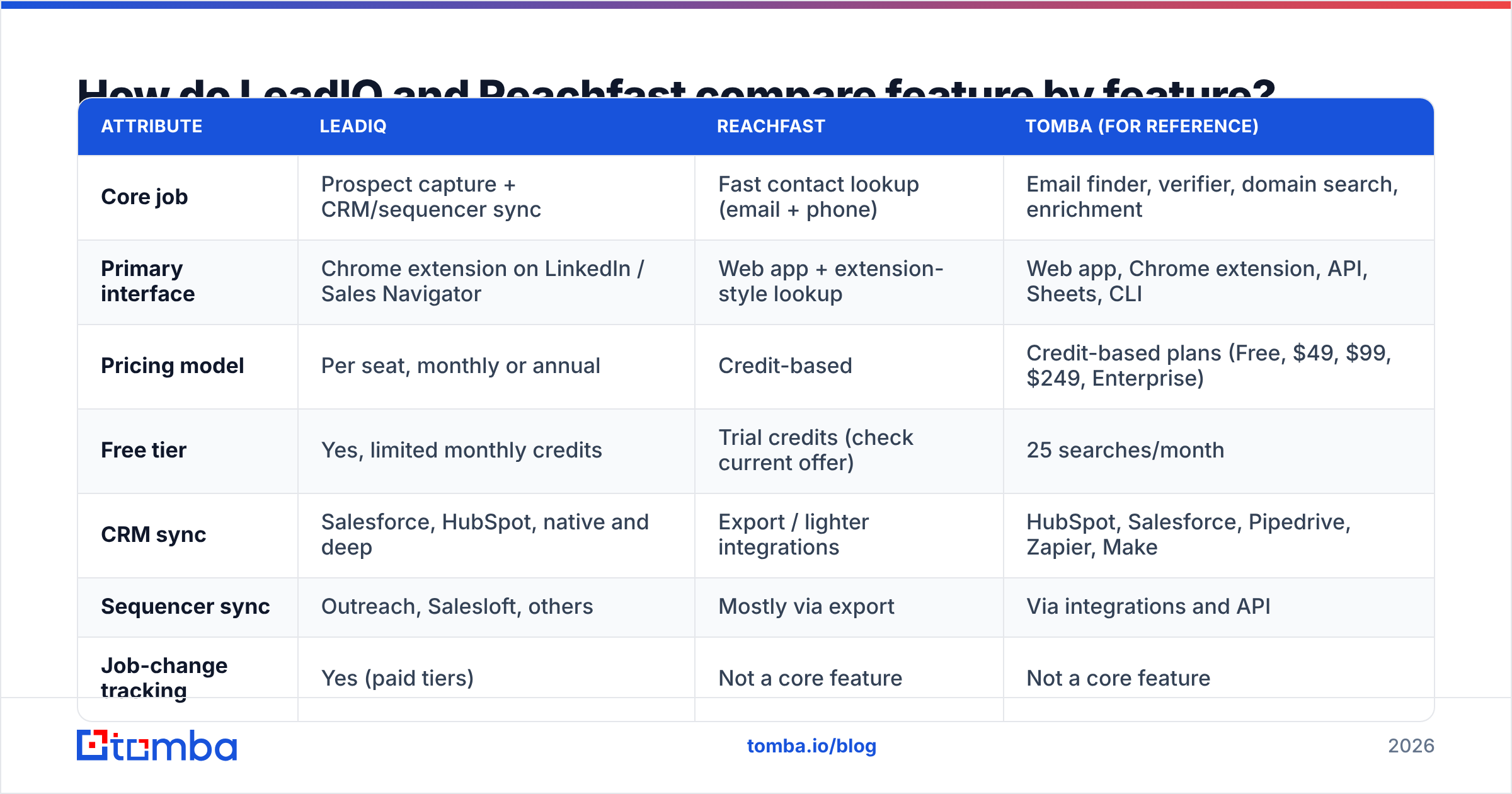
The table below reflects each vendor's public positioning at the time of writing. Pricing and credit allowances change often, so check the vendor pages before you commit. LeadIQ's pricing page is the canonical source for their tiers.
| Attribute | LeadIQ | Reachfast | Tomba (for reference) |
|---|---|---|---|
| Core job | Prospect capture + CRM/sequencer sync | Fast contact lookup (email + phone) | Email finder, verifier, domain search, enrichment |
| Primary interface | Chrome extension on LinkedIn / Sales Navigator | Web app + extension-style lookup | Web app, Chrome extension, API, Sheets, CLI |
| Pricing model | Per seat, monthly or annual | Credit-based | Credit-based plans (Free, $49, $99, $249, Enterprise) |
| Free tier | Yes, limited monthly credits | Trial credits (check current offer) | 25 searches/month |
| CRM sync | Salesforce, HubSpot, native and deep | Export / lighter integrations | HubSpot, Salesforce, Pipedrive, Zapier, Make |
| Sequencer sync | Outreach, Salesloft, others | Mostly via export | Via integrations and API |
| Job-change tracking | Yes (paid tiers) | Not a core feature | Not a core feature |
| Domain-wide search | No, person-by-person capture | No, person-by-person lookup | Yes |
| Bulk enrichment | Yes, on higher tiers | Yes, via file upload (check limits) | Yes, bulk finder and bulk verifier |
| API access | Enterprise-oriented | Check plan availability | Available on paid plans |
| Best for | SDR teams of 5+ on a CRM | Recruiters, founders, small outbound teams | Teams needing domain search + verification at predictable cost |

Two things stand out. First, LeadIQ's advantage is integration depth. If a rep captures a contact, the record lands in Salesforce with the right owner, deduplicated against existing leads, and ready to add to a sequence. For a 20-rep team that saves real hours every week. Second, neither tool does domain-level discovery. If your motion starts with "show me everyone in marketing at these 300 companies" rather than "get me this one person's email," you'll need a domain search tool alongside either one.
How does pricing compare between LeadIQ and Reachfast?#
This is where the two products differ most in structure.
LeadIQ charges per user. Its free plan gives you a small monthly allowance of verified emails and mobile numbers, which is enough to test the workflow but not enough to run a real outbound program. Paid tiers (Essential, Pro, and Enterprise at the time of writing) add more credits, CRM and sequencer integrations, job-change tracking and team management. Integration features are the main reason teams pay for LeadIQ, and they sit behind the higher tiers.
That matters for your budget math. A five-person SDR team on a mid-tier LeadIQ plan pays five seat fees whether each rep captures 50 contacts a month or 500. If usage is uneven (common when some reps work inbound and others outbound), you pay for seats that don't use their credits.
Reachfast uses a credit model. You pay for lookups, not people. That fits:
- Solo founders doing their own outbound
- Recruiters who need 30 contacts one week and 300 the next
- Agencies running campaigns for several clients with uneven volume
The trade-off is that you don't get LeadIQ's workflow layer, so you'll spend more time exporting CSVs and importing them into your CRM or sequencer.

Here is a practical way to compare the two:
- Estimate monthly contact volume per rep. Be honest. Most teams overestimate this.
- Calculate cost per usable contact, not cost per credit. A "usable" contact is one that doesn't bounce and actually belongs to the right person.
- Add the cost of manual work. If Reachfast saves $200/month but each rep spends two extra hours on CSV imports, that saving can disappear.
- Factor in verification. Whichever tool you choose, you'll likely want an email verifier pass before sending. Budget for it.
Which tool has better data accuracy?#
Nobody can give you an honest universal answer. Accuracy depends heavily on your target segment: region, company size, seniority and industry all change results.

What you can say with confidence:
- LeadIQ is strongest where LinkedIn data is dense, meaning North American and Western European mid-market and enterprise contacts in sales, marketing and tech roles. That's the market it was built for, and user reviews on G2 consistently rate its extension workflow highly, with the usual complaints about mobile number coverage and credit limits.
- Reachfast's focus on direct contact lookup means you judge it almost entirely on hit rate and bounce rate. There's no workflow layer to make up for weak data, which makes it easy to test: run 100 known contacts and count.
- Catch-all domains hurt everyone. A large share of B2B domains accept every address at the SMTP level, so no tool can fully confirm a mailbox there. Tools label these "accept-all," "risky" or "unverifiable." If your target list is heavy on catch-all domains, a dedicated catch-all verifier will do more for your bounce rate than switching finders.
How should you run your own accuracy test?#
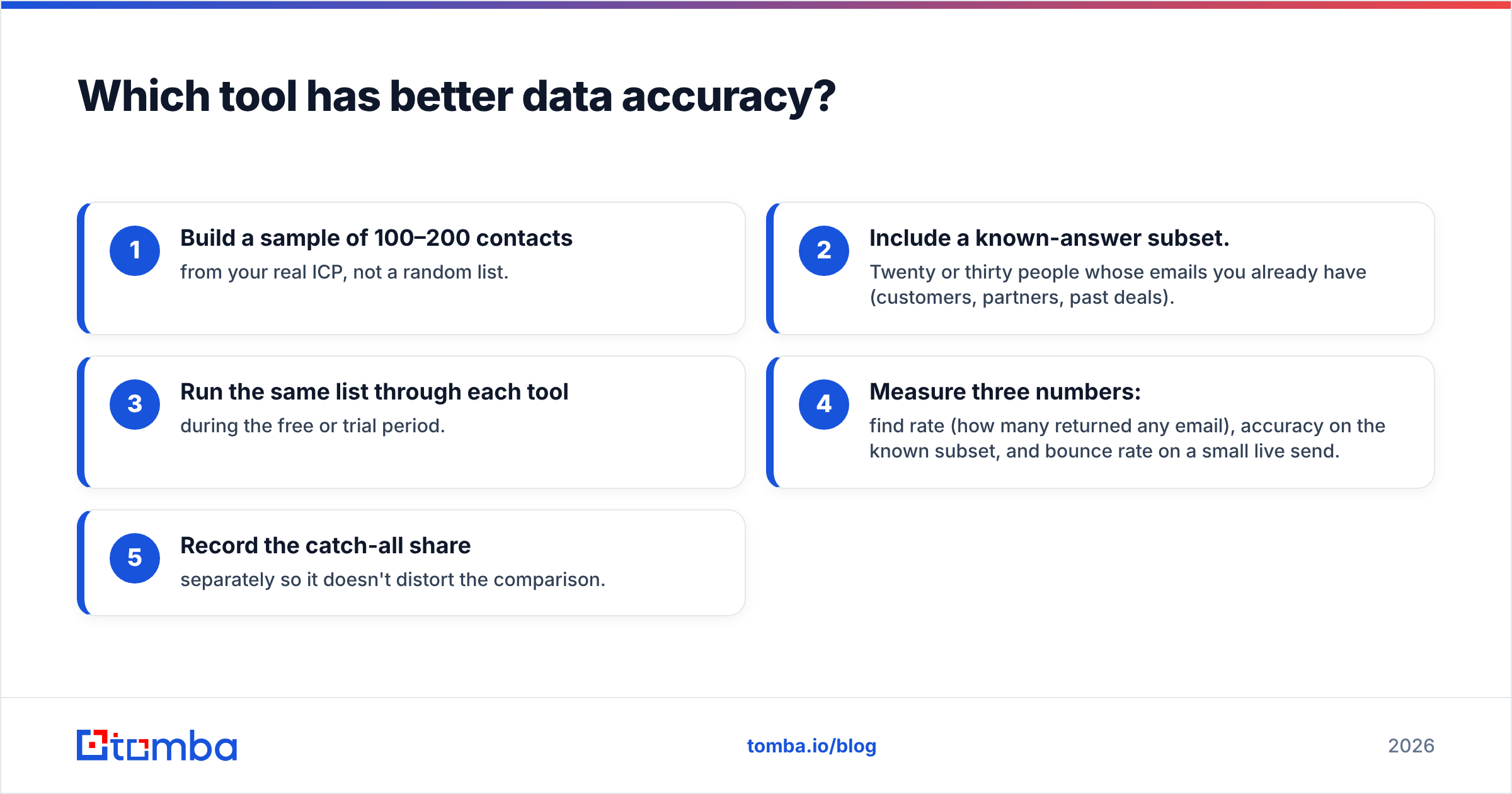
Don't rely on vendor claims, and don't rely on this article either. Run a controlled test:
- Build a sample of 100–200 contacts from your real ICP, not a random list.
- Include a known-answer subset. Twenty or thirty people whose emails you already have (customers, partners, past deals).
- Run the same list through each tool during the free or trial period.
- Measure three numbers: find rate (how many returned any email), accuracy on the known subset, and bounce rate on a small live send.
- Record the catch-all share separately so it doesn't distort the comparison.
Results from a test like this are worth more than any published benchmark, because they reflect your own market.
What does each tool do better?#
A plain split of strengths and weaknesses:
| LeadIQ | Reachfast | |
|---|---|---|
| Strengths | Deep Salesforce/HubSpot sync, sequencer integration, dedup, job-change alerts, team admin controls, mature extension | Simple lookups, credit-based pricing that follows actual usage, low setup overhead, quick to learn |
| Weaknesses | Per-seat cost adds up, key integrations gated to higher tiers, less value for solo users | Lighter workflow layer, more manual export/import, fewer team-management features |
| Ideal user | SDR/BDR team with a defined CRM and sequencer stack | Recruiter, founder, agency or small team with bursty volume |
| Setup time | Hours to days (CRM mapping, field rules, team rollout) | Minutes |
If you're already comparing alternatives more broadly, our LeadIQ alternative breakdown covers where other tools overlap with LeadIQ's feature set and where they don't.
Is LeadIQ better than Reachfast for sales teams?#
For a structured sales team, usually yes. And the reason isn't data quality.
The reason is process integrity. When ten reps each capture contacts into a CRM by hand, you end up with duplicates, missing owner assignments, inconsistent field formats and contacts that never make it into a sequence. LeadIQ's value is that it removes those failure points. The data arrives in your CRM already mapped, checked against existing records and ready to work. Sales ops teams care about this a lot, because messy CRM data compounds: it breaks routing, attribution and forecasting further down the line.
Reachfast can feed a CRM, but you'll handle more of that plumbing yourself through exports, Zapier-style automations or manual imports. For a three-person team that's fine. For a thirty-person team it becomes a RevOps problem.
Is Reachfast better than LeadIQ for recruiters and founders?#
Often, yes, for the opposite reason.
A recruiter sourcing a senior engineer doesn't need Outreach sync or job-change alerts on 5,000 accounts. They need a reliable email or phone number for a specific person, fast, without paying for a seat license that sits idle between searches. The same goes for founders doing founder-led sales: they're prospecting in bursts between product work, and a per-seat subscription with monthly credit resets is a poor fit for that pattern.
Credit-based lookup tools match that usage well. The key question is whether Reachfast's coverage is good enough in your specific niche, which brings you back to running the controlled test above.
What about verification: can you trust the "verified" label?#
Treat any finder's "verified" status as a strong hint, not a guarantee. Here's why:
- Verification is a point-in-time check. An address that validated three months ago may belong to someone who has since left. B2B contact data decays fast because people change jobs, companies rebrand and domains migrate.
- Different vendors define "verified" differently. Some mean an SMTP handshake succeeded. Others mean the pattern matched plus a signal from another source. Few vendors publish exactly what the label means.
- Catch-all domains can't be fully verified by SMTP alone, whatever tool you use.

The practical rule is to re-verify right before a campaign goes out, especially for lists older than 30 days. Your sender reputation depends on keeping hard bounces low, and one bad list can undo weeks of warmup. Mailbox providers like Google now enforce bulk-sender requirements around authentication and spam complaint rates, so a clean list matters more than it did a few years ago.
When should you consider neither tool?#
There are three common situations where LeadIQ and Reachfast both miss what you need:
- Account-based discovery. If your motion starts from a list of target companies and you need to find who to contact there, person-by-person tools are slow. You want a domain search that returns every known address at a company, with role and department filters.
- Developer-driven enrichment. If you're enriching sign-ups, scoring inbound leads, or building data into your own product, you need a well-documented API with predictable credit pricing, not an extension.
- Spreadsheet-first workflows. Plenty of teams still build lists in Google Sheets or Excel. Add-ons that find and verify emails inside the sheet remove the export/import loop completely.
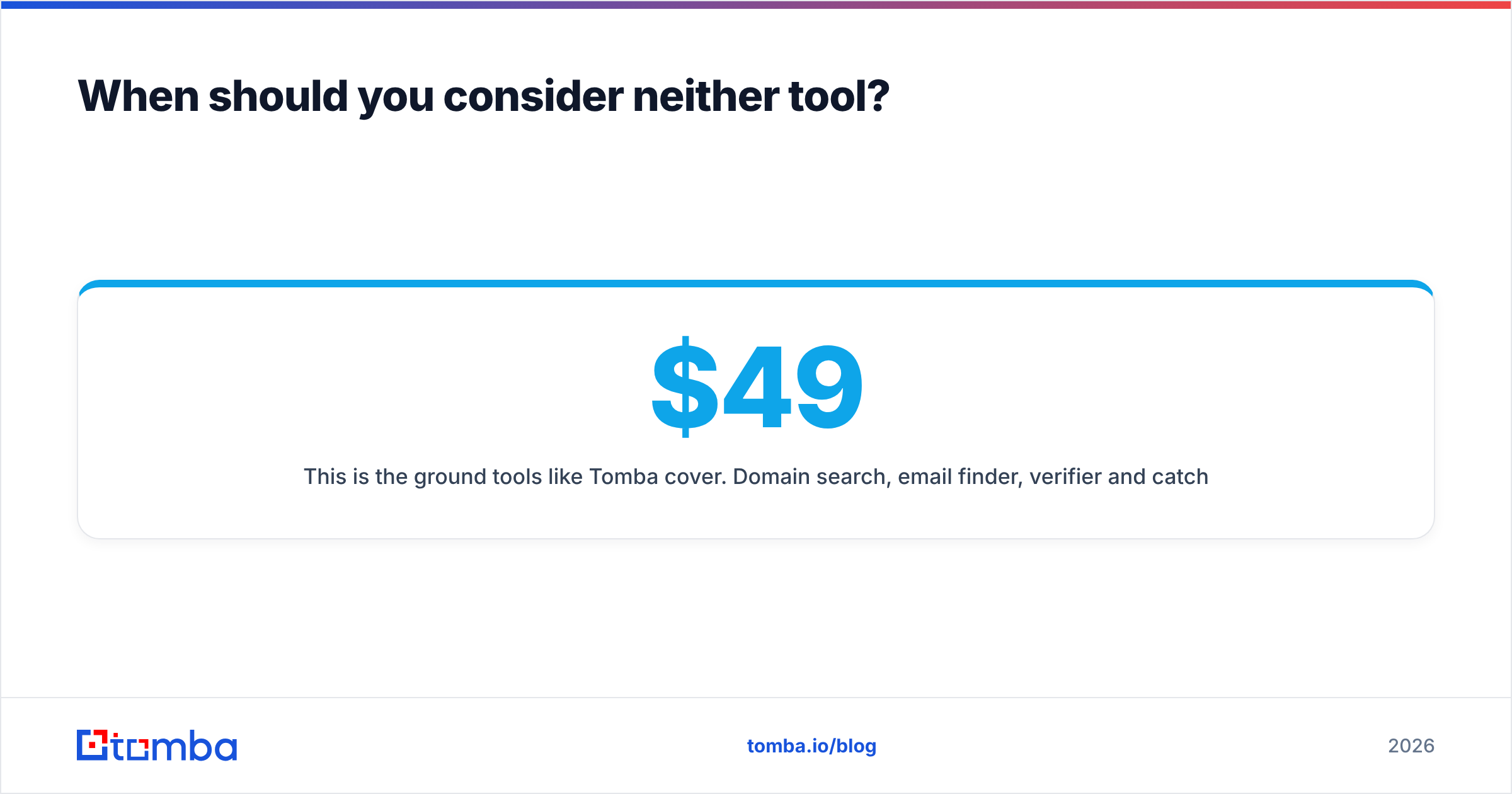
This is the ground tools like Tomba cover. Domain search, email finder, verifier and catch-all verifier sit in one account, with Chrome, Sheets, Excel, API and CLI access. Tomba pricing runs from a free tier with 25 searches a month up to Starter at $49/mo, Growth at $99/mo and Pro at $249/mo, with no per-seat multiplier on the core credit pool. It won't replace LeadIQ's deep sequencer sync or job-change tracking. It is a strong fit if your gap is discovery and verification rather than CRM workflow.
How do you decide between LeadIQ and Reachfast?#
Use this short decision path:
- You have 5+ reps, Salesforce or HubSpot, and a sequencer → LeadIQ. The integration layer pays for the seat cost.
- You're a recruiter, founder or agency with bursty, person-level lookups → Reachfast. Pay for data, skip the workflow.
- You need to find contacts across whole companies, not individuals → Add a domain search tool, whichever finder you choose.
- You're sending cold email at any real volume → Add a verification step before every send, whichever finder you choose.
- You're unsure → Run the 100-contact controlled test on both free trials. Let your own bounce and match rates decide.
For more independent context, user reviews on Capterra and G2 are useful for spotting recurring complaints (credit expiry, mobile coverage, support response times) that feature pages don't mention.
Where does Tomba fit if you need both discovery and accuracy?#
If your comparison of LeadIQ and Reachfast keeps ending with "I like the data, but I need to find people across whole companies" or "I need to verify before I send," look at Tomba Email Finder. It finds professional emails by name, domain or company. It works from a Chrome extension, Google Sheets, or the API. It also includes built-in verification and catch-all checks, so your list is ready to send and not just ready to import. Start on the free plan with 25 searches, run it against the same 100-contact test list you used for LeadIQ and Reachfast, and let the bounce rate decide.
Related guides#
// get started
Find, verify and enrich your first contacts today
Start on the free plan with 25 searches a month, then scale when your team is ready.
Free plan · No credit card required · GDPR & CCPA
// about the author