LeadIQ vs Salutary Data: Which B2B Data Source Fits Your Team?
LeadIQ gives reps a per-seat prospecting tool that works inside LinkedIn. Salutary Data licenses B2B contact data in bulk. Here's how to tell which one your team actually needs before you commit budget.
TL;DR
- LeadIQ is a prospecting tool for sales reps. It runs as a Chrome extension on LinkedIn and Sales Navigator, captures contacts one at a time or in small batches, and pushes them into your CRM and sequencer. You pay per seat.
- Salutary Data sells data. It licenses B2B contact and company records in bulk, builds custom lists, and offers enrichment and API access. Pricing is quote-based, not self-serve.
- Pick LeadIQ if your reps prospect by hand on LinkedIn and you want capture, CRM sync, and job-change alerts in one place.
- Pick Salutary Data if RevOps or marketing needs large volumes of records, whether to fill a data warehouse, enrich a CRM, or power a product.
- If you mainly need verified work emails at a predictable monthly price, a dedicated email finder is often cheaper than either one.
What is the real difference between LeadIQ and Salutary Data?#
People compare these two a lot, but they solve different problems. LeadIQ is a workflow tool that comes with data. Salutary Data is a data supplier that comes with delivery options.
Think of LeadIQ as a checkout lane. A rep finds a prospect on LinkedIn, clicks the extension, gets an email and maybe a phone number, and sends the contact to Salesforce or Outreach without leaving the browser. The value is speed and staying in one tab.
Think of Salutary Data as a warehouse. You tell it which records you want (for example, VPs of Finance at US manufacturers with 200 to 1,000 employees), and it delivers them as a file, through an API, or by appending fields to data you already have. The value is volume and coverage. Nobody has to click through LinkedIn one profile at a time.
That difference affects everything else: who uses the tool, how it's priced, how you measure ROI, and what can go wrong.
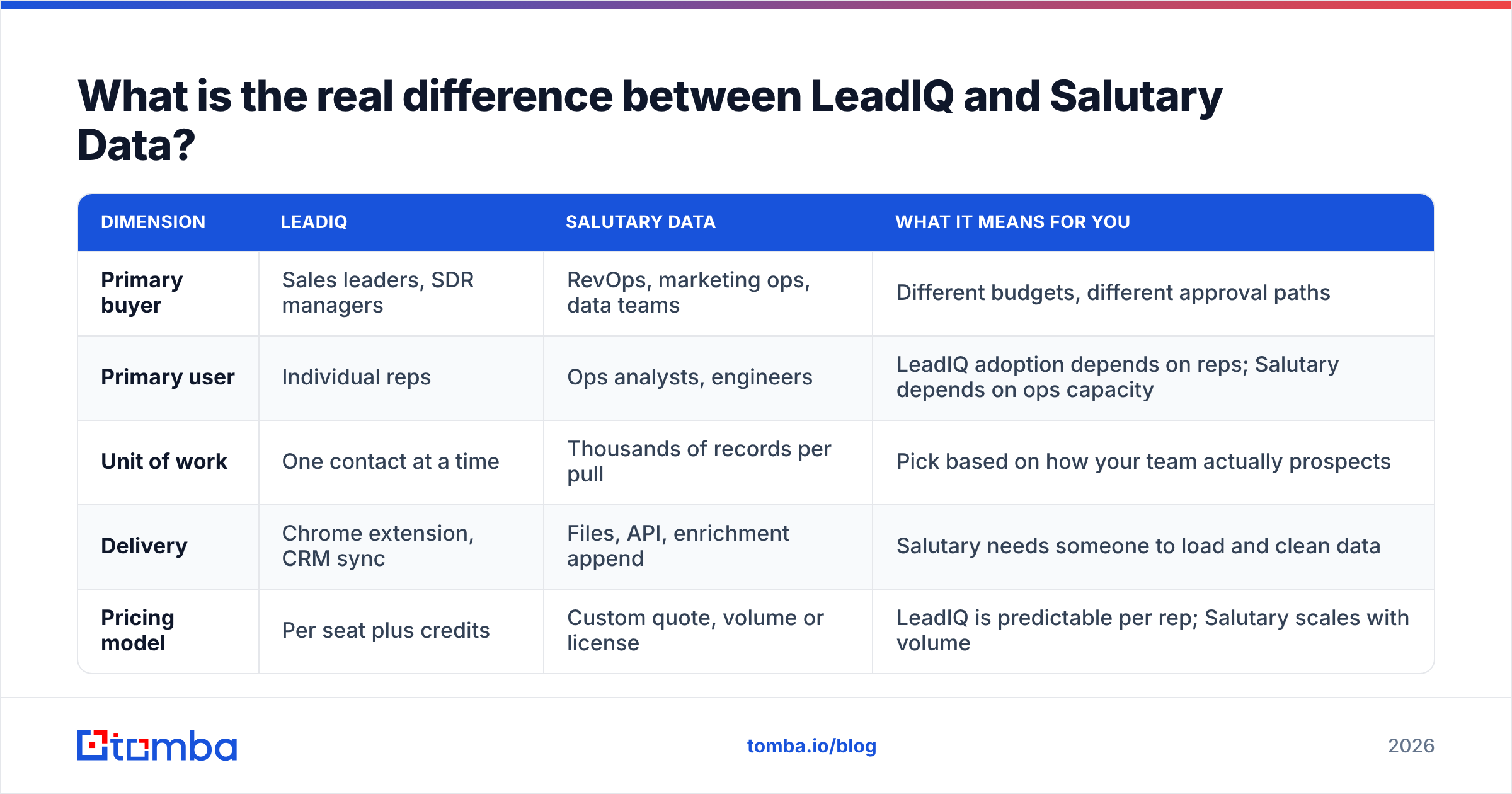
| Dimension | LeadIQ | Salutary Data | What it means for you |
|---|---|---|---|
| Primary buyer | Sales leaders, SDR managers | RevOps, marketing ops, data teams | Different budgets, different approval paths |
| Primary user | Individual reps | Ops analysts, engineers | LeadIQ adoption depends on reps; Salutary depends on ops capacity |
| Unit of work | One contact at a time | Thousands of records per pull | Pick based on how your team actually prospects |
| Delivery | Chrome extension, CRM sync | Files, API, enrichment append | Salutary needs someone to load and clean data |
| Pricing model | Per seat plus credits | Custom quote, volume or license | LeadIQ is predictable per rep; Salutary scales with volume |
How does LeadIQ work day to day?#
LeadIQ is built around a rep's browser. According to LeadIQ's website, these are the core pieces:
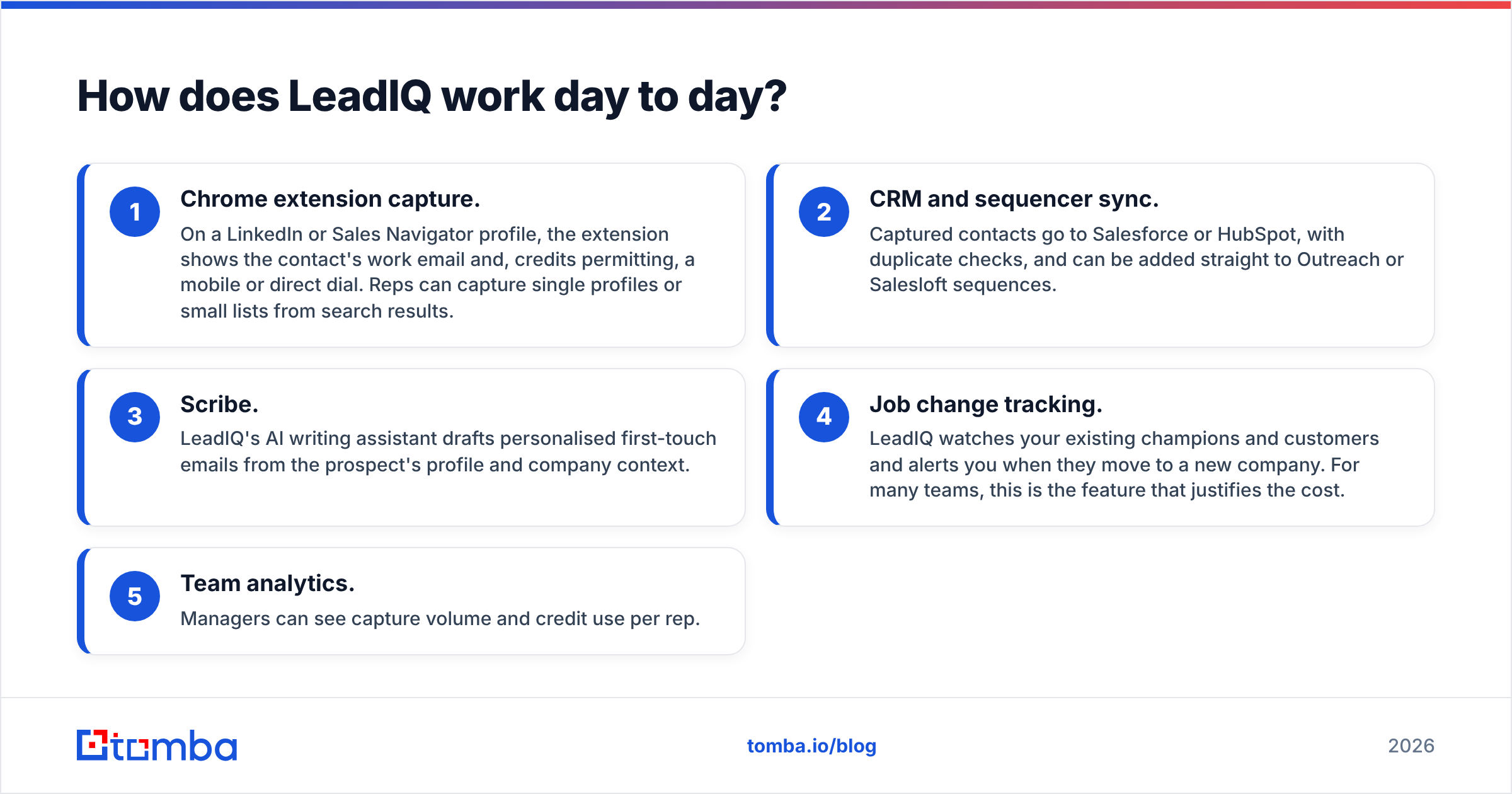
- Chrome extension capture. On a LinkedIn or Sales Navigator profile, the extension shows the contact's work email and, credits permitting, a mobile or direct dial. Reps can capture single profiles or small lists from search results.
- CRM and sequencer sync. Captured contacts go to Salesforce or HubSpot, with duplicate checks, and can be added straight to Outreach or Salesloft sequences.
- Scribe. LeadIQ's AI writing assistant drafts personalised first-touch emails from the prospect's profile and company context.
- Job change tracking. LeadIQ watches your existing champions and customers and alerts you when they move to a new company. For many teams, this is the feature that justifies the cost.
- Team analytics. Managers can see capture volume and credit use per rep.
The design is sensible. Reps don't have to copy and paste between LinkedIn, a data tool, and the CRM. When adoption is high, LeadIQ cuts research time noticeably and keeps CRM records cleaner than manual entry.
The catch is that LeadIQ's value grows with how many people use it every day. A seat that sits idle is money wasted. The data is also only as good as LeadIQ's coverage for your market. It's generally strong for North American tech and SaaS, and patchier for SMBs, non-tech verticals, and some international regions. That pattern is common across the category, not specific to LeadIQ.
How does Salutary Data work?#
Salutary Data is a B2B data provider. It focuses on contact and company records: names, titles, work emails, direct dials, mobile numbers, firmographics, and related attributes. It sells access to that data in several ways instead of through one rep-facing app:
- Custom list builds. You describe your ICP and get a matched file.
- Data licensing. You license a larger slice of the database, or the whole thing, for internal use or to power your own product.
- Enrichment and append. You send your existing CRM or marketing records and get back missing emails, phones, titles, or firmographics.
- API access. Engineers query the data programmatically for real-time enrichment or lookups inside your own systems.
This is a different model. There's no rep-by-rep capture step, so you can load 50,000 records into your CRM or warehouse in one go. That's the right shape for marketing ops running account-based campaigns, RevOps teams fixing years of CRM decay, or companies that embed B2B data in their own software.
The trade-off is that someone on your team has to own the data. Files have to be mapped, deduplicated, verified, and loaded. Enrichment jobs have to be scheduled. API integrations have to be built and maintained. If you don't have that ops capacity, a bulk dataset can end up untouched in a shared drive.
LeadIQ vs Salutary Data: how do pricing and features compare?#
Neither vendor publishes a full, stable price list for every tier. LeadIQ lists self-serve plans on its site, but prices and credit allotments change, so treat the figures below as a starting point and check the vendor's current page. Salutary Data quotes custom pricing based on volume, fields, and use case.
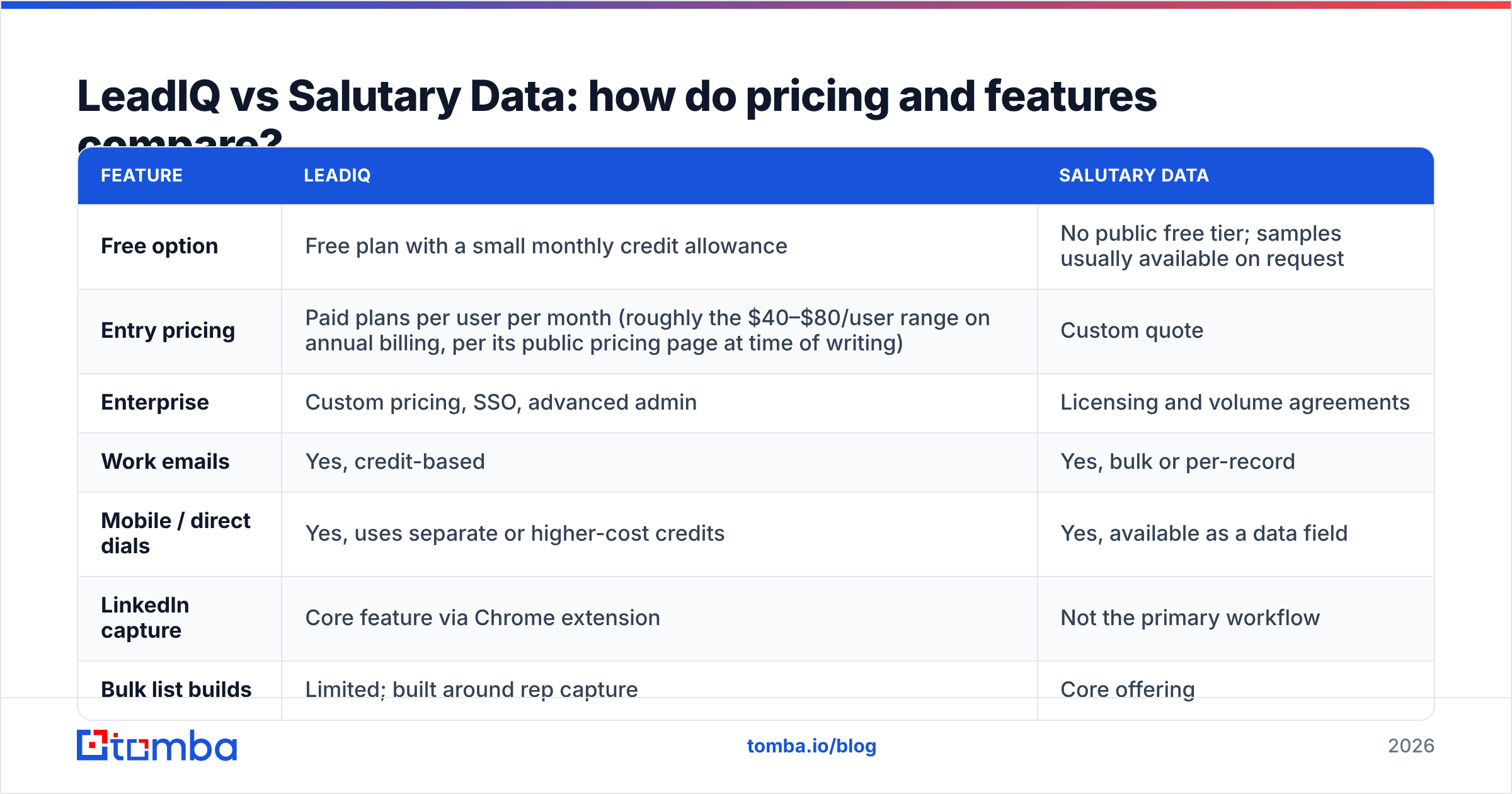
| Feature | LeadIQ | Salutary Data |
|---|---|---|
| Free option | Free plan with a small monthly credit allowance | No public free tier; samples usually available on request |
| Entry pricing | Paid plans per user per month (roughly the $40–$80/user range on annual billing, per its public pricing page at time of writing) | Custom quote |
| Enterprise | Custom pricing, SSO, advanced admin | Licensing and volume agreements |
| Work emails | Yes, credit-based | Yes, bulk or per-record |
| Mobile / direct dials | Yes, uses separate or higher-cost credits | Yes, available as a data field |
| LinkedIn capture | Core feature via Chrome extension | Not the primary workflow |
| Bulk list builds | Limited; built around rep capture | Core offering |
| CRM enrichment / append | Partial, via CRM sync | Core offering |
| API | Available on higher tiers | Core delivery channel |
| Job change alerts | Yes (Track) | Not a headline feature |
| AI email writing | Yes (Scribe) | No |
| Best for | SDR/AE teams prospecting on LinkedIn | Ops teams needing large data volumes |
Two things stand out.
First, cost behaves differently as you scale. LeadIQ's cost goes up with headcount. Salutary Data's goes up with data volume. A 5-rep team capturing 300 contacts a month each is a good fit for LeadIQ. A 3-person marketing ops team that needs 200,000 enriched records per quarter would spend a lot on LeadIQ seats and still not get the bulk delivery it needs.
Second, the features barely overlap. LeadIQ's strongest features (Scribe, Track, sequencer push) are workflow features that Salutary Data doesn't try to offer. Salutary Data's strengths (licensing, bulk append, API-first delivery) are data-supply features that LeadIQ only covers partially. For most teams, the real choice is between two different operating models, not two versions of the same product.
Which one has better data accuracy?#
Nobody can give you an honest universal answer. Accuracy depends on your segment, your region, and how fresh the records are when you use them.
Here's what does hold up:
- Rep-captured data is usually fresher at the point of use. When a LeadIQ user captures a contact, the lookup happens right then, against a live profile. That's a real advantage for reaching people who just changed roles.
- Bulk data goes stale over time. Any licensed or bulk-delivered dataset starts to decay the day it's delivered. B2B contact data is widely estimated to decay by 20–30% a year as people change jobs. That's a property of the data, not a problem with Salutary Data specifically. The fix is to re-verify before you send and to schedule regular refreshes.
- Verification is your job either way. Whatever you buy, run an email verification pass before a record goes into a sequence. It protects your sender reputation, and it's far cheaper than a spike in bounces.
The only reliable way to compare is a blind test on your own ICP. Pull 200 contacts you already know are valid, ask each vendor to match them, and measure match rate, correct-email rate, and bounce rate after verification. Review sites like G2 are useful for workflow and support feedback, but they can't tell you how either vendor covers your segment.
When should you choose LeadIQ?#
LeadIQ is the better choice when:
- Your reps prospect by hand on LinkedIn. If Sales Navigator is where pipeline starts, LeadIQ fits into that workflow better than any bulk data file.
- CRM hygiene has been a problem. Automatic duplicate checks and field mapping at capture time stop reps from creating messy records.
- You sell to repeat buyers. Job change tracking tends to produce warm pipeline, because a former champion at a new company is one of the best leads you can get.
- You want one tool for capture, data, and first-touch copy. Scribe won't replace a good copywriter, but it speeds up the first draft.
Skip LeadIQ if most of your reps won't use it every day, if you mostly need bulk lists instead of one-by-one capture, or if your per-seat budget is tight.
When should you choose Salutary Data?#
Salutary Data is the better choice when:
- You need volume. Building a TAM, running ABM campaigns across thousands of accounts, or seeding a new territory all call for lists, not clicks.
- Your CRM needs a large-scale fix. Enrichment and append jobs can fill missing emails, phones, and titles across your whole database far faster than reps could.
- You're embedding data in a product or internal system. Licensing and API delivery are built for this. Per-seat tools aren't.
- You have ops capacity. Someone can own ingestion, dedupe, verification, and refresh cycles.
Skip Salutary Data if you don't have anyone to manage bulk data, if your team wants a self-serve tool to try today, or if your volume is too low to justify a custom contract.
What does each option cost in a realistic scenario?#
Here are three common team shapes. The figures are illustrative, so get real quotes before budgeting.
- Solo founder or 1–2 SDRs, around 500 contacts a month. LeadIQ's lower paid tier is workable if you live in LinkedIn. Salutary Data is probably overkill at this volume. A self-serve email finder is usually the cheapest route.
- 10-rep SDR team, LinkedIn-first. LeadIQ's per-seat model adds up fast: ten seats on a mid-tier plan costs several hundred dollars a month before any premium phone credits. It's often still worth it if reps actually use it and Track generates pipeline.
- Marketing ops team enriching 100,000+ CRM records. This is where Salutary Data fits. A volume-based quote for enrichment will almost always beat buying enough per-seat credits to do the same job, and the delivery format suits the work.
For many teams, the right answer is a mix: a rep-facing tool for daily prospecting, bulk data for ops, and a verification layer between everything and your sending domain.
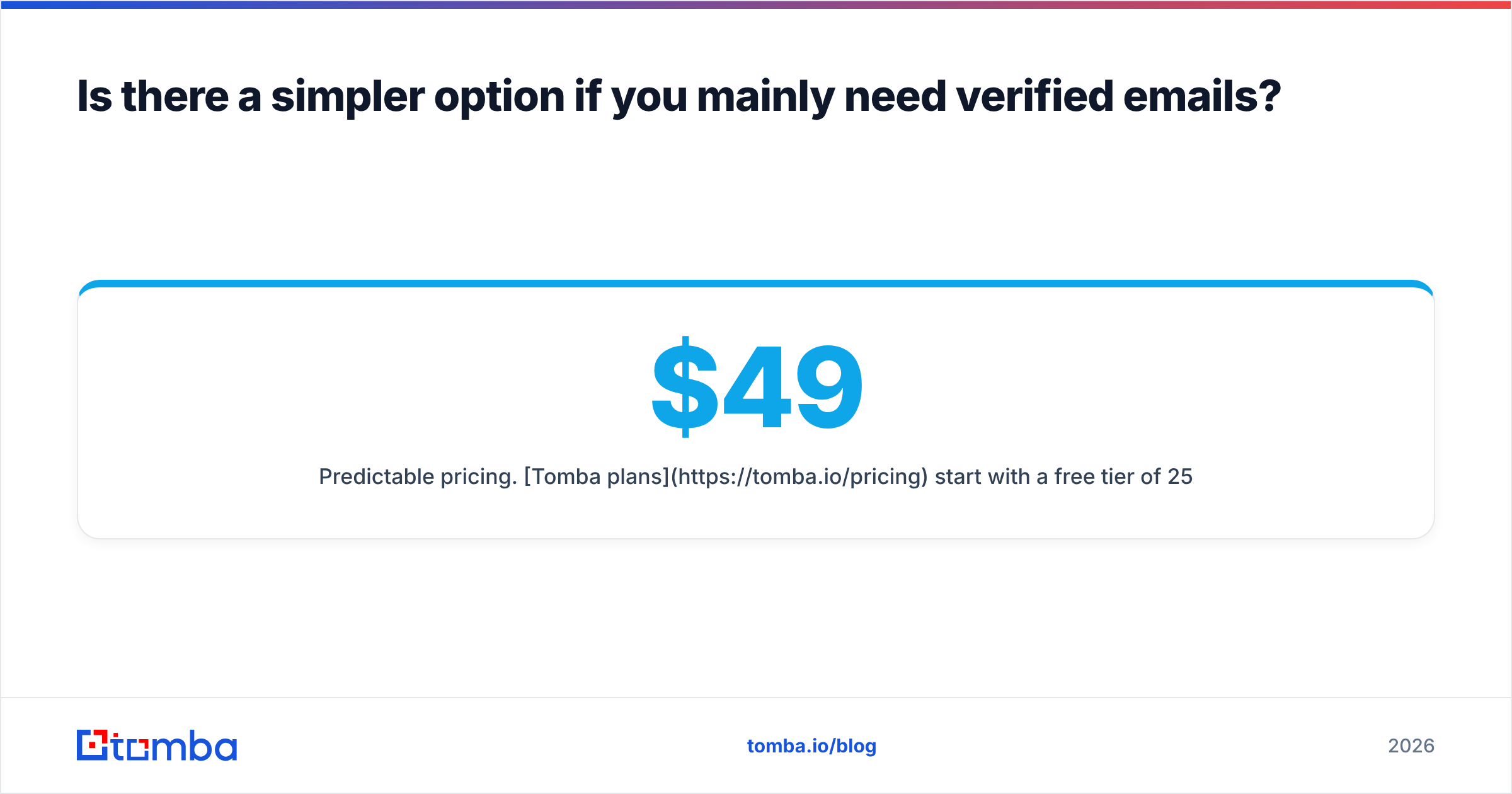
Is there a simpler option if you mainly need verified emails?#
Often, yes. A lot of teams looking at LeadIQ vs Salutary Data really just need accurate work emails for a known list of people or companies. For that, a dedicated email finder is usually simpler and cheaper:
- Predictable pricing. Tomba plans start with a free tier of 25 searches a month, then Starter at $49/mo, Growth at $99/mo, and Pro at $249/mo, with Enterprise on custom terms. You don't pay per seat just to give a teammate access.
- Both workflows. A browser extension covers one-off lookups. Bulk upload and domain search cover list work. An API covers automation.
- Built-in verification and enrichment. You can run emails through the verifier and add company or contact fields with data enrichment in the same place.
It won't replace LeadIQ's job-change alerts or Salutary Data's licensing agreements. If your core need is "find and verify the right email for these people," though, it covers most of the work at a fraction of the cost. If LeadIQ's per-seat pricing is the main problem, see our LeadIQ alternative breakdown for a closer comparison.
How should you make the final call?#
Answer these four questions and the choice usually becomes obvious:
- Who is the primary user? Reps point to LeadIQ. Ops points to Salutary Data.
- What's the unit of work? One contact at a time points to LeadIQ. Thousands of records points to Salutary Data.
- Who owns data quality after delivery? If nobody does, avoid bulk data until someone can.
- How will you measure ROI? For LeadIQ: meetings booked per seat. For Salutary Data: cost per enriched, verified record and campaign reach.
Then run a small paid pilot or a blind match test on your own ICP before signing anything annual. Vendor demos use their best segments, so your test should use yours.
Frequently asked questions#
Is LeadIQ a data provider or a sales tool?#
It's both, but mainly a sales workflow tool. LeadIQ supplies contact data, and the product is designed around reps capturing that data on LinkedIn and syncing it into their CRM and sequencer.
Does Salutary Data have a Chrome extension like LeadIQ?#
Rep-facing browser capture isn't Salutary Data's main focus. It concentrates on list builds, licensing, enrichment, and API delivery. Check its website for the current product lineup.
Can I use LeadIQ and Salutary Data together?#
Yes, and some larger teams do. Salutary Data handles bulk TAM builds and CRM enrichment, and LeadIQ handles reps' daily LinkedIn prospecting. Just make sure your CRM has dedupe rules so the two sources don't create duplicate records.
Which is cheaper, LeadIQ or Salutary Data?#
It depends on your team shape. LeadIQ is cheaper for small rep teams with modest volume. Salutary Data is usually cheaper per record at high volume. If you mainly need verified emails, a self-serve email finder is often cheaper than both.
Do I still need to verify emails from either vendor?#
Yes. Any B2B dataset decays over time, and even point-of-capture lookups can miss catch-all domains or recent job moves. Verify before you send to protect your deliverability.
Ready to find verified emails without per-seat pricing?#
If you've compared LeadIQ and Salutary Data and realised you mostly need accurate work emails, not a seat-based prospecting suite or a bulk licensing contract, try the Tomba Email Finder. Search by name and domain, pull every public address for a company, or upload a list in bulk, and verify each result before it reaches your sequencer. Start on the free plan with 25 searches a month, then upgrade to Starter at $49/mo when you're ready to scale.
Related guides#
// get started
Find, verify and enrich your first contacts today
Start on the free plan with 25 searches a month, then scale when your team is ready.
Free plan · No credit card required · GDPR & CCPA
// about the author