LeadIQ vs SphereScout (2026): Which Prospecting Tool Fits You?
LeadIQ and SphereScout both sell B2B contact data, but they are built for different buyers. One finds decision-makers at tech companies. The other pulls local businesses from Google Maps. Here is how to pick.
TL;DR
- LeadIQ finds contact data for specific people. It captures verified emails and direct dials from LinkedIn and pushes them into Salesforce, HubSpot, Outreach, or Salesloft. It suits SDR teams selling into mid-market and enterprise accounts.
- SphereScout is a database of local businesses. It pulls companies from Google Maps and fills in details from their websites, so you get company emails, phone numbers, socials, and websites in bulk. It suits agencies and teams selling to SMBs by location and industry.
- On price per record, SphereScout is far cheaper. Plans start around $15/mo, with a Growth tier near $99/mo for about 40K contacts. LeadIQ charges per seat and per credit, and a phone number costs 10 credits.
- Neither tool covers everything. LeadIQ is weak on local SMBs. SphereScout mostly gives you company-level inboxes (info@, contact@), not named decision-makers.
- Pick based on who you sell to, not on feature lists. If you need named people at companies you've already chosen, a dedicated email finder can fill the gap for either tool.
What is the real difference between LeadIQ and SphereScout?#
These two tools rarely come up in the same search, and that tells you something. "LeadIQ vs SphereScout" is less a head-to-head between rivals and more a choice between two ways of prospecting.
LeadIQ is built around the person. A rep opens a LinkedIn profile or a Sales Navigator list, clicks the Chrome extension, and LeadIQ returns that person's work email and, if available, a mobile or direct dial. The record goes straight into the CRM or sequencer. Add job-change tracking and the Scribe AI email writer, and you have a tool made for account-based outbound SDR teams.
SphereScout is built around the business. It says it has 200M+ local business records, collected from Google Maps and filled in with data scraped from each company's own website. You filter by category ("dental clinics", "HVAC contractors", "boutique hotels") and location, then export a CSV with company name, email, phone, website, and social handles. It's made for agencies, local-services vendors, and anyone whose buyer is a business with a street address.
Here's a simple way to picture it. LeadIQ is a phone book of people who work at companies. SphereScout is a phone book of storefronts.
How do LeadIQ and SphereScout compare feature by feature?#
The table below reflects each vendor's public positioning and pricing pages at the time of writing. Credit rules and prices change often, so check both sites before you sign anything.
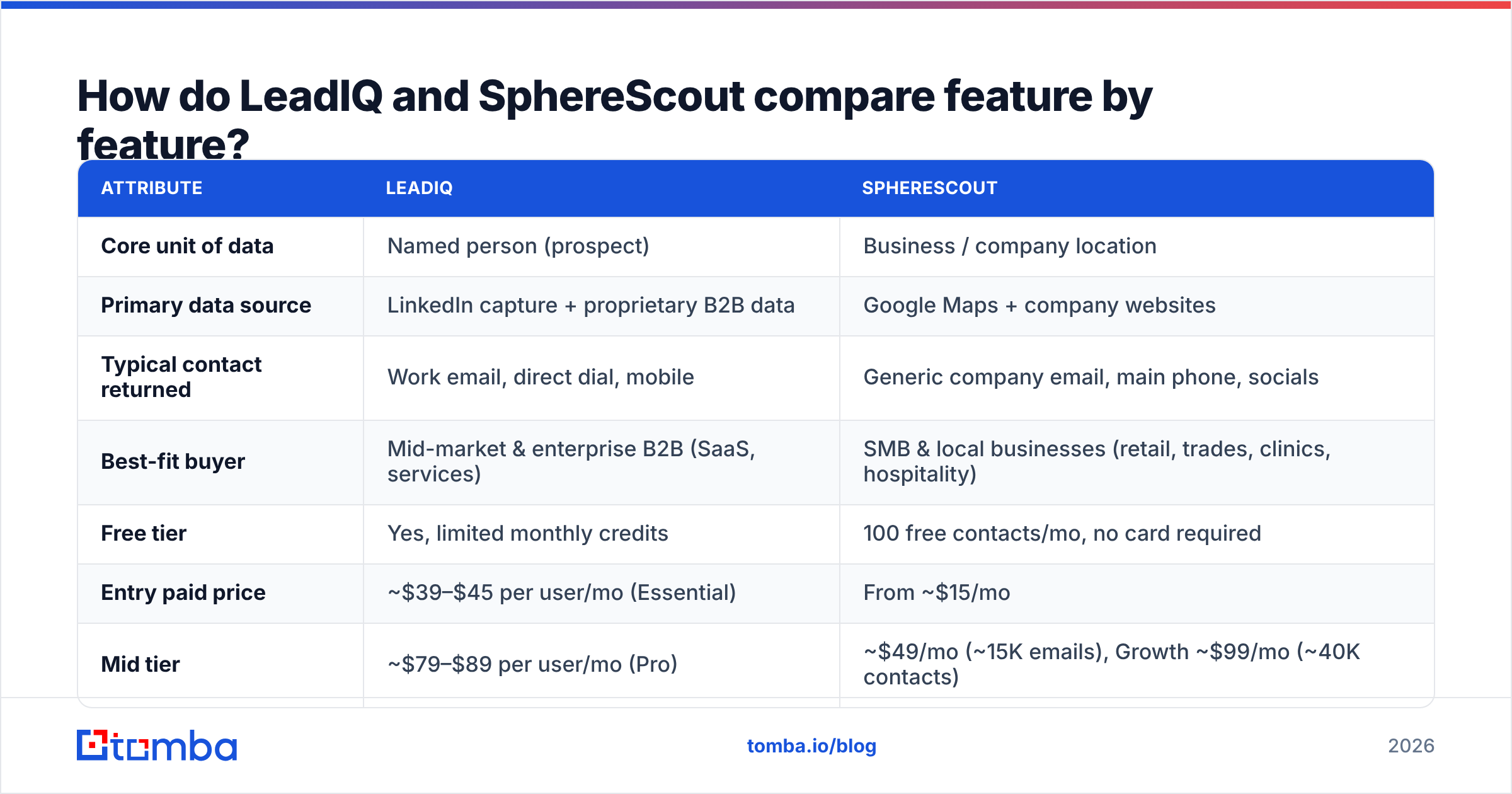
| Attribute | LeadIQ | SphereScout |
|---|---|---|
| Core unit of data | Named person (prospect) | Business / company location |
| Primary data source | LinkedIn capture + proprietary B2B data | Google Maps + company websites |
| Typical contact returned | Work email, direct dial, mobile | Generic company email, main phone, socials |
| Best-fit buyer | Mid-market & enterprise B2B (SaaS, services) | SMB & local businesses (retail, trades, clinics, hospitality) |
| Free tier | Yes, limited monthly credits | 100 free contacts/mo, no card required |
| Entry paid price | ~$39–$45 per user/mo (Essential) | From ~$15/mo |
| Mid tier | ~$79–$89 per user/mo (Pro) | ~$49/mo (~15K emails), Growth ~$99/mo (~40K contacts) |
| Pricing model | Per seat + credits (phone ≈ 10 credits) | Per volume of contacts |
| CRM / sequencer sync | Salesforce, HubSpot, Outreach, Salesloft, Gong Engage | CSV export, CRM integration, REST API |
| AI features | Scribe (AI email writer), job-change alerts | New-lead alerts on saved searches, AI-agent-friendly API |
| Chrome extension on LinkedIn | Yes, core workflow | Not the core workflow |
| Main weakness | Expensive at volume; thin on local SMBs | Few named decision-makers at larger companies |
The main thing to notice is the "Typical contact returned" row. LeadIQ gets you Jane Smith, VP of Operations, jane.smith@company.com, +1 mobile. SphereScout gets you Smith Plumbing, info@smithplumbing.com, main line, Facebook page. Both are useful. They answer different questions.

How does LeadIQ work in a real SDR workflow?#
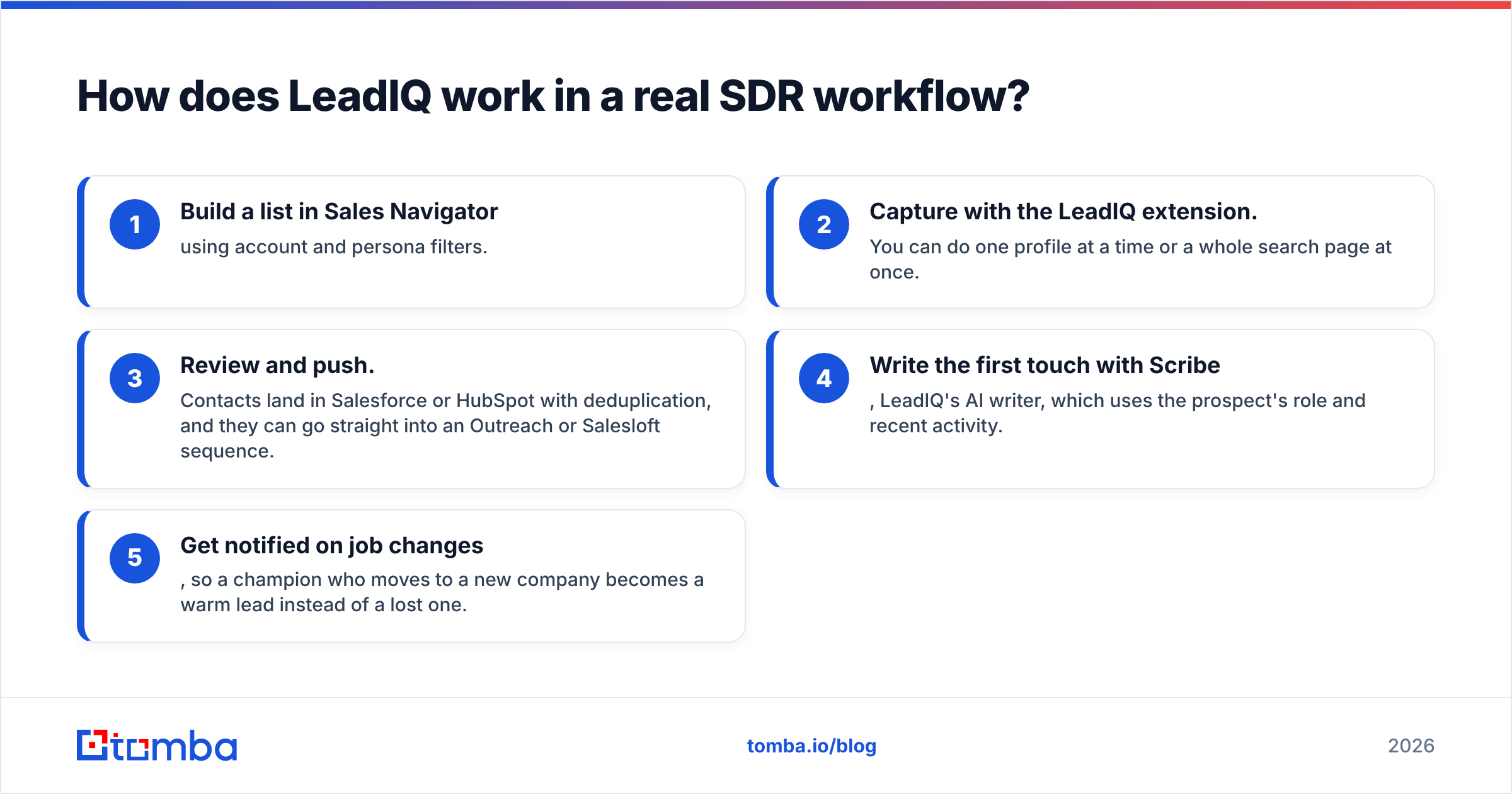
LeadIQ fits into the tools an outbound team already uses. A typical day for a rep looks like this:
- Build a list in Sales Navigator using account and persona filters.
- Capture with the LeadIQ extension. You can do one profile at a time or a whole search page at once.
- Review and push. Contacts land in Salesforce or HubSpot with deduplication, and they can go straight into an Outreach or Salesloft sequence.
- Write the first touch with Scribe, LeadIQ's AI writer, which uses the prospect's role and recent activity.
- Get notified on job changes, so a champion who moves to a new company becomes a warm lead instead of a lost one.
Many reviewers on G2's LeadIQ page say the real value is less the raw data and more the saved clicks. Reps don't copy and paste between tabs, and ops doesn't have to clean up duplicate records.
What it costs you:
- Credits run out fast when you need phone numbers. At roughly 10 credits per phone number versus 1 per email, a team that dials a lot burns through its allowance quickly.
- Per-seat pricing grows with headcount. A 10-rep team on Pro is already a four-figure monthly bill before any Enterprise add-ons. Third-party reviews put mid-size Enterprise contracts in the low-to-mid five figures per year.
- Coverage follows LinkedIn. A dentist, restaurant owner, or roofing contractor often has no useful LinkedIn profile, so LeadIQ has nothing to capture.
If those limits are what's pushing you away, our LeadIQ alternative breakdown covers tools with different pricing models.
How does SphereScout work in a real prospecting workflow?#
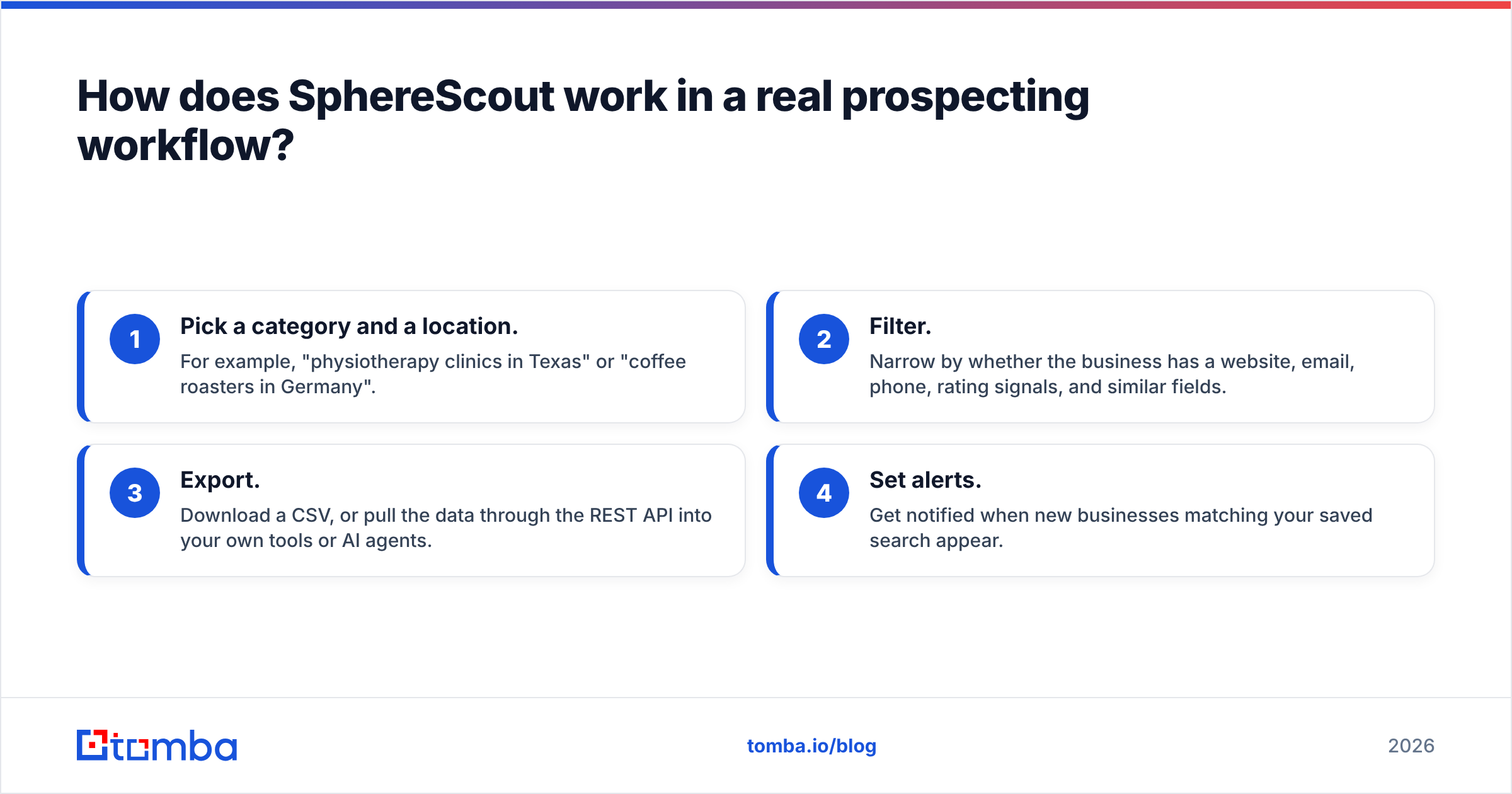
SphereScout's workflow is closer to building a mailing list than to sequencing individual people:
- Pick a category and a location. For example, "physiotherapy clinics in Texas" or "coffee roasters in Germany".
- Filter. Narrow by whether the business has a website, email, phone, rating signals, and similar fields.
- Export. Download a CSV, or pull the data through the REST API into your own tools or AI agents.
- Set alerts. Get notified when new businesses matching your saved search appear.
This fits several groups well:
- Marketing and web agencies that sell to local SMBs.
- B2B vendors with a vertical focus, such as POS systems for restaurants, practice-management software for clinics, or supplies for salons.
- Franchise and field-sales teams that plan territory by ZIP code or city.
- Data teams building AI agents that need structured local-business records.
What it costs you:
- Mostly company-level inboxes. An info@ or contact@ address reaches whoever reads the shared inbox. That's fine for a 3-person business where the owner reads everything. It works poorly for a 300-person company where it goes to a receptionist or a ticketing system.
- Less role targeting. You can target "restaurants in Chicago". It's much harder to target "the operations manager at restaurant groups with 5+ locations".
- Deliverability needs care. Generic role addresses tend to bounce more and draw more spam complaints than named inboxes, so verify before you send. Running exports through an email verifier should be standard practice.
Is LeadIQ or SphereScout better on price?#
For raw volume, SphereScout wins easily. Being "cheaper" only matters if the data fits your motion, though.
Here are rough example scenarios based on public pricing:
- Agency wants 20,000 local business contacts a month. SphereScout's mid tiers cover this for tens of dollars a month. On LeadIQ, 20,000 credits would take several seats plus a custom plan, and much of that local-business data isn't in LeadIQ's index anyway.
- SDR team needs 400 named decision-makers a month, with phones for 100 of them. That's about 400 email credits plus about 1,000 phone credits. LeadIQ is priced for this, and SphereScout mostly can't provide named people at that seniority.
- Founder doing mixed prospecting. Neither tool is ideal on its own. A pay-per-lookup email finder may be the better fit.
A useful metric is cost per usable contact: what you pay per record that actually reaches the right person and doesn't bounce. A $0.001 generic inbox that goes nowhere costs more than a $0.50 verified email to the right VP.
Which tool has better data quality?#
"Better" depends on what the data is for.
LeadIQ's strength is person-level accuracy at companies with a strong LinkedIn presence. Emails are verified before delivery, and job-change tracking keeps records current. That matters because B2B contact data decays quickly: people change roles, companies rebrand, domains move. Its weak spot is coverage outside that world. Small businesses, non-English markets with low LinkedIn use, and blue-collar industries tend to return empty results.
SphereScout's strength is breadth and freshness at the business level. Google Maps listings get updated constantly by owners and users, so addresses, phones, and "is this place still open" signals tend to be current. Its weak spot is depth. A website's contact page rarely lists the person who signs the purchase order.
Either way, treat any exported list as a starting point, not a finished list. Verify emails before sending, deduplicate against your CRM, and watch bounce rates in your first sends.
When should you choose LeadIQ?#
Choose LeadIQ if most of these apply:
- Your buyers are named roles at companies with 50+ employees. Think VP Sales, Head of IT, CFO.
- Your team already works in Sales Navigator and wants one-click capture.
- CRM hygiene matters to you. You want records to sync cleanly into Salesforce or HubSpot and into Outreach or Salesloft sequences.
- You run account-based outbound, where 200 well-targeted contacts beat 20,000 generic ones.
- You care about tracking job changes as a pipeline source.
- Your budget can absorb per-seat pricing, and your team dials enough to justify the phone credits.
When should you choose SphereScout?#
Choose SphereScout if most of these apply:
- Your buyers are local businesses, where the owner and the decision-maker are often the same person.
- You segment by geography and category, not by job title.
- You need volume, meaning thousands to tens of thousands of records a month, at low cost per record.
- You want API or CSV access to feed your own enrichment, scoring, or AI-agent workflow.
- Your outreach mixes channels. Phone, email, and social handles all matter, and a main business line is a useful contact.
- You're price-sensitive and want a free tier you can actually test with (100 contacts, no card).

Can you use LeadIQ and SphereScout together?#
Yes, and some teams do. The two tools rarely overlap, so running both isn't redundant:
- Tiered outbound. Use SphereScout to size and list the SMB segment, and LeadIQ for your named mid-market and enterprise accounts.
- Agency plus product-led motion. An agency uses SphereScout to find local clients, while its SaaS product team uses LeadIQ to reach partnership leads at larger platforms.
The catch is that two tools mean two bills, two data formats, and two sources of duplicates. Before you commit to both, check whether the gap is really "I need a named person at this specific business". If it is, a third, lighter option often works better.
What is the gap neither tool fully covers?#
Picture this situation: you've exported 2,000 multi-location restaurant groups from SphereScout, or you have 150 target accounts outside LinkedIn's coverage. You know the company. What you don't have is the named decision-maker's verified email.
That's the job of a domain-based email finder. You enter a company domain, or a first name, last name, and domain, and it returns the most likely professional email with a confidence score and the sources where that address was seen. Pair it with verification and you've turned a generic info@ list into a list of real people, without paying for seats you don't need.
Three practical ways to use it:
- Upgrading a SphereScout list. Run the exported domains through domain search to see which named employees are publicly listed, then target owners, GMs, or ops leads.
- Filling LeadIQ's gaps. When LeadIQ comes back empty for a small or non-LinkedIn-heavy company, look up the person by name and domain instead.
- Checking before you send. Verify every address, especially role-based ones, before it goes into a sequence.
Pricing for this layer usually runs per search, not per seat. Tomba's plans start with a free tier of 25 searches a month, then Starter at $49/mo, Growth at $99/mo, and Pro at $249/mo, so you can size it to your gap instead of your headcount.
So, LeadIQ vs SphereScout: which should you pick?#
Pick LeadIQ if you sell into defined accounts, your reps live in Sales Navigator, and clean CRM sync plus direct dials justify per-seat pricing.
Pick SphereScout if you sell to local businesses by category and location, want high volume at a low cost per record, and are fine reaching company-level inboxes and main phone lines.
Pick neither as your only tool if you keep ending up with the right company but not the right person. That calls for a dedicated email finder alongside whichever database you choose.
If that last case sounds like you, try Tomba Email Finder. Give it a company domain, or a name plus a domain, and it returns verified professional emails with sources and confidence scores. It works alongside a LeadIQ capture or a SphereScout export, and the free plan gives you 25 searches a month to test it on your own list before you commit.
Related guides#
// get started
Find, verify and enrich your first contacts today
Start on the free plan with 25 searches a month, then scale when your team is ready.
Free plan · No credit card required · GDPR & CCPA
// about the author