LeadIQ vs Thomson Data: Prospecting Tool or Data Vendor in 2026?
LeadIQ and Thomson Data both sell B2B contacts, but they work in very different ways. One captures leads live from LinkedIn. The other sells pre-built lists by quote. Here's which one fits your team.
TL;DR
- LeadIQ is a prospecting tool for SDRs. You find a contact on LinkedIn, capture their email and phone number, and push the record into your CRM or sequencer with one click.
- Thomson Data is a B2B data vendor. It sells ready-made contact lists, data append services, and technology install-base lists, and you get a custom quote for each order.
- If you prospect one account at a time and want CRM sync, go with LeadIQ. If you need a large list of a specific segment (for example, hospital CFOs in the Midwest) for a one-off campaign, go with Thomson Data.
- Whichever you pick, verify the data before you send. Purchased lists and captured contacts both lose accuracy over time.
- If you mainly need to find and verify emails by name or domain, a pay-as-you-go email finder like Tomba costs less than either one.
What is the real difference between LeadIQ and Thomson Data?#
People search "LeadIQ vs Thomson Data" as if the two were interchangeable. They aren't. Both sell B2B contact information, but they sit at opposite ends of the buying process.
LeadIQ is software. You install a Chrome extension, open a LinkedIn or Sales Navigator profile, and LeadIQ looks up that person's work email and phone number. The contact then goes straight into Salesforce, HubSpot, Outreach, or Salesloft. Its main selling point is speed inside an SDR's daily routine. It also includes AI-written outreach (Scribe) and job-change tracking.
Thomson Data is a data vendor in the traditional sense. You tell them who you want: job titles, industries, company sizes, geographies, or tech stacks. They build a list and quote a price, and you receive a file. They also offer data appending, which fills missing emails or phone numbers in your existing records, plus industry-specific lists. Healthcare and technology users are among the segments they promote most.
An analogy helps. LeadIQ is a fishing rod: you catch one fish at a time, with a lot of control over which fish. Thomson Data is buying a crate of fish from a wholesaler: you get volume up front, but you didn't pick each one, and the crate starts aging as soon as it's packed.
How do LeadIQ and Thomson Data compare feature by feature?#
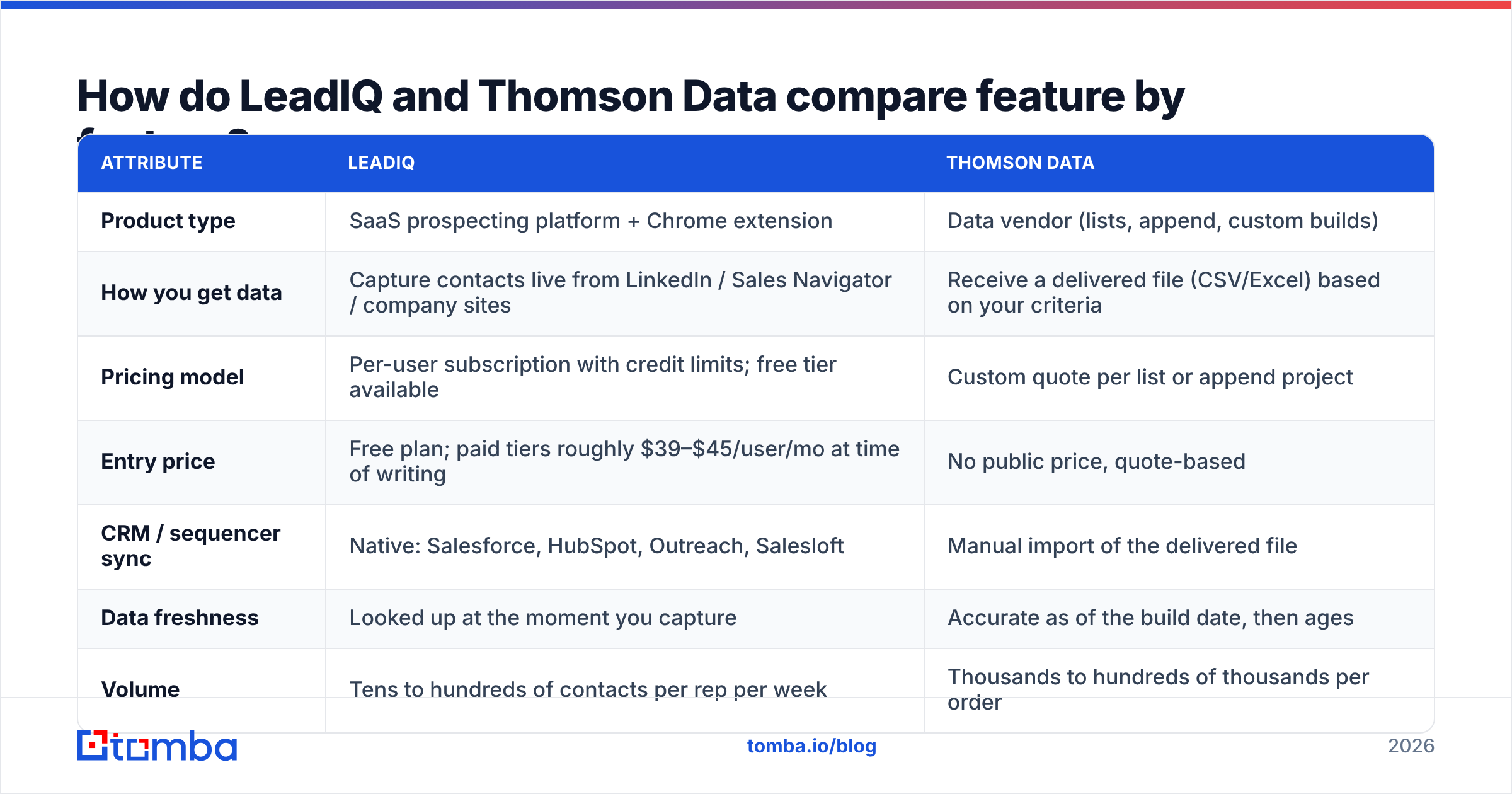
Here is the side-by-side. Pricing reflects publicly available information at the time of writing. LeadIQ lists self-serve tiers, and Thomson Data works on custom quotes, so check both vendors before you budget.
| Attribute | LeadIQ | Thomson Data |
|---|---|---|
| Product type | SaaS prospecting platform + Chrome extension | Data vendor (lists, append, custom builds) |
| How you get data | Capture contacts live from LinkedIn / Sales Navigator / company sites | Receive a delivered file (CSV/Excel) based on your criteria |
| Pricing model | Per-user subscription with credit limits; free tier available | Custom quote per list or append project |
| Entry price | Free plan; paid tiers roughly $39–$45/user/mo at time of writing | No public price, quote-based |
| CRM / sequencer sync | Native: Salesforce, HubSpot, Outreach, Salesloft | Manual import of the delivered file |
| Data freshness | Looked up at the moment you capture | Accurate as of the build date, then ages |
| Volume | Tens to hundreds of contacts per rep per week | Thousands to hundreds of thousands per order |
| AI features | Scribe AI email writer, job-change alerts | Not a core offering |
| Best for | SDR/BDR teams doing account-based outbound | Marketing teams, direct mail, large one-off campaigns |
| Main risk | Credit caps and per-seat cost as the team grows | List decay, and compliance of how the list is used |
The table shows why "which is better?" is the wrong question. The useful question is which buying model matches how your team actually sends emails.
How does each tool fit into a real workflow?#
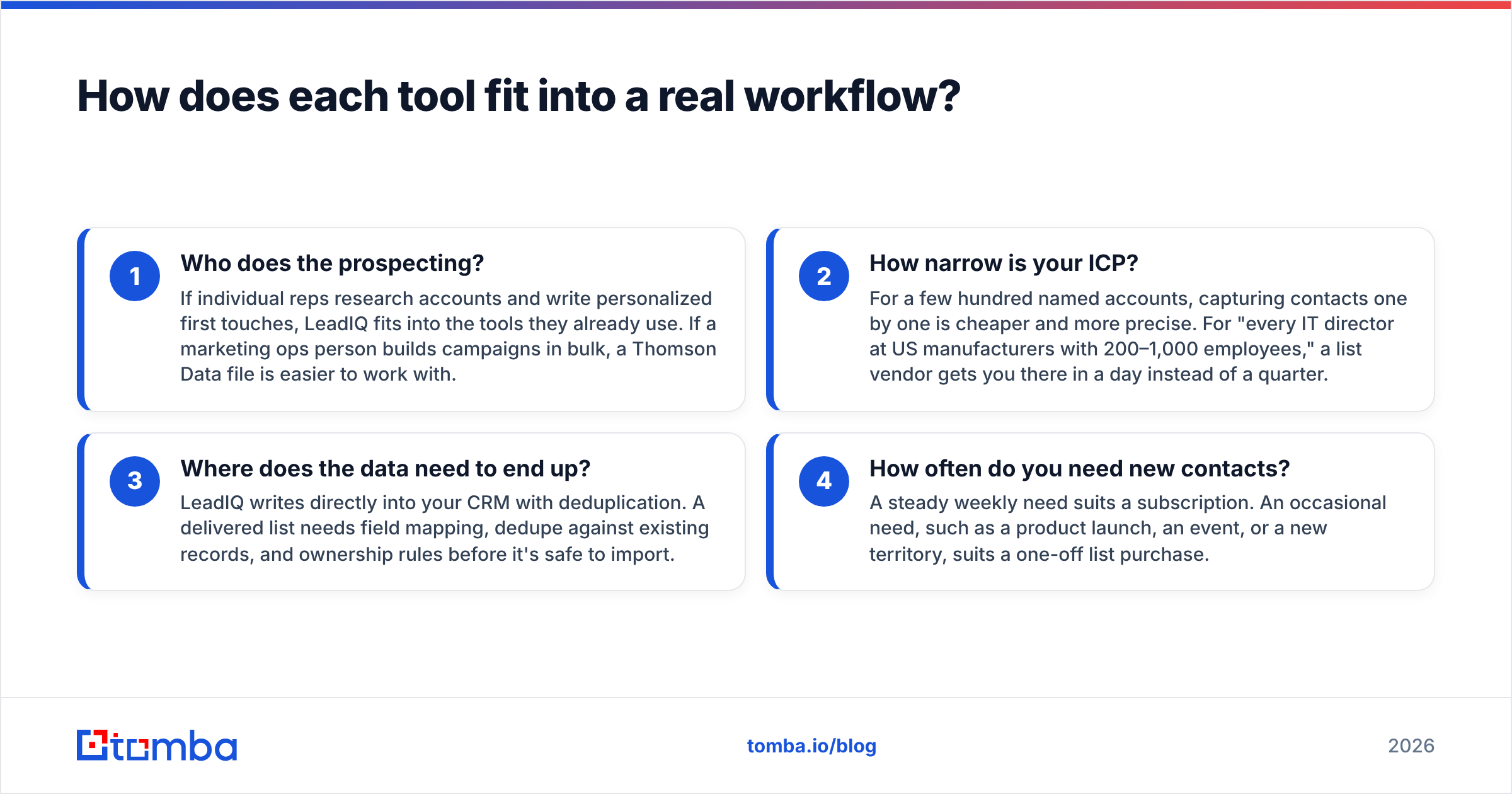
These are the four workflow questions that usually decide the choice:
- Who does the prospecting? If individual reps research accounts and write personalized first touches, LeadIQ fits into the tools they already use. If a marketing ops person builds campaigns in bulk, a Thomson Data file is easier to work with.
- How narrow is your ICP? For a few hundred named accounts, capturing contacts one by one is cheaper and more precise. For "every IT director at US manufacturers with 200–1,000 employees," a list vendor gets you there in a day instead of a quarter.
- Where does the data need to end up? LeadIQ writes directly into your CRM with deduplication. A delivered list needs field mapping, dedupe against existing records, and ownership rules before it's safe to import.
- How often do you need new contacts? A steady weekly need suits a subscription. An occasional need, such as a product launch, an event, or a new territory, suits a one-off list purchase.

Is LeadIQ worth it for SDR teams?#
For teams built around LinkedIn prospecting, usually yes. Its strengths are real:
- Low friction. Reps stay on the LinkedIn profile, click capture, and move on. No spreadsheets.
- Clean CRM hygiene. LeadIQ checks whether the contact already exists in Salesforce or HubSpot before creating a duplicate. RevOps teams care about this a lot.
- Job-change tracking. When a past champion moves to a new company, you get an alert. For many teams this is the highest-converting signal they have.
- Built-in personalization. Scribe drafts outreach from the prospect's profile, which saves time on the first draft (you still need to edit it).
The limitations show up at scale. Pricing is per seat with credit allowances, so a 20-rep team pays 20 times over, and heavy users hit their caps. Coverage is best for North American tech and SaaS contacts and thinner in some international and non-tech segments. Mobile number coverage in particular varies by region. Like any real-time lookup tool, some addresses come back unverified or on catch-all domains, and those need a second check.
You can read LeadIQ user reviews on G2 to see how these trade-offs play out for teams your size. If per-seat pricing is the sticking point, our LeadIQ alternative breakdown covers cheaper options.
Is Thomson Data a good choice for bulk B2B lists?#
Thomson Data suits a different buyer. According to its official site, it focuses on targeted email and mailing lists, data appending, and segment-specific databases, including healthcare professionals and technology users.
Where it works well:
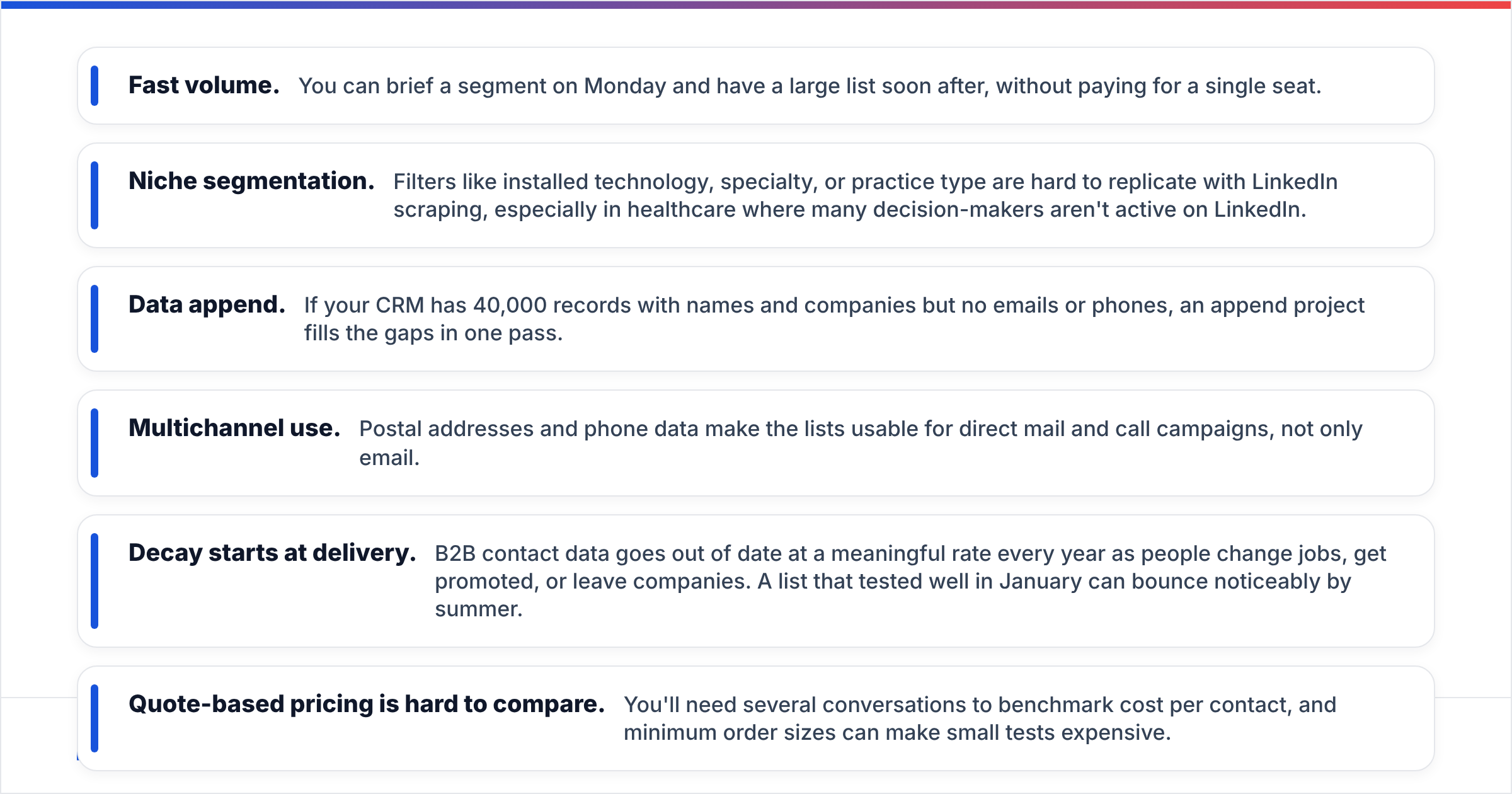
- Fast volume. You can brief a segment on Monday and have a large list soon after, without paying for a single seat.
- Niche segmentation. Filters like installed technology, specialty, or practice type are hard to replicate with LinkedIn scraping, especially in healthcare where many decision-makers aren't active on LinkedIn.
- Data append. If your CRM has 40,000 records with names and companies but no emails or phones, an append project fills the gaps in one pass.
- Multichannel use. Postal addresses and phone data make the lists usable for direct mail and call campaigns, not only email.
The risks come with the purchased-list model in general, not with Thomson Data specifically:
- Decay starts at delivery. B2B contact data goes out of date at a meaningful rate every year as people change jobs, get promoted, or leave companies. A list that tested well in January can bounce noticeably by summer.
- Quote-based pricing is hard to compare. You'll need several conversations to benchmark cost per contact, and minimum order sizes can make small tests expensive.
- Deliverability exposure. Sending cold email to a large list you haven't verified is a quick way to damage your sender reputation. Treat every purchased file as unverified until you've checked it.
- Compliance is your responsibility. Whether you can legally email a contact depends on your jurisdiction and how you use the data (GDPR in the EU, CAN-SPAM and state laws in the US). Ask any vendor how the data was sourced and whether opt-out handling is documented.
Which is more accurate: LeadIQ or Thomson Data?#
No one has published a neutral, same-sample accuracy benchmark comparing these two, so be skeptical of any head-to-head percentage you see. What you can reason about is how each model affects accuracy:
- LeadIQ looks up data when you capture it, so it's as fresh as its underlying sources that day. Errors come from coverage gaps and catch-all domains.
- Thomson Data delivers data that was accurate when the list was built. Errors come from the gap between the build date and your send date, plus any records that were stale at build time.
In practice, the most accurate setup is whichever source you choose plus an independent verification step. Run every list, captured or purchased, through an email verifier before it goes into a sequence. Remove invalid addresses, flag catch-alls for lower-volume sending, and re-verify anything older than 60–90 days.
A simple test works for both vendors. Ask for a sample of 200–500 contacts in your exact ICP, verify them independently, and compare bounce rates, title accuracy, and the share of catch-all domains. It costs a few hours and tells you more than any sales deck.
How do pricing and total cost of ownership compare?#
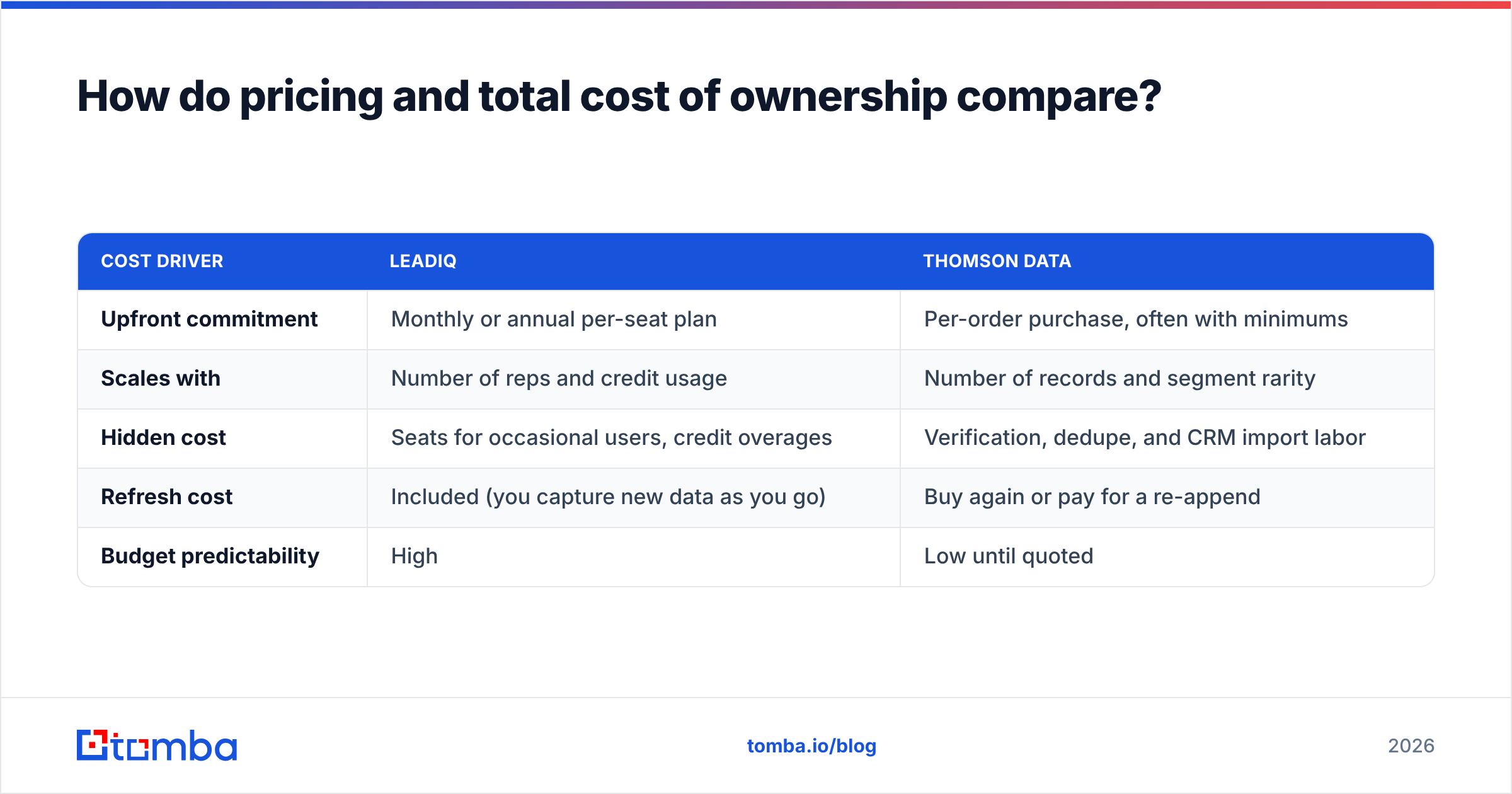
Sticker price is only part of the cost. Here is what each one actually costs you:
| Cost driver | LeadIQ | Thomson Data |
|---|---|---|
| Upfront commitment | Monthly or annual per-seat plan | Per-order purchase, often with minimums |
| Scales with | Number of reps and credit usage | Number of records and segment rarity |
| Hidden cost | Seats for occasional users, credit overages | Verification, dedupe, and CRM import labor |
| Refresh cost | Included (you capture new data as you go) | Buy again or pay for a re-append |
| Budget predictability | High | Low until quoted |
For a five-rep SDR team prospecting steadily, LeadIQ's per-seat model is predictable and includes the workflow tooling. For a marketing team that needs 25,000 contacts twice a year, a Thomson Data order may cost less per contact, as long as you budget for verification and cleanup.
There is also a third option many teams overlook. If what you really need is to find and verify email addresses for a known list of names or domains, a dedicated email finder with pay-as-you-go credits often costs less than both. Tomba's plans start with a free tier (25 searches/month), and paid plans run $49/mo Starter, $99/mo Growth, and $249/mo Pro. See the Tomba pricing page for full credit limits.

Which should you choose: LeadIQ or Thomson Data?#
Pick based on your operating model, not the feature list.
Choose LeadIQ if:
- Your outbound is account-based and run by SDRs or AEs.
- LinkedIn and Sales Navigator are where your reps already spend their day.
- CRM hygiene and sequencer sync matter more than raw volume.
- You want job-change alerts to re-engage past champions.
Choose Thomson Data if:
- You need a large, tightly segmented list quickly, especially in healthcare or technology-user segments.
- You run direct mail, phone, or multichannel campaigns alongside email.
- You have a one-off need (launch, event, new territory) rather than steady weekly prospecting.
- You have the ops capacity to verify, dedupe, and import a large file safely.
Choose neither (or add a layer) if:
- You already know which companies or people you want and just need their verified emails.
- Your budget can't support per-seat plans or minimum list orders.
- You want to enrich or verify data you already own instead of buying new records.
Many mature teams combine these. They use a list vendor for top-of-funnel segments, a prospecting tool for named accounts, and an independent finder and verifier to keep both clean. For more context on how buyers evaluate this category, Gartner's sales technology research covers sales-data and engagement platforms in depth.
What should you check before signing with either vendor?#
Use this checklist in your evaluation calls:
- Sample in your exact ICP. Not a generic demo list, but your titles, industries, and regions.
- Data sourcing. How was the data collected, and how often is it refreshed?
- Bounce guarantees. Does the vendor credit or replace invalid records, and within what time window?
- Catch-all handling. How are catch-all domains flagged? You'll want a dedicated catch-all check for those.
- Export and ownership rights. Can you keep the data after your contract ends? Are there usage restrictions?
- Compliance documentation. Opt-out processes, GDPR handling, and suppression list support.
- Integration effort. Native sync, or a CSV someone has to map by hand?
The bottom line#
LeadIQ and Thomson Data answer different questions. LeadIQ helps a rep find the right person and put them in the CRM right now. Thomson Data answers "who are all the people in this segment?" and delivers them in one file. Neither is the better product overall. The right choice is the one that matches how your team sources and sends.
If your real bottleneck is simpler, such as finding the correct email for a name and company, or checking that a purchased list won't bounce, you probably don't need a per-seat platform or a quote-based list order. Tomba Email Finder finds professional email addresses by domain, name, or company, with built-in verification, a browser extension, and bulk upload. Start on the free plan with 25 searches a month and upgrade only when your volume justifies it.
Related guides#
// get started
Find, verify and enrich your first contacts today
Start on the free plan with 25 searches a month, then scale when your team is ready.
Free plan · No credit card required · GDPR & CCPA
// about the author