LeadIQ vs Xverify (2026): Prospecting Tool or Email Verifier?
LeadIQ finds contacts. Xverify checks whether emails are valid. They do different jobs, so the real question is which gap in your outbound stack you need to fill, or whether one tool should cover both.
TL;DR
- LeadIQ is a prospecting and contact-capture tool. It finds work emails and phone numbers, mostly from LinkedIn, and pushes them into your CRM and sequencer.
- Xverify is a verification service. It checks whether an email address (plus phone numbers and postal addresses) is real and safe to send to, either in real time through its API or in bulk.
- They are not direct substitutes. LeadIQ answers "who should I contact and how?" and Xverify answers "will this address bounce?"
- Choose LeadIQ if your SDRs live in LinkedIn and Salesforce/HubSpot. Choose Xverify if you already have lists or web forms and need to keep bad data out.
- If you want finding and verifying in one place for less than a per-seat prospecting tool costs, an email finder with a built-in verifier is usually the simpler setup.
What is the difference between LeadIQ and Xverify?#
The short version: LeadIQ creates contact data and Xverify checks it.
Picture a restaurant. LeadIQ is the supplier bringing in ingredients: names, titles, emails and mobile numbers for the people you want to sell to. Xverify is the kitchen inspector who looks at each ingredient before it reaches a plate. You can run a kitchen without an inspector, but sooner or later a bad batch reaches a customer. In email, that bad batch is a bounce, and enough bounces damage your sender reputation.
People search "leadiq vs xverify" because both show up when you're shopping for tools that "deal with email data." What they actually do barely overlaps:
- LeadIQ is built for sales development teams. Its Chrome extension captures prospects from LinkedIn and Sales Navigator, looks up their contact details, and syncs them to Salesforce, HubSpot, Outreach, Salesloft and similar tools. It also offers job-change tracking and an AI email-writing assistant.
- Xverify is a data-validation service. It checks email addresses (syntax, domain, mailbox existence, disposable and role-based detection, known complainers/spam traps), plus phone and address validation. It's mostly used by marketing teams, ecommerce sites and lead-gen publishers that collect data through forms or buy lists.
So the useful question is where your data problem is. If you don't have contacts yet, you need a finder. If you have contacts and they bounce, you need a verifier.
How do LeadIQ and Xverify compare feature by feature?#
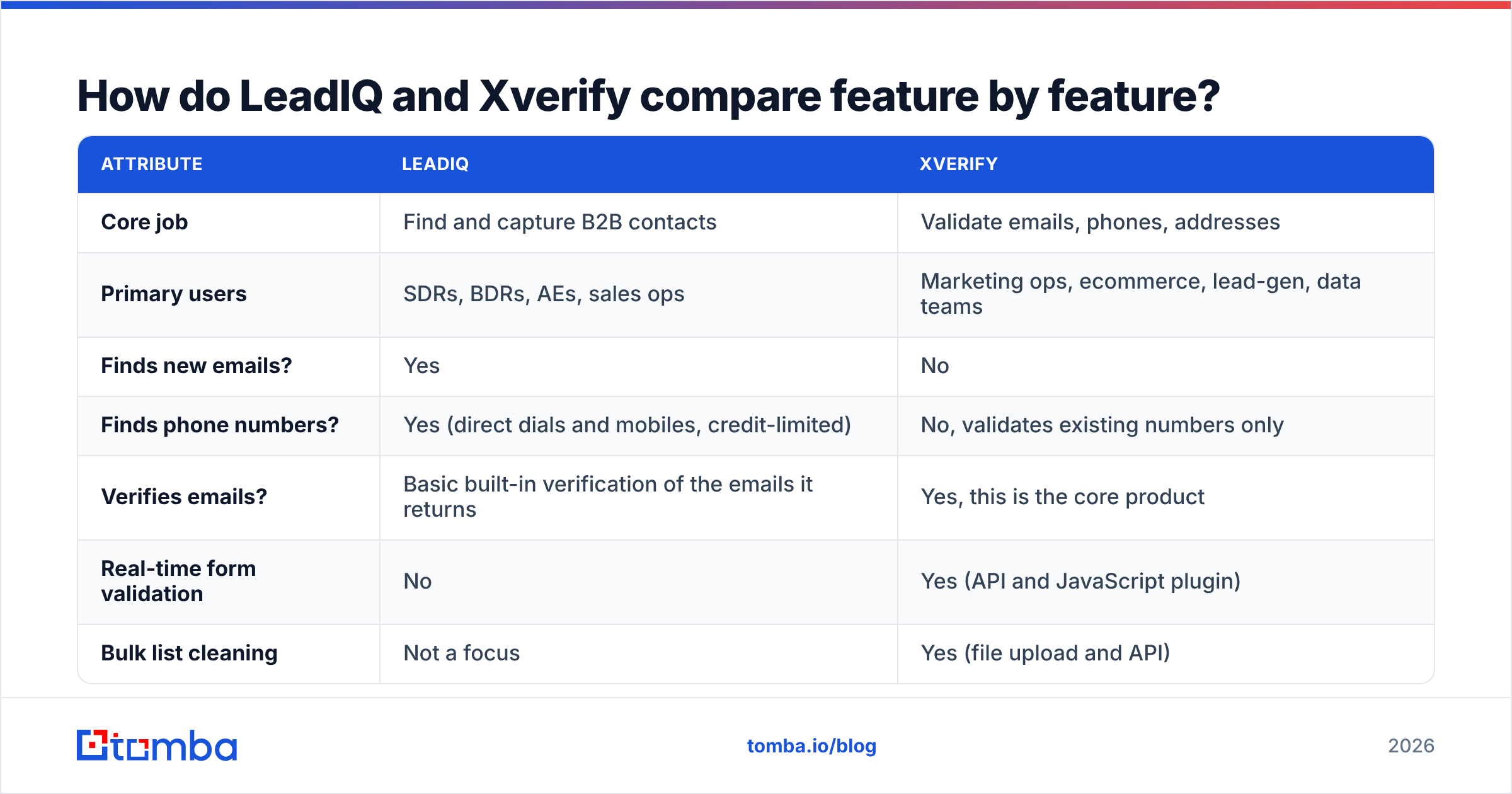
Here's a side-by-side of the attributes buyers usually care about. Pricing and plan limits change often, so confirm current numbers on each vendor's site before you buy.
| Attribute | LeadIQ | Xverify |
|---|---|---|
| Core job | Find and capture B2B contacts | Validate emails, phones, addresses |
| Primary users | SDRs, BDRs, AEs, sales ops | Marketing ops, ecommerce, lead-gen, data teams |
| Finds new emails? | Yes | No |
| Finds phone numbers? | Yes (direct dials and mobiles, credit-limited) | No, validates existing numbers only |
| Verifies emails? | Basic built-in verification of the emails it returns | Yes, this is the core product |
| Real-time form validation | No | Yes (API and JavaScript plugin) |
| Bulk list cleaning | Not a focus | Yes (file upload and API) |
| LinkedIn / Sales Navigator workflow | Yes, Chrome extension | No |
| CRM and sequencer sync | Salesforce, HubSpot, Outreach, Salesloft and more | Mostly via API and integrations |
| AI features | AI email writing (Scribe), job-change alerts | Risk and fraud-oriented scoring |
| Pricing model | Per-seat subscription with credit limits; free tier available | Credit-based / volume pricing |
| Best for | Building net-new prospect lists | Keeping existing data clean |
What the table shows is that each tool is strong where the other has nothing. LeadIQ's verification exists to make its own found emails usable. Xverify has no prospecting layer at all.
Is LeadIQ good for finding B2B contacts?#
Yes, especially for teams whose prospecting starts on LinkedIn.
The LeadIQ workflow is simple. A rep opens a LinkedIn or Sales Navigator profile, clicks the extension, and LeadIQ returns a work email and, where available, a phone number. One more click sends the contact to the CRM and into a sequence. For an SDR doing 50 to 100 manual captures a day, cutting out copy-paste saves real time.
Where LeadIQ is strong:
- Capture speed. Profile to CRM record to sequence in one flow.
- CRM hygiene. It checks for duplicates against existing CRM records before creating new ones, which sales ops teams like.
- Job-change tracking. Alerts when champions or past customers move to a new company, which is often a good trigger for outreach.
- Team features. Shared credits, admin controls and usage reporting across SDR pods.
Where LeadIQ is weaker:
- Per-seat pricing. Costs grow with headcount, not just with how much data you use. Mobile-number credits are usually the scarcest part of a plan.
- LinkedIn-centric. If your targeting starts from company domains, technographics or a CSV of accounts, the extension-first workflow fits less well.
- Coverage varies by region. Like most contact databases, it tends to be strongest for North American tech and SaaS and thinner in some EMEA and APAC markets.
If LeadIQ's seat cost is the sticking point, it's worth comparing a LeadIQ alternative that charges by search volume instead of by seat.

Is Xverify good for email verification?#
Yes. Xverify is a mature verification service with more than a decade in the market, and it does two things especially well: real-time validation at the point of capture, and risk detection beyond a simple "valid or invalid" answer.
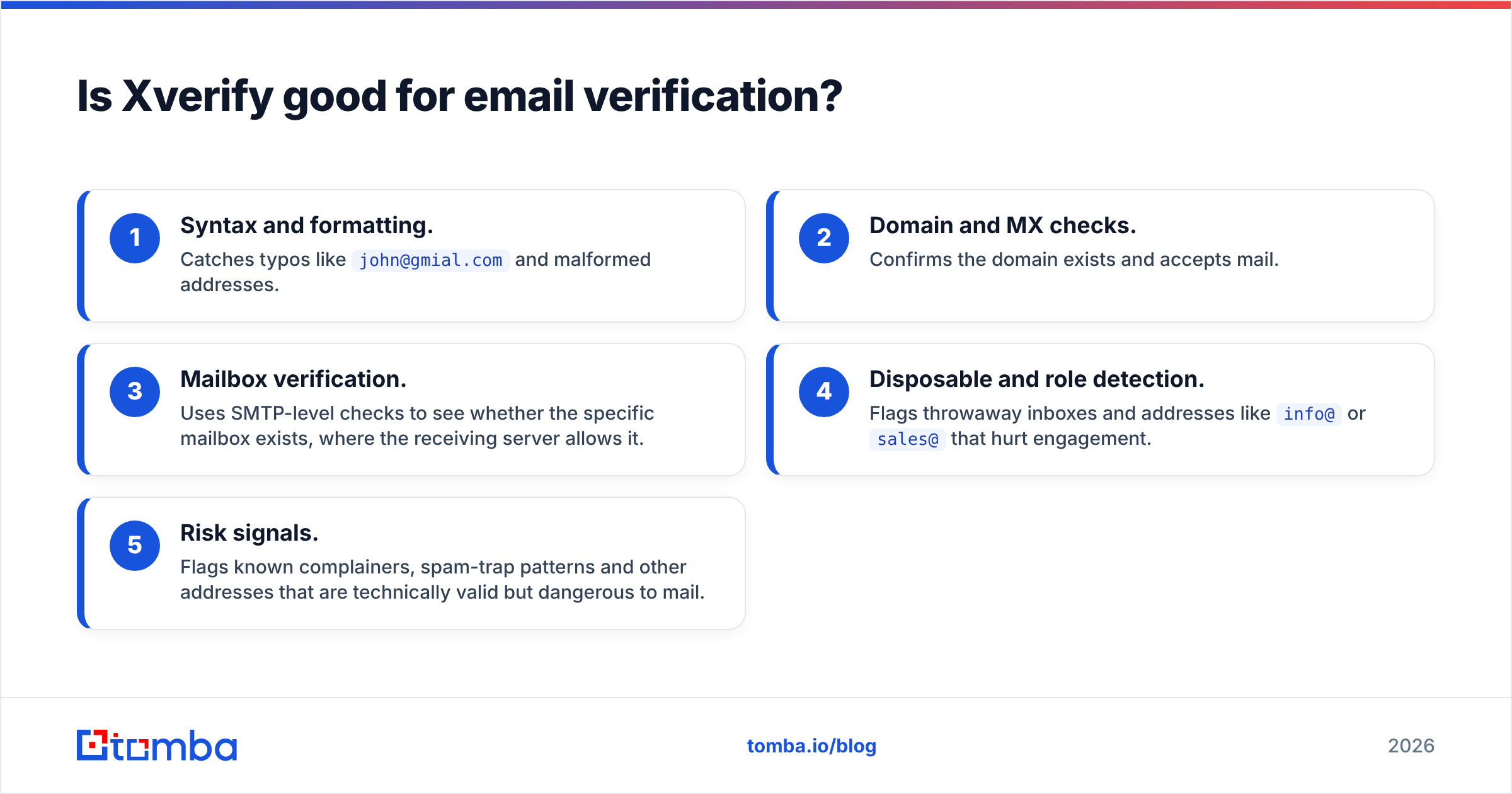
A typical Xverify check covers:
- Syntax and formatting. Catches typos like
john@gmial.comand malformed addresses. - Domain and MX checks. Confirms the domain exists and accepts mail.
- Mailbox verification. Uses SMTP-level checks to see whether the specific mailbox exists, where the receiving server allows it.
- Disposable and role detection. Flags throwaway inboxes and addresses like
info@orsales@that hurt engagement. - Risk signals. Flags known complainers, spam-trap patterns and other addresses that are technically valid but dangerous to mail.
Where Xverify is strong:
- Form protection. The real-time API stops bad emails and phone numbers at signup, checkout or lead forms before they reach your database.
- Multi-channel validation. Email, phone and postal address in one vendor, which suits ecommerce and lead-gen publishers.
- Pay for what you use. Credit-based pricing matches spend to volume, so you aren't paying for idle seats.
Where Xverify is weaker:
- It doesn't find anyone. If you give it a name and a company, you get nothing back. You have to bring your own data.
- Catch-all domains stay uncertain. Many B2B companies configure their mail servers to accept every address. Like most verifiers, Xverify can flag these as "accept-all" but can't always confirm the specific mailbox. That's the gap a dedicated catch-all verifier is designed to narrow.
- Built for marketing more than sales. No LinkedIn workflow, no sequencer integration, no prospect enrichment.
How accurate are LeadIQ and Xverify?#
Neither vendor publishes an independent, repeatable accuracy benchmark, so be skeptical of any single percentage you read, including in vendor marketing. What you can measure is how each tool behaves on your own data.
The two tools also measure accuracy differently:
- LeadIQ accuracy means: when it returns an email for a prospect, is that the person's current, deliverable work address? That depends on its data sources, how fresh the records are, and whether the person changed jobs recently.
- Xverify accuracy means: when it labels an address valid, invalid or risky, is the label correct? That depends on how well its SMTP checks and risk models handle hard cases like catch-alls, greylisting and aggressive corporate firewalls.
A practical test you can run in an afternoon:
- Take 200 prospects you already know are correct (recent replies, closed-won contacts).
- Look them up in LeadIQ and record the hit rate and how many returned emails match your known-good ones.
- Run the same known-good list plus 100 known-bad addresses (old bounces) through Xverify. Count false positives (bad marked valid) and false negatives (good marked invalid).
- Repeat the same test with any alternative you're considering.
Reviews on G2 are useful for workflow and support feedback, but your own 200-row test tells you more about accuracy than a star rating does.
How much do LeadIQ and Xverify cost?#
The pricing models are different enough that "which is cheaper" depends entirely on how you use them.
LeadIQ follows the standard sales-tool pattern: a free tier with a small number of monthly credits, then paid plans billed per user, with email and mobile credits allocated per seat. Higher tiers add CRM features, job-change tracking and admin controls, and enterprise plans are quoted on request. Check the current tiers on LeadIQ's site. Seat-based pricing means a 10-SDR team pays roughly 10 times what one rep pays, whatever the data volume.
Xverify uses credit-based pricing: you buy verification volume, and larger volumes get lower per-check rates. Trial credits are usually available. For high-volume list cleaning or form traffic, the per-verification cost is what you'll watch.
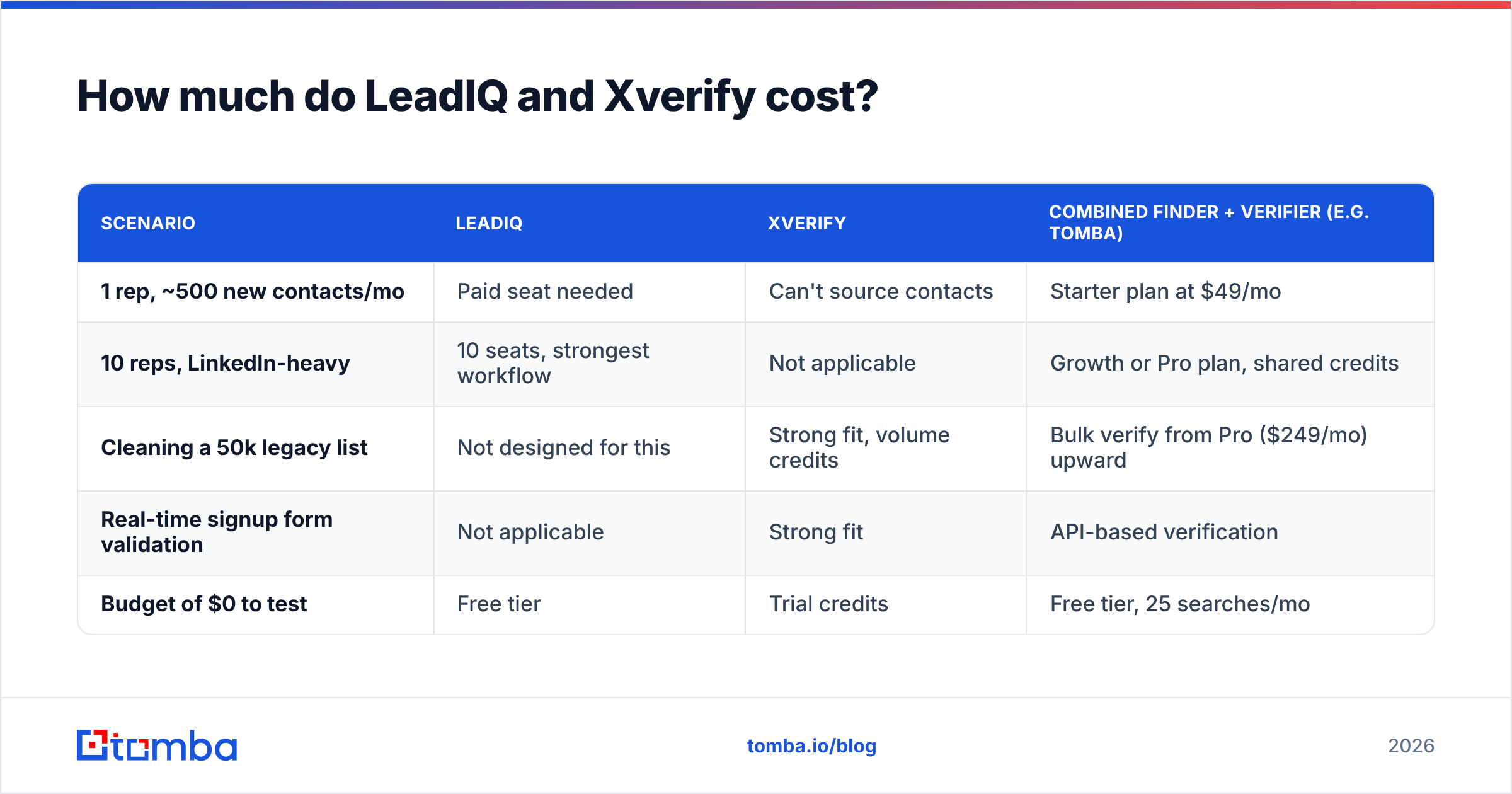
Here's how they compare with a combined option:
| Scenario | LeadIQ | Xverify | Combined finder + verifier (e.g. Tomba) |
|---|---|---|---|
| 1 rep, ~500 new contacts/mo | Paid seat needed | Can't source contacts | Starter plan at $49/mo |
| 10 reps, LinkedIn-heavy | 10 seats, strongest workflow | Not applicable | Growth or Pro plan, shared credits |
| Cleaning a 50k legacy list | Not designed for this | Strong fit, volume credits | Bulk verify from Pro ($249/mo) upward |
| Real-time signup form validation | Not applicable | Strong fit | API-based verification |
| Budget of $0 to test | Free tier | Trial credits | Free tier, 25 searches/mo |
Do you need both LeadIQ and Xverify?#
Some teams do run both, and it's a sensible setup: LeadIQ sources the contacts and Xverify checks them again before a large send. The redundancy isn't a waste, because data decays. A B2B contact database loses a meaningful share of its accuracy every year as people change jobs and companies change domains, which HubSpot's research on database decay and most RevOps teams will confirm from experience.
But running both has costs:
- Two contracts, two vendors, two sets of credits to monitor.
- An extra step between finding a contact and sending: export, verify, re-import, or build an integration to automate it.
- Overlapping spend. You pay LeadIQ to verify its own emails, then pay Xverify to verify them again.
For many small and mid-size outbound teams, a single tool that finds an email and verifies it in the same request removes that entire handoff. With a combined email finder and email verifier, every address arrives with a deliverability status, and you only send a separate bulk verification pass before a large campaign.

Which should you choose: LeadIQ or Xverify?#
Match the tool to where your data problem actually is:
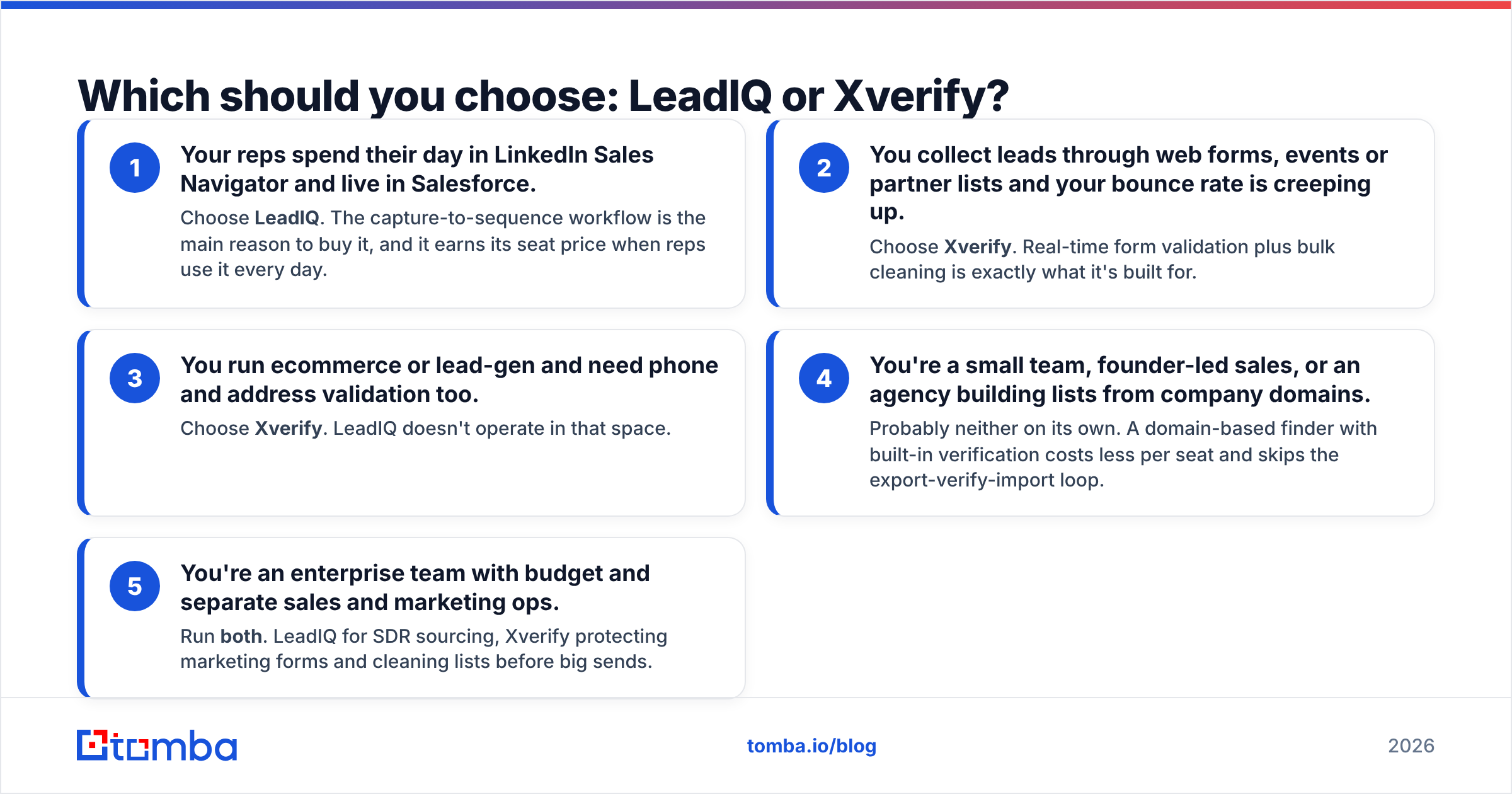
- Your reps spend their day in LinkedIn Sales Navigator and live in Salesforce. Choose LeadIQ. The capture-to-sequence workflow is the main reason to buy it, and it earns its seat price when reps use it every day.
- You collect leads through web forms, events or partner lists and your bounce rate is creeping up. Choose Xverify. Real-time form validation plus bulk cleaning is exactly what it's built for.
- You run ecommerce or lead-gen and need phone and address validation too. Choose Xverify. LeadIQ doesn't operate in that space.
- You're a small team, founder-led sales, or an agency building lists from company domains. Probably neither on its own. A domain-based finder with built-in verification costs less per seat and skips the export-verify-import loop.
- You're an enterprise team with budget and separate sales and marketing ops. Run both. LeadIQ for SDR sourcing, Xverify protecting marketing forms and cleaning lists before big sends.
A quick way to decide: if you can't name the specific people you want to email, you need a finder. If you can name them but your emails are bouncing, you need a verifier.
What about deliverability after you pick a tool?#
Neither tool fixes deliverability on its own. Clean data is necessary, but it's only one input. Before you scale any outbound campaign:
- Keep hard bounces under roughly 2%. Above that, mailbox providers start treating you as a careless sender. Google's sender guidelines spell out the authentication and complaint thresholds bulk senders now have to meet.
- Authenticate your domain with SPF, DKIM and DMARC before sending at volume.
- Re-verify lists older than 60 to 90 days. Contacts sourced last quarter aren't guaranteed valid today, whichever tool found them.
- Treat catch-all results as a separate segment. Send to them in smaller batches and watch bounces closely rather than mixing them into your main list.
Whichever tool you pick, verification is the last check before sending, not a one-time cleanup.
The bottom line on LeadIQ vs Xverify#
LeadIQ and Xverify aren't really competing products. LeadIQ is a strong LinkedIn-first prospecting tool for sales teams willing to pay per seat for a smooth capture-to-CRM workflow. Xverify is a dependable verification layer for teams that already have data and need to keep bad addresses out of their systems. Pick based on the gap in your stack, not on which brand you've heard of more.
If you want finding and verification in one step, Tomba Email Finder returns professional email addresses from a name, company or domain, and each result comes with a verification status, so you can build and clean a prospect list in the same place. You can start on the free tier with 25 searches a month, and paid plans start at $49/month. See the Tomba pricing page for the full breakdown and run the same 200-contact test on it before you commit to anything.
Related guides#
// get started
Find, verify and enrich your first contacts today
Start on the free plan with 25 searches a month, then scale when your team is ready.
Free plan · No credit card required · GDPR & CCPA
// about the author