LeadIQ vs Xverum (2026): Prospecting Tool or Raw B2B Data Feed?
LeadIQ and Xverum both sell B2B contact data, but they work very differently. One is a seat-based tool for SDRs and the other is a bulk data feed for data teams. Here's how to tell which one you need.
TL;DR
- LeadIQ is a prospecting tool for sales reps. You capture contacts from LinkedIn and Sales Navigator, enrich them with emails and phone numbers, and push them into your CRM or sequencer. You pay per seat and per credit.
- Xverum is a data provider. It sells large B2B datasets (company and professional profiles) as bulk files or feeds for data, analytics, and product teams. Pricing is custom and usually set by contract.
- Pick LeadIQ if your SDRs need verified contacts inside their daily workflow. Pick Xverum if you're building a data warehouse, training models, or enriching a product at scale.
- Neither tool removes the need for email verification before you send. Bulk datasets need it most.
- If you mainly need to find and verify business emails at a predictable price, a focused email finder with an API may cost less than either one.
What is the real difference between LeadIQ and Xverum?#
LeadIQ and Xverum sit in the same broad "B2B data" category, but they are built for different buyers.
LeadIQ is built for the person sending the email. Its main interface is a Chrome extension that sits on top of LinkedIn, Sales Navigator, and company websites. A rep finds a prospect, clicks capture, and LeadIQ returns work emails and phone numbers. It can then sync the contact to Salesforce, HubSpot, Outreach, or Salesloft. It also includes job-change tracking and an AI message writer, both aimed at reps who work a book of accounts every day.
Xverum is built for the person who owns the data pipeline. It sells datasets: company firmographics, professional and employee profiles, and related records, delivered in bulk through file drops, cloud storage, or data marketplaces. The buyer is usually a data engineer, analyst, or product manager who needs millions of rows. A rep who needs one email address right now is not the target.
An analogy: LeadIQ is a grocery store where you pick exactly the items you need for tonight's dinner. Xverum is a wholesale distributor that ships you pallets. Both sell food, but you wouldn't use a pallet to make one dinner, and a grocery store can't stock your restaurant chain.
How do LeadIQ and Xverum compare feature by feature?#
Here's a side-by-side view based on each vendor's public positioning. Plans and limits change often, so check the current details on each vendor's site before you buy.
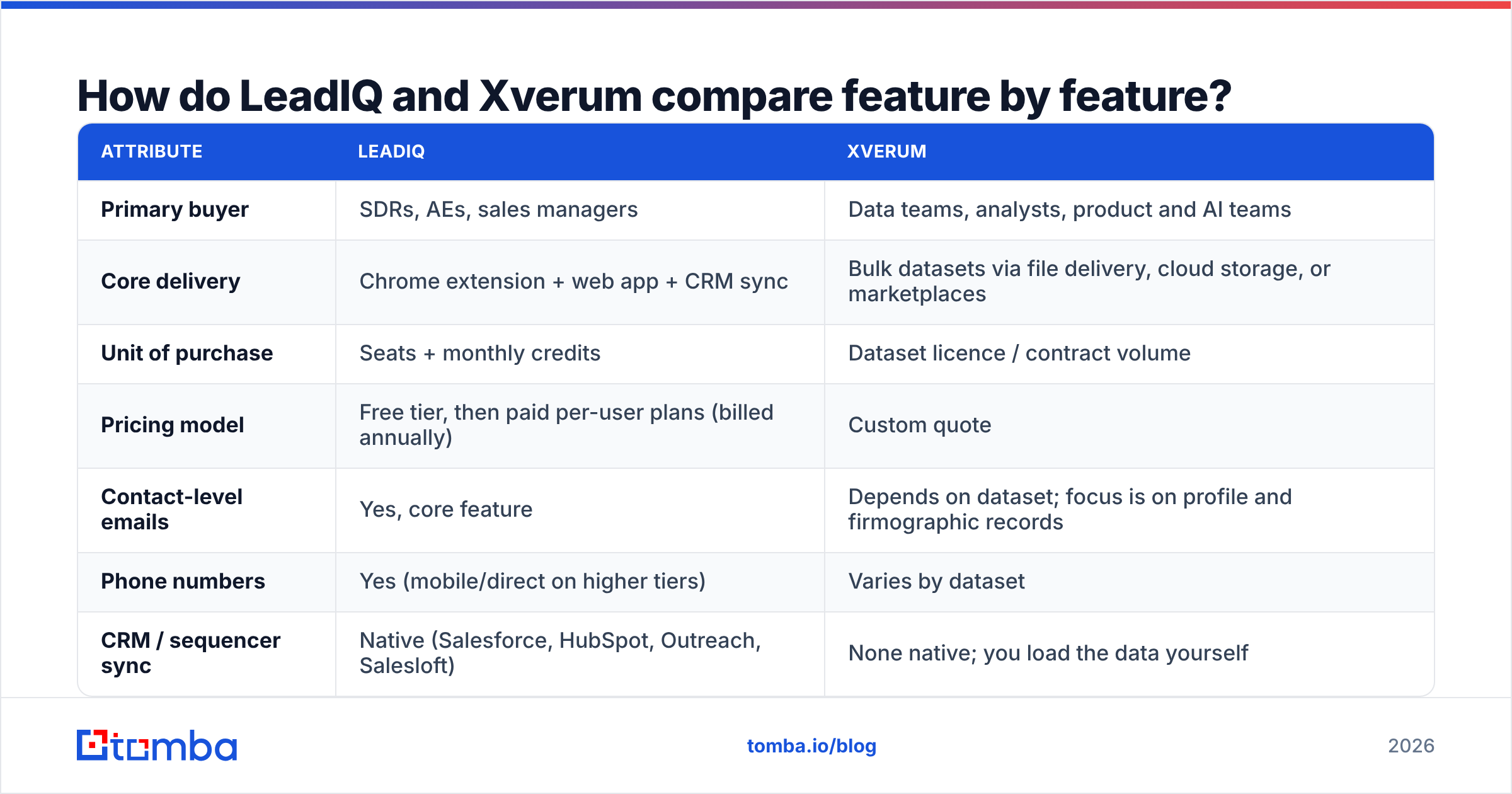
| Attribute | LeadIQ | Xverum |
|---|---|---|
| Primary buyer | SDRs, AEs, sales managers | Data teams, analysts, product and AI teams |
| Core delivery | Chrome extension + web app + CRM sync | Bulk datasets via file delivery, cloud storage, or marketplaces |
| Unit of purchase | Seats + monthly credits | Dataset licence / contract volume |
| Pricing model | Free tier, then paid per-user plans (billed annually) | Custom quote |
| Contact-level emails | Yes, core feature | Depends on dataset; focus is on profile and firmographic records |
| Phone numbers | Yes (mobile/direct on higher tiers) | Varies by dataset |
| CRM / sequencer sync | Native (Salesforce, HubSpot, Outreach, Salesloft) | None native; you load the data yourself |
| Job-change tracking | Yes | Available only if you rebuild or refresh your dataset |
| AI email writing | Yes | No |
| Best at | Accurate one-off contacts inside a rep's workflow | Coverage and volume for analytics or product enrichment |
| Main weakness | Credit caps and per-seat cost at scale | Needs engineering work; not built for single lookups |
The table shows why "which one is better" usually has an obvious answer once you know who will use the tool. It's rarely close.
Who should choose LeadIQ?#
LeadIQ fits teams where reps do their own prospecting. The usual pattern:
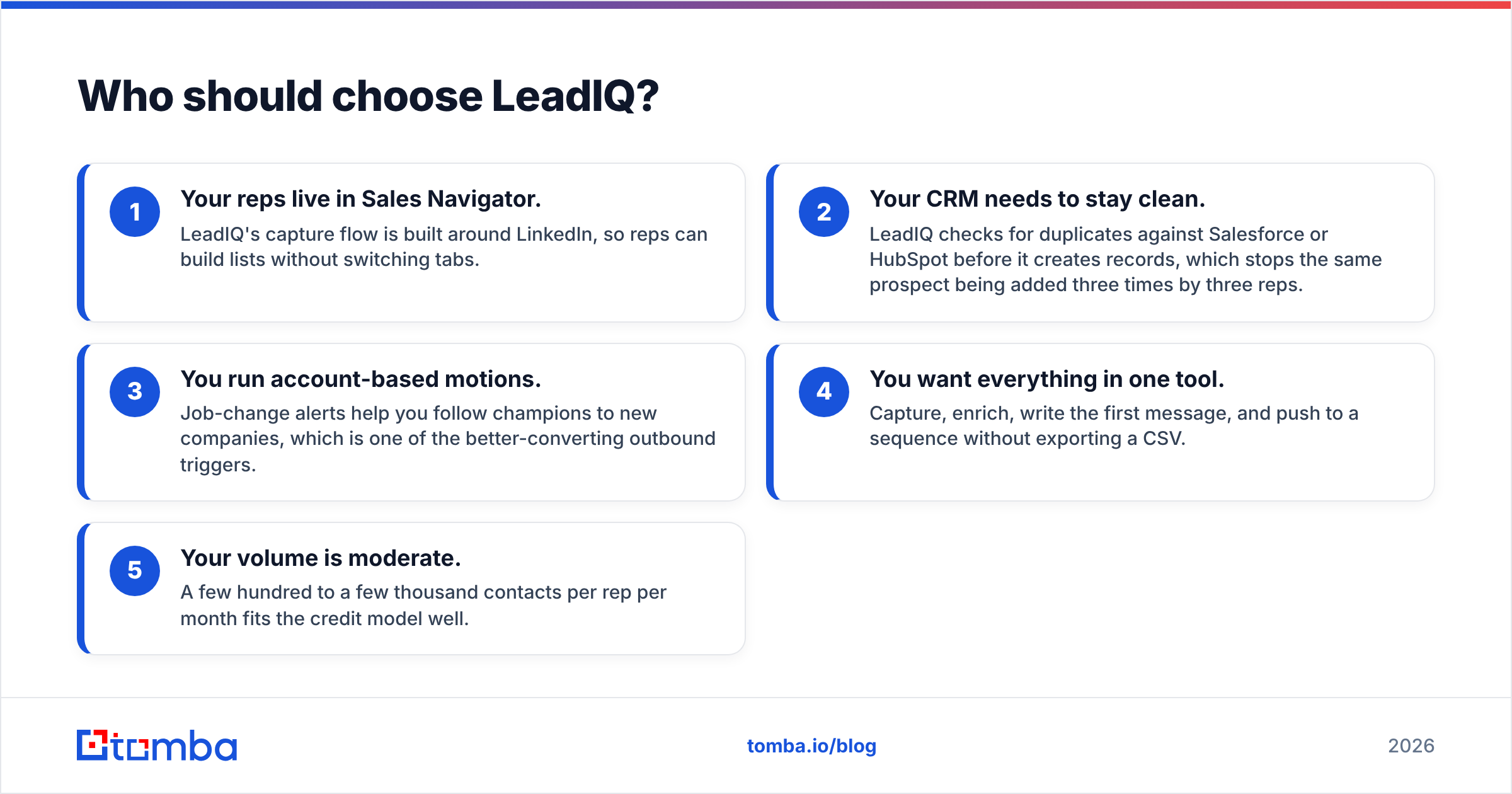
- Your reps live in Sales Navigator. LeadIQ's capture flow is built around LinkedIn, so reps can build lists without switching tabs.
- Your CRM needs to stay clean. LeadIQ checks for duplicates against Salesforce or HubSpot before it creates records, which stops the same prospect being added three times by three reps.
- You run account-based motions. Job-change alerts help you follow champions to new companies, which is one of the better-converting outbound triggers.
- You want everything in one tool. Capture, enrich, write the first message, and push to a sequence without exporting a CSV.
- Your volume is moderate. A few hundred to a few thousand contacts per rep per month fits the credit model well.
LeadIQ has limits you should expect. Credits are rationed by plan, so heavy prospectors or agencies hit the ceiling. Phone coverage outside North America is usually weaker than email coverage. You also pay per seat, so adding occasional users (marketing, RevOps, founders) gets expensive for what they actually use.
If those limits sound familiar, our breakdown of the LeadIQ alternative landscape covers tools that trade some workflow polish for more credits per dollar.

Who should choose Xverum?#
Xverum is a better fit when "contacts" means rows in a warehouse rather than names in a rep's queue. Typical buyers:
- Data and analytics teams building market maps, TAM models, or territory plans that need broad company coverage.
- SaaS product teams enriching signups or powering search and filtering features inside their own app.
- AI and ML teams that need large, structured datasets of company and professional records for training or entity resolution.
- Investment and research firms tracking company growth, hiring signals, or headcount shifts across whole sectors.
- Data resellers and platforms that combine several upstream sources into their own product.
The trade-off is that Xverum doesn't hold your hand. You get the data and your team decides how to store, de-duplicate, match, refresh, and activate it. There's no Chrome extension, no "push to sequence" button, and no job-change alert in a rep's inbox. You need engineering time before a salesperson sees any value.
Freshness matters too. A dataset delivered in January describes January. People change jobs, and a known share of a B2B database decays every year, with estimates commonly cited in the range of 20–30% annually. If you plan to email contacts from a bulk dataset, budget for refresh cycles and for verification on every send.
How does pricing compare between LeadIQ and Xverum?#
The two vendors price so differently that a direct comparison can mislead you. Here's how to think about it.
LeadIQ publishes tiered plans: a free tier with a small monthly credit allowance, then paid per-user plans that add more email and phone credits, CRM integrations, and team features. The top tier is enterprise and quote-based. Your cost is roughly seats × plan price, and it scales with headcount rather than with how many contacts you use. Check leadiq.com for current plan names and prices, because they have changed several times.
Xverum doesn't publish list prices. You scope a dataset (geography, industry, fields, refresh frequency, delivery method) and get a quote. Cost scales with data volume and licence terms, not seats. That can be very cheap per record at high volume and poor value if you only need a few thousand contacts.
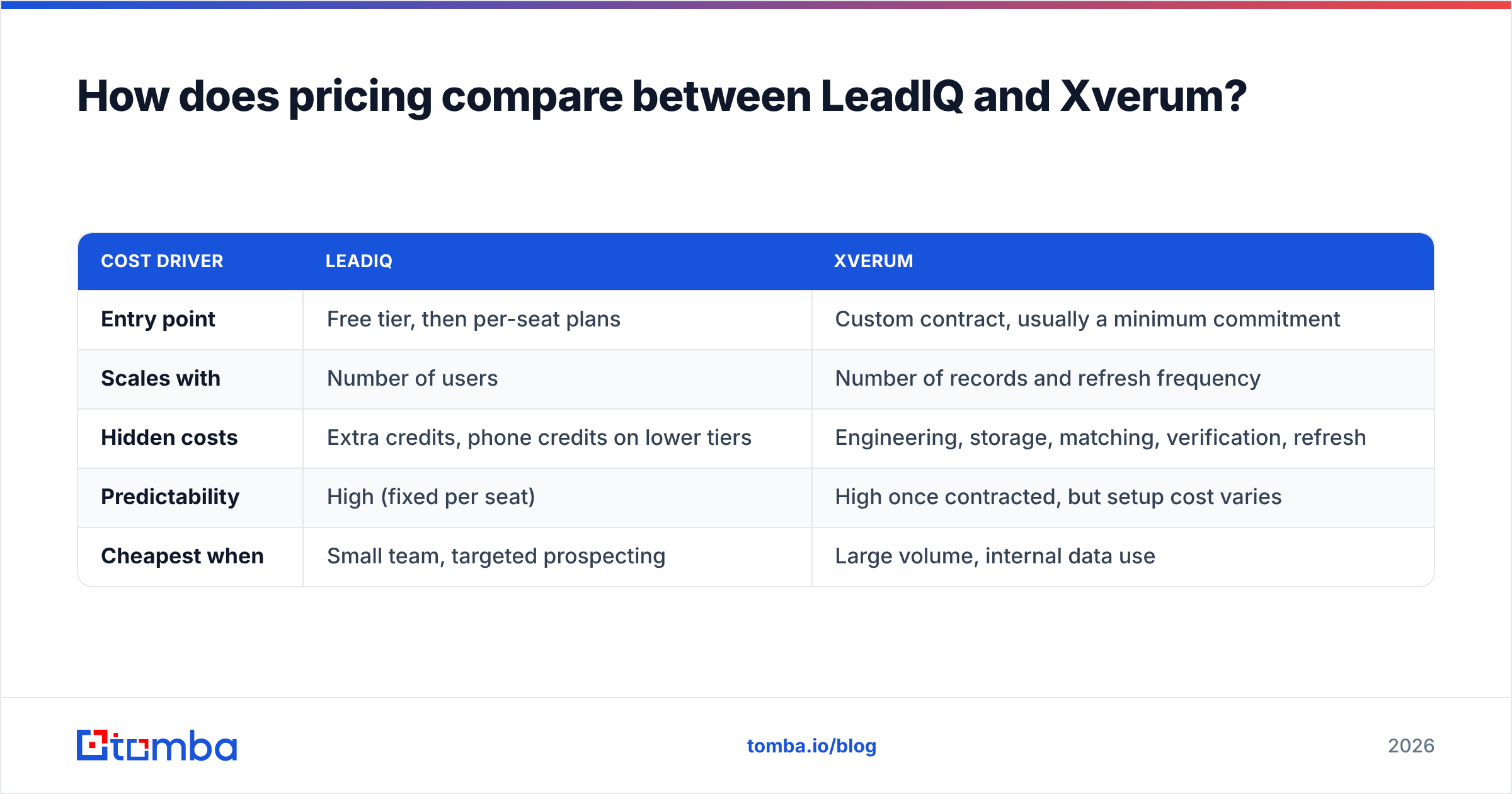
| Cost driver | LeadIQ | Xverum |
|---|---|---|
| Entry point | Free tier, then per-seat plans | Custom contract, usually a minimum commitment |
| Scales with | Number of users | Number of records and refresh frequency |
| Hidden costs | Extra credits, phone credits on lower tiers | Engineering, storage, matching, verification, refresh |
| Predictability | High (fixed per seat) | High once contracted, but setup cost varies |
| Cheapest when | Small team, targeted prospecting | Large volume, internal data use |
Here's a rule of thumb you can test. If more than 80% of your contacts will be emailed by a rep within a week of being found, LeadIQ-style per-contact economics usually win. If most records will sit in a database for analytics, bulk licensing usually wins.
How accurate is the data from each provider?#
Neither vendor's marketing claims should replace your own test. Accuracy depends heavily on region, seniority, industry, and company size. A tool that performs well on US SaaS mid-market can do much worse on European manufacturing.
A practical way to test:
- Build a 200-contact sample from your real ICP, split across your main regions and seniority levels.
- Run the sample through each tool (for Xverum, ask for a sample file that matches your spec).
- Verify every email with an independent verifier and record valid, invalid, catch-all, and unknown.
- Send a small, warmed-up test from a secondary domain and track hard bounces.
- Compare cost per valid contact, not cost per record. A cheap record that bounces is the most expensive one you can buy.
Expect the numbers to differ. LeadIQ verifies at the point of capture, so the email is fresh when the rep uses it. With a bulk dataset, the email's quality depends on when the dataset was last refreshed. Either way, running each list through an email verifier before sending protects your sender reputation. Review sites such as G2 are useful for spotting recurring complaints (bounce rates, regional gaps) but are not a substitute for your own sample.

Which integrates better with your sales stack?#
This is where the gap is widest.
LeadIQ is integration-first. Native connections to Salesforce and HubSpot handle record creation, field mapping, and duplicate checks. Sequencer integrations with Outreach, Salesloft, and similar tools let reps add a prospect to a cadence as soon as they capture it. For a sales team, this workflow is most of what you pay for.
Xverum integrates at the data layer. Expect delivery to cloud storage, data marketplaces, or an API, after which your own ETL loads it into Snowflake, BigQuery, or Postgres. From there your team has to build the path to the CRM, usually with a reverse-ETL tool or custom scripts. That setup is powerful and flexible, but someone has to own it.
If you don't have a data engineer, Xverum is probably the wrong choice no matter how good the data is.
Is LeadIQ better than Xverum?#
LeadIQ is better for sales execution. Xverum is better for building a data asset. The honest verdict:
- Choose LeadIQ if you have 3–50 reps prospecting on LinkedIn, need CRM hygiene, and value speed over volume.
- Choose Xverum if you need millions of company or professional records for analytics, product features, or model training, and you have the engineering team to use them.
- Choose neither if your real need is simpler: finding and verifying business emails for a targeted list at a predictable monthly cost, often from a spreadsheet, a script, or an automation.
That last group is bigger than most vendor comparisons admit. Many teams buy a seat-based prospecting suite or sign a data contract when what they need is a reliable email lookup they can call from a Google Sheet, a Zapier flow, or their own code.
What about a middle path between seats and bulk data?#
Some teams need more than a rep's Chrome extension but much less than a warehouse feed. For them, a pay-per-lookup email finder with an API works well:
- Domain search returns the known emails for a company so you can map a buying committee.
- Name + domain lookup returns one verified address for one person, like a LeadIQ capture but without the seat licence.
- Bulk upload covers list jobs of a few thousand rows, which is too big for manual capture and too small for a data contract.
- API access lets engineers enrich product signups or CRM records on demand instead of buying and refreshing a full dataset.
- Built-in verification checks each address before you send.
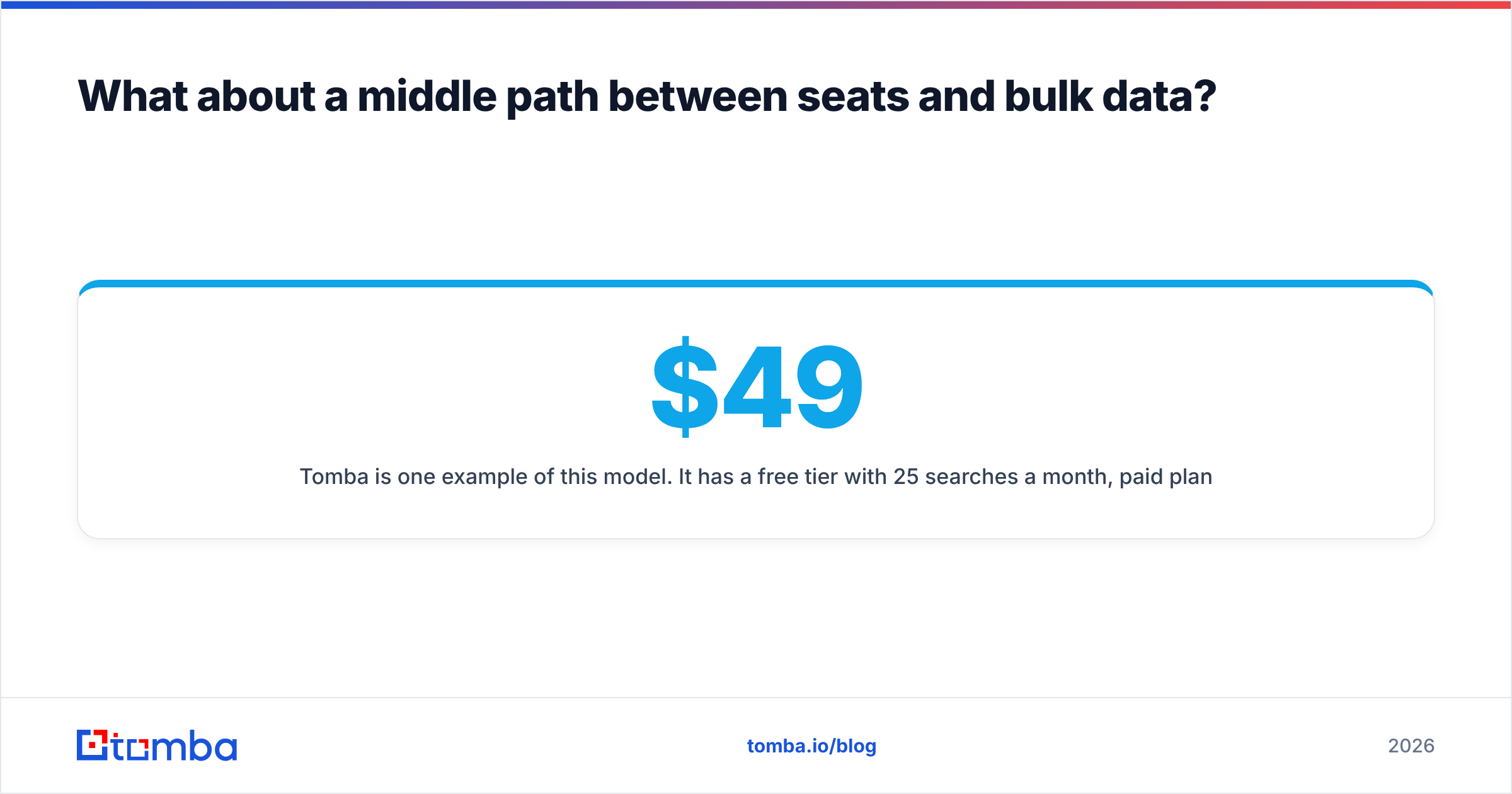
Tomba is one example of this model. It has a free tier with 25 searches a month, paid plans at $49, $99, and $249 per month, and enterprise pricing for larger volumes. You can compare plans on the Tomba pricing page. Developers can call the Tomba API directly. This model won't replace LeadIQ's job-change tracking or Xverum's coverage at dataset scale. It fits the large middle ground where you need accurate emails, not a platform.
| Need | Best fit |
|---|---|
| Reps capturing contacts from Sales Navigator into Salesforce | LeadIQ |
| 10M company records for a market-sizing model | Xverum |
| Enriching 5,000 inbound signups a month via API | Email finder API (e.g. Tomba) |
| Verifying a purchased list before a campaign | Standalone email verifier |
| Tracking champions who change jobs | LeadIQ |
How should you run the final evaluation?#
Before you sign either contract, run a short buying checklist:
- Name the user. Is it a rep, a RevOps lead, or a data engineer? The answer usually decides for you.
- Estimate monthly volume honestly. Count contacts that will actually be contacted, not contacts you might one day want.
- Run a 200-contact bake-off on your own ICP and measure cost per verified email.
- Price the hidden work. For LeadIQ, that means extra credits and seats. For Xverum, that means engineering hours, storage, and refresh cycles.
- Check compliance. Ask both vendors how they source data and handle GDPR and CCPA requests, especially if you prospect in the EU.
- Negotiate a pilot. Both types of vendor will usually agree to a limited pilot or sample before a long-term commitment.
The LeadIQ vs Xverum decision rarely turns on data quality alone. It turns on whether you're buying a workflow or a raw material.
Ready to find verified emails without seat licences or data contracts?#
If your team is somewhere between "one rep and a Chrome extension" and "a warehouse full of records," you probably need accurate business emails on demand. Tomba Email Finder lets you look up professional email addresses by domain, name, or company. You can use it in the browser, in bulk, or through the API, and verification is built in. Start on the free plan with 25 searches a month, run the same 200-contact test described above, and compare your cost per valid email against LeadIQ and Xverum before you commit.
Related guides#
// get started
Find, verify and enrich your first contacts today
Start on the free plan with 25 searches a month, then scale when your team is ready.
Free plan · No credit card required · GDPR & CCPA
// about the author