LeadLander Pricing Reviews Pros and Cons: 2026 Buyer's Guide
LeadLander tells you which companies visited your website, but not who visited or how to reach them. Here is what it costs, what reviewers say, and when a cheaper setup does the job better.
Looking for LeadLander pricing reviews pros and cons before you take a sales call? Here's the short version first, then the detail.
TL;DR
- LeadLander is a website visitor identification tool. It matches visitor IPs to companies and shows which firms browsed your site, what pages they saw, and how often they came back.
- Pricing is quote-based and scales with monthly traffic. There's a free trial but no public price list, so you need a sales call to budget.
- Reviewers like the simple interface, the email alerts and the stable product. They dislike company-only data, weak contact details, and low match rates for remote and mobile visitors.
- LeadLander tells you which company visited. It doesn't tell you who, or how to email them. You need a second tool for that.
- On a tight budget, a visitor-reveal tool plus an email finder like Tomba usually costs less and gives you contacts you can use.
What is LeadLander and what does it actually do?#
LeadLander is one of the older B2B website visitor tracking tools. You put a JavaScript snippet on your site. The tool logs each visit's IP address, then matches that address against a database of company-registered IP ranges. If the IP belongs to a company network, you see the company name, its location, the pages it viewed, how long the session lasted, and the referral source.
It's the same basic idea as a reverse DNS lookup, plus firmographic data and a dashboard built for sales teams. You can learn more about the product on the official LeadLander site.
Its features fall into five groups:
- Company identification. It resolves visitor IPs to organization names and filters out ISPs and residential traffic.
- Visit analytics. For each company you see page paths, visit counts, time on site, and referrers such as search, paid, or direct.
- Alerts. It emails you when a target account or a watched company comes back to your site.
- Filters and lists. You can segment by industry, geography, or behaviour. For example, "viewed pricing page twice this week."
- CRM hand-off. You can export or sync to your CRM so reps can act on the data.
What it doesn't do is just as important. LeadLander doesn't tell you which person visited. It works at the company level. When you see "Acme Corp viewed /pricing three times," you still have to work out who at Acme is evaluating you and find a verified way to contact them.
How much does LeadLander cost in 2026?#
LeadLander doesn't publish a full price list. Pricing is quote-based and depends mainly on how much traffic your site gets, because more visits means more IP lookups. There's usually a free trial, so you can see match quality on your own traffic before you sign.
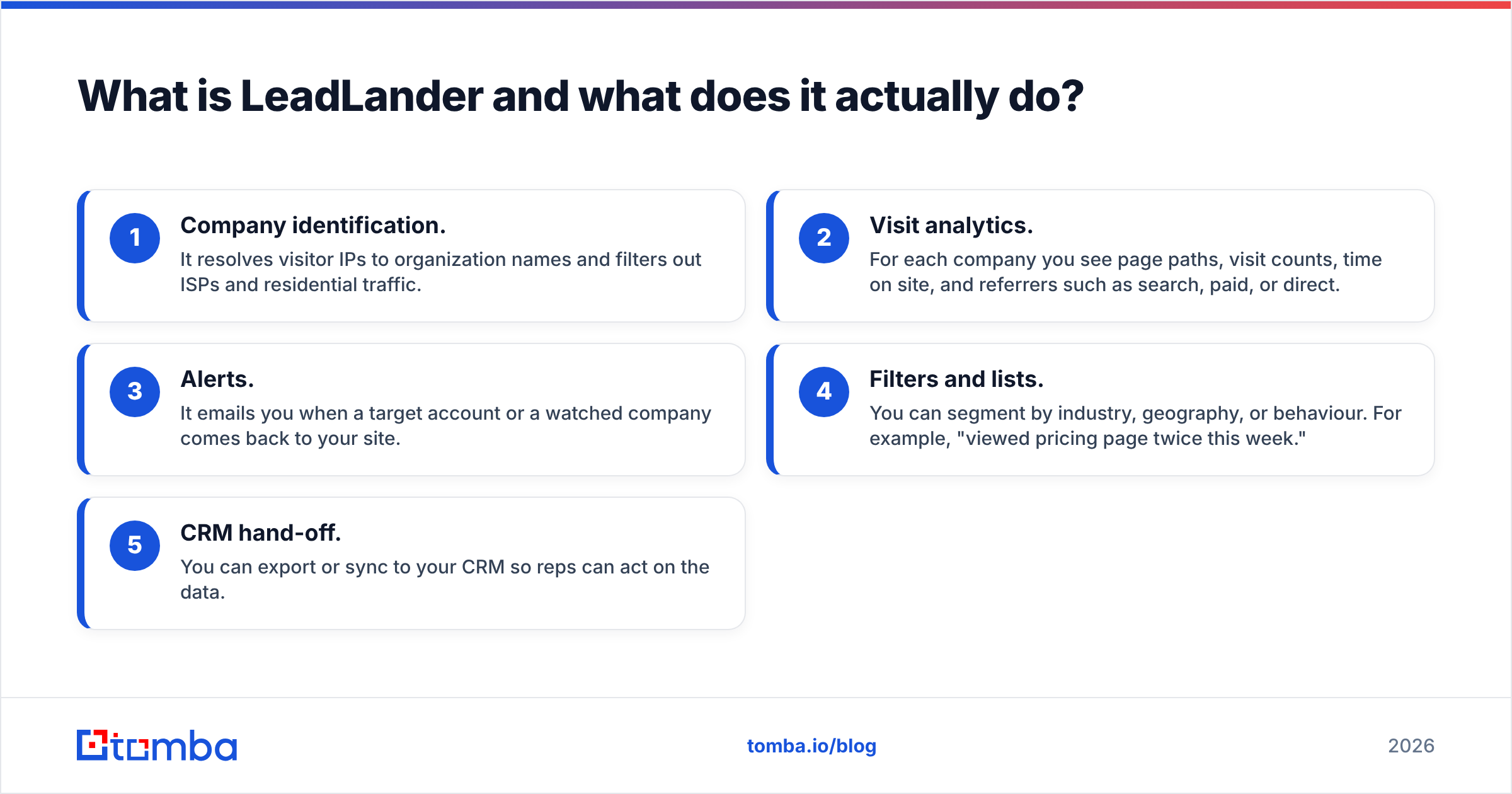
Buyers typically see pricing built like this:
- Traffic tiers. Low-traffic sites pay the least. As monthly visits grow, you move into higher tiers.
- Monthly or annual billing. Annual contracts usually get a discount. Ask for one if you're committed.
- Seats and features. Depending on the package, the number of users, alert volume, and CRM integrations can affect the quote.
Since there's no public number, the honest advice is this: get a written quote for your actual traffic, and compare it to the total cost of a two-tool setup (visitor reveal plus contact finder). That total is the number that matters. LeadLander alone doesn't get you to a named contact.
What hidden costs should you watch for?#
The subscription is only part of what you'll spend. Budget for these as well:
- A contact-data tool. LeadLander gives you the company. To reach a person, you need an email finder or a B2B database on top. For many teams, this second line item costs as much as the first.
- Traffic growth. A successful content push or paid campaign can move you into a higher tier in the middle of a contract.
- Unmatched traffic. You pay based on traffic, but a large share of B2B visits come from home Wi-Fi, VPNs, or mobile carriers. Those can't be matched to a company, so part of what you pay for returns nothing.
- Rep time. A "company visited" alert with no contact attached means a rep spends 10 to 20 minutes researching before sending anything.
What do LeadLander reviews say?#
The product has been around a long time, so there are plenty of reviews on sites like G2 and Capterra. The feedback is fairly consistent.
What reviewers praise#
- Easy to use. The dashboard is simple. Non-technical marketers get value in the first week.
- Good alerts. Watchlist emails are the feature people mention most. Knowing a key account came back to your pricing page is useful.
- Mature and stable. It's been on the market for years and has a predictable feature set. Reviewers rarely report bugs or outages.
- Helpful support. Many reviewers mention responsive account management, especially during setup.
What reviewers criticize#
- No person-level data. This is the most common complaint. You see companies, not people, so you still have to prospect manually.
- Match rates vary. As more B2B buyers work remotely, the share of traffic that maps to a company network has dropped. Reviewers with distributed audiences report more "unknown" sessions.
- Opaque pricing. Not knowing the cost without a sales call frustrates smaller teams.
- Dated UI and integrations. Some users say the interface and CRM integrations lag behind newer tools built for modern outbound workflows.
LeadLander pricing reviews pros and cons at a glance#
| Pros | Cons |
|---|---|
| Quick setup: one script, data in hours | Company-level only, no named contacts |
| Clean, easy dashboard | Quote-only pricing, no public tiers |
| Useful watchlist and return-visit alerts | Match rates drop with remote and mobile traffic |
| Long track record and stable product | Needs a second tool to reach decision-makers |
| Traffic-based pricing suits low-volume sites | Cost rises as traffic grows, even unmatched traffic |
| Responsive support in reviews | Integrations feel dated next to newer tools |
Is LeadLander better than other visitor identification tools?#
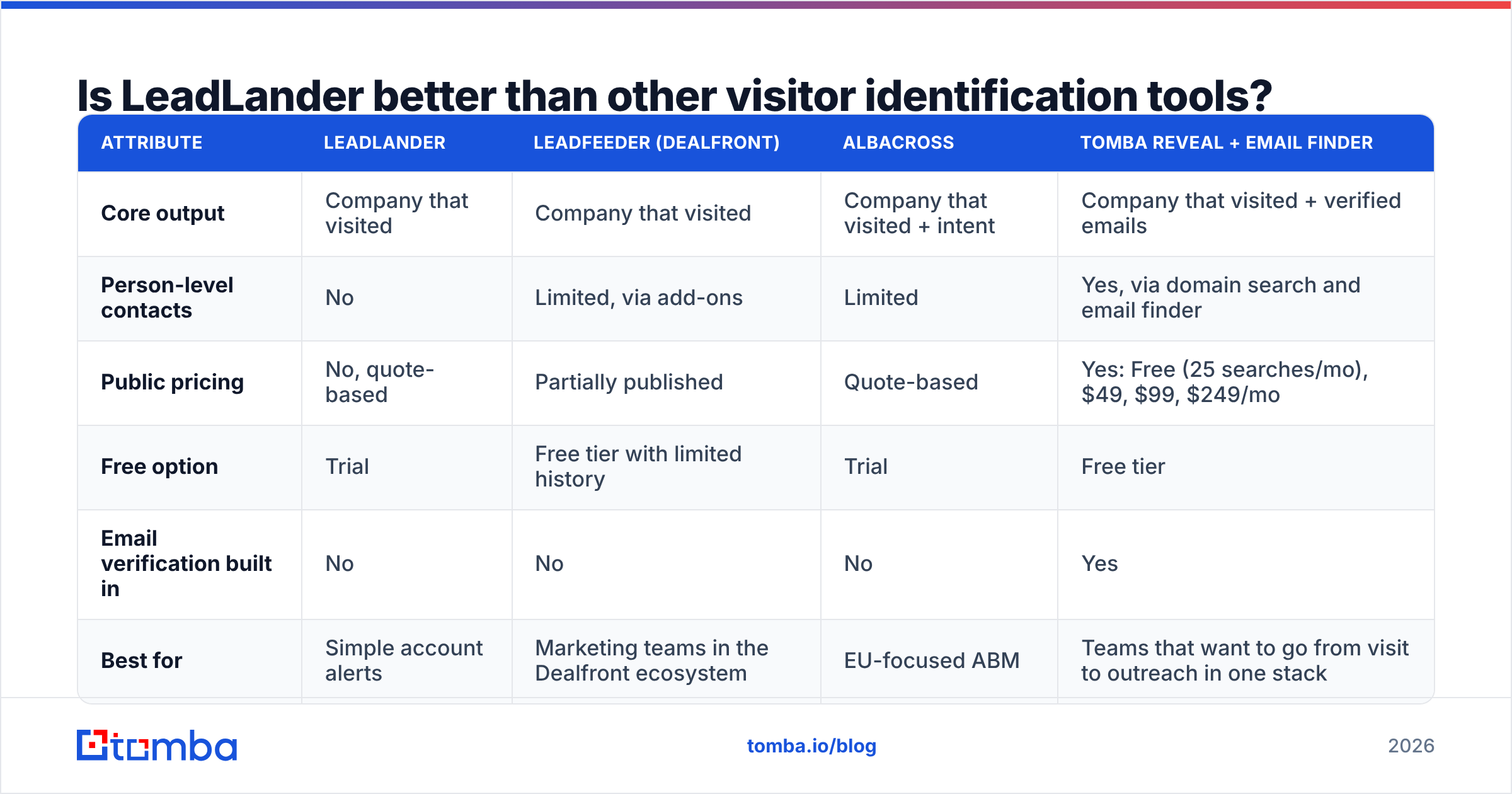
That depends on what you need at the end of the process. If you want account-level intent signals that feed a marketing dashboard, LeadLander does that well. If you want a list of people you can email today, you'll need to combine tools regardless of which one you pick.
This is how the main approaches compare:
| Attribute | LeadLander | Leadfeeder (Dealfront) | Albacross | Tomba Reveal + Email Finder |
|---|---|---|---|---|
| Core output | Company that visited | Company that visited | Company that visited + intent | Company that visited + verified emails |
| Person-level contacts | No | Limited, via add-ons | Limited | Yes, via domain search and email finder |
| Public pricing | No, quote-based | Partially published | Quote-based | Yes: Free (25 searches/mo), $49, $99, $249/mo |
| Free option | Trial | Free tier with limited history | Trial | Free tier |
| Email verification built in | No | No | No | Yes |
| Best for | Simple account alerts | Marketing teams in the Dealfront ecosystem | EU-focused ABM | Teams that want to go from visit to outreach in one stack |
Pricing and features for third-party tools change often. Check each vendor's current page before you buy.
Tomba isn't a like-for-like LeadLander replacement on analytics depth. LeadLander's visit dashboards are more mature. Tomba's advantage is what happens after a company is identified.
Its website visitor reveal tells you which companies are on your site. Then domain search plus the email finder turns "Acme Corp" into "Jane Doe, VP Operations, jane@acme.com, verified." With LeadLander, that last step is a separate purchase.
Who should buy LeadLander?#
LeadLander fits well if:
- You're running account-based marketing with a fixed target list, and you mainly want to know when those accounts show up.
- Your traffic is modest and mostly from corporate networks. Enterprise-heavy audiences visiting from office IPs give the best match rates.
- You already have a contact-data provider and only need the "who's warm" signal to add to it.
- Your marketing team owns the tool, not SDRs, and uses it for reporting and campaign attribution more than for direct outreach.
It's a weaker fit if:
- You're an SDR team measured on meetings booked. Company names without contacts slow reps down.
- Your audience is SMB, remote, or global. More of your traffic will come back as unmatched ISP sessions.
- You need a predictable budget. Quote-only pricing makes it hard to plan spend or compare vendors quickly.
How do you turn anonymous company visits into real leads?#
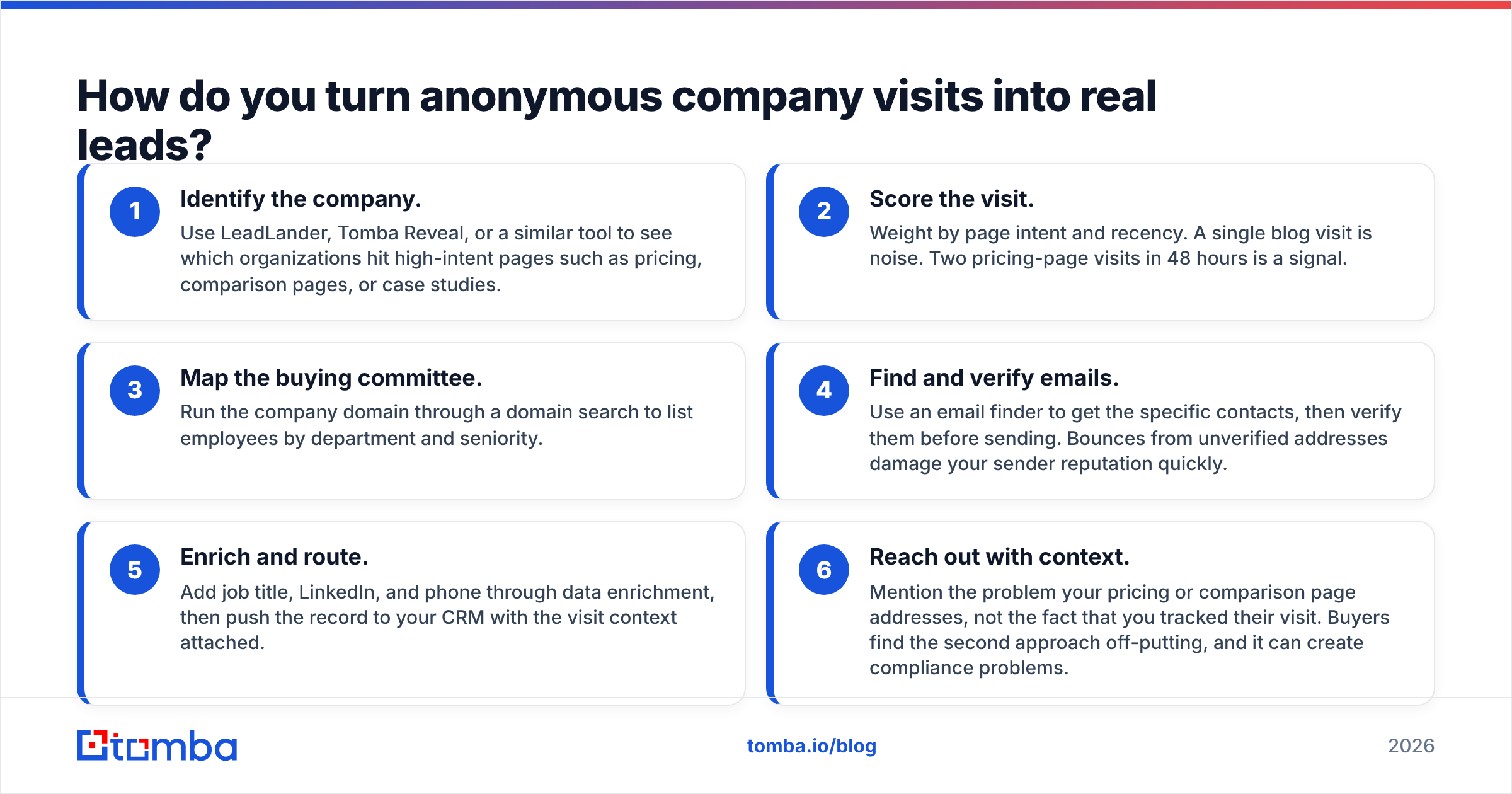
Whichever visitor tool you choose, the workflow that produces pipeline looks about the same:
- Identify the company. Use LeadLander, Tomba Reveal, or a similar tool to see which organizations hit high-intent pages such as pricing, comparison pages, or case studies.
- Score the visit. Weight by page intent and recency. A single blog visit is noise. Two pricing-page visits in 48 hours is a signal.
- Map the buying committee. Run the company domain through a domain search to list employees by department and seniority.
- Find and verify emails. Use an email finder to get the specific contacts, then verify them before sending. Bounces from unverified addresses damage your sender reputation quickly.
- Enrich and route. Add job title, LinkedIn, and phone through data enrichment, then push the record to your CRM with the visit context attached.
- Reach out with context. Mention the problem your pricing or comparison page addresses, not the fact that you tracked their visit. Buyers find the second approach off-putting, and it can create compliance problems.
On compliance: IP-based company identification is generally treated differently from tracking individuals, but if you have EU traffic, you still need a lawful basis and proper disclosure under the GDPR. Update your privacy policy and cookie banner before you install any visitor tracking script. This applies to LeadLander, Tomba, and every other tool here.

Is LeadLander worth the money in 2026?#
LeadLander is worth it if all you need is a reliable signal of which companies are visiting and you already have a way to reach them. It's stable, simple, and its alerts are useful for ABM teams watching a set list of accounts.
It's harder to justify if you're paying for it expecting leads. What it delivers is company-level intent data. To turn that into pipeline, you also need contact data, verification, and outreach. Once you add a second tool's subscription, LeadLander's quote-based price can end up higher than a combined stack with published pricing.
To put these LeadLander pricing reviews pros and cons to work, do this before you sign:
- Run the trial on real traffic and calculate the match rate yourself: identified companies divided by total sessions.
- Count how many identified companies match your ICP. A big list of students, competitors, and ISPs doesn't help anyone.
- Price the whole workflow, from visit to verified email, not just the visitor ID step.
- Ask for annual and multi-year pricing in writing and check what happens if your traffic jumps mid-term.
Frequently asked questions#
Does LeadLander have a free plan?#
LeadLander offers a free trial rather than a permanent free plan. Paid access is quote-based and scales with website traffic.
Can LeadLander show individual visitor names?#
No. LeadLander identifies companies by IP address. To reach a specific person, you need a separate email finder or contact database.
What is a cheaper alternative to LeadLander?#
If your end goal is outreach, combining a visitor-reveal tool with an email finder that has public pricing is usually the more predictable option. You can compare Tomba pricing, which starts with a free tier and a $49/mo Starter plan, against your LeadLander quote.
How accurate is LeadLander?#
Accuracy is good when visitors browse from corporate networks. It drops for remote workers, VPN users, and mobile traffic. Measure it on your own traffic during the trial.
Ready to turn company visits into conversations?#
LeadLander tells you who's interested. Tomba tells you who to email. If you're already getting company-level visitor data, from LeadLander or anywhere else, Tomba Email Finder takes the next step: enter the company domain or a person's name and get professional email addresses that are verified before you send. Start on the free tier with 25 searches a month, run it against last week's top visiting accounts, and see how many named decision-makers you would have missed.
Related guides#
// get started
Find, verify and enrich your first contacts today
Start on the free plan with 25 searches a month, then scale when your team is ready.
Free plan · No credit card required · GDPR & CCPA
// about the author