LeadLeaper Pricing 2026: Plans, Credits, Hidden Costs & Alternatives
LeadLeaper looks like one of the cheapest email finders around. Here is what each plan actually includes, how much each lead really costs, and when you are better off with a different tool.

TL;DR
- LeadLeaper has a free plan with 100 email credits a month. Paid plans are Starter at $29/mo, Basic at $49/mo (about 3,000 credits plus a sales CRM and sequences) and Professional at $69/mo (about 10,000 credits plus team features). Enterprise pricing is custom.
- At full use, Professional works out to under a cent per credit. That's cheap. It only stays cheap if you actually use the credits and most of the emails you find are deliverable.
- LeadLeaper is built for people who prospect inside the browser, mainly on LinkedIn and company websites. It suits solo reps and small teams better than API-driven or bulk workflows.
- The costs that don't show on the pricing page are unverified catch-all addresses, manual one-at-a-time capture, and the extra verifier or data tool many teams end up adding.
- If you need domain search, bulk lookups, an API and verification in one account, a combined email finder is usually the simpler buy.
What is LeadLeaper, and how does its pricing work?#
LeadLeaper is a browser-based lead capture tool that has been around for more than ten years. You install the extension, open a LinkedIn profile, a Sales Navigator search or a company website, and LeadLeaper tries to find and save a business email for the people on the page. Leads go into a list inside LeadLeaper. On the higher tiers they can move straight into a light CRM and email sequences.
Pricing is based on email credits, not seats or exports. One credit is roughly one email lookup. LeadLeaper also says it does not charge export credits, so once a lead is in your list you can download it as often as you like. Several competitors charge separately for exports, so this is a real plus.
Subscriptions are month-to-month, and you can cancel online. You aren't locked into an annual contract, which matters if your prospecting volume changes with the season.
Check the current numbers on the official LeadLeaper pricing page before you buy. Credit allowances on low-cost tools change more often than headline prices do.
How much does each LeadLeaper plan cost in 2026?#
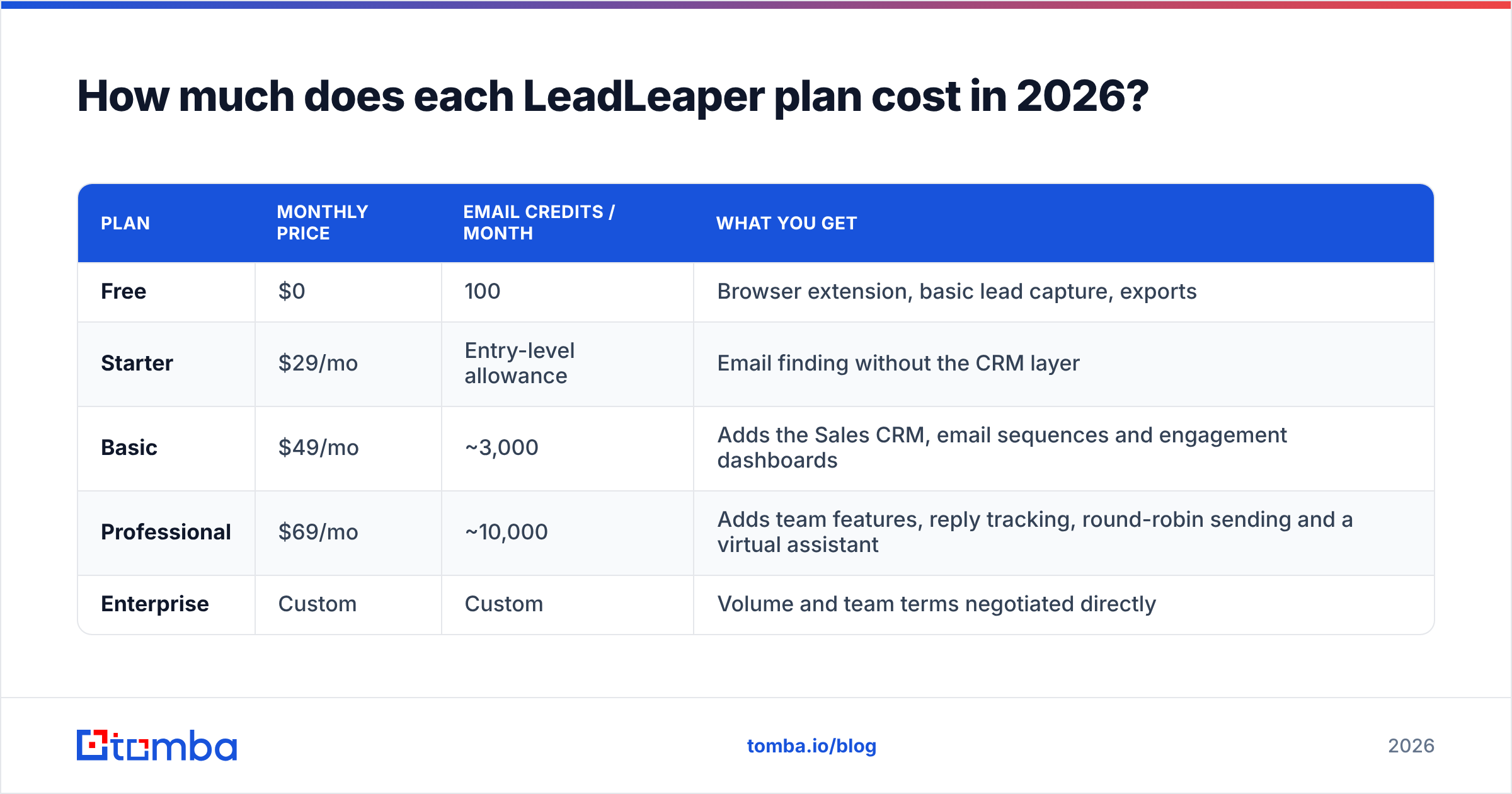
These are the tiers as they appear across LeadLeaper's own page and independent directories at the time of writing:
| Plan | Monthly price | Email credits / month | What you get |
|---|---|---|---|
| Free | $0 | 100 | Browser extension, basic lead capture, exports |
| Starter | $29/mo | Entry-level allowance | Email finding without the CRM layer |
| Basic | $49/mo | ~3,000 | Adds the Sales CRM, email sequences and engagement dashboards |
| Professional | $69/mo | ~10,000 | Adds team features, reply tracking, round-robin sending and a virtual assistant |
| Enterprise | Custom | Custom | Volume and team terms negotiated directly |
Starting from these numbers, you get:
- Basic: $49 ÷ 3,000 credits ≈ $0.016 per credit
- Professional: $69 ÷ 10,000 credits ≈ $0.007 per credit
On paper that's very low for an email finder. The question is how many of those credits turn into emails you can safely send to.

Is LeadLeaper's free plan actually useful?#
For testing, yes. For real prospecting, not really.
A hundred credits a month is enough to:
- Check whether LeadLeaper finds addresses in your niche. Hit rates vary a lot between industries and regions.
- Work a short list of target accounts by hand, such as a founder chasing 20 design partners.
- See how the extension feels inside LinkedIn before you pay.
It isn't enough to run a sequence. Even a small outbound campaign of 50 new contacts a week needs about 200 credits a month before any re-checks. If you plan to send cold email regularly, treat the free tier as a trial and assume you'll be on Basic or higher.
What hidden costs should you plan for with LeadLeaper?#
The sticker price is the easy part. These are the costs that come up once you use it:
- Catch-all domains: Many B2B companies set their mail servers to accept every address. A finder can return a well-formed guess that nobody can confirm. If you send to unconfirmed catch-alls in volume, your bounce rate goes up, and you pay for that later in email deliverability problems, not in credits.
- A separate verifier: Plenty of LeadLeaper users run their exports through a standalone email verifier before sending. That's another subscription and another CSV round-trip.
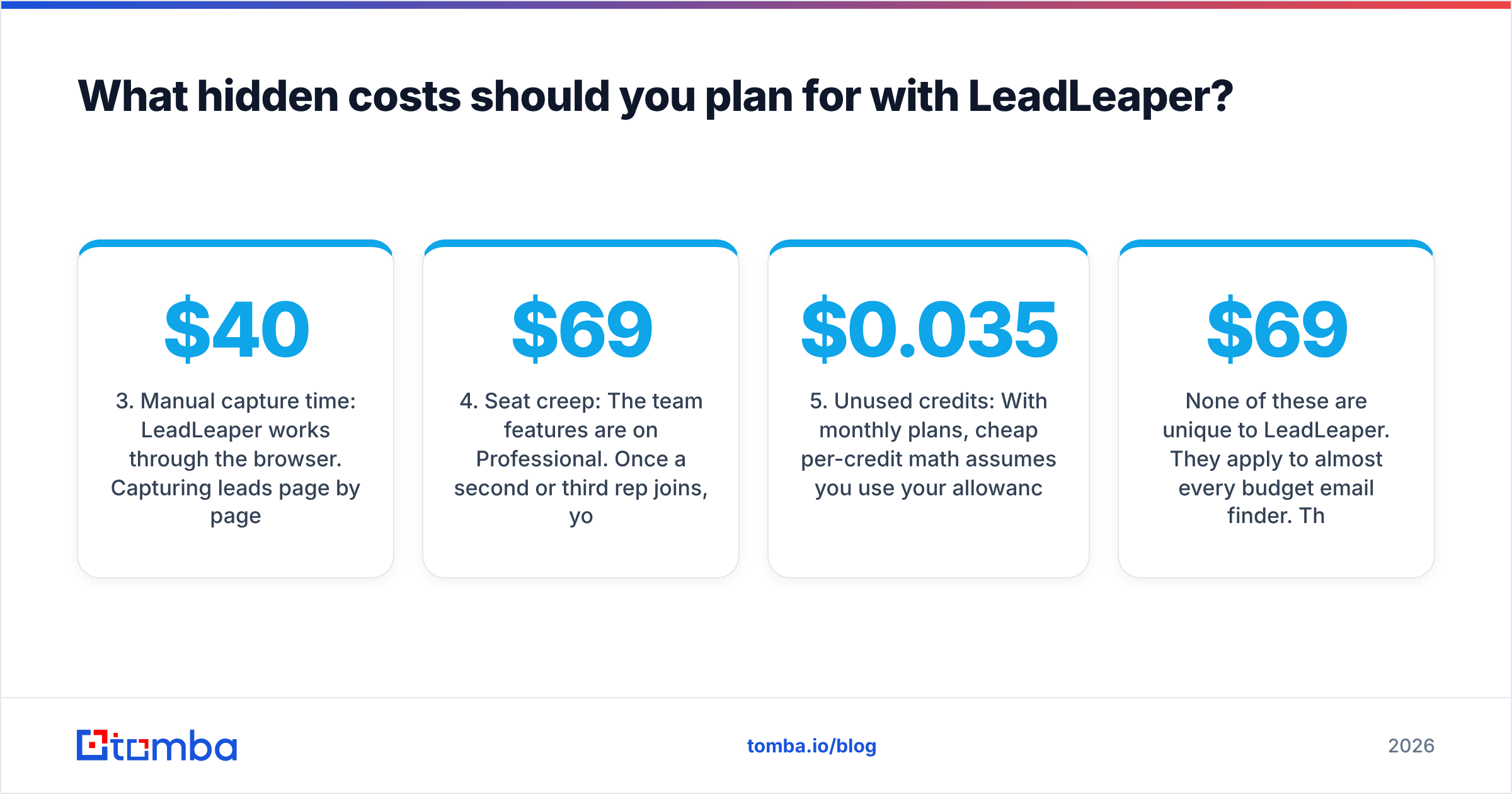
- Manual capture time: LeadLeaper works through the browser. Capturing leads page by page is fine for 30 prospects a day. It gets expensive when an SDR spends an hour a day on it at a loaded cost of $40–$60 an hour.
- Seat creep: The team features are on Professional. Once a second or third rep joins, you're comparing per-seat totals, not one $69 plan.
- Unused credits: With monthly plans, cheap per-credit math assumes you use your allowance. A team that only uses 2,000 of 10,000 Professional credits is really paying about $0.035 per lead, five times the headline rate.
None of these are unique to LeadLeaper. They apply to almost every budget email finder. They're still the difference between "$69 a month" and what you actually spend.
How accurate is LeadLeaper compared with other email finders?#
LeadLeaper doesn't publish a standardized accuracy benchmark, and neither do most tools in this price range. That means you should run your own test.

Here's a simple test you can run in an afternoon:
- Pick 100 known contacts: Use people whose real work emails you already have, such as customers, past prospects and partners.
- Run them through each tool you're considering: Use the free tiers. LeadLeaper's 100 credits are enough for a full test.
- Score three outcomes: correct email found, wrong email found, and no result. A wrong email is worse than no email, because it bounces.
- Look at catch-all handling: Count how many results each tool flags as "risky" or "accept-all". Check whether it tells you or quietly returns a guess.
- Weight by your market: A tool that does well on US SaaS companies can struggle with European mid-market manufacturers. Test on the accounts you actually target.
User reviews on Capterra and side-by-side pages on G2 generally praise LeadLeaper's ease of use and price. Coverage and verification depth get more mixed comments. That fits a tool designed around quick, in-browser capture.
Is LeadLeaper cheaper than Tomba?#
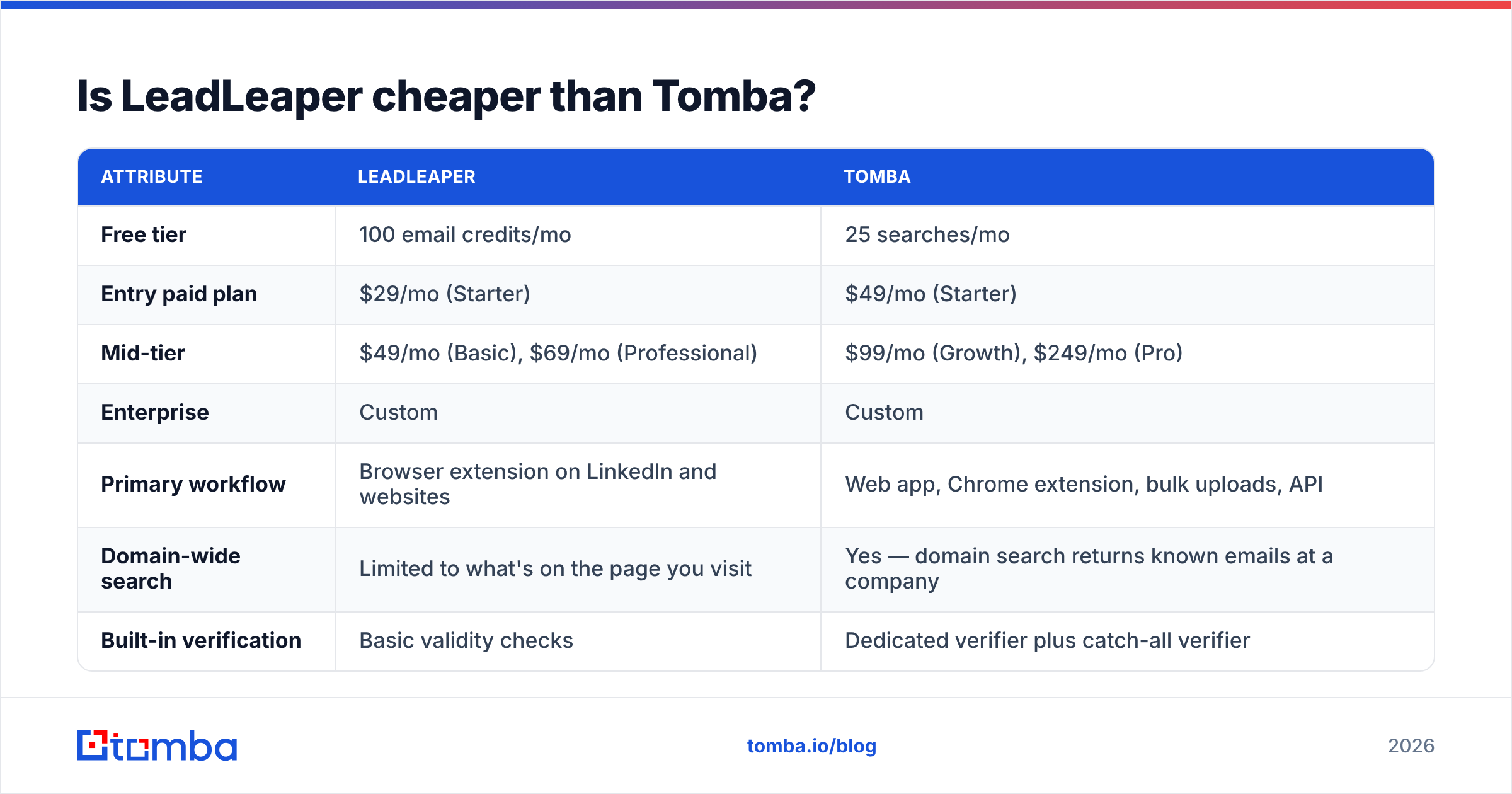
On headline price per credit, LeadLeaper's Professional plan is hard to beat. The two tools are built for different jobs, so the useful comparison is what you get for the money, not only the credit count.

| Attribute | LeadLeaper | Tomba |
|---|---|---|
| Free tier | 100 email credits/mo | 25 searches/mo |
| Entry paid plan | $29/mo (Starter) | $49/mo (Starter) |
| Mid-tier | $49/mo (Basic), $69/mo (Professional) | $99/mo (Growth), $249/mo (Pro) |
| Enterprise | Custom | Custom |
| Primary workflow | Browser extension on LinkedIn and websites | Web app, Chrome extension, bulk uploads, API |
| Domain-wide search | Limited to what's on the page you visit | Yes — domain search returns known emails at a company |
| Built-in verification | Basic validity checks | Dedicated verifier plus catch-all verifier |
| Bulk / CSV processing | Export-focused | Bulk finder and bulk verify |
| API access | Not a core part of the product | Full REST API, CLI and MCP server |
| Built-in CRM & sequences | Yes, from Basic upward | No — integrates with HubSpot, Salesforce, Pipedrive and others |
| Best fit | Solo reps and small teams prospecting by hand | Teams that need volume, automation or enrichment |
A short version:
- Choose LeadLeaper if you're one or two people, you live in LinkedIn, you want a basic CRM and sequencer included, and $49–$69 a month is the whole tooling budget.
- Choose Tomba if you need to pull every relevant contact at a target domain, run thousands of lookups from a spreadsheet, verify catch-alls before sending, or plug email finding into your own stack through an API.
Tomba's starting price is higher, and that's worth saying plainly. What you get for it is a different kind of product: data infrastructure, not a prospecting notepad. The full tier breakdown is on the Tomba pricing page.
Which LeadLeaper plan should you pick?#
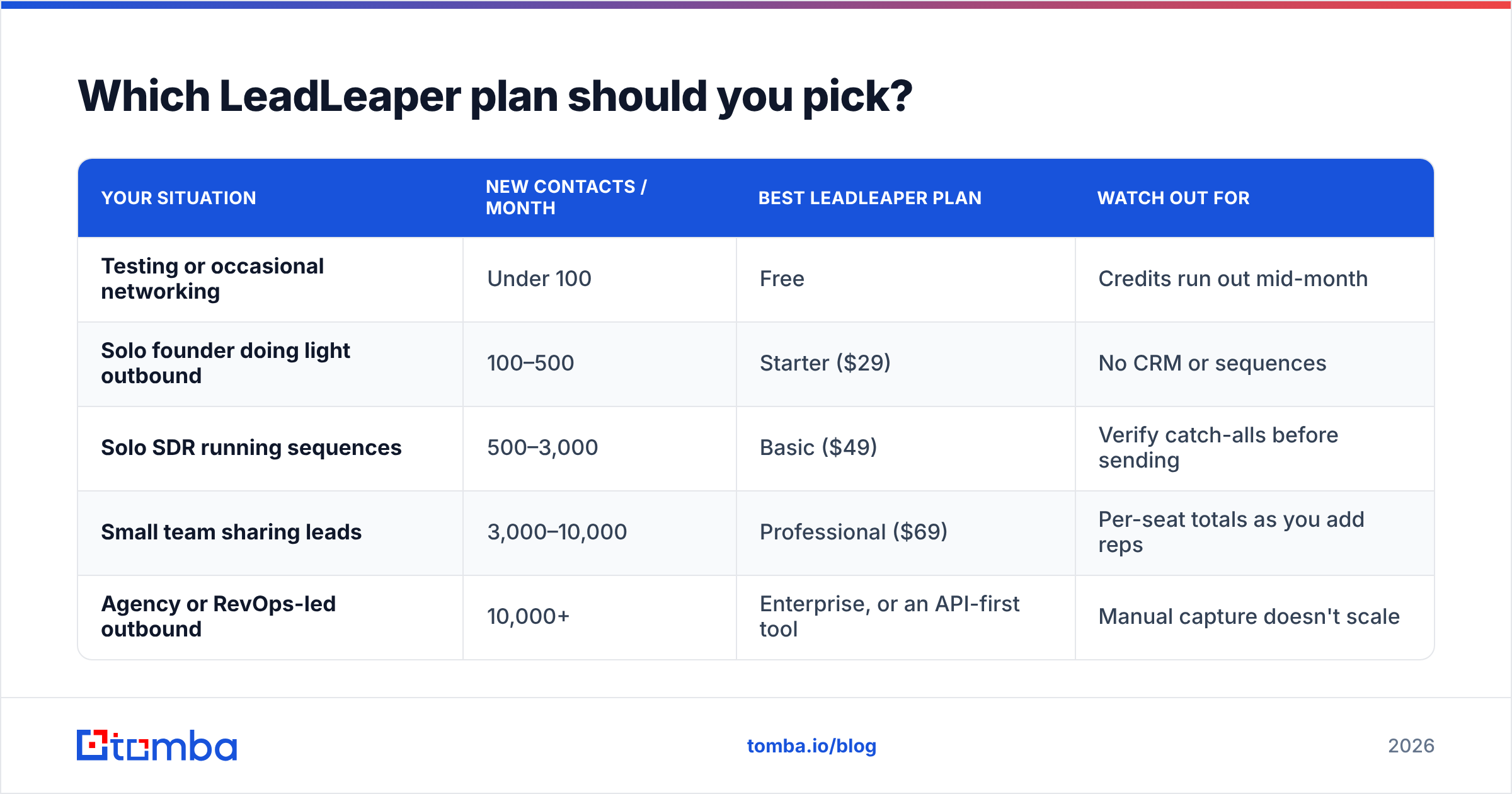
Match the plan to your weekly volume and team size, not to the feature list.
| Your situation | New contacts / month | Best LeadLeaper plan | Watch out for |
|---|---|---|---|
| Testing or occasional networking | Under 100 | Free | Credits run out mid-month |
| Solo founder doing light outbound | 100–500 | Starter ($29) | No CRM or sequences |
| Solo SDR running sequences | 500–3,000 | Basic ($49) | Verify catch-alls before sending |
| Small team sharing leads | 3,000–10,000 | Professional ($69) | Per-seat totals as you add reps |
| Agency or RevOps-led outbound | 10,000+ | Enterprise, or an API-first tool | Manual capture doesn't scale |
If you're in the bottom row, ask yourself whether a browser extension should be your main data source at all. Past about 10,000 contacts a month, most teams move lookups into bulk jobs or an API and keep the extension for spot checks.
When does LeadLeaper stop being worth it?#
LeadLeaper earns its price in a fairly narrow but real situation: one person, a LinkedIn tab, a focused account list. It gets harder to justify when:
- You prospect by company, not by profile. If your list starts as 500 target domains, not 500 LinkedIn URLs, you need domain-level search, not page-by-page capture.
- Your bounce rate goes above 2–3%. That usually means unverified or catch-all addresses are getting through. Mailbox providers such as Google treat high bounce rates as a spam signal, and a cheap data source can end up costing you inbox placement.
- You want data inside your own systems. A CRM enrichment workflow, a Clay-style table, or an AI agent that researches accounts all need an API, not an extension.
- More than a few reps need access. Per-seat totals add up, and shared lists get messy without proper team controls.

What are the best alternatives if LeadLeaper doesn't fit?#
The right replacement depends on which limit you hit:
- You need more coverage and verification: Use a combined email finder and verifier so every found address is checked, catch-alls included, before it reaches your sequencer.
- You need volume: Pick a tool with CSV bulk processing, so a list of 5,000 names and domains comes back enriched in one job, not 5,000 clicks.
- You're still LinkedIn-first: Use a dedicated LinkedIn finder or extension that also supports bulk profile lists, so you keep the workflow you know without the manual ceiling.
- You want to automate: Choose an API-first provider that works with your CRM, Zapier or Make, or an MCP-compatible AI assistant.
- You mainly want the CRM and sequences: In that case you may be better off with a dedicated sequencer, feeding it from a separate data provider.
Before you switch, run the 100-contact accuracy test above on your shortlist. Price per credit only matters once you know the price per correct, deliverable email.
Is LeadLeaper pricing worth it in 2026?#
For a solo seller or a two-person team working LinkedIn by hand, yes. The Basic and Professional plans cost less per credit than most of the market, exports are free, and there's no annual lock-in. Few tools at $49–$69 a month include a CRM and sequencer as well.
For teams that prospect by domain, need bulk throughput, send in volume, or want email data flowing into other systems, the low sticker price hides real costs: an extra verifier, rep time, and deliverability risk from unconfirmed addresses. Those teams usually spend less overall with a tool built for scale, even if the first invoice is bigger.
If you've outgrown one-at-a-time capture, try Tomba Email Finder. You can find professional emails by name, domain or company, verify them before they reach your sequencer, and run the same lookups in bulk or through the API when your volume grows. Start on the free plan with 25 searches a month, test it against your own target accounts, and upgrade to Starter at $49/mo only once the hit rate earns it.
Related guides#
// get started
Find, verify and enrich your first contacts today
Start on the free plan with 25 searches a month, then scale when your team is ready.
Free plan · No credit card required · GDPR & CCPA
// about the author