Leadleaper vs SalesQL (2026): Which LinkedIn Email Finder Wins?
LeadLeaper and SalesQL both pull contact data from LinkedIn, but they suit different buyers. This guide compares the workflows, contact data, CRM sync and pricing logic of each, then tells you which to pick.
TL;DR
- SalesQL is the better pick if you work mostly inside LinkedIn, Sales Navigator or LinkedIn Recruiter and want emails and phone numbers pushed straight into a CRM or ATS. Recruiters and SDR teams tend to use it.
- LeadLeaper suits solo sellers, consultants and small agencies. It captures leads from LinkedIn and from company websites, then keeps them in simple lead lists you can export.
- Neither tool is a full data platform. Both depend on LinkedIn as the starting point, and both give you less when a prospect has a thin profile or works at a catch-all domain.
- Whichever you choose, verify every address before you send. An unverified list from any finder will hurt your sender reputation faster than bad copy will.
- If you need to find emails outside LinkedIn (by domain, name, company, API or spreadsheet), add a general-purpose email finder next to either tool.
What are LeadLeaper and SalesQL?#
Both are browser-based prospecting tools. Each one puts a "find contact info" layer on top of LinkedIn, but they start from different ideas.
LeadLeaper is a lead capture extension. You browse LinkedIn, Sales Navigator or a company's website, click the extension, and it tries to find a business email for that person. Leads go into lists inside LeadLeaper, where you can tag them, add notes and export them. It's built for people who prospect by hand, one account at a time, and want a light system of record without paying for a full sales platform.
SalesQL is a LinkedIn contact enrichment tool. You open a profile or a search results page, and SalesQL shows the email addresses (work and sometimes personal) and phone numbers it has for that person. Its strength is volume and integrations: you can enrich lists pulled from Sales Navigator or Recruiter searches and sync the results to tools such as HubSpot, Salesforce, Pipedrive and common ATS platforms.
In short, LeadLeaper is a capture-and-organize tool for individual sellers. SalesQL is an enrichment layer for teams that live in LinkedIn.
How do LeadLeaper and SalesQL compare side by side?#
This is the head-to-head view. Pricing and credit limits on both products change often, so check each vendor's pricing page before you buy. The structure of the offers has stayed fairly stable, and that's what the table compares.
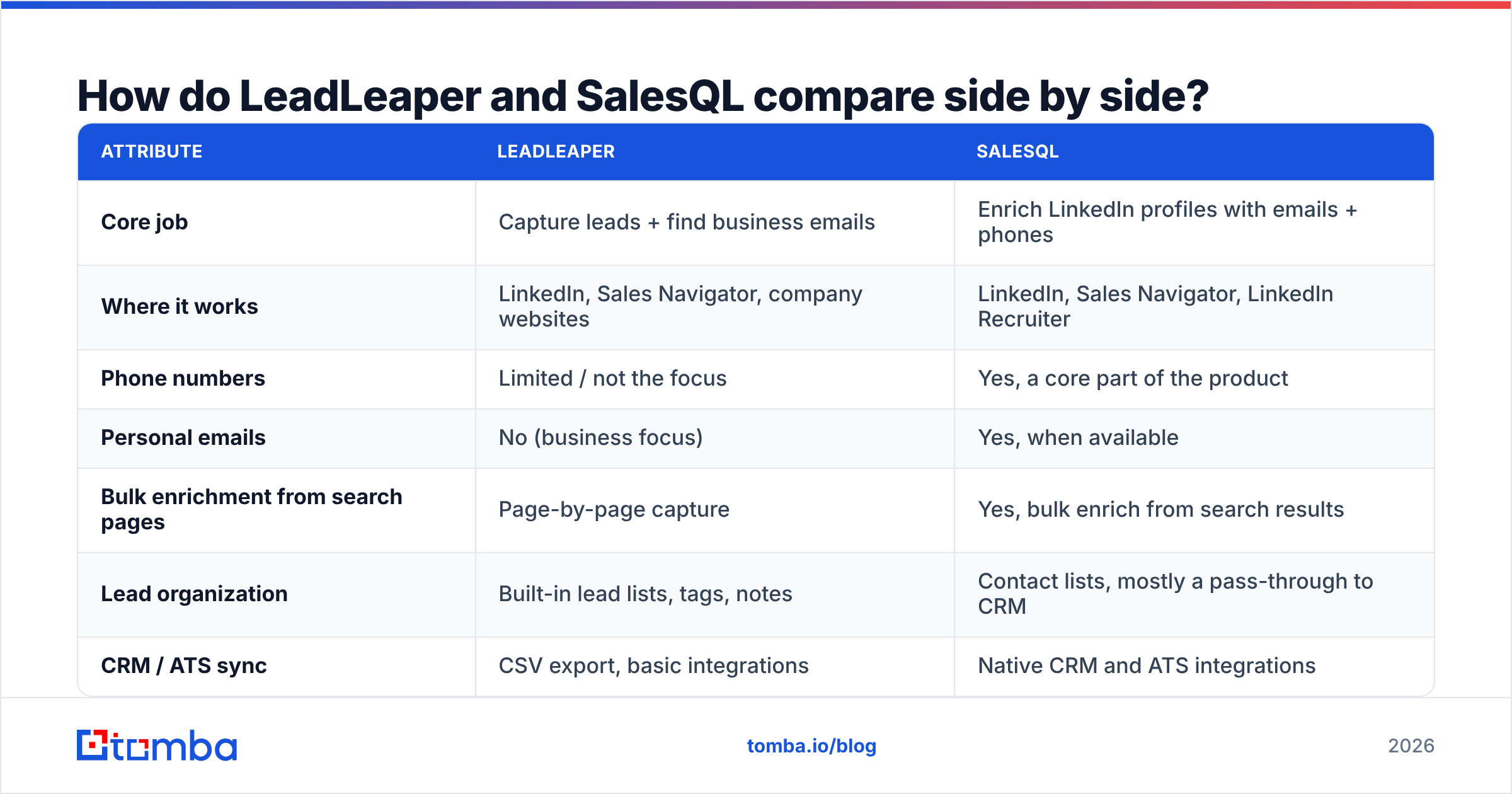
| Attribute | LeadLeaper | SalesQL |
|---|---|---|
| Core job | Capture leads + find business emails | Enrich LinkedIn profiles with emails + phones |
| Where it works | LinkedIn, Sales Navigator, company websites | LinkedIn, Sales Navigator, LinkedIn Recruiter |
| Phone numbers | Limited / not the focus | Yes, a core part of the product |
| Personal emails | No (business focus) | Yes, when available |
| Bulk enrichment from search pages | Page-by-page capture | Yes, bulk enrich from search results |
| Lead organization | Built-in lead lists, tags, notes | Contact lists, mostly a pass-through to CRM |
| CRM / ATS sync | CSV export, basic integrations | Native CRM and ATS integrations |
| Free tier | Yes, limited monthly leads | Yes, limited monthly credits |
| Pricing model | Per-user monthly plans | Per-user monthly plans with credit tiers |
| Best for | Solo reps, consultants, small agencies | SDR teams, recruiters, agencies at volume |

Both tools reach the same outcome, a contact record for a LinkedIn profile, by different routes. The next sections look at the differences that matter once you use them every day.
Which tool finds more accurate emails?#
No independent public benchmark tests LeadLeaper against SalesQL on the same sample of profiles. Treat any vendor claim of "95%+ accuracy" as marketing until you test it yourself. Here's what you can say with confidence:
- SalesQL relies on a large pre-built contact database mapped to LinkedIn profiles. When someone is in its database, you get results instantly and often more than one data point. When someone isn't, you get nothing.
- LeadLeaper leans more on finding and checking addresses at the moment you look them up, using name and company domain. That can help with people at small companies who aren't in large databases. It's weaker at personal emails and direct dials.

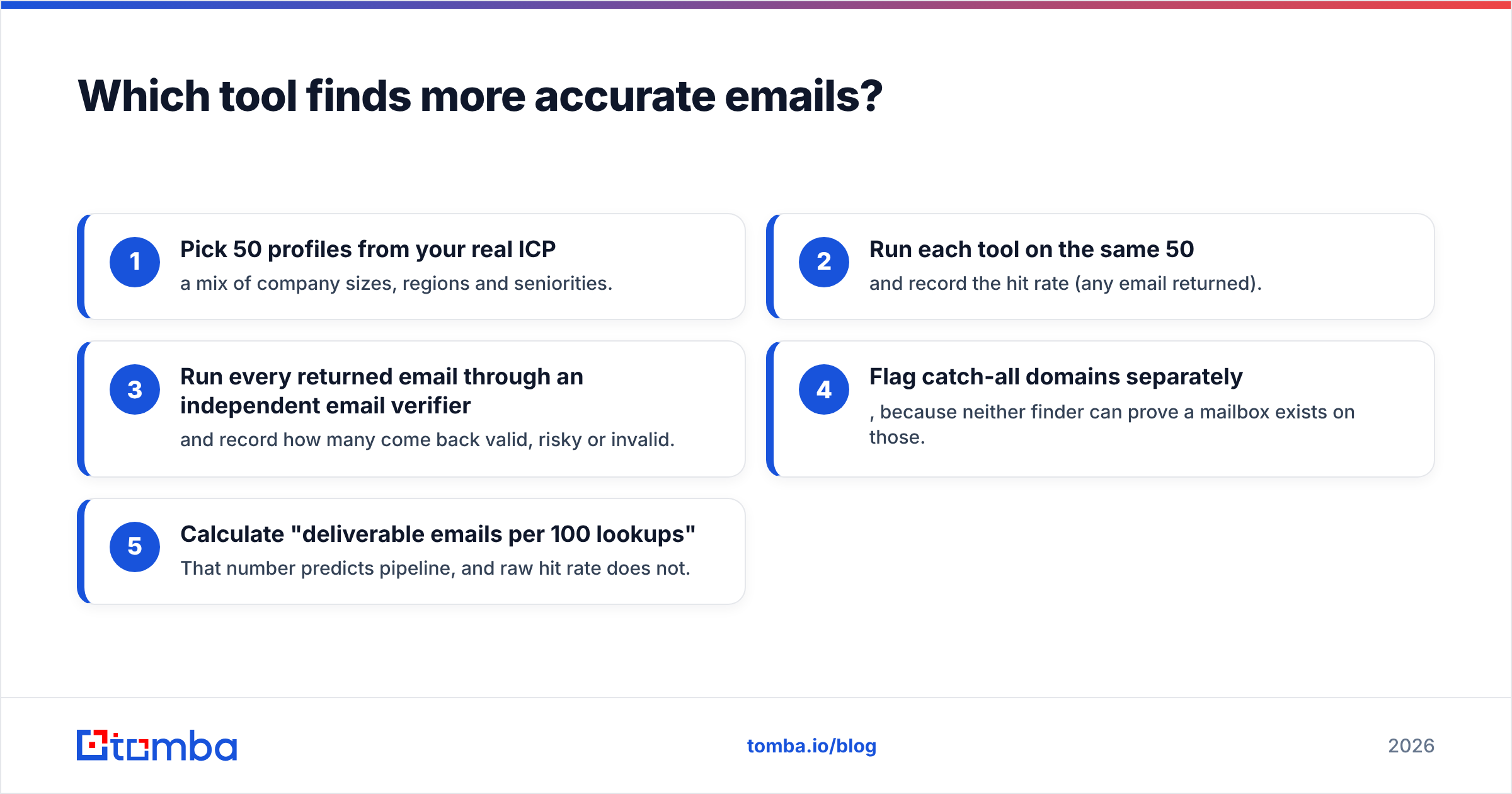
The most reliable way to compare them is a 50-profile bake-off:
- Pick 50 profiles from your real ICP: a mix of company sizes, regions and seniorities.
- Run each tool on the same 50 and record the hit rate (any email returned).
- Run every returned email through an independent email verifier and record how many come back valid, risky or invalid.
- Flag catch-all domains separately, because neither finder can prove a mailbox exists on those.
- Calculate "deliverable emails per 100 lookups". That number predicts pipeline, and raw hit rate does not.
In most teams we've seen run this kind of test, the tool with the higher raw hit rate doesn't always win on deliverable emails. That's why step 3 is worth the extra few minutes.
How do the workflows differ day to day?#
This is where most buyers find their answer, because the two tools change how you prospect.
A day with LeadLeaper looks like this: you research an account, open three or four stakeholders on LinkedIn, capture each into a lead list, maybe grab one more contact from the company's "About" page, then export the list or work it from LeadLeaper's own view. It feels like a notebook. That suits consultants and founders who send 20 to 50 highly personalized emails a week and care more about context than volume.
A day with SalesQL looks different: you build a Sales Navigator or Recruiter search with 200 results, enrich the whole page, and push the contacts with emails and phones into HubSpot or your ATS. From there your sequencing tool takes over. It feels like a pipeline feeder, which suits SDRs with activity targets and recruiters filling several roles at once.
Neither approach is better in general. Pick the one that matches how you already work. A solo consultant who buys SalesQL will pay for bulk features they never use. An SDR team that buys LeadLeaper will hit the ceiling of one-at-a-time capture within the first week.
What about CRM integrations and data hygiene?#
Integrations are SalesQL's clearest advantage. Native syncs to major CRMs and ATS platforms mean enriched contacts show up where your team already works, without CSV round-trips. If your team runs on a CRM and managers measure activity from it, this matters.
LeadLeaper's lighter approach (lists, notes, export) is enough for a one-person operation and can even be a plus if you don't want every half-researched lead cluttering your CRM. But once two or more people prospect into the same accounts, CSV exports cause duplicates and ownership disputes.
Whichever you pick, set up three hygiene rules on day one:
- Dedupe on email and on LinkedIn URL before importing.
- Store the verification status and date as CRM fields so stale records are easy to re-check.
- Tag the source ("LeadLeaper", "SalesQL") so you can compare bounce rates by tool after 60 days.
How does pricing compare?#
Both vendors use a similar model: a free tier with a small monthly allowance, then per-user monthly plans that scale by credits. Exact numbers change, so check the LeadLeaper and SalesQL pricing pages directly. Compare them on these terms:
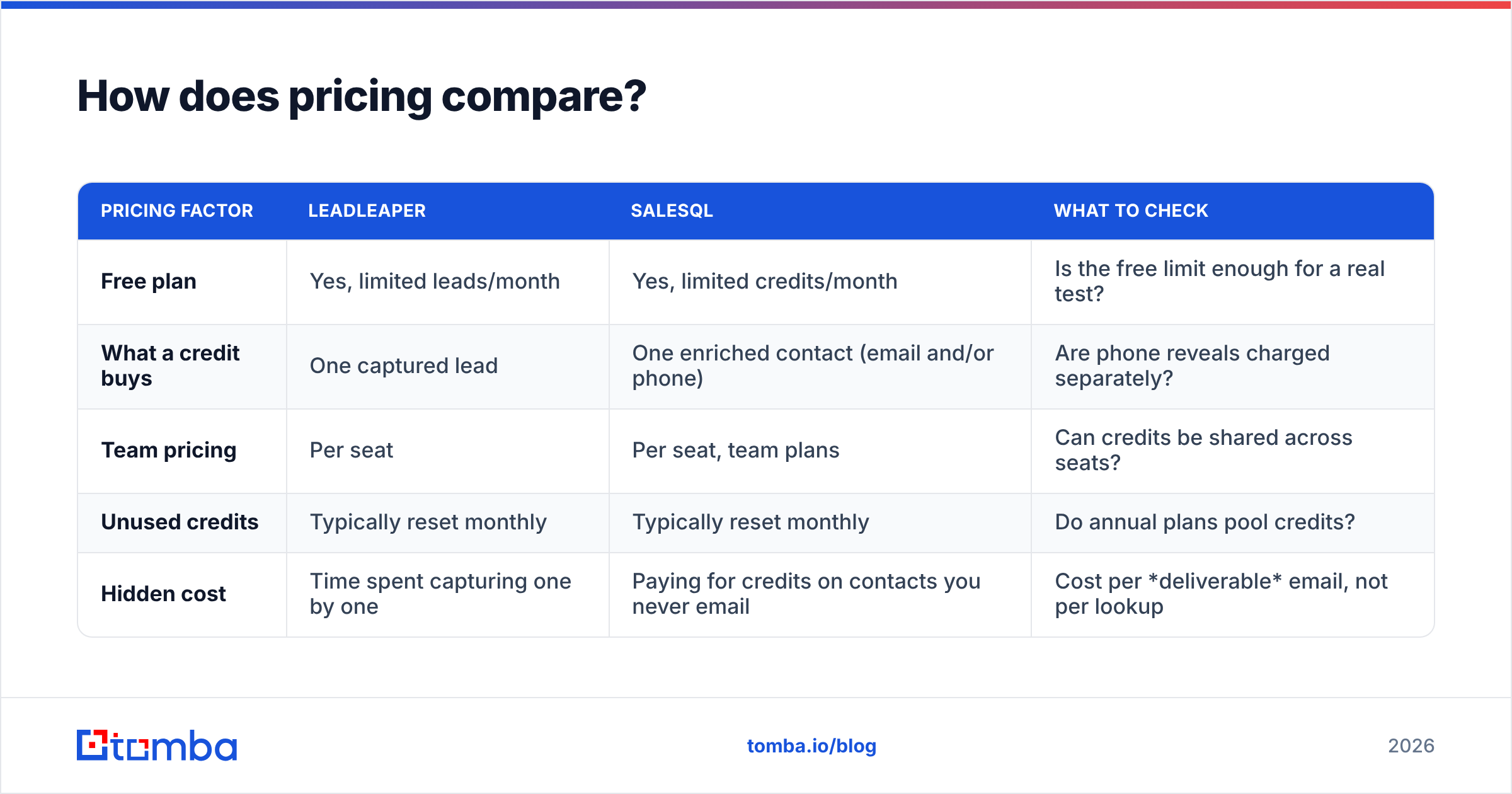
| Pricing factor | LeadLeaper | SalesQL | What to check |
|---|---|---|---|
| Free plan | Yes, limited leads/month | Yes, limited credits/month | Is the free limit enough for a real test? |
| What a credit buys | One captured lead | One enriched contact (email and/or phone) | Are phone reveals charged separately? |
| Team pricing | Per seat | Per seat, team plans | Can credits be shared across seats? |
| Unused credits | Typically reset monthly | Typically reset monthly | Do annual plans pool credits? |
| Hidden cost | Time spent capturing one by one | Paying for credits on contacts you never email | Cost per deliverable email, not per lookup |
The metric that actually matters is cost per deliverable email. If one tool costs 20% more per credit but returns 30% more verified addresses for your ICP, it's the cheaper tool.
For reference, general-purpose finders price differently. Tomba pricing starts with a free tier of 25 searches per month, then Starter at $49/mo, Growth at $99/mo, Pro at $249/mo and custom Enterprise plans. The credits work across domain search, name lookups, verification and the API, not only LinkedIn.
What do users say on review sites?#
Both tools have a decent following on review sites such as G2. The patterns in reviews are consistent:
- SalesQL reviewers praise speed, bulk enrichment and the phone numbers, especially recruiters. Common complaints are about credit usage and missing data for people outside North America and Western Europe.
- LeadLeaper reviewers like the simplicity, the website capture and the low learning curve. Common complaints are about the dated interface and less coverage for phone numbers and very senior contacts.
Take reviews as a signal of fit, not accuracy. Someone happy with SalesQL for tech recruiting in the US may get very different results selling into manufacturing in Germany.
Where do both tools fall short?#
Both tools have limits you should know about before you commit.
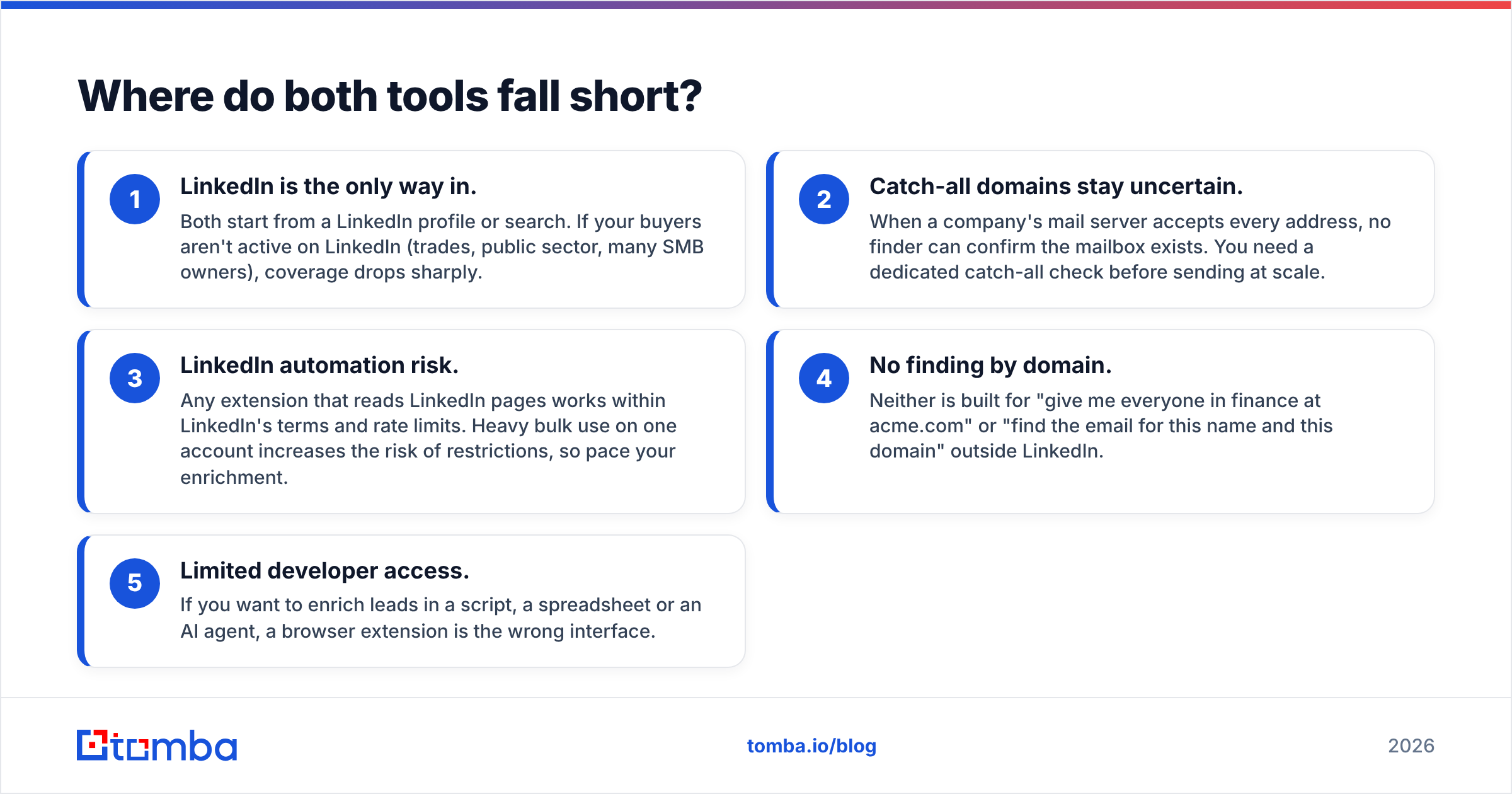
- LinkedIn is the only way in. Both start from a LinkedIn profile or search. If your buyers aren't active on LinkedIn (trades, public sector, many SMB owners), coverage drops sharply.
- Catch-all domains stay uncertain. When a company's mail server accepts every address, no finder can confirm the mailbox exists. You need a dedicated catch-all check before sending at scale.
- LinkedIn automation risk. Any extension that reads LinkedIn pages works within LinkedIn's terms and rate limits. Heavy bulk use on one account increases the risk of restrictions, so pace your enrichment.
- No finding by domain. Neither is built for "give me everyone in finance at acme.com" or "find the email for this name and this domain" outside LinkedIn.
- Limited developer access. If you want to enrich leads in a script, a spreadsheet or an AI agent, a browser extension is the wrong interface.
Is there a better option than both?#
It depends on the job. For LinkedIn-centric prospecting, SalesQL and LeadLeaper are both reasonable, and the verdict below holds. But many teams find the bottleneck isn't LinkedIn at all. It's everything around it:
- Finding emails for people you found at a conference, on a podcast or in a news article
- Enriching a spreadsheet of 5,000 company domains from a trade-show list
- Checking a list before a campaign
- Adding lookups to your product or an AI agent through an API
That's where a general-purpose finder earns its place. Tomba's LinkedIn finder covers the profile-based workflow both tools handle. The main Tomba Email Finder also works from domain, name or company, alongside verification, catch-all checks, bulk jobs and an API. Many teams keep SalesQL or LeadLeaper for daily LinkedIn browsing and use a broader finder for everything else.
Leadleaper vs SalesQL: which should you choose?#
Choose SalesQL if:
- You prospect or recruit mostly from Sales Navigator or LinkedIn Recruiter
- You need phone numbers as well as emails
- You want contacts synced to a CRM or ATS automatically
- You're a team with volume targets
Choose LeadLeaper if:
- You're a solo seller, founder or consultant doing account-based outreach by hand
- You also capture contacts from company websites, not just LinkedIn
- You want a light built-in lead list instead of another CRM integration
- You'd rather pay for fewer, well-researched leads
Choose neither on its own if:
- A large share of your targets aren't on LinkedIn
- You need to enrich spreadsheets or run lookups through an API
- You send cold email at a volume where one bad list could damage your domain
For most SDR and recruiting teams in 2026, SalesQL is the stronger LinkedIn tool. For one-person, research-heavy outreach, LeadLeaper is simpler and fits better. In both cases, run the 50-profile test before you buy, and don't send to an address you haven't verified.
Ready to find emails beyond LinkedIn?#
If your prospects aren't all on LinkedIn, or you want finding, verification and enrichment in one place, try the Tomba Email Finder. Look up professional emails by domain, name or company. Verify them before you send, including catch-all checks. Scale up through bulk jobs, Google Sheets or the API. The free plan includes 25 searches a month, so you can run the same 50-profile test described above and compare deliverable emails per 100 lookups against LeadLeaper or SalesQL on your own ICP.
Related guides#
// get started
Find, verify and enrich your first contacts today
Start on the free plan with 25 searches a month, then scale when your team is ready.
Free plan · No credit card required · GDPR & CCPA
// about the author