LeadLeaper vs Seamless.AI (2026): Which Email Finder Should You Pick?
LeadLeaper is a cheap LinkedIn-first email helper. Seamless.AI is a full sales-intelligence platform with pricing to match. Here's how they compare on data, workflow, contracts, and cost, and when a third option makes more sense.
TL;DR
- LeadLeaper is a light Chrome extension. It pulls emails from LinkedIn, Sales Navigator, and company websites for a low monthly price. It works best for solo prospectors and small teams who build lists by hand.
- Seamless.AI is a full sales-intelligence platform. It gives you emails, direct dials, buyer intent, AI writing tools, and CRM sync. It's built for SDR teams, and the pricing and contracts reflect that.
- In the LeadLeaper vs SeamlessAI matchup, the bigger difference is how you buy, not how accurate the data is. LeadLeaper is a cheap monthly tool. Seamless.AI is usually a quote-based annual deal.
- Neither tool lets you check its results against a separate verifier inside the product. Check any list before you send to it, whichever tool you pick.
- If you want transparent pricing plus finder, verifier, and bulk tools in one place, a third option like Tomba (free plan, then $49/mo) is worth a look.
What are LeadLeaper and Seamless.AI, in one paragraph each?#
LeadLeaper is a browser extension for prospectors who live on LinkedIn. Open a profile, a Sales Navigator search, or a company website, and the sidebar tries to find each person's business email. Contacts go into lead lists that you can export as CSV. LeadLeaper also has some basic Gmail-based outreach features. The product is simple on purpose: little setup, little training, and a low price.
Seamless.AI is a much bigger product. It calls itself a real-time search engine for B2B contacts. It returns emails and phone numbers, and it adds buyer-intent signals, job-change alerts, AI writing tools, and native CRM integrations. Teams usually buy it as a platform and roll it out to a whole SDR floor.
The two tools are not really direct peers. One is a prospecting utility and the other is a sales-data platform. The real question is which one matches your volume, budget, and workflow.
How do LeadLeaper and Seamless.AI compare side by side?#
Here's the high-level view before we go through each point. Pricing on both sides changes often, especially Seamless.AI's quote-based tiers, so confirm current numbers on each vendor's site before you sign.
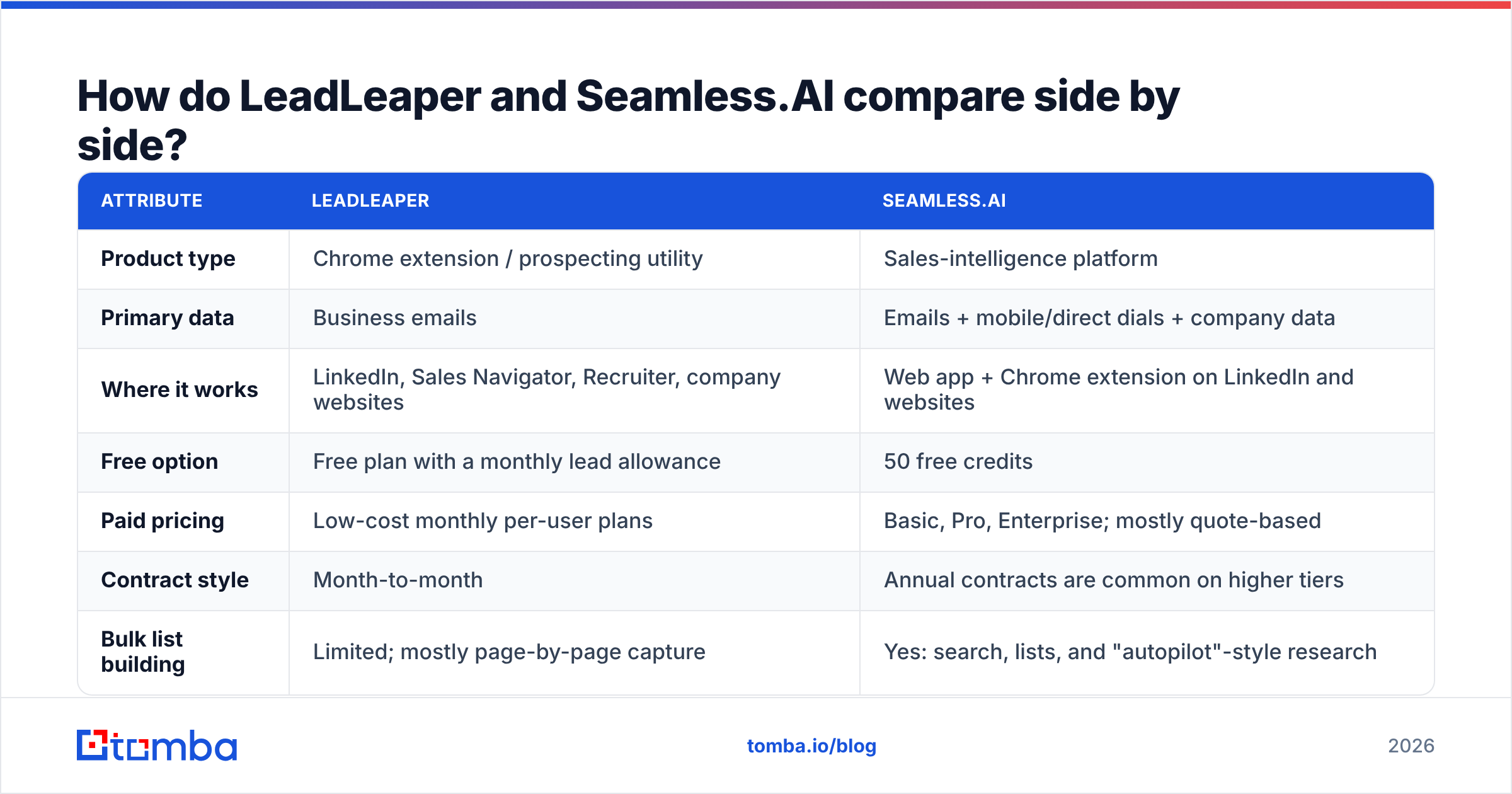
| Attribute | LeadLeaper | Seamless.AI |
|---|---|---|
| Product type | Chrome extension / prospecting utility | Sales-intelligence platform |
| Primary data | Business emails | Emails + mobile/direct dials + company data |
| Where it works | LinkedIn, Sales Navigator, Recruiter, company websites | Web app + Chrome extension on LinkedIn and websites |
| Free option | Free plan with a monthly lead allowance | 50 free credits |
| Paid pricing | Low-cost monthly per-user plans | Basic, Pro, Enterprise; mostly quote-based |
| Contract style | Month-to-month | Annual contracts are common on higher tiers |
| Bulk list building | Limited; mostly page-by-page capture | Yes: search, lists, and "autopilot"-style research |
| CRM integrations | CSV export; limited native sync | Salesforce, HubSpot, Outreach, Salesloft, and more |
| Extras | Lead lists, basic Gmail outreach | Intent data, job changes, AI writer, pitch tools |
| Best fit | Solo reps, founders, recruiters, agencies | Funded SDR/BDR teams with phone-heavy motions |

Which tool has better data accuracy?#
No vendor publishes independent, like-for-like accuracy numbers, and your own test on your own ICP beats any marketing claim. Still, the design of each tool tells you where problems tend to appear.
LeadLeaper mostly works out email patterns and checks them in real time as you capture each contact. For small and mid-sized companies with standard formats (first.last@, flast@), it does fine. It struggles with the usual trouble spots: catch-all domains, companies with more than one mail domain, and very large enterprises with inconsistent formats.
Seamless.AI also researches contacts on demand instead of serving a static database, and it attaches a confidence score to each result. You get more fields, especially phone numbers. Reviews on G2 show a recurring pattern, though. Users like the volume and coverage but report mixed accuracy, particularly on mobile numbers and in niche verticals.

The practical takeaway: neither tool removes the need for a separate verification step. Before a list goes into your sequencer, run it through an email verifier that handles catch-all domains properly. One bad batch can do more harm to your domain reputation than a month of good prospecting fixes.
How to run a fair accuracy test yourself#
If you're choosing between the two, don't rely on reviews. Run a 1-hour bake-off:
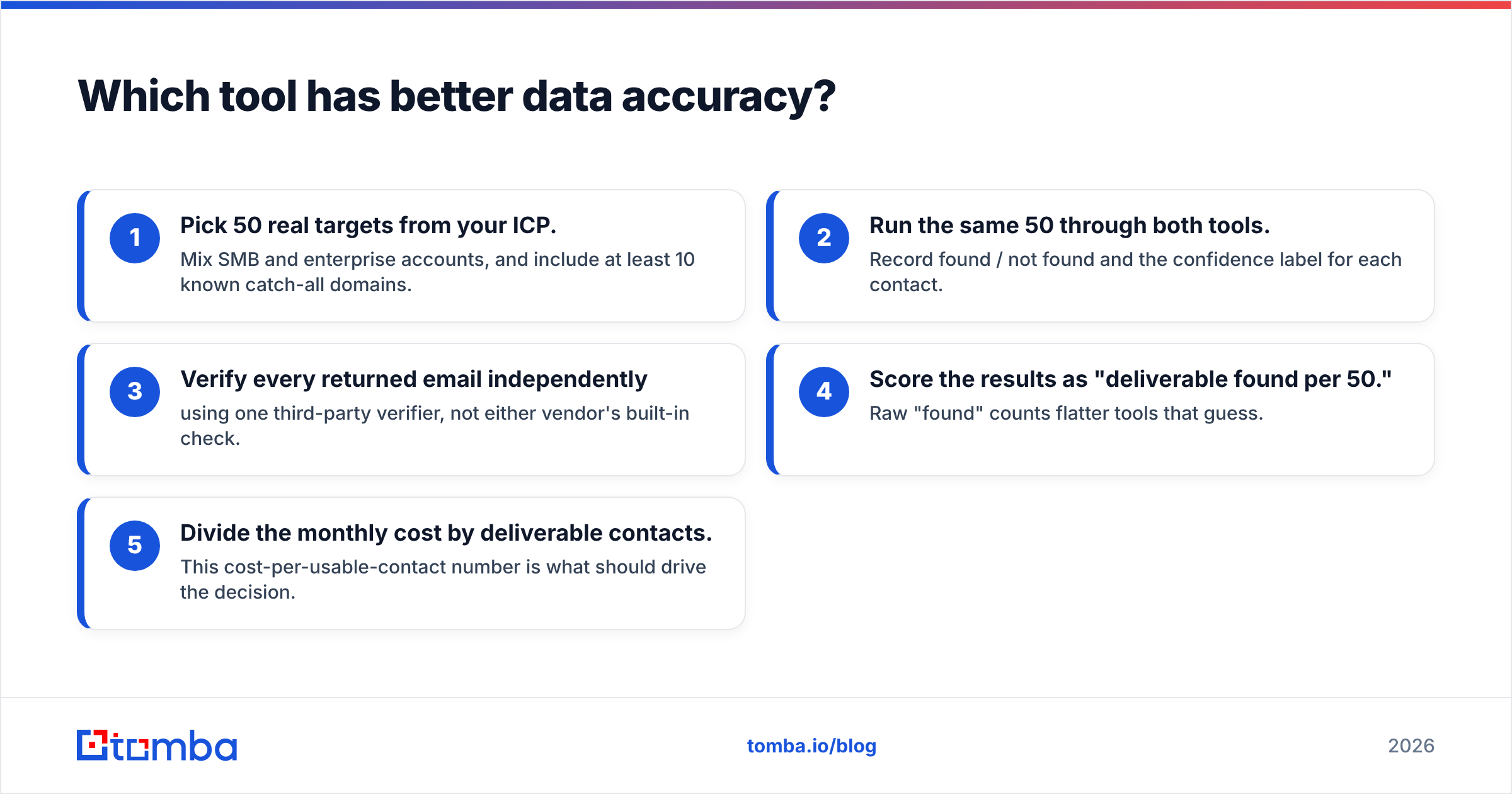
- Pick 50 real targets from your ICP. Mix SMB and enterprise accounts, and include at least 10 known catch-all domains.
- Run the same 50 through both tools. Record found / not found and the confidence label for each contact.
- Verify every returned email independently using one third-party verifier, not either vendor's built-in check.
- Score the results as "deliverable found per 50." Raw "found" counts flatter tools that guess.
- Divide the monthly cost by deliverable contacts. This cost-per-usable-contact number is what should drive the decision.
How does pricing actually compare?#
Pricing is where the two tools differ most, and where most buyer regret comes from.
LeadLeaper is priced like a utility. A free plan covers a small monthly number of leads, and paid plans are inexpensive per-user subscriptions that you can cancel month to month. For a founder or recruiter who needs a few hundred contacts a month, the total cost is small, and you can drop it with no penalty when a campaign ends.
Seamless.AI gives new accounts 50 free credits, and the paid tiers (Basic, Pro, Enterprise) are mostly sold through a sales conversation. Higher tiers usually involve annual commitments. In public reviews, users often mention auto-renewal terms and friction when cancelling. That doesn't make it a bad product. It means you should read the order form closely, put a calendar reminder before the renewal date, and negotiate credit limits at the start.

The hidden cost to watch on both tools is credits spent on contacts you can't use. If 20% of what you pull bounces or turns out to be a catch-all guess, your real cost per contact is 25% higher than the sticker price suggests.
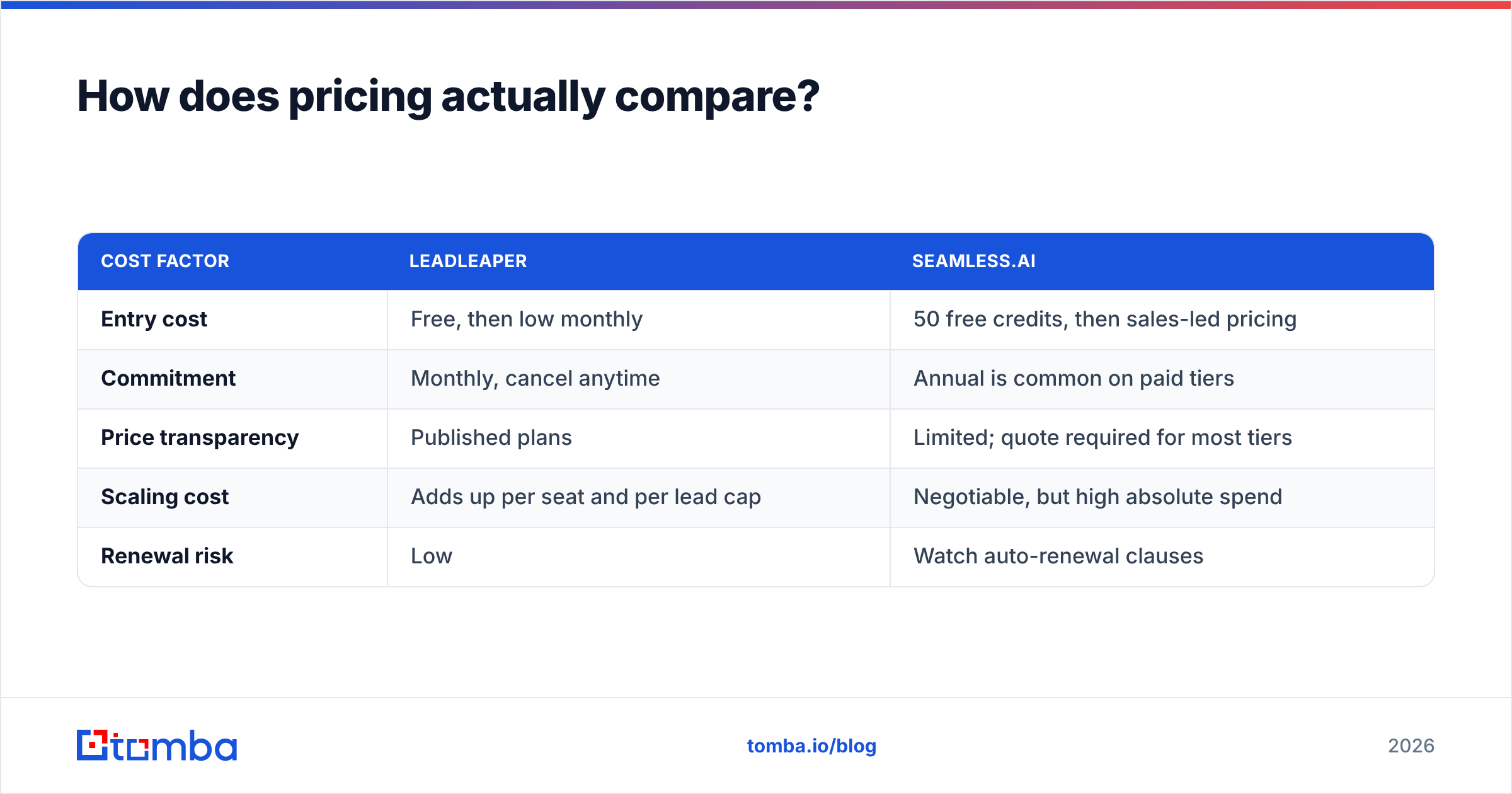
| Cost factor | LeadLeaper | Seamless.AI |
|---|---|---|
| Entry cost | Free, then low monthly | 50 free credits, then sales-led pricing |
| Commitment | Monthly, cancel anytime | Annual is common on paid tiers |
| Price transparency | Published plans | Limited; quote required for most tiers |
| Scaling cost | Adds up per seat and per lead cap | Negotiable, but high absolute spend |
| Renewal risk | Low | Watch auto-renewal clauses |
Which one fits your prospecting workflow?#
The better tool depends on how your day actually runs, not on the longer feature list.
Choose LeadLeaper if:
- You prospect one account or one profile at a time on LinkedIn or Sales Navigator.
- You're a founder, recruiter, or agency owner who needs dozens to low hundreds of contacts a month.
- You mostly use email, and phone numbers are a nice-to-have.
- You want nothing to install beyond an extension and nothing to negotiate.
Choose Seamless.AI if:
- You run a team of SDRs making calls and need direct dials along with emails.
- You want intent data and job-change alerts feeding your pipeline.
- You need native Salesforce or HubSpot sync with field mapping and deduplication.
- You have the budget for an annual platform deal and someone to administer it.
If you're a team of two to ten reps doing email-first outbound, neither choice fits perfectly. LeadLeaper gets awkward once you need bulk enrichment, APIs, or shared workflows. Seamless.AI can be more platform, and more contract, than you actually need. That middle group is the one most likely to look at a Seamless.AI alternative.
What are the pros and cons of each tool?#
LeadLeaper pros
- Cheap, month-to-month, with a real free plan
- Very fast to learn and use inside LinkedIn
- Works on company websites as well as profiles
- Good enough accuracy for standard-format SMB domains
LeadLeaper cons
- Mostly one contact at a time, with no strong bulk or API workflow
- Thin phone data
- Limited native CRM integrations
- The interface and feature set feel dated next to newer tools
Seamless.AI pros
- Broad coverage, including mobile and direct-dial numbers
- Intent data, job changes, and AI writing in one platform
- Deep CRM and sales-engagement integrations
- Built to roll out to large SDR teams
Seamless.AI cons
- Pricing is mostly sales-led and hard to compare
- Annual contracts and renewal terms need close reading
- Reviews report mixed accuracy on phones and niche segments
- Easy to spend credits on contacts you never use
Is there a middle-ground option worth considering?#
Yes. Many teams end up with LeadLeaper for quick grabs, Seamless.AI for calling, and a spreadsheet of bounces to reconcile between them. If you're heading that way, it's worth testing a tool that covers the email side of both from one account.

Tomba is one example of that middle ground. Its email finder works by name and domain, the LinkedIn finder and Chrome extension handle profile-by-profile capture the way LeadLeaper does, and domain search pulls every public address for a company in one query. A built-in verifier and catch-all verifier cover the step neither LeadLeaper nor Seamless.AI makes easy, and bulk tools plus an API handle volume. Pricing is published: a free tier with 25 searches a month, then Starter at $49/mo, Growth at $99/mo, and Pro at $249/mo. Details are on the Tomba pricing page.
To be clear about the trade-offs: Tomba is email-first. If direct dials and intent signals are the core of your motion, Seamless.AI's platform goes further in those areas. If you only need a handful of LinkedIn emails a month, LeadLeaper's free plan may be all you need.
| Need | Best fit |
|---|---|
| A few LinkedIn emails a month, near-zero budget | LeadLeaper |
| Phone-heavy SDR team with intent data and CRM sync | Seamless.AI |
| Email-first team needing finder + verifier + bulk + API, monthly billing | Tomba |
| Enterprise with procurement and dedicated RevOps admin | Seamless.AI (or a broader data platform) |
LeadLeaper vs SeamlessAI: which should you choose?#
Here's the direct verdict.
- For solo prospectors, founders, and recruiters, LeadLeaper wins. It's cheaper, simpler, and does exactly the one job you need without a contract.
- For funded SDR teams whose motion depends on phone numbers and intent data, Seamless.AI wins, as long as you negotiate the contract carefully and verify emails before sending.
- For small-to-mid teams doing email-first outbound, you'll probably outgrow LeadLeaper and overpay for Seamless.AI. A transparent, monthly, all-in-one email tool fits better.
Whichever you pick, follow the rule that protects your domain: never send to an unverified list. A finder only tells you where an email probably is. Verification tells you whether it's safe to send to.
Ready to test a transparent alternative?#
If LeadLeaper feels too manual and Seamless.AI feels like too much contract, run the 50-contact bake-off above with a third tool included. The Tomba Email Finder finds professional emails by name, domain, or company, verifies them in the same workflow, and scales from the free plan to $49/mo Starter without an annual commitment. Start with the free 25 searches, compare your deliverable-found rate against both tools, and let cost per usable contact make the decision.
Related guides#
// get started
Find, verify and enrich your first contacts today
Start on the free plan with 25 searches a month, then scale when your team is ready.
Free plan · No credit card required · GDPR & CCPA
// about the author