LeadLeaper vs WarpLeads: Which Email Finder Wins in 2026?
LeadLeaper finds emails one LinkedIn profile at a time. WarpLeads sells unlimited exports from a 100M+ contact database. Here is which one fits your pipeline, and when neither does.
LeadLeaper vs WarpLeads comes down to one question: do you find leads one profile at a time, or pull them from a database in bulk? Here is how the two compare.
TL;DR
LeadLeaper is a Chrome extension that finds emails while you browse LinkedIn, Sales Navigator, and company websites. It has a free plan (about 100 credits a month), and paid plans have been listed from roughly $29/month.
WarpLeads is a B2B contact database with a Chrome extension added on top. It advertises 100M+ contacts and exports that aren't metered by credits. Plans have been listed at $59/month (Essentials) and $99/month (Unlimited) per workspace, with a free tier of about 30 contacts a month.
Pick LeadLeaper if you prospect by hand, one account at a time, and want a small CRM built in.
Pick WarpLeads if you build large filtered lists and care more about the cost per lead than about hand-picking each contact.
Whichever you choose, verify every address before you send. Both tools return guessed or pattern-based results some of the time, and that is how bounce rates climb.
What are LeadLeaper and WarpLeads?#
Both tools find business emails, but they are built for different jobs.
LeadLeaper is one of the older LinkedIn email finders on the market. You open a LinkedIn or Sales Navigator profile (or a company's team page), click the extension, and it tries to return the person's business email. The leads you capture go into a list inside LeadLeaper. From there you can export them to CSV or, on higher tiers, work them through its lightweight sales CRM and email sequences. LeadLeaper only charges a credit when it finds a business email, and it doesn't charge extra for exports.
WarpLeads starts from the database. You filter a large B2B contact dataset by job title, industry, company size, location, and similar fields, then export the matching contacts. Its main selling point is that exports aren't metered the way most credit-based tools meter them. A Chrome extension handles the one-off lookups on LinkedIn profiles and websites.
Put simply, LeadLeaper helps you research one person at a time, and WarpLeads helps you build big lists quickly.
LeadLeaper vs WarpLeads: how do they compare side by side?#
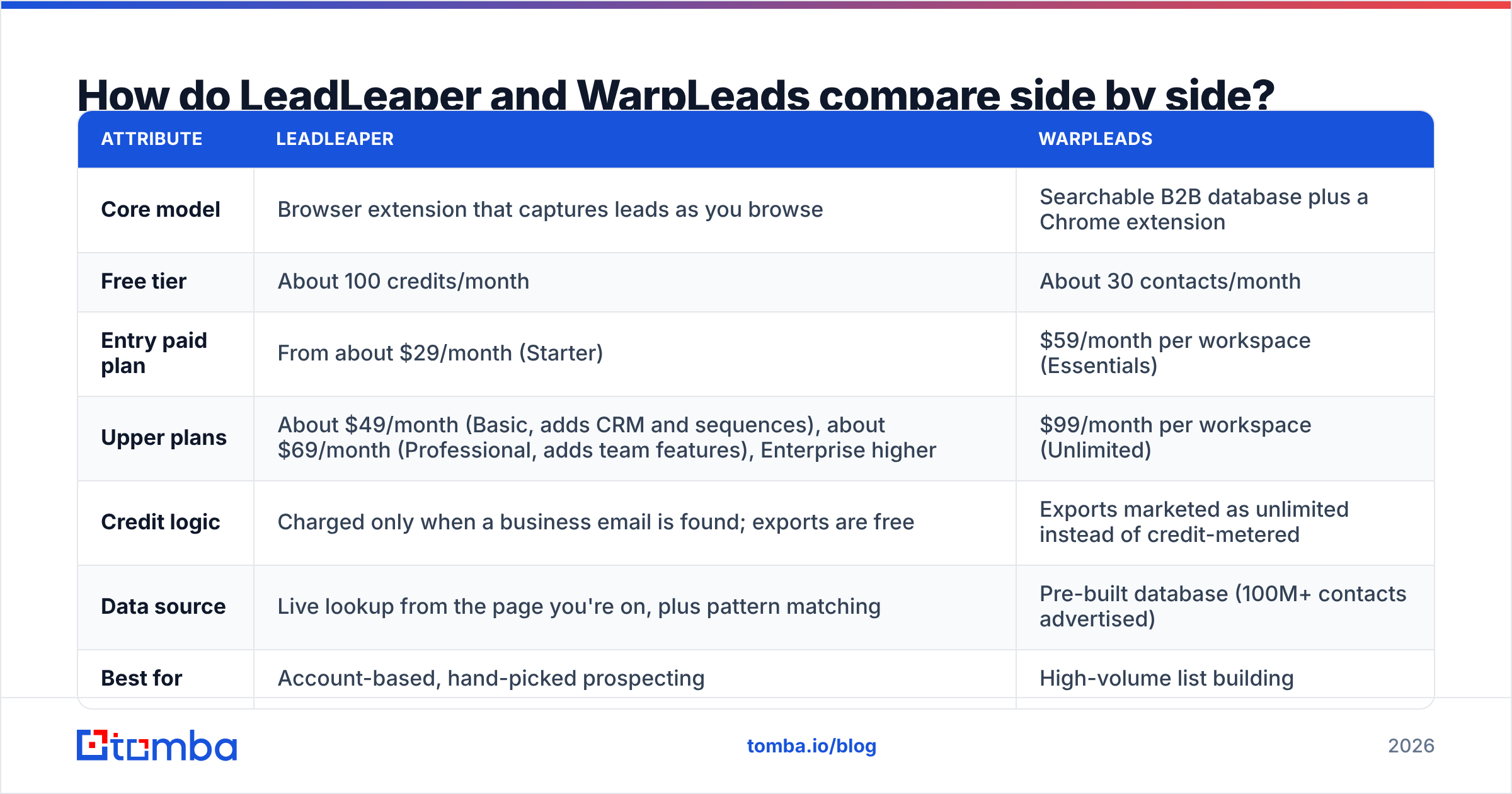
Here is the comparison at a glance. Pricing comes from public listings at the time of writing. Both vendors change their plans often, so check their pricing pages before you buy.
| Attribute | LeadLeaper | WarpLeads |
|---|---|---|
| Core model | Browser extension that captures leads as you browse | Searchable B2B database plus a Chrome extension |
| Free tier | About 100 credits/month | About 30 contacts/month |
| Entry paid plan | From about $29/month (Starter) | $59/month per workspace (Essentials) |
| Upper plans | About $49/month (Basic, adds CRM and sequences), about $69/month (Professional, adds team features), Enterprise higher | $99/month per workspace (Unlimited) |
| Credit logic | Charged only when a business email is found; exports are free | Exports marketed as unlimited instead of credit-metered |
| Data source | Live lookup from the page you're on, plus pattern matching | Pre-built database (100M+ contacts advertised) |
| Best for | Account-based, hand-picked prospecting | High-volume list building |
| Built-in outreach | Lightweight CRM and email sequences on mid-tier plans | No, you export to your own sequencer |
| Phone numbers | Limited | Advertised via the extension where publicly available |

The table shows the tradeoff clearly. LeadLeaper is cheaper to start with and fits how an SDR works day to day. WarpLeads costs more per month but can bring your cost per contact close to zero if you really do pull thousands of records.
How does each tool actually find emails?#
This section matters most. How each tool gets its data explains most of the accuracy gaps you'll see.
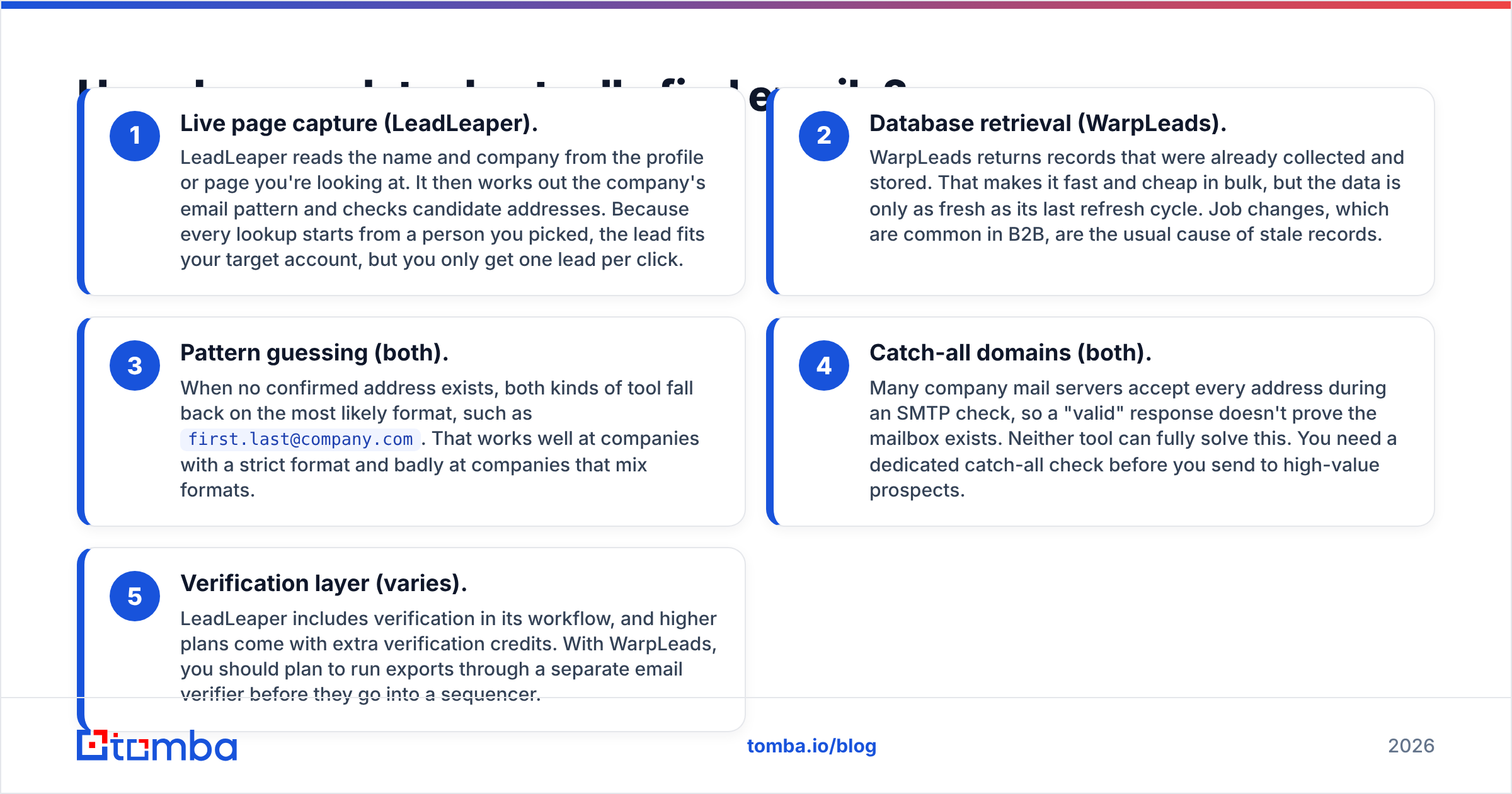
Live page capture (LeadLeaper). LeadLeaper reads the name and company from the profile or page you're looking at. It then works out the company's email pattern and checks candidate addresses. Because every lookup starts from a person you picked, the lead fits your target account, but you only get one lead per click.
Database retrieval (WarpLeads). WarpLeads returns records that were already collected and stored. That makes it fast and cheap in bulk, but the data is only as fresh as its last refresh cycle. Job changes, which are common in B2B, are the usual cause of stale records.
Pattern guessing (both). When no confirmed address exists, both kinds of tool fall back on the most likely format, such as
first.last@company.com. That works well at companies with a strict format and badly at companies that mix formats.Catch-all domains (both). Many company mail servers accept every address during an SMTP check, so a "valid" response doesn't prove the mailbox exists. Neither tool can fully solve this. You need a dedicated catch-all check before you send to high-value prospects.
Verification layer (varies). LeadLeaper includes verification in its workflow, and higher plans come with extra verification credits. With WarpLeads, you should plan to run exports through a separate email verifier before they go into a sequencer.
Which is more accurate: LeadLeaper or WarpLeads?#
We don't have an independent, controlled benchmark of these two tools against the same sample, so we won't make up a percentage. What we can say for sure is which failure mode each one is prone to.
- LeadLeaper's weak spot is coverage, not freshness. Each lookup happens live against a real, current profile, so the person is almost always still at the company. The misses come from small companies, unusual email formats, and catch-all domains where it can't confirm a mailbox.
- WarpLeads' weak spot is decay, not coverage. A database of over 100 million records will return something for almost any search. But B2B contact data decays steadily as people change jobs, get promoted, and companies rebrand. Industry estimates, including HubSpot's summaries of database decay research, commonly put annual B2B contact decay above 20%. Any database that isn't re-verified continuously will have a share of dead addresses.

In practice, if you send cold email from a domain you care about, the accuracy of the finder matters less than whether you verify before you send. A 5% bounce rate on a 10,000-contact export means 500 hard bounces. That is enough to hurt a young sending domain's reputation.
How much do LeadLeaper and WarpLeads really cost per lead?#
Monthly prices mislead here. The two tools charge for different things, so compare the cost per usable contact instead.
LeadLeaper example. Suppose a paid tier gives you a few thousand credits a month. You're only charged when a business email is found, so your cost per found email is roughly the plan price divided by the credits you actually use. If you prospect by hand, you will rarely use more than a few hundred credits a month anyway. Even then, the cost per contact stays small, and every contact is one you picked.
WarpLeads example. On the $99/month Unlimited plan, pulling 10,000 contacts works out to about one cent per contact before verification. But if 15 to 25% of those records bounce or are catch-all unknowns, your cost per deliverable contact goes up. You also pay separately to verify the list.
The pattern:
- Low volume, high intent: LeadLeaper is almost always cheaper overall.
- High volume, broad targeting: WarpLeads wins on unit cost, as long as you budget for verification.
- Mid volume (500 to 3,000 contacts a month): It depends on whether your workflow starts from LinkedIn profiles (LeadLeaper) or from filters (WarpLeads).
User reviews on sites such as Capterra follow the same split. LeadLeaper reviewers tend to praise the simplicity and the fact that exports are free. Database-tool reviewers tend to praise volume and bring up data freshness as the tradeoff.
Which workflow does each tool fit best?#
When is LeadLeaper the better choice?#
- You're an SDR, founder, or recruiter doing account-based outreach and you already live in LinkedIn or Sales Navigator.
- You want to capture context along with the email: title, company, and the profile you found them on.
- You want a basic CRM and simple sequences without paying for a separate outreach tool yet.
- Your budget is tight and the free plan (about 100 credits) covers your monthly volume.
When is WarpLeads the better choice?#
- You run high-volume outbound across a broad ICP and need thousands of contacts a month.
- You'd rather filter and export than click through profiles one by one.
- You already use a sequencer (Instantly, Smartlead, Lemlist, or similar) and just need raw contact data.
- You have a verification step in your stack to clean exports before sending.
When might neither be the right fit?#
If you need a documented REST API, integrations with Google Sheets or your CRM, catch-all handling, and domain-level search all in one product, both tools will leave gaps. That's usually when teams start looking at a broader email-finding platform instead of a single-purpose extension or database.
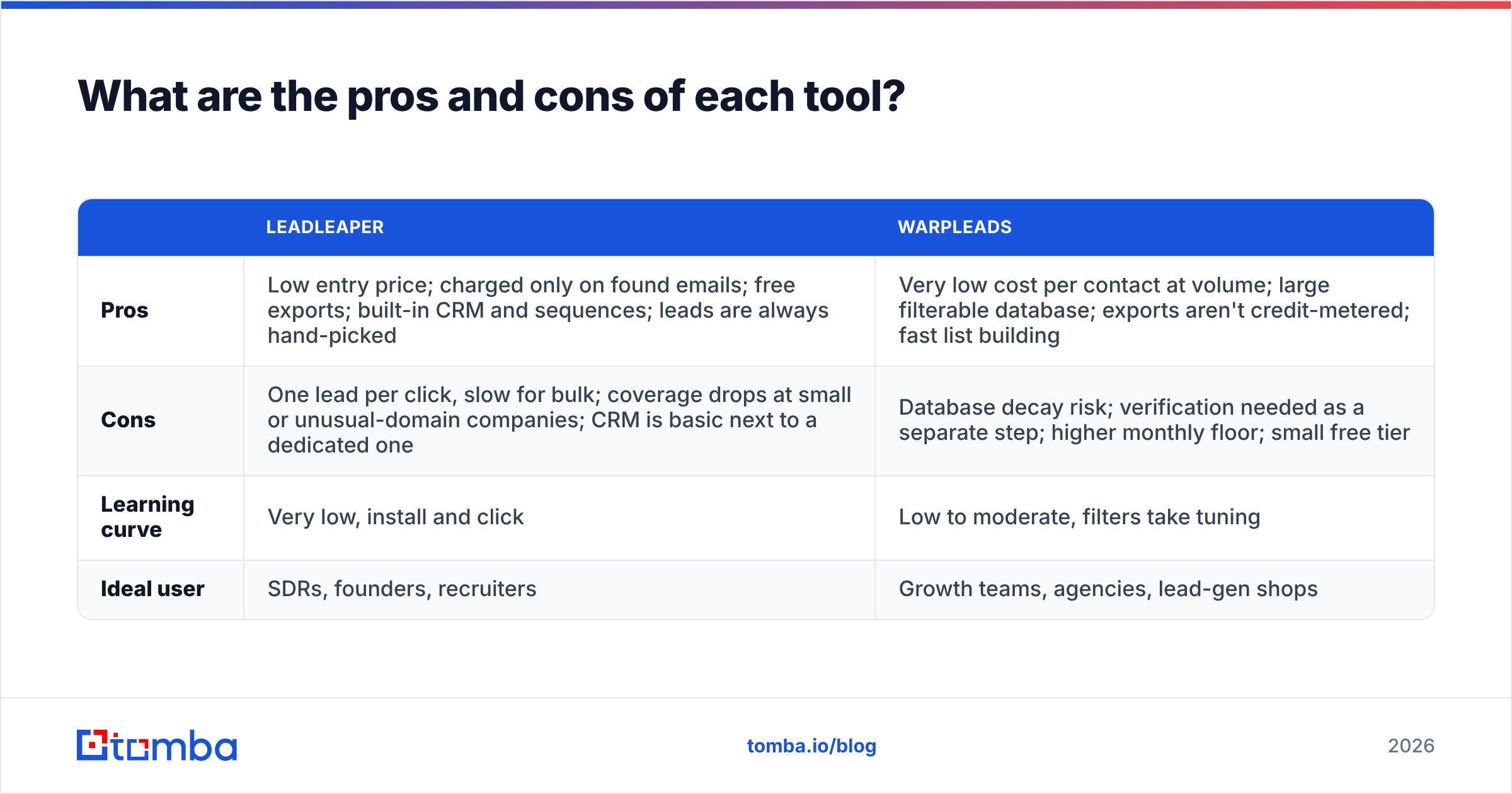
What are the pros and cons of each tool?#
| LeadLeaper | WarpLeads | |
|---|---|---|
| Pros | Low entry price; charged only on found emails; free exports; built-in CRM and sequences; leads are always hand-picked | Very low cost per contact at volume; large filterable database; exports aren't credit-metered; fast list building |
| Cons | One lead per click, slow for bulk; coverage drops at small or unusual-domain companies; CRM is basic next to a dedicated one | Database decay risk; verification needed as a separate step; higher monthly floor; small free tier |
| Learning curve | Very low, install and click | Low to moderate, filters take tuning |
| Ideal user | SDRs, founders, recruiters | Growth teams, agencies, lead-gen shops |
Is LeadLeaper better than WarpLeads?#
The LeadLeaper vs WarpLeads question has no single winner. It depends on how your team prospects.
- If your prospecting starts with a person, LeadLeaper fits your workflow better. You see the profile, decide they're a fit, and grab the email. That's the cleanest way to work for small teams and account-based motions.
- If your prospecting starts with a filter, WarpLeads fits better. You define the ICP, pull the list, clean it, and load it into a sequencer.
The mistake to avoid is buying the database tool for a hand-picked workflow, where you pay for volume you never use. The reverse mistake is buying the extension for a volume workflow, where you burn hours clicking profiles.
What should you check before committing to either tool?#
Before you pay for an annual plan, run a quick trial on both. It takes about an hour.
- Build a 50-contact test list from accounts you know well, ideally a few where you already have confirmed emails.
- Run the same list through both tools. Record the found rate, the "verified" rate, and how many results are catch-all or unknown.
- Verify every result independently with a separate verifier so you're comparing both tools against the same standard.
- Spot-check job titles. For database tools, check that the person still holds the role on LinkedIn.
- Calculate cost per deliverable contact, not cost per exported contact.
- Test the export path into your real CRM or sequencer, because field mapping problems cost more time than they look like on a demo.
If you'd rather not test two tools, compare them against a single platform that covers finding, verification, and domain search. Tomba's email finder works from a name and domain, a LinkedIn profile, or a whole company domain. It returns a confidence score and the public sources behind each address, and verification is built into the same workflow.
Plans start with a free tier of 25 searches a month and go up to Starter at $49/month, Growth at $99/month, and Pro at $249/month (full Tomba pricing). If most of your prospecting happens on LinkedIn, the LinkedIn finder covers the same use case as LeadLeaper's core feature.
Frequently asked questions#
Does LeadLeaper work with Sales Navigator?#
Yes. LeadLeaper works on standard LinkedIn profiles, Sales Navigator, and many company websites. You capture leads with the extension and they collect in your LeadLeaper list.
Is WarpLeads really unlimited?#
WarpLeads markets its higher plan as unlimited exports rather than credit-metered downloads. As with any "unlimited" offer, read the fair-use terms and check for per-workspace limits before building your process around it.
Do I still need an email verifier with these tools?#
Yes. Neither tool can confirm mailboxes on catch-all domains, and database records go stale over time. Verify before every campaign, especially on new sending domains.
Which is better for agencies?#
Agencies that run volume campaigns for several clients usually get more from a database model like WarpLeads. Agencies running high-touch ABM tend to prefer LeadLeaper's hand-picked approach.
Which should you choose?#
In the LeadLeaper vs WarpLeads decision, choose LeadLeaper if you want a cheap, simple, profile-by-profile email finder with a small CRM attached. Choose WarpLeads if volume is your bottleneck and you have verification in place. And if you want finding, verifying, and domain-wide search in one tool with a free tier and an API, try the Tomba Email Finder. Run your own 50-contact test list through it on the free plan and compare the deliverable-contact rate against whichever tool you're considering.
Related guides#
// get started
Find, verify and enrich your first contacts today
Start on the free plan with 25 searches a month, then scale when your team is ready.
Free plan · No credit card required · GDPR & CCPA
// about the author