Leadleaper vs Wiza: Which LinkedIn Email Finder Wins in 2026?
Leadleaper and Wiza both pull emails from LinkedIn, but they suit very different buyers. Here's how they compare on workflow, accuracy, pricing model and scale, and which one to pick.
TL;DR
- Leadleaper is a lightweight browser extension. It captures leads one at a time while you browse LinkedIn, Sales Navigator and company websites. It suits solo sellers and small teams who prospect by hand.
- Wiza is built for bulk export. You point it at a Sales Navigator search or list, and it returns an enriched, verified CSV or pushes the records into your CRM. It suits teams that already live in Sales Navigator.
- Leadleaper is the cheaper way to start. Wiza costs more per seat but saves a lot of time once you're exporting hundreds of contacts a week.
- Both tools depend on LinkedIn. Neither is a full domain-level email finder, so teams that prospect from company websites, lists or APIs usually add a third tool.
- Our pick: choose Leadleaper for low-volume manual prospecting and Wiza for high-volume Sales Navigator workflows. If you need domain search, verification and API access in one place, look at a broader email finder.
What are Leadleaper and Wiza?#
Both tools answer the same question: "I found the right person on LinkedIn, so what's their work email?" They take very different routes to the answer.
Leadleaper is a Chrome and Edge extension. As you browse a LinkedIn profile, a Sales Navigator lead page or a company's "About" page, it shows a sidebar. You click to save the lead, and it tries to find the person's business email. Leads go into Leadleaper's own list manager, and you can export them to CSV from there. It started as a tool for individual sellers, and that's still who it serves best.
Wiza started as a Sales Navigator list exporter. You build a search in Sales Navigator, paste the URL or open the Wiza extension, and Wiza pulls every matching profile. It then finds and verifies emails (and phone numbers on higher plans) and returns a clean spreadsheet or syncs straight to HubSpot, Salesforce or other CRMs. Wiza has since added an individual-profile extension and an API, but bulk list export is still where it's strongest.
So the real difference isn't which tool finds more emails. It's whether you prospect one person at a time or one list at a time.
How do Leadleaper and Wiza compare side by side?#
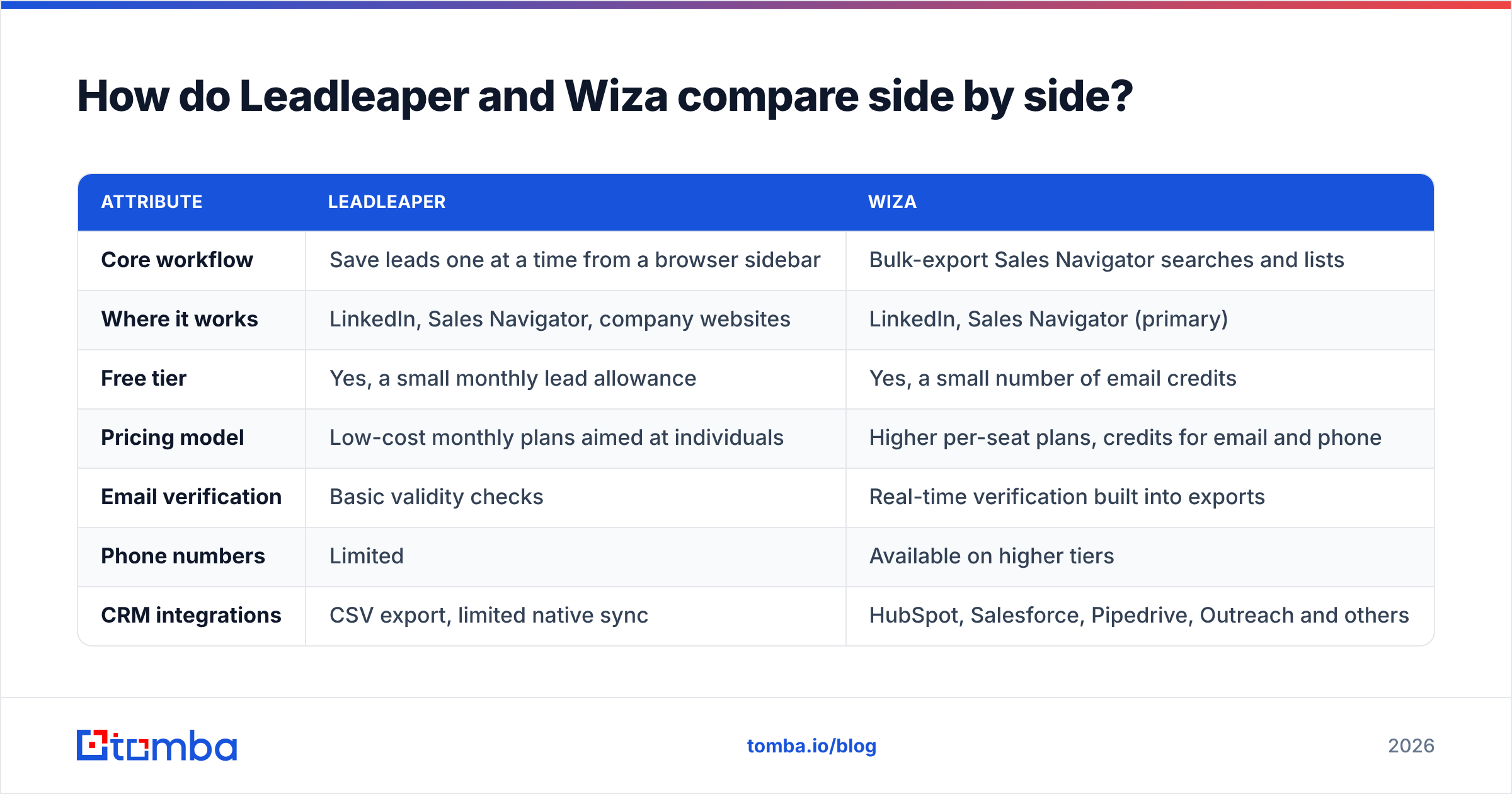
Here's the high-level comparison. Pricing and credit allowances change often, so check each vendor's pricing page before you buy. The table shows how each product is structured, not a price quote.
| Attribute | Leadleaper | Wiza |
|---|---|---|
| Core workflow | Save leads one at a time from a browser sidebar | Bulk-export Sales Navigator searches and lists |
| Where it works | LinkedIn, Sales Navigator, company websites | LinkedIn, Sales Navigator (primary) |
| Free tier | Yes, a small monthly lead allowance | Yes, a small number of email credits |
| Pricing model | Low-cost monthly plans aimed at individuals | Higher per-seat plans, credits for email and phone |
| Email verification | Basic validity checks | Real-time verification built into exports |
| Phone numbers | Limited | Available on higher tiers |
| CRM integrations | CSV export, limited native sync | HubSpot, Salesforce, Pipedrive, Outreach and others |
| API | No public API for bulk workflows | Yes |
| Best for | Solo reps, founders, recruiters working manually | SDR teams running Sales Navigator at scale |
| Main weakness | Slow at scale, few integrations | Cost climbs fast, and it needs Sales Navigator for the full value |

The short version: Leadleaper is cheap and hands-on, and Wiza is higher-volume and more automated. Your choice depends mostly on how many contacts you need a week and whether you already pay for Sales Navigator.
Which workflow fits how you actually prospect?#
Look at your last week of prospecting before you look at feature lists.
If you did something like this, lean Leadleaper:
- Opened 30 to 60 LinkedIn profiles, one by one, after reading posts or checking job changes.
- Researched each account before you reached out.
- Sent personalized, low-volume emails from your own inbox.
- Kept leads in a spreadsheet or a lightweight CRM.
Leadleaper fits that motion. The sidebar is always there, saving a lead takes one click, and you don't pay for bulk capacity you won't use. It also works on company websites, which helps when a prospect's LinkedIn profile is thin but the "Team" page lists them.
If you did something like this, lean Wiza:
- Built a Sales Navigator search, for example "VP Marketing, SaaS, 50 to 500 employees, US."
- Wanted every result, often 200 to 2,500 contacts, in a sequencer by the afternoon.
- Needed verified emails, since a bounce rate above a few percent damages your sender reputation.
- Wanted the records to land in HubSpot or Salesforce without a manual CSV step.
Wiza is built for exactly that. Paste the search, let it run, and pick up an enriched list. Manual tools can't match that time saving once you're past a few dozen leads a day.
How accurate are Leadleaper and Wiza?#
Accuracy is where most comparisons get vague, so here's what we can say.
Wiza verifies emails as part of the export. Every address it returns has gone through a mailbox-level check, and you only spend credits on emails it can verify. That model protects your deliverability, and it's one of the main reasons teams pay Wiza's higher price. User reviews on G2 regularly praise how few bounces Wiza exports produce. The most common complaint is the cost.
Leadleaper combines pattern-based guessing with lookups. It does some validity checking, but you should treat its output as "likely correct" rather than "verified." For low-volume, hand-written outreach, a handful of bounces won't hurt you much. If you're loading hundreds of Leadleaper emails into a sequencer, run them through a dedicated email verifier first.

Both tools share two accuracy limits:
- Catch-all domains. Many mid-market and enterprise companies accept mail for any address at their domain. A verifier can't confirm whether
jane.doe@actually reaches Jane. Wiza labels these results, while Leadleaper is less explicit. Either way, catch-all results need a separate risk decision. - LinkedIn freshness. Both tools rely on what the person shows on LinkedIn. If someone changed jobs but hasn't updated their profile, both tools will confidently return the wrong company's email.
How does pricing compare between Leadleaper and Wiza?#
Exact prices move around, so check Leadleaper's site and Wiza's pricing page for current numbers. The structure is more useful to compare than any single figure.
Leadleaper is priced for individuals. The free plan lets you save a limited number of leads each month, which is enough to test the workflow properly. Paid plans are low-cost monthly subscriptions that raise the lead cap. There's no expensive seat license, which is why founders and freelance recruiters like it.
Wiza is priced for teams and volume. The free plan gives you a small batch of credits to test an export. Paid plans cost considerably more per month and include a larger pool of email credits. Phone credits and team features sit on higher tiers. Because you only pay for verified results, cost per usable email is reasonable, but the monthly commitment is real. Most teams also need a Sales Navigator subscription on top to get Wiza's full value.
Here's a quick way to think about cost:
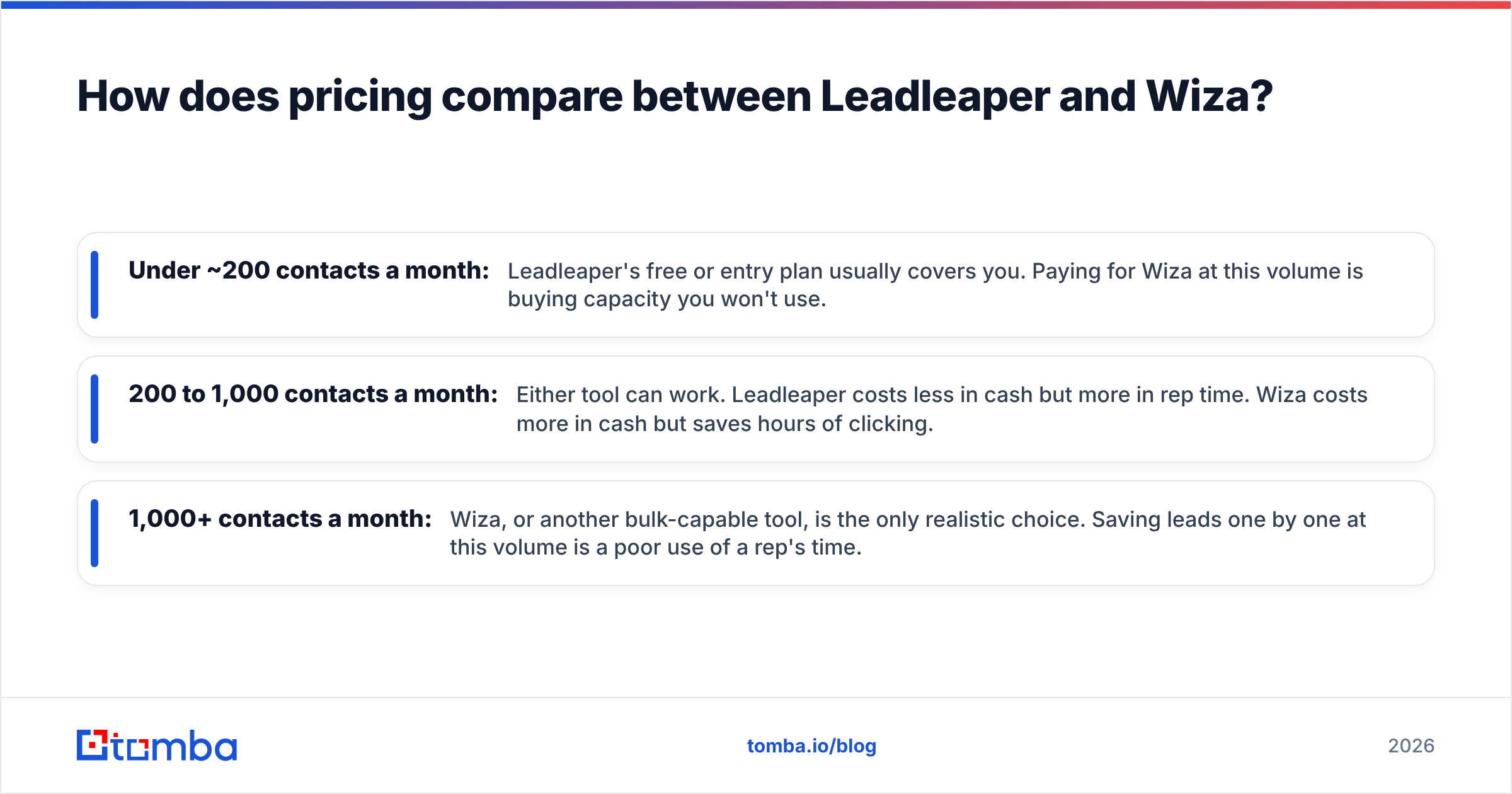
- Under ~200 contacts a month: Leadleaper's free or entry plan usually covers you. Paying for Wiza at this volume is buying capacity you won't use.
- 200 to 1,000 contacts a month: Either tool can work. Leadleaper costs less in cash but more in rep time. Wiza costs more in cash but saves hours of clicking.
- 1,000+ contacts a month: Wiza, or another bulk-capable tool, is the only realistic choice. Saving leads one by one at this volume is a poor use of a rep's time.
Remember the Sales Navigator line item too. If your team doesn't already pay for Sales Navigator, adding it just to use Wiza changes the math a lot.
What do Leadleaper and Wiza integrate with?#
Integrations matter more than most buyers expect. A lead stuck in a CSV on someone's desktop never gets worked.
Wiza has native integrations with the major CRM and sales engagement platforms, including HubSpot, Salesforce, Pipedrive, Outreach, Salesloft and more, plus Zapier and an API. For a RevOps team, that means Sales Navigator results can flow into the system of record with owner assignment and deduplication handled on the way in.
Leadleaper is lighter. Its main output is CSV export from its own lead manager, and native CRM sync is limited. That's fine if you're a solo seller using a simple CRM or a spreadsheet. It becomes a bottleneck when three or more reps need a shared, deduplicated pipeline.
If your stack depends on automation, Wiza is clearly ahead here. If your "stack" is Gmail plus a Google Sheet, Leadleaper's simplicity is an advantage.
What are the pros and cons of each tool?#
Leadleaper — pros
- Low cost to start, with a usable free plan
- Works on company websites as well as LinkedIn
- Simple sidebar that non-technical users learn in minutes
- Good fit for research-heavy, personalized outreach
Leadleaper — cons
- Slow once you need more than a few dozen leads a day
- Verification is lighter than dedicated tools
- Few native CRM and sequencer integrations
- No real bulk or API workflow
Wiza — pros
- Fast bulk export of whole Sales Navigator searches and lists
- Verification built into every export, and you only pay for verified emails
- Strong native CRM and sales engagement integrations
- Phone numbers available on higher tiers
Wiza — cons
- Much higher monthly cost than Leadleaper
- Needs Sales Navigator to get its full value
- Less useful when prospects aren't well represented on LinkedIn
- Credits can run out quickly for teams that aren't disciplined about who they export
What do both tools miss?#
LinkedIn-first email finders share one blind spot: they start from a LinkedIn profile. That covers a lot of B2B prospecting, but not all of it.
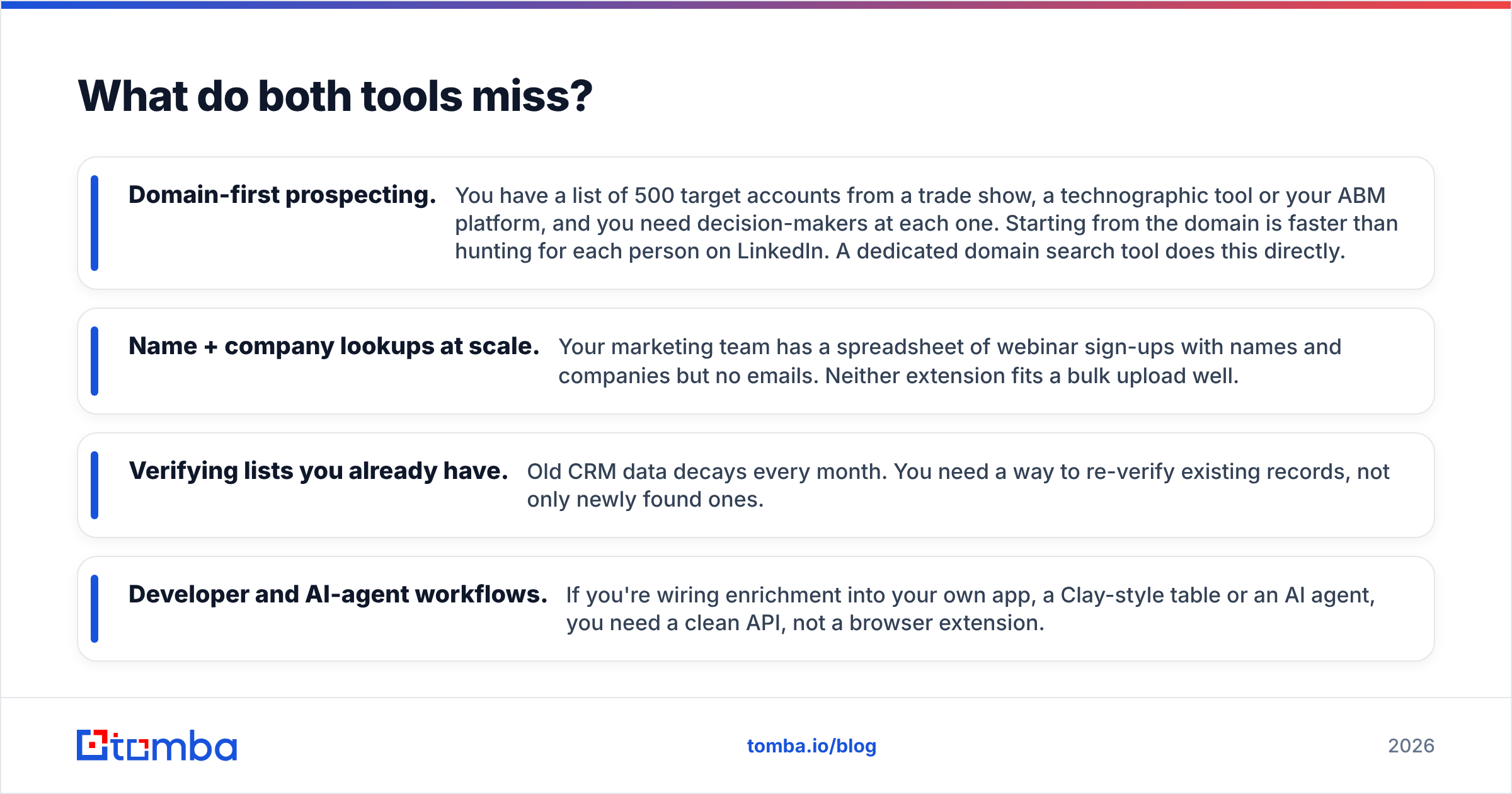
These are common gaps you'll hit with either tool:
- Domain-first prospecting. You have a list of 500 target accounts from a trade show, a technographic tool or your ABM platform, and you need decision-makers at each one. Starting from the domain is faster than hunting for each person on LinkedIn. A dedicated domain search tool does this directly.
- Name + company lookups at scale. Your marketing team has a spreadsheet of webinar sign-ups with names and companies but no emails. Neither extension fits a bulk upload well.
- Verifying lists you already have. Old CRM data decays every month. You need a way to re-verify existing records, not only newly found ones.
- Developer and AI-agent workflows. If you're wiring enrichment into your own app, a Clay-style table or an AI agent, you need a clean API, not a browser extension.
This is why many teams end up with a LinkedIn tool for Sales Navigator work plus a general-purpose email finder for everything else. If you're already comparing options, our Wiza alternative breakdown covers where a domain-first tool overlaps with Wiza and where it doesn't.
Is Leadleaper better than Wiza?#
Neither is better overall. Each one wins a specific use case.
Choose Leadleaper if:
- You're a founder, solo AE, recruiter or freelancer
- You prospect fewer than a few hundred people a month
- You write personalized emails and research each lead
- You want the cheapest way to get LinkedIn emails into a spreadsheet
Choose Wiza if:
- You run an SDR or BDR team on Sales Navigator
- You regularly export lists of hundreds or thousands of contacts
- Bounce rate matters because you send at volume through sequencers
- You need records to sync straight into HubSpot, Salesforce or a sales engagement tool
Consider a third option if:
- Your prospect lists start from domains or company names, not LinkedIn profiles
- You need bulk verification of existing data
- You want API or spreadsheet-add-on access so enrichment runs outside the browser
- You'd rather not pay for Sales Navigator just to find emails
How should you test Leadleaper and Wiza before committing?#
Both tools have free tiers, so test them on your real market instead of trusting any review, this one included.
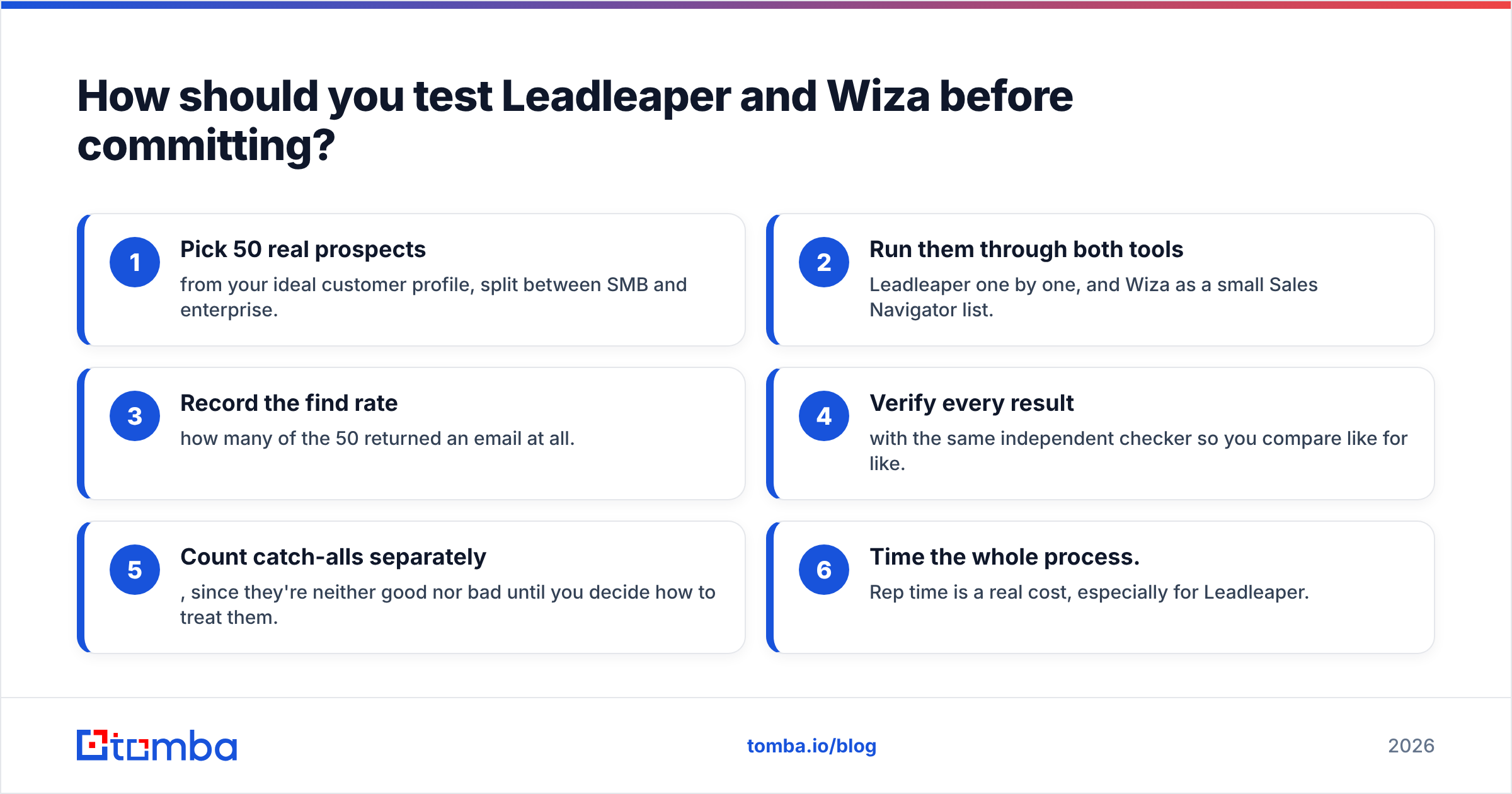
- Pick 50 real prospects from your ideal customer profile, split between SMB and enterprise.
- Run them through both tools: Leadleaper one by one, and Wiza as a small Sales Navigator list.
- Record the find rate: how many of the 50 returned an email at all.
- Verify every result with the same independent checker so you compare like for like.
- Count catch-alls separately, since they're neither good nor bad until you decide how to treat them.
- Time the whole process. Rep time is a real cost, especially for Leadleaper.
After a couple of hours, you'll have your own find rate, verified rate and cost per usable email. Those three numbers should drive the decision more than any feature grid.
Where does Tomba fit alongside these tools?#
If your research shows you need more than LinkedIn-sourced emails, such as domain search, name + company lookup, bulk verification, and access through an API or a Sheets add-on, the Tomba Email Finder covers all of those from one account. You can find emails by domain, by name and company, or from LinkedIn through the browser extension, then verify them before they reach your sequencer. There's a free tier with 25 searches a month to test against your own prospect list, and paid plans start at $49/mo. See Tomba pricing for the full breakdown. Run the same 50-prospect test above with Tomba included and choose based on your own results.
Related guides#
// get started
Find, verify and enrich your first contacts today
Start on the free plan with 25 searches a month, then scale when your team is ready.
Free plan · No credit card required · GDPR & CCPA
// about the author