Leadleaper vs ZoomInfo: Honest 2026 Comparison for B2B Teams
One is a lightweight LinkedIn email-capture extension, the other is a five-figure enterprise data platform. Here is how Leadleaper and ZoomInfo actually compare on data, workflow, and cost, and which one fits your team.
TL;DR
- Leadleaper is a lightweight Chrome extension. It captures leads from LinkedIn, Sales Navigator, and company websites, then finds and verifies their business emails. It's cheap and quick to set up, but its scope is narrow.
- ZoomInfo is an enterprise go-to-market platform. It covers contacts, direct dials, org charts, intent data, website visitor tracking, and engagement tools. Pricing isn't published, and contracts are annual.
- If you're a solo founder, freelancer, or small SDR team that prospects one person at a time on LinkedIn, Leadleaper covers most of what you need for a small fraction of ZoomInfo's cost.
- If you run a sales org of 20+ reps that needs territory planning, intent signals, and direct dials at scale, ZoomInfo is built for you, and you'll pay for it.
- Many teams in between do better with a mid-market email finder and verifier than with either extreme.
Comparing Leadleaper and ZoomInfo is less like comparing two cars and more like comparing a bicycle with a freight truck. Both move things. The real question is what you need to move and how far. This guide lines the two up on data coverage, workflow, accuracy, pricing, and team fit so you can decide based on how you actually prospect, not on brand recognition.
What is Leadleaper?#
Leadleaper is a prospecting tool built mainly around a Chrome extension. You browse LinkedIn, Sales Navigator, or a company website, click the extension, and the person gets saved to a lead list in Leadleaper's web app. It then tries to find and verify that person's business email.
Its core strengths:
- LinkedIn-native capture. It works inside the pages you already use to research prospects, so you don't have to learn a separate search interface.
- Email finding plus verification. Emails are checked before you export, which cuts bounces.
- Simple list management. You get lists, tags, and CSV export for your sequencer or CRM.
- Light outreach features. Leadleaper has offered Gmail-based email sending and tracking so small teams can run basic campaigns without a separate tool.
- Accessible pricing. There's a free tier with limited monthly lookups, and paid plans have historically cost tens of dollars per month, not thousands. Check their site for current numbers because plans change.
What Leadleaper doesn't try to be: a searchable database of hundreds of millions of contacts, an intent-data provider, or a direct-dial phone source at enterprise depth.
What is ZoomInfo?#
ZoomInfo is one of the largest B2B data and go-to-market intelligence platforms. The core product, SalesOS, is a searchable database of companies and contacts with firmographics, technographics, org charts, direct dials, mobile numbers, and business emails.
On top of that, ZoomInfo adds:
- Intent data, which shows which accounts are researching topics related to your product.
- Website visitor identification, which ties anonymous traffic to companies.
- Engagement tooling for sequences and dialing.
- Conversation intelligence, through its acquisition of Chorus.
- AI assistants that surface account signals and draft outreach.
- CRM enrichment and data hygiene at scale for Salesforce and HubSpot instances.
ZoomInfo doesn't list prices publicly. Deals are negotiated annual contracts. Buyers regularly report entry-level packages in the low-to-mid five figures per year, with costs rising by seat count, credits, and add-ons.

How do Leadleaper and ZoomInfo compare side by side?#
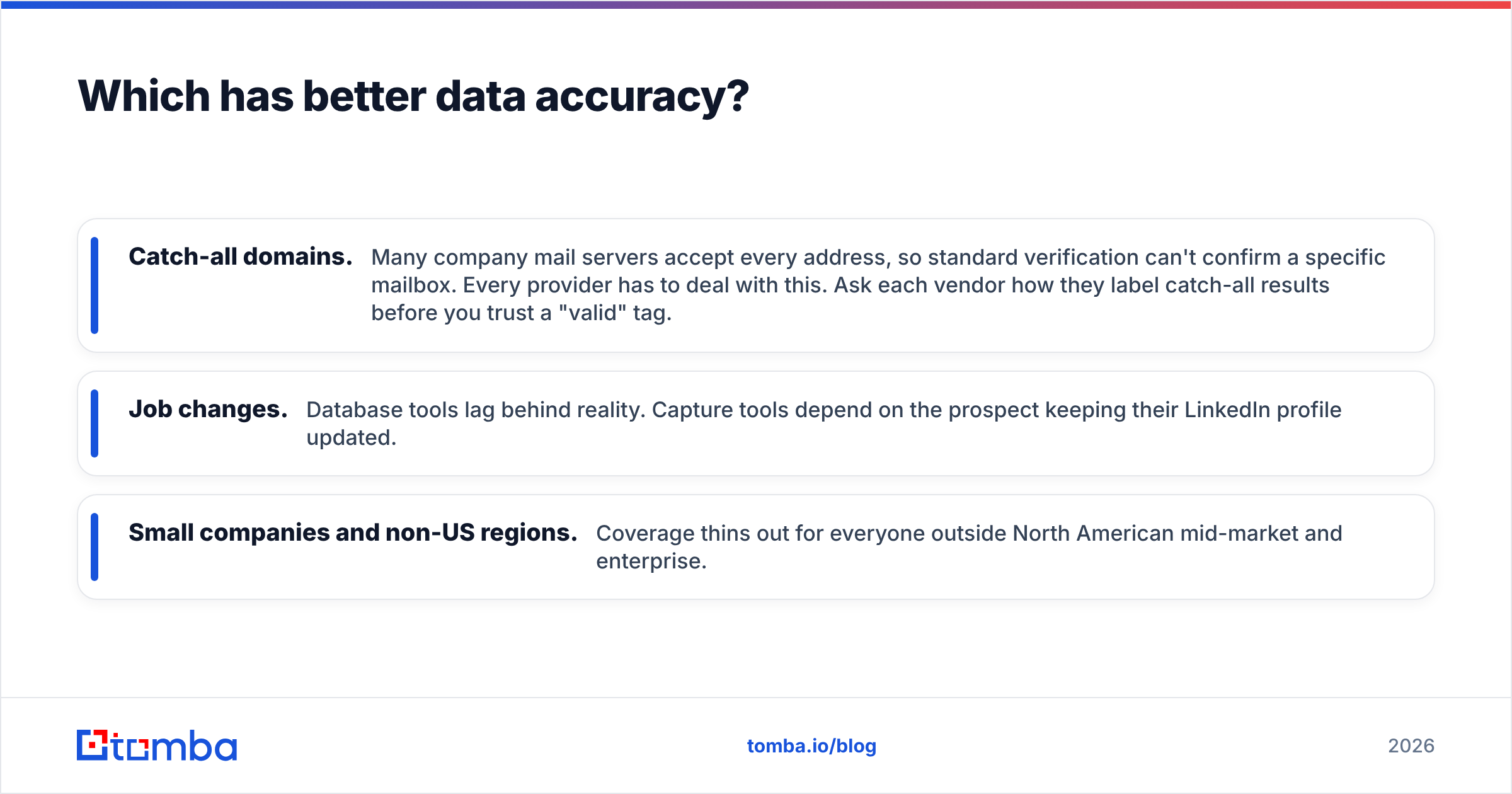
Here are the attributes that usually decide the purchase:
| Attribute | Leadleaper | ZoomInfo |
|---|---|---|
| Primary product | Chrome extension + lead list app | Enterprise B2B database + GTM platform |
| Starting price | Free tier; low-cost paid monthly plans | Not published; annual contracts, typically five figures |
| Contract model | Monthly, self-serve | Annual, sales-led, often auto-renewing |
| How you find leads | Capture while browsing LinkedIn / websites | Search and filter a proprietary database |
| Business emails | Yes, with verification | Yes, at large scale |
| Direct dials / mobiles | Limited | Core strength |
| Org charts | No | Yes |
| Intent data | No | Yes (add-on / tier-dependent) |
| Website visitor ID | No | Yes |
| CRM enrichment | CSV export, basic integrations | Deep Salesforce / HubSpot / Dynamics sync |
| Setup time | Minutes | Weeks (onboarding, admin config, training) |
| Best for | Solo sellers, freelancers, small SDR teams | Mid-market and enterprise sales orgs |
If you want the same comparison as a decision checklist, answer these four questions:
- Volume: Do you need a few hundred contacts a month or tens of thousands? Low volume points to Leadleaper. High volume points to ZoomInfo.
- Discovery vs capture: Do you already know who you want, or do you need a database to tell you? Capture favors Leadleaper. Discovery favors ZoomInfo.
- Channels: Are you email-first, or do you depend on phone? Email-first works fine with Leadleaper. Phone-heavy teams need ZoomInfo's dials.
- Budget authority: Can you sign a five-figure annual contract? If not, ZoomInfo is off the table no matter how good the data is.
Which has better data accuracy?#
Accuracy is where this matchup gets more interesting than the price gap suggests.
ZoomInfo's advantage is breadth and depth. It has a huge contact graph, frequent refreshes, and research teams plus contributory data networks feeding it. It also has something few tools match: phone numbers and org structure. For an enterprise account executive mapping a 5,000-person buying committee, that depth matters.
Leadleaper's advantage is freshness at the moment of capture. You're pulling from a LinkedIn profile you're looking at right now, so job title and company are current as of that click. The email is then found and verified on demand, not read from a record that might be months old. For one-to-one prospecting, this "live lookup" approach can match or beat a stale database row.

Where both can struggle:
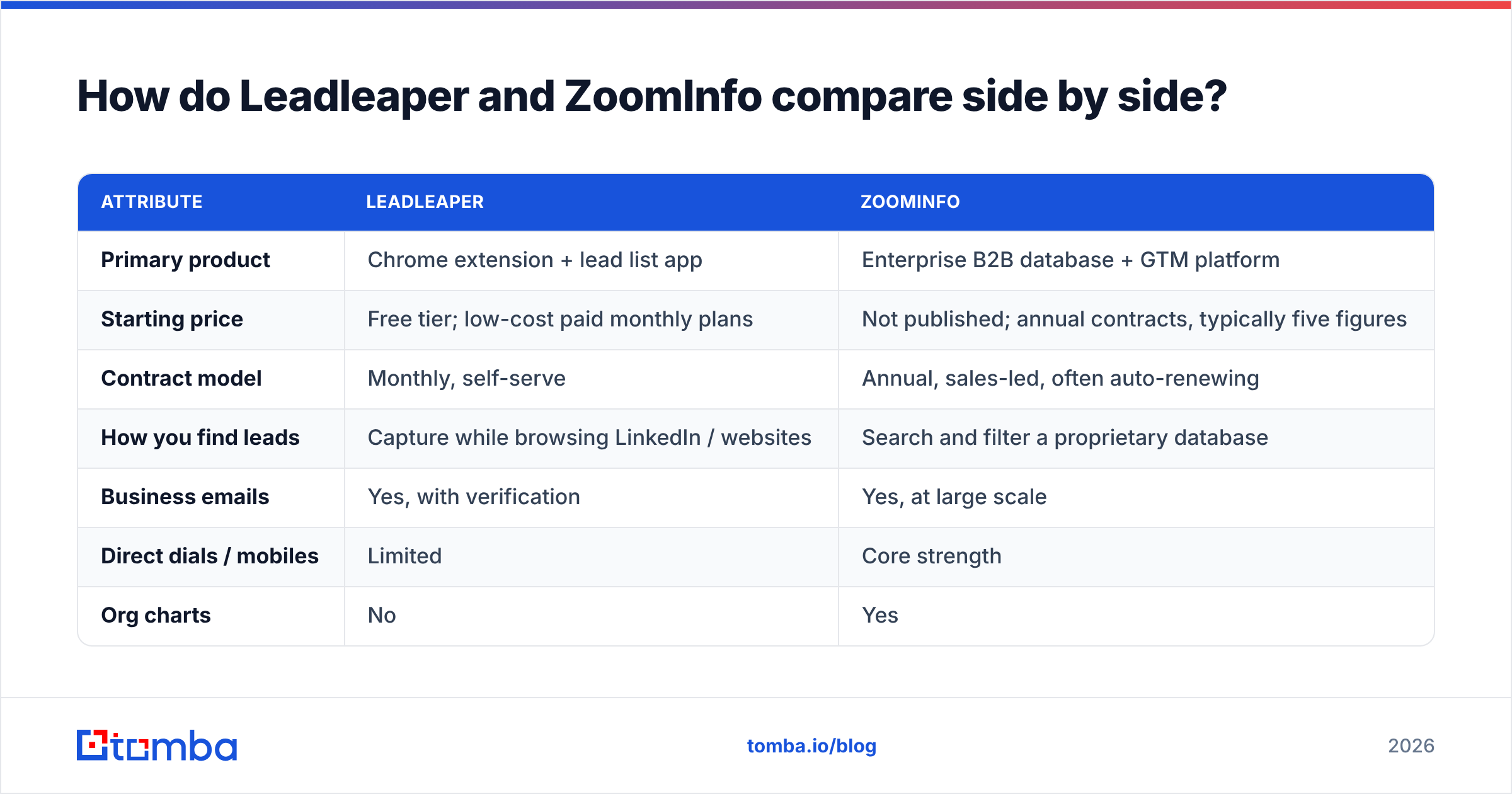
- Catch-all domains. Many company mail servers accept every address, so standard verification can't confirm a specific mailbox. Every provider has to deal with this. Ask each vendor how they label catch-all results before you trust a "valid" tag.
- Job changes. Database tools lag behind reality. Capture tools depend on the prospect keeping their LinkedIn profile updated.
- Small companies and non-US regions. Coverage thins out for everyone outside North American mid-market and enterprise.
Whichever tool you pick, run your exported list through an independent email verifier before a large send. It's cheap insurance for your sender reputation.
User reviews on G2 are worth reading for both products. Filter by company size that matches yours, because a 10-person agency and a 2,000-person SaaS company will rate ZoomInfo very differently.
How does the day-to-day workflow differ?#
A typical Leadleaper day: You open Sales Navigator and run a saved search. You click into a profile that fits, hit the extension, and the lead lands in a list with an email attached. After 30 to 50 of these, you export to your sequencer or send a short Gmail campaign directly. It's manual, but you control every step, and the list is exactly who you picked.
A typical ZoomInfo day: You open a territory view filtered by industry, headcount, tech stack, and intent surge. You pull 400 contacts across 60 accounts that are showing buying signals this week. You push them into Salesforce with direct dials, then start a sequence and a call block. It's scale and signal-driven prioritization, as long as someone on your team keeps the filters, integrations, and credit usage under control.
The hidden cost of ZoomInfo is operational overhead. It usually needs an admin or RevOps owner to manage integrations, enrichment rules, and seat assignments. The hidden cost of Leadleaper is rep time. Capturing one prospect at a time doesn't scale to a 20-person team hitting aggressive volume targets.
Is Leadleaper cheaper than ZoomInfo?#
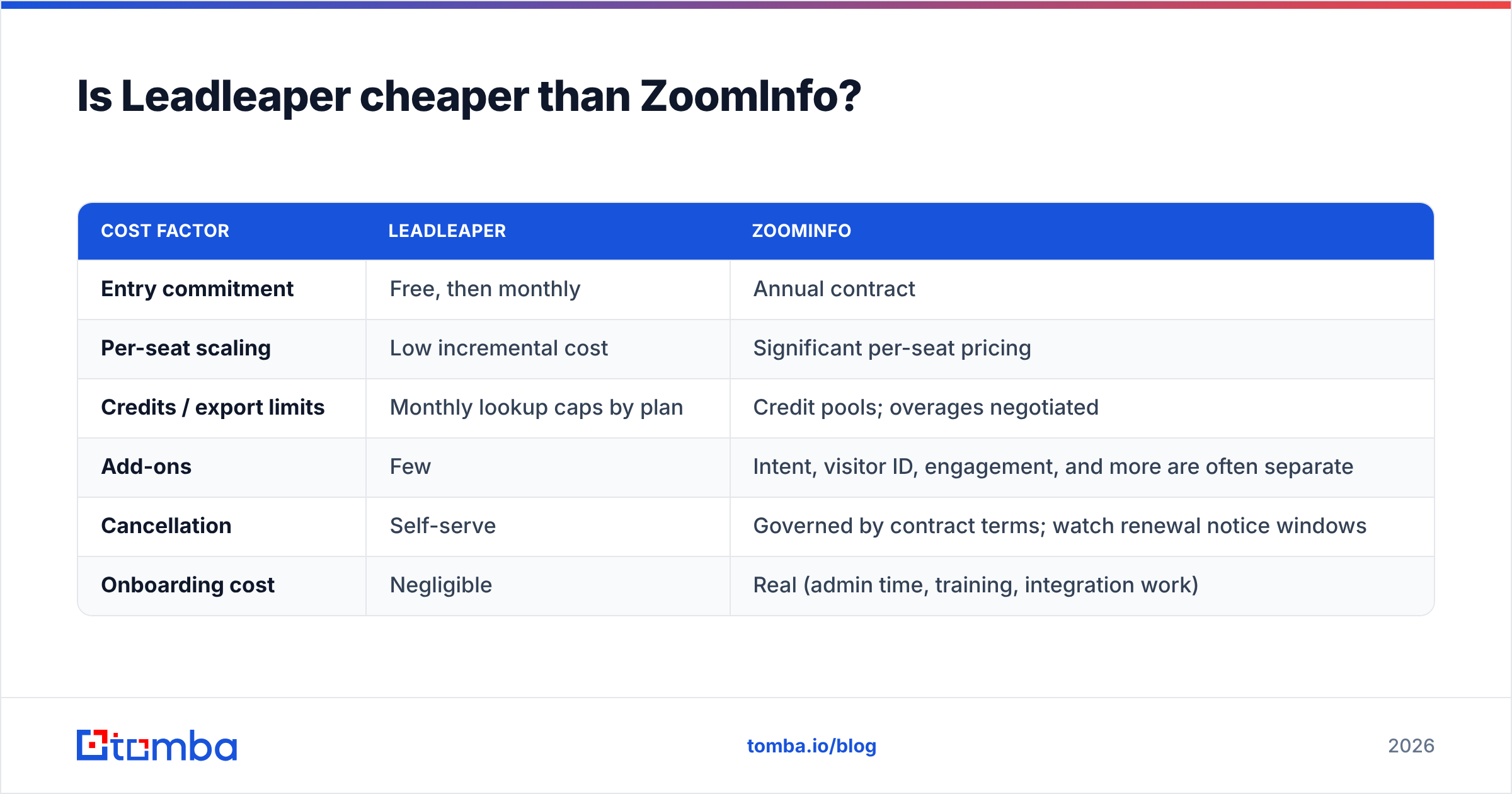
Yes, by one to two orders of magnitude for most small teams. But "cheaper" only matters relative to output.
| Cost factor | Leadleaper | ZoomInfo |
|---|---|---|
| Entry commitment | Free, then monthly | Annual contract |
| Per-seat scaling | Low incremental cost | Significant per-seat pricing |
| Credits / export limits | Monthly lookup caps by plan | Credit pools; overages negotiated |
| Add-ons | Few | Intent, visitor ID, engagement, and more are often separate |
| Cancellation | Self-serve | Governed by contract terms; watch renewal notice windows |
| Onboarding cost | Negligible | Real (admin time, training, integration work) |
A practical rule of thumb: if ZoomInfo's intent data or direct dials won't clearly produce more pipeline than the contract costs within the first two quarters, you're paying for capacity you won't use. Many teams sign enterprise data contracts and end up mostly exporting emails. That's the one job a lean email finder does at a fraction of the price.

What are the pros and cons of each?#
Leadleaper pros
- Very low cost of entry, including a free tier
- Works inside LinkedIn and Sales Navigator
- Built-in verification reduces bounce risk
- No contracts, no sales calls, no onboarding project
Leadleaper cons
- No searchable database for net-new discovery
- Limited phone data, and no intent or org charts
- Manual capture caps throughput per rep
- Lighter integrations than enterprise tools
ZoomInfo pros
- Huge database with deep firmographic and technographic filters
- Strong direct-dial and mobile coverage
- Intent data and visitor identification for prioritization
- Enterprise-grade CRM enrichment and governance
ZoomInfo cons
- Opaque pricing and annual commitments
- Real admin and onboarding overhead
- Overkill for email-only outbound
- Credit limits can surprise heavy users
Who should choose Leadleaper vs ZoomInfo?#
Choose Leadleaper if:
- You're a founder, consultant, recruiter, or agency doing targeted outreach
- LinkedIn is already your main research surface
- You send fewer than a few thousand cold emails a month
- You need to be up and running today, with no procurement process
Choose ZoomInfo if:
- You manage a sales team of 15 to 20+ reps with defined territories
- Phone is a primary channel and you need direct dials at scale
- You want intent signals to decide which accounts to work this week
- You have RevOps capacity to run the platform properly
Consider a middle option if:
- You've outgrown manual capture but can't justify an enterprise contract
- You need domain-level search ("show me everyone at acme.com"), bulk enrichment, and API access
- You want verification, catch-all handling, and LinkedIn lookups under one monthly plan

Are there alternatives between Leadleaper and ZoomInfo?#
Yes, and for many teams this middle tier is the right answer. Email-first platforms offer searchable company data, bulk lookups, and APIs without enterprise contracts. What to look for:
- Domain search, to list known emails at a target company, not just one person
- Name + domain lookup with confidence scoring
- A LinkedIn extension for the same capture workflow Leadleaper users are used to. Tomba's LinkedIn finder covers this.
- Bulk processing for CSVs of thousands of rows
- Verification with catch-all detection
- An API for piping lookups into your CRM or enrichment workflows
- Monthly pricing you can scale up or down
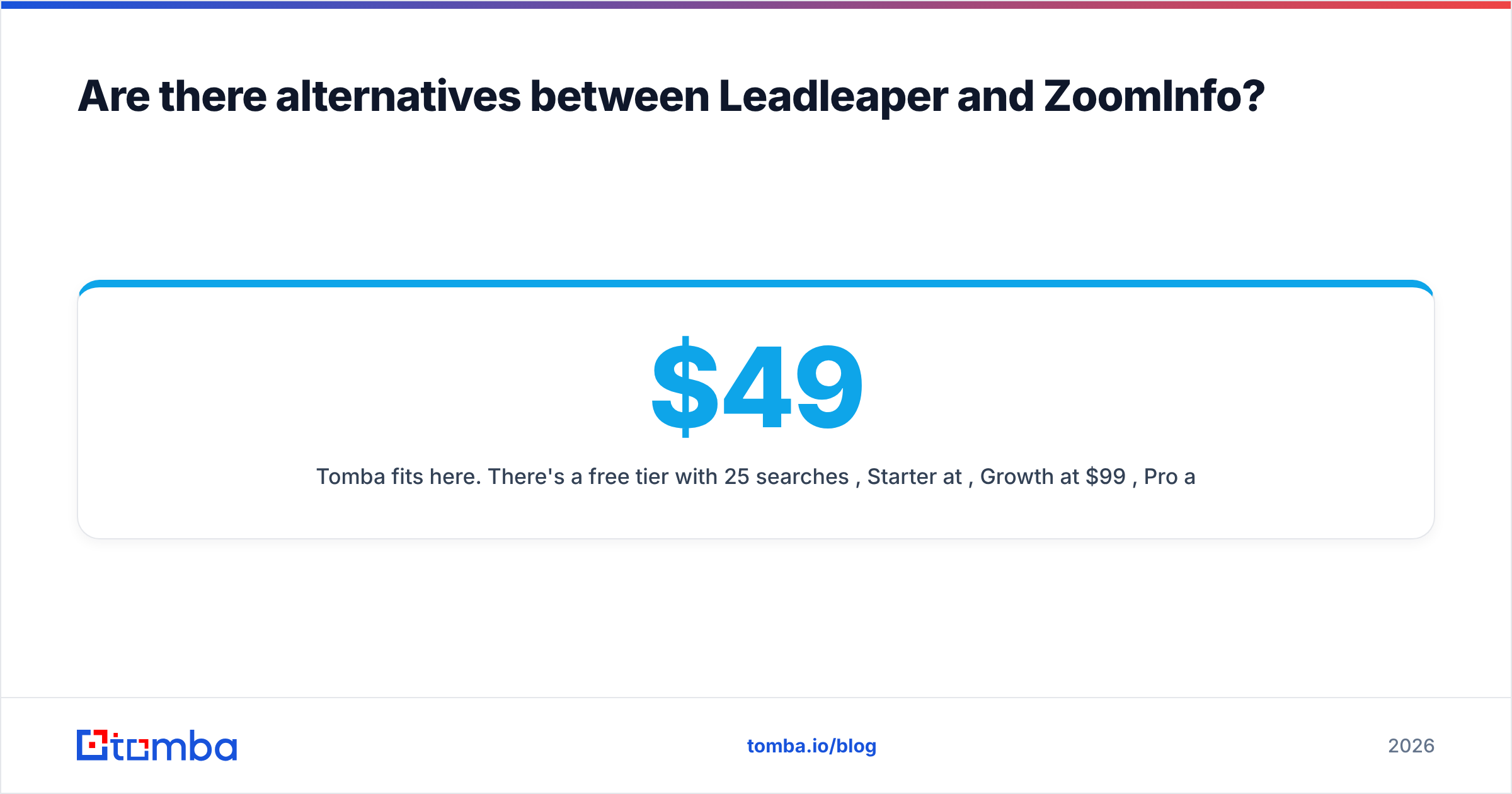
Tomba fits here. There's a free tier with 25 searches per month, Starter at $49/mo, Growth at $99/mo, Pro at $249/mo, and custom Enterprise plans. The full breakdown is on the Tomba pricing page. It doesn't replace ZoomInfo's intent data or phone depth, and it isn't trying to. It gives teams that mainly need accurate business emails more capacity than a capture-only extension, without a five-figure commitment.
So, which one wins: Leadleaper or ZoomInfo?#
Neither wins outright, because they're built for different buyers.
- For small teams and individual sellers, Leadleaper wins on value. It does one job, capturing and verifying emails from the profiles you already browse, and it doesn't charge you for platform features you won't touch.
- For scaled sales organizations, ZoomInfo wins on capability. Intent data, direct dials, org charts, and CRM governance are real advantages when you have the headcount and processes to use them.
- For the growing team in between, an email finder with domain search, bulk lookups, and an API is usually the better trade-off than either extreme.
Before you commit, run a head-to-head test. Take 100 prospects from your real ICP, run them through each tool you're considering, verify every result independently, and send to a small segment. Compare bounce rate, reply rate, and cost per valid contact. That number is worth more than any vendor demo.
If your outbound mostly depends on reaching the right person's inbox, start with the Tomba Email Finder. Search by name, domain, or company, verify in the same workflow, and scale from the free tier to a monthly plan as your pipeline grows. You get most of the email-finding value you'd use in an enterprise platform, with no annual contract.
Related guides#
// get started
Find, verify and enrich your first contacts today
Start on the free plan with 25 searches a month, then scale when your team is ready.
Free plan · No credit card required · GDPR & CCPA
// about the author