Leadmine vs Pubrio: Which B2B Contact Tool Fits Your Team in 2026?
Leadmine is a lean email finder for solo prospectors. Pubrio is a credit-based B2B data platform with company search built in. We compare pricing, data, workflow, and fit so you can choose the right one.
TL;DR
- Leadmine is a small, browser-first email finder and verifier. It suits solo founders and small teams who want cheap email lookups from LinkedIn and company websites.
- Pubrio is a wider B2B data and sales intelligence platform. It combines company and people search, filters, enrichment, and an API, with credits charged for reveals and exports.
- Price: Leadmine's paid plans have recently been listed from about $29/mo. Pubrio's paid plans start at $125/mo for 6,000 credits (Startup) and go to $250/mo for 15,000 credits (Corporate).
- Our pick: Choose Leadmine if all you need is a quick way to find emails for a short list of people. Choose Pubrio if you need to build lists from scratch using firmographic filters. If what matters most is verified emails at a predictable cost per contact, also look at a dedicated email finder with built-in verification.
What are Leadmine and Pubrio, in one sentence each?#
Leadmine (leadmine.net) is a Chrome extension and web app. It finds and verifies professional email addresses from LinkedIn profiles, company domains, and names. It is built for people who already know who they want to contact.
Pubrio (pubrio.com) is a B2B data platform with a searchable database of companies and contacts. It adds filters, enrichment, a browser extension, and API access, and it is built for people who still need to work out who to contact.
That difference drives most of this comparison. Leadmine is a lookup tool: you bring a name or a domain and it returns an email. Pubrio is a discovery tool: you bring an ideal customer profile and it returns a list of accounts and contacts, then charges credits to reveal and export them.
Before you compare features, decide which job you are hiring the tool for. A team with a 200-row target account list needs something different from a team that wants to find every Series B fintech in Singapore with 50–200 employees.
How do Leadmine and Pubrio compare side by side?#
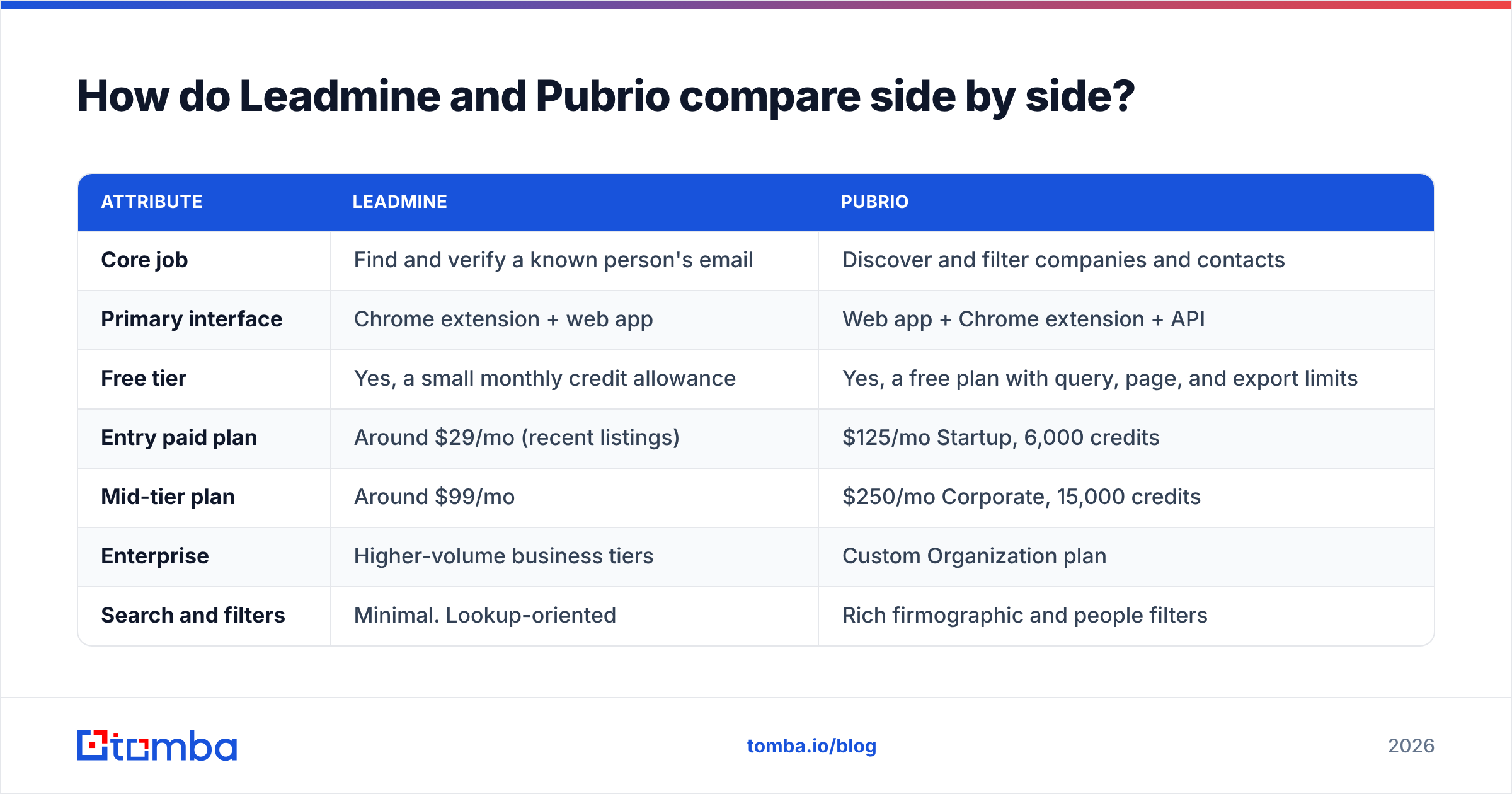
Here is the high-level matrix. Prices come from each vendor's public pricing pages and recent third-party listings (G2, Capterra, GetApp) as of 2026. Both vendors change plans often, so confirm on their sites before you buy.

| Attribute | Leadmine | Pubrio |
|---|---|---|
| Core job | Find and verify a known person's email | Discover and filter companies and contacts |
| Primary interface | Chrome extension + web app | Web app + Chrome extension + API |
| Free tier | Yes, a small monthly credit allowance | Yes, a free plan with query, page, and export limits |
| Entry paid plan | Around $29/mo (recent listings) | $125/mo Startup, 6,000 credits |
| Mid-tier plan | Around $99/mo | $250/mo Corporate, 15,000 credits |
| Enterprise | Higher-volume business tiers | Custom Organization plan |
| Search and filters | Minimal. Lookup-oriented | Rich firmographic and people filters |
| Built-in email verification | Yes | Verification status shown on reveals |
| API access | Limited | Yes, documented public API |
| Best for | Solo founders, freelancers, small SDR teams | Growth teams, RevOps, data-driven outbound |
| Learning curve | Very low | Moderate |
The short version: Leadmine is cheaper per seat and easier to start with. Pubrio gives you far more ways to slice the market, and you pay for that in price and complexity.
What does Leadmine do well, and where does it fall short?#
Leadmine is deliberately simple. You install the extension, open a LinkedIn profile or a company website, and it tries to return a work email with a verification status. You can also run lookups by name plus domain in the web app, and upload CSVs for bulk finding.
Where Leadmine is strong:
- Low cost to start. Paid plans have recently been listed from about $29/mo. Among branded email finders, that is one of the cheaper ways to test outbound.
- Low friction. There is no database to learn, no saved-search setup, and no filter taxonomy. You can get value in five minutes.
- Verification included. Every result carries a status, so you don't need a separate verifier for small campaigns.
- Good fit for LinkedIn-driven prospecting. If your reps already build lists in LinkedIn or Sales Navigator, Leadmine adds the missing email step.
Where Leadmine falls short:
- No real discovery layer. You can't filter for "VP Marketing at SaaS companies in DACH with 100–500 employees" and get a list back. You need to bring the names yourself.
- Thin enrichment. You get the email plus basic fields. Firmographics, technographics, and funding data are mostly out of scope.
- Limited integrations and API. Teams that want CRM sync or automated enrichment pipelines will run into limits quickly.
- Plan confusion. Third-party sites list different tier names and credit counts for Leadmine. Check the official pricing page before you commit.

What does Pubrio do well, and where does it fall short?#
Pubrio positions itself as a business data layer. You search a database of hundreds of millions of company and people records, filter by industry, headcount, location, job title, seniority, and technology, and then spend credits to reveal contact details or export them. It also exposes that data through an API. That makes it attractive to RevOps teams and to builders wiring B2B data into AI agents or internal tools.
Where Pubrio is strong:
- Real list building. Filters let you turn an ICP into a target list without a second tool. Pubrio's documentation says search and filtering are free and that credits are spent on enrichment and reveals, so you can explore the market before paying for contacts.
- Company-level intelligence. Firmographic data sits next to contact data, which helps with account scoring and territory planning.
- API-first options. A documented API and presence on marketplaces like Apify make it usable in automated workflows, not just by humans clicking in a UI.
- Regional breadth. Pubrio markets coverage beyond the usual US-heavy datasets. That can matter if you sell into APAC or other markets that US-centric databases underserve. Test your own region before you rely on it.
Where Pubrio falls short:
- Higher entry price. $125/mo for the Startup plan is a real commitment for a solo founder who only needs a few hundred emails a month.
- Credit math takes attention. Different actions (reveal email, reveal phone, export, enrich) cost different amounts. Budget depends on how your team works, not just on the headline credit number.
- More to learn. Saved searches, filter logic, and credit rules take onboarding time that a lookup-only tool doesn't need.
- Newer review base. Compared with long-established platforms, Pubrio has fewer public reviews on G2 and Capterra. That makes independent quality signals harder to judge.
Is Leadmine or Pubrio more accurate?#
Neither vendor publishes an independent, reproducible accuracy benchmark. Treat any single accuracy figure, from either side, with caution. Accuracy depends on three things more than on the logo:
- Region and segment. An email finder that works well for US SaaS companies can struggle with manufacturing firms in Germany or family businesses in Southeast Asia.
- Domain type. Catch-all domains accept every address at the SMTP level. So "valid" often really means "unknown", whichever tool you use.
- Data freshness. People change jobs constantly. A database record that was correct 18 months ago may bounce today.

The only accuracy test that matters is your own. Take 100 contacts from your real ICP, including a mix of company sizes and at least one hard region. Run them through both tools. Then pass every result through an independent email verifier and send a small, warmed-up test campaign. Compare hard bounce rates, not "found" rates. A tool that finds 90% of emails with a 12% bounce rate is worse than one that finds 75% with a 2% bounce rate, because bounces damage your sender reputation for every later campaign.
How does pricing actually compare per usable email?#
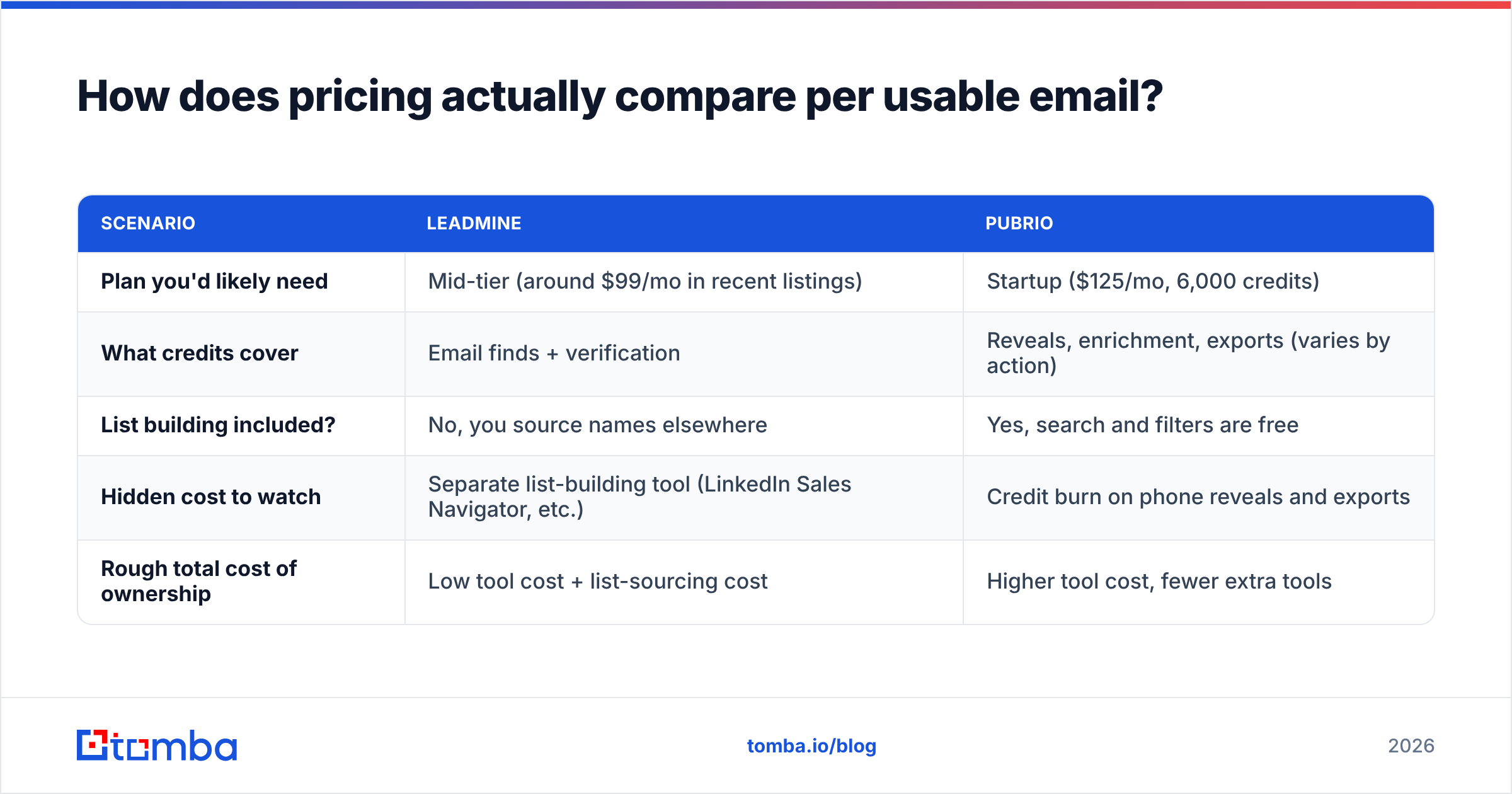
Headline prices hide the real cost. Here is how to think about it for a team that needs about 1,000 verified emails a month.
| Scenario | Leadmine | Pubrio |
|---|---|---|
| Plan you'd likely need | Mid-tier (around $99/mo in recent listings) | Startup ($125/mo, 6,000 credits) |
| What credits cover | Email finds + verification | Reveals, enrichment, exports (varies by action) |
| List building included? | No, you source names elsewhere | Yes, search and filters are free |
| Hidden cost to watch | Separate list-building tool (LinkedIn Sales Navigator, etc.) | Credit burn on phone reveals and exports |
| Rough total cost of ownership | Low tool cost + list-sourcing cost | Higher tool cost, fewer extra tools |
If you already pay for Sales Navigator or build lists by hand, Leadmine's low price is a genuine saving. If you would otherwise need a separate database subscription just to find target accounts, Pubrio's higher sticker price may still work out cheaper overall.
Whichever you pick, track cost per verified, delivered email, not cost per credit. That one number makes tools with very different pricing models directly comparable.
Which workflows fit Leadmine best?#
Leadmine fits when the list already exists and you just need the email:
- Founder-led sales. You're working through 50 target accounts you already know by name.
- Recruiting and partnerships. You found the right person on LinkedIn and need a way to reach them outside InMail.
- Account-based follow-ups. Your AE has a named buying committee and needs emails for three people who weren't in the CRM.
- Low-volume agencies. You run a few hundred lookups a month across several client campaigns and want predictable, small bills.
In these cases, Pubrio's filter engine is overkill. You'd be paying for discovery you don't use.
Which workflows fit Pubrio best?#
Pubrio fits when the list doesn't exist yet:
- Building a TAM from scratch. Filter by industry, size, location, and tech to size and segment your market.
- Outbound at scale. SDR teams that need thousands of new contacts a month benefit from search, reveal, and export in one place.
- Data pipelines and AI agents. The API lets you enrich inbound leads automatically or feed company data into internal tools.
- International prospecting. If your ICP sits outside North America, test Pubrio's regional coverage. It is one of the platform's selling points.
- RevOps enrichment. Filling firmographic gaps in CRM records is a better match for a data platform than for a lookup extension.
Is there a middle ground between Leadmine and Pubrio?#
Yes, and many teams end up there. Leadmine and Pubrio sit at opposite ends: one is a narrow lookup tool, the other a broad data platform. A dedicated email finder with strong verification and a domain-level search sits in between.
That middle option lets you:
- Enter a company domain and get every public professional email for it, with sources. A domain search gives you light discovery without a full database subscription.
- Look up a specific person by name plus company when you already know who you want.
- Verify every address, including catch-all checks, before it reaches your sequencer.
- Work from the tools your team already uses: a browser extension, Google Sheets, a CRM integration, or an API.
Tomba is built for this middle ground. It has a free tier (25 searches/mo) and paid plans from $49/mo (Starter), $99/mo (Growth), and $249/mo (Pro). You can see the full breakdown on Tomba pricing. It doesn't try to replace a full sales intelligence database like Pubrio. It focuses on finding and verifying the email itself.

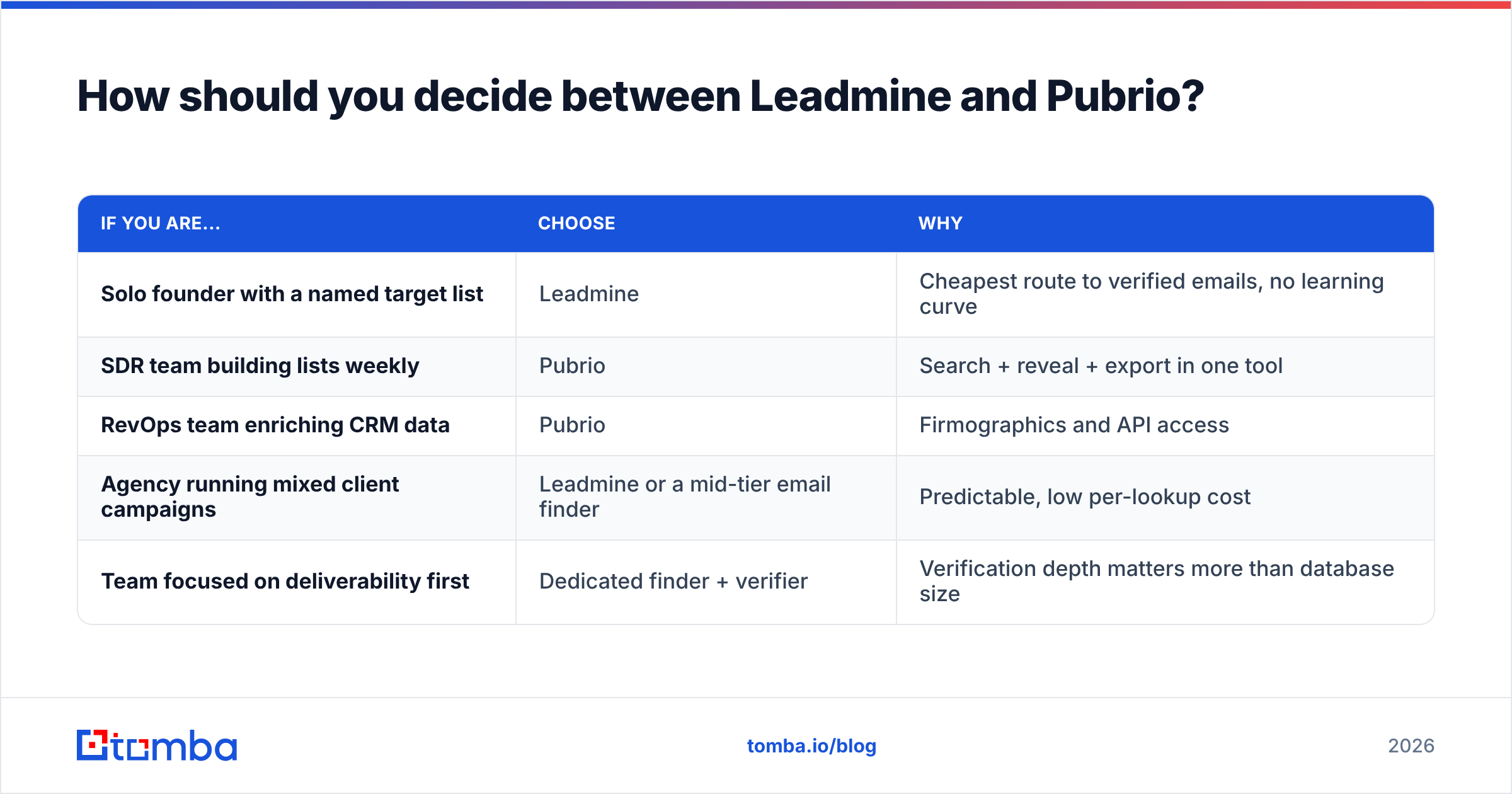
How should you decide between Leadmine and Pubrio?#
Answer these four questions in order:
- Do you already have the names? If yes, lean toward Leadmine or another lookup-first email finder. If no, lean toward Pubrio.
- How many new contacts do you need each month? Under about 500: Leadmine's economics are hard to beat. Several thousand: Pubrio's credit bundles and filters start to pay off.
- Do you need company data, or just emails? If you score accounts, plan territories, or enrich CRM records, you need Pubrio-style firmographics.
- Who will use it? A single founder wants zero setup. A RevOps lead wants an API, filters, and exports.
| If you are... | Choose | Why |
|---|---|---|
| Solo founder with a named target list | Leadmine | Cheapest route to verified emails, no learning curve |
| SDR team building lists weekly | Pubrio | Search + reveal + export in one tool |
| RevOps team enriching CRM data | Pubrio | Firmographics and API access |
| Agency running mixed client campaigns | Leadmine or a mid-tier email finder | Predictable, low per-lookup cost |
| Team focused on deliverability first | Dedicated finder + verifier | Verification depth matters more than database size |
What's the final verdict on Leadmine vs Pubrio?#
These tools don't really compete head to head. They solve adjacent problems.
- Leadmine wins on simplicity and entry price. Choose it if you know who you want to reach and just need their email, fast and cheap.
- Pubrio wins on discovery and data depth. Choose it if you need to build lists from filters, enrich accounts, or pipe B2B data into other systems through an API.
Whichever you choose, run a 100-contact bake-off on your real ICP, verify every result, and judge by bounce rate and cost per delivered email. Vendor claims won't tell you what your own data will.
If your main job is finding the right email for the right person, with verification built in and without paying for a full database, try the Tomba Email Finder. Search by name, domain, or company, check each result's source and verification status, and start on the free tier before you commit to a plan.
Related guides#
// get started
Find, verify and enrich your first contacts today
Start on the free plan with 25 searches a month, then scale when your team is ready.
Free plan · No credit card required · GDPR & CCPA
// about the author