Leadmine vs SMARTe (2026): Which B2B Data Tool Should You Pick?
Leadmine is a low-cost email finder built for solo prospectors. SMARTe is a global sales-intelligence platform with mobile numbers. Here's how they compare on price, data, and workflow, and which one fits your team.
TL;DR
- Leadmine is a lightweight, self-serve email finder. It has a Chrome extension that pulls leads from Google search results and Crunchbase, and paid plans start around $29/mo.
- SMARTe is a sales-intelligence platform with global contact data and mobile numbers. It has a small Pro plan, but its main business is enterprise contracts.
- Leadmine's credits cost less (roughly $0.10 each on paid plans), but it doesn't focus on phone data. SMARTe costs more per credit, and a lot of what you pay for is direct dials and coverage outside North America.
- Choose Leadmine if you're a freelancer or a small team that mainly needs emails. Choose SMARTe if you cold call or sell into EMEA or APAC.
- If you want a finder, verifier, domain search, and phone finder in one place with public pricing, Tomba is worth adding to your shortlist.
Leadmine and SMARTe both find contact data for B2B prospecting, but they're built for different buyers. One is a small, low-cost tool you can sign up for with a credit card over lunch. The other is sold to sales teams that need mobile numbers across several regions and are used to going through procurement.
This comparison covers how each tool works, what a usable contact costs you, where the data is strong and where it's thin, and which one fits your workflow.
What are Leadmine and SMARTe?#
Leadmine is a self-serve email finder for small teams, agencies, and solo founders. It has three parts: a lead finder, email lookup and verification, and a Chrome extension. The extension pulls names, emails, job titles, and social profiles from Google search results and Crunchbase pages. You pay in credits. One credit covers one email search, lookup, or verification check, and Leadmine's pricing page says credits come back to you for bounces and duplicates.
SMARTe is a B2B sales-intelligence platform. Its pitch is global coverage and phone data. It says it has close to 290 million B2B contacts, with mobile numbers for about 75% of contacts in North America and about 50% globally. The product includes a prospecting Chrome extension, enrichment, CRM integrations, and an API. It's meant for SDR teams and RevOps rather than one-person shops.
Put simply, Leadmine is a tool for finding emails, while SMARTe is a database you subscribe to for contact coverage.
How do Leadmine and SMARTe compare at a glance?#
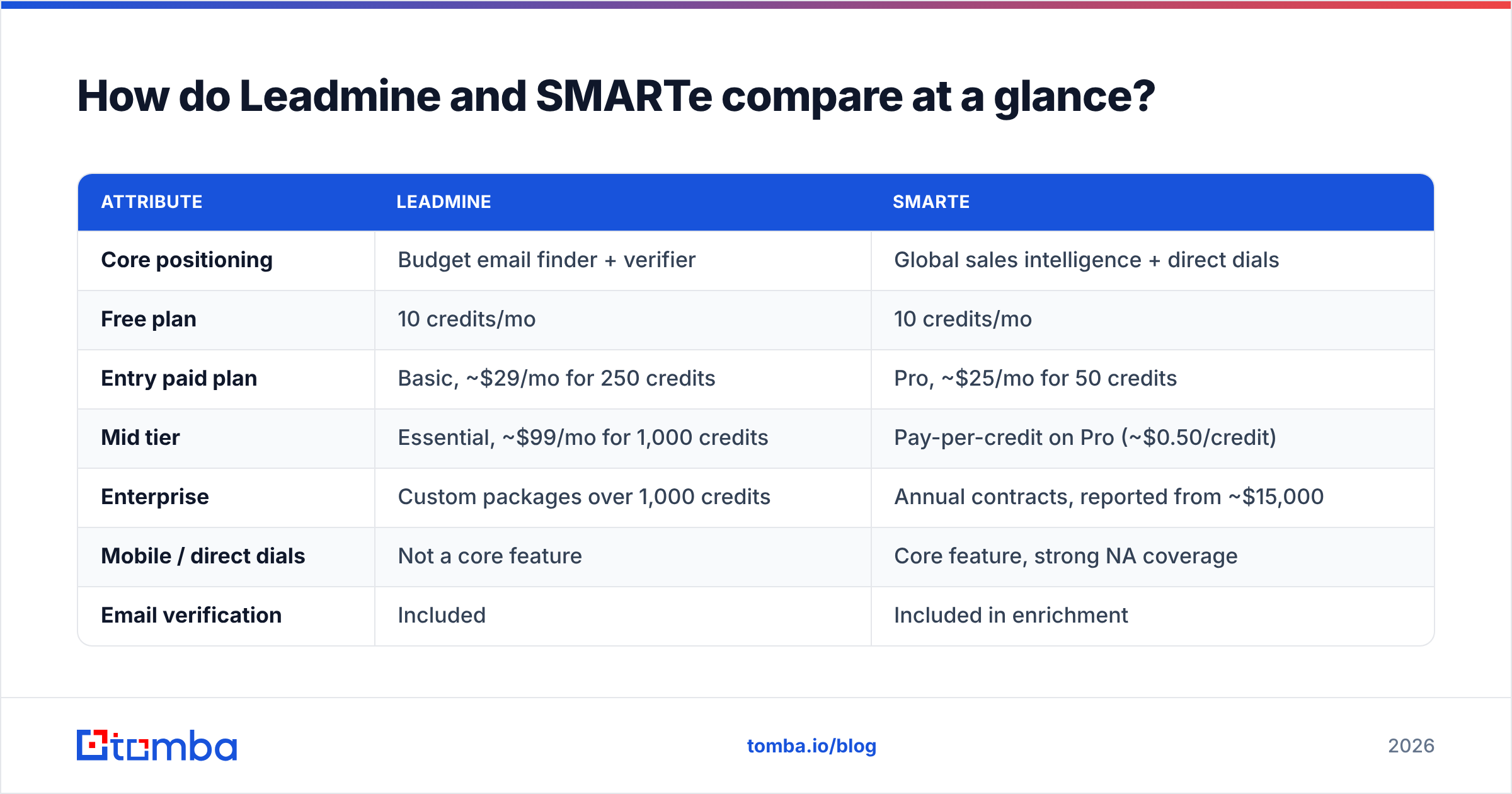
Prices below come from each vendor's public pricing page at the time of writing. Both change their plans often, so check before you buy.
| Attribute | Leadmine | SMARTe |
|---|---|---|
| Core positioning | Budget email finder + verifier | Global sales intelligence + direct dials |
| Free plan | 10 credits/mo | 10 credits/mo |
| Entry paid plan | Basic, ~$29/mo for 250 credits | Pro, ~$25/mo for 50 credits |
| Mid tier | Essential, ~$99/mo for 1,000 credits | Pay-per-credit on Pro (~$0.50/credit) |
| Enterprise | Custom packages over 1,000 credits | Annual contracts, reported from ~$15,000 |
| Mobile / direct dials | Not a core feature | Core feature, strong NA coverage |
| Email verification | Included | Included in enrichment |
| Chrome extension | Google SERPs + Crunchbase | LinkedIn and web prospecting |
| CRM integrations | Mainly CSV export | Salesforce, HubSpot, and other native CRM syncs |
| Best fit | Freelancers, agencies, small outbound teams | Mid-market and enterprise SDR teams |

The free plans are about the same size: 10 credits a month on each. The difference shows up as soon as you pay. Leadmine's Basic plan gives you roughly five times as many credits as SMARTe's Pro plan for about the same money. Those SMARTe credits can return phone numbers, though, which Leadmine doesn't really offer.

Which tool finds more accurate emails?#
Neither vendor publishes an independent accuracy audit. Treat any single "98% accurate" number, including numbers in comparison posts, as marketing until you've tested it on your own list.
Here's what you can say about each from how it gets its data:
- Leadmine combines finding and verifying in one step. It checks each email it finds and refunds the credit if the address bounces. That setup encourages the vendor to return only addresses it's confident about, so you'll likely see fewer results but a lower bounce rate. The weak spot is catch-all domains. On those servers a standard SMTP check can't tell whether a mailbox exists, so check how Leadmine labels catch-all results before you load them into a sequence.
- SMARTe says its data is human-verified and refreshed regularly, and it puts compliance (GDPR-ready data) front and center. For large enterprise accounts that's a real advantage. For a small startup that changes its email format every year, any database, SMARTe included, can be behind.

To compare them fairly, export 200 contacts you already know are valid: current customers, people who replied recently, or your own team. Run the list through both tools, then send every result through a separate email verifier. Track three numbers:
- Find rate: the share of the 200 that came back with an email.
- Valid rate: the share of found emails that pass independent verification.
- Catch-all share: the share marked "accept-all" or "risky", which you can't fully trust.
Most teams find the vendor with the higher find rate isn't the one with the higher valid rate. For your sender reputation, the valid rate is the number to watch.
Does SMARTe beat Leadmine on phone numbers?#
Yes, clearly. Phone data is a big part of SMARTe's pitch. Mobile coverage around 75% in North America is on par with the better-known direct-dial vendors. If your SDRs make 60+ calls a day, the number of mobiles you can reach directly changes how many conversations you book.
Leadmine is built around email. If phone outreach is part of your motion, you'd have to pair it with a separate phone finder, which adds a second tool, a second bill, and more merging in spreadsheets.
This matters most when your market is:
- Mid-market or enterprise, where executives screen email hard but pick up mobiles
- Outside the US, where email-first tools often have weaker coverage
- Regulated, such as financial services or healthcare, where compliance paperwork counts during procurement
If you only send cold email, you'd be paying for SMARTe's phone coverage without using it.
How does Leadmine vs SMARTe pricing actually work?#
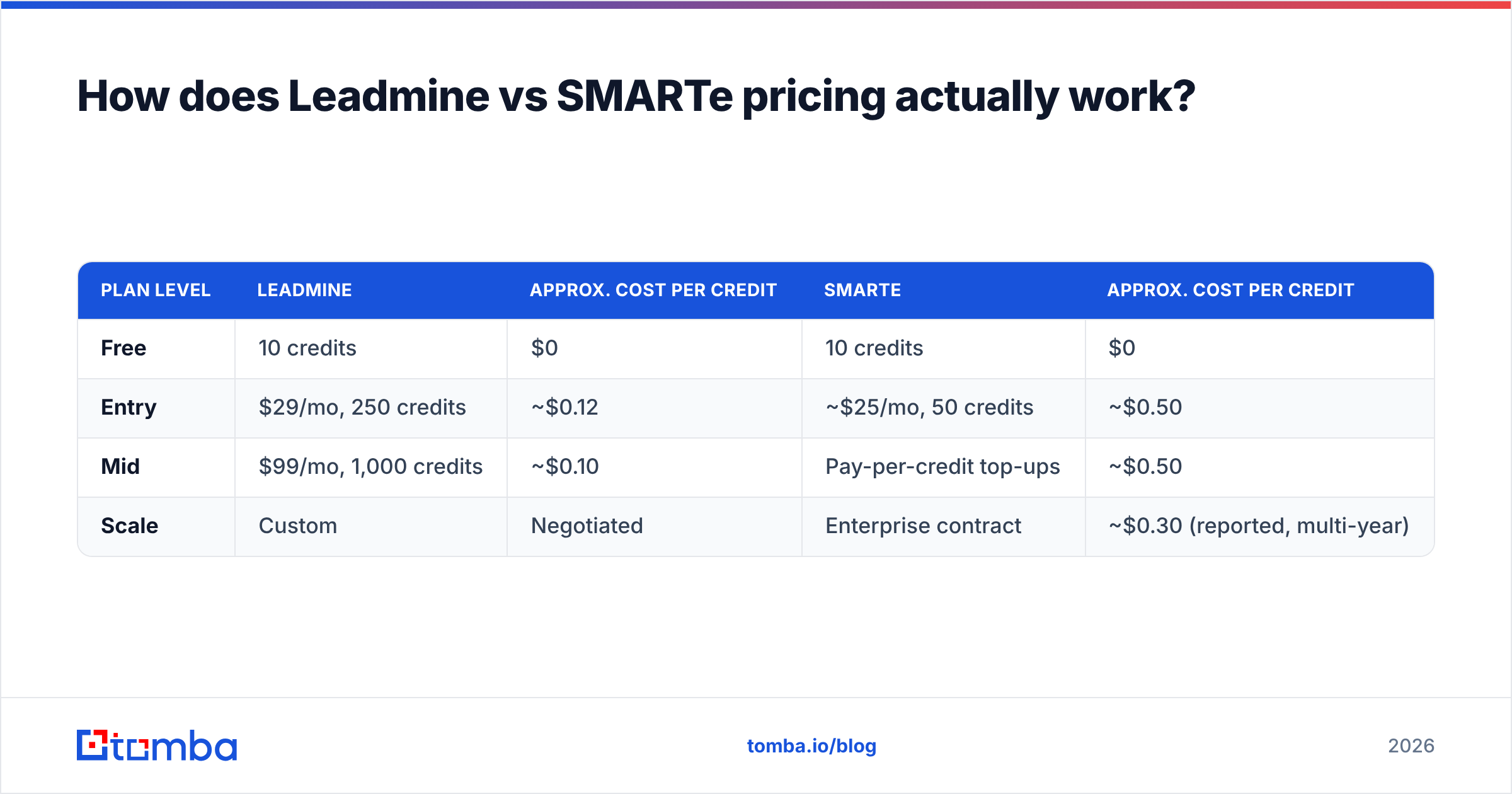
This is where the two differ most. Leadmine prices like a SaaS tool. SMARTe prices like a data contract.
| Plan level | Leadmine | Approx. cost per credit | SMARTe | Approx. cost per credit |
|---|---|---|---|---|
| Free | 10 credits | $0 | 10 credits | $0 |
| Entry | $29/mo, 250 credits | ~$0.12 | ~$25/mo, 50 credits | ~$0.50 |
| Mid | $99/mo, 1,000 credits | ~$0.10 | Pay-per-credit top-ups | ~$0.50 |
| Scale | Custom | Negotiated | Enterprise contract | ~$0.30 (reported, multi-year) |
Per credit, Leadmine costs about a quarter of SMARTe's Pro rate. That comparison is fair when all you need is emails. When you need a mobile number, you're comparing different products: a SMARTe credit returning a verified direct dial is worth more than a Leadmine credit returning an email.
Three costs are easy to miss:
- Refund rules. Leadmine refunds credits for bounces. Before you sign an enterprise contract with SMARTe, ask how it handles bad records.
- Contract length. SMARTe's lowest per-credit rates reportedly require a multi-year commitment. If your ICP could change in six months, that commitment is a risk.
- Integration effort. Leadmine mostly works through CSV export. If your reps live in Salesforce or HubSpot, the time they spend moving files by hand costs you too, even though it never shows up on an invoice.
If you want to see how a third option prices things, Tomba pricing is public: a free tier (25 searches/mo), Starter at $49/mo, Growth at $99/mo, Pro at $249/mo, and custom Enterprise. You don't have to talk to sales to see those numbers.
Which workflows fit each tool best?#
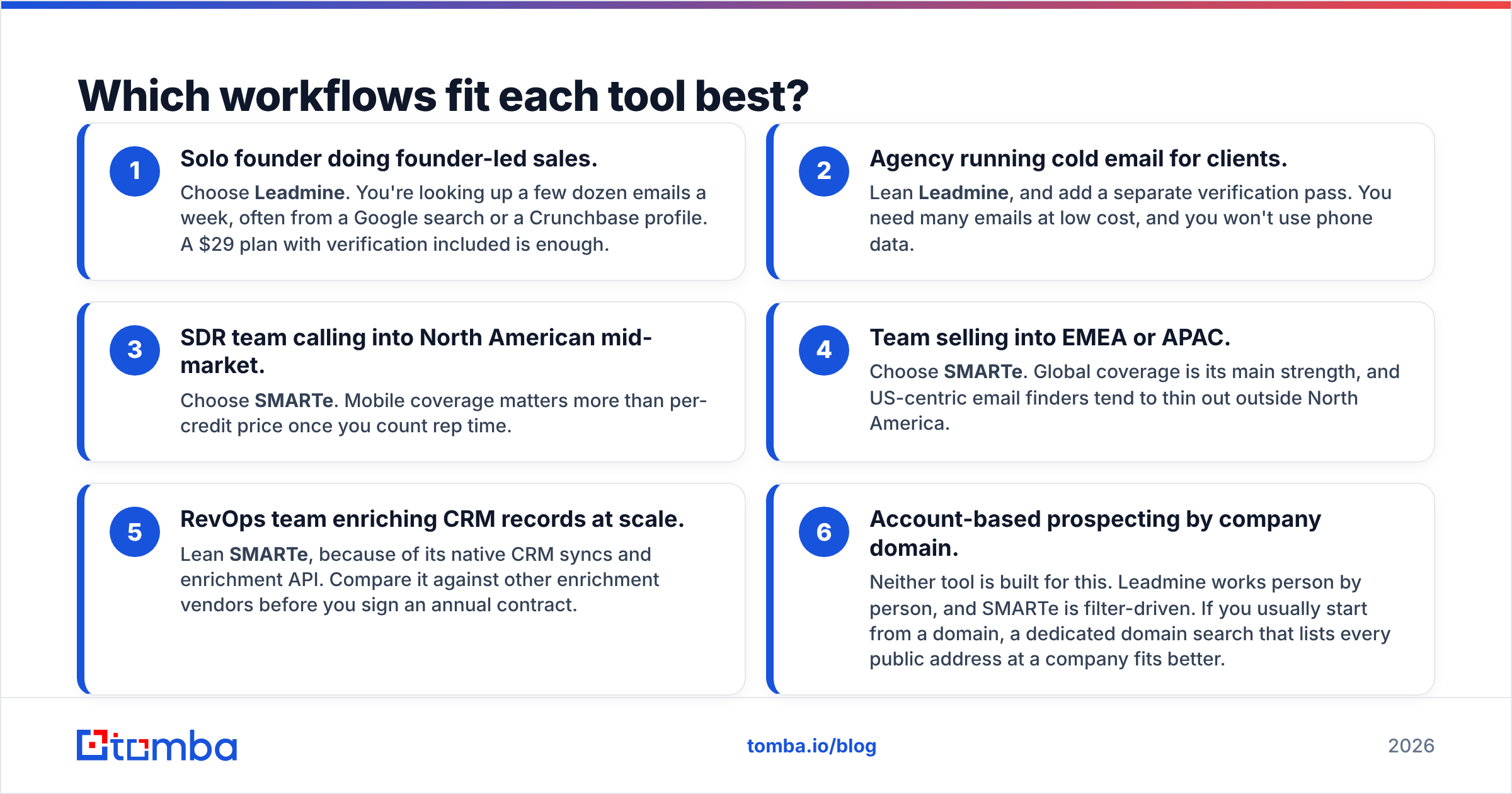
Pick based on the workflow you actually run, not the feature list. Here's how common outbound setups line up:
- Solo founder doing founder-led sales. Choose Leadmine. You're looking up a few dozen emails a week, often from a Google search or a Crunchbase profile. A $29 plan with verification included is enough.
- Agency running cold email for clients. Lean Leadmine, and add a separate verification pass. You need many emails at low cost, and you won't use phone data.
- SDR team calling into North American mid-market. Choose SMARTe. Mobile coverage matters more than per-credit price once you count rep time.
- Team selling into EMEA or APAC. Choose SMARTe. Global coverage is its main strength, and US-centric email finders tend to thin out outside North America.
- RevOps team enriching CRM records at scale. Lean SMARTe, because of its native CRM syncs and enrichment API. Compare it against other enrichment vendors before you sign an annual contract.
- Account-based prospecting by company domain. Neither tool is built for this. Leadmine works person by person, and SMARTe is filter-driven. If you usually start from a domain, a dedicated domain search that lists every public address at a company fits better.

What are the pros and cons of each?#
Leadmine pros
- Low cost per credit and fully self-serve
- Verification is built in, and bounced lookups are refunded
- The Chrome extension is useful for Crunchbase and Google-based research
- Easy to learn
Leadmine cons
- Little phone data
- Few native CRM integrations
- Its own database is smaller than enterprise vendors'
- The top self-serve plan caps out at around 1,000 credits a month
SMARTe pros
- Strong mobile and direct-dial coverage
- Better global coverage than most email-first tools
- Native CRM syncs and enrichment for RevOps
- Presents its data as compliance-focused, which helps with enterprise procurement
SMARTe cons
- The self-serve Pro plan comes with very few credits
- The real value is in enterprise contracts that need a sales process
- Expensive if you only need emails
- Long commitments are usually required to get the best rates
User reviews on Capterra's LeadMine listing and on SMARTe's own site follow the same pattern. Leadmine users say it's affordable and simple. SMARTe users say the phone data is good and that pricing only makes sense once they're buying at volume.
Where does Tomba fit in the Leadmine vs SMARTe decision?#
Tomba doesn't replace every SMARTe use case. If you need direct dials across APAC in bulk, a dedicated phone-data vendor will likely cover more. Tomba sits between the two products compared here, and it may cover what you need.
- Compared with Leadmine: Tomba's email finder works by name and company, by domain, and from LinkedIn profiles. Verification, catch-all checking, a phone finder, and enrichment are included too. You get more ways to find contacts without needing a second tool.
- Compared with SMARTe: Tomba publishes its pricing, sells month to month, and offers an API, a CLI, Google Sheets and Excel add-ons, and native HubSpot and Salesforce integrations. You don't need an enterprise contract to connect it to your CRM.
Whichever tool you use, run a verification pass on any list that came from a database before you send. Bounce rates are one of the quickest ways to hurt a sending domain.
Frequently asked questions#
Is Leadmine or SMARTe better for cold email?#
Leadmine. It costs less per verified email and refunds bounces. SMARTe's advantage is mostly phone data, which cold email doesn't use.
Is SMARTe worth it for a small team?#
Usually not on the Pro plan, which comes with few credits. SMARTe gets cost-effective when you sign an annual contract and use its mobile numbers.
Do both tools offer a free plan?#
Yes. Each gives you about 10 credits a month. That's enough to test data quality on a small sample, not enough to run a campaign.
Can I use both together?#
Yes. Some teams use a cheap email finder for volume and a phone-data vendor only for top-tier accounts. Remove duplicates before you import, or you'll pay twice for the same contact.
Which should you choose: Leadmine or SMARTe?#
Pick Leadmine if you mainly send cold email, work alone or on a small team, and want the lowest cost per verified email with no contract.
Pick SMARTe if your team makes phone calls, sells outside North America, or needs enrichment that syncs with your CRM and can go through enterprise procurement.
If neither fits, because you want email and phone data, verification, and CRM integrations at a published monthly price, run the same 200-contact test on a third tool before you commit.
Tomba is a good candidate for that test. Tomba Email Finder finds professional emails by name, company, or domain, and it comes with verification, catch-all checks, and a phone finder. The free tier gives you 25 searches a month, and paid plans start at $49/mo. Run your known-good list through it next to Leadmine and SMARTe, and choose whichever tool gives you the most valid contacts per dollar.
Related guides#
// get started
Find, verify and enrich your first contacts today
Start on the free plan with 25 searches a month, then scale when your team is ready.
Free plan · No credit card required · GDPR & CCPA
// about the author