Leadmine vs Trueverify: Email Finder or Verifier in 2026?
Leadmine finds B2B emails. Trueverify cleans the lists you already have. Here is how they compare on price, checks, and workflow fit, and when you need one, both, or neither.
TL;DR
- Leadmine and Trueverify do different jobs. Leadmine is an email finder that has verification built in. Trueverify is a standalone email validation service for lists you already have.
- Pick Leadmine if your problem is getting contacts. It has a 200M+ contact search, a Chrome extension, and a $0 plan with 10 credits a month.
- Pick Trueverify if your problem is cleaning contacts: bulk list hygiene, real-time signup validation, and spam-trap screening through an API.
- Don't buy both before you've mapped your workflow. Many teams pay for two logins to cover one pipeline (find, then verify). A platform that does both in one pass is often cheaper.
- Our pick: Leadmine for small prospecting teams. Trueverify for marketing and SaaS teams protecting signup forms. A combined finder-plus-verifier for anyone running both jobs.
What is Leadmine?#
Leadmine is a cloud-based lead generation tool built around one task: find a B2B person's work email address. It says it has more than 200 million business contacts gathered from public web sources. You can search them by name, job title, company, domain, industry, and location.
It has three main parts:
- Web dashboard. Filter-based search for building lead lists. You can export to CSV.
- Chrome extension. Pulls leads and emails from company websites and Google search results while you browse.
- Built-in email verifier. Leadmine says it only returns addresses it can verify, and it advertises a deliverability guarantee above 95%.
Leadmine pitches simplicity. It isn't trying to be a sales engagement suite, intent-data platform, or dialer. It's a search box, a list builder, and a verifier. That's a fair match for solo founders, agencies, and small SDR teams who don't want to configure something like Apollo.
What is Trueverify?#
Trueverify sits on the other side of the pipeline. It doesn't find anyone. It checks whether addresses you already hold are real, safe to send to, and likely to land in an inbox.
According to its homepage, every address goes through several checks:
- Syntax. Is the address correctly formatted?
- DNS and MX. Does the domain exist, and does it accept mail?
- SMTP. Does the mailbox respond as deliverable?
- Spam-trap detection. Is this an address that could hurt your sender reputation?
Trueverify offers bulk list cleaning and a real-time API that validates addresses at signup or import. It claims 99.9% accuracy and says customer data is encrypted and not stored. It also has a free verifier that works without sign-up, which is handy for spot-checking a few addresses before you commit.
Its audience is marketers and SaaS teams: people who have large inbound lists, newsletter databases, or signup forms that collect junk addresses.
Leadmine vs Trueverify: how do they compare side by side?#
The quickest way to see the difference is to compare what each tool actually does at every stage of an outbound or lifecycle workflow.
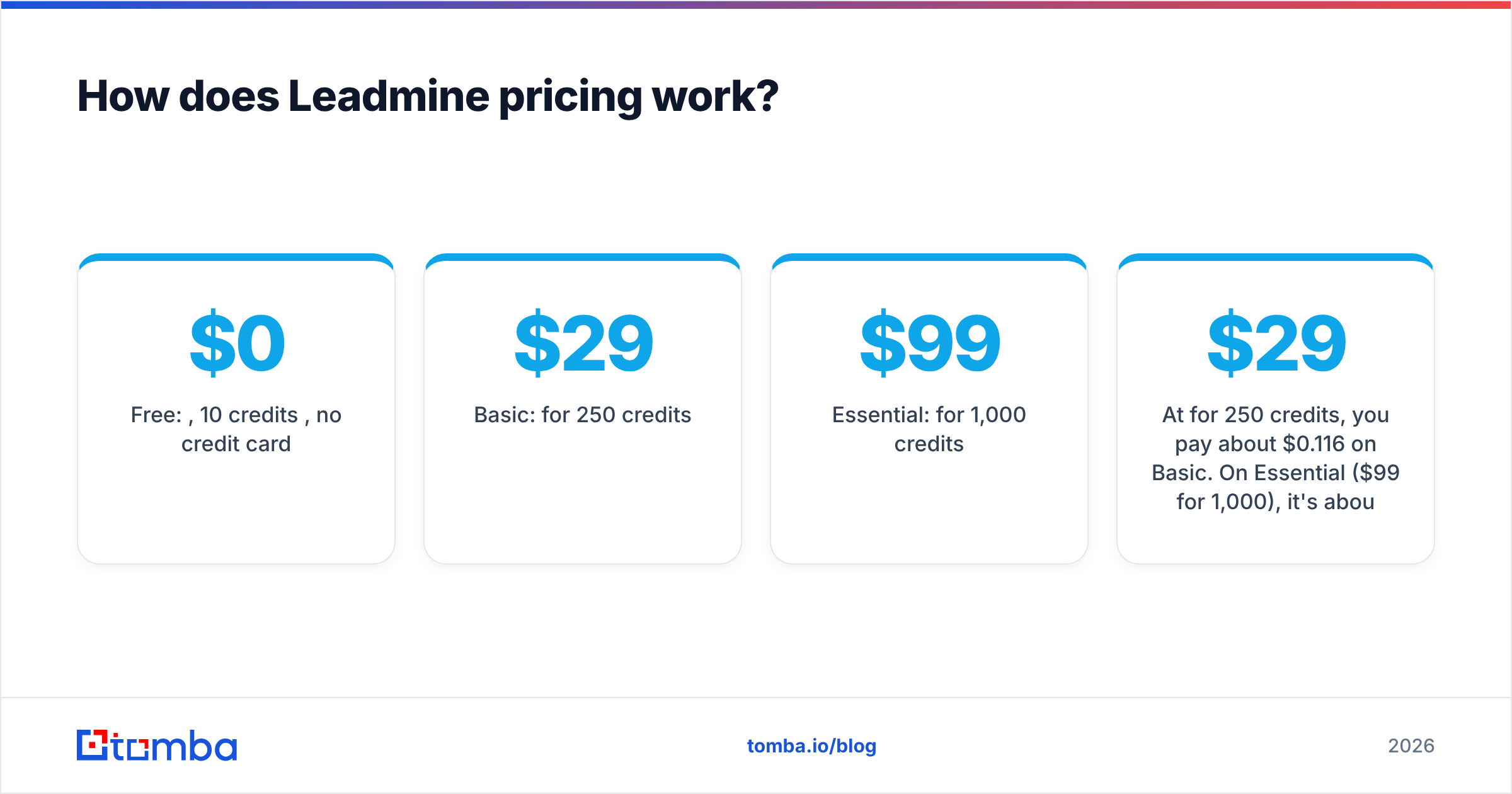
| Attribute | Leadmine | Trueverify |
|---|---|---|
| Core job | Find B2B emails and leads | Validate existing email addresses |
| Contact database | 200M+ business contacts (vendor claim) | None; you bring the list |
| Email verification | Built in, applied to returned results | Core product: syntax, DNS/MX, SMTP, spam trap |
| Real-time API validation | Not the main focus | Yes, validates at signup or import |
| Chrome extension | Yes, works on websites and Google results | Not a core feature |
| Free option | 10 credits/month, no card required | Free verifier tool, no sign-up |
| Entry paid plan | From $29/mo (Basic, 250 credits, per its pricing page) | Check trueverify.io for current tiers |
| Accuracy claim | 95%+ deliverability guarantee | 99.9% verification accuracy |
| Best for | Prospecting, list building, agencies | List hygiene, signup forms, email marketing |
| Weak spot | Not built for cleaning large inbound lists | Can't generate new leads |
Two things stand out.
First, the accuracy numbers measure different things, so don't compare them directly. Leadmine's 95% is a deliverability promise on emails it found. Trueverify's 99.9% describes how accurately it classifies addresses you give it. A verifier can be 99.9% accurate and still hand back a list that's 40% invalid, because the verdict is about your data, not the tool.
Second, the prices aren't directly comparable either. A Leadmine credit usually buys a found-and-verified contact. A verification credit only buys a verdict. When you model cost, work out cost per usable contact at the end of your pipeline, not cost per credit.

How does Leadmine pricing work?#
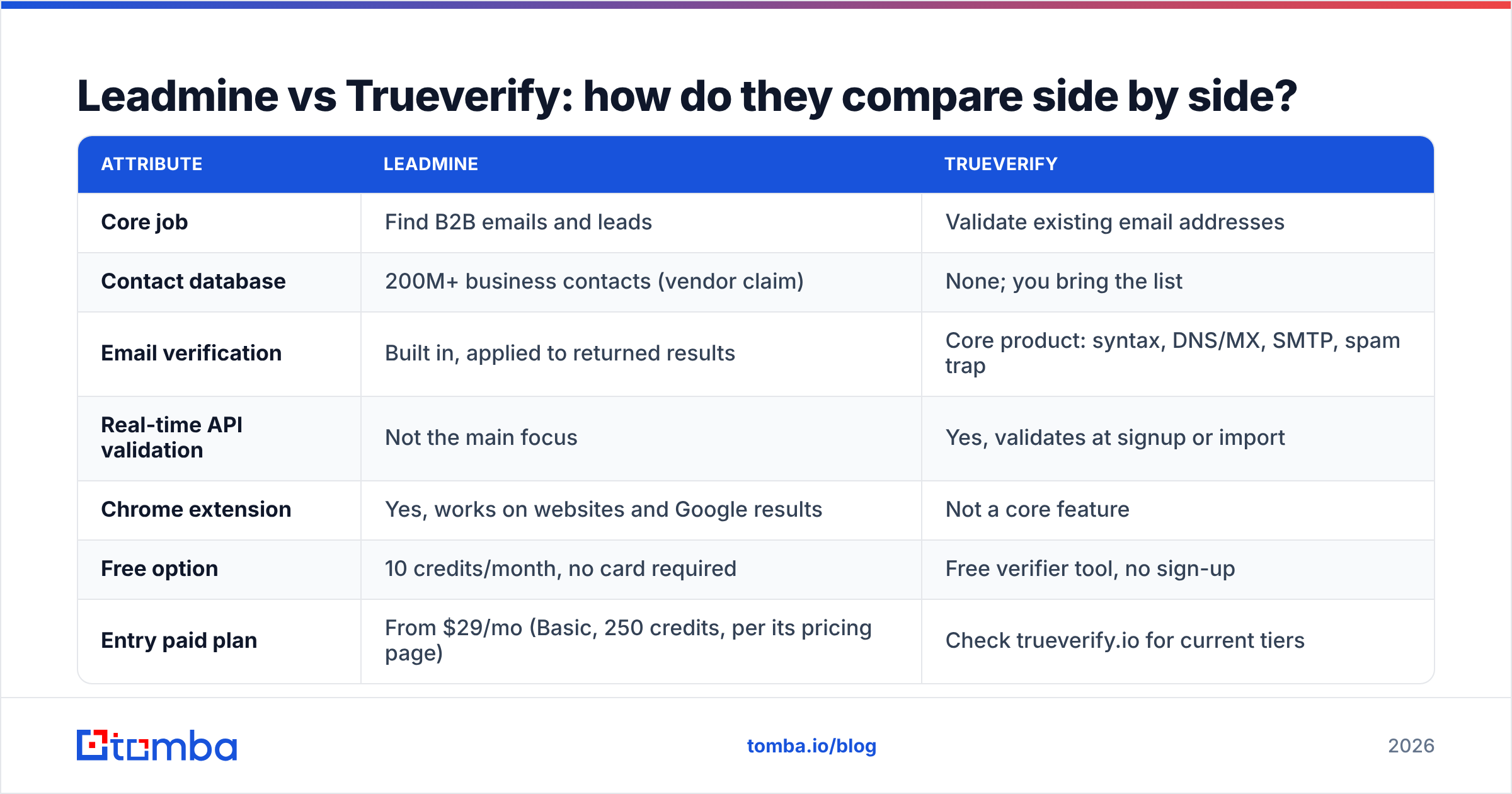
Leadmine uses a monthly credit model. At the time of writing, its pricing page lists:
- Free: $0, 10 credits per month, no credit card.
- Basic: $29/mo for 250 credits.
- Essential: $99/mo for 1,000 credits.
Third-party directories also list higher tiers, going up to 10,000 credits a month. Check Leadmine's pricing page before you budget, because plan names and credit amounts have changed over time.
Some mechanics that matter in practice:
- Credits reset monthly and don't roll over. If you prospect in bursts, say one big push per quarter, you'll lose unused credits in quiet months.
- Hard stop at the limit. Leadmine stops returning data once you run out, so a big list build can stall partway through.
- Upgrade or downgrade any time. Credits update right away, which softens the rollover problem a little.
At $29 for 250 credits, you pay about $0.116 per credit on Basic. On Essential ($99 for 1,000), it's about $0.099. That's competitive for a finder that verifies results, as long as you actually use the credits.
How does Trueverify pricing work?#
Trueverify runs a free verifier plus paid bulk and API options. We couldn't confirm a stable public price list for trueverify.io while writing this, so we won't quote numbers that might be wrong. Look at the vendor's site and its G2 listing for current tiers and user reviews.
Some tips for evaluating any verifier's pricing, Trueverify included:
- Ask how "unknown" and "catch-all" results are billed. Some verifiers charge for every check. Others refund inconclusive results.
- Check whether API calls and bulk uploads use the same credit pool. If you validate signups in real time and clean lists in batches, a split pool can surprise you.
- Test with a list you already understand. Run 500 addresses where you know the bounce history and compare the verdicts to reality.
Which is more accurate: Leadmine or Trueverify?#
Neither vendor publishes an independent third-party benchmark we could verify, so treat both claims as marketing until you test them yourself. Here's how to run a fair test in one afternoon:
- Build a truth set. Pull 300 to 500 contacts from your CRM where you already know the outcome: delivered and replied, delivered with no reply, or hard bounced.
- Run the known-good and known-bad addresses through Trueverify. Count false positives (bounced addresses marked valid) and false negatives (good addresses marked invalid).
- Search the same people in Leadmine by name and domain. Measure the hit rate (how many it finds) and the match rate (how many match the address you know works).
- Pay attention to catch-all domains. Neither SMTP checks nor finder guesses work cleanly on servers that accept every address. How a tool labels these tells you how honest its accuracy claims are. A dedicated catch-all verifier goes a step further than a standard SMTP ping here.
The key metric for a finder is verified hit rate: of 100 people searched, how many usable emails do you get back? For a verifier, it's bounce rate after cleaning: of the addresses marked valid, how many actually bounce when you send? Keep that under 2% to protect sender reputation. Mailbox providers like Google now enforce strict bulk-sender requirements.
Should you use Leadmine and Trueverify together?#
Sometimes you should, but it's usually not the best setup.
When stacking makes sense:
- You source leads from several places (events, purchased lists, Leadmine, form fills) and want one neutral verifier to check everything before it reaches your sending tool.
- Your marketing team needs real-time signup validation, which a finder doesn't provide.
When it's wasted spend:
- Your only lead source is Leadmine. Its results are already verified, so running them through Trueverify again means paying twice to check the same address.
- You're a two- or three-person team. Two subscriptions, two credit pools, and a CSV export-import step between them adds up to real work every week.
What a double-tool stack really costs is the handoff, not the licenses. Every CSV that moves between tools is a chance to lose data, mismatch columns, or duplicate records. If you need both finding and verifying, a single platform that does both in one pass usually beats two single-purpose tools.
What are the pros and cons of each?#
Leadmine pros
- Simple interface with little setup.
- Returns only verified emails, so you don't need a separate cleaning step for its own data.
- Real free plan with no credit card.
- Chrome extension works on ordinary websites, not just LinkedIn.
Leadmine cons
- Credits don't roll over.
- Not designed for cleaning large lists from other sources.
- Smaller ecosystem than the big all-in-one platforms.
Trueverify pros
- Multi-layer checks, including spam-trap detection, which matters most for sender reputation.
- Real-time API for signup and import validation.
- Free no-sign-up verifier for quick checks.
- Says it's privacy-first: encrypted and not stored.
Trueverify cons
- Doesn't generate any leads.
- Public pricing is harder to pin down than Leadmine's.
- Limited value if all your contacts already come from a verified finder.

Which one should you choose?#
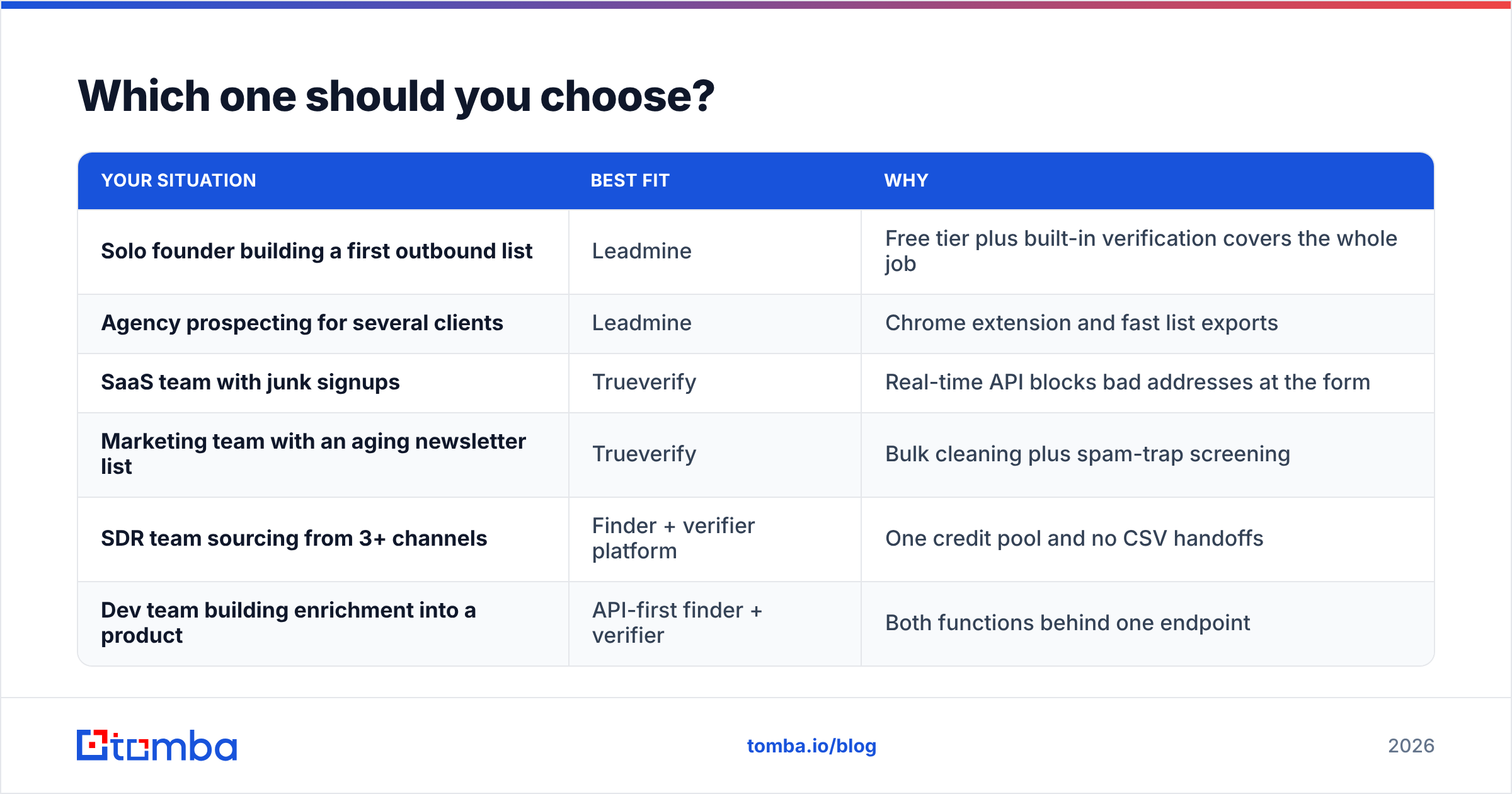
Go by the job, not the feature list.
| Your situation | Best fit | Why |
|---|---|---|
| Solo founder building a first outbound list | Leadmine | Free tier plus built-in verification covers the whole job |
| Agency prospecting for several clients | Leadmine | Chrome extension and fast list exports |
| SaaS team with junk signups | Trueverify | Real-time API blocks bad addresses at the form |
| Marketing team with an aging newsletter list | Trueverify | Bulk cleaning plus spam-trap screening |
| SDR team sourcing from 3+ channels | Finder + verifier platform | One credit pool and no CSV handoffs |
| Dev team building enrichment into a product | API-first finder + verifier | Both functions behind one endpoint |
If you're still unsure, ask yourself one question: Do I have too few contacts, or too many bad ones? Too few means you need a finder like Leadmine. Too many bad ones means you need a verifier like Trueverify. If the answer is "both," look at tools that do both before you pay for two.
Is there an alternative that does both?#
Yes. Several platforms combine finding and verification, and Tomba is one we know well. The Tomba Email Finder searches by name, domain, or company. The email verifier runs the same kind of syntax, MX, and SMTP checks Trueverify performs, and both draw from one account. Catch-all verification, domain search, phone finder, and enrichment are included, so you won't need a third tool the first time you hit a catch-all domain.
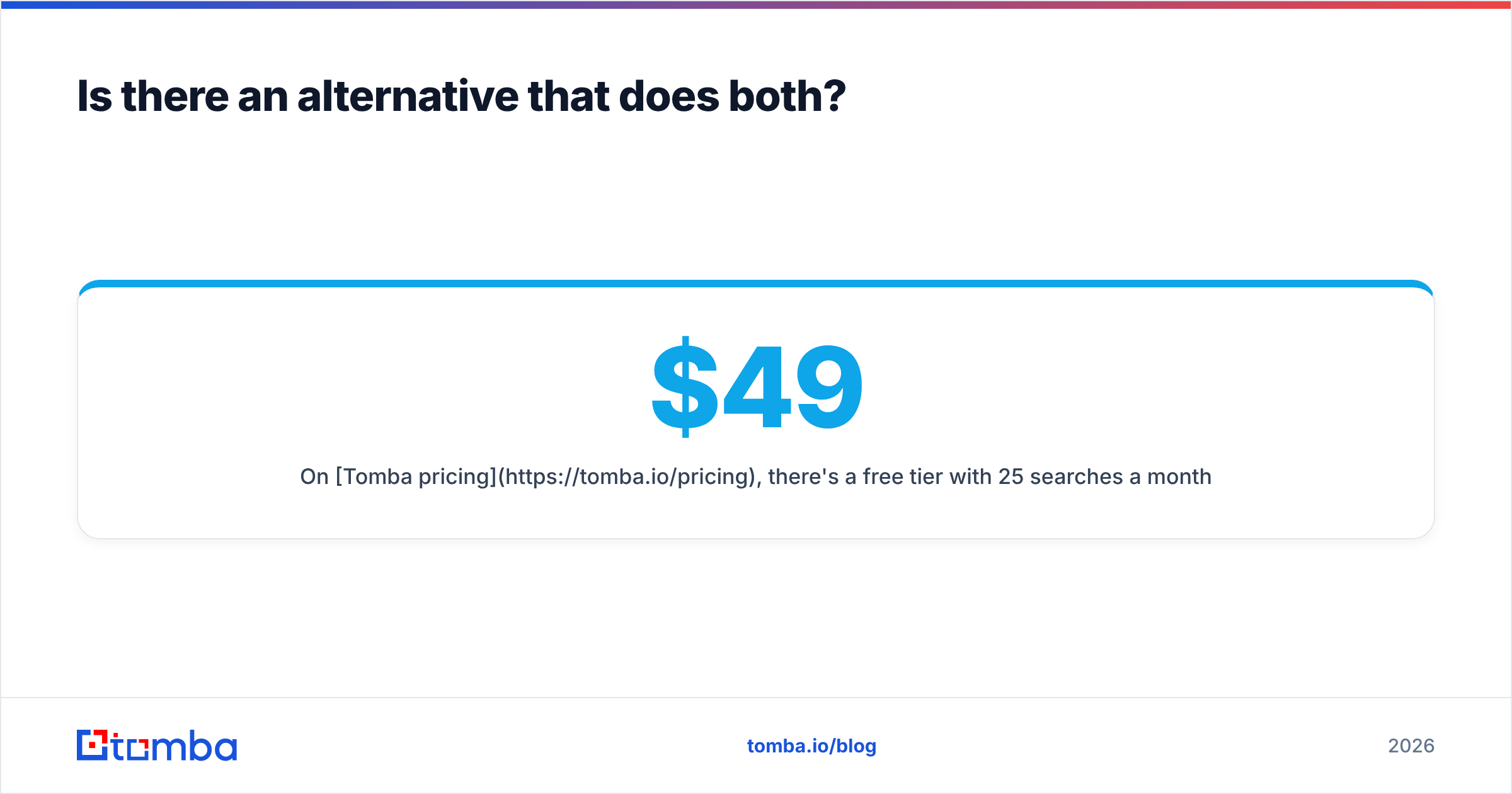
On Tomba pricing, there's a free tier with 25 searches a month (more than Leadmine's 10). Starter is $49/mo, Growth $99/mo, Pro $249/mo, and Enterprise is custom. That's not always cheaper per credit than a single-purpose tool. But if you're comparing "finder subscription + verifier subscription + CSV handoffs" against a single plan, the total usually favors combining them.
To be fair: if you only need real-time signup validation and never prospect, a dedicated verifier like Trueverify fits more closely. And if you only need a simple, low-cost finder for a few hundred leads a month, Leadmine's Basic plan is hard to beat.
Final verdict: Leadmine vs Trueverify#
Leadmine vs Trueverify isn't a head-to-head fight, because they solve two different problems. Leadmine wins for affordable, simple prospecting with verification built in. Trueverify wins for protecting sender reputation on lists and forms you already own. Test either one against your own bounce data before you trust the headline accuracy numbers.
If your workflow needs both finding and verifying, and most outbound workflows do, try the Tomba Email Finder. Search a domain or a person, get a verified address in the same step, and run the free 25 monthly searches against your own truth set before you pay.
Related guides#
// get started
Find, verify and enrich your first contacts today
Start on the free plan with 25 searches a month, then scale when your team is ready.
Free plan · No credit card required · GDPR & CCPA
// about the author