Leadmine vs Wiza: Which Email Finder Fits Your Workflow in 2026?
Leadmine finds emails from company websites and domains. Wiza pulls them out of LinkedIn and Sales Navigator. Here is how they compare on price, credits, data and fit, plus which one to pick.
TL;DR
- Leadmine starts from a company domain or website. It works like a Hunter-style tool: you look up a domain, it finds contacts and verified emails, and a Chrome extension works on any company site.
- Wiza starts from LinkedIn. It turns LinkedIn and Sales Navigator searches into enriched lists with emails and, on higher tiers, phone numbers.
- Price: Leadmine's paid plans start lower (around $29/mo). Wiza starts at $49/mo, and phone data costs more. In practice, Wiza also needs a Sales Navigator seat to be useful.
- Pick Leadmine if you prospect by account or company list. Pick Wiza if your team lives in Sales Navigator and wants phones.
- If you need both workflows (domain search and LinkedIn) plus verification in one account, a single platform like Tomba covers all three from $49/mo.
What is the real difference between Leadmine and Wiza?#
The main difference is where each tool starts. Most comparisons treat them as two email finders with different price tags, but that misses the point. They begin in different places and fit different workflows.
Leadmine is domain-first. You give it a company website or domain, or a person's name plus domain, and it returns business email addresses it can verify. Its Chrome extension runs on company websites, so you can go from "this looks like a good account" to "here are three people to email" without leaving the page. It also has bulk lookups, email verification, and CSV export.
Wiza is LinkedIn-first. You build a search in LinkedIn or Sales Navigator, and Wiza exports that list with enriched contact data: work emails, and phone numbers on the plans that include them. Its Chrome extension sits on LinkedIn profiles and search pages. Wiza has also added its own prospecting database (Wiza Prospect), but the core product is still built around LinkedIn.
A simple way to think about it: Leadmine answers "who works at this company, and what's their email?" Wiza answers "I already have 500 people from a Sales Navigator search; give me their emails and phones."
How do Leadmine and Wiza compare feature by feature?#
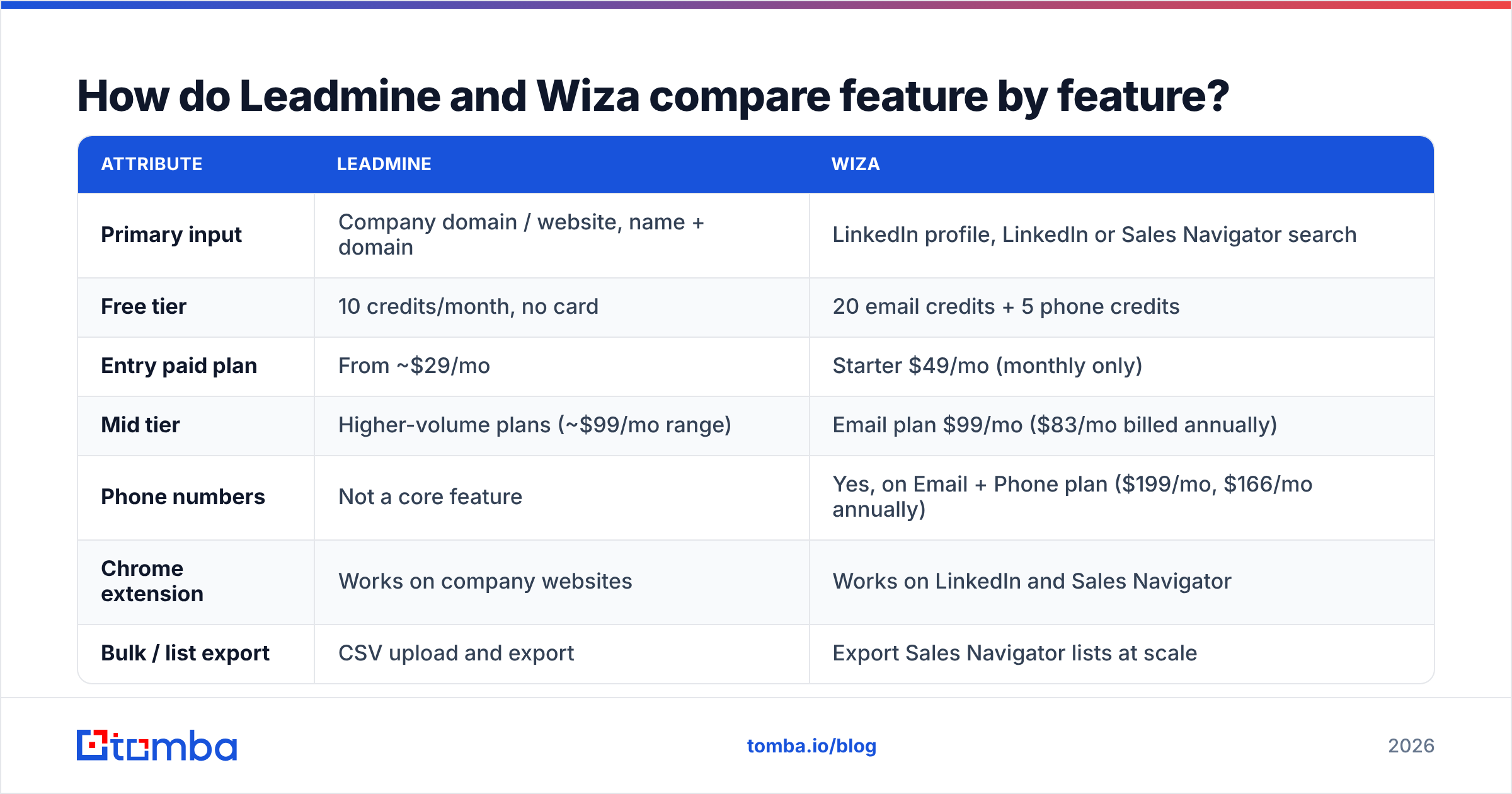
Here's how they line up on the things that affect your day-to-day work. Pricing reflects public pricing pages and third-party listings at the time of writing. Both vendors change tiers often, so check Leadmine's pricing page and Wiza's G2 pricing listing before you commit.
| Attribute | Leadmine | Wiza |
|---|---|---|
| Primary input | Company domain / website, name + domain | LinkedIn profile, LinkedIn or Sales Navigator search |
| Free tier | 10 credits/month, no card | 20 email credits + 5 phone credits |
| Entry paid plan | From ~$29/mo | Starter $49/mo (monthly only) |
| Mid tier | Higher-volume plans (~$99/mo range) | Email plan $99/mo ($83/mo billed annually) |
| Phone numbers | Not a core feature | Yes, on Email + Phone plan ($199/mo, $166/mo annually) |
| Chrome extension | Works on company websites | Works on LinkedIn and Sales Navigator |
| Bulk / list export | CSV upload and export | Export Sales Navigator lists at scale |
| Email verification | Built in, also sold as a standalone action | Built in; only verified results use credits |
| CRM integrations | Basic (CSV-centric) | HubSpot, Salesforce and others on paid plans |
| Hidden dependency | None | Sales Navigator seat for list exports |
| Best for | Account-based prospecting, founders, agencies | SDR teams already working in Sales Navigator |
In both tools, you only pay credits for results that come back as valid business emails. That matters when you compare cost per contact. A tool that charges for every lookup, including misses, can cost two or three times more per usable email than its sticker price suggests.
Which one is cheaper, Leadmine or Wiza?#
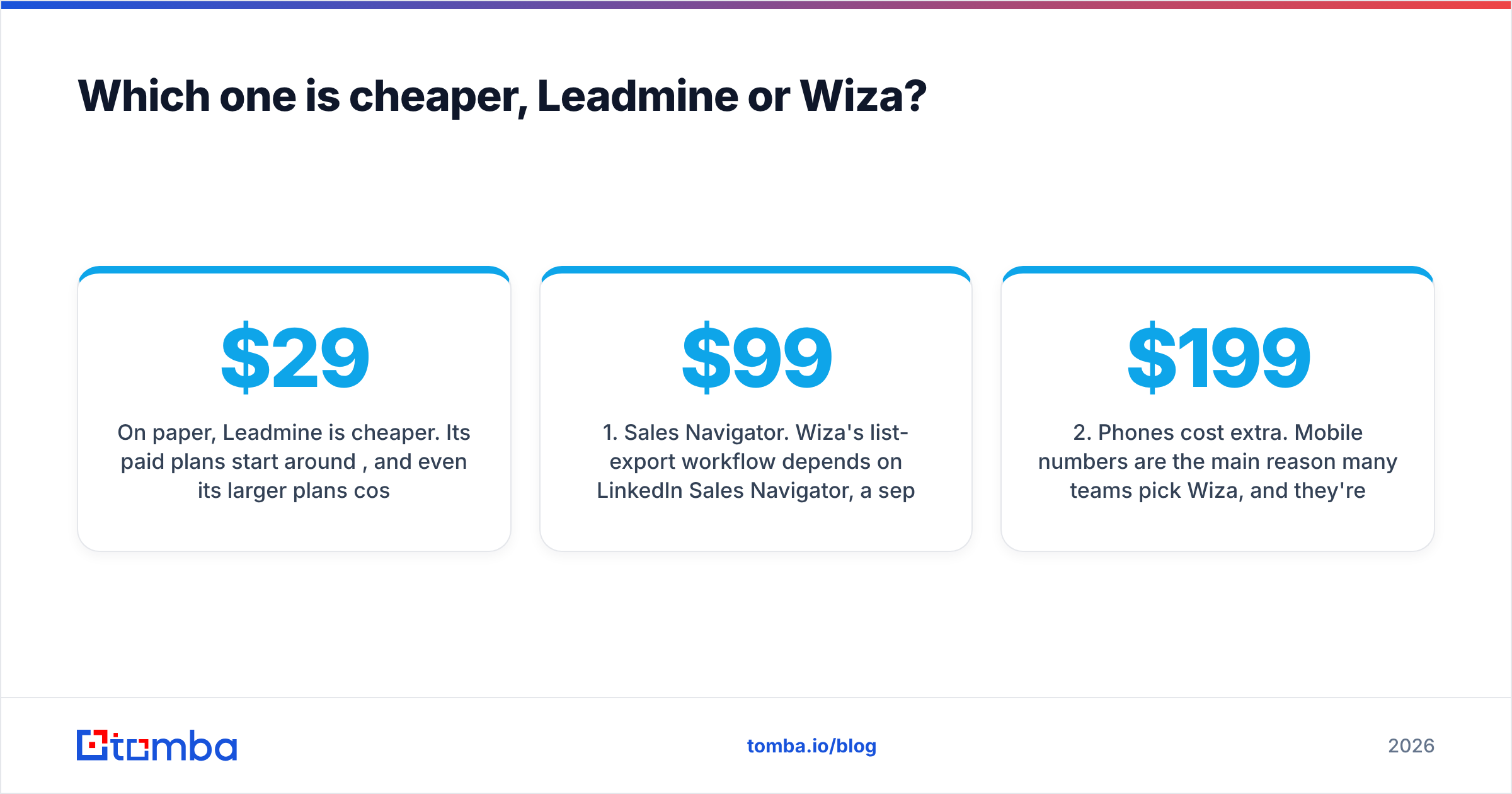
On paper, Leadmine is cheaper. Its paid plans start around $29/mo, and even its larger plans cost less than Wiza's phone tier. If you only need verified work emails, Leadmine's cost per credit is competitive.
Wiza's pricing is simple on its own page, but the total cost is higher than it looks. Three things add to it:
- Sales Navigator. Wiza's list-export workflow depends on LinkedIn Sales Navigator, a separate subscription that usually costs around $99/mo or more per seat. If you don't already pay for it, add that to Wiza's price.
- Phones cost extra. Mobile numbers are the main reason many teams pick Wiza, and they're on the Email + Phone tier at $199/mo ($166/mo annually). The $49 Starter plan won't give you real phone coverage at volume.
- Credits expire. Monthly credits on most Wiza plans reset at the end of the cycle. If your outbound is seasonal or project-based, you'll pay for capacity you don't use.
Leadmine has fewer of these add-ons, but it also does less: no strong phone data and lighter CRM integrations. So you're comparing different amounts of product, not just different prices.
A fairer way to compare is cost per usable contact in your ICP. Run the same 100 target accounts or profiles through each free tier. Count how many valid emails you get, then divide the plan price by that hit rate. That number matters more than the list price.
Which tool has better data accuracy?#
Neither vendor publishes independent accuracy audits, so be skeptical of any single percentage you see quoted. What you can say is that each tool's accuracy depends on where its data comes from.

Leadmine builds emails around the company domain: it detects the email pattern, finds candidate contacts, and verifies deliverability. This is reliable when the domain has a consistent pattern and a normal mail server. It gets weaker on catch-all domains, where the server accepts every address and verification can't confirm a specific mailbox. That's a problem for every domain-based tool, not only Leadmine, but you'll notice it most in enterprise and older mid-market companies.
Wiza pairs LinkedIn identity data with email and phone enrichment from multiple providers, then verifies before charging. Because the person's identity comes from LinkedIn, the matching tends to be solid. Stale emails come from job changes: LinkedIn profiles update faster than email databases, so someone who moved companies last month may show their new title with a mailbox that doesn't exist yet or is already gone.
The practical takeaway:
- Test on your own ICP. A tool that does well on US SaaS startups can struggle with European manufacturers.
- Check catch-all handling. Ask each vendor how they label catch-all results and whether those results use credits.
- Re-verify before sending. Even verified data goes stale. Run the final list through an independent email verifier right before a campaign so your bounce rate stays under 2%.
What does each tool do best?#
These four points decide most Leadmine vs Wiza choices:
- Account-first prospecting favors Leadmine. If your process starts with a target account list ("these 200 companies fit our ICP"), a domain-first workflow is faster. You paste domains, get contacts, and export.
- Persona-first prospecting favors Wiza. If your process starts with a person filter ("VPs of Finance at 200–1,000 employee fintechs in the UK"), Sales Navigator's filters combined with Wiza's export are hard to beat.
- Phone-heavy outbound favors Wiza. If your SDRs cold call, Wiza's phone tier is the stronger choice. Leadmine isn't built for this.
- Tight budgets favor Leadmine. Solo founders, freelancers, and small agencies who need a few hundred verified emails a month will spend less with Leadmine and won't need a Sales Navigator seat.
Is Wiza better than Leadmine for LinkedIn prospecting?#
Yes, clearly. LinkedIn is what Wiza was built for. You can export a whole Sales Navigator search, keep LinkedIn URLs attached to every record, and push the results straight into HubSpot or Salesforce. Leadmine doesn't have a comparable LinkedIn list-export workflow.
The trade-off is dependency. Your Wiza workflow is only as stable as your LinkedIn access. Sales Navigator pricing changes, account restrictions, or policy updates on LinkedIn's side affect your pipeline directly. Some teams reduce that risk with a lighter LinkedIn finder that resolves emails from individual profile URLs, without needing a full Sales Navigator scraping setup.
Is Leadmine better than Wiza for finding emails by company?#
Yes. If the input is a company, Leadmine's domain-first approach fits better. Enter a domain, see who's there, pick the right roles, and verify. Its Chrome extension works on the company's own website, which is often where you're doing account research anyway.
Its weaknesses are breadth and depth. Leadmine doesn't have Wiza's phone coverage or its CRM integrations. If you need a large database of people at a domain, broader domain search tools with larger indexes will usually return more contacts per company, which matters when you're multithreading into accounts with buying committees of five or more people.
Which should you choose, Leadmine or Wiza?#
Choose based on your workflow, not on a feature checklist:
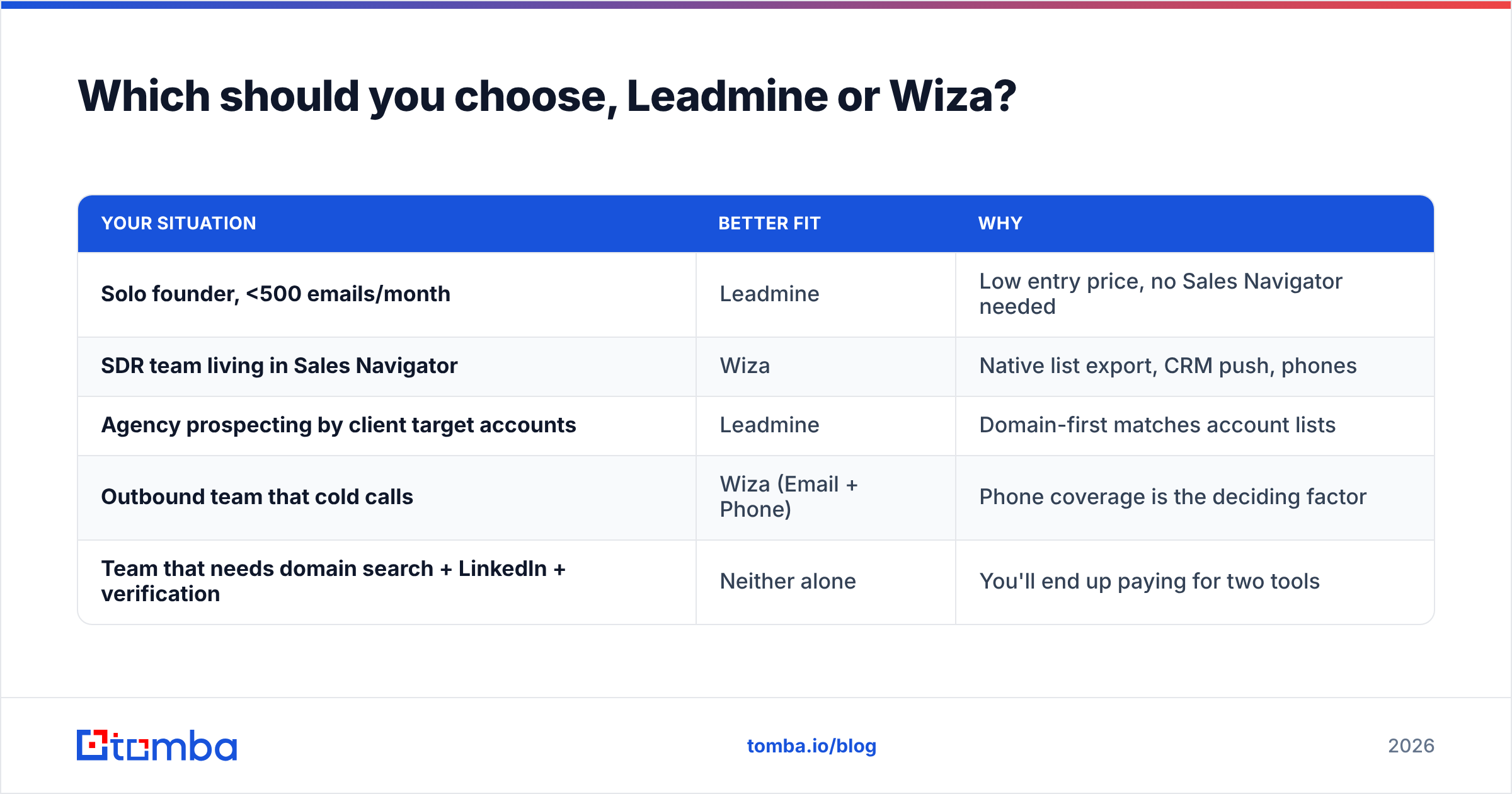
| Your situation | Better fit | Why |
|---|---|---|
| Solo founder, <500 emails/month | Leadmine | Low entry price, no Sales Navigator needed |
| SDR team living in Sales Navigator | Wiza | Native list export, CRM push, phones |
| Agency prospecting by client target accounts | Leadmine | Domain-first matches account lists |
| Outbound team that cold calls | Wiza (Email + Phone) | Phone coverage is the deciding factor |
| Team that needs domain search + LinkedIn + verification | Neither alone | You'll end up paying for two tools |
That last row describes more teams than you might think. Many sales orgs end up running both tools: Leadmine for account research, Wiza for Sales Navigator exports, plus a separate verifier on top. Now you're managing three subscriptions, three credit balances, and three sets of CSVs that need deduplicating before every campaign.

Where does Tomba fit in this comparison?#
If neither tool alone covers your workflow, it's worth looking at a single platform that handles both starting points. In the interest of full disclosure, this is Tomba's blog. Here's an honest look at where it fits.

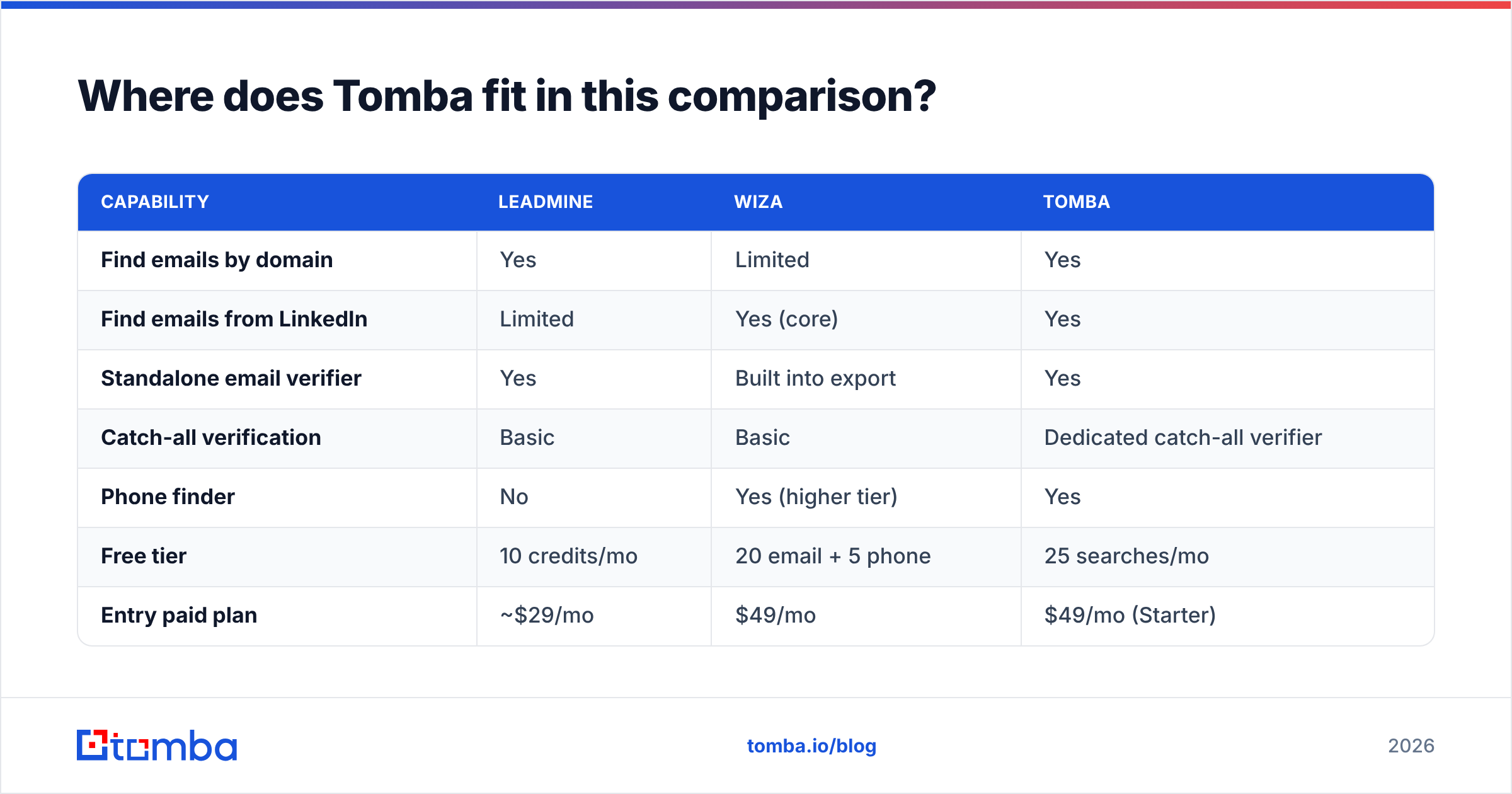
| Capability | Leadmine | Wiza | Tomba |
|---|---|---|---|
| Find emails by domain | Yes | Limited | Yes |
| Find emails from LinkedIn | Limited | Yes (core) | Yes |
| Standalone email verifier | Yes | Built into export | Yes |
| Catch-all verification | Basic | Basic | Dedicated catch-all verifier |
| Phone finder | No | Yes (higher tier) | Yes |
| Free tier | 10 credits/mo | 20 email + 5 phone | 25 searches/mo |
| Entry paid plan | ~$29/mo | $49/mo | $49/mo (Starter) |
| Sales Navigator required | No | For list exports | No |
| Integrations | CSV-centric | HubSpot, Salesforce | HubSpot, Salesforce, Sheets, Zapier, API |
Where Tomba doesn't win: if your whole motion is exporting big Sales Navigator searches and you already pay for Navigator seats, Wiza's native list export is more polished for that one job. And if you need a few hundred emails a month and nothing else, Leadmine's lowest tier is cheaper than Tomba's Starter plan.
Where Tomba does win: teams that prospect both by account and by person, who want domain search, LinkedIn lookup, verification, and phone data under one credit balance and one API. You don't need Sales Navigator, you have one list to deduplicate, and you have one vendor to evaluate for accuracy.
How should you test Leadmine vs Wiza before paying?#
Both tools have free tiers, so run a proper test instead of trusting marketing pages:
- Build a 50-contact sample from your real ICP. Include a mix of company sizes and at least a few enterprise domains, since those are often catch-all.
- Run the same sample through each tool. For Leadmine, use domains plus names. For Wiza, use the matching LinkedIn profiles.
- Record the find rate. How many contacts returned a verified email?
- Verify everything independently. Run all results through one third-party verifier so you're comparing like for like.
- Send a small warm-up batch. Real bounces are the only accuracy number that matters. Anything over 3% is a red flag.
- Calculate cost per valid contact using the paid plan you'd actually buy, including Sales Navigator for Wiza if you'd need it.
This takes an afternoon and tells you more than any comparison article, this one included.
Frequently asked questions#
Does Wiza work without Sales Navigator? Partly. The Chrome extension can enrich individual LinkedIn profiles, and Wiza Prospect gives you a built-in database. But Wiza's main feature, bulk list export, is designed around Sales Navigator searches.
Does Leadmine find phone numbers? Phone data isn't a core Leadmine feature. If phones matter to you, look at Wiza's Email + Phone tier or a dedicated phone finder.
Do failed lookups cost credits? In both tools, credits are generally used only for verified results. Check how each handles catch-all or "risky" results, because that's where policies differ.
Which is better for agencies? Agencies prospecting by client target account lists usually prefer Leadmine's domain-first workflow. Agencies running LinkedIn-based campaigns for clients tend to prefer Wiza.
Ready to find emails without juggling two tools?#
Leadmine and Wiza are both good tools for their own job: Leadmine for domain-first account research, Wiza for exporting from LinkedIn and Sales Navigator. If your team needs both workflows, verification you can trust, and phone data without a separate Sales Navigator bill, try the Tomba Email Finder. Search by domain, name, company, or LinkedIn profile, verify results on the spot, and start free with 25 searches a month before moving to Starter at $49/mo.
Related guides#
// get started
Find, verify and enrich your first contacts today
Start on the free plan with 25 searches a month, then scale when your team is ready.
Free plan · No credit card required · GDPR & CCPA
// about the author