LeadRocks Pricing 2026: Plans, Credit Costs and Who It Suits
LeadRocks starts at $29/mo, which is cheap. The catch is that every credit costs the same $0.029 whether you buy 1,000 or 20,000. Here's what you actually pay at each tier and when another tool is the better buy.
TL;DR
- LeadRocks has five tiers: Free (50 credits/mo), Starter at $29/mo (1,000 credits), Growth at $145/mo (5,000), Professional at $290/mo (10,000) and Enterprise at $580/mo (20,000).
- Every paid tier works out to the same $0.029 per credit. Buying more doesn't get you a volume discount. You get a bigger bucket at the same unit price.
- The $29 Starter plan is one of the cheapest ways into a 100M+ contact database with a LinkedIn Chrome extension. Solo reps and small teams get good value from it.
- The jump from Starter to Growth is 5x in price. If you need 1,500 contacts a month, you'll pay for 5,000.
- If your workflow starts from a company domain, needs a separate verification step, or runs through an API, compare LeadRocks with a domain-first email finder such as Tomba before you commit.
What is LeadRocks, and what are you actually paying for?#
LeadRocks is a B2B contact database and enrichment tool. It says it covers more than 100 million professional contacts. You search that database by filters, or you use its Chrome extension to pull contact data while you browse LinkedIn profiles and search results. Paid plans also include email verification and basic Gmail/Outlook sequencing, so the product mixes three jobs:
- Contact database: filter-based search for people by title, company, industry and location.
- LinkedIn extension: reveal emails and phone numbers for profiles you're already viewing.
- Light outreach: verification plus simple email sequences, so small teams can send without adding another tool.
You pay in credits. In general, a credit gets spent when you reveal or enrich a contact. Before you plan your volume, check how LeadRocks counts phone numbers compared with emails. On many contact-data platforms a phone reveal costs more than an email, so find out whether a "1,000 credit" plan gives you 1,000 full contacts or fewer.
The official plan list is on the LeadRocks website. Third-party trackers such as SaaSworthy's LeadRocks pricing page show the same tier structure. The numbers below come from those sources as of 2026.
How much does LeadRocks cost in 2026?#
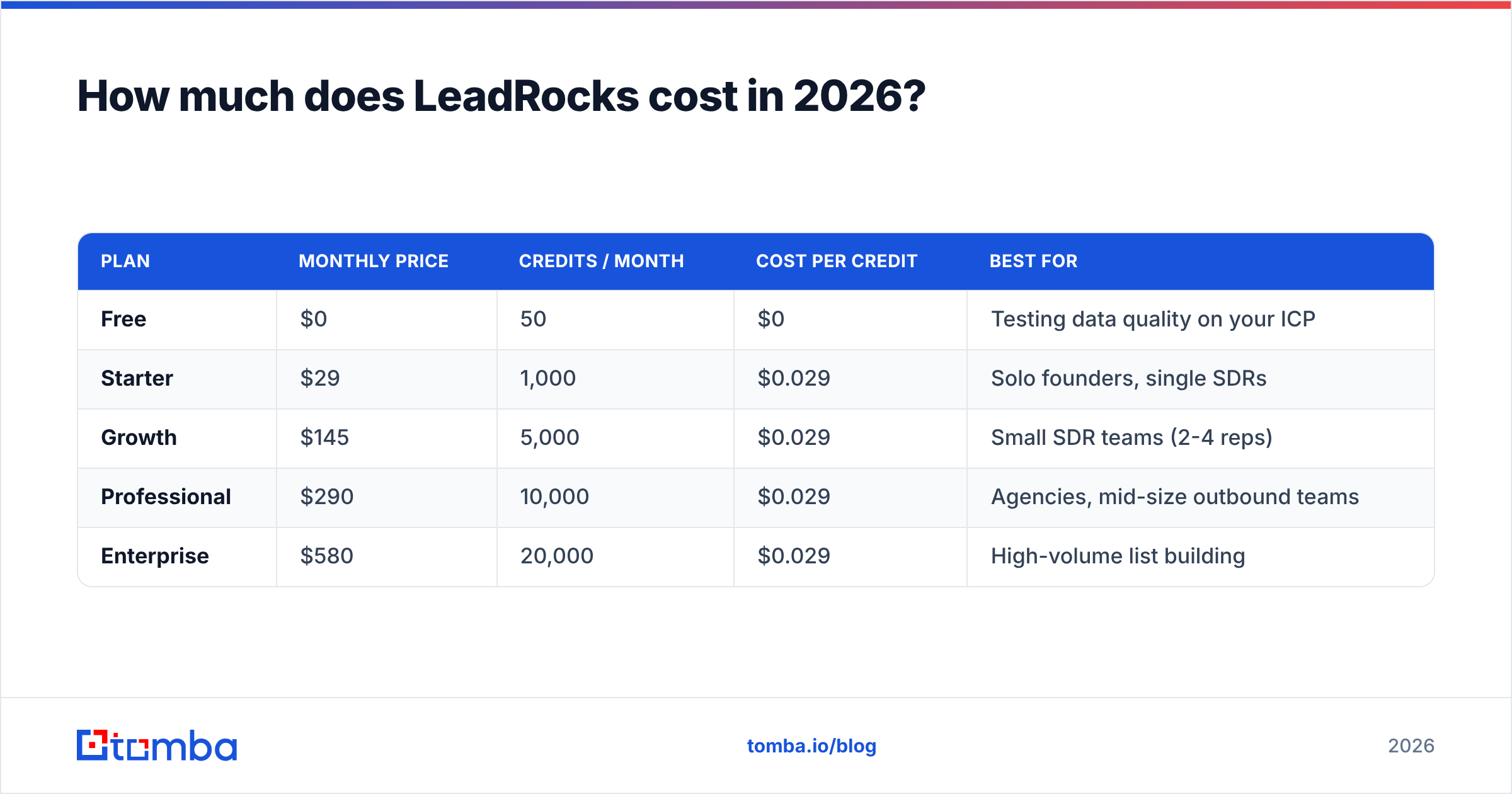
Here's the full plan ladder with the math done for you. The cost-per-credit column matters most here, because it shows that the per-credit price never drops.
| Plan | Monthly price | Credits / month | Cost per credit | Best for |
|---|---|---|---|---|
| Free | $0 | 50 | $0 | Testing data quality on your ICP |
| Starter | $29 | 1,000 | $0.029 | Solo founders, single SDRs |
| Growth | $145 | 5,000 | $0.029 | Small SDR teams (2-4 reps) |
| Professional | $290 | 10,000 | $0.029 | Agencies, mid-size outbound teams |
| Enterprise | $580 | 20,000 | $0.029 | High-volume list building |
A few things stand out:
- The unit price is flat. Most data vendors reward volume. LeadRocks charges 2.9 cents per credit at every paid tier, so moving up gets you more capacity but no discount.
- The free plan is real, but it's small. 50 credits a month is enough to see whether LeadRocks covers your niche, and not enough to run a campaign.
- Unlimited users on the free tier. Aggregators list unlimited seats, which helps if a few teammates want to test the extension at the same time. Confirm the seat rules on paid tiers before you roll it out to a whole team.
- Lifetime deals have come up before. LeadRocks has run a $79 lifetime deal on AppSumo. Treat that as a possible bonus, not as something you can plan a budget around.

Is the $29 Starter plan worth it?#
For most individual users, yes. 1,000 credits for $29 is a low price for a database that includes emails, phone numbers and a LinkedIn extension. If you're a founder doing your own outbound, or one SDR who sends 40-50 personalised emails a day, 1,000 credits covers a normal month with some room left over.
You get the most out of Starter when:
- You prospect mainly from LinkedIn Sales Navigator or LinkedIn search and want contact data in one click.
- Your target market is English-speaking and mid-market to enterprise, where large databases usually have their best coverage.
- You don't need an API or bulk file processing at this stage.
- You're comfortable doing light verification before sending.
Starter is a weaker fit when your list-building starts from company domains instead of people. Suppose you have 300 target accounts in a spreadsheet and need decision-makers at each one. A database built around filters and the extension will get you there, but a tool built for domain search usually gets you there with fewer steps.
What are the hidden costs in LeadRocks pricing?#
"Hidden" is too strong, because LeadRocks publishes its prices. There are still three cost traps that many buyers only notice after a month or two.
1. The Starter-to-Growth cliff#
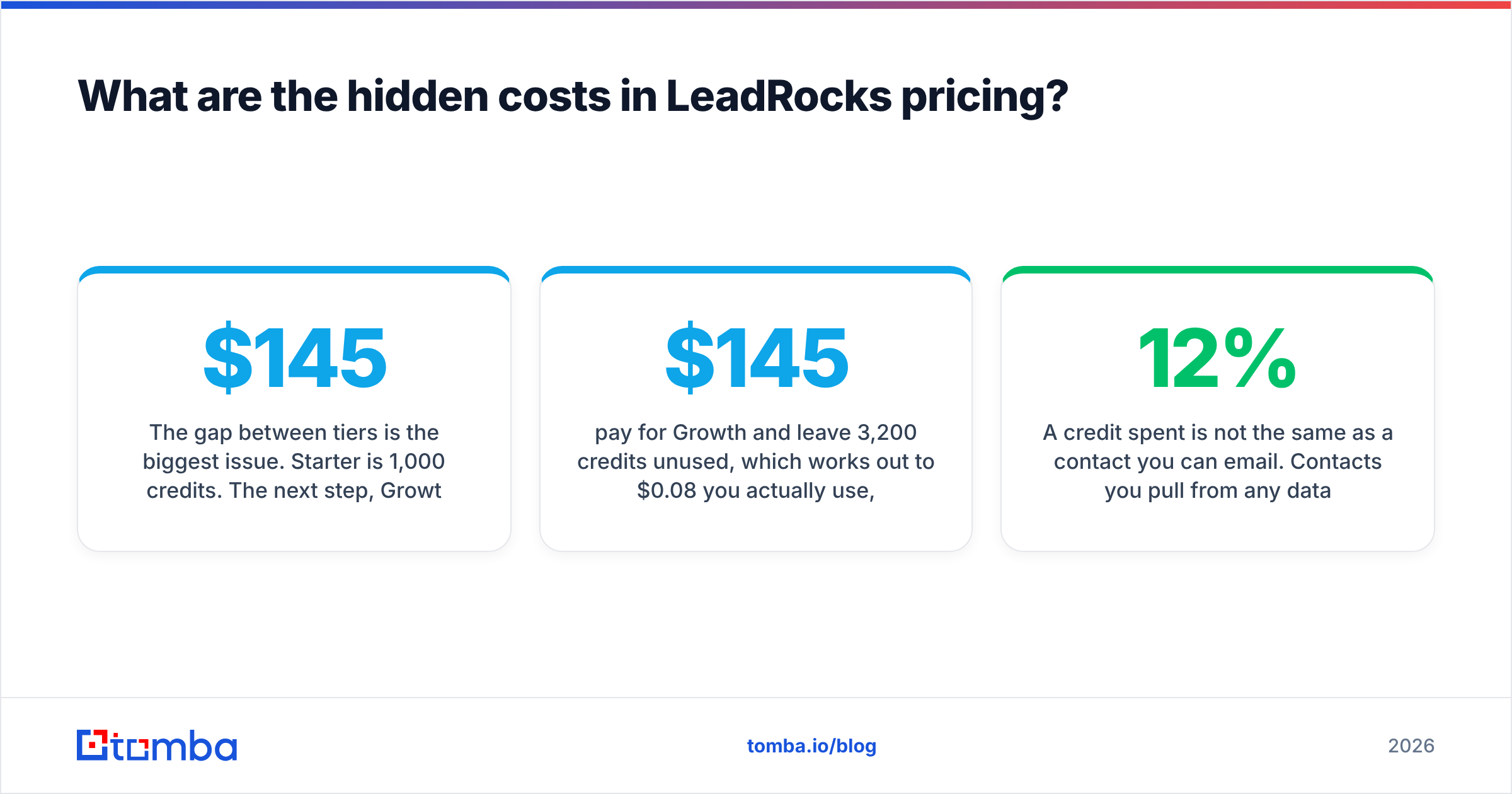
The gap between tiers is the biggest issue. Starter is 1,000 credits. The next step, Growth, is 5,000 credits at $145, which is five times the price. There's no 2,000 or 3,000 credit option in between.
Say your team needs 1,800 contacts a month. You can:
- buy two separate Starter accounts (possible, but awkward for shared lists and billing), or
- pay $145 for Growth and leave 3,200 credits unused, which works out to $0.08 per credit you actually use, almost three times the advertised rate.
This is the main trade-off in LeadRocks pricing: you get a low entry price, and the upgrade path is lumpy.
2. Credits vs. usable contacts#
A credit spent is not the same as a contact you can email. Contacts you pull from any database come with some share of outdated, risky or catch-all addresses. If 12% of what you reveal fails verification, your real cost per usable email goes up by the same proportion. That's why email verification before sending isn't optional. Bounces hurt sender reputation, and a damaged domain costs a lot more than a subscription.
3. Tool overlap#
LeadRocks includes basic sequencing. If you already pay for Instantly, lemlist, Apollo or HubSpot sequences, you're paying for that feature twice. It won't change the LeadRocks price, but it matters when you compare total stack cost against a data-only tool.
How does LeadRocks pricing compare with other email finders?#
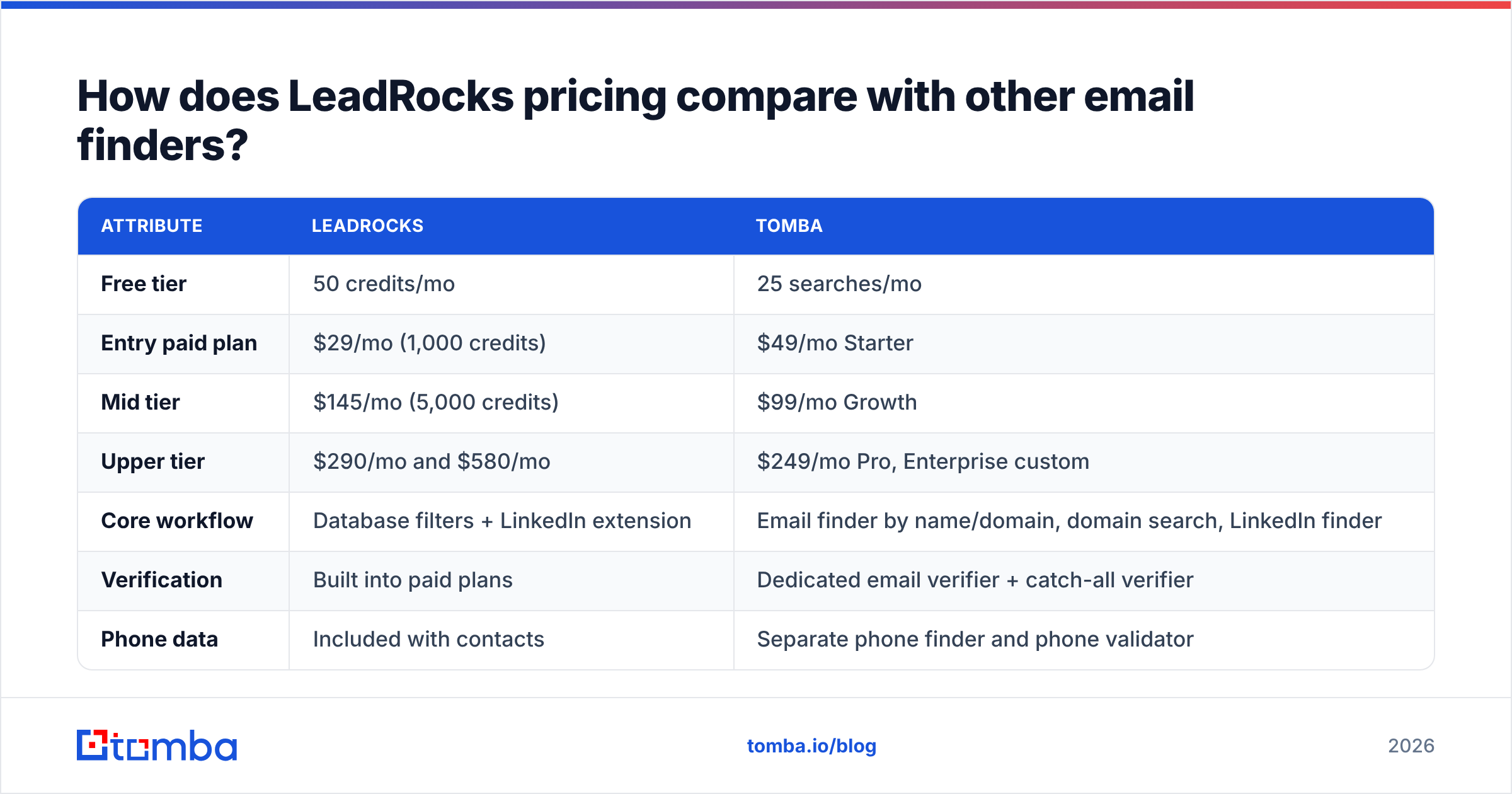
It helps to put LeadRocks next to a domain-first email finder, because the two pricing models suit different workflows. Here's how LeadRocks and Tomba compare on the attributes that affect your monthly bill:

| Attribute | LeadRocks | Tomba |
|---|---|---|
| Free tier | 50 credits/mo | 25 searches/mo |
| Entry paid plan | $29/mo (1,000 credits) | $49/mo Starter |
| Mid tier | $145/mo (5,000 credits) | $99/mo Growth |
| Upper tier | $290/mo and $580/mo | $249/mo Pro, Enterprise custom |
| Core workflow | Database filters + LinkedIn extension | Email finder by name/domain, domain search, LinkedIn finder |
| Verification | Built into paid plans | Dedicated email verifier + catch-all verifier |
| Phone data | Included with contacts | Separate phone finder and phone validator |
| API / bulk | Check current plan limits | Public API, bulk finder/verifier, Sheets and Excel add-ins |
| Outreach sequencing | Basic Gmail/Outlook sequences | Not included (integrates with CRMs and sequencers) |
To be fair to LeadRocks: at the very entry level it costs less than Tomba. $29 against $49 is a real difference for a solo user. If all you need is a LinkedIn-first workflow with occasional reveals, LeadRocks is a sensible choice.
The comparison changes in the middle tiers. Tomba's Growth plan costs $99. LeadRocks' next step above $29 is $145. For a team that has outgrown an entry plan but doesn't need 5,000 reveals a month, Tomba's tiers are closer together, so you're less likely to pay for capacity you won't use. Check current volumes on Tomba pricing, because the right answer depends on how many lookups you really run.

Which LeadRocks plan should you choose?#
Work backward from your actual monthly contact volume. Don't start from the plan names.
- Under 50 contacts/month: stay on Free. You're testing, and the free credits are enough to judge coverage in your segment.
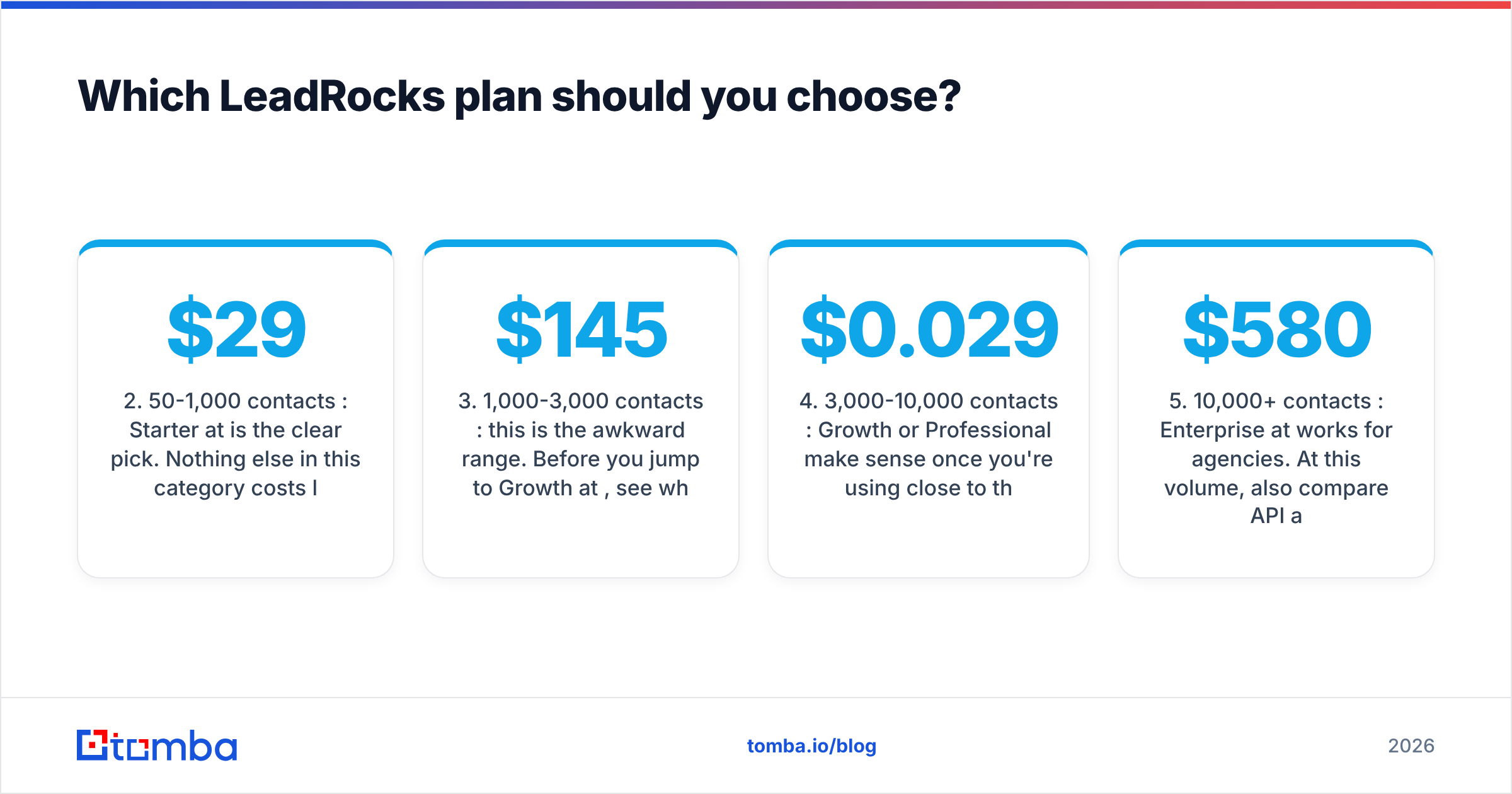
- 50-1,000 contacts/month: Starter at $29 is the clear pick. Nothing else in this category costs less for a LinkedIn-first workflow.
- 1,000-3,000 contacts/month: this is the awkward range. Before you jump to Growth at $145, see whether a second tool or a cheaper mid-tier elsewhere covers the overflow. Paying for 5,000 credits to use 2,000 wastes most of the budget.
- 3,000-10,000 contacts/month: Growth or Professional make sense once you're using close to the full allowance. The flat $0.029 rate is fair at this level, as long as you use the credits.
- 10,000+ contacts/month: Enterprise at $580 works for agencies. At this volume, also compare API access, bulk processing and export rules, because those affect your team's time more than the credit price does.

Is LeadRocks data accurate enough to justify the price?#
The honest answer is that it depends on your segment, and you should test it yourself instead of trusting any vendor's accuracy claim, including ours. Review sites such as G2 collect user feedback on many B2B data tools. The consistent pattern across the category is that coverage is strongest for North American tech and SaaS companies and weaker for SMBs, non-English markets and industries with little LinkedIn activity.
A practical test protocol that costs you nothing:
- Pick 50 contacts you already know are valid, such as closed-won customers or current pipeline.
- Run them through the LeadRocks free tier and record how many it finds and whether the addresses match.
- Run the same 50 through a second tool's free tier. Tomba's 25 free searches are enough for a meaningful sample.
- Verify every result and count deliverable, risky and invalid addresses.
The tool with the highest count of verified, correct addresses for your ICP is the cheaper tool, whatever the list price says. At 2.9 cents per credit, a 70% usable rate means you pay about 4.1 cents per real contact. At a 90% usable rate a pricier tool can still come out ahead.
Does LeadRocks work well with a LinkedIn-first workflow?#
Yes, that's where it's strongest. The Chrome extension is the main reason people buy LeadRocks. If most of your day is spent in Sales Navigator building account lists and saving leads, one-click reveals remove a lot of copy-paste work.
If you want LinkedIn-based lookups without being tied to one extension, dedicated tools such as a LinkedIn finder take a profile URL and return a professional email. That's useful when LinkedIn URLs arrive in a CSV from a scraper, an event list or a CRM export and not from live browsing.
What are the pros and cons of LeadRocks pricing?#
Pros
- Low entry price. $29/month is among the cheapest paid plans for a combined database, extension and verification tool.
- Transparent, simple pricing. Every tier is published, with no "contact sales to see a number" until Enterprise-level volume.
- Emails and phones together. You don't need two subscriptions to get both channels.
- Useful free plan. 50 monthly credits and generous seat rules make it easy to trial.
Cons
- No volume discount. The per-credit price is the same at 20,000 credits as at 1,000.
- Big gap between Starter and Growth. Teams in the 1,000-5,000 range end up paying for credits they don't use.
- Sequencing overlap. Built-in outreach features duplicate what many teams already pay for elsewhere.
- Less suited to domain-first or API-heavy workflows. Enrichment pipelines, spreadsheet workflows and developer use cases usually fit tools built for those jobs better.
So, is LeadRocks worth the money?#
For a solo seller or a two-person outbound team working mostly from LinkedIn, yes. The $29 Starter plan is good value, and the free tier lets you check data quality before you pay anything.
It gets harder to justify as you grow. The flat per-credit price and the 5x jump to Growth mean a team at 1,500-3,000 contacts a month is likely to overpay. At that point, compare total cost per verified contact, not the plan price. A tool with closer-together tiers, separate verification and an API can end up cheaper even when its entry plan costs more.
If your prospecting starts from a list of target companies, a spreadsheet of names and domains, or an automated enrichment pipeline, look at Tomba Email Finder. You can find professional addresses by name, domain or company, check them with the built-in verifier, and scale from 25 free searches up to the $99 Growth plan. Run your known-good sample through both tools, count the verified hits, and pick whichever gives you the lower cost per real contact.
Related guides#
// get started
Find, verify and enrich your first contacts today
Start on the free plan with 25 searches a month, then scale when your team is ready.
Free plan · No credit card required · GDPR & CCPA
// about the author